I'm not sure if this is the correct section for this question but anyway....
Having read this article:
Microsoft Giving .NET Users The Option to Shed RC4
Then this one:
Security Advisory 2868725: Recommendation to disable RC4
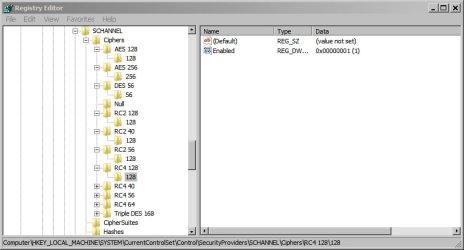
It leaves me slightly confused on how to disable RC4 on a home based Windows 7 machine.
I see the following advice:
How to Completely Disable RC4
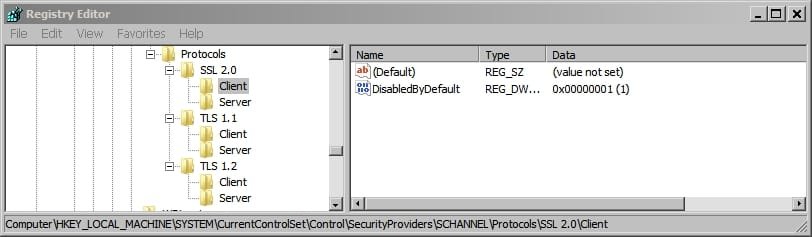
Clients and Servers that do not wish to use RC4 ciphersuites, regardless of the other party's supported ciphers, can disable the use of RC4 cipher suites completely by setting the following registry keys. In this manner any server or client that is talking to a client or server that must use RC4, can prevent a connection from happening. Clients that deploy this setting will not be able to connect to sites that require RC4 while servers that deploy this setting will not be able to service clients that must use RC4.
That seems to confilct with the advice in this article:
https://support.microsoft.com/kb/245030
Notes
If anyone has made the modifications and can provide a registry key to import please post!
Is it a good enough fix to ignore all of the above and just make the following browser settings changes?
Having read this article:
Microsoft Giving .NET Users The Option to Shed RC4
Then this one:
Security Advisory 2868725: Recommendation to disable RC4
It leaves me slightly confused on how to disable RC4 on a home based Windows 7 machine.
I see the following advice:
How to Completely Disable RC4
Clients and Servers that do not wish to use RC4 ciphersuites, regardless of the other party's supported ciphers, can disable the use of RC4 cipher suites completely by setting the following registry keys. In this manner any server or client that is talking to a client or server that must use RC4, can prevent a connection from happening. Clients that deploy this setting will not be able to connect to sites that require RC4 while servers that deploy this setting will not be able to service clients that must use RC4.
- [HKEY_LOCAL_MACHINE\SYSTEM\CurrentControlSet\Control\SecurityProviders\SCHANNEL\Ciphers\RC4 128/128]
- "Enabled"=dword:00000000
- [HKEY_LOCAL_MACHINE\SYSTEM\CurrentControlSet\Control\SecurityProviders\SCHANNEL\Ciphers\RC4 40/128]
- "Enabled"=dword:00000000
- [HKEY_LOCAL_MACHINE\SYSTEM\CurrentControlSet\Control\SecurityProviders\SCHANNEL\Ciphers\RC4 56/128]
- "Enabled"=dword:00000000
That seems to confilct with the advice in this article:
https://support.microsoft.com/kb/245030
Notes
- The Ciphers key should contain no values or subkeys
If anyone has made the modifications and can provide a registry key to import please post!
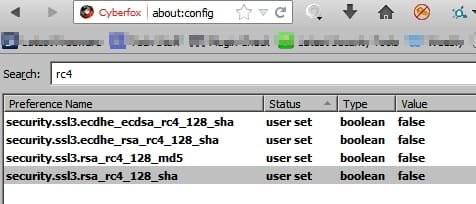
Is it a good enough fix to ignore all of the above and just make the following browser settings changes?
Last edited:
My Computer
- Computer type
- Laptop
- Computer Manufacturer/Model Number
- ASUS
- OS
- Microsoft Windows 7 Home Premium 64-bit 7601 Multiprocessor Free Service Pack 1
- CPU
- AMD C-60 APU with Radeon(tm) HD Graphics
- Motherboard
- ASUSTeK COMPUTER INC. X501U
- Memory
- 4.00 GB
- Graphics Card(s)
- AMD Radeon HD 6290 Graphics
- Sound Card
- (1) AMD High Definition Audio Device (2) Realtek High Defi
- Screen Resolution
- 1366 x 768 x 32 bits (4294967296 colors) @ 60 Hz
- Hard Drives
- Hitachi HTS545050A7E380 SATA Disk Device
- Antivirus
- Comodo CIS & FW, SecureAplus App Whitelisting, Threatfire
- Browser
- Cyberfox 64bit, Opera 64bit, Airfox
- Other Info
- Spy-The-Spy, HitmanPro.Alert, Norton Connect Safe, MJRegWatcher, BitDefender TrafficLight, Voodoo Shield, Zemana AntiMalware