Installer folder viruses-What to do if I need to remove important file

NED11WILS

New member
Local time
10:24 PM
Messages
24
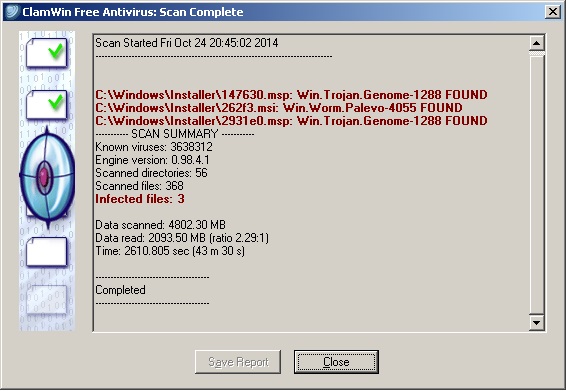
I have found files in the Windows 7 Installer Folder that are infected. Ok remove the bad files. But what if they are important. How to repair the folder? Below are the scan results from ClamWin. From what I have read in google searches it is very likely that these particular files are no longer of importance. But 1) How do I know? 2) Once again, what to do when it is an important file. 3) For that matter what does one do if they need to remove infected necessary files in any system folder?

Scan results. Thank you for any assistance.

cutpLQu.jpg
 

My Computer My Computer

At a glance

Windows 7 Starter x32Intel Atom N4702GB
Computer type
Laptop
Computer Manufacturer/Model Number
hp
OS
Windows 7 Starter x32
CPU
Intel Atom N470
Memory
2GB
Hard Drives
232GB
Antivirus
Norton 360
Browser
IE10
Hi Welcome to Seven Forums ... Did Norton find any Problems .. You could always check with Virus Total ....
 

My Computer My Computer

At a glance

windows 7 home 64bitINTEL-CORE I716GB
Computer Manufacturer/Model Number
W530-3630QM1
OS
windows 7 home 64bit
CPU
INTEL-CORE I7
Memory
16GB
Hard Drives
750GB
Browser
Chrome
Hi Welcome to Seven Forums ... Did Norton find any Problems .. You could always check with Virus Total ....

MAXIE,

Thank you for responding. Actually I am gaining more faith in ClamWin than Norton. Norton passes right over infected files that ClamWin detects. Click directly on the bad file and "Scan now" with Norton and it finally sees it.

But that is besides the point. Detecting and removing is solved. I am concerned with knowing if the infected file that I remove is important and what to do about replacing it.
 

My Computer My Computer

At a glance

Windows 7 Starter x32Intel Atom N4702GB
Computer type
Laptop
Computer Manufacturer/Model Number
hp
OS
Windows 7 Starter x32
CPU
Intel Atom N470
Memory
2GB
Hard Drives
232GB
Antivirus
Norton 360
Browser
IE10
I understand your concern .. You are convinced that you are Infected .. To answer your Question will the files be Replaced .. Tbh I have no idea the point is though what choices do you have ...
 

My Computer My Computer

At a glance

windows 7 home 64bitINTEL-CORE I716GB
Computer Manufacturer/Model Number
W530-3630QM1
OS
windows 7 home 64bit
CPU
INTEL-CORE I7
Memory
16GB
Hard Drives
750GB
Browser
Chrome
That folder is a cache of installed applications/updates using the Windows Installer, so you might get problems when or if you try to uninstall these 3 applications. You could try Revo Uninstaller in that case.

Since you found infections in windows installer packages, logically these infections should also have been found in other places: you have 3 installed applications/updates whose setup programs were infected. Or maybe these files were infected after the programs were installed.
I would scan with several other products as well, for example Malwarebytes Anti-malware and ESET Online Scanner.

If you hadn't deleted these files you could have figured out what programs it is. Maybe a log file can help if they have more information than just the file names. Any way, scan with the previous mentioned products, is my advice.
 

My Computer My Computer

At a glance

Windows 7 Pro 32Intel(R) Core(TM) i5 CPU M 540 @ 2.53GHz4,00 GB (Usable 2,98)NVIDIA NVS 5100M
Computer type
Laptop
Computer Manufacturer/Model Number
HP Elitebook 8540p
OS
Windows 7 Pro 32
CPU
Intel(R) Core(TM) i5 CPU M 540 @ 2.53GHz
Motherboard
Hewlett-Packard 1521
Memory
4,00 GB (Usable 2,98)
Graphics Card(s)
NVIDIA NVS 5100M
Sound Card
NVIDIA High Definition Audio
Screen Resolution
1600x900
Hard Drives
INTEL SSDSA2CW120G3
Antivirus
F-Secure Internet Security
Browser
IE, Firefox, Opera
Other Info
Sandboxie,
SRP (Software Restriction Policy),
EMET (Enhanced Mitigation Experience Toolkit),
WFC (Windows Firewall Control by BiniSoft),
Malwarebytes Premium
I'm sorry to say it, but you acted rather harshly. Wondering afterwards if the files are important to the system or not is what you should have done BEFORE "cleaning" them.

Files in the Windows\Installer folder are associated with any application that you have installed at some point. They are used when you want to update/uninstall them. Some of them might be from older programs you have already uninstalled. If it's the case for the ones you "cleaned" then you're in luck. If not then you'll have problems when update/uninstalling...

Here's a tip though if you encounter a similar situation in the future...

If your AV detects something malicious :

* If a malware is detected when first launching/executing/downloading a file (the AV blocked an attachment in an email, blocked a download in your browser, gave a warning when trying to install an application)...
Feel free to clean it/block it/whatever the AV recommends.

* If the file has already been installed on your PC (the AV detected it during a scheduled system scan or a manual scan)
NEVER delete the file immediately.
I can't stress this enough : Do not erase/clean the file immediately ! Maybe you can quarantine it, but I don't recommend it either, just let it alone for the time being.
Reason : the file has been present on your system for a while, a few hours won't change anything at this point so take your time and don't do anything in a panicked/"I am doomed" state of mind. This might be one of countless false positives that show up in any AV (and Clamwin is reputed to have more of them than other AV). Relax. Breathe.

Launch your favorite search engine in your browser, and search for the specific malware that your AV detected to get more info. Check if the symptoms associated with this malware are effectively present on your PC.

Get a second opinion from other AVs, I suggest using an online service like VirusTotal (https://www.virustotal.com/) or Jotti (Jotti's malware scan) and either upload the suspicious files or send their hashes. In the case of VirusTotal, it will check your files with 50+ Anti-Viruses (Clamwin included) at their latest versions... It makes the detection of false postives THAT much easier.

If you do get confirmation from other AVs, then and only then can you proceed to clean your PC.

Depending on the type of malware I'm also a proponent of using the "nuke from orbit" option rather than any automatic AV cleaning : Restore from a previous image (you've backed up right ?? if not check this : http://www.sevenforums.com/tutorials/73828-imaging-free-macrium.html ) or do a clean install.

 
Last edited:

My Computer My Computer

At a glance

Windows 8
Computer type
PC/Desktop
OS
Windows 8
Back
Top