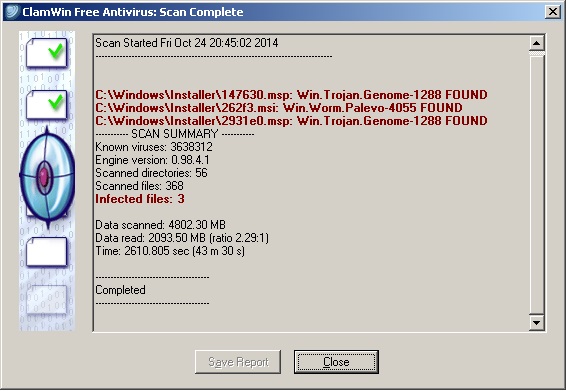
I'm sorry to say it, but you acted rather harshly. Wondering afterwards if the files are important to the system or not is what you should have done BEFORE "cleaning" them.
Files in the Windows\Installer folder are associated with any application that you have installed at some point. They are used when you want to update/uninstall them. Some of them might be from older programs you have already uninstalled. If it's the case for the ones you "cleaned" then you're in luck. If not then you'll have problems when update/uninstalling...
Here's a tip though if you encounter a similar situation in the future...
If your AV detects something malicious :
* If a malware is detected when first launching/executing/downloading a file (the AV blocked an attachment in an email, blocked a download in your browser, gave a warning when trying to install an application)...
Feel free to clean it/block it/whatever the AV recommends.
* If the file has already been installed on your PC (the AV detected it during a scheduled system scan or a manual scan)
NEVER delete the file immediately.
I can't stress this enough : Do not erase/clean the file immediately ! Maybe you can quarantine it, but I don't recommend it either, just let it alone for the time being.
Reason : the file has been present on your system for a while, a few hours won't change anything at this point so take your time and don't do anything in a panicked/"I am doomed" state of mind. This might be one of countless false positives that show up in any AV (and Clamwin is reputed to have more of them than other AV). Relax. Breathe.
Launch your favorite search engine in your browser, and search for the specific malware that your AV detected to get more info. Check if the symptoms associated with this malware are effectively present on your PC.
Get a second opinion from other AVs, I suggest using an online service like VirusTotal (
https://www.virustotal.com/) or Jotti (
Jotti's malware scan) and either upload the suspicious files or send their hashes. In the case of VirusTotal, it will check your files with 50+ Anti-Viruses (Clamwin included) at their latest versions... It makes the detection of false postives THAT much easier.
If you do get confirmation from other AVs, then and only then can you proceed to clean your PC.
Depending on the type of malware I'm also a proponent of using the "nuke from orbit" option rather than any automatic AV cleaning : Restore from a previous image (you've backed up right ?? if not check this :
http://www.sevenforums.com/tutorials/73828-imaging-free-macrium.html ) or do a clean install.