Vulnerability in SSL 3.0 Could Allow Information Disclosure, v1.1

NoN

New member
Guru
Gold Member
VIP
Local time
2:23 PM
Messages
4,101
Location
LostInSpace, Vol15 - Cool It
Microsoft Security Advisory 3009008
Vulnerability in SSL 3.0 Could Allow Information Disclosure
Published: October 14, 2014 | Updated: October 15, 2014
Version: 1.1

CVE-ID: CVE-2014-3566

General Information

Executive Summary
Microsoft is aware of detailed information that has been published describing a new method to exploit a vulnerability in SSL 3.0. This is an industry-wide vulnerability affecting the SSL 3.0 protocol itself and is not specific to the Windows operating system. All supported versions of Microsoft Windows implement this protocol and are affected by this vulnerability. Microsoft is not aware of attacks that try to use the reported vulnerability at this time. Considering the attack scenario, this vulnerability is not considered high risk to customers.
We are actively working with partners in our Microsoft Active Protections Program (MAPP) to provide information that they can use to provide broader protections to customers.
Upon completion of this investigation, Microsoft will take the appropriate action to help protect our customers. This may include providing a security update through our monthly release process or providing an out-of-cycle security update, depending on customer needs.

Mitigating Factors:
The attacker must make several hundred HTTPS requests before the attack could be successful.
TLS 1.0, TLS 1.1, TLS 1.2, and all cipher suites that do not use CBC mode are not affected.

Include Workaround to disable SSL 3.0.
Disable SSL 3.0 and enable TLS 1.0, TLS 1.1, and TLS 1.2 in Internet Explorer & Windows

Note After applying this workaround, Internet Explorer will fail to connect to Web servers that only support SSL up to 3.0 and don’t support TLS 1.0, TLS 1.1, and TLS 1.2.

SOURCE
 

My Computer My Computer

At a glance

Windows 7 Professional SP1 - x64 [Non-UEFI Boot]Ivy Bridge Core i5 3570K (Delidded)G.Skill "Ares" DDR3 PC3-12800 - 1600MHz (16Gb)Asus Dual-RX480-O4G
Computer type
PC/Desktop
Computer Manufacturer/Model Number
Custom Build
OS
Windows 7 Professional SP1 - x64 [Non-UEFI Boot]
CPU
Ivy Bridge Core i5 3570K (Delidded)
Motherboard
Asus P8Z77-V LE PLUS
Memory
G.Skill "Ares" DDR3 PC3-12800 - 1600MHz (16Gb)
Graphics Card(s)
Asus Dual-RX480-O4G
Sound Card
Creative Sound Blaster Z w/5.1 sound system
Monitor(s) Displays
Asus IPS 23"
Screen Resolution
16/9
Hard Drives
Internal:
500Go Sata 6Gb/s (x2)
500Go Sata 3Gb/s (x2)
SSD 60Go Sata 6Gb/s
PSU
In Win C 900W Series 80+ Platinum
Case
Thermaltake Chaser A71
Cooling
Custom Water Cooling Loop
Keyboard
Cooler Master QuickFire XTi
Mouse
Razer Imperator 2012 (4G)
Antivirus
MSE
Browser
IE 11.0.xxx Rtm
Other Info
"Raid0" with Intel Smart Response Technology (HDD/SSD)
Non,

Would I have to follow the instructions at the source link you provided to secure the Windows OS even if I'm not on a server per se?
  • Disable SSL 3.0 in Windows You can disable support for the SSL 3.0 protocol on Windows by following these steps:
    1. Click Start, click Run, type regedt32 or type regedit, and then click OK.
    2. In Registry Editor, locate the following registry key:HKey_Local_Machine\System\CurrentControlSet\Control\SecurityProviders \SCHANNEL\Protocols\SSL 3.0\Server
      Note If the complete registry key path does not exist, you can create it by expanding the available keys and using the New -> Key option from the Edit menu.
    3. On the Edit menu, click Add Value.
    4. In the Data Type list, click DWORD.
    5. In the Value Name box, type Enabled, and then click OK. Note If this value is present, double-click the value to edit its current value.
    6. Type 00000000 in Binary Editor to set the value of the new key equal to "0".
    7. Click OK. Restart the computer.

    Note This workaround will disable SSL 3.0 for all server software installed on a system, including IIS.

    Note After applying this workaround, clients that rely only on SSL 3.0 will not be able to communicate with the server.
Source: https://technet.microsoft.com/en-us/library/security/3009008
I do realize that I am on one now using my ISP, and its servers are linked to other servers. I'm asking because I would have to create the Key, I have no problem creating one, but would it not be better than going through the steps to protect individual browsers as noted here?

Full article:
Protecting yourself from POODLE attacks

Related Forum Link:
Protecting yourself from POODLE attacks | Windows Secrets Lounge


Or is it used as an adjunct to the browsers?
 

My Computer My Computer

At a glance

Originally Win 7 Hm Prem x64 Ver 6.1.7600 Bui...Intel i3 530 2.93GHz, 2933MHz 2 Cores 4 Logic...6GB of 1,333MHz DDR3 SDRAM32MB Intel Graphics Media Accelerator HD IGChip
Computer type
PC/Desktop
Computer Manufacturer/Model Number
Gateway DX4831-01e (Mid-Tower Desktop)
OS
Originally Win 7 Hm Prem x64 Ver 6.1.7600 Build 7601-SP1 | Upgraded to Windows 10 December 14, 2019
CPU
Intel i3 530 2.93GHz, 2933MHz 2 Cores 4 Logical Processors
Motherboard
Gateway H57M01 133 megahertz
Memory
6GB of 1,333MHz DDR3 SDRAM
Graphics Card(s)
32MB Intel Graphics Media Accelerator HD IGChip
Sound Card
Realtek High Definition Audio
Monitor(s) Displays
Gateway HX2000 20inch TFT active matrix TN
Screen Resolution
1600 x 900 x 59 hertz
Hard Drives
WDC WD10EADS-00M2B0 [HDD] (1000.20 GB) -- drive 0,
HL-DT-ST DVDRAM GH41N [CD-ROM dr]
Four card readers, and Four USB 2.0
PSU
300watts.
Case
Mid-Tower Desktop
Cooling
Stock from Gateway
Keyboard
Natural Ergonomic Keyboard 4000, see Other Info
Mouse
Orig. Gateway wore out now using Insignia USB wired optical
Internet Speed
Vz FIOS 10ms png 57.64Mbps down 65.53Mbps up Speedtest.org
Antivirus
Zamana Anti-logger with Anti-malware, MSE, Windows Firewall,
Browser
IE11.0.9600.19399-Upd ver11.0.135, Firefox 68.0.1 x64
Other Info
System Specs by Belarc.

BIOS: American Megatrends Inc. P01-A0 11/17/2009

Replaced the MS 'Natural' Standard PS/2 Enhanced 101-102 Keyboard with a new Natural Ergonomic Keyboard 4000 on August 1st 2014.

Canon Pixma MG3222 Printer.

Updated to IE11 on 12102015 | Fios Quantum Router g1100

Additional AV: SpywareBlaster, manual Mbam, SAS
I think if your only using internet browser, you can safely uncheck box in the Internet Options of your control Panel only, first.

Like it is mention in the Microsoft article and the ones you gave links, the attackers would need hundred HTTPS request. Since it had been a little while SSL is downgrade in favor of TLS you could try to set in registry only SSL 3.0/Server key with the value Enable "0"...

I have tried myself with Enable "0" and without setting this registry key and didn't went on of both settings with issues while browsing secure online sites. Maybe because i have uncheck box first in Internet Options.

EDIT:
Even unchecking the SSL 3.0 in internet Options and set the registry key for Server "0" poodletest.com says i'm still or could be vulnerable by block ciphers (i cleared my cache before testing).:(

There's an interesting Microsoft article to look at, that detail all about "schannel":

How to restrict the use of certain cryptographic algorithms and protocols in Schannel.dll

This also might interest you:

TLS/SSL (re-)negociation revisited
 
Last edited:

My Computer My Computer

At a glance

Windows 7 Professional SP1 - x64 [Non-UEFI Boot]Ivy Bridge Core i5 3570K (Delidded)G.Skill "Ares" DDR3 PC3-12800 - 1600MHz (16Gb)Asus Dual-RX480-O4G
Computer type
PC/Desktop
Computer Manufacturer/Model Number
Custom Build
OS
Windows 7 Professional SP1 - x64 [Non-UEFI Boot]
CPU
Ivy Bridge Core i5 3570K (Delidded)
Motherboard
Asus P8Z77-V LE PLUS
Memory
G.Skill "Ares" DDR3 PC3-12800 - 1600MHz (16Gb)
Graphics Card(s)
Asus Dual-RX480-O4G
Sound Card
Creative Sound Blaster Z w/5.1 sound system
Monitor(s) Displays
Asus IPS 23"
Screen Resolution
16/9
Hard Drives
Internal:
500Go Sata 6Gb/s (x2)
500Go Sata 3Gb/s (x2)
SSD 60Go Sata 6Gb/s
PSU
In Win C 900W Series 80+ Platinum
Case
Thermaltake Chaser A71
Cooling
Custom Water Cooling Loop
Keyboard
Cooler Master QuickFire XTi
Mouse
Razer Imperator 2012 (4G)
Antivirus
MSE
Browser
IE 11.0.xxx Rtm
Other Info
"Raid0" with Intel Smart Response Technology (HDD/SSD)
Last edited:

My Computer My Computer

At a glance

Microsoft Windows 7 Home Premium 64-bit 7601 ...AMD C-60 APU with Radeon(tm) HD Graphics4.00 GBAMD Radeon HD 6290 Graphics
Computer type
Laptop
Computer Manufacturer/Model Number
ASUS
OS
Microsoft Windows 7 Home Premium 64-bit 7601 Multiprocessor Free Service Pack 1
CPU
AMD C-60 APU with Radeon(tm) HD Graphics
Motherboard
ASUSTeK COMPUTER INC. X501U
Memory
4.00 GB
Graphics Card(s)
AMD Radeon HD 6290 Graphics
Sound Card
(1) AMD High Definition Audio Device (2) Realtek High Defi
Screen Resolution
1366 x 768 x 32 bits (4294967296 colors) @ 60 Hz
Hard Drives
Hitachi HTS545050A7E380 SATA Disk Device
Antivirus
Comodo CIS & FW, SecureAplus App Whitelisting, Threatfire
Browser
Cyberfox 64bit, Opera 64bit, Airfox
Other Info
Spy-The-Spy, HitmanPro.Alert, Norton Connect Safe, MJRegWatcher, BitDefender TrafficLight, Voodoo Shield, Zemana AntiMalware
As far as i know regisrty settings take care of windows but browsers need to be configured separately.

I'm not 100% sure though. Take a look at this thread:

http://www.sevenforums.com/newreply.php?do=newreply&noquote=1&p=2918110

The script needs modifying to disable SSL v3

And this post:

http://www.sevenforums.com/browsers...not-working-some-https-sites.html#post2912837

Registry take care of Windows and Internet Options SSL/TLS boxes are made for the browser. Is indeed two different settings.

Edit:
I've for a long time disable RC4 in Windows too...

Just found one of your thread too: How to disable RC4 Ciphers in TLS?

One can also use Group Policy =>Security Parameters => Security Options, to set the kind of authorized encrypted method Kerberos would use in windows.
 

Attachments

  • Capture.PNG
    Capture.PNG
    5 KB · Views: 74
Last edited:

My Computer My Computer

At a glance

Windows 7 Professional SP1 - x64 [Non-UEFI Boot]Ivy Bridge Core i5 3570K (Delidded)G.Skill "Ares" DDR3 PC3-12800 - 1600MHz (16Gb)Asus Dual-RX480-O4G
Computer type
PC/Desktop
Computer Manufacturer/Model Number
Custom Build
OS
Windows 7 Professional SP1 - x64 [Non-UEFI Boot]
CPU
Ivy Bridge Core i5 3570K (Delidded)
Motherboard
Asus P8Z77-V LE PLUS
Memory
G.Skill "Ares" DDR3 PC3-12800 - 1600MHz (16Gb)
Graphics Card(s)
Asus Dual-RX480-O4G
Sound Card
Creative Sound Blaster Z w/5.1 sound system
Monitor(s) Displays
Asus IPS 23"
Screen Resolution
16/9
Hard Drives
Internal:
500Go Sata 6Gb/s (x2)
500Go Sata 3Gb/s (x2)
SSD 60Go Sata 6Gb/s
PSU
In Win C 900W Series 80+ Platinum
Case
Thermaltake Chaser A71
Cooling
Custom Water Cooling Loop
Keyboard
Cooler Master QuickFire XTi
Mouse
Razer Imperator 2012 (4G)
Antivirus
MSE
Browser
IE 11.0.xxx Rtm
Other Info
"Raid0" with Intel Smart Response Technology (HDD/SSD)
I haven't created the Key yet, here are my results in the only two browsers we use, i.e. IE10 and Firefox (FF) cache was cleared before testing.

IE10 Settings:
SSL2.0, SSL3.0, TLS1.0 un-checked; TLS1.1 and TLS1.2 checked.

With the Poodle Test I see the Terrier and it says: seeing a Springfield Terrier below, your browser doesn't support SSLv3, or only supports SSLv3 using stream ciphers.

Qualys SSL Labs: Your user agent is not vulnerable.

I un-checked TLS1.0 because in my travels I've been seeing where TLS1.0 is becoming more vulnerable, if need be, I can reverse the change.


FF v33.0 Settings:
Rather than use the FF add-on I set my security.tls.version.min from about:config, the original setting was 0 and I changed it to 3, but had to switch back to 1 because of all places I couldn't reach https://support.mozilla.org
0 means SSL 3.0 and higher is enabled, 1 means TLS 1.0 and higher is enabled, 2 means TLS 1.1, and higher is enabled.

The security.tls.version.max was originally 3 and I left it as is.

The Poodle test and SSL Labs report identical results although, the SSL Labs test for IE10 had more yes's in the Mixed Content Handling Section.

I've been following along with both of your recent posts as I've been creating this post and have decided to create that Key, but it seems that the instructions for creating the Key are ambiguous at best out in the field and I am going to follow the instructions in your How to restrict use link, NoN.

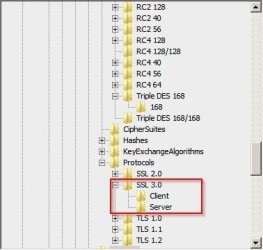
The ambiguity I'm seeing is there is nothing about the Client side of the Key, its all Server related, but in your link it instructs you to create the Key in/under Protocols and create both.

Again, from the link,
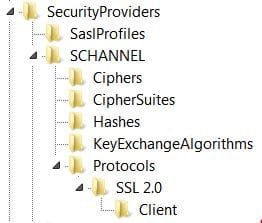
By default, Client SSL 2.0 is disabled in Windows Server 2008, Windows Server 2008 R2, and Windows 7. This means that the computer will not use SSL 2.0 to start a Client Hello. Therefore, the registry is displayed as follows:

2880600.png
This is exactly what my Protocol Key shows, and I'll add SSL3.0 to show right below the SSL2.0 Key but I'm only going to have a Client subkey not Client/Server.

Steps, go to:

  • HKey_Local_Machine\System\CurrentControlSet\Control\SecurityProviders\SCHANNEL\Protocols
  • Under the Protocols, create a key called "SSL 3.0." Then, under that key, create another key called "Client."
  • Create a DWORD called "Enabled" and give it a value of 0.
  • Reboot the Client.
It makes it more confusing when the disablebydefault is set with a value of 1 meaning yes it is disabled, but when you go in to create the DWORD enabled and use a value of 0 it means no it is not enabled. :confused:
If anyone sees anything wrong with the way I'm creating this Key, speak up.

Thanks for the links guys!

More:
https://scotthelme.co.uk/sslv3-goes-to-the-dogs-poodle-kills-off-protocol/

Firefox 34 which is to be released on Nov 25th with have SSL3.0 disabled by default, and follow up with SCSV support in Firefox 35.

Chrome already supports TLS_FALLBACK_SCSV
 
Last edited:

My Computer My Computer

At a glance

Originally Win 7 Hm Prem x64 Ver 6.1.7600 Bui...Intel i3 530 2.93GHz, 2933MHz 2 Cores 4 Logic...6GB of 1,333MHz DDR3 SDRAM32MB Intel Graphics Media Accelerator HD IGChip
Computer type
PC/Desktop
Computer Manufacturer/Model Number
Gateway DX4831-01e (Mid-Tower Desktop)
OS
Originally Win 7 Hm Prem x64 Ver 6.1.7600 Build 7601-SP1 | Upgraded to Windows 10 December 14, 2019
CPU
Intel i3 530 2.93GHz, 2933MHz 2 Cores 4 Logical Processors
Motherboard
Gateway H57M01 133 megahertz
Memory
6GB of 1,333MHz DDR3 SDRAM
Graphics Card(s)
32MB Intel Graphics Media Accelerator HD IGChip
Sound Card
Realtek High Definition Audio
Monitor(s) Displays
Gateway HX2000 20inch TFT active matrix TN
Screen Resolution
1600 x 900 x 59 hertz
Hard Drives
WDC WD10EADS-00M2B0 [HDD] (1000.20 GB) -- drive 0,
HL-DT-ST DVDRAM GH41N [CD-ROM dr]
Four card readers, and Four USB 2.0
PSU
300watts.
Case
Mid-Tower Desktop
Cooling
Stock from Gateway
Keyboard
Natural Ergonomic Keyboard 4000, see Other Info
Mouse
Orig. Gateway wore out now using Insignia USB wired optical
Internet Speed
Vz FIOS 10ms png 57.64Mbps down 65.53Mbps up Speedtest.org
Antivirus
Zamana Anti-logger with Anti-malware, MSE, Windows Firewall,
Browser
IE11.0.9600.19399-Upd ver11.0.135, Firefox 68.0.1 x64
Other Info
System Specs by Belarc.

BIOS: American Megatrends Inc. P01-A0 11/17/2009

Replaced the MS 'Natural' Standard PS/2 Enhanced 101-102 Keyboard with a new Natural Ergonomic Keyboard 4000 on August 1st 2014.

Canon Pixma MG3222 Printer.

Updated to IE11 on 12102015 | Fios Quantum Router g1100

Additional AV: SpywareBlaster, manual Mbam, SAS
@Anak,

You might have confuse some keys...In the SSL 3.0/Client, only the DisabledByDefault set to "1" does exist (you have to create it).

Then the next key, SSL 3.0/Server is the Enabled set to value "0".
There's no Enable "0" in the Client key.

I think the Microsoft article mention to create the Server key only in their workaround.....

With IE11, Qualys SSL Labs says: Your user agent is not vulnerable. Protocole Features => SSLv3 "No".

Poodletest.com says i might be vulnerable by block ciphers...i might be somewhere in between and have TLS1.0 still checked in Internet Options
 
Last edited:

My Computer My Computer

At a glance

Windows 7 Professional SP1 - x64 [Non-UEFI Boot]Ivy Bridge Core i5 3570K (Delidded)G.Skill "Ares" DDR3 PC3-12800 - 1600MHz (16Gb)Asus Dual-RX480-O4G
Computer type
PC/Desktop
Computer Manufacturer/Model Number
Custom Build
OS
Windows 7 Professional SP1 - x64 [Non-UEFI Boot]
CPU
Ivy Bridge Core i5 3570K (Delidded)
Motherboard
Asus P8Z77-V LE PLUS
Memory
G.Skill "Ares" DDR3 PC3-12800 - 1600MHz (16Gb)
Graphics Card(s)
Asus Dual-RX480-O4G
Sound Card
Creative Sound Blaster Z w/5.1 sound system
Monitor(s) Displays
Asus IPS 23"
Screen Resolution
16/9
Hard Drives
Internal:
500Go Sata 6Gb/s (x2)
500Go Sata 3Gb/s (x2)
SSD 60Go Sata 6Gb/s
PSU
In Win C 900W Series 80+ Platinum
Case
Thermaltake Chaser A71
Cooling
Custom Water Cooling Loop
Keyboard
Cooler Master QuickFire XTi
Mouse
Razer Imperator 2012 (4G)
Antivirus
MSE
Browser
IE 11.0.xxx Rtm
Other Info
"Raid0" with Intel Smart Response Technology (HDD/SSD)
@NoN & @Anak

Thanks for the detailed information. It sure helps!
 

My Computer My Computer

At a glance

Microsoft Windows 7 Home Premium 64-bit 7601 ...AMD C-60 APU with Radeon(tm) HD Graphics4.00 GBAMD Radeon HD 6290 Graphics
Computer type
Laptop
Computer Manufacturer/Model Number
ASUS
OS
Microsoft Windows 7 Home Premium 64-bit 7601 Multiprocessor Free Service Pack 1
CPU
AMD C-60 APU with Radeon(tm) HD Graphics
Motherboard
ASUSTeK COMPUTER INC. X501U
Memory
4.00 GB
Graphics Card(s)
AMD Radeon HD 6290 Graphics
Sound Card
(1) AMD High Definition Audio Device (2) Realtek High Defi
Screen Resolution
1366 x 768 x 32 bits (4294967296 colors) @ 60 Hz
Hard Drives
Hitachi HTS545050A7E380 SATA Disk Device
Antivirus
Comodo CIS & FW, SecureAplus App Whitelisting, Threatfire
Browser
Cyberfox 64bit, Opera 64bit, Airfox
Other Info
Spy-The-Spy, HitmanPro.Alert, Norton Connect Safe, MJRegWatcher, BitDefender TrafficLight, Voodoo Shield, Zemana AntiMalware
I've made a quick test for HTTPS sites with Windows XP Ciphers settings and the SSL 3.0 by using IE8 as main browser.

When i uncheck the SSL 3.0 in the Internet Options, i cannot log onto Https sites. The same happen if i set a SSL 3.0 registry setting too.

Another registry setting in "HKey_Local_Machine\System\CurrentControlSet\Control\SecurityProviders\SCHANNEL\Ciphers\Triple DES 168/168" registry key cannot permit Https sites when the Dword Enabled "0" key is set.

All others Ciphers can be set to "0".

Which of course make IE8 & XP vulnerable in the Poodle test!!


BTW, found another Microsoft article about those settings in TLS/SSL vulnerability: "SendExtraRecord" registry key.

MS12-006: Vulnerability in SSL/TLS could allow information disclosure: January 10, 2012
 
Last edited:

My Computer My Computer

At a glance

Windows 7 Professional SP1 - x64 [Non-UEFI Boot]Ivy Bridge Core i5 3570K (Delidded)G.Skill "Ares" DDR3 PC3-12800 - 1600MHz (16Gb)Asus Dual-RX480-O4G
Computer type
PC/Desktop
Computer Manufacturer/Model Number
Custom Build
OS
Windows 7 Professional SP1 - x64 [Non-UEFI Boot]
CPU
Ivy Bridge Core i5 3570K (Delidded)
Motherboard
Asus P8Z77-V LE PLUS
Memory
G.Skill "Ares" DDR3 PC3-12800 - 1600MHz (16Gb)
Graphics Card(s)
Asus Dual-RX480-O4G
Sound Card
Creative Sound Blaster Z w/5.1 sound system
Monitor(s) Displays
Asus IPS 23"
Screen Resolution
16/9
Hard Drives
Internal:
500Go Sata 6Gb/s (x2)
500Go Sata 3Gb/s (x2)
SSD 60Go Sata 6Gb/s
PSU
In Win C 900W Series 80+ Platinum
Case
Thermaltake Chaser A71
Cooling
Custom Water Cooling Loop
Keyboard
Cooler Master QuickFire XTi
Mouse
Razer Imperator 2012 (4G)
Antivirus
MSE
Browser
IE 11.0.xxx Rtm
Other Info
"Raid0" with Intel Smart Response Technology (HDD/SSD)
SSL Firefox

Rather than use the FF add-on I set my security.tls.version.min from about:config, the original setting was 0 and I changed it to 3, but had to switch back to 2 because of all places I couldn't reach https://support.mozilla.org
0 means SSL 3.0 and higher is enabled, 1 means TLS 1.0 and higher is enabled, 2 means TLS 1.1, and higher is enabled.

The security.tls.version.max was originally 3 and I left it as is.

That's odd. Here's Cyberfox v33 settings and they're default (not user set)

TLS - Cyberfox.jpg

Also following other links that have been posted in this thead I found this one:

hxxps://www.ssllabs.com/ssltest/analyze.html?d=sevenforums.com

If you can't connect to a site you can see which secure protocols/ available cipher suites are supported.

Also regarding the SSL 3.0 registry key - mine has been removed entirely. I'm assuming that's the same as disabled.

SCHANNEL.jpg
 
Last edited:

My Computer My Computer

At a glance

Microsoft Windows 7 Home Premium 64-bit 7601 ...AMD C-60 APU with Radeon(tm) HD Graphics4.00 GBAMD Radeon HD 6290 Graphics
Computer type
Laptop
Computer Manufacturer/Model Number
ASUS
OS
Microsoft Windows 7 Home Premium 64-bit 7601 Multiprocessor Free Service Pack 1
CPU
AMD C-60 APU with Radeon(tm) HD Graphics
Motherboard
ASUSTeK COMPUTER INC. X501U
Memory
4.00 GB
Graphics Card(s)
AMD Radeon HD 6290 Graphics
Sound Card
(1) AMD High Definition Audio Device (2) Realtek High Defi
Screen Resolution
1366 x 768 x 32 bits (4294967296 colors) @ 60 Hz
Hard Drives
Hitachi HTS545050A7E380 SATA Disk Device
Antivirus
Comodo CIS & FW, SecureAplus App Whitelisting, Threatfire
Browser
Cyberfox 64bit, Opera 64bit, Airfox
Other Info
Spy-The-Spy, HitmanPro.Alert, Norton Connect Safe, MJRegWatcher, BitDefender TrafficLight, Voodoo Shield, Zemana AntiMalware
@Anak,

You might have confuse some keys...In the SSL 3.0/Client, only the DisabledByDefault set to "1" does exist (you have to create it).

Then the next key, SSL 3.0/Server is the Enabled set to value "0".
There's no Enable "0" in the Client key.

I think the Microsoft article mention to create the Server key only in their workaround...
They did, but that's what I mean about confusing.
In my capacity as a residential user; Am I or am I not considered a Client? If I am, then why would I create a Key named Server??

I can not find any information if you want to do this to a single user machine or would that be superfluous? (that will be my next search :p )

@NoN & @Anak

Thanks for the detailed information. It sure helps!
You're welcome. I have a couple more, another test: https://zmap.io/sslv3/ from: https://disablesslv3.com/ about half way down the latter link at "How to check your Browser" you'll see what a still vulnerable browser warning would look like, both mine are blue and say "Good News! Your browser does not support SSLv3".


BTW, found another Microsoft article about those settings in TLS/SSL vulnerability: "SendExtraRecord" registry key.

MS12-006: Vulnerability in SSL/TLS could allow information disclosure: January 10, 2012
I'll take a look.

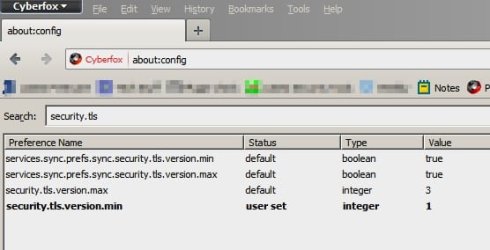
That's odd. Here's Cyberfox v33 settings and they're default (not user set)
338101d1414170452-vulnerability-ssl-3-0-could-allow-information-disclosure-v1-1-tls-cyberfox.jpg
Callender, did you misspeak? The security.tls.version.min setting is clearly in bold and marked user set.
Also following other links that have been posted in this thead I found this one:

hxxps://www.ssllabs.com/ssltest/analyze.html?d=sevenforums.com

If you can't connect to a site you can see which secure protocols/ available cipher suites are supported.
John (z3r) should have a look at that, if he hasn't already. When I tested SevenForums it came up with a certificate name mismatch. Only he would have the capacity to make heads or tails of the report.
https://www.ssllabs.com/ssltest/analyze.html?d=sevenforums.com&hideResults=on

Also regarding the SSL 3.0 registry key - mine has been removed entirely. I'm assuming that's the same as disabled.
Possibly, was it there before you started adding Keys? By disabled, do you mean SSL3 is unblocked?

If articles are telling us to add it that would mean the OS doesn't know to block SSL3, and you have to tell it (the OS). Ergo, if it's missing the OS is wide open to SSL3.
 

My Computer My Computer

At a glance

Originally Win 7 Hm Prem x64 Ver 6.1.7600 Bui...Intel i3 530 2.93GHz, 2933MHz 2 Cores 4 Logic...6GB of 1,333MHz DDR3 SDRAM32MB Intel Graphics Media Accelerator HD IGChip
Computer type
PC/Desktop
Computer Manufacturer/Model Number
Gateway DX4831-01e (Mid-Tower Desktop)
OS
Originally Win 7 Hm Prem x64 Ver 6.1.7600 Build 7601-SP1 | Upgraded to Windows 10 December 14, 2019
CPU
Intel i3 530 2.93GHz, 2933MHz 2 Cores 4 Logical Processors
Motherboard
Gateway H57M01 133 megahertz
Memory
6GB of 1,333MHz DDR3 SDRAM
Graphics Card(s)
32MB Intel Graphics Media Accelerator HD IGChip
Sound Card
Realtek High Definition Audio
Monitor(s) Displays
Gateway HX2000 20inch TFT active matrix TN
Screen Resolution
1600 x 900 x 59 hertz
Hard Drives
WDC WD10EADS-00M2B0 [HDD] (1000.20 GB) -- drive 0,
HL-DT-ST DVDRAM GH41N [CD-ROM dr]
Four card readers, and Four USB 2.0
PSU
300watts.
Case
Mid-Tower Desktop
Cooling
Stock from Gateway
Keyboard
Natural Ergonomic Keyboard 4000, see Other Info
Mouse
Orig. Gateway wore out now using Insignia USB wired optical
Internet Speed
Vz FIOS 10ms png 57.64Mbps down 65.53Mbps up Speedtest.org
Antivirus
Zamana Anti-logger with Anti-malware, MSE, Windows Firewall,
Browser
IE11.0.9600.19399-Upd ver11.0.135, Firefox 68.0.1 x64
Other Info
System Specs by Belarc.

BIOS: American Megatrends Inc. P01-A0 11/17/2009

Replaced the MS 'Natural' Standard PS/2 Enhanced 101-102 Keyboard with a new Natural Ergonomic Keyboard 4000 on August 1st 2014.

Canon Pixma MG3222 Printer.

Updated to IE11 on 12102015 | Fios Quantum Router g1100

Additional AV: SpywareBlaster, manual Mbam, SAS
SSL Hardening Tool

Note: For advanced users only. Backup Registry first.

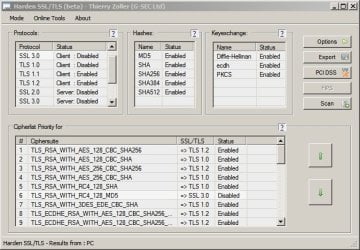
I thought that I'd share this information. I was looking for a utility to easily check protocols and cipher suites. I found this one:

Harden SSL/TLS : Windows server and client SSL/TLS hardening tool

Download link is under the section headed TLS/SSL hardening and compatibility report 2011

It's a zipped file containing the tool and a pdf user guide.

Running the sslharden.exe file from an elevated shortcut worked for me.

It makes the registry changes for you based on your selections.

Screenshot from my machine is below. Note: It found one SSL v3 setting that I'd missed.

Harden SSL_TLS.jpg
 

My Computer My Computer

At a glance

Microsoft Windows 7 Home Premium 64-bit 7601 ...AMD C-60 APU with Radeon(tm) HD Graphics4.00 GBAMD Radeon HD 6290 Graphics
Computer type
Laptop
Computer Manufacturer/Model Number
ASUS
OS
Microsoft Windows 7 Home Premium 64-bit 7601 Multiprocessor Free Service Pack 1
CPU
AMD C-60 APU with Radeon(tm) HD Graphics
Motherboard
ASUSTeK COMPUTER INC. X501U
Memory
4.00 GB
Graphics Card(s)
AMD Radeon HD 6290 Graphics
Sound Card
(1) AMD High Definition Audio Device (2) Realtek High Defi
Screen Resolution
1366 x 768 x 32 bits (4294967296 colors) @ 60 Hz
Hard Drives
Hitachi HTS545050A7E380 SATA Disk Device
Antivirus
Comodo CIS & FW, SecureAplus App Whitelisting, Threatfire
Browser
Cyberfox 64bit, Opera 64bit, Airfox
Other Info
Spy-The-Spy, HitmanPro.Alert, Norton Connect Safe, MJRegWatcher, BitDefender TrafficLight, Voodoo Shield, Zemana AntiMalware
Thanks, will check it out.
 

My Computer My Computer

At a glance

Windows 7 Pro 32Intel(R) Core(TM) i5 CPU M 540 @ 2.53GHz4,00 GB (Usable 2,98)NVIDIA NVS 5100M
Computer type
Laptop
Computer Manufacturer/Model Number
HP Elitebook 8540p
OS
Windows 7 Pro 32
CPU
Intel(R) Core(TM) i5 CPU M 540 @ 2.53GHz
Motherboard
Hewlett-Packard 1521
Memory
4,00 GB (Usable 2,98)
Graphics Card(s)
NVIDIA NVS 5100M
Sound Card
NVIDIA High Definition Audio
Screen Resolution
1600x900
Hard Drives
INTEL SSDSA2CW120G3
Antivirus
F-Secure Internet Security
Browser
IE, Firefox, Opera
Other Info
Sandboxie,
SRP (Software Restriction Policy),
EMET (Enhanced Mitigation Experience Toolkit),
WFC (Windows Firewall Control by BiniSoft),
Malwarebytes Premium
Callender, did you misspeak? The security.tls.version.min setting is clearly in bold and marked user set.

Thanks - well spotted!
 

My Computer My Computer

At a glance

Microsoft Windows 7 Home Premium 64-bit 7601 ...AMD C-60 APU with Radeon(tm) HD Graphics4.00 GBAMD Radeon HD 6290 Graphics
Computer type
Laptop
Computer Manufacturer/Model Number
ASUS
OS
Microsoft Windows 7 Home Premium 64-bit 7601 Multiprocessor Free Service Pack 1
CPU
AMD C-60 APU with Radeon(tm) HD Graphics
Motherboard
ASUSTeK COMPUTER INC. X501U
Memory
4.00 GB
Graphics Card(s)
AMD Radeon HD 6290 Graphics
Sound Card
(1) AMD High Definition Audio Device (2) Realtek High Defi
Screen Resolution
1366 x 768 x 32 bits (4294967296 colors) @ 60 Hz
Hard Drives
Hitachi HTS545050A7E380 SATA Disk Device
Antivirus
Comodo CIS & FW, SecureAplus App Whitelisting, Threatfire
Browser
Cyberfox 64bit, Opera 64bit, Airfox
Other Info
Spy-The-Spy, HitmanPro.Alert, Norton Connect Safe, MJRegWatcher, BitDefender TrafficLight, Voodoo Shield, Zemana AntiMalware
You're welcome, and thank you, I've downloaded the hardening tool and guide.
 

My Computer My Computer

At a glance

Originally Win 7 Hm Prem x64 Ver 6.1.7600 Bui...Intel i3 530 2.93GHz, 2933MHz 2 Cores 4 Logic...6GB of 1,333MHz DDR3 SDRAM32MB Intel Graphics Media Accelerator HD IGChip
Computer type
PC/Desktop
Computer Manufacturer/Model Number
Gateway DX4831-01e (Mid-Tower Desktop)
OS
Originally Win 7 Hm Prem x64 Ver 6.1.7600 Build 7601-SP1 | Upgraded to Windows 10 December 14, 2019
CPU
Intel i3 530 2.93GHz, 2933MHz 2 Cores 4 Logical Processors
Motherboard
Gateway H57M01 133 megahertz
Memory
6GB of 1,333MHz DDR3 SDRAM
Graphics Card(s)
32MB Intel Graphics Media Accelerator HD IGChip
Sound Card
Realtek High Definition Audio
Monitor(s) Displays
Gateway HX2000 20inch TFT active matrix TN
Screen Resolution
1600 x 900 x 59 hertz
Hard Drives
WDC WD10EADS-00M2B0 [HDD] (1000.20 GB) -- drive 0,
HL-DT-ST DVDRAM GH41N [CD-ROM dr]
Four card readers, and Four USB 2.0
PSU
300watts.
Case
Mid-Tower Desktop
Cooling
Stock from Gateway
Keyboard
Natural Ergonomic Keyboard 4000, see Other Info
Mouse
Orig. Gateway wore out now using Insignia USB wired optical
Internet Speed
Vz FIOS 10ms png 57.64Mbps down 65.53Mbps up Speedtest.org
Antivirus
Zamana Anti-logger with Anti-malware, MSE, Windows Firewall,
Browser
IE11.0.9600.19399-Upd ver11.0.135, Firefox 68.0.1 x64
Other Info
System Specs by Belarc.

BIOS: American Megatrends Inc. P01-A0 11/17/2009

Replaced the MS 'Natural' Standard PS/2 Enhanced 101-102 Keyboard with a new Natural Ergonomic Keyboard 4000 on August 1st 2014.

Canon Pixma MG3222 Printer.

Updated to IE11 on 12102015 | Fios Quantum Router g1100

Additional AV: SpywareBlaster, manual Mbam, SAS
Hardening Tool

Running that tool on my machine has added the missing registry keys with the correct settings. Yes, I'd removed them assuming that it disabled SSL v3 entirely if they were missing. It seems that all is well now.

Protocols.jpg
 

My Computer My Computer

At a glance

Microsoft Windows 7 Home Premium 64-bit 7601 ...AMD C-60 APU with Radeon(tm) HD Graphics4.00 GBAMD Radeon HD 6290 Graphics
Computer type
Laptop
Computer Manufacturer/Model Number
ASUS
OS
Microsoft Windows 7 Home Premium 64-bit 7601 Multiprocessor Free Service Pack 1
CPU
AMD C-60 APU with Radeon(tm) HD Graphics
Motherboard
ASUSTeK COMPUTER INC. X501U
Memory
4.00 GB
Graphics Card(s)
AMD Radeon HD 6290 Graphics
Sound Card
(1) AMD High Definition Audio Device (2) Realtek High Defi
Screen Resolution
1366 x 768 x 32 bits (4294967296 colors) @ 60 Hz
Hard Drives
Hitachi HTS545050A7E380 SATA Disk Device
Antivirus
Comodo CIS & FW, SecureAplus App Whitelisting, Threatfire
Browser
Cyberfox 64bit, Opera 64bit, Airfox
Other Info
Spy-The-Spy, HitmanPro.Alert, Norton Connect Safe, MJRegWatcher, BitDefender TrafficLight, Voodoo Shield, Zemana AntiMalware
Running that tool on my machine has added the missing registry keys with the correct settings. Yes, I'd removed them assuming that it disabled SSL v3 entirely if they were missing. It seems that all is well now.

I was not entirely sure that's why i didn't mentioned you, that your Ciphers keys were named wrong at the first place...the hardening tool have correct it them, though! But not all

Now you have (as example) RC4 128/128 instead of RC4 128.

All the keys should be 40/128, 56/128, 64/128, 128/128, 168/168.

SSL 3.0 is not set by default in registry....you have to create it yourself and this after a Microsoft security update that came along while ago. That was intended for IT Administrators.

Actually it is what we doesn't see during "Patch Tuesday" most of the time, because it is not impacting most of end-users, Microsoft lets the IT Admins to care about it in their article IDs. You have to dig it!!!

That's the purpose of this thread too for Home Premium end-users that can enforce their security settings with registry. The Professional Edition have more of the Group Policy to manage along some registry.
 
Last edited:

My Computer My Computer

At a glance

Windows 7 Professional SP1 - x64 [Non-UEFI Boot]Ivy Bridge Core i5 3570K (Delidded)G.Skill "Ares" DDR3 PC3-12800 - 1600MHz (16Gb)Asus Dual-RX480-O4G
Computer type
PC/Desktop
Computer Manufacturer/Model Number
Custom Build
OS
Windows 7 Professional SP1 - x64 [Non-UEFI Boot]
CPU
Ivy Bridge Core i5 3570K (Delidded)
Motherboard
Asus P8Z77-V LE PLUS
Memory
G.Skill "Ares" DDR3 PC3-12800 - 1600MHz (16Gb)
Graphics Card(s)
Asus Dual-RX480-O4G
Sound Card
Creative Sound Blaster Z w/5.1 sound system
Monitor(s) Displays
Asus IPS 23"
Screen Resolution
16/9
Hard Drives
Internal:
500Go Sata 6Gb/s (x2)
500Go Sata 3Gb/s (x2)
SSD 60Go Sata 6Gb/s
PSU
In Win C 900W Series 80+ Platinum
Case
Thermaltake Chaser A71
Cooling
Custom Water Cooling Loop
Keyboard
Cooler Master QuickFire XTi
Mouse
Razer Imperator 2012 (4G)
Antivirus
MSE
Browser
IE 11.0.xxx Rtm
Other Info
"Raid0" with Intel Smart Response Technology (HDD/SSD)
Callender, NoN,

I'm going to run the hardening tool, have backed up Registry, will let you know in a bit how it turns out.

Update:

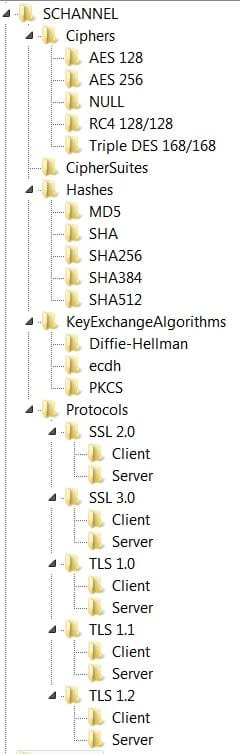
It seemed to go okay; The tool added new SubKeys to the Ciphers, Hashes, KeyExchangeAlgorithms, and Protocols Keys, but, the only subkeys that have any values are the new ones in the Protocols Key.

The SSL2.0 was already present, the new Keys are from SSL3.0 down to TLS1.2 inclusive, and they have the proper values for hardening.

I had thought that the exported file from the tool might have the values in it, but when I checked, it was empty.

When I ran the tool all I did was open it, there is the note on the tool that domain admin privileges are needed, but when I opened it there was no run as administrator option. Checking Permissions in properties for the tool I have ownership and full control of the tool.

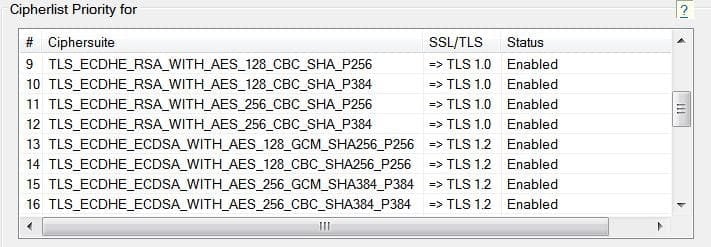
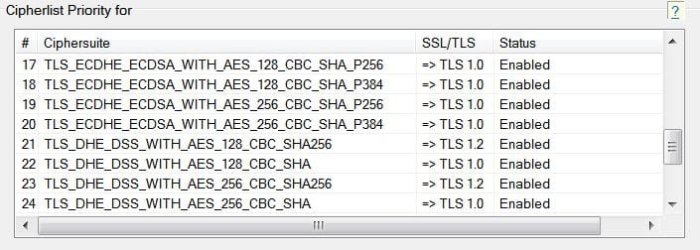
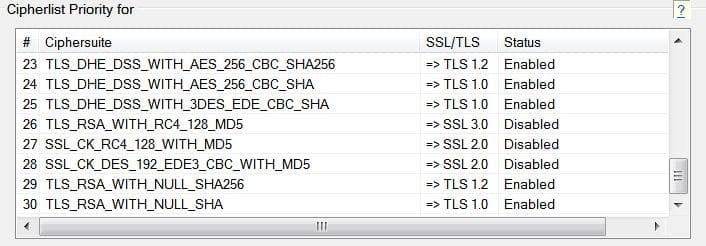
The last three screenshots of the tool are to show the settings I applied the full Cipher list.

Thoughts?

SchannelOld.JPG
SchannelNew.jpg
tool1.jpg
tool2.JPG
tool3.JPG
tool4.JPG
 
Last edited:

My Computer My Computer

At a glance

Originally Win 7 Hm Prem x64 Ver 6.1.7600 Bui...Intel i3 530 2.93GHz, 2933MHz 2 Cores 4 Logic...6GB of 1,333MHz DDR3 SDRAM32MB Intel Graphics Media Accelerator HD IGChip
Computer type
PC/Desktop
Computer Manufacturer/Model Number
Gateway DX4831-01e (Mid-Tower Desktop)
OS
Originally Win 7 Hm Prem x64 Ver 6.1.7600 Build 7601-SP1 | Upgraded to Windows 10 December 14, 2019
CPU
Intel i3 530 2.93GHz, 2933MHz 2 Cores 4 Logical Processors
Motherboard
Gateway H57M01 133 megahertz
Memory
6GB of 1,333MHz DDR3 SDRAM
Graphics Card(s)
32MB Intel Graphics Media Accelerator HD IGChip
Sound Card
Realtek High Definition Audio
Monitor(s) Displays
Gateway HX2000 20inch TFT active matrix TN
Screen Resolution
1600 x 900 x 59 hertz
Hard Drives
WDC WD10EADS-00M2B0 [HDD] (1000.20 GB) -- drive 0,
HL-DT-ST DVDRAM GH41N [CD-ROM dr]
Four card readers, and Four USB 2.0
PSU
300watts.
Case
Mid-Tower Desktop
Cooling
Stock from Gateway
Keyboard
Natural Ergonomic Keyboard 4000, see Other Info
Mouse
Orig. Gateway wore out now using Insignia USB wired optical
Internet Speed
Vz FIOS 10ms png 57.64Mbps down 65.53Mbps up Speedtest.org
Antivirus
Zamana Anti-logger with Anti-malware, MSE, Windows Firewall,
Browser
IE11.0.9600.19399-Upd ver11.0.135, Firefox 68.0.1 x64
Other Info
System Specs by Belarc.

BIOS: American Megatrends Inc. P01-A0 11/17/2009

Replaced the MS 'Natural' Standard PS/2 Enhanced 101-102 Keyboard with a new Natural Ergonomic Keyboard 4000 on August 1st 2014.

Canon Pixma MG3222 Printer.

Updated to IE11 on 12102015 | Fios Quantum Router g1100

Additional AV: SpywareBlaster, manual Mbam, SAS
The Ciphers keys do not have subkeys...only a Dword value "Enabled" in or none.

For me looks OK, fine... but since Windows 7 haven't the same behavior (at least its what had been said) than the previous Windows XP/ XP Pro and that now Microsoft is more of patching .DLL files instead of adding some registry entries (or lets IT Admin do it), it does let me a bit on side and let me think if all those keys are really needed, some are indeed. Might not harm any to have them set.

I have the half of yours in my registry...and i'm adding/removing entries whichever i can see while browsing if it does have any effect as i previously did with Windows XP post# 9 of this thread.

What i did on XP to test HTTPS doesn't have any effect on my Windows 7.
 

My Computer My Computer

At a glance

Windows 7 Professional SP1 - x64 [Non-UEFI Boot]Ivy Bridge Core i5 3570K (Delidded)G.Skill "Ares" DDR3 PC3-12800 - 1600MHz (16Gb)Asus Dual-RX480-O4G
Computer type
PC/Desktop
Computer Manufacturer/Model Number
Custom Build
OS
Windows 7 Professional SP1 - x64 [Non-UEFI Boot]
CPU
Ivy Bridge Core i5 3570K (Delidded)
Motherboard
Asus P8Z77-V LE PLUS
Memory
G.Skill "Ares" DDR3 PC3-12800 - 1600MHz (16Gb)
Graphics Card(s)
Asus Dual-RX480-O4G
Sound Card
Creative Sound Blaster Z w/5.1 sound system
Monitor(s) Displays
Asus IPS 23"
Screen Resolution
16/9
Hard Drives
Internal:
500Go Sata 6Gb/s (x2)
500Go Sata 3Gb/s (x2)
SSD 60Go Sata 6Gb/s
PSU
In Win C 900W Series 80+ Platinum
Case
Thermaltake Chaser A71
Cooling
Custom Water Cooling Loop
Keyboard
Cooler Master QuickFire XTi
Mouse
Razer Imperator 2012 (4G)
Antivirus
MSE
Browser
IE 11.0.xxx Rtm
Other Info
"Raid0" with Intel Smart Response Technology (HDD/SSD)
Apologies for the "subkey" nomenclature, here's what's in mine, and what I meant by no values, they're all like this including the Hashes, and KeyExchangeAlgorithms:

cipher1.JPG
 

My Computer My Computer

At a glance

Originally Win 7 Hm Prem x64 Ver 6.1.7600 Bui...Intel i3 530 2.93GHz, 2933MHz 2 Cores 4 Logic...6GB of 1,333MHz DDR3 SDRAM32MB Intel Graphics Media Accelerator HD IGChip
Computer type
PC/Desktop
Computer Manufacturer/Model Number
Gateway DX4831-01e (Mid-Tower Desktop)
OS
Originally Win 7 Hm Prem x64 Ver 6.1.7600 Build 7601-SP1 | Upgraded to Windows 10 December 14, 2019
CPU
Intel i3 530 2.93GHz, 2933MHz 2 Cores 4 Logical Processors
Motherboard
Gateway H57M01 133 megahertz
Memory
6GB of 1,333MHz DDR3 SDRAM
Graphics Card(s)
32MB Intel Graphics Media Accelerator HD IGChip
Sound Card
Realtek High Definition Audio
Monitor(s) Displays
Gateway HX2000 20inch TFT active matrix TN
Screen Resolution
1600 x 900 x 59 hertz
Hard Drives
WDC WD10EADS-00M2B0 [HDD] (1000.20 GB) -- drive 0,
HL-DT-ST DVDRAM GH41N [CD-ROM dr]
Four card readers, and Four USB 2.0
PSU
300watts.
Case
Mid-Tower Desktop
Cooling
Stock from Gateway
Keyboard
Natural Ergonomic Keyboard 4000, see Other Info
Mouse
Orig. Gateway wore out now using Insignia USB wired optical
Internet Speed
Vz FIOS 10ms png 57.64Mbps down 65.53Mbps up Speedtest.org
Antivirus
Zamana Anti-logger with Anti-malware, MSE, Windows Firewall,
Browser
IE11.0.9600.19399-Upd ver11.0.135, Firefox 68.0.1 x64
Other Info
System Specs by Belarc.

BIOS: American Megatrends Inc. P01-A0 11/17/2009

Replaced the MS 'Natural' Standard PS/2 Enhanced 101-102 Keyboard with a new Natural Ergonomic Keyboard 4000 on August 1st 2014.

Canon Pixma MG3222 Printer.

Updated to IE11 on 12102015 | Fios Quantum Router g1100

Additional AV: SpywareBlaster, manual Mbam, SAS
Back
Top