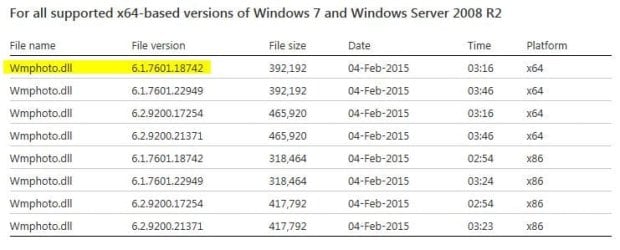
For some reason half the computers in our organization will not take this patch.
Patch is suppose to update the %systemroot%\system32\wmphoto.dll file to Version: 6.2.9200.17254.
All indications show that the patch is successfully installed.
I can go to Program & Features view installed updates and see its there. Remove it/uninstall no problem.
Windowsupdate.log says patch installs. Dll just will not update.
Not setup to connect to the internet to do windows update. All patches are pushed via SCCM.
Manual install will not work either.
All computers are WIN 7 SP1.
Anyone experience/seen anything like this?
Patch is suppose to update the %systemroot%\system32\wmphoto.dll file to Version: 6.2.9200.17254.
All indications show that the patch is successfully installed.
I can go to Program & Features view installed updates and see its there. Remove it/uninstall no problem.
Windowsupdate.log says patch installs. Dll just will not update.
Not setup to connect to the internet to do windows update. All patches are pushed via SCCM.
Manual install will not work either.
All computers are WIN 7 SP1.
Anyone experience/seen anything like this?
My Computer
- Computer type
- PC/Desktop
- OS
- windows 7