
Creative X-Fi MB issues on Windows 7 - CMSS 3D and Creative Console

CreativeLabs

New member
Local time
2:21 AM
Messages
8
I have a 5.1 system and I play it through the Sound Blaster X-Fi MB audio card. As I'm playing a stereo file in Winamp, I have enabled CMSS 3D upmixing (surround). It would play in the surround (upmixed state) for a while and if I play any movie on VLC and return to Winamp, the CMSS 3D won't play (it will be still enabled in the Dell Audio panel for Sound Blaster). No matter how many times I turn it on and off, it still won't play in the CMSS 3D Surround mode or Stereo Upmix mode.

Frustrated by that, I used the creative auto updater to update my creative drivers. And all hell broke loose! :mad: When I restarted and tried to use the new driver it showed: "The audio device supported by this application is not detected". I again reverted the driver back to the factory version and now creative audio works but the CMSS 3D issue still persists. Also, the Creative Console wont open either. :mad: Spent the whole day trying to fix this. Someone please help me why this happens and how the hell can I fix it? :shock:

So far,

  • I have re-installed and updated all the creative drivers and reverted it back to factory version as updates didn't recognize the device.
  • My 5.1 speakers are working fine (tested with a 5.1 media).
  • Restarted and reconnected my audio system several times.
  • Creative and a few other forums have no answers. (Been trying to fix it for the past four hours)

Details:
Creative X-Fi MB
Dell XPS 15 (l502x)

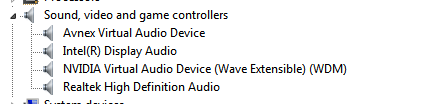
Update: Though I can play audio over the card and see Sound Blaster X-Fi MB in Dell audio, the Device Manager is not showing it :huh:
ROAxKKY.png
 

My Computer My Computer

At a glance

Windows 7 Home Premium 64 Biti7 Quad Core 2.0 (2.9) Ghz6 GBNVIDIA GTX 525M - 1 GB
Computer type
Laptop
Computer Manufacturer/Model Number
Dell
OS
Windows 7 Home Premium 64 Bit
CPU
i7 Quad Core 2.0 (2.9) Ghz
Memory
6 GB
Graphics Card(s)
NVIDIA GTX 525M - 1 GB
The Dell SoundBlasters and drivers tend to be custom for Dell. I used to work the Dell forums and we always recommended the Dell supplied drivers.

Since this is a Dell PC and the Dell SoundBlaster version, the Dell forums would be the best place to try and get help.
Dell Community
 

My Computer My Computer

At a glance

Windows 10 64 bitIntel i7 6700K16GB Corsair DominatorIntel CPU Graphics
Computer type
PC/Desktop
Computer Manufacturer/Model Number
My Own Build
OS
Windows 10 64 bit
CPU
Intel i7 6700K
Motherboard
ASUS ROG Maximus VIII Hero
Memory
16GB Corsair Dominator
Graphics Card(s)
Intel CPU Graphics
Sound Card
RealTek
Monitor(s) Displays
27" Dell S2719dgf
Screen Resolution
2560X1440
Hard Drives
1 TB Samsung 850 EVO SSD for Win 10 Pro
500GB Samsung 850 EVO SSD for Win 10 Insider
2 TB drive for backup
PSU
EVGA Supernova 750G2
Case
BeQuiet Silent Base 600
Cooling
Deepcool Captain 120EX
Keyboard
Microsoft Wireless 2000
Mouse
Microsoft wireless
Internet Speed
100 MB/sec (Cable)
Antivirus
Microsoft Defender and Malwarebytes
Browser
Edge/Firefox
Other Info
Cakewalk (Sonar) by BandLab and Studio One 4.1 Pro recording studio software. MOTU 896Mk3 Hybrid recording interface, Frontier Tranzport wireless control unit, Behringer X-Touch Control Surface.
Five USB connected optical drives for CD Audio production using Nero BurningROM
Thanks man :) But unfortunately, there are no drivers available for this. And, the problem is my CMSS 3D wouldn't work if I restart VLC, or close it and resume Winamp (which was earlier playing in surround sound. Would appreciate any workaround.
 

My Computer My Computer

At a glance

Windows 7 Home Premium 64 Biti7 Quad Core 2.0 (2.9) Ghz6 GBNVIDIA GTX 525M - 1 GB
Computer type
Laptop
Computer Manufacturer/Model Number
Dell
OS
Windows 7 Home Premium 64 Bit
CPU
i7 Quad Core 2.0 (2.9) Ghz
Memory
6 GB
Graphics Card(s)
NVIDIA GTX 525M - 1 GB
Dell used to have a "My Dell Downloads". I don't know if they still have that, but it had all the software that was on the PC when delivered, such as the SoundBlaster application software. You can download from that.

Again, post on the Dell forum and those more familiar with what is happening now can help you better than I can.
 

My Computer My Computer

At a glance

Windows 10 64 bitIntel i7 6700K16GB Corsair DominatorIntel CPU Graphics
Computer type
PC/Desktop
Computer Manufacturer/Model Number
My Own Build
OS
Windows 10 64 bit
CPU
Intel i7 6700K
Motherboard
ASUS ROG Maximus VIII Hero
Memory
16GB Corsair Dominator
Graphics Card(s)
Intel CPU Graphics
Sound Card
RealTek
Monitor(s) Displays
27" Dell S2719dgf
Screen Resolution
2560X1440
Hard Drives
1 TB Samsung 850 EVO SSD for Win 10 Pro
500GB Samsung 850 EVO SSD for Win 10 Insider
2 TB drive for backup
PSU
EVGA Supernova 750G2
Case
BeQuiet Silent Base 600
Cooling
Deepcool Captain 120EX
Keyboard
Microsoft Wireless 2000
Mouse
Microsoft wireless
Internet Speed
100 MB/sec (Cable)
Antivirus
Microsoft Defender and Malwarebytes
Browser
Edge/Firefox
Other Info
Cakewalk (Sonar) by BandLab and Studio One 4.1 Pro recording studio software. MOTU 896Mk3 Hybrid recording interface, Frontier Tranzport wireless control unit, Behringer X-Touch Control Surface.
Five USB connected optical drives for CD Audio production using Nero BurningROM
I have the CD that contains the Creative software :) I did install the factory version of the Creative software. But the problem seems to be with Windows 7. The CMSS 3D surround holds good only for one time play. If I have to use the effect again, I have to turn off X-Fi in dell audio and then relaunch VLC and then turn it on again :/ At least this workaround is working for me now. (I changed VLC audio output to DirectX)
 

My Computer My Computer

At a glance

Windows 7 Home Premium 64 Biti7 Quad Core 2.0 (2.9) Ghz6 GBNVIDIA GTX 525M - 1 GB
Computer type
Laptop
Computer Manufacturer/Model Number
Dell
OS
Windows 7 Home Premium 64 Bit
CPU
i7 Quad Core 2.0 (2.9) Ghz
Memory
6 GB
Graphics Card(s)
NVIDIA GTX 525M - 1 GB
Well; for the creative console you were trying to open; I would go directly to creative's support/drive downloads page and search to see if there are updates for the console. As for why your surround sound stopped working; i would again still check creative's site for updated drivers that will work for that.
 

My Computer My Computer

At a glance

Windows 7 ultimate 64-bitIntel I7 2600K 3.4ghzCorsair 16gb ddr3 1600mhzNvidia Geforce gt 430
Computer type
PC/Desktop
Computer Manufacturer/Model Number
custom built
OS
Windows 7 ultimate 64-bit
CPU
Intel I7 2600K 3.4ghz
Motherboard
Asus Evo P8P67
Memory
Corsair 16gb ddr3 1600mhz
Graphics Card(s)
Nvidia Geforce gt 430
Sound Card
Sound Blaster Titanium x-fi pci express
Monitor(s) Displays
Dell E198WFP
Hard Drives
1 western digital 2TB drive.
PSU
Antec 1200 watt
Case
Inwin Dragon Rider
Cooling
6 case supplied cooling fans
Keyboard
logitech mk700
Mouse
logitech m705
Internet Speed
25-50mbps download; 10mbps upload(i think)
Antivirus
avg free 2014
Browser
mozilla firefox
Other Info
Also have a pretty bad speaker setup which is a klipsch promedia 5.1 surround speaker setup with huge subwoofer and lg blu ray player/writer. Also a hp officejet pro 8600 plus wireless all in one and a logitech s7500 webcam.
As for why your surround sound stopped working; i would again still check creative's site for updated drivers that will work for that.

X-Fi MB is not listed in Creative website! Their support won't respond to me. Why do you think I'm here? :sarc: :)
 

My Computer My Computer

At a glance

Windows 7 Home Premium 64 Biti7 Quad Core 2.0 (2.9) Ghz6 GBNVIDIA GTX 525M - 1 GB
Computer type
Laptop
Computer Manufacturer/Model Number
Dell
OS
Windows 7 Home Premium 64 Bit
CPU
i7 Quad Core 2.0 (2.9) Ghz
Memory
6 GB
Graphics Card(s)
NVIDIA GTX 525M - 1 GB
Again, as this is a Dell custom model sound card, the Dell forum, that I linked, is the best place for help with the custom hardware. It is a users helping users, as this forum is, but with specific knowledge of the Dell products.
 

My Computer My Computer

At a glance

Windows 10 64 bitIntel i7 6700K16GB Corsair DominatorIntel CPU Graphics
Computer type
PC/Desktop
Computer Manufacturer/Model Number
My Own Build
OS
Windows 10 64 bit
CPU
Intel i7 6700K
Motherboard
ASUS ROG Maximus VIII Hero
Memory
16GB Corsair Dominator
Graphics Card(s)
Intel CPU Graphics
Sound Card
RealTek
Monitor(s) Displays
27" Dell S2719dgf
Screen Resolution
2560X1440
Hard Drives
1 TB Samsung 850 EVO SSD for Win 10 Pro
500GB Samsung 850 EVO SSD for Win 10 Insider
2 TB drive for backup
PSU
EVGA Supernova 750G2
Case
BeQuiet Silent Base 600
Cooling
Deepcool Captain 120EX
Keyboard
Microsoft Wireless 2000
Mouse
Microsoft wireless
Internet Speed
100 MB/sec (Cable)
Antivirus
Microsoft Defender and Malwarebytes
Browser
Edge/Firefox
Other Info
Cakewalk (Sonar) by BandLab and Studio One 4.1 Pro recording studio software. MOTU 896Mk3 Hybrid recording interface, Frontier Tranzport wireless control unit, Behringer X-Touch Control Surface.
Five USB connected optical drives for CD Audio production using Nero BurningROM
As for why your surround sound stopped working; i would again still check creative's site for updated drivers that will work for that.

X-Fi MB is not listed in Creative website! Their support won't respond to me. Why do you think I'm here? :sarc: :)

Well; its possible it could be a legacy product(basically meaning discontinued) and therefore they wont support it anymore. But instead of trying to email etc. i would actually call them and find out because there should be drivers out there somewhere for it whether it be from creative's site or elsewhere.
 

My Computer My Computer

At a glance

Windows 7 ultimate 64-bitIntel I7 2600K 3.4ghzCorsair 16gb ddr3 1600mhzNvidia Geforce gt 430
Computer type
PC/Desktop
Computer Manufacturer/Model Number
custom built
OS
Windows 7 ultimate 64-bit
CPU
Intel I7 2600K 3.4ghz
Motherboard
Asus Evo P8P67
Memory
Corsair 16gb ddr3 1600mhz
Graphics Card(s)
Nvidia Geforce gt 430
Sound Card
Sound Blaster Titanium x-fi pci express
Monitor(s) Displays
Dell E198WFP
Hard Drives
1 western digital 2TB drive.
PSU
Antec 1200 watt
Case
Inwin Dragon Rider
Cooling
6 case supplied cooling fans
Keyboard
logitech mk700
Mouse
logitech m705
Internet Speed
25-50mbps download; 10mbps upload(i think)
Antivirus
avg free 2014
Browser
mozilla firefox
Other Info
Also have a pretty bad speaker setup which is a klipsch promedia 5.1 surround speaker setup with huge subwoofer and lg blu ray player/writer. Also a hp officejet pro 8600 plus wireless all in one and a logitech s7500 webcam.
The Sound Blaster X-FI MB is software only - it is not a real audio device, which is why it will never show up in Device Manager when it's installed. It is a software suite to emulate or imitate an actual Sound Blaster X-FI audio card. Plus the X-FI MB software OP was using on the Dell XPS 15 is an OEM product and there are no specific downloads listed on the Creative support web site for that.

See here:
OEM - Software Solutions - Sound Blaster X-Fi MB

Originally the X-FI MB software supported Windows XP & Vista until either Dell or Creative had to release some updates to make it compatible with Windows 7.

If you're having trouble with the X-FI MB application, I suggest you un-install it, clear any registry entries, files and folders relating to Creative Labs, Creative Tech, etc. that have not been removed by the uninstaller, and remove your main HD audio driver, which on the Dell XPS 15 L502X is a Realtek HD Audio Codec driver and install the newest Realtek driver from the Realtek web site. Reboot after installing the latest Realtek audio driver and re-install the Sound Blaster X-FI MB program and restart the PC again. And if the X-FI MB software is still not working right, try the following downloads from Dell (though they are "patches" for the X-FI MB)
Creative Labs Sound Blaster X-Fi MB Application Driver Details | Dell US
At least one of the patch downloads attempts to fix the compatibility problems on Windows 7.

And if the bundled X-FI MB software still doesn't work on Windows 7, even after applying the patches you may want to remove it and consider trying out and buying the new X-FI MB3 software.
 

My Computer My Computer

At a glance

Windows 7 SP1 Home Premium 64bit [x64]Intel(R) Core(TM) i5-2310 CPU @ 2.90GHz6 GBIntel HD Graphics 2000
Computer type
PC/Desktop
Computer Manufacturer/Model Number
Dell Inspiron 620
OS
Windows 7 SP1 Home Premium 64bit [x64]
CPU
Intel(R) Core(TM) i5-2310 CPU @ 2.90GHz
Memory
6 GB
Graphics Card(s)
Intel HD Graphics 2000
Sound Card
Conexant CX20641 HD Audio
Hard Drives
Western Digital 1TB (1024GB) WD10EALX-759BA1
Internet Speed
Spectrum Cable Internet up to 100Mbps
Back
Top