Solved After Windows update, cannot login nor restore system

i was able to get to the command prompt in safe mode and save the info on the patches.txt, but now I can't upload to this forum. Even in safe mode, I cannot log on to my guest account - I get the message "windows could not connect to the Sens service. Please consult your system administrator."
 

My Computer My Computer

Computer type
Laptop
Computer Manufacturer/Model Number
Lenovo Thinkpad
OS
Windows 7 Enterprise 64bit
Antivirus
AVG
Browser
Firefox
Second, when I press F8 and choose Repair System, a message box called System Recovery Options opens and tells me that "To access the command prompt as well, log on using an administrator account." Again, I cannot do this because my admin profile "cannot be loaded".

Can't you login under your normal accountname in recovery environment?

No, I can't. The system won't accept my pw.
Says wrong password? Exact error message plz
 

My Computer My Computer

Computer type
Laptop
Computer Manufacturer/Model Number
ACER ASPIRE 5742G
OS
Microsoft Windows 7 Home Premium 64-bits 7601 Multiprocessor Free Service Pack 1
CPU
Intel(R) Core(TM) i3 CPU M 370 @ 2.40GHz
Motherboard
Acer Aspire 5742G
Memory
4,00 GB
Graphics Card(s)
ATI Mobility Radeon HD 5400 Series
Sound Card
(1) AMD High Definition Audio Device (2) Realtek High Defi
Screen Resolution
1366 x 768 x 32 bits (4294967296 colors) @ 60 Hz
Hard Drives
WDC WD5000BEVT-22ZAT0
i was able to get to the command prompt in safe mode and save the info on the patches.txt, but now I can't upload to this forum. Even in safe mode, I cannot log on to my guest account - I get the message "windows could not connect to the Sens service. Please consult your system administrator."
I thought you only had 1 account with admin rights? How did you manage to login successfully?
Enable the admin account asap.... much easier for you
 

My Computer My Computer

Computer type
Laptop
Computer Manufacturer/Model Number
ACER ASPIRE 5742G
OS
Microsoft Windows 7 Home Premium 64-bits 7601 Multiprocessor Free Service Pack 1
CPU
Intel(R) Core(TM) i3 CPU M 370 @ 2.40GHz
Motherboard
Acer Aspire 5742G
Memory
4,00 GB
Graphics Card(s)
ATI Mobility Radeon HD 5400 Series
Sound Card
(1) AMD High Definition Audio Device (2) Realtek High Defi
Screen Resolution
1366 x 768 x 32 bits (4294967296 colors) @ 60 Hz
Hard Drives
WDC WD5000BEVT-22ZAT0
repair your computer->command prompt

Code:
dir  c:\users
dir  d:\users
dir  e:\users
On what drive letter is your user account? Assume it is P. Of course replace P with actual drive letter!!

Code:
Dism /Image:[B][COLOR=red]P[/COLOR][/B]:\WINDOWS  /Get-Packages /Format:Table > [B][COLOR=#ff0000]P[/COLOR][/B]:\patches.txt
Copy P:\patches.txt to an usb stick and post.

Attached is the info from my C:\patches.txt
View attachment patches.txt
 

My Computer My Computer

Computer type
Laptop
Computer Manufacturer/Model Number
Lenovo Thinkpad
OS
Windows 7 Enterprise 64bit
Antivirus
AVG
Browser
Firefox
Can you do #15 ? Very easy to enter command prompt in recovery mode that way.
Copy c:\patches.txt to usb stick then. Attach stick to a working machine and post the file
 

My Computer My Computer

Computer type
Laptop
Computer Manufacturer/Model Number
ACER ASPIRE 5742G
OS
Microsoft Windows 7 Home Premium 64-bits 7601 Multiprocessor Free Service Pack 1
CPU
Intel(R) Core(TM) i3 CPU M 370 @ 2.40GHz
Motherboard
Acer Aspire 5742G
Memory
4,00 GB
Graphics Card(s)
ATI Mobility Radeon HD 5400 Series
Sound Card
(1) AMD High Definition Audio Device (2) Realtek High Defi
Screen Resolution
1366 x 768 x 32 bits (4294967296 colors) @ 60 Hz
Hard Drives
WDC WD5000BEVT-22ZAT0
repair your computer->command prompt

Code:
dir  c:\users
dir  d:\users
dir  e:\users
On what drive letter is your user account? Assume it is P. Of course replace P with actual drive letter!!

Code:
Dism /Image:[B][COLOR=red]P[/COLOR][/B]:\WINDOWS  /Get-Packages /Format:Table > [B][COLOR=#ff0000]P[/COLOR][/B]:\patches.txt
Copy P:\patches.txt to an usb stick and post.

Attached is the info from my C:\patches.txt
View attachment 341097
Did you check the file yourself??? Rubbish.

Did you do this?
Code:
Dism  /Image:[B][COLOR=#ff0000]C[/COLOR][/B]:\WINDOWS   /Get-Packages  /Format:Table > [B][COLOR=#ff0000]C[/COLOR][/B]:\patches.txt

Prove it by posting a camshot
 

My Computer My Computer

Computer type
Laptop
Computer Manufacturer/Model Number
ACER ASPIRE 5742G
OS
Microsoft Windows 7 Home Premium 64-bits 7601 Multiprocessor Free Service Pack 1
CPU
Intel(R) Core(TM) i3 CPU M 370 @ 2.40GHz
Motherboard
Acer Aspire 5742G
Memory
4,00 GB
Graphics Card(s)
ATI Mobility Radeon HD 5400 Series
Sound Card
(1) AMD High Definition Audio Device (2) Realtek High Defi
Screen Resolution
1366 x 768 x 32 bits (4294967296 colors) @ 60 Hz
Hard Drives
WDC WD5000BEVT-22ZAT0
dir c:\users

showed your user account?
 

My Computer My Computer

Computer type
Laptop
Computer Manufacturer/Model Number
ACER ASPIRE 5742G
OS
Microsoft Windows 7 Home Premium 64-bits 7601 Multiprocessor Free Service Pack 1
CPU
Intel(R) Core(TM) i3 CPU M 370 @ 2.40GHz
Motherboard
Acer Aspire 5742G
Memory
4,00 GB
Graphics Card(s)
ATI Mobility Radeon HD 5400 Series
Sound Card
(1) AMD High Definition Audio Device (2) Realtek High Defi
Screen Resolution
1366 x 768 x 32 bits (4294967296 colors) @ 60 Hz
Hard Drives
WDC WD5000BEVT-22ZAT0
i was able to get to the command prompt in safe mode and save the info on the patches.txt, but now I can't upload to this forum. Even in safe mode, I cannot log on to my guest account - I get the message "windows could not connect to the Sens service. Please consult your system administrator."
I thought you only had 1 account with admin rights? How did you manage to login successfully?
Enable the admin account asap.... much easier for you

When I restarted the computer, I pressed F8, was in that black screen and chose safe mode command prompt. At that time, I could still get into my guest account, but when I tried to restart to be able to get to a browser, I was given the Sens service message.

When you say enable the admin account, I am assuming you mean the built-in admin since I can't use my pw?
 

My Computer My Computer

Computer type
Laptop
Computer Manufacturer/Model Number
Lenovo Thinkpad
OS
Windows 7 Enterprise 64bit
Antivirus
AVG
Browser
Firefox
repair your computer->command prompt

Code:
dir  c:\users
dir  d:\users
dir  e:\users
On what drive letter is your user account? Assume it is P. Of course replace P with actual drive letter!!

Code:
Dism /Image:[B][COLOR=red]P[/COLOR][/B]:\WINDOWS  /Get-Packages /Format:Table > [B][COLOR=#ff0000]P[/COLOR][/B]:\patches.txt
Copy P:\patches.txt to an usb stick and post.

Attached is the info from my C:\patches.txt
View attachment 341097
Did you check the file yourself??? Rubbish.

Did you do this?
Code:
Dism  /Image:[B][COLOR=#ff0000]C[/COLOR][/B]:\WINDOWS   /Get-Packages  /Format:Table > [B][COLOR=#ff0000]C[/COLOR][/B]:\patches.txt

Prove it by posting a camshot


I did exactly what you told me to do and the file is what I received. Not quite sure how you want me to take a cam shot, but I'll see if I can figure it out.
 

My Computer My Computer

Computer type
Laptop
Computer Manufacturer/Model Number
Lenovo Thinkpad
OS
Windows 7 Enterprise 64bit
Antivirus
AVG
Browser
Firefox
Get your camera and make a picture! Transfer it to a computer and post.

C: is not the drive letter where the users folder is with your account name. Or you typed the command wrong!
I want to have proof of both
 

My Computer My Computer

Computer type
Laptop
Computer Manufacturer/Model Number
ACER ASPIRE 5742G
OS
Microsoft Windows 7 Home Premium 64-bits 7601 Multiprocessor Free Service Pack 1
CPU
Intel(R) Core(TM) i3 CPU M 370 @ 2.40GHz
Motherboard
Acer Aspire 5742G
Memory
4,00 GB
Graphics Card(s)
ATI Mobility Radeon HD 5400 Series
Sound Card
(1) AMD High Definition Audio Device (2) Realtek High Defi
Screen Resolution
1366 x 768 x 32 bits (4294967296 colors) @ 60 Hz
Hard Drives
WDC WD5000BEVT-22ZAT0
Can you do #15 ? Very easy to enter command prompt in recovery mode that way.
Copy c:\patches.txt to usb stick then. Attach stick to a working machine and post the file

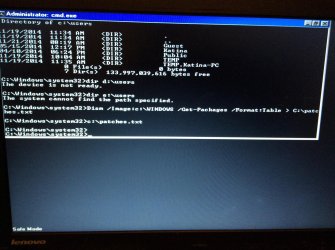
My steps

F8
Safe mode with command
Try guest login - won't work, gives Sens service message
Try my login - says "preparing your desktop" then this time, it opened to cmd.exe screen after about 5 minutes

image.jpg
 

My Computer My Computer

Computer type
Laptop
Computer Manufacturer/Model Number
Lenovo Thinkpad
OS
Windows 7 Enterprise 64bit
Antivirus
AVG
Browser
Firefox
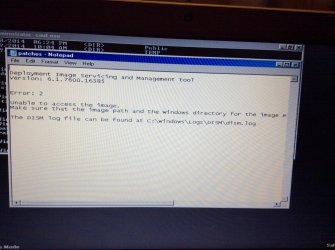
Here is the patches.txt.image.jpg
 

My Computer My Computer

Computer type
Laptop
Computer Manufacturer/Model Number
Lenovo Thinkpad
OS
Windows 7 Enterprise 64bit
Antivirus
AVG
Browser
Firefox
Get your camera and make a picture! Transfer it to a computer and post.

C: is not the drive letter where the users folder is with your account name. Or you typed the command wrong!
I want to have proof of both

Why are you being so rude to me? I am just asking for help. If you don't want to help me or cannot be patient, please do not post anymore. You are not required to help me if you don't want to.

Also, the only other computer I have is a borrowed IPad and my phone so some things may not be as easy as you assume they are.
 

My Computer My Computer

Computer type
Laptop
Computer Manufacturer/Model Number
Lenovo Thinkpad
OS
Windows 7 Enterprise 64bit
Antivirus
AVG
Browser
Firefox
I told you to do it in recovery environment! When done in win7 itself (or safe mode) do:
Code:
Dism /online  /Get-Packages /Format:Table > C:\patches.txt
 

My Computer My Computer

Computer type
Laptop
Computer Manufacturer/Model Number
ACER ASPIRE 5742G
OS
Microsoft Windows 7 Home Premium 64-bits 7601 Multiprocessor Free Service Pack 1
CPU
Intel(R) Core(TM) i3 CPU M 370 @ 2.40GHz
Motherboard
Acer Aspire 5742G
Memory
4,00 GB
Graphics Card(s)
ATI Mobility Radeon HD 5400 Series
Sound Card
(1) AMD High Definition Audio Device (2) Realtek High Defi
Screen Resolution
1366 x 768 x 32 bits (4294967296 colors) @ 60 Hz
Hard Drives
WDC WD5000BEVT-22ZAT0
also in safe mode as administrator you can do:

  1. Net user administrator SomeSecretPasswordYouWillNeverForget
  2. Net user administrator /active:yes
Afterwords you can login normally as that user!
 

My Computer My Computer

Computer type
Laptop
Computer Manufacturer/Model Number
ACER ASPIRE 5742G
OS
Microsoft Windows 7 Home Premium 64-bits 7601 Multiprocessor Free Service Pack 1
CPU
Intel(R) Core(TM) i3 CPU M 370 @ 2.40GHz
Motherboard
Acer Aspire 5742G
Memory
4,00 GB
Graphics Card(s)
ATI Mobility Radeon HD 5400 Series
Sound Card
(1) AMD High Definition Audio Device (2) Realtek High Defi
Screen Resolution
1366 x 768 x 32 bits (4294967296 colors) @ 60 Hz
Hard Drives
WDC WD5000BEVT-22ZAT0
I told you to do it in recovery environment! When done in win7 itself (or safe mode) do:
Code:
Dism /online  /Get-Packages /Format:Table > C:\patches.txt

Maybe you are not understanding me. I cannot get into Repair Your Computer because my admin password is not being accepted.
 

My Computer My Computer

Computer type
Laptop
Computer Manufacturer/Model Number
Lenovo Thinkpad
OS
Windows 7 Enterprise 64bit
Antivirus
AVG
Browser
Firefox
Just want to help. No intention to be rude or impatient. But you did some things wrong and forgot to do some things. Maybe I'm just having a bad day (due to other reasons) or it's because my English is far from perfect. anyway try to give me the information.

A quick summary:
-system restore is OFF. At least I think. No restore points are on system to restore from. You can't go back in time.
-Your user profile is corrupted and you are logged in in a temporary profile. Your original user profile is still on disk. Why it's corrupted ... I don't know. It hasn't been touched by a win7 update... windows update patches touch no user files... only system files.
-Maybe rollback of system files (uninstall latest patches) make win7 think your profile is healthy again (?)

What applications do you use (please give a brief summary). and have you changed many settings?
 

My Computer My Computer

Computer type
Laptop
Computer Manufacturer/Model Number
ACER ASPIRE 5742G
OS
Microsoft Windows 7 Home Premium 64-bits 7601 Multiprocessor Free Service Pack 1
CPU
Intel(R) Core(TM) i3 CPU M 370 @ 2.40GHz
Motherboard
Acer Aspire 5742G
Memory
4,00 GB
Graphics Card(s)
ATI Mobility Radeon HD 5400 Series
Sound Card
(1) AMD High Definition Audio Device (2) Realtek High Defi
Screen Resolution
1366 x 768 x 32 bits (4294967296 colors) @ 60 Hz
Hard Drives
WDC WD5000BEVT-22ZAT0
Try in safe mode:
Code:
Dism /online  /Get-Packages /Format:Table > C:\patches.txt
and post that file
 

My Computer My Computer

Computer type
Laptop
Computer Manufacturer/Model Number
ACER ASPIRE 5742G
OS
Microsoft Windows 7 Home Premium 64-bits 7601 Multiprocessor Free Service Pack 1
CPU
Intel(R) Core(TM) i3 CPU M 370 @ 2.40GHz
Motherboard
Acer Aspire 5742G
Memory
4,00 GB
Graphics Card(s)
ATI Mobility Radeon HD 5400 Series
Sound Card
(1) AMD High Definition Audio Device (2) Realtek High Defi
Screen Resolution
1366 x 768 x 32 bits (4294967296 colors) @ 60 Hz
Hard Drives
WDC WD5000BEVT-22ZAT0
Ok, so now, I am really confused. I'm not sure if you want me in safe mode or not. So, here are the steps I took:

Went into safe mode with command prompt, typed in Dism /online /Get-Packages /Format:Table > C:\patches.txt. System sent back another command line.

Restarted, F8

Chose Repair My Computer (to see is something different might happen)
This time, got system recovery options screen
Chose startup repair: nothing
Chose system restore: no restore points
Chose command prompt. Typed in same code as above: system just sent back another command line.
 

My Computer My Computer

Computer type
Laptop
Computer Manufacturer/Model Number
Lenovo Thinkpad
OS
Windows 7 Enterprise 64bit
Antivirus
AVG
Browser
Firefox
Just want to help. No intention to be rude or impatient. But you did some things wrong and forgot to do some things. Maybe I'm just having a bad day (due to other reasons) or it's because my English is far from perfect. anyway try to give me the information.

A quick summary:
-system restore is OFF. At least I think. No restore points are on system to restore from. You can't go back in time.
-Your user profile is corrupted and you are logged in in a temporary profile. Your original user profile is still on disk. Why it's corrupted ... I don't know. It hasn't been touched by a win7 update... windows update patches touch no user files... only system files.
-Maybe rollback of system files (uninstall latest patches) make win7 think your profile is healthy again (?)

What applications do you use (please give a brief summary). and have you changed many settings?


Thank you for your willingness to help me.

The evening before this all occurred, the only changes that I can remember are the Windows updates and my AVG may have updated (somehow AVG zen was dl on my computer weeks ago and I think the trial may have ended), but I've had AVG on my computer for a long time.

The applications I use most are those from MS Office (Word, PowerPoint are the two I remember using the day before the collapse. I was also online a bit.

I don't typically play with settings because obviously, I don't really know what I am doing. Let me know if there is anything else I can tell you.
 

My Computer My Computer

Computer type
Laptop
Computer Manufacturer/Model Number
Lenovo Thinkpad
OS
Windows 7 Enterprise 64bit
Antivirus
AVG
Browser
Firefox
Back
Top