Reinstalling Windows (Lemme Explain First)

stuckstuck

New member
Member
VIP
Local time
9:47 AM
Messages
168
Hi, I will be purchasing a SSD soon but having doubts about how I want to go about reinstalling my OS into the SSD when I get it.
My plan is to install my OS into the SSD, and then enter the OS, then deleting my old OS on my HDD by simply clicking and dragging all the relative folders, and then deleting it.
But something tells me that it's not so simple, or I might seriously mess something up.
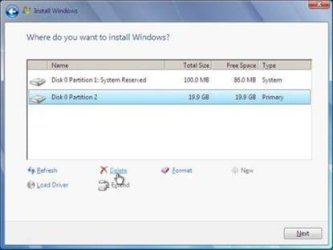
Just want to make sure I don't accidentally wipe out my entire HDD in attempts to delete the OS by getting rid of it like the sample picture presented.
Just so I ask the question in advance, how would I go about deleting the OS off my HDD without deleting everything else, as it will now act as storage whilst my new SSD acts as the OS.
Thanks in advance.
 

Attachments
  • windows-7-partition-setup-screenshot.jpg
    windows-7-partition-setup-screenshot.jpg
    11.8 KB · Views: 39

My Computer My Computer

At a glance

Microsoft Windows 7 Professional 64-bit5960X @ 4.4GHz16.0 GBNVIDIA GeForce GTX 980 Ti
Computer type
PC/Desktop
Computer Manufacturer/Model Number
Custom
OS
Microsoft Windows 7 Professional 64-bit
CPU
5960X @ 4.4GHz
Motherboard
X99 SABERTOOTH
Memory
16.0 GB
Graphics Card(s)
NVIDIA GeForce GTX 980 Ti
Hard Drives
(1) OCZ-VERT EX460 SCSI Disk Device
(2) WDC WD1002FAEX-00Z3A SCSI Disk Device
(3) WDC WD1003FZEX-00MK2 SCSI Disk Device
Internet Speed
God Speed.
Antivirus
Glock 9
Do not have any other drives hooked up when you install windows on the ssd, just the ssd, nothing else. Make sure the ssd is hooked to the 1st sata port on the motherboard, it will be marked Sata 0.

If the Motherboard has Intel Sata 6 Gbps ports hook the ssd to the 1st one. This is very important.

Ideally you`ll want to hook the hard drive back up, get your data off, then format the entire hard drive, then put your data back on.
 

My Computer My Computer

At a glance

Windows 10 Pro x64Intel Core i7 6700KGSkill TridentZ RGB 16GB 3600 16-16-16-36EVGA GTX 980 Ti SC x2
Computer type
PC/Desktop
Computer Manufacturer/Model Number
Skylake Special #666
OS
Windows 10 Pro x64
CPU
Intel Core i7 6700K
Motherboard
Asus Sabertooth Z170 Mark 1
Memory
GSkill TridentZ RGB 16GB 3600 16-16-16-36
Graphics Card(s)
EVGA GTX 980 Ti SC x2
Sound Card
Realtek High Definition
Monitor(s) Displays
AOC G2460PG
Screen Resolution
1920 x 1080 144Hz
Hard Drives
Samsung 860 Pro 256GB, Seagate Barracuda 4TB x2
PSU
EVGA 1000 P2, EVGA White Custom Braided Cables
Case
Corsair Vengeance C70 Gunmetal Black
Cooling
Corsair H100i v2, Corsair ML120 x2, Thermal Grizzly Kryonaut
Keyboard
Logitech G910 Orion Spectrum
Mouse
Logitech G700s
Internet Speed
Verizon Fios Quantum Gateway 75/75
Antivirus
Windows Defender, Malwarebytes Free 3.8.3
Browser
Chrome
Other Info
Corsair SP120 x4, LG Blu-ray Drive, Durabrand HT-395 100 Watt Dolby Digital Amp, Corsair H2100 Wireless 7.1 Headset
Ideally you`ll want to hook the hard drive back up, get your data off, then format the entire hard drive, then put your data back on.

Got it, but I was hoping I wouldn't have to go through all that, which was why I was trying to find an alternative way to delete the OS off the HDD and just leaving all the data as it is, but minus the OS.
Surely I could locate all the OS files and just deleting it?
This is to say that I'm in my newly installed SSD OS and deleting the HDD OS from there.
Thoughts?
 

My Computer My Computer

At a glance

Microsoft Windows 7 Professional 64-bit5960X @ 4.4GHz16.0 GBNVIDIA GeForce GTX 980 Ti
Computer type
PC/Desktop
Computer Manufacturer/Model Number
Custom
OS
Microsoft Windows 7 Professional 64-bit
CPU
5960X @ 4.4GHz
Motherboard
X99 SABERTOOTH
Memory
16.0 GB
Graphics Card(s)
NVIDIA GeForce GTX 980 Ti
Hard Drives
(1) OCZ-VERT EX460 SCSI Disk Device
(2) WDC WD1002FAEX-00Z3A SCSI Disk Device
(3) WDC WD1003FZEX-00MK2 SCSI Disk Device
Internet Speed
God Speed.
Antivirus
Glock 9
No, the correct way for many reasons to uninstall an OS is to delete its partition in Disk Mgmt or using a partition manager.

It explains here how to get a perfect Clean Reinstall Windows 7. The first part includes everything that must be remembered to back up. You can use your HD as the backup. Then after install to the SSD plugged in alone, plug back in the HD to copy in your files as it explains how to do.

Once you're sure you have everything from the HD then either wipe it with Diskpart Clean Command to get it cleanest, or mark the old drive Inactive so it will delete in Disk Mgmt, repartition as a data drive. If you don't have enough space to back up all your files elsewhere then you can shrink the OS partition first, create a new partitionn to copy the excess files into, delete the OS partition and repartition it as another data partition on the drive.
 
If you don't have enough space to back up all your files elsewhere then you can shrink the OS partition first, create a new partitionn to copy the excess files into, delete the OS partition and repartition it as another data partition on the drive.

I don't suppose you could walk me through this process?
I'm currently looking at my drives at the moment in disk management and minitool partition.
Just so you know, the picture shown above isn't actually a shot of my actual drives, I just found that screenshot online just to show you what I was thinking about doing.
Bare in mind that the hard drive that I want to rid of it's OS has '96%' of it's memory occupied with data.
So I won't be able to split it's partition and put everything there whilst I delete the other partition.
 

My Computer My Computer

At a glance

Microsoft Windows 7 Professional 64-bit5960X @ 4.4GHz16.0 GBNVIDIA GeForce GTX 980 Ti
Computer type
PC/Desktop
Computer Manufacturer/Model Number
Custom
OS
Microsoft Windows 7 Professional 64-bit
CPU
5960X @ 4.4GHz
Motherboard
X99 SABERTOOTH
Memory
16.0 GB
Graphics Card(s)
NVIDIA GeForce GTX 980 Ti
Hard Drives
(1) OCZ-VERT EX460 SCSI Disk Device
(2) WDC WD1002FAEX-00Z3A SCSI Disk Device
(3) WDC WD1003FZEX-00MK2 SCSI Disk Device
Internet Speed
God Speed.
Antivirus
Glock 9
Then just leave it as is until you can install another drive to transfer your data to.
 

My Computer My Computer

At a glance

Windows 10 Pro x64Intel Core i7 6700KGSkill TridentZ RGB 16GB 3600 16-16-16-36EVGA GTX 980 Ti SC x2
Computer type
PC/Desktop
Computer Manufacturer/Model Number
Skylake Special #666
OS
Windows 10 Pro x64
CPU
Intel Core i7 6700K
Motherboard
Asus Sabertooth Z170 Mark 1
Memory
GSkill TridentZ RGB 16GB 3600 16-16-16-36
Graphics Card(s)
EVGA GTX 980 Ti SC x2
Sound Card
Realtek High Definition
Monitor(s) Displays
AOC G2460PG
Screen Resolution
1920 x 1080 144Hz
Hard Drives
Samsung 860 Pro 256GB, Seagate Barracuda 4TB x2
PSU
EVGA 1000 P2, EVGA White Custom Braided Cables
Case
Corsair Vengeance C70 Gunmetal Black
Cooling
Corsair H100i v2, Corsair ML120 x2, Thermal Grizzly Kryonaut
Keyboard
Logitech G910 Orion Spectrum
Mouse
Logitech G700s
Internet Speed
Verizon Fios Quantum Gateway 75/75
Antivirus
Windows Defender, Malwarebytes Free 3.8.3
Browser
Chrome
Other Info
Corsair SP120 x4, LG Blu-ray Drive, Durabrand HT-395 100 Watt Dolby Digital Amp, Corsair H2100 Wireless 7.1 Headset
Then just leave it as is until you can install another drive to transfer your data to.

Is there seriously no other alternative?
Although I'm here asking for help I still find it hard to believe there's no two ways about this.
I figured the partitioning would've been the next best step but seeing as I can't move anything that already has data on it it's a no no.
Damn.
So just to re-iterate, there's absolutely NOTHING one can do to delete the OS without having to delete everything else on the drive.
That the ONLY way to do what it is I want to do is to back up everything onto another drive, format the drive with the OS, and then transferring ALL the files back onto that HDD??
I still can't believe there's no other way, it's such a ridiculous lengthy process!
 

My Computer My Computer

At a glance

Microsoft Windows 7 Professional 64-bit5960X @ 4.4GHz16.0 GBNVIDIA GeForce GTX 980 Ti
Computer type
PC/Desktop
Computer Manufacturer/Model Number
Custom
OS
Microsoft Windows 7 Professional 64-bit
CPU
5960X @ 4.4GHz
Motherboard
X99 SABERTOOTH
Memory
16.0 GB
Graphics Card(s)
NVIDIA GeForce GTX 980 Ti
Hard Drives
(1) OCZ-VERT EX460 SCSI Disk Device
(2) WDC WD1002FAEX-00Z3A SCSI Disk Device
(3) WDC WD1003FZEX-00MK2 SCSI Disk Device
Internet Speed
God Speed.
Antivirus
Glock 9
You can certainly delete files and folders from the HDD, leaving only what you want. Basically you delete everything that does not contain your data. First you go into Folder Options in Control Panel and setup so you will see all files and folders, including hiden and system.

Is all your data under \Users\youusername or is it scatterd in other folders on the HDD?

How much data are you talking about, 5-10GB or 100s of GBs?

It would be far better to do as others stated and save the data, format then restore it but you can do it by deleting everything you don't want. You will surely run into Access Denied problems and will have to Take Ownership of folders and files you want to delete so it will be a time consuming process.
 

My Computer My Computer

At a glance

Windows 10 Pro X64Intel Quad Core i7-4770 @ 3.4Ghz16.0GB PC3-12800 DDR3 SDRAM 1600 MHzIntel Integrated HD Graphics
Computer type
PC/Desktop
Computer Manufacturer/Model Number
Lenovo IdeaCenter 450
OS
Windows 10 Pro X64
CPU
Intel Quad Core i7-4770 @ 3.4Ghz
Memory
16.0GB PC3-12800 DDR3 SDRAM 1600 MHz
Graphics Card(s)
Intel Integrated HD Graphics
Sound Card
Realtek HD Audio
Monitor(s) Displays
HP 22" LCD
Screen Resolution
1680 x 1050
Hard Drives
250GB Samsung EVO SATA-3 SSD
2TB Seagate ST2000DM001 SATA-2
1.5TB Seagate ST3150041AS SATA
Keyboard
Dell USB
Mouse
Lenovo USB
Internet Speed
Cable via Road Runner 3MB Upload, 30MB Download
Antivirus
Windows Defender, MBAM Pro, MBAE
Browser
Seamonkey
Other Info
UEFI/GPT
PLDS DVD-RW DH16AERSH
If you don't have enough space to back up all your files elsewhere then you can shrink the OS partition first, create a new partitionn to copy the excess files into, delete the OS partition and repartition it as another data partition on the drive.

I don't suppose you could walk me through this process?
I'm currently looking at my drives at the moment in disk management and minitool partition.
Just so you know, the picture shown above isn't actually a shot of my actual drives, I just found that screenshot online just to show you what I was thinking about doing.
Bare in mind that the hard drive that I want to rid of it's OS has '96%' of it's memory occupied with data.
So I won't be able to split it's partition and put everything there whilst I delete the other partition.

Can we see a screenshot of Disk Management - How to Post a Screenshot of making sure you follow the instructions to show us all the sizes in the listings?

The way I've deleted the Windows folder easily without the permissioning problems is to boot into the Win7 installation media or System Repair Disk to browse to the Windows folder on C (which may have another drive letter in boot mode) as shown in Copy & Paste - in Windows Recovery Console.

Once you've found the Windows folder, right click it to Delete. This will take awhile prompting if you want certain folders to go, so just tick your agreement applying it to all folders. I did this earlier today and it took 10 minutes total.

I would delete the System Reserved partition which can also be done using the booted Win7 installation media by clicking Install Now, choosing Custom Install, then on the drive selection screen highlight only the 100mb SYstem Reserved partition to Delete it using the Drive Options in bottom right pictured in steps 7 and 8 of Clean Install Windows 7. Then cancel out of the install without touching any other partition.

If you have the System Active labels on C or another partition instead of System Reserved, mark it Inactive so that it isn't queried as a bootable drive any longer: Partition - Mark as Inactive - Windows 7 Forums. You can also do this on the System Reserved partition which may allow you to delete it in Disk Mgmt instead of using the Win7 installer at boot.
 
Post the shot of disk management, we`ll see if you have room to create another partition on the hard drive to put all your files on, once you`re sure you have everything copied over we can then delete the windows partition.
 

My Computer My Computer

At a glance

Windows 10 Pro x64Intel Core i7 6700KGSkill TridentZ RGB 16GB 3600 16-16-16-36EVGA GTX 980 Ti SC x2
Computer type
PC/Desktop
Computer Manufacturer/Model Number
Skylake Special #666
OS
Windows 10 Pro x64
CPU
Intel Core i7 6700K
Motherboard
Asus Sabertooth Z170 Mark 1
Memory
GSkill TridentZ RGB 16GB 3600 16-16-16-36
Graphics Card(s)
EVGA GTX 980 Ti SC x2
Sound Card
Realtek High Definition
Monitor(s) Displays
AOC G2460PG
Screen Resolution
1920 x 1080 144Hz
Hard Drives
Samsung 860 Pro 256GB, Seagate Barracuda 4TB x2
PSU
EVGA 1000 P2, EVGA White Custom Braided Cables
Case
Corsair Vengeance C70 Gunmetal Black
Cooling
Corsair H100i v2, Corsair ML120 x2, Thermal Grizzly Kryonaut
Keyboard
Logitech G910 Orion Spectrum
Mouse
Logitech G700s
Internet Speed
Verizon Fios Quantum Gateway 75/75
Antivirus
Windows Defender, Malwarebytes Free 3.8.3
Browser
Chrome
Other Info
Corsair SP120 x4, LG Blu-ray Drive, Durabrand HT-395 100 Watt Dolby Digital Amp, Corsair H2100 Wireless 7.1 Headset
Post the shot of disk management, we`ll see if you have room to create another partition on the hard drive to put all your files on, once you`re sure you have everything copied over we can then delete the windows partition.

Wait, so you're saying it is possible to just delete the OS without wiping everything off?
That's great!
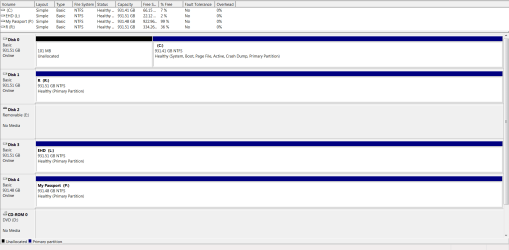
Here...

*UPDATE*

Note that it's C: drive I want to remove the OS off of.
 

Attachments

  • disk management SS.png
    disk management SS.png
    26.2 KB · Views: 5
Last edited:

My Computer My Computer

At a glance

Microsoft Windows 7 Professional 64-bit5960X @ 4.4GHz16.0 GBNVIDIA GeForce GTX 980 Ti
Computer type
PC/Desktop
Computer Manufacturer/Model Number
Custom
OS
Microsoft Windows 7 Professional 64-bit
CPU
5960X @ 4.4GHz
Motherboard
X99 SABERTOOTH
Memory
16.0 GB
Graphics Card(s)
NVIDIA GeForce GTX 980 Ti
Hard Drives
(1) OCZ-VERT EX460 SCSI Disk Device
(2) WDC WD1002FAEX-00Z3A SCSI Disk Device
(3) WDC WD1003FZEX-00MK2 SCSI Disk Device
Internet Speed
God Speed.
Antivirus
Glock 9
Wait a minute, you have a 1 TB My Passport that`s 99% free, just copy your data from C to that.

This should have been done already, there should be no discussion on that.

Then you can format Disk 0.

With 3 extra 1 TB drives you SHOULD NOT be storing ANY DATA on C.

You will then have windows on the ssd and 4 hard drives for storage ;)
 

My Computer My Computer

At a glance

Windows 10 Pro x64Intel Core i7 6700KGSkill TridentZ RGB 16GB 3600 16-16-16-36EVGA GTX 980 Ti SC x2
Computer type
PC/Desktop
Computer Manufacturer/Model Number
Skylake Special #666
OS
Windows 10 Pro x64
CPU
Intel Core i7 6700K
Motherboard
Asus Sabertooth Z170 Mark 1
Memory
GSkill TridentZ RGB 16GB 3600 16-16-16-36
Graphics Card(s)
EVGA GTX 980 Ti SC x2
Sound Card
Realtek High Definition
Monitor(s) Displays
AOC G2460PG
Screen Resolution
1920 x 1080 144Hz
Hard Drives
Samsung 860 Pro 256GB, Seagate Barracuda 4TB x2
PSU
EVGA 1000 P2, EVGA White Custom Braided Cables
Case
Corsair Vengeance C70 Gunmetal Black
Cooling
Corsair H100i v2, Corsair ML120 x2, Thermal Grizzly Kryonaut
Keyboard
Logitech G910 Orion Spectrum
Mouse
Logitech G700s
Internet Speed
Verizon Fios Quantum Gateway 75/75
Antivirus
Windows Defender, Malwarebytes Free 3.8.3
Browser
Chrome
Other Info
Corsair SP120 x4, LG Blu-ray Drive, Durabrand HT-395 100 Watt Dolby Digital Amp, Corsair H2100 Wireless 7.1 Headset
Well I'm well aware of my extra drives aha
But I was hoping I could just remove the OS from C: drive (properly) without having to delete or move everything/anything else
which was why I started this thread from the beginning, to gain some insight as to how one would go about doing this, if at all possible.
 

My Computer My Computer

At a glance

Microsoft Windows 7 Professional 64-bit5960X @ 4.4GHz16.0 GBNVIDIA GeForce GTX 980 Ti
Computer type
PC/Desktop
Computer Manufacturer/Model Number
Custom
OS
Microsoft Windows 7 Professional 64-bit
CPU
5960X @ 4.4GHz
Motherboard
X99 SABERTOOTH
Memory
16.0 GB
Graphics Card(s)
NVIDIA GeForce GTX 980 Ti
Hard Drives
(1) OCZ-VERT EX460 SCSI Disk Device
(2) WDC WD1002FAEX-00Z3A SCSI Disk Device
(3) WDC WD1003FZEX-00MK2 SCSI Disk Device
Internet Speed
God Speed.
Antivirus
Glock 9
I told you how it can be done above even though its not the recommended way. Yet I still took the time to write out how to do it. Did you even read it?

To correctly delete an OS its best to delete its partition. No need to be lazy when you have all that storage space. Just follow Reinstall tutorial below so you don't forget anything and get/keep a perfect install
 
Back
Top