Very Slow Network Identification and Connection

mrick36

Banned
Local time
12:45 PM
Messages
18
Location
Ft. Worth, Texas
When I start up my computer, the start up time is tolerable. But the system has begun taking way too much time to identify my Wifi network, connecting to it, and also showing internet access. Before I had Microsoft fix my Windows Media Player problem, this process was almost instantaneous. But now, it may take 2 or 3 minutes. Does anyone know why this is happening?
 

My Computer

Computer type
PC/Desktop
Computer Manufacturer/Model Number
Dell n5040
OS
Windows 7, 64 bit
CPU
Intel Core i3
Memory
4.0 GB RAM
Antivirus
Norton Internet Security
Browser
Chrome, Firefox, IE .....commonly used in that order
Hi, have you tried updating the wireless card driver?
 

My Computer

Computer type
PC/Desktop
Computer Manufacturer/Model Number
dell xps 9000
OS
win 10
Searched for update on Dell Wireless 1502 802.11 b/g/n and there is none.

Searched for update on Microsoft Virtual Wifi Miniport Adapter and got a window saying "Windows can't verify the publisher of this driver software."

And the Realtek PCIe FE Family Controller also has no update.
 

My Computer

Computer type
PC/Desktop
Computer Manufacturer/Model Number
Dell n5040
OS
Windows 7, 64 bit
CPU
Intel Core i3
Memory
4.0 GB RAM
Antivirus
Norton Internet Security
Browser
Chrome, Firefox, IE .....commonly used in that order

My Computer

Computer type
PC/Desktop
Computer Manufacturer/Model Number
dell xps 9000
OS
win 10
Hi mrick36,

Fixing the WMP and the slowness might also be a coincidence. Go ahead and follow up with oscer1's instructions above.

The following program might shed a bit of light of what might be happening as well.

Please download MiniToolBox and run it.

Checkmark following boxes:


  • Flush DNS
  • Report IE Proxy Settings
  • Reset IE Proxy
  • Report FF Proxy Settings
  • Reset FF Proxy Settings
  • List content of Hosts
  • List IP Configuration
  • List Winsock Entries
  • List last 10 Event Viewer log
  • List Installed Programs
  • List Devices - choose >>> (dial) All
  • List Users, Partitions and Memory size
  • List Minidump Files

Click Go and attach the resultant log that will be generated.
 

My Computer

Computer type
Laptop
OS
Win7 64-bit, Vista 32-bit, XP 32-bit, W2K 32-bit (VM)
Antivirus
Avast, MSE
Browser
Firefox
Other Info
Multiple systems. Too many specs to name.
Norton is telling me that MiniToolBox is not safe and has been removed.

I went to the Dell site and the driver suggestions are confusing. Isn't the network adapter(Dell Wireless 1502 802.11b/g/n) a physical device? If so, then why are they telling me that Dell Wireless 1703 802.11b/g/n is a updated driver for my device?

My computer is telling me that the driver for my network adapter is something different.
 

My Computer

Computer type
PC/Desktop
Computer Manufacturer/Model Number
Dell n5040
OS
Windows 7, 64 bit
CPU
Intel Core i3
Memory
4.0 GB RAM
Antivirus
Norton Internet Security
Browser
Chrome, Firefox, IE .....commonly used in that order
Norton always errs on the side of paranoia, it'd probably also tell you your best friend isn't good to be around. :p

You can consider any utility that Donna or any member here would ask you to D/L'd especially from bleepingcomputer as safe. Still it's good to be cautious, I routinely scan D/L's with a third-party scan.

Does norton automatically remove minitoolbox (MTB) or does it mark it as unsafe and you remove it? If it's the latter just rename it to MTB or mrick36 that way norton will ignore it.
If it's the former you'll have to turn norton off until you have a chance to D/L'd and rename it. Remember where you put it then run it.
If you can run it, reboot your machine and test your network connections are they better, worse, no change?

Don't worry about updating the driver for your adapter just yet as there are a few items we need to know about norton. Let's start with the full name and version number and does it include any form of Symantec Endpoint Protection (SEP); Especially SEP as that's been known to disrupt network communications. Can you supply a link to its web page?

Post back on success or failure with MTB and concise information about that norton product you have installed.
I sure hope you can run MTB because that will reset your network adapter and supply vital information, some programs like bonjour can also slow or stop network communications. Don't forget the log if it runs.
 

My Computer

Computer type
PC/Desktop
Computer Manufacturer/Model Number
Gateway DX4831-01e (Mid-Tower Desktop)
OS
Originally Win 7 Hm Prem x64 Ver 6.1.7600 Build 7601-SP1 | Upgraded to Windows 10 December 14, 2019
CPU
Intel i3 530 2.93GHz, 2933MHz 2 Cores 4 Logical Processors
Motherboard
Gateway H57M01 133 megahertz
Memory
6GB of 1,333MHz DDR3 SDRAM
Graphics Card(s)
32MB Intel Graphics Media Accelerator HD IGChip
Sound Card
Realtek High Definition Audio
Monitor(s) Displays
Gateway HX2000 20inch TFT active matrix TN
Screen Resolution
1600 x 900 x 59 hertz
Hard Drives
WDC WD10EADS-00M2B0 [HDD] (1000.20 GB) -- drive 0,
HL-DT-ST DVDRAM GH41N [CD-ROM dr]
Four card readers, and Four USB 2.0
PSU
300watts.
Case
Mid-Tower Desktop
Cooling
Stock from Gateway
Keyboard
Natural Ergonomic Keyboard 4000, see Other Info
Mouse
Orig. Gateway wore out now using Insignia USB wired optical
Internet Speed
Vz FIOS 10ms png 57.64Mbps down 65.53Mbps up Speedtest.org
Antivirus
Zamana Anti-logger with Anti-malware, MSE, Windows Firewall,
Browser
IE11.0.9600.19399-Upd ver11.0.135, Firefox 68.0.1 x64
Other Info
System Specs by Belarc.

BIOS: American Megatrends Inc. P01-A0 11/17/2009

Replaced the MS 'Natural' Standard PS/2 Enhanced 101-102 Keyboard with a new Natural Ergonomic Keyboard 4000 on August 1st 2014.

Canon Pixma MG3222 Printer.

Updated to IE11 on 12102015 | Fios Quantum Router g1100

Additional AV: SpywareBlaster, manual Mbam, SAS
This is one reason I DO NOT like Norton. As Anak pointed out, Norton will tell you your best friend is a threat even after that friend has saved you from certain death. There is nothing wrong with the Windows Firewall. Why so many think they need a 3rd party firewall is beyond me. (Please note: my opinion does not reflect the opinions of other members nor this site.)

Disable the Norton firewall if necessary (or better yet, uninstall Norton temporarily). I was helping someone once and they chose to uninstall Norton temporarily. Funny thing happened. We found out that Norton was the problem causing the issues the user was encountering. Go figure!
 

My Computer

Computer type
Laptop
OS
Win7 64-bit, Vista 32-bit, XP 32-bit, W2K 32-bit (VM)
Antivirus
Avast, MSE
Browser
Firefox
Other Info
Multiple systems. Too many specs to name.
I still don't know if I've updated my wireless card driver because no one has answered my last question. Please forgive my lack of knowledge about the vaguely named items used on computers.

Norton removes the download and gives me a message that it is not trusted. And I cannot find any setting in Norton to bypass this removal process. Norton "help" is very confusing. Yet I have only been affected by malicious files a couple times with Norton, as compared to losing a hard drive with McAfee. And I've never seen Windows Firewall at work.

Why does the suggested driver update for my wireless network adapter have almost the identical name as the adapter itself?

Network recognition process has not changed. Though, I have been busy with work and all I've done is attempt to download a file that I can't tell whether is a driver or not.

When my desktop loads, all icons are loaded properly, then they all go to a blank icon before reappearing. This didn't happen before Microsoft got access to my computer. Though, neither did the network recognition retardation. I failed to mention this earlier.

Also, now my browser opens up in a window 1/4 the size of the screen, though I continue to keep it in full screen mode. This just started a couple days ago.

Oh, and I'm told by my computer that Norton is controlling my Windows Firewall settings! WHO GAVE THEM THAT PERMISSION?
 

My Computer

Computer type
PC/Desktop
Computer Manufacturer/Model Number
Dell n5040
OS
Windows 7, 64 bit
CPU
Intel Core i3
Memory
4.0 GB RAM
Antivirus
Norton Internet Security
Browser
Chrome, Firefox, IE .....commonly used in that order
results with MiniToolBox

Took me a while to figure out where to find this!
 

Attachments

My Computer

Computer type
PC/Desktop
Computer Manufacturer/Model Number
Dell n5040
OS
Windows 7, 64 bit
CPU
Intel Core i3
Memory
4.0 GB RAM
Antivirus
Norton Internet Security
Browser
Chrome, Firefox, IE .....commonly used in that order
My reply will be in two parts, Post #3 first and then Post #9 in Part 2:

Part 1.
I still don't know if I've updated my wireless card driver because no one has answered my last question. Please forgive my lack of knowledge about the vaguely named items used on computers.
Did you or didn't you update it? This part says you didn't In Part 2 it sounds like you did. :confused:

Norton removes the download and gives me a message that it is not trusted. And I cannot find any setting in Norton to bypass this removal process. Norton "help" is very confusing. Yet I have only been affected by malicious files a couple times with Norton, as compared to losing a hard drive with McAfee. And I've never seen Windows Firewall at work.
From what I've seen that's understandable.

Why does the suggested driver update for my wireless network adapter have almost the identical name as the adapter itself?
An "almost identical name or version number" Is like horseshoe pitchin' "Close don't count".

Network recognition process has not changed. Though, I have been busy with work and all I've done is attempt to download a file that I can't tell whether is a driver or not.
We're working on that.

When my desktop loads, all icons are loaded properly, then they all go to a blank icon before reappearing. This didn't happen before Microsoft got access to my computer. Though, neither did the network recognition retardation. I failed to mention this earlier.
What do you mean by "before Microsoft got access to my computer"?

Built icons or refreshing to what your normally accustom to just means that another Service has interrupted the loading process and when all the Services are finished loading you will be presented with your Desktop.

Also, now my browser opens up in a window 1/4 the size of the screen, though I continue to keep it in full screen mode. This just started a couple days ago.
Not sure about this one, do you remember what you did a couple of days ago?

Oh, and I'm told by my computer that Norton is controlling my Windows Firewall settings! WHO GAVE THEM THAT PERMISSION?
It sounds like you missed a request from norton on whether or not you wanted norton to control the firewall when you installed norton.


Part2.
Searched for update on Dell Wireless 1502 802.11 b/g/n and there is none.
Did you search here? http:// Drivers and Downloads Identify your product | www.dell.com Click on Detect Product, let it scan your machine and see what Dell has to offer. If they aren't offering, you don't need it.

Searched for update on Microsoft Virtual Wifi Miniport Adapter and got a window saying "Windows can't verify the publisher of this driver software."
I agree, in searching both this and the Realtek PCIe FE Family Controller on this site (and I only found the realtek by looking in the MTB results log): http://Windows Compatibility Center | www.microsoft.com, I found "no results".

Links, Links! We need to know where you searched for verification! If you let Dell scan your machine and they come up with wireless adapter drivers, post the link!
   Note
I'll try to help you update your network adapter if that's what you really want, but then what we need from you in turn, is to run and follow the instructions to fill in your System Specs: http://www.sevenforums.com/tutorials/180324-system-info-see-your-system-specs.html We can't help you if you want to keep everything a secret!

I still don't believe this is an adapter problem because I found this in your MTB results:
Name: Norton Identity Safe Settings Manager
Description: Norton Identity Safe Settings Manager
Class Guid: {8ECC055D-047F-11D1-A537-0000F8753ED1}
Manufacturer:
Service: ccSet_NST
Problem: : This device is not present, is not working properly, or does not have all its drivers installed. (Code 24)
Resolution: The device is installed incorrectly. The problem could be a hardware failure, or a new driver might be needed.
Devices stay in this state if they have been prepared for removal.
After you remove the device, this error disappears.Remove the device, and this error should be resolved.
This tells me that norton was installed once, maybe re-installed, if it was, it was never completely cleaned from your machine before you attempted the second or subsequent re-install(s).

This is definitely a bad thing, its not your fault, its norton's; They should be held responsible on how their programs work and if they need a complete uninstall before the user can reinstall their product they should build that feature into their product.

Download the Norton Removal Tool from here: www.norton.com/nrt


Related Links
http://I need assistance with NIS 21.0.1.18 | community.norton.com/forums

By the way, what version of norton do you have? If you want to know how to shut norton down so it doesn't interfere, I need to know the version and if it's one or more programs.

I realize there is a lot here and we're going to have to clean up a lot of confusion before we can proceed. Try to answer any questions I have in part 1 and keep them separate from answers for part 2.

 

My Computer

Computer type
PC/Desktop
Computer Manufacturer/Model Number
Gateway DX4831-01e (Mid-Tower Desktop)
OS
Originally Win 7 Hm Prem x64 Ver 6.1.7600 Build 7601-SP1 | Upgraded to Windows 10 December 14, 2019
CPU
Intel i3 530 2.93GHz, 2933MHz 2 Cores 4 Logical Processors
Motherboard
Gateway H57M01 133 megahertz
Memory
6GB of 1,333MHz DDR3 SDRAM
Graphics Card(s)
32MB Intel Graphics Media Accelerator HD IGChip
Sound Card
Realtek High Definition Audio
Monitor(s) Displays
Gateway HX2000 20inch TFT active matrix TN
Screen Resolution
1600 x 900 x 59 hertz
Hard Drives
WDC WD10EADS-00M2B0 [HDD] (1000.20 GB) -- drive 0,
HL-DT-ST DVDRAM GH41N [CD-ROM dr]
Four card readers, and Four USB 2.0
PSU
300watts.
Case
Mid-Tower Desktop
Cooling
Stock from Gateway
Keyboard
Natural Ergonomic Keyboard 4000, see Other Info
Mouse
Orig. Gateway wore out now using Insignia USB wired optical
Internet Speed
Vz FIOS 10ms png 57.64Mbps down 65.53Mbps up Speedtest.org
Antivirus
Zamana Anti-logger with Anti-malware, MSE, Windows Firewall,
Browser
IE11.0.9600.19399-Upd ver11.0.135, Firefox 68.0.1 x64
Other Info
System Specs by Belarc.

BIOS: American Megatrends Inc. P01-A0 11/17/2009

Replaced the MS 'Natural' Standard PS/2 Enhanced 101-102 Keyboard with a new Natural Ergonomic Keyboard 4000 on August 1st 2014.

Canon Pixma MG3222 Printer.

Updated to IE11 on 12102015 | Fios Quantum Router g1100

Additional AV: SpywareBlaster, manual Mbam, SAS
Product Support | Dell US

Does it not say that this list is drivers? It doesn't say if this is your adapter click it to download your driver. It calls them drivers specifically.

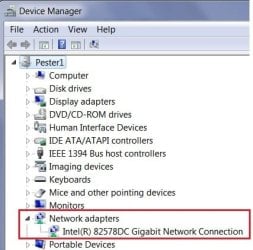
I've attached my device man. showing what adapter I have. And the Dell site gave me these choices. Is the driver there or not?
 

My Computer

Computer type
PC/Desktop
Computer Manufacturer/Model Number
Dell n5040
OS
Windows 7, 64 bit
CPU
Intel Core i3
Memory
4.0 GB RAM
Antivirus
Norton Internet Security
Browser
Chrome, Firefox, IE .....commonly used in that order
What do you mean by "before Microsoft got access to my computer"?

Read #1
 

My Computer

Computer type
PC/Desktop
Computer Manufacturer/Model Number
Dell n5040
OS
Windows 7, 64 bit
CPU
Intel Core i3
Memory
4.0 GB RAM
Antivirus
Norton Internet Security
Browser
Chrome, Firefox, IE .....commonly used in that order
Product Support | Dell US

Does it not say that this list is drivers? It doesn't say if this is your adapter click it to download your driver. It calls them drivers specifically.

I've attached my device man. showing what adapter I have. And the Dell site gave me these choices. Is the driver there or not?
Yes there are eight categories of drivers. The reason it doesn't hand you the specific driver is there are different permutations within your machine's (n5040 ) class.
Out of the ten's to hundreds of thousands of n5040's produced some undoubtedly had:

  • More or less memory than yours.

  • A bigger or smaller HDD.

  • Wifi or no wifi.

  • A different chipset.

  • A different optical drive.

  • Different networking capabilities.
The auto-detect is good but with these variables it can't possibly give you the exact one, only the range that was installed before it left the building, and that doesn't include any changes made by the re-sellers once they got their hands on the machine.


I see the link, but where's the attachment??

If you're going to send one like this don't bother.

n5040.jpg


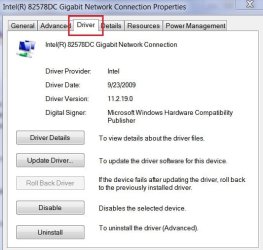
We need you to right click on your adapter, click on properties then the Driver tab, this is what we need to see.

n50401.jpg

We need to see the Driver Provider, Date, and Version.


What do you mean by "before Microsoft got access to my computer"?
Read #1
I had Microsoft fix my Windows Media Player problem
Did you run a utility to fix the problem or did you allow a Microsoft customer service agent to remotely control your machine to fix the Media Player problem?
 

My Computer

Computer type
PC/Desktop
Computer Manufacturer/Model Number
Gateway DX4831-01e (Mid-Tower Desktop)
OS
Originally Win 7 Hm Prem x64 Ver 6.1.7600 Build 7601-SP1 | Upgraded to Windows 10 December 14, 2019
CPU
Intel i3 530 2.93GHz, 2933MHz 2 Cores 4 Logical Processors
Motherboard
Gateway H57M01 133 megahertz
Memory
6GB of 1,333MHz DDR3 SDRAM
Graphics Card(s)
32MB Intel Graphics Media Accelerator HD IGChip
Sound Card
Realtek High Definition Audio
Monitor(s) Displays
Gateway HX2000 20inch TFT active matrix TN
Screen Resolution
1600 x 900 x 59 hertz
Hard Drives
WDC WD10EADS-00M2B0 [HDD] (1000.20 GB) -- drive 0,
HL-DT-ST DVDRAM GH41N [CD-ROM dr]
Four card readers, and Four USB 2.0
PSU
300watts.
Case
Mid-Tower Desktop
Cooling
Stock from Gateway
Keyboard
Natural Ergonomic Keyboard 4000, see Other Info
Mouse
Orig. Gateway wore out now using Insignia USB wired optical
Internet Speed
Vz FIOS 10ms png 57.64Mbps down 65.53Mbps up Speedtest.org
Antivirus
Zamana Anti-logger with Anti-malware, MSE, Windows Firewall,
Browser
IE11.0.9600.19399-Upd ver11.0.135, Firefox 68.0.1 x64
Other Info
System Specs by Belarc.

BIOS: American Megatrends Inc. P01-A0 11/17/2009

Replaced the MS 'Natural' Standard PS/2 Enhanced 101-102 Keyboard with a new Natural Ergonomic Keyboard 4000 on August 1st 2014.

Canon Pixma MG3222 Printer.

Updated to IE11 on 12102015 | Fios Quantum Router g1100

Additional AV: SpywareBlaster, manual Mbam, SAS
"If you're going to send one like this don't bother."

Maybe I should have someone with a little patience help me here. And maybe you could take a sensitivity class that might explain to you that people come to this forum for help with computer problems that they don't understand. We aren't as knowledgeable in this subject as you are.

"What do you mean by "before Microsoft got access to my computer"?"
"I had Microsoft fix my Windows Media Player problem"

Since there is no physical location to get help from Microsoft, the only conclusion that can be drawn from the following two statements is remote access.

Please ask someone else to help me with this problem.
 

My Computer

Computer type
PC/Desktop
Computer Manufacturer/Model Number
Dell n5040
OS
Windows 7, 64 bit
CPU
Intel Core i3
Memory
4.0 GB RAM
Antivirus
Norton Internet Security
Browser
Chrome, Firefox, IE .....commonly used in that order
I don't know where the attachment went. I used the Manage Attachment button below to attach it. Where does it go when you hit the Submit Reply button?
 

My Computer

Computer type
PC/Desktop
Computer Manufacturer/Model Number
Dell n5040
OS
Windows 7, 64 bit
CPU
Intel Core i3
Memory
4.0 GB RAM
Antivirus
Norton Internet Security
Browser
Chrome, Firefox, IE .....commonly used in that order
Attachment?

It worked that time.
 

Attachments

My Computer

Computer type
PC/Desktop
Computer Manufacturer/Model Number
Dell n5040
OS
Windows 7, 64 bit
CPU
Intel Core i3
Memory
4.0 GB RAM
Antivirus
Norton Internet Security
Browser
Chrome, Firefox, IE .....commonly used in that order
Driver properties
 

Attachments

  • Driver.png
    Driver.png
    249.5 KB · Views: 2

My Computer

Computer type
PC/Desktop
Computer Manufacturer/Model Number
Dell n5040
OS
Windows 7, 64 bit
CPU
Intel Core i3
Memory
4.0 GB RAM
Antivirus
Norton Internet Security
Browser
Chrome, Firefox, IE .....commonly used in that order
Please ask someone else to help me with this problem.
Okay, anyone else that is subscribed to this thread can jump in, I'm unsubscribing to it.
 

My Computer

Computer type
PC/Desktop
Computer Manufacturer/Model Number
Gateway DX4831-01e (Mid-Tower Desktop)
OS
Originally Win 7 Hm Prem x64 Ver 6.1.7600 Build 7601-SP1 | Upgraded to Windows 10 December 14, 2019
CPU
Intel i3 530 2.93GHz, 2933MHz 2 Cores 4 Logical Processors
Motherboard
Gateway H57M01 133 megahertz
Memory
6GB of 1,333MHz DDR3 SDRAM
Graphics Card(s)
32MB Intel Graphics Media Accelerator HD IGChip
Sound Card
Realtek High Definition Audio
Monitor(s) Displays
Gateway HX2000 20inch TFT active matrix TN
Screen Resolution
1600 x 900 x 59 hertz
Hard Drives
WDC WD10EADS-00M2B0 [HDD] (1000.20 GB) -- drive 0,
HL-DT-ST DVDRAM GH41N [CD-ROM dr]
Four card readers, and Four USB 2.0
PSU
300watts.
Case
Mid-Tower Desktop
Cooling
Stock from Gateway
Keyboard
Natural Ergonomic Keyboard 4000, see Other Info
Mouse
Orig. Gateway wore out now using Insignia USB wired optical
Internet Speed
Vz FIOS 10ms png 57.64Mbps down 65.53Mbps up Speedtest.org
Antivirus
Zamana Anti-logger with Anti-malware, MSE, Windows Firewall,
Browser
IE11.0.9600.19399-Upd ver11.0.135, Firefox 68.0.1 x64
Other Info
System Specs by Belarc.

BIOS: American Megatrends Inc. P01-A0 11/17/2009

Replaced the MS 'Natural' Standard PS/2 Enhanced 101-102 Keyboard with a new Natural Ergonomic Keyboard 4000 on August 1st 2014.

Canon Pixma MG3222 Printer.

Updated to IE11 on 12102015 | Fios Quantum Router g1100

Additional AV: SpywareBlaster, manual Mbam, SAS
Almost every comment Anak wrote in #11 indicate that this person(male/female, I can't tell) doesn't understand the statement that he/she is questioning.

This might be the source of our issues here. Or it could be their impatience with someone less knowledgeable than themselves.
 

My Computer

Computer type
PC/Desktop
Computer Manufacturer/Model Number
Dell n5040
OS
Windows 7, 64 bit
CPU
Intel Core i3
Memory
4.0 GB RAM
Antivirus
Norton Internet Security
Browser
Chrome, Firefox, IE .....commonly used in that order
Back
Top