Christmolo
New member
- Local time
- 11:13 PM
- Messages
- 9
My Computer
At a glance
windows 7 and windows 8.1 (home and office)
- Computer type
- PC/Desktop
- OS
- windows 7 and windows 8.1 (home and office)


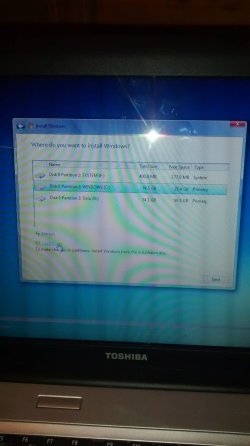
If you want to do a clean install, you would need to delete all partitions.
That will leave you with "unallocated space".
Then tell Windows to install to that unallocated space.
You might have to back up a screen or two from where you are in your picture. Look for a choice that says something like "drive options, advanced" toward the bottom of the screen.
Look here:
http://www.sevenforums.com/tutorials/1649-clean-install-windows-7-a.html
Thanks for reply.
Problem: This option is not available to me here for some reason.
Thanks for reply.
Problem: This option is not available to me here for some reason.
Go to that tutorial and work through it step by step, carefully.
Where did you get the Windows installation disc?
Are you booting from that disc?

Partition D is labeled Data, if you have data on that partition and wipe it out, your data is gone.
Did you backup that data ? As in did you save it somewhere else ?

No, you`re not beig stupid. Re read the tutorial I just posted again and start over, delete the drive to un allocated space as ignatz has suggested.
Then simply click next. Windows should be done installing in 15 minutes.
Did you even notice what it says at the bottom of your picture ?
You are not running the install disc from within windows are you ?


