Long time to establish connection with router

cactusek

New member
Local time
10:01 AM
Messages
10
I have windows 7 RC on my laptop.
Few months everithing was ok but since last week i have a problem with connection with router. After restart or wake up computer establishing connection takes long time (few minutes). After first attempt I always got announcement "limited access" , I must wait to second attempt to establish good connection with router. There is only one web and it is default for my laptop.
IT is problem with OS because on the same computer but on XP everthing is ok, connection with router takes few seconds.
 

My Computer My Computer

At a glance

windows 7 RC
OS
windows 7 RC
I have windows 7 RC on my laptop.
Few months everithing was ok but since last week i have a problem with connection with router. After restart or wake up computer establishing connection takes long time (few minutes). After first attempt I always got announcement "limited access" , I must wait to second attempt to establish good connection with router. There is only one web and it is default for my laptop.
IT is problem with OS because on the same computer but on XP everthing is ok, connection with router takes few seconds.

Do you have DHCP or fixed IP addresses? Also, is IPv6 turned on in Windows 7 (It reportedly can cause some issues.)
 

My Computer My Computer

At a glance

Windows 7 x64 HP, Windows 7 HP, Windows 7 UltIntel I3, Cerelon, Pentium 4 @ 3Ghz8G, 3G, 3GOn-board Intel, On-board nVidia, nVIDIA card
Computer Manufacturer/Model Number
Gateway, Toshiba Laptop, and Home Brew
OS
Windows 7 x64 HP, Windows 7 HP, Windows 7 Ult
CPU
Intel I3, Cerelon, Pentium 4 @ 3Ghz
Motherboard
Intel, Intel, Asus
Memory
8G, 3G, 3G
Graphics Card(s)
On-board Intel, On-board nVidia, nVIDIA card
Sound Card
on-board, on-board, SoundBlaster
Monitor(s) Displays
Hannspree HF237, Toshiba, SyncMaster 931B
Screen Resolution
default (all)
Hard Drives
1T internal, 320G internal, 160G internal, 1T networked
PSU
300w, unk, 650w
Case
black, black, grey
Cooling
air (all)
Keyboard
standard wired (all)
Mouse
standard wired (all)
Internet Speed
6M down, 768K up
Other Info
Home LAN through Linksys hub to 4 port and wireless switch/router. Networked HP 2600n. Wife's computer running Windows 7, and spare laptop running Ubuntu "Karmic Kola" (9.10).
DHCP is enabled, IPv6 is disabled.
 

My Computer My Computer

At a glance

windows 7 RC
OS
windows 7 RC
If both Router as well as the Cable Modem are sharing the same IP Address i.e. 192.168.1.1, please do try few changes inside Router's configurations:

1. Set IP Address of Router as 192.168.2.20
2. Set DHCP to Broadcast IP from 192.168.2.100
3. Set the limit for DHCP Users as per your desire i.e. 5 or 10

Hope by this time you'd have the access instantly.
 

My Computer My Computer

At a glance

Windows 7 Ultimate x64, Windows Vista Ultimat...Intel Core 2 Quad CPU Q6600 @ 2.40GHz (4 CPUs)8.00 GB DDR2 RAM @ 800MHznVidia GeForce 260 GTX 896MB DDR3 and AGEIA P...
Computer Manufacturer/Model Number
DELL XPS 700
OS
Windows 7 Ultimate x64, Windows Vista Ultimate x64 and Windows 2003 Datacenter Server x64 Edition
CPU
Intel Core 2 Quad CPU Q6600 @ 2.40GHz (4 CPUs)
Motherboard
nForce 590 SLI Intel Edition
Memory
8.00 GB DDR2 RAM @ 800MHz
Graphics Card(s)
nVidia GeForce 260 GTX 896MB DDR3 and AGEIA PhysX Card
Sound Card
Creative SB X-Fi Xtreme Music
Monitor(s) Displays
DELL ST2410
Screen Resolution
1920 x 1080
Hard Drives
4 x 250 GB SATA HDDs
PSU
Dell Dimension 1100 Watt Power Supply
Case
DELL Custom
Keyboard
Microsoft Razer Reclusa
Mouse
Microsoft USB IntelliMouse Explorer 3.0
If both Router as well as the Cable Modem are sharing the same IP Address i.e. 192.168.1.1, please do try few changes inside Router's configurations:

1. Set IP Address of Router as 192.168.2.20
2. Set DHCP to Broadcast IP from 192.168.2.100
3. Set the limit for DHCP Users as per your desire i.e. 5 or 10

Hope by this time you'd have the access instantly.

I haven't cable modem, router is directly connected to ISP. Router has public IP address.
Earlier everything was ok and I did't change any settings and configuration in my device.
 

My Computer My Computer

At a glance

windows 7 RC
OS
windows 7 RC
Hmmm... It means the said device has dual capabilities i.e. Cable Modem as well as Router. OK... Please do describe the name and model of connected device, if possible.
 

My Computer My Computer

At a glance

Windows 7 Ultimate x64, Windows Vista Ultimat...Intel Core 2 Quad CPU Q6600 @ 2.40GHz (4 CPUs)8.00 GB DDR2 RAM @ 800MHznVidia GeForce 260 GTX 896MB DDR3 and AGEIA P...
Computer Manufacturer/Model Number
DELL XPS 700
OS
Windows 7 Ultimate x64, Windows Vista Ultimate x64 and Windows 2003 Datacenter Server x64 Edition
CPU
Intel Core 2 Quad CPU Q6600 @ 2.40GHz (4 CPUs)
Motherboard
nForce 590 SLI Intel Edition
Memory
8.00 GB DDR2 RAM @ 800MHz
Graphics Card(s)
nVidia GeForce 260 GTX 896MB DDR3 and AGEIA PhysX Card
Sound Card
Creative SB X-Fi Xtreme Music
Monitor(s) Displays
DELL ST2410
Screen Resolution
1920 x 1080
Hard Drives
4 x 250 GB SATA HDDs
PSU
Dell Dimension 1100 Watt Power Supply
Case
DELL Custom
Keyboard
Microsoft Razer Reclusa
Mouse
Microsoft USB IntelliMouse Explorer 3.0
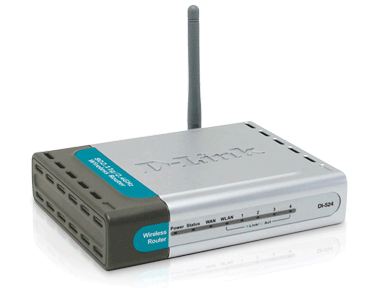
Router d-link di 524 (cable connected to ISP server) and enabled wireless connection.
notebook: HP DV6000
It normally works (on windows XP), problem is on Windows 7.
 

My Computer My Computer

At a glance

windows 7 RC
OS
windows 7 RC
DI-524_right.png

The instant product has been discontinued as of January 01, 2009 and is no longer supported by D-Link tech support. However, as a courtesy to their customers, they've provided the resources as available on instant page:

DI-524 High Speed 2.4GHz (802.11g) Wireless Router

There are multiple revisions of the DI-524, each with revision specific drivers, firmware, installation guides, and other resources likewise:

•DI-524
•DI-524_REVC
•DI-524_REVD
•DI-524_REVE

SUPPORT RESOURCES

Here you may find the details as to Product Manual, Quick Install Guides, Product Firmware, Additional Downloads, Warranty Info, FAQ, and Knowledgebase etc.

See if these available resources assist you in configuring your device within Windows 7.
 

My Computer My Computer

At a glance

Windows 7 Ultimate x64, Windows Vista Ultimat...Intel Core 2 Quad CPU Q6600 @ 2.40GHz (4 CPUs)8.00 GB DDR2 RAM @ 800MHznVidia GeForce 260 GTX 896MB DDR3 and AGEIA P...
Computer Manufacturer/Model Number
DELL XPS 700
OS
Windows 7 Ultimate x64, Windows Vista Ultimate x64 and Windows 2003 Datacenter Server x64 Edition
CPU
Intel Core 2 Quad CPU Q6600 @ 2.40GHz (4 CPUs)
Motherboard
nForce 590 SLI Intel Edition
Memory
8.00 GB DDR2 RAM @ 800MHz
Graphics Card(s)
nVidia GeForce 260 GTX 896MB DDR3 and AGEIA PhysX Card
Sound Card
Creative SB X-Fi Xtreme Music
Monitor(s) Displays
DELL ST2410
Screen Resolution
1920 x 1080
Hard Drives
4 x 250 GB SATA HDDs
PSU
Dell Dimension 1100 Watt Power Supply
Case
DELL Custom
Keyboard
Microsoft Razer Reclusa
Mouse
Microsoft USB IntelliMouse Explorer 3.0
Assign a static, permanent ip address in Windows. Any will do as long as it's on the same subnet as the router. Disable DHCP in the router config. Enjoy.
 

My Computer My Computer

At a glance

7600.20510 x86P4 550 3.4 GHz HT running at 3.5 GHzOCZ 2 GB(2x1GB) DDR400mHz running @ 414 mHzHIS Radeon HD 3850 IceQ 3 Turbo HDMI Dual DL-...
Computer Manufacturer/Model Number
self built
OS
7600.20510 x86
CPU
P4 550 3.4 GHz HT running at 3.5 GHz
Motherboard
MSI PM8M3-V (MS-7211 v1.x) Micro-ATX mainboard
Memory
OCZ 2 GB(2x1GB) DDR400mHz running @ 414 mHz
Graphics Card(s)
HIS Radeon HD 3850 IceQ 3 Turbo HDMI Dual DL-DVI AGP
Sound Card
MOTU Traveler firewire studio interface 192 kHz 24 bit
Monitor(s) Displays
22" widescreen Acer X223W LCD, 17" Compaq P75 CRT
Screen Resolution
1680x1050 and 1280x1024
Hard Drives
SATA I x2 WD, 400 GB and 120 GB, SATA 2 WD Caviar Black 1 TB
PSU
350W generic
Case
Cybertronpc, it glows blue
Cooling
stock cpu fan, Ice-Q 3 gpu and system, many case fans
Keyboard
Logitch Classical Keyboard 200
Mouse
Logitech Mediaplay cordless
Internet Speed
1792/448 kbits/sec
Other Info
SATA II PCI fake RAID adapter, 1 GB Readyboost, original ATI Remote Wonder (even works with WMC perfectly), Logitech Rumblepad 2 game controller x2
Assign a static, permanent ip address in Windows. Any will do as long as it's on the same subnet as the router. Disable DHCP in the router config. Enjoy.

I tried this, time to connect to router is stiil very long. Problem is identification home web. Computer see web, but can't get link parameters and IP Address.
 

My Computer My Computer

At a glance

windows 7 RC
OS
windows 7 RC
The instant product has been discontinued as of January 01, 2009 and is no longer supported by D-Link tech support. However, as a courtesy to their customers, they've provided the resources as available on instant page:

DI-524 High Speed 2.4GHz (802.11g) Wireless Router

There are multiple revisions of the DI-524, each with revision specific drivers, firmware, installation guides, and other resources likewise:

•DI-524
•DI-524_REVC
•DI-524_REVD
•DI-524_REVE

SUPPORT RESOURCES

Here you may find the details as to Product Manual, Quick Install Guides, Product Firmware, Additional Downloads, Warranty Info, FAQ, and Knowledgebase etc.

See if these available resources assist you in configuring your device within Windows 7.

All drivers are ok, everything was ok through 5 months.
 

My Computer My Computer

At a glance

windows 7 RC
OS
windows 7 RC
Under these circumstances, you may better ask / consult some technical personnel of your local ISP.
 

My Computer My Computer

At a glance

Windows 7 Ultimate x64, Windows Vista Ultimat...Intel Core 2 Quad CPU Q6600 @ 2.40GHz (4 CPUs)8.00 GB DDR2 RAM @ 800MHznVidia GeForce 260 GTX 896MB DDR3 and AGEIA P...
Computer Manufacturer/Model Number
DELL XPS 700
OS
Windows 7 Ultimate x64, Windows Vista Ultimate x64 and Windows 2003 Datacenter Server x64 Edition
CPU
Intel Core 2 Quad CPU Q6600 @ 2.40GHz (4 CPUs)
Motherboard
nForce 590 SLI Intel Edition
Memory
8.00 GB DDR2 RAM @ 800MHz
Graphics Card(s)
nVidia GeForce 260 GTX 896MB DDR3 and AGEIA PhysX Card
Sound Card
Creative SB X-Fi Xtreme Music
Monitor(s) Displays
DELL ST2410
Screen Resolution
1920 x 1080
Hard Drives
4 x 250 GB SATA HDDs
PSU
Dell Dimension 1100 Watt Power Supply
Case
DELL Custom
Keyboard
Microsoft Razer Reclusa
Mouse
Microsoft USB IntelliMouse Explorer 3.0
Quick Installation & Configuration Guide:
dlink_router.png


Further to our previous discussion, you may better follow the instant guide for your convenience:

Configuration

1. Using the "Quick Installation Guide", follow the instructions in step 1 to set up your new wireless router. You may also need to restart your computer in order to see the router.
   Note
If you normally use a static IP address, you will have to reconfigure your internet connection to use DHCP. Go into the control panel and open your network connections. Edit the properties of your current network connection, and make sure that "Obtain an IP address automatically" is enabled.

2. Connect to the router using your web browser by typing "http://192.168.0.1" into the URL address box.

3. Enter the Username "admin" and leave the password field blank when the login prompt appears.

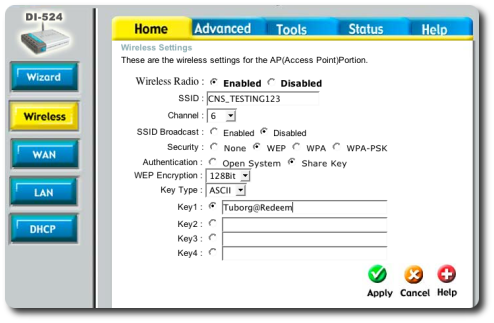
4. You will be redirected to a page that asks you to "Run the Wizard". We will not use this method, but instead set things up manually. Click on the "Wireless" link on the left-hand menu. You should be taken to a screen that looks something like:
home-wireless.png

You should set all the values the same as in the screenshot, with the exception of the following ones:

SSID This will be assigned to you when you register your access point
Channel You will be told which channel you should run on in order to avoid interfering with other networks in the area
Key 1 A 13 character string that you will distribute to your users as the password to access your network. Obviously, you should not use the same string as in the example given here!

Make sure you write down the Key that you have chosen, and then click the "Apply" button.

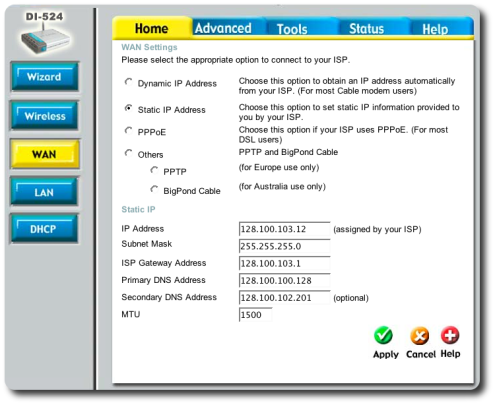
5. Next, go to the "Wan" section on the left menu:
home-wan.png

Choose to set a static IP address for your router, and enter the information needed in the form (this will differ from what appears in this example).

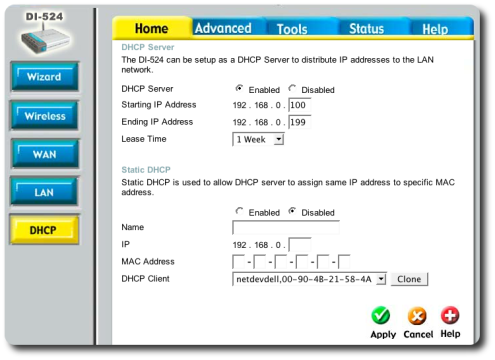
6. You don't have to make any changes in the "LAN" section on the left menu, so click instead on "DHCP":
home-dhcp.png

You shouldn't need to configure much in this screen, although you can choose to give out a different set of addresses in the first section. If you would like to assign IP addresses according to the MAC address of the connecting user, use the "Static DHCP" section to do this.

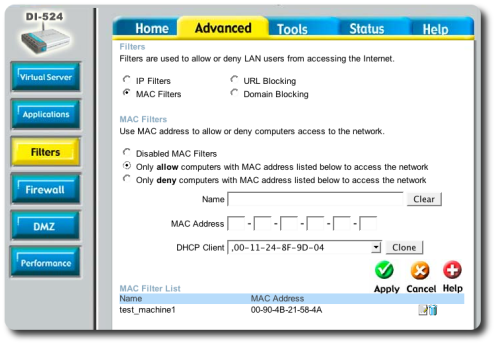
7. Now click on the "Advanced" tab on the top of the screen and choose "Filters":
advanced-filters.png

Click the "Mac Filters" checkbox and the page will refresh to display what you see above. We recommend that you use this section to limit the users that are allowed to connect to your network by the MAC address of their computer.
   Note
Make sure that you add the MAC address of the computer you are using to set up your router first, before enabling this filter. Otherwise you will be unable to access the router and will have to reset the router. If you do have to reset the router because you have locked yourself out, there is a small hole on the back of the router that can be pressed using a paper clip.

Add all the necessary MAC addresses in this section, and click "Apply" to save your changes.

8. Change to the "Tools" tab at the top of the screen, and click on the "Time" section on the left menu:
tools-time.png

Enter the "Customized NTP" address of 128.100.100.128, select your Time Zone and enable daylight savings time.

9. Finally, click the "Admin" button on the left menu:
tools-admin.png

Reset your Administrator password to something other than a blank password. You can use Remote Management to be able to access the router from the WAN, but this is a security hole, and we strongly discourage such use. It is better to just connect a computer to the router when it needs to be configured.

10. That's it! You should be on the air!

Log Reporting

If you visit the "Status" tab on the top of the page, you will find that the D-Link router has a number of facilities for logging and statistics reporting. If you would like to be sent logs of your router's activity, use the following procedure:

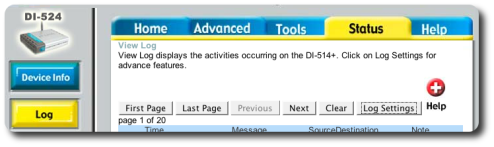
1. Click on the Log button on the left menu. You will be taken to a screen that looks something like this:
status-log1.png

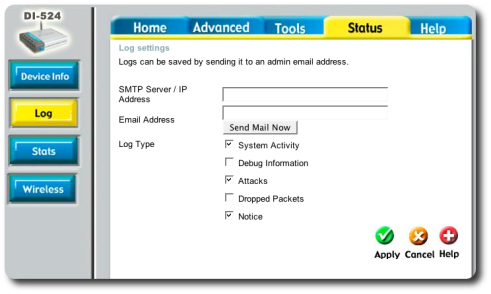
2. Click on the "Log Settings" button to set up your logging reporting, and you will be taken here:
status-log2.png

If you enter an SMTP server and your email address, you will receive updates via email with the most current logs.

Courtesy: The University of Toronto campus wireless network (UTORcwn)

 
Last edited:

My Computer My Computer

At a glance

Windows 7 Ultimate x64, Windows Vista Ultimat...Intel Core 2 Quad CPU Q6600 @ 2.40GHz (4 CPUs)8.00 GB DDR2 RAM @ 800MHznVidia GeForce 260 GTX 896MB DDR3 and AGEIA P...
Computer Manufacturer/Model Number
DELL XPS 700
OS
Windows 7 Ultimate x64, Windows Vista Ultimate x64 and Windows 2003 Datacenter Server x64 Edition
CPU
Intel Core 2 Quad CPU Q6600 @ 2.40GHz (4 CPUs)
Motherboard
nForce 590 SLI Intel Edition
Memory
8.00 GB DDR2 RAM @ 800MHz
Graphics Card(s)
nVidia GeForce 260 GTX 896MB DDR3 and AGEIA PhysX Card
Sound Card
Creative SB X-Fi Xtreme Music
Monitor(s) Displays
DELL ST2410
Screen Resolution
1920 x 1080
Hard Drives
4 x 250 GB SATA HDDs
PSU
Dell Dimension 1100 Watt Power Supply
Case
DELL Custom
Keyboard
Microsoft Razer Reclusa
Mouse
Microsoft USB IntelliMouse Explorer 3.0
I update firmware to newest in router. No changes.
It is problem in OS.
I brought other laptop with windows 7 and there connection was very fast.

And...
When I switch off and switch on router, connection comes back in 10sec. That's ok.
When I restart windows (router works), establishing connection lastes two or three minutes. So I think there is a problem with Windows 7.
 

My Computer My Computer

At a glance

windows 7 RC
OS
windows 7 RC
Build 7100 probably have some issues as to connectivity / IP Address assignment...
 

My Computer My Computer

At a glance

Windows 7 Ultimate x64, Windows Vista Ultimat...Intel Core 2 Quad CPU Q6600 @ 2.40GHz (4 CPUs)8.00 GB DDR2 RAM @ 800MHznVidia GeForce 260 GTX 896MB DDR3 and AGEIA P...
Computer Manufacturer/Model Number
DELL XPS 700
OS
Windows 7 Ultimate x64, Windows Vista Ultimate x64 and Windows 2003 Datacenter Server x64 Edition
CPU
Intel Core 2 Quad CPU Q6600 @ 2.40GHz (4 CPUs)
Motherboard
nForce 590 SLI Intel Edition
Memory
8.00 GB DDR2 RAM @ 800MHz
Graphics Card(s)
nVidia GeForce 260 GTX 896MB DDR3 and AGEIA PhysX Card
Sound Card
Creative SB X-Fi Xtreme Music
Monitor(s) Displays
DELL ST2410
Screen Resolution
1920 x 1080
Hard Drives
4 x 250 GB SATA HDDs
PSU
Dell Dimension 1100 Watt Power Supply
Case
DELL Custom
Keyboard
Microsoft Razer Reclusa
Mouse
Microsoft USB IntelliMouse Explorer 3.0
um not really, im using it right now
 

My Computer My Computer

At a glance

Win 8 Release candidate 8400[email protected]4 gigsNvidia 9600M
Computer Manufacturer/Model Number
HP Pavillion dv-7 1005 Tx
OS
Win 8 Release candidate 8400
CPU
[email protected]
Memory
4 gigs
Graphics Card(s)
Nvidia 9600M
Sound Card
HD built-in
Monitor(s) Displays
17" Wxga
Screen Resolution
1440x900
Cooling
none
Internet Speed
45Mb down 5Mb up
I update firmware to newest in router. No changes.
It is problem in OS.
I brought other laptop with windows 7 and there connection was very fast.

And...
When I switch off and switch on router, connection comes back in 10sec. That's ok.
When I restart windows (router works), establishing connection lastes two or three minutes. So I think there is a problem with Windows 7.
Did you try / test the above referred guide?
 

My Computer My Computer

At a glance

Windows 7 Ultimate x64, Windows Vista Ultimat...Intel Core 2 Quad CPU Q6600 @ 2.40GHz (4 CPUs)8.00 GB DDR2 RAM @ 800MHznVidia GeForce 260 GTX 896MB DDR3 and AGEIA P...
Computer Manufacturer/Model Number
DELL XPS 700
OS
Windows 7 Ultimate x64, Windows Vista Ultimate x64 and Windows 2003 Datacenter Server x64 Edition
CPU
Intel Core 2 Quad CPU Q6600 @ 2.40GHz (4 CPUs)
Motherboard
nForce 590 SLI Intel Edition
Memory
8.00 GB DDR2 RAM @ 800MHz
Graphics Card(s)
nVidia GeForce 260 GTX 896MB DDR3 and AGEIA PhysX Card
Sound Card
Creative SB X-Fi Xtreme Music
Monitor(s) Displays
DELL ST2410
Screen Resolution
1920 x 1080
Hard Drives
4 x 250 GB SATA HDDs
PSU
Dell Dimension 1100 Watt Power Supply
Case
DELL Custom
Keyboard
Microsoft Razer Reclusa
Mouse
Microsoft USB IntelliMouse Explorer 3.0
Your not crazy

I have started having this issue as of last week --- I have been running 7 for a long time, and now all of my network connections take a few minutes to come up when computer comes out of sleep, or is turned on. Very annoying considering that I move around alot... I require DHCP because I move from site to site alot and each site has different IP ranges.

It happened after I installed a large number of patches, not sure which one caused the issue unfortionately. I hope that this is not the case in the actual released version, still running 7100 here.

Running on a Dell Latitude D630, Broadcom Gig NIC, same on both 100Mbps and 1000Mbps networks. Already tried changing and updating network drivers. Networks behind ZyXel and Cisco firewalls depending on location, DHCP served from Windows 2003 servers or said routers depending on location.
 

My Computer My Computer

At a glance

Windows 7
OS
Windows 7
you're really not crazy

Same problem here. At home I have a Cisco modem and it always takes about 5 minutes before I can start surfing although windows reports immediately that everything is fine with the connection. I can sometimes speed up the process by changing from cable to wireless a few times back and forth. Or just activate/inactivate wireless a few times. But now I just let the computer sit 5 minutes after turning it on. At work the computer works perfect every time. Immediate connection and surfing. At home I have another computer running Ubuntu and it connects at home immediately. But my windows vista always takes 5 minutes at home only to be able to surf. The problem is making me totaly crazy.
 

My Computer My Computer

At a glance

Windows 7
OS
Windows 7
The problem is making me totaly crazy.
I would bet money on the problem has to do with how Windows interfaces with the network domain. I know that the network at my work has a Windows Server running the network but the network at home is run by a Linux Server. Consequently the server at work connects immediately with my windows vista computer for immediate surfing. At home my windows vista takes 5 minutes after connection to finally be able to surf. Sorry but I am a little paranoid about Microsoft and I would bet this is thier way to force companies to use Windows Network servers.
 

My Computer My Computer

At a glance

Windows 7
OS
Windows 7
Back
Top