Solved Benefits of GPT vs MBR Primary and MBR Logical Partitions ?

This whole efi/gpt thing certainly adds complexity and introduces limitations for the end user. They don't get much choice, pretty much all the new laptops the average Joe buys come like that now.
 

My Computers My Computers

  • At a glance

    7 X64i5 84002x8gb 3200mhz
    Computer type
    PC/Desktop
    OS
    7 X64
    CPU
    i5 8400
    Motherboard
    gigabyte b365m ds3h
    Memory
    2x8gb 3200mhz
    Hard Drives
    various
    PSU
    pure power 11 400w cm
    Case
    Coolermaster
    Cooling
    cryorig m9i
  • At a glance

    7x64g54008gb ddr4 2400
    Computer type
    PC/Desktop
    OS
    7x64
    CPU
    g5400
    Motherboard
    ga b365m ds3h
    Memory
    8gb ddr4 2400
    PSU
    xfx pro 450w
.......and therefore it will be wiser for anyone with GPT drives to save all the important sectors using Bootice so that one can restore the drive to the original condition in case partition related problems arise making the drive inaccessible.

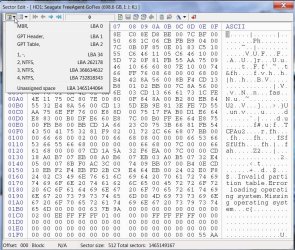
The screenshot below shows a GPT drive with three partitions.

17-02-2014 21-56-51.jpg

In this case as an example, I would save LBA0(sector 0), LBA1, LBA2, LBA34, and then the three NTFS volume boot records LBA 262178, LBA 366634632 and LBA 732818343.

During the restoration process I would start with restoring the backups that are supposed to exist in the last sector (LBA n) and LBA n-32. These might have gotten corrupted and need to be restored first.

So I would restore the last sector n with the GPT header - saved LBA1, and then sector n-32 with the GPT Table - saved LBA2.

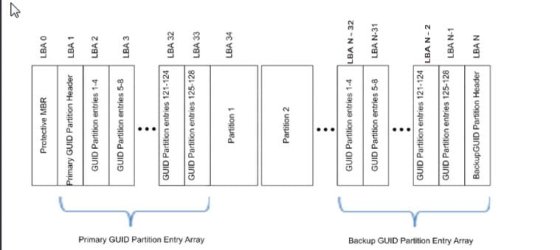
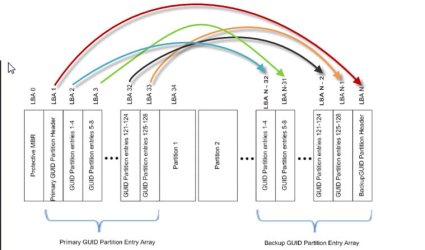
EDIT: The following figure shows the partition structure of a GPT drive.

18-02-2014 10-58-37.jpg

That should give an idea what all sectors one should backup and save. That would depend upon the number of GPT partitions one has. While restoring the saved sectors to the backup area in the drive the following progression should be maintained.

LBA n (the last sector) with saved LBA 1 and then on LBA n-32 with saved LBA 2, LBA n-31 with saved LBA 3, LBA n-30 with saved LBA4 .......... upto LBA n-1 with saved LBA 33

Then LBA 0, 1, 2,.......to 34 and other VBRs with the respective saves.

In most cases, one should be back in business and be able to access the drives as before without the necessity of trying any data recovery software the efficacy of which in dealing with GPT drives, in my view, is uncertain as on date.

On how to save and restore the sectors using Bootice, http://www.sevenforums.com/hardware-devices/310295-lost-partitions.html#post2584426

Update: Amplified in post#29 to be read in conjunction with.
 
Last edited:

My Computer My Computer

At a glance

Windows 7 Home Premium 32 bit
OS
Windows 7 Home Premium 32 bit
  • Like
Reactions: whs
Far,far,far too complicated for the average user.
 

My Computers My Computers

  • At a glance

    7 X64i5 84002x8gb 3200mhz
    Computer type
    PC/Desktop
    OS
    7 X64
    CPU
    i5 8400
    Motherboard
    gigabyte b365m ds3h
    Memory
    2x8gb 3200mhz
    Hard Drives
    various
    PSU
    pure power 11 400w cm
    Case
    Coolermaster
    Cooling
    cryorig m9i
  • At a glance

    7x64g54008gb ddr4 2400
    Computer type
    PC/Desktop
    OS
    7x64
    CPU
    g5400
    Motherboard
    ga b365m ds3h
    Memory
    8gb ddr4 2400
    PSU
    xfx pro 450w
I am an average user :), honestly. ( looks, reads very complicated but once you do it you know you can do it and if I can do it then anyone can.)
 

My Computer My Computer

At a glance

Windows 7 Home Premium 32 bit
OS
Windows 7 Home Premium 32 bit
I think this is the KB article in question : Disk drive numbers may not correspond to the SATA channel numbers when you install Windows on a computer that has multiple SATA or RAID disks
My goodness... What an atrocious error! This is absolutely mind-blowing in stupidity. Drive numbering according to.... order of enumeration.
Even with this brain-dead manner of drive numbering, how could it get confused with ITS own numbering in a SINGLE boot!?

And yeah, the tool is apparently buggy, if it can't find the simple truth that this disk was GPT.
But wait, could you not tell it that this was a GPT disk, and so not to try to interpret it as MBR?
Perhaps your classification of partition managers as Beta is right... It's so much easier to recover from GPT, I can only blame the tool.Reassigning GUID is trivial. simply replacing with a protective MBR would have let any other tool recover the backup partition table.

Windows is to blame for getting confused, but Lazesoft is to blame for not recognizing the basic GPT layout. There is NO 3mb partition connected with GPT at all. Wonder what it scanned...
 

My Computer My Computer

At a glance

Windows 7 Home Premium x64Intel Core 2 Quad Q6600 G0Transcend JM800QLU-2G x 2 (2x2GB)Sapphire Radeon HD6850 1GB
Computer type
PC/Desktop
Computer Manufacturer/Model Number
Custom
OS
Windows 7 Home Premium x64
CPU
Intel Core 2 Quad Q6600 G0
Motherboard
MSI P45 Platinum MS-7512
Memory
Transcend JM800QLU-2G x 2 (2x2GB)
Graphics Card(s)
Sapphire Radeon HD6850 1GB
Hard Drives
Seagate ST3360320AS in Transcend Storejet Ultra35 eSATA
Seagate ST31000524AS
PSU
Corsair GS600
Cooling
Stock
Mouse
Logitech Wired M500 USB
Internet Speed
15Mbps
Antivirus
Microsoft Security Essentials
Browser
Google Chrome

My Computer My Computer

At a glance

Windows 7 Home Premium x64Intel Core 2 Quad Q6600 G0Transcend JM800QLU-2G x 2 (2x2GB)Sapphire Radeon HD6850 1GB
Computer type
PC/Desktop
Computer Manufacturer/Model Number
Custom
OS
Windows 7 Home Premium x64
CPU
Intel Core 2 Quad Q6600 G0
Motherboard
MSI P45 Platinum MS-7512
Memory
Transcend JM800QLU-2G x 2 (2x2GB)
Graphics Card(s)
Sapphire Radeon HD6850 1GB
Hard Drives
Seagate ST3360320AS in Transcend Storejet Ultra35 eSATA
Seagate ST31000524AS
PSU
Corsair GS600
Cooling
Stock
Mouse
Logitech Wired M500 USB
Internet Speed
15Mbps
Antivirus
Microsoft Security Essentials
Browser
Google Chrome
As I've said the vast majority of users don't need a GPT boot disk (really useful on a 250GB SSD!). However, as SIW2 says it's pretty much standard on most bought PCs so if you are interested in computers it is probably worth understanding the GPT standard.
 

My Computer My Computer

At a glance

Windows 7x64 Home Premium SP1Intel i7 2600kG.Skill Ripjaws (DDR3-1600) 2x4GBNvidia GeForce GTS 450; Intel HD Graphics 300...
Computer type
PC/Desktop
Computer Manufacturer/Model Number
Own build
OS
Windows 7x64 Home Premium SP1
CPU
Intel i7 2600k
Motherboard
ASUS P8Z68 Deluxe
Memory
G.Skill Ripjaws (DDR3-1600) 2x4GB
Graphics Card(s)
Nvidia GeForce GTS 450; Intel HD Graphics 3000(GT2+)
Monitor(s) Displays
Dell Ultrasharp IPS panel U2311H, Samsung SyncMaster P2350
Screen Resolution
1920x1080
Hard Drives
Samsung 850 Pro SSD 256GB, Samsung SSD 840 120GB, Seagates 1TB Barracuda ST31000528AS x2
PSU
Seasonic M12II 520W
Case
Lian Li Lancool PC-K60
Cooling
Case: 1x120mm, 3x140mm CPU: Hyper 212+
Keyboard
Logitech MK520 (wireless)
Mouse
Logitech MK520
Internet Speed
6-7 Mbps
Antivirus
Norton Security Premium, Malwarebytes on 2 (MSE on 3rd PC)
Browser
FireFox
Other Info
Audio: Logitech Z523 2.1
I think this is the KB article in question : Disk drive numbers may not correspond to the SATA channel numbers when you install Windows on a computer that has multiple SATA or RAID disks
My goodness... What an atrocious error! This is absolutely mind-blowing in stupidity. Drive numbering according to.... order of enumeration.
Even with this brain-dead manner of drive numbering, how could it get confused with ITS own numbering in a SINGLE boot!?
I totally agree.

Windows is to blame for getting confused, but Lazesoft is to blame for not recognizing the basic GPT layout. There is NO 3mb partition connected with GPT at all. Wonder what it scanned...
I remembered wrongly, and Lazesoft made absolutely no such mistake.

I actually tried many third party tools and they were all defeated by Windows insisting that the GPT DIsk had to retain the MBR style of Disk Identity.
Perhaps I could have booted into a LINUX Recovery tool and fixed the problem,
but I thought it more likely that Learning to use Linux tools would result in me placing everything in jeopardy.

It was the commercial MINIDISK DATA RECOVERY which showed me 3 MB things which I assumed were remnants of GPT links.

Lazesoft actually showed me 1.41 MB EFISECTORS, which I assume are your GPT linked list.
Lazesoft was NOT being used to recover partitions but was digging through UNALLOCATED SPACE in that region of the disc, and it did the job perfectly.
It rescued over 400 GB of Macrium Partition Image backup files,
and Macrium has validated all the internal checksums of each file,
THEREFORE all the fragments were correctly assembled (the files were fragmented when first created).

The only alternative data recovery that recovered each file with the correct number of bytes,
probably assumed that no file was fragmented,and simply located the start sector for each file and then read a contiguous set of sectors, actually composing a "recovered file" which consisted of fragments of many different files. Macrium tested its recovery attempts and each one failed hash checksum validation.

Lazesoft now has a recently enhanced capability to repair in a few minutes all the damage done by Windows when Windows "converted" the GPT disk into a trashed MBR disk,
BUT I will only test this once I am satisfied that I have NOT RECOVERED ANY FILES that I actually deleted BEFORE Windows has trashed the system.

Regards
Alan
 

Attachments

  • sshot-97.png
    sshot-97.png
    32.8 KB · Views: 1
  • sshot-151.png
    sshot-151.png
    35.1 KB · Views: 1

My Computer My Computer

At a glance

Windows 7 Ultimate 64 bit SP1 x64AMD Phenom X4 95008 GBATI Radeon HD 4600 Series
Computer Manufacturer/Model Number
ASUSTeK Computer INC. M3A32-MVP DELUXE (CPU 1)
OS
Windows 7 Ultimate 64 bit SP1 x64
CPU
AMD Phenom X4 9500
Motherboard
ASUSTeK M3A32-MVP Deluxe (CPU 1)
Memory
8 GB
Graphics Card(s)
ATI Radeon HD 4600 Series
Sound Card
AMD High Definition Audio Device
Monitor(s) Displays
SyncMaster (1680x1050@60Hz)
Hard Drives
59GB OCZ-VERTEX2 ATA Device
+
977GB SAMSUNG HD103SJ ATA Device
+
625GB WDC WD6401AALS-00L3B2 ATA Device
Having gone through all the posts in this thread this morning and having noted that Windows can create problems by not enumerating the disks in the same order with each startup and presenting a different picture to the unwary user, I am more than ever convinced that users with GPT drives will be better off saving the important sectors in all the drives they use - whether MBR or GPT.

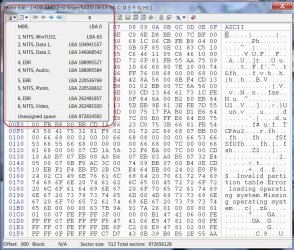
In the case of MBR disks the screenshot below shows the typical LBAs one would save for later restoration. (This disk has three primary and three logical drives.)

18-02-2014 15-39-34.jpg

I have since amplified my post #22 by including a figure showing the GPT structure. I repeat it here with some colours added.

arrow.jpg

On a GPT drive if one has 128 partitions then one may have to save roughly 38+128(VBR) LBAs.

But considering that nobody is likely to have more than 12 partitions the number of LBA saves get reduced to 6+12(VBR) LBAs. Each sector save is only 512bytes.

And saving the LBAs with Bootice is not at all a difficult task. One just selects the drive, clicks on Sector Edit, view the partition details, select the sectors one by one and click on the save to file icon. Similar process for restoring. ( In the case of restoring the sectors on the system drive that has gone awry one may have to perhaps run Bootice from a WinPE disk or remove the HDD and place it as a second drive on another system and run Bootice). By default Bootice saves the files in the same folder in which it resides.

The only problem an average user will face is what goes where when restoring. The GPT structure figure coupled with the text statements should come in handy for that. Does not take much time to figure out and understand.

If anyone who wants to undertake this exercise face any problem, we are always here to walk you through.
 
Last edited:

My Computer My Computer

At a glance

Windows 7 Home Premium 32 bit
OS
Windows 7 Home Premium 32 bit

My Computer My Computer

At a glance

Windows 7x64 Home Premium SP1Intel i7 2600kG.Skill Ripjaws (DDR3-1600) 2x4GBNvidia GeForce GTS 450; Intel HD Graphics 300...
Computer type
PC/Desktop
Computer Manufacturer/Model Number
Own build
OS
Windows 7x64 Home Premium SP1
CPU
Intel i7 2600k
Motherboard
ASUS P8Z68 Deluxe
Memory
G.Skill Ripjaws (DDR3-1600) 2x4GB
Graphics Card(s)
Nvidia GeForce GTS 450; Intel HD Graphics 3000(GT2+)
Monitor(s) Displays
Dell Ultrasharp IPS panel U2311H, Samsung SyncMaster P2350
Screen Resolution
1920x1080
Hard Drives
Samsung 850 Pro SSD 256GB, Samsung SSD 840 120GB, Seagates 1TB Barracuda ST31000528AS x2
PSU
Seasonic M12II 520W
Case
Lian Li Lancool PC-K60
Cooling
Case: 1x120mm, 3x140mm CPU: Hyper 212+
Keyboard
Logitech MK520 (wireless)
Mouse
Logitech MK520
Internet Speed
6-7 Mbps
Antivirus
Norton Security Premium, Malwarebytes on 2 (MSE on 3rd PC)
Browser
FireFox
Other Info
Audio: Logitech Z523 2.1
Which one is faster?I tried both and felt MBR to be slightly faster than GPT. I don't have crazy drives hence don't really need GPT but my motherboard supports it so went ahead and tried it. It feels slightly slower than MBR. Anyone with any experience using both?
 

My Computer My Computer

At a glance

Windows 8.1 ProCore i5 44404GB Corsair Vengeance DDR3Sapphire Ati Radeon R7 240
Computer type
PC/Desktop
Computer Manufacturer/Model Number
Self Hand Build
OS
Windows 8.1 Pro
CPU
Core i5 4440
Motherboard
Gigabyte GA H97M-DS3P
Memory
4GB Corsair Vengeance DDR3
Graphics Card(s)
Sapphire Ati Radeon R7 240
Sound Card
ASUS Xonar DX - Fiio E10 - Audio Technica M50
Monitor(s) Displays
Panasonic L42ET60D & Dell 2240L (Dual Display)
Screen Resolution
1920X1080
Hard Drives
Samsung 850 Pro 128 GB
1 TB WD Green.
3 TB WD Green
1 TB WD External
PSU
Corsair VS350
Case
Corsair Carbide 400R
Cooling
Stock
Keyboard
Logitech
Mouse
Logitech Optical/MX518.
Internet Speed
60 KBps (Things are different in India LOL)
Antivirus
AVIRA Free Edition
Browser
Waterfox
Other Info
Previous set-up:
E6300>E2140 @3.6 Ghz>Q6600 @ 3.8 Ghz with Thermaltake Ultima 90.
Nvidia 8600GT>8800 GT>ATI 4850>ATI 3450>ATI 5770>ATI 3100>ATI R7 240.
Intel DG965WH>ASUS P5B>ABIT IP35-E>Gigabyte G31-S2L> Gigabyte GA78LMT-USB3>Gigabyte H97M-DS3P.
Corsair Value Select 2GB>Crucial Ballistix 2GB>GSkill 2GB>Corsair Vengeance 4GB.
Matrix Server Chassis (with 12 Glacialtech Fans)>Coolermaster Elit
Which one is faster?I tried both and felt MBR to be slightly faster than GPT. I don't have crazy drives hence don't really need GPT but my motherboard supports it so went ahead and tried it. It feels slightly slower than MBR. Anyone with any experience using both?

Never noticed any difference, but I didn't break out a stopwatch or run benchmarks.

The main reason I'd use GPT is to be able to use all of a large drive and that's much more important to me than whatever miniscule speed advantage MBR might have---if any.
 

My Computer My Computer

At a glance

Windows 7 Home Premium SP1, 64-bitIntel Skylake i5-6600K, not overclocked8 GB HyperX DDR4-2666 (2 x 4 GB)none; graphics are integrated on CPU
Computer type
PC/Desktop
Computer Manufacturer/Model Number
Ignatz Special; 4 speed manual gearbox; factory air conditioning; one of one
OS
Windows 7 Home Premium SP1, 64-bit
CPU
Intel Skylake i5-6600K, not overclocked
Motherboard
AsRock Z170M Extreme 4, micro ATX
Memory
8 GB HyperX DDR4-2666 (2 x 4 GB)
Graphics Card(s)
none; graphics are integrated on CPU
Sound Card
onboard: Realtek ALC1150; external: USB Behringer UF0-202
Monitor(s) Displays
Dell S2340M 23 inch IPS
Screen Resolution
1600 x 900
Hard Drives
System: Crucial MX100 series SSD, 128 GB;
Data: Samsung Spinpoint 103SJ, 1 TB;
Backup: WD Caviar Green WD30EZRX-00D8PB0, 3 TB
PSU
Rosewill SilentNight 500 watt fanless, semi-modular
Case
Antec Solo II
Cooling
Noctua NH-U12S; Noctua F12 intake, Noctua S12A exhaust
Keyboard
Microsoft 200 6JH-00001 USB
Mouse
Dell or Microsoft optical wired; USB
Antivirus
Microsoft Security Essentials and Malwarebytes Premium
Browser
Pale Moon
Other Info
All fans PWM; speeds at idle: CPU circa 500 rpm; intake circa 600 rpm; exhaust circa 600 rpm; CPU temps 27 idle and 47 C load in a warm room (27 C/81 F) when running Intel Extreme Tuning Utility stress test.
I'm very surprised that you found a speed difference.... Do you mean boot time? Other than that there should be absolutely no difference.
 

My Computer My Computer

At a glance

Windows 7 Home Premium x64Intel Core 2 Quad Q6600 G0Transcend JM800QLU-2G x 2 (2x2GB)Sapphire Radeon HD6850 1GB
Computer type
PC/Desktop
Computer Manufacturer/Model Number
Custom
OS
Windows 7 Home Premium x64
CPU
Intel Core 2 Quad Q6600 G0
Motherboard
MSI P45 Platinum MS-7512
Memory
Transcend JM800QLU-2G x 2 (2x2GB)
Graphics Card(s)
Sapphire Radeon HD6850 1GB
Hard Drives
Seagate ST3360320AS in Transcend Storejet Ultra35 eSATA
Seagate ST31000524AS
PSU
Corsair GS600
Cooling
Stock
Mouse
Logitech Wired M500 USB
Internet Speed
15Mbps
Antivirus
Microsoft Security Essentials
Browser
Google Chrome
I am an average user :), honestly. ( looks, reads very complicated but once you do it you know you can do it and if I can do it then anyone can.)

Why is this any different than MBR? GPT has redundant structures that make it less likely the disk boot sectors will be unrecoverably corrupted than with MBR and your are making it sound worse.

Why would you need to save both the primary and backup sectors- you need only save one or the other.

If the data is important, make a backup image or have a copy on another drive. Being able to fix a drive's boot sectors only gives you a sense of false security IMO. If these sectors get corrupted, it is likely your data is ass well.
 

My Computer My Computer

At a glance

Windows 10 Pro. EFI boot partition, full EFI ...i7 4770k 4.4GHz (44-44-43-43 turbo) @ 1.248V16GB (8GBx2) @2200 MHz G.skill Sniper 10-11-1...MSI GTX 970 Gaming 4G
Computer type
PC/Desktop
Computer Manufacturer/Model Number
Home built (GeneO industries)/Model 4
OS
Windows 10 Pro. EFI boot partition, full EFI boot
CPU
i7 4770k 4.4GHz (44-44-43-43 turbo) @ 1.248V
Motherboard
ASUS Maximus VI Hero
Memory
16GB (8GBx2) @2200 MHz G.skill Sniper 10-11-10-30-1, 1.6V
Graphics Card(s)
MSI GTX 970 Gaming 4G
Sound Card
Onboard SupremeFX Audio
Monitor(s) Displays
NEC Spectraview 2490WUXi-SV
Screen Resolution
1920 x 1200
Hard Drives
Samsung 850 Pro 256GB (OS), Samsung 2x 128GB 840 Pro SSD in RAID0, 3x WD Blue 6Gb/s 1TB RAID0, WD 2TB Black external USB 3.0, 2TB WD20EARS Green external USB 3.0, 2x 500GB Seagate and 1 750 GB external USB, 1x 350GB external USB3
PSU
Seasonic X-850 (2012 KM3 model)
Case
Fractal Design Define R4
Cooling
NH-D14, NF-F12, NF-A15; NF-P14, NF-P12,NF-A14, S12A PWM
Keyboard
Cooler Master Storm Quickfire Rapid - Brown
Mouse
Logitech G602
Internet Speed
126.4 Mb/s down, 24.3 Mb/s up
Other Info
USB 3.0 x8 , SATA III x8, eSATA, USB 2.0 x6. Samsung DVD R/W drive.

WEI: CPU 7.8, Memory 7.9, Graphics 7.9, Disk 7.9
I just felt like that but I was wrong. Some youtube videos suggest GPT is faster so I am using GPT now.
Which one is faster?I tried both and felt MBR to be slightly faster than GPT. I don't have crazy drives hence don't really need GPT but my motherboard supports it so went ahead and tried it. It feels slightly slower than MBR. Anyone with any experience using both?

yeah boot/reboot only. Although I didn't ran a stop watch. Just went by this review:
https://www.youtube.com/watch?v=dQIE5tV2LAs

I'm very surprised that you found a speed difference.... Do you mean boot time? Other than that there should be absolutely no difference.
 
Last edited:

My Computer My Computer

At a glance

Windows 8.1 ProCore i5 44404GB Corsair Vengeance DDR3Sapphire Ati Radeon R7 240
Computer type
PC/Desktop
Computer Manufacturer/Model Number
Self Hand Build
OS
Windows 8.1 Pro
CPU
Core i5 4440
Motherboard
Gigabyte GA H97M-DS3P
Memory
4GB Corsair Vengeance DDR3
Graphics Card(s)
Sapphire Ati Radeon R7 240
Sound Card
ASUS Xonar DX - Fiio E10 - Audio Technica M50
Monitor(s) Displays
Panasonic L42ET60D & Dell 2240L (Dual Display)
Screen Resolution
1920X1080
Hard Drives
Samsung 850 Pro 128 GB
1 TB WD Green.
3 TB WD Green
1 TB WD External
PSU
Corsair VS350
Case
Corsair Carbide 400R
Cooling
Stock
Keyboard
Logitech
Mouse
Logitech Optical/MX518.
Internet Speed
60 KBps (Things are different in India LOL)
Antivirus
AVIRA Free Edition
Browser
Waterfox
Other Info
Previous set-up:
E6300>E2140 @3.6 Ghz>Q6600 @ 3.8 Ghz with Thermaltake Ultima 90.
Nvidia 8600GT>8800 GT>ATI 4850>ATI 3450>ATI 5770>ATI 3100>ATI R7 240.
Intel DG965WH>ASUS P5B>ABIT IP35-E>Gigabyte G31-S2L> Gigabyte GA78LMT-USB3>Gigabyte H97M-DS3P.
Corsair Value Select 2GB>Crucial Ballistix 2GB>GSkill 2GB>Corsair Vengeance 4GB.
Matrix Server Chassis (with 12 Glacialtech Fans)>Coolermaster Elit
With all due respect, data backups are NOT RELEVANT to the topic in hand,
which is concerned with the relevant merits of GPT and MBR style Disks.

Post #7 indicates how useless GPT can be as a backup because a backup that fails is USELESS as a backup.

I received a Windows 7 Desktop already configured with System C: installed on an MBR Disk because the hardware/BIOS lacked the ability to boot from GPT.

My main use for the GPT disk was to create and maintain on-line Macrium Reflect image backups of C:\,
and to frequently duplicate those backups to USB and eSATA connected disks.

Life is too short to make a backup of every backup of EACH backup.
So I do not waste my time,

One morning Windows woke up stupid,
and decided that the GPT disk had the disk identity of my MBR disk, and put my MBR disk (C:\) offline.

I was able to eventually give the original MBR disk a new identity to replace that which had been stolen,
and put the imitation MBR disk off-line.
Windows does NOT allow me to correct the disk ID of the original GPT DISC, and that puts ALL on-line backups out of bounds.

I needed Lazesoft Data Recovery to retrieve those backups to off-line storage.

I have seen no reason to defer changing my DEAD-OFFLINE Disk to MBR,
and this should avoid any repetition of the same Windows stupidity.

Regards
Alan
 

My Computer My Computer

At a glance

Windows 7 Ultimate 64 bit SP1 x64AMD Phenom X4 95008 GBATI Radeon HD 4600 Series
Computer Manufacturer/Model Number
ASUSTeK Computer INC. M3A32-MVP DELUXE (CPU 1)
OS
Windows 7 Ultimate 64 bit SP1 x64
CPU
AMD Phenom X4 9500
Motherboard
ASUSTeK M3A32-MVP Deluxe (CPU 1)
Memory
8 GB
Graphics Card(s)
ATI Radeon HD 4600 Series
Sound Card
AMD High Definition Audio Device
Monitor(s) Displays
SyncMaster (1680x1050@60Hz)
Hard Drives
59GB OCZ-VERTEX2 ATA Device
+
977GB SAMSUNG HD103SJ ATA Device
+
625GB WDC WD6401AALS-00L3B2 ATA Device
From what I have read, it wasn't as simple as your system woke up stupid. You booted to a SysLinux flash drive, it crashed, and when you rebooted you found that the GPT disk was no longer recognized as such. That the flash boot failed is an indication it was doing something stupid. If I had to guess, it would be that the flash boot saw the disk as a damaged MBR and overwrote the partition type of 0xEE and tried to repair it, turning it into a regular MBR. The partition type had to have been changed, and when it did, it was recognized as a valid MBR partition. You may have tried this, but I would beet that if you changed the partition type of the MBR back to 0xEE, you would have recovered your gpt disk.
 
Last edited:

My Computer My Computer

At a glance

Windows 10 Pro. EFI boot partition, full EFI ...i7 4770k 4.4GHz (44-44-43-43 turbo) @ 1.248V16GB (8GBx2) @2200 MHz G.skill Sniper 10-11-1...MSI GTX 970 Gaming 4G
Computer type
PC/Desktop
Computer Manufacturer/Model Number
Home built (GeneO industries)/Model 4
OS
Windows 10 Pro. EFI boot partition, full EFI boot
CPU
i7 4770k 4.4GHz (44-44-43-43 turbo) @ 1.248V
Motherboard
ASUS Maximus VI Hero
Memory
16GB (8GBx2) @2200 MHz G.skill Sniper 10-11-10-30-1, 1.6V
Graphics Card(s)
MSI GTX 970 Gaming 4G
Sound Card
Onboard SupremeFX Audio
Monitor(s) Displays
NEC Spectraview 2490WUXi-SV
Screen Resolution
1920 x 1200
Hard Drives
Samsung 850 Pro 256GB (OS), Samsung 2x 128GB 840 Pro SSD in RAID0, 3x WD Blue 6Gb/s 1TB RAID0, WD 2TB Black external USB 3.0, 2TB WD20EARS Green external USB 3.0, 2x 500GB Seagate and 1 750 GB external USB, 1x 350GB external USB3
PSU
Seasonic X-850 (2012 KM3 model)
Case
Fractal Design Define R4
Cooling
NH-D14, NF-F12, NF-A15; NF-P14, NF-P12,NF-A14, S12A PWM
Keyboard
Cooler Master Storm Quickfire Rapid - Brown
Mouse
Logitech G602
Internet Speed
126.4 Mb/s down, 24.3 Mb/s up
Other Info
USB 3.0 x8 , SATA III x8, eSATA, USB 2.0 x6. Samsung DVD R/W drive.

WEI: CPU 7.8, Memory 7.9, Graphics 7.9, Disk 7.9
I am an average user :), honestly. ( looks, reads very complicated but once you do it you know you can do it and if I can do it then anyone can.)

Why is this any different than MBR? GPT has redundant structures that make it less likely the disk boot sectors will be unrecoverably corrupted than with MBR and your are making it sound worse.....

''GPT was designed with improved robustness in mind compared to the older MBR partition table;GPT includes stored CRC values to help utilities spot problems and redundancy to help recover from them. Neither of these features makes GPT completely immune to errors, though; they just help utilities to detect and recover from those problems" - Rod Smith, Author of GPT fdisk- a set of text-mode partitioning tools for Linux, FreeBSD, Mac OS X, and Windows that can also repair/try to repair a broken GPT.

The same author: " An Ounce of Prevention: Before you get into trouble, it's worth taking preventive measures: Back up your partition tables! If you take the simple precaution of backing up your GPT data, and keeping this backup current with any changes you make, you should find data recovery much easier."

This learned author sounds worse than me, an average user :D ! :)
 
Last edited:

My Computer My Computer

At a glance

Windows 7 Home Premium 32 bit
OS
Windows 7 Home Premium 32 bit
From what I have read, it wasn't as simple as your system woke up stupid. You booted to a SysLinux flash drive, it crashed, and when you rebooted you found that the GPT disk was no longer recognized as such. That the flash boot failed is an indication it was doing something stupid. If I had to guess, it would be that the flash boot saw the disk as a damaged MBR and overwrote the partition type of 0xEE and tried to repair it, turning it into a regular MBR. The partition type had to have been changed, and when it did, it was recognized as a valid MBR partition. You may have tried this, but I would beet that if you changed the partition type of the MBR back to 0xEE, you would have recovered your gpt disk.
Where were you when I asked years ago how to turn my disk back to GPT ! ! !
ALL INTELLECTUAL GIANTS AT THAT TIME FAILED TO SOLVE THE PROBLEM.

Please explain how and why Windows would decide that it was appropriate to IGNORE all the good disks,
and deliberately choose to not only re-write a long and complex GPT GUID as a simple and short 8 digit number,
but to ALSO ARBITRARILY USE THE SAME 8 DIGIT NUMBER EMPLOYED by my system C:\ MBR SSD Disk,
and THEN PUT MY SSD OFF-LINE,
and try to boot my trashed GPT disk as C:\ ! ! !

Software such as Macrium Reflect and Hard Disk Analyzer,
AND ALL THEIR COMPETITORS,
were dependent upon disk numbers, and that was good with IDE.
All partition image users had problems once SATA came along,
and Macrium Reflect were the first to overcome the new idiosyncrasies with Windows.

Obviously Windows itself is fundamentally flawed and cannot start up in a predictable controlled fashion.

Yes, I have dabbled with SysLinux
BUT NO -SYSLINUX WAS NOT PART OF THE PROBLEM,
and I cannot find where in this topic you had cause to think it was.

WINDOWS IS STUPID.
It does NOT number SATA disks according to how they are physically connected but in "order of enumeration",
which is MickyMouse speak for "a race hazard we cannot handle - just deal with it."

My SSD is always enumerated last, as number 3,
BUT ONLY when I first switch on the P.C. at the start of the day.
If I ever REBOOT then the SSD is NORMALLY either number 1 or 2.
Further evidence of a STUPID WINDOWS RACE HAZARD.

Regards
Alan

 

My Computer My Computer

At a glance

Windows 7 Ultimate 64 bit SP1 x64AMD Phenom X4 95008 GBATI Radeon HD 4600 Series
Computer Manufacturer/Model Number
ASUSTeK Computer INC. M3A32-MVP DELUXE (CPU 1)
OS
Windows 7 Ultimate 64 bit SP1 x64
CPU
AMD Phenom X4 9500
Motherboard
ASUSTeK M3A32-MVP Deluxe (CPU 1)
Memory
8 GB
Graphics Card(s)
ATI Radeon HD 4600 Series
Sound Card
AMD High Definition Audio Device
Monitor(s) Displays
SyncMaster (1680x1050@60Hz)
Hard Drives
59GB OCZ-VERTEX2 ATA Device
+
977GB SAMSUNG HD103SJ ATA Device
+
625GB WDC WD6401AALS-00L3B2 ATA Device
From what I have read, it wasn't as simple as your system woke up stupid. You booted to a SysLinux flash drive, it crashed, and when you rebooted you found that the GPT disk was no longer recognized as such. That the flash boot failed is an indication it was doing something stupid. If I had to guess, it would be that the flash boot saw the disk as a damaged MBR and overwrote the partition type of 0xEE and tried to repair it, turning it into a regular MBR. The partition type had to have been changed, and when it did, it was recognized as a valid MBR partition. You may have tried this, but I would beet that if you changed the partition type of the MBR back to 0xEE, you would have recovered your gpt disk.
Where were you when I asked years ago how to turn my disk back to GPT ! ! !
ALL INTELLECTUAL GIANTS AT THAT TIME FAILED TO SOLVE THE PROBLEM.

Yes, I have dabbled with SysLinux
BUT NO -SYSLINUX WAS NOT PART OF THE PROBLEM,
and I cannot find where in this topic you had cause to think it was.

DISKPART UNIQUEID Error. Windows reports my GPT Disk as MBR. How do I fix it ?

I found this post (I assume to be yours) looking for failed GPT as I couldn't imagine the scenario you presented. It sounds to me like the smoking gun is the failed Linux boot. Though I suppose it is possible for something to have happened before the Linux boot that made it crash.

WINDOWS IS STUPID.
It does NOT number SATA disks according to how they are physically connected but in "order of enumeration",
which is MickyMouse speak for "a race hazard we cannot handle - just deal with it."

My SSD is always enumerated last, as number 3,
BUT ONLY when I first switch on the P.C. at the start of the day.
If I ever REBOOT then the SSD is NORMALLY either number 1 or 2.
Further evidence of a STUPID WINDOWS RACE HAZARD.

Regards
Alan

Windows doesn't use the enumeration to address drives, it uses the disk's signature which is an ID written on the disk and read at boot time. I don't know if windows can do anything about the order that drives are enumerated or if that is a BIOS thing, but it is what it is. It certainly is a pain to diagnose problems I agree. You also have to be careful with programs like DISKPART - that your are operating on the disk that you think you are - or you can clobber a disk that way.
 
Last edited:

My Computer My Computer

At a glance

Windows 10 Pro. EFI boot partition, full EFI ...i7 4770k 4.4GHz (44-44-43-43 turbo) @ 1.248V16GB (8GBx2) @2200 MHz G.skill Sniper 10-11-1...MSI GTX 970 Gaming 4G
Computer type
PC/Desktop
Computer Manufacturer/Model Number
Home built (GeneO industries)/Model 4
OS
Windows 10 Pro. EFI boot partition, full EFI boot
CPU
i7 4770k 4.4GHz (44-44-43-43 turbo) @ 1.248V
Motherboard
ASUS Maximus VI Hero
Memory
16GB (8GBx2) @2200 MHz G.skill Sniper 10-11-10-30-1, 1.6V
Graphics Card(s)
MSI GTX 970 Gaming 4G
Sound Card
Onboard SupremeFX Audio
Monitor(s) Displays
NEC Spectraview 2490WUXi-SV
Screen Resolution
1920 x 1200
Hard Drives
Samsung 850 Pro 256GB (OS), Samsung 2x 128GB 840 Pro SSD in RAID0, 3x WD Blue 6Gb/s 1TB RAID0, WD 2TB Black external USB 3.0, 2TB WD20EARS Green external USB 3.0, 2x 500GB Seagate and 1 750 GB external USB, 1x 350GB external USB3
PSU
Seasonic X-850 (2012 KM3 model)
Case
Fractal Design Define R4
Cooling
NH-D14, NF-F12, NF-A15; NF-P14, NF-P12,NF-A14, S12A PWM
Keyboard
Cooler Master Storm Quickfire Rapid - Brown
Mouse
Logitech G602
Internet Speed
126.4 Mb/s down, 24.3 Mb/s up
Other Info
USB 3.0 x8 , SATA III x8, eSATA, USB 2.0 x6. Samsung DVD R/W drive.

WEI: CPU 7.8, Memory 7.9, Graphics 7.9, Disk 7.9
Back
Top