Solved gaming PC with 2 caviar greens, looking to upgrade

AndarielHalo

New member
Member
Local time
10:23 AM
Messages
91
Right now I have two hard drives, my main OS drive and a gaming drive. I'm looking to upgrade the gaming drive to a Caviar Black, while keeping my main drive as it is.


Will this help improve gaming or is it bottlenecked by the OS drive?


Additionally, would upgrading my main drive to a Caviar Blue or Black see any significant increase in speed in terms of loading programs, performing system maintenance, etc? (My main drive is a 2 TB Green that is 85% full)
 

My Computer My Computer

At a glance

7Intel Core i7 3770 3.40 GHzCorsair 16GB total RAM 4x4GB sticksNvidia GeForce GTX 780
Computer type
PC/Desktop
Computer Manufacturer/Model Number
custom build
OS
7
CPU
Intel Core i7 3770 3.40 GHz
Motherboard
ASRock Z77 EXTREME4-M
Memory
Corsair 16GB total RAM 4x4GB sticks
Graphics Card(s)
Nvidia GeForce GTX 780
Monitor(s) Displays
ViewSonic LED 1080p Full HD
Screen Resolution
1920x1080
Hard Drives
Two
PSU
Corsair HX 750W
Case
Cooler Master
Cooling
A bunch of fans
Keyboard
Old and busty Dell, with some letters scratched off
Mouse
Logitech trackball
Internet Speed
Xfinity
SSD would be your best bet and to be honest Athlon 620 is Ancient and probably struggles and would recommend new cpu board and ram if you want to get rid of the bottleneck because it's really the CPU ;)
 

My Computer My Computer

At a glance

Windows 10 Home Premium 64bit sp1Intel I7-6700K @ 4.6 Ghz 1.344 volts everyday OC32GB G-Skill TridentZ 3200mhz 16-18-18-38 DDR4Sli Gigabyte Windforce GTX 980 G1
Computer type
PC/Desktop
Computer Manufacturer/Model Number
CoreI7-6700K MrFingerIII Special Builds
OS
Windows 10 Home Premium 64bit sp1
CPU
Intel I7-6700K @ 4.6 Ghz 1.344 volts everyday OC
Motherboard
Asrock Fatality K6 Z170 Socket 1151
Memory
32GB G-Skill TridentZ 3200mhz 16-18-18-38 DDR4
Graphics Card(s)
Sli Gigabyte Windforce GTX 980 G1
Sound Card
AC97 Creative Rage Tactic 3D Headphones Bluetooth
Monitor(s) Displays
27" Asus ROG Swift PG278Q G-Sync 48" Vizio Smart HD TV
Screen Resolution
2560x1440p 27"- 48" Currently Gaming at 2560x1440p Res 2K
Hard Drives
250GB Samsung Evo840SSD Seagate baracuda 500 GB WD Mybook 500Gb 1TB Seagate Barracuda
PSU
HX1050w Corsair Silver 80plus certified crosfire/sli
Case
Enthod Pro Full Tower
Cooling
Corsair H110i GT 280 mm High Performance WaterBlock
Keyboard
Logitech wireless keyboard
Mouse
Logitech wireless mouse
Internet Speed
Cox Cable 100+ mb
Antivirus
WebRoot Spysweeper with Antivirus
Browser
IE-10, Chrome, Opera
Other Info
My Other Rig is a AMD FX8320E @4.6Ghz 16GB Ballistic Sport Ram
Mobo Asrock Fatality 990FX 120GB OCZ SSD 1TB Seagate Barracuda Corsair H75 Cooling PSU Corsair CX750
GPU GTX Gigabyte 970G1
That setup in my profile is outdated. Right now I have 16 GB RAM and an i7 cpu. As for SSD, I don't know if I want to pay more for generally less space when I regularly use huge amounts of space on videos and graphics files (as well as backups for several other older hard drives).
 

My Computer My Computer

At a glance

7Intel Core i7 3770 3.40 GHzCorsair 16GB total RAM 4x4GB sticksNvidia GeForce GTX 780
Computer type
PC/Desktop
Computer Manufacturer/Model Number
custom build
OS
7
CPU
Intel Core i7 3770 3.40 GHz
Motherboard
ASRock Z77 EXTREME4-M
Memory
Corsair 16GB total RAM 4x4GB sticks
Graphics Card(s)
Nvidia GeForce GTX 780
Monitor(s) Displays
ViewSonic LED 1080p Full HD
Screen Resolution
1920x1080
Hard Drives
Two
PSU
Corsair HX 750W
Case
Cooler Master
Cooling
A bunch of fans
Keyboard
Old and busty Dell, with some letters scratched off
Mouse
Logitech trackball
Internet Speed
Xfinity

My Computer My Computer

At a glance

Windows 7 Professional X64Core i7 (2nd gen) i7-2600K / 3.40GHzDDR3 2400MHz (OC) 16gbIntel(R) HD Graphics 3000, -1988 Mb
Computer type
PC/Desktop
Computer Manufacturer/Model Number
Self-Built
OS
Windows 7 Professional X64
CPU
Core i7 (2nd gen) i7-2600K / 3.40GHz
Motherboard
ASUS P8Z77-V Intel 7 Series Motherboard
Memory
DDR3 2400MHz (OC) 16gb
Graphics Card(s)
Intel(R) HD Graphics 3000, -1988 Mb
Sound Card
8 ChannelsAudio Chipset Realtek ALC892
Monitor(s) Displays
LG 29UM65 Black 29"
Screen Resolution
2560 x 1080
Hard Drives
840 EVO 250 GB SSD ;2tb (2);Seagate;1tb Seagate; 750 gb Seagate; wd ext (2) 750 gb,WD 2tb X 2;WD 3TB Black
PSU
750 watt
Case
Thermaltake RX -1
Cooling
2120mm Fans Included 1Other Fan Ports 5x 200mm Fan Ports
Keyboard
Microsoft Digital Media Pro
Mouse
Microsoft Wireless 6000
Internet Speed
U-verse 18 mbps
Antivirus
MSE
Browser
Firefox, Chrome and my favorite: Pale Moon
Other Info
HdHomerun Dual Tuner.
SRS Audio Lab,
Pioneer BDR 208-DBK
PS3-What a difference in my Surround Sound Receiver!
HP 4540s - My new Toy.
Epson R280 Printer- To personalize my Dvds.
Canon MP 560 - For scanning.
Granted, but as it stands I don't want to use an SSD (yet). I don't really have enough money to do so, and my game contents take up more than 900 GB. I'd much rather wait a few years for a more cost-efficient SSD at larger sizes (if that'll even happen). Until then, I'm mostly aiming for larger hard drive size, with the faster speed as a bonus.
 

My Computer My Computer

At a glance

7Intel Core i7 3770 3.40 GHzCorsair 16GB total RAM 4x4GB sticksNvidia GeForce GTX 780
Computer type
PC/Desktop
Computer Manufacturer/Model Number
custom build
OS
7
CPU
Intel Core i7 3770 3.40 GHz
Motherboard
ASRock Z77 EXTREME4-M
Memory
Corsair 16GB total RAM 4x4GB sticks
Graphics Card(s)
Nvidia GeForce GTX 780
Monitor(s) Displays
ViewSonic LED 1080p Full HD
Screen Resolution
1920x1080
Hard Drives
Two
PSU
Corsair HX 750W
Case
Cooler Master
Cooling
A bunch of fans
Keyboard
Old and busty Dell, with some letters scratched off
Mouse
Logitech trackball
Internet Speed
Xfinity

My Computer My Computer

At a glance

Vista, Windows7, Mint Mate, Zorin, Windows 8from 1.6GHz Duo to i7
Computer Manufacturer/Model Number
HP, Dell, Gateway, Toshiba - 4 laptops and 2 desktops
OS
Vista, Windows7, Mint Mate, Zorin, Windows 8
CPU
from 1.6GHz Duo to i7
Monitor(s) Displays
2x HP w2207
Hard Drives
5x HDD, 7x SSD, 12x Externals
Keyboard
with trackball - no mices
Mouse
Trackball mice
Internet Speed
DSL 6000
Keep in mind no HDD or SSD will increase your FPS. An SSD will dramatically increase boot speed and will reduce the time it takes for a program or game to load but that pretty much is all.
 

My Computer My Computer

At a glance

Win 7 Ultimate 64 bitIntel i7-3930KKingston HyperX Genesis 32GB Kit (8x4GB Modul...MSI R7850 Twin Frozr 2GD5/OC Radeon HD 7850 2...
Computer type
PC/Desktop
Computer Manufacturer/Model Number
Custom Build
OS
Win 7 Ultimate 64 bit
CPU
Intel i7-3930K
Motherboard
ASUS P9X79 WS
Memory
Kingston HyperX Genesis 32GB Kit (8x4GB Modules) 1600MHz DDR
Graphics Card(s)
MSI R7850 Twin Frozr 2GD5/OC Radeon HD 7850 2GB 256-bit GDDR
Sound Card
Asus Xonar Essence STX
Monitor(s) Displays
3x Asus VG248QE 24", Vizio 32" TV
Screen Resolution
1920 x 1080, ?
Hard Drives
Samsung 128GB 840 Pro SSD (1),
Samsung 4TB 850 EVO SSDs (4)
Samsung 4TB 850 EVO SSDs (16) external backup drives used in 2.5" hot swap bays in the computer.
PSU
Corsair HX750w
Case
Antec Two Hundred v2 (modified)
Cooling
Cooler Master GeminII S524 120mm (fan replaced with a 140mm)
Keyboard
Logitech G510s
Mouse
Logitech M525 (two in use)
Internet Speed
=< 32Mbps down, 8Mbps up
Antivirus
AVAST!, MBAM, SAS, Spybot S&D (all but MBAM free) Glary Util
Browser
IE11
Other Info
LSI 9211-8i HBA card (8 SATA III ports), 2.5" & 3.5" Hot Swap Bays, HooToo HT-CR001 PCI-E to USB 3.0 Internal Hub + 6 Slot Card Reader, and LG Model CH12LS28 BD-ROM Optical Drive. Also, ScanSnap S1500 ADF duplexing scanner, Canon 9000F flat bed scanner, Corsair SP2500 2.1 speakers, Samsung CLP 415nw laser color printer, Cyberpower PP2200SW UPS
LF, would you like to live without an SSD ??
 

My Computer My Computer

At a glance

Vista, Windows7, Mint Mate, Zorin, Windows 8from 1.6GHz Duo to i7
Computer Manufacturer/Model Number
HP, Dell, Gateway, Toshiba - 4 laptops and 2 desktops
OS
Vista, Windows7, Mint Mate, Zorin, Windows 8
CPU
from 1.6GHz Duo to i7
Monitor(s) Displays
2x HP w2207
Hard Drives
5x HDD, 7x SSD, 12x Externals
Keyboard
with trackball - no mices
Mouse
Trackball mice
Internet Speed
DSL 6000
SSD would be your best bet and to be honest Athlon 620 is Ancient and probably struggles and would recommend new cpu board and ram if you want to get rid of the bottleneck because it's really the CPU ;)

Only thing to waste money for SSD if you want the games to load faster. HDD vs SSD while playing games doesn't make a difference but in loading times :D
 

My Computer My Computer

At a glance

Windows 7 Home Premium 64-BITAMD A8 7200P8GB 1600mhzRadeon R5 (APU) + Radeon R5 M230 2GB Dual Gra...
Computer type
PC/Desktop
Computer Manufacturer/Model Number
ASUS X550ZE
OS
Windows 7 Home Premium 64-BIT
CPU
AMD A8 7200P
Motherboard
N/A
Memory
8GB 1600mhz
Graphics Card(s)
Radeon R5 (APU) + Radeon R5 M230 2GB Dual Graphics
Sound Card
Realtek ALC269 with SonicMaster
Monitor(s) Displays
Laptop Display
Screen Resolution
1920 x 1080 @60hz
Hard Drives
WDC WD50 00LPVX-80V0TT0 (500GB)
PSU
Laptop Charger
Mouse
ARMAGGEDON TEXTRON SCORPION 7
Internet Speed
100 mbps DOWN / 50 mbps UP
Antivirus
Windows Defender
Browser
Mozzila FireFox, Valve Steam in-game internet browser
I never asked about SSDs to begin with :(


My current gaming config is such that FPS is almost never an issue for me on any game. My main concern is extra space now, but I'd also any slight boost in speed that a Black might offer over a Green.


All I want to know is whether upgrading the secondary hard drive would see a slight increase in gaming speed or if it's bottlenecked by the main hard drive, and also upgrading the main drive from Green to Black would see a slight increase in system speed for the main drive.


As well, I use my OS drive for mass storage.
 

My Computer My Computer

At a glance

7Intel Core i7 3770 3.40 GHzCorsair 16GB total RAM 4x4GB sticksNvidia GeForce GTX 780
Computer type
PC/Desktop
Computer Manufacturer/Model Number
custom build
OS
7
CPU
Intel Core i7 3770 3.40 GHz
Motherboard
ASRock Z77 EXTREME4-M
Memory
Corsair 16GB total RAM 4x4GB sticks
Graphics Card(s)
Nvidia GeForce GTX 780
Monitor(s) Displays
ViewSonic LED 1080p Full HD
Screen Resolution
1920x1080
Hard Drives
Two
PSU
Corsair HX 750W
Case
Cooler Master
Cooling
A bunch of fans
Keyboard
Old and busty Dell, with some letters scratched off
Mouse
Logitech trackball
Internet Speed
Xfinity
The short answer is NO
 

My Computer My Computer

At a glance

Vista, Windows7, Mint Mate, Zorin, Windows 8from 1.6GHz Duo to i7
Computer Manufacturer/Model Number
HP, Dell, Gateway, Toshiba - 4 laptops and 2 desktops
OS
Vista, Windows7, Mint Mate, Zorin, Windows 8
CPU
from 1.6GHz Duo to i7
Monitor(s) Displays
2x HP w2207
Hard Drives
5x HDD, 7x SSD, 12x Externals
Keyboard
with trackball - no mices
Mouse
Trackball mice
Internet Speed
DSL 6000
LF, would you like to live without an SSD ??

Absolutely not! But you appear to be comparing apples and kumquats. An SSD is an upgrade I highly recommend but not for the purpose the OP is wanting. The OP is concerned about increasing system speed and, since a SSD won't speed it up (neither will a faster HDD), I didn't want the OP to have any misconceptions about what an SSD does. His games will still run at the same speed. The only things a SSD or faster HDD will do is speed up boot, read, and write times. There will some apparent speed increase if a program or game frequently reads from or writes to a drive but that is all.
 

My Computer My Computer

At a glance

Win 7 Ultimate 64 bitIntel i7-3930KKingston HyperX Genesis 32GB Kit (8x4GB Modul...MSI R7850 Twin Frozr 2GD5/OC Radeon HD 7850 2...
Computer type
PC/Desktop
Computer Manufacturer/Model Number
Custom Build
OS
Win 7 Ultimate 64 bit
CPU
Intel i7-3930K
Motherboard
ASUS P9X79 WS
Memory
Kingston HyperX Genesis 32GB Kit (8x4GB Modules) 1600MHz DDR
Graphics Card(s)
MSI R7850 Twin Frozr 2GD5/OC Radeon HD 7850 2GB 256-bit GDDR
Sound Card
Asus Xonar Essence STX
Monitor(s) Displays
3x Asus VG248QE 24", Vizio 32" TV
Screen Resolution
1920 x 1080, ?
Hard Drives
Samsung 128GB 840 Pro SSD (1),
Samsung 4TB 850 EVO SSDs (4)
Samsung 4TB 850 EVO SSDs (16) external backup drives used in 2.5" hot swap bays in the computer.
PSU
Corsair HX750w
Case
Antec Two Hundred v2 (modified)
Cooling
Cooler Master GeminII S524 120mm (fan replaced with a 140mm)
Keyboard
Logitech G510s
Mouse
Logitech M525 (two in use)
Internet Speed
=< 32Mbps down, 8Mbps up
Antivirus
AVAST!, MBAM, SAS, Spybot S&D (all but MBAM free) Glary Util
Browser
IE11
Other Info
LSI 9211-8i HBA card (8 SATA III ports), 2.5" & 3.5" Hot Swap Bays, HooToo HT-CR001 PCI-E to USB 3.0 Internal Hub + 6 Slot Card Reader, and LG Model CH12LS28 BD-ROM Optical Drive. Also, ScanSnap S1500 ADF duplexing scanner, Canon 9000F flat bed scanner, Corsair SP2500 2.1 speakers, Samsung CLP 415nw laser color printer, Cyberpower PP2200SW UPS
I never asked about SSDs to begin with :(


My current gaming config is such that FPS is almost never an issue for me on any game. My main concern is extra space now, but I'd also any slight boost in speed that a Black might offer over a Green.


All I want to know is whether upgrading the secondary hard drive would see a slight increase in gaming speed or if it's bottlenecked by the main hard drive, and also upgrading the main drive from Green to Black would see a slight increase in system speed for the main drive.


As well, I use my OS drive for mass storage.

A Black will give you better read and write speeds than a Green and will probably be far more reliable. I will only use Blacks in my desktop machine mostly because of the longer warranty, which suggest improved reliability, and the snappier reads and writes on larger files and use Greens only for backup drives; since they run for only a short time per day, there is no significant need for a more expensive drive.

If you are using the same drive for your OS, programs (including games) and mass storage, I strongly suggest that you put the OS and programs on a separate partition from your data storage. This will simplify and speed up backups (you do make backups, right?). Because for their size, many people prefer to also put their games on their own separate partition; that's an individual choice although doing so would allow them to put their OS and smaller programs on a smaller, more affordable SSD to speed up boot times, etc.
 

My Computer My Computer

At a glance

Win 7 Ultimate 64 bitIntel i7-3930KKingston HyperX Genesis 32GB Kit (8x4GB Modul...MSI R7850 Twin Frozr 2GD5/OC Radeon HD 7850 2...
Computer type
PC/Desktop
Computer Manufacturer/Model Number
Custom Build
OS
Win 7 Ultimate 64 bit
CPU
Intel i7-3930K
Motherboard
ASUS P9X79 WS
Memory
Kingston HyperX Genesis 32GB Kit (8x4GB Modules) 1600MHz DDR
Graphics Card(s)
MSI R7850 Twin Frozr 2GD5/OC Radeon HD 7850 2GB 256-bit GDDR
Sound Card
Asus Xonar Essence STX
Monitor(s) Displays
3x Asus VG248QE 24", Vizio 32" TV
Screen Resolution
1920 x 1080, ?
Hard Drives
Samsung 128GB 840 Pro SSD (1),
Samsung 4TB 850 EVO SSDs (4)
Samsung 4TB 850 EVO SSDs (16) external backup drives used in 2.5" hot swap bays in the computer.
PSU
Corsair HX750w
Case
Antec Two Hundred v2 (modified)
Cooling
Cooler Master GeminII S524 120mm (fan replaced with a 140mm)
Keyboard
Logitech G510s
Mouse
Logitech M525 (two in use)
Internet Speed
=< 32Mbps down, 8Mbps up
Antivirus
AVAST!, MBAM, SAS, Spybot S&D (all but MBAM free) Glary Util
Browser
IE11
Other Info
LSI 9211-8i HBA card (8 SATA III ports), 2.5" & 3.5" Hot Swap Bays, HooToo HT-CR001 PCI-E to USB 3.0 Internal Hub + 6 Slot Card Reader, and LG Model CH12LS28 BD-ROM Optical Drive. Also, ScanSnap S1500 ADF duplexing scanner, Canon 9000F flat bed scanner, Corsair SP2500 2.1 speakers, Samsung CLP 415nw laser color printer, Cyberpower PP2200SW UPS
a gaming drive. I'm looking to upgrade the gaming drive to a Caviar Black, while keeping my main drive as it is.
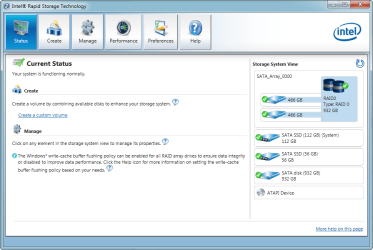
I faced a similar situation where I need large high-speed volume on a secondary drive and an SSD solution was just too expensive. I ended up RAID'ing 2 disks into a RAID0 array, and the read and write performance was noticeably improved.

Perhaps the same configuration might work for you. Just be aware that if one disk in the RAID malfunctions, then you loose everything on the RAID. A lot of people are scared off by this, sometimes to the point of being frightened to death of the risk without being able to look at the rewards objectively. Of course, its simple to mitigate against risk with backups and imaging :thumbsup:

1.png
 

My Computer My Computer

At a glance

Windows 10 Pro x64 ; Xubuntu x64Intel i7 860 @ 2.80 GHz O/C'ed to 4.0GHz16GB Corsair Vengance DDR3 @ 661 MHz Dual Cha...EVGA NVidia GTX 560 1024MB
Computer type
PC/Desktop
Computer Manufacturer/Model Number
Golden Mk. I.4
OS
Windows 10 Pro x64 ; Xubuntu x64
CPU
Intel i7 860 @ 2.80 GHz O/C'ed to 4.0GHz
Motherboard
Gigabyte P55A-UD3R Rev.1. Award BIOS F13
Memory
16GB Corsair Vengance DDR3 @ 661 MHz Dual Channel (9-9-9-24)
Graphics Card(s)
EVGA NVidia GTX 560 1024MB
Sound Card
Realtek Integrated
Monitor(s) Displays
Dual Samsung SyncMaster 2494HS
Screen Resolution
1920*1080 and 1920*1080
Hard Drives
1*Samsung 840 EVO 120GB SSD;
1*OCZ Vertex 2 60GB SSD;
2*Samsung F3 SpinPoint 1TB in RAID0;
1*Samsung F1 SpinPoint 1TB;
2*Western Digital 1TB External USB 3.0
1*Western Digital 500GB External USB 3.0
1*Seagate 500GB External USB 2.0
PSU
Thermaltake ToughPower QFan 750W
Case
Thermaltake Element S VK60001W2Z
Cooling
Corsair H60 Water Cooling, 2*230mm and 2*80mm case fans
Keyboard
Logitech G110
Mouse
Logitech MX518
Anymore now, by the time the OP gets two HDDs and, possibly, a controller card, setting up RAID 0 may not be all that much less expensive than a SSD and may even be more expensive. Using his existing Greens in any kind of RAID is not recommended by WD.

Going back to the OP's original question, replacing your gaming Green with a Blue or a Black (I personally prefer the Blacks for their longer warranty and larger available sizes; I no longer buy 3.55" HDDs smaller than 4TB) will most likely increase reliability and will make writing and reading to and from the disk noticeably snappier, especially with larger files but, otherwise, will not improve gaming performance. I would suggest you replace both of your Greens with Blues or Blacks. Either drive is better suited for use in a computer while the Greens are better suited for light usage, such as for backup drives or static external storage that will be accessed only occasionally; they aren't well suited for heavy or continuous usage. I especially do not recommend them for installing one's OS on. If one's budget is tight, a Blue would be much better for that and will not cost all that much more.

If you replace both of your Greens, they can be used in enclosures or a dock for backup drives.
 

My Computer My Computer

At a glance

Win 7 Ultimate 64 bitIntel i7-3930KKingston HyperX Genesis 32GB Kit (8x4GB Modul...MSI R7850 Twin Frozr 2GD5/OC Radeon HD 7850 2...
Computer type
PC/Desktop
Computer Manufacturer/Model Number
Custom Build
OS
Win 7 Ultimate 64 bit
CPU
Intel i7-3930K
Motherboard
ASUS P9X79 WS
Memory
Kingston HyperX Genesis 32GB Kit (8x4GB Modules) 1600MHz DDR
Graphics Card(s)
MSI R7850 Twin Frozr 2GD5/OC Radeon HD 7850 2GB 256-bit GDDR
Sound Card
Asus Xonar Essence STX
Monitor(s) Displays
3x Asus VG248QE 24", Vizio 32" TV
Screen Resolution
1920 x 1080, ?
Hard Drives
Samsung 128GB 840 Pro SSD (1),
Samsung 4TB 850 EVO SSDs (4)
Samsung 4TB 850 EVO SSDs (16) external backup drives used in 2.5" hot swap bays in the computer.
PSU
Corsair HX750w
Case
Antec Two Hundred v2 (modified)
Cooling
Cooler Master GeminII S524 120mm (fan replaced with a 140mm)
Keyboard
Logitech G510s
Mouse
Logitech M525 (two in use)
Internet Speed
=< 32Mbps down, 8Mbps up
Antivirus
AVAST!, MBAM, SAS, Spybot S&D (all but MBAM free) Glary Util
Browser
IE11
Other Info
LSI 9211-8i HBA card (8 SATA III ports), 2.5" & 3.5" Hot Swap Bays, HooToo HT-CR001 PCI-E to USB 3.0 Internal Hub + 6 Slot Card Reader, and LG Model CH12LS28 BD-ROM Optical Drive. Also, ScanSnap S1500 ADF duplexing scanner, Canon 9000F flat bed scanner, Corsair SP2500 2.1 speakers, Samsung CLP 415nw laser color printer, Cyberpower PP2200SW UPS
Anymore now, by the time the OP gets two HDDs and, possibly, a controller card, setting up RAID 0 may not be all that much less expensive than a SSD and may even be more expensive. Using his existing Greens in any kind of RAID is not recommended by WD.
No controller card required - the motherboard natively supports RAID 0, 1, 5 and 10.

The cost of 2 or more WD 1TB Greens is far less than the same size SSD.

Have a proper read about WD's stance on RAID arrays - you are confusing desktop and enterprise scenarios:
Support for WD desktop drives in a RAID 0 or RAID 1 configuration
 

My Computer My Computer

At a glance

Windows 10 Pro x64 ; Xubuntu x64Intel i7 860 @ 2.80 GHz O/C'ed to 4.0GHz16GB Corsair Vengance DDR3 @ 661 MHz Dual Cha...EVGA NVidia GTX 560 1024MB
Computer type
PC/Desktop
Computer Manufacturer/Model Number
Golden Mk. I.4
OS
Windows 10 Pro x64 ; Xubuntu x64
CPU
Intel i7 860 @ 2.80 GHz O/C'ed to 4.0GHz
Motherboard
Gigabyte P55A-UD3R Rev.1. Award BIOS F13
Memory
16GB Corsair Vengance DDR3 @ 661 MHz Dual Channel (9-9-9-24)
Graphics Card(s)
EVGA NVidia GTX 560 1024MB
Sound Card
Realtek Integrated
Monitor(s) Displays
Dual Samsung SyncMaster 2494HS
Screen Resolution
1920*1080 and 1920*1080
Hard Drives
1*Samsung 840 EVO 120GB SSD;
1*OCZ Vertex 2 60GB SSD;
2*Samsung F3 SpinPoint 1TB in RAID0;
1*Samsung F1 SpinPoint 1TB;
2*Western Digital 1TB External USB 3.0
1*Western Digital 500GB External USB 3.0
1*Seagate 500GB External USB 2.0
PSU
Thermaltake ToughPower QFan 750W
Case
Thermaltake Element S VK60001W2Z
Cooling
Corsair H60 Water Cooling, 2*230mm and 2*80mm case fans
Keyboard
Logitech G110
Mouse
Logitech MX518
Right now I have two hard drives, my main OS drive and a gaming drive. I'm looking to upgrade the gaming drive to a Caviar Black, while keeping my main drive as it is.


Will this help improve gaming or is it bottlenecked by the OS drive?


Additionally, would upgrading my main drive to a Caviar Blue or Black see any significant increase in speed in terms of loading programs, performing system maintenance, etc? (My main drive is a 2 TB Green that is 85% full)

Hello AndarielHalo

First you must change your main OS drive if you can get your hands on a Samsung or Intel SSD that would be the best thing to do if not then you should upgrade your OS drive from Green to Blue or Black or even get Seagate 7200rpm drives. The Caviar Greens are made for storage and I personally have used all colors from WD and the Greens are the worst one's coz they are slow most likely they run @ 5400rpm or so as WD use InteliPower technology in them and they have this weird Head Parking Mechanism which is lets say they are actually just used for Storage drives and are not recommended for OS or Gaming. The Blue one's are great and the Black one's are best but honestly I didn't feel any difference between Blue and Blacks :huh:

Yes even if you just upgrade the secondary drive which you use for Games that will make a little bit difference due to the better RPM speed but just upgrade your OS drive first and then go for the second ;) I also noticed slight minor stuttering during texture loading and gameplay on the Greens it's best to stay away from them unless you just want to store data in them.
 

My Computer My Computer

At a glance

Windows 10 ProCore i5 9600KCorsair Vengeance Pro 2x 8GB (16GB) 3200MHz DDR4MSI GTX 1070 Gaming X 8GB
Computer type
PC/Desktop
Computer Manufacturer/Model Number
Self Built
OS
Windows 10 Pro
CPU
Core i5 9600K
Motherboard
ASUS ROG Strix Z390-F Gaming
Memory
Corsair Vengeance Pro 2x 8GB (16GB) 3200MHz DDR4
Graphics Card(s)
MSI GTX 1070 Gaming X 8GB
Sound Card
ASRock A-Style Purity Sound
Monitor(s) Displays
ASUS VX239H IPS
Screen Resolution
1920x1080
Hard Drives
XPG SPECTRIX S40G 2566GB M.2 NVMe | Patriot P210 512GB SSD | Seagate BarraCuda 4TB 5400RPM
PSU
Thermaltake Smart 600w RGB 80Plus
Case
NZXT H500 with 3x Corsair HD120 RGB w/Node Pro
Cooling
Cryorig H7
Keyboard
Corsair K70 RapidFire RGB (Cherry MX Speed)
Mouse
Logitech G402 Hyperion Fury
Internet Speed
20MB Cable Broadband
Browser
Chrome
Other Info
Corsair MM300 Extended Anti-Fray Mouse Pad | Edifier C2 2.1ch Sound System | XBOX One S Controller | XBOX 360 Wireless Controller for Windows | APC SUA1000i Smart-UPS | PS4 Slim 500GB [Region 1 - USA]
Anymore now, by the time the OP gets two HDDs and, possibly, a controller card, setting up RAID 0 may not be all that much less expensive than a SSD and may even be more expensive. Using his existing Greens in any kind of RAID is not recommended by WD.
No controller card required - the motherboard natively supports RAID 0, 1, 5 and 10.

The cost of 2 or more WD 1TB Greens is far less than the same size SSD.

Have a proper read about WD's stance on RAID arrays - you are confusing desktop and enterprise scenarios:
Support for WD desktop drives in a RAID 0 or RAID 1 configuration

Curious. In WD's own description of their Greens, at the bottom of the page, they say this:

"Desktop drives are not recommended for use in RAID environments, please consider using WD Red hard drives for desktop RAID environments or WD datacenter hard drives for rackmount or large RAID configurations."

My own experience with Greens is they are not all that suitable for use as an OS drive (variable speed and excessive head parking when used as an OS drive although the head parking can be turned off). If a computer racks up very many run hours in a given period of time, the Greens are more likely to fail sooner. I personally do not recommend them for use as internal drives (again, based on my own experience; the Blues and Blacks are much better) but they are ideal for external backup and cold storage drives as long as they are connected only when in actual use.
 

My Computer My Computer

At a glance

Win 7 Ultimate 64 bitIntel i7-3930KKingston HyperX Genesis 32GB Kit (8x4GB Modul...MSI R7850 Twin Frozr 2GD5/OC Radeon HD 7850 2...
Computer type
PC/Desktop
Computer Manufacturer/Model Number
Custom Build
OS
Win 7 Ultimate 64 bit
CPU
Intel i7-3930K
Motherboard
ASUS P9X79 WS
Memory
Kingston HyperX Genesis 32GB Kit (8x4GB Modules) 1600MHz DDR
Graphics Card(s)
MSI R7850 Twin Frozr 2GD5/OC Radeon HD 7850 2GB 256-bit GDDR
Sound Card
Asus Xonar Essence STX
Monitor(s) Displays
3x Asus VG248QE 24", Vizio 32" TV
Screen Resolution
1920 x 1080, ?
Hard Drives
Samsung 128GB 840 Pro SSD (1),
Samsung 4TB 850 EVO SSDs (4)
Samsung 4TB 850 EVO SSDs (16) external backup drives used in 2.5" hot swap bays in the computer.
PSU
Corsair HX750w
Case
Antec Two Hundred v2 (modified)
Cooling
Cooler Master GeminII S524 120mm (fan replaced with a 140mm)
Keyboard
Logitech G510s
Mouse
Logitech M525 (two in use)
Internet Speed
=< 32Mbps down, 8Mbps up
Antivirus
AVAST!, MBAM, SAS, Spybot S&D (all but MBAM free) Glary Util
Browser
IE11
Other Info
LSI 9211-8i HBA card (8 SATA III ports), 2.5" & 3.5" Hot Swap Bays, HooToo HT-CR001 PCI-E to USB 3.0 Internal Hub + 6 Slot Card Reader, and LG Model CH12LS28 BD-ROM Optical Drive. Also, ScanSnap S1500 ADF duplexing scanner, Canon 9000F flat bed scanner, Corsair SP2500 2.1 speakers, Samsung CLP 415nw laser color printer, Cyberpower PP2200SW UPS
Having gone over everything here and with some other people, I've decided to get an SSD for my OS. And for the gaming drive, I'm going with a WD Red rather than Black, as I hear that Red is more suited for continuous operation, and my comp is usually running most of the day. As well, since my primary concern was space rather than performance, the cost of a 3 TB red was better than that of a 2-3 TB black.


Thanks for your help, everyone (and for making me spend more than I intended)
 

My Computer My Computer

At a glance

7Intel Core i7 3770 3.40 GHzCorsair 16GB total RAM 4x4GB sticksNvidia GeForce GTX 780
Computer type
PC/Desktop
Computer Manufacturer/Model Number
custom build
OS
7
CPU
Intel Core i7 3770 3.40 GHz
Motherboard
ASRock Z77 EXTREME4-M
Memory
Corsair 16GB total RAM 4x4GB sticks
Graphics Card(s)
Nvidia GeForce GTX 780
Monitor(s) Displays
ViewSonic LED 1080p Full HD
Screen Resolution
1920x1080
Hard Drives
Two
PSU
Corsair HX 750W
Case
Cooler Master
Cooling
A bunch of fans
Keyboard
Old and busty Dell, with some letters scratched off
Mouse
Logitech trackball
Internet Speed
Xfinity
Having gone over everything here and with some other people, I've decided to get an SSD for my OS. And for the gaming drive, I'm going with a WD Red rather than Black, as I hear that Red is more suited for continuous operation, and my comp is usually running most of the day. As well, since my primary concern was space rather than performance, the cost of a 3 TB red was better than that of a 2-3 TB black.


Thanks for your help, everyone (and for making me spend more than I intended)

I disagree about the WD Reds. They have been getting poor reviews. If you need only 1TB and are on a tight budget, the Blue would be a better choice. Otherwise, the Blacks would be better (plus there is that five year warranty). I run the three in my rig (two 2TB and one 4TB) 24/7.
 

My Computer My Computer

At a glance

Win 7 Ultimate 64 bitIntel i7-3930KKingston HyperX Genesis 32GB Kit (8x4GB Modul...MSI R7850 Twin Frozr 2GD5/OC Radeon HD 7850 2...
Computer type
PC/Desktop
Computer Manufacturer/Model Number
Custom Build
OS
Win 7 Ultimate 64 bit
CPU
Intel i7-3930K
Motherboard
ASUS P9X79 WS
Memory
Kingston HyperX Genesis 32GB Kit (8x4GB Modules) 1600MHz DDR
Graphics Card(s)
MSI R7850 Twin Frozr 2GD5/OC Radeon HD 7850 2GB 256-bit GDDR
Sound Card
Asus Xonar Essence STX
Monitor(s) Displays
3x Asus VG248QE 24", Vizio 32" TV
Screen Resolution
1920 x 1080, ?
Hard Drives
Samsung 128GB 840 Pro SSD (1),
Samsung 4TB 850 EVO SSDs (4)
Samsung 4TB 850 EVO SSDs (16) external backup drives used in 2.5" hot swap bays in the computer.
PSU
Corsair HX750w
Case
Antec Two Hundred v2 (modified)
Cooling
Cooler Master GeminII S524 120mm (fan replaced with a 140mm)
Keyboard
Logitech G510s
Mouse
Logitech M525 (two in use)
Internet Speed
=< 32Mbps down, 8Mbps up
Antivirus
AVAST!, MBAM, SAS, Spybot S&D (all but MBAM free) Glary Util
Browser
IE11
Other Info
LSI 9211-8i HBA card (8 SATA III ports), 2.5" & 3.5" Hot Swap Bays, HooToo HT-CR001 PCI-E to USB 3.0 Internal Hub + 6 Slot Card Reader, and LG Model CH12LS28 BD-ROM Optical Drive. Also, ScanSnap S1500 ADF duplexing scanner, Canon 9000F flat bed scanner, Corsair SP2500 2.1 speakers, Samsung CLP 415nw laser color printer, Cyberpower PP2200SW UPS
Back
Top