On what to believe(SSD health\remaining life)

vsub

New member
Member
Local time
4:27 PM
Messages
66
Couple of days ago I check one 6 years old OCZ Agility 4 SSD 120gb(it was used like normal hdd(saving to it like there is no write limit))with SSDLife and the status the program give me was "bad" and no info about remaining life

After I delete the partition and check the ssd again,SSDLife now says that the status of the ssd is "excellent" and there is almost 8.5 years remaining life(which is the exact same remaining life on brand new samsung 840 evo 120gb)
 

My Computer My Computer

At a glance

Windows 7 Ultimate x64 SP1i7 4771 3.5Ghz2x8GB DDR3 GEIL EVO LEGGERAPALIT GTX 750 TI StormX Duo
Computer type
PC/Desktop
Computer Manufacturer/Model Number
Custom Build
OS
Windows 7 Ultimate x64 SP1
CPU
i7 4771 3.5Ghz
Motherboard
ASUS B85 Plus
Memory
2x8GB DDR3 GEIL EVO LEGGERA
Graphics Card(s)
PALIT GTX 750 TI StormX Duo
Monitor(s) Displays
Samsung T24D390
Screen Resolution
1920x1080
Hard Drives
Samsung SSD 840 EVO 128GB
2TB Seagate SATA 3
600GB WD Blue SATA 2
PSU
Seasonic S12II 520W Bronze
Case
Cooler Master Force 500
Antivirus
Avast Free
Browser
Firefox
I get the same on my 3 year old Crucial M4. And it was similar on my 6 year old Gen1 Intel. Go figure.
 

Attachments

  • 2014-12-30_1722.png
    2014-12-30_1722.png
    18 KB · Views: 71

My Computer My Computer

At a glance

Vista, Windows7, Mint Mate, Zorin, Windows 8from 1.6GHz Duo to i7
Computer Manufacturer/Model Number
HP, Dell, Gateway, Toshiba - 4 laptops and 2 desktops
OS
Vista, Windows7, Mint Mate, Zorin, Windows 8
CPU
from 1.6GHz Duo to i7
Monitor(s) Displays
2x HP w2207
Hard Drives
5x HDD, 7x SSD, 12x Externals
Keyboard
with trackball - no mices
Mouse
Trackball mice
Internet Speed
DSL 6000
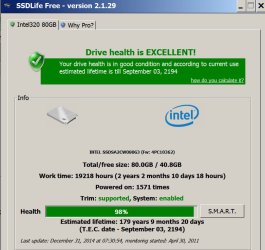
Hmm....I've got 179 years to go. I'm pretty sure you can't believe much of what SSDLife says.
 

Attachments

  • Untitled-2.jpg
    Untitled-2.jpg
    98.1 KB · Views: 2

My Computer My Computer

At a glance

Windows 7 Home Premium SP1, 64-bitIntel Skylake i5-6600K, not overclocked8 GB HyperX DDR4-2666 (2 x 4 GB)none; graphics are integrated on CPU
Computer type
PC/Desktop
Computer Manufacturer/Model Number
Ignatz Special; 4 speed manual gearbox; factory air conditioning; one of one
OS
Windows 7 Home Premium SP1, 64-bit
CPU
Intel Skylake i5-6600K, not overclocked
Motherboard
AsRock Z170M Extreme 4, micro ATX
Memory
8 GB HyperX DDR4-2666 (2 x 4 GB)
Graphics Card(s)
none; graphics are integrated on CPU
Sound Card
onboard: Realtek ALC1150; external: USB Behringer UF0-202
Monitor(s) Displays
Dell S2340M 23 inch IPS
Screen Resolution
1600 x 900
Hard Drives
System: Crucial MX100 series SSD, 128 GB;
Data: Samsung Spinpoint 103SJ, 1 TB;
Backup: WD Caviar Green WD30EZRX-00D8PB0, 3 TB
PSU
Rosewill SilentNight 500 watt fanless, semi-modular
Case
Antec Solo II
Cooling
Noctua NH-U12S; Noctua F12 intake, Noctua S12A exhaust
Keyboard
Microsoft 200 6JH-00001 USB
Mouse
Dell or Microsoft optical wired; USB
Antivirus
Microsoft Security Essentials and Malwarebytes Premium
Browser
Pale Moon
Other Info
All fans PWM; speeds at idle: CPU circa 500 rpm; intake circa 600 rpm; exhaust circa 600 rpm; CPU temps 27 idle and 47 C load in a warm room (27 C/81 F) when running Intel Extreme Tuning Utility stress test.
So you'll be what - only 200 years old!!:roflmao:
 

My Computer My Computer

At a glance

Windows 7 Professional X64Core i7 (2nd gen) i7-2600K / 3.40GHzDDR3 2400MHz (OC) 16gbIntel(R) HD Graphics 3000, -1988 Mb
Computer type
PC/Desktop
Computer Manufacturer/Model Number
Self-Built
OS
Windows 7 Professional X64
CPU
Core i7 (2nd gen) i7-2600K / 3.40GHz
Motherboard
ASUS P8Z77-V Intel 7 Series Motherboard
Memory
DDR3 2400MHz (OC) 16gb
Graphics Card(s)
Intel(R) HD Graphics 3000, -1988 Mb
Sound Card
8 ChannelsAudio Chipset Realtek ALC892
Monitor(s) Displays
LG 29UM65 Black 29"
Screen Resolution
2560 x 1080
Hard Drives
840 EVO 250 GB SSD ;2tb (2);Seagate;1tb Seagate; 750 gb Seagate; wd ext (2) 750 gb,WD 2tb X 2;WD 3TB Black
PSU
750 watt
Case
Thermaltake RX -1
Cooling
2120mm Fans Included 1Other Fan Ports 5x 200mm Fan Ports
Keyboard
Microsoft Digital Media Pro
Mouse
Microsoft Wireless 6000
Internet Speed
U-verse 18 mbps
Antivirus
MSE
Browser
Firefox, Chrome and my favorite: Pale Moon
Other Info
HdHomerun Dual Tuner.
SRS Audio Lab,
Pioneer BDR 208-DBK
PS3-What a difference in my Surround Sound Receiver!
HP 4540s - My new Toy.
Epson R280 Printer- To personalize my Dvds.
Canon MP 560 - For scanning.
i looked for that software, but it seems to be a paid-for version (at least they hide the freeware link). i had to google and download the free version from a german site.
But coincidentally I ran my Samsung Magician software this morning and all that tells me is "good health" and "5.44 TB written".

I don't think the SAMRT really was great for HDD, and probably isn't great for SSD. I'd say use the manufacturer tool and see what that says... after all the OEM knows their drive best.

Mine shows 100% health in SSDLife but also has it die in 2023, like your drives. I almost think this tool is useless. and when do you replace your SSD? When it says 1% life left? unless it just fails (which this tool may not detect) the SSD will be obsolete in 2023 anyway.

Since you have an OCZ drive, you probably heard enough stories about their failure rates. hope you are lucky.. but if you aren't i don't think this software will tell you.

edit: and the fact that just deleting a partition magically fixed the Health status of the SSD tells you how useless this tool is.
 

My Computer My Computer

At a glance

W7 Pro 64Intel i3 3220 @ 3.3 GHz2x8GB DDR 3 1600 Kingstononboard
Computer Manufacturer/Model Number
homemade
OS
W7 Pro 64
CPU
Intel i3 3220 @ 3.3 GHz
Motherboard
ASRock H77M
Memory
2x8GB DDR 3 1600 Kingston
Graphics Card(s)
onboard
Sound Card
onboard
Monitor(s) Displays
two 21" LCD
Hard Drives
128 GB Samsung 830
PSU
OCZ400MXSP
Cooling
Stock
Internet Speed
DSL
Well at least it tells me how much data is been written to it every day.
The OCZ ssd is not my ssd,my ssd is samsung 840 evo 120gb and since I got it two months ago(along with the whole pc),only 144gb has been written to it and most of it is because of the windows installation(pagefile,hibernation file(they took 32gb)and so on.

On my pc,everything is set to write as less as possible on the ssd.
 

My Computer My Computer

At a glance

Windows 7 Ultimate x64 SP1i7 4771 3.5Ghz2x8GB DDR3 GEIL EVO LEGGERAPALIT GTX 750 TI StormX Duo
Computer type
PC/Desktop
Computer Manufacturer/Model Number
Custom Build
OS
Windows 7 Ultimate x64 SP1
CPU
i7 4771 3.5Ghz
Motherboard
ASUS B85 Plus
Memory
2x8GB DDR3 GEIL EVO LEGGERA
Graphics Card(s)
PALIT GTX 750 TI StormX Duo
Monitor(s) Displays
Samsung T24D390
Screen Resolution
1920x1080
Hard Drives
Samsung SSD 840 EVO 128GB
2TB Seagate SATA 3
600GB WD Blue SATA 2
PSU
Seasonic S12II 520W Bronze
Case
Cooler Master Force 500
Antivirus
Avast Free
Browser
Firefox
because of the windows installation(pagefile,hibernation file(they took 32gb)and so on.

On my pc,everything is set to write as less as possible on the ssd.

Actually disabling hibernation is one of the life-extending measures of the Samsung Magician tool. Unless you actually use hibernation you should disable it. it also saves space.
 

My Computer My Computer

At a glance

W7 Pro 64Intel i3 3220 @ 3.3 GHz2x8GB DDR 3 1600 Kingstononboard
Computer Manufacturer/Model Number
homemade
OS
W7 Pro 64
CPU
Intel i3 3220 @ 3.3 GHz
Motherboard
ASRock H77M
Memory
2x8GB DDR 3 1600 Kingston
Graphics Card(s)
onboard
Sound Card
onboard
Monitor(s) Displays
two 21" LCD
Hard Drives
128 GB Samsung 830
PSU
OCZ400MXSP
Cooling
Stock
Internet Speed
DSL
because of the windows installation(pagefile,hibernation file(they took 32gb)and so on.

On my pc,everything is set to write as less as possible on the ssd.

Actually disabling hibernation is one of the life-extending measures of the Samsung Magician tool. Unless you actually use hibernation you should disable it. it also saves space.


:ditto::ditto::ditto:
 

My Computer My Computer

At a glance

Windows 10x64 Build 1709Intel i7 7700HQ Kaby Lake16 GB DDR4 @2400Nvidia Geforce GTX 1060
Computer type
Laptop
Computer Manufacturer/Model Number
MSI GE72VR Apache Pro-416
OS
Windows 10x64 Build 1709
CPU
Intel i7 7700HQ Kaby Lake
Motherboard
Micro-Star Intl. MS-179B (U3C1)
Memory
16 GB DDR4 @2400
Graphics Card(s)
Nvidia Geforce GTX 1060
Screen Resolution
1920x1080 120Hz
Hard Drives
256 GB Nvme M.2 SSD

1TB HDD@7200
Cooling
Cooler Blast 4
Keyboard
Steel Series
Antivirus
Bit Defender Free
Browser
Edge
Hmm....I've got 179 years to go. I'm pretty sure you can't believe much of what SSDLife says.

If you click on the "how do you calculate it?" entry in the top box, you will be taken to their website for a complete explanation on how life is calculated. A quick and dirty answer is this quote taken from the site:

1. We do not calculate the percentage of the drive health. The SSD itself calculates it and gives it to us. Or in other words, this data comes from the manufacturer of the drive.
2. The estimated lifetime is calculated depending on the amount of data written to the drive. If it is not calculated yet, it means that little data has been written to it. Simply wait a bit, it does not usually take more than a week (or two) after the first launch of the program.

Some manufacturers are going to be more conservative about life remaining estimates and others are going to be more "optimistic" (I hate to say they lie).

It also can take a while for usage patterns to emerge. My current notebook has a 500GB Samsung 840 EVO in it and it is showing only eight years or so life in it with only 640GB written to it. However, it has had intense usage over a short period of time. The normal pattern for it is to use it for up to a week, then put it away for a few weeks to a few months. Six months from now, that usage may triple or more.

My desktop's SSD is a 128GB Samsung 840 Pro and it is showing around 75 years life. One big difference between its usage and that of the notebook's SSD's usage is the desktop's SSD isn't getting any data written to it.
 

My Computer My Computer

At a glance

Win 7 Ultimate 64 bitIntel i7-3930KKingston HyperX Genesis 32GB Kit (8x4GB Modul...MSI R7850 Twin Frozr 2GD5/OC Radeon HD 7850 2...
Computer type
PC/Desktop
Computer Manufacturer/Model Number
Custom Build
OS
Win 7 Ultimate 64 bit
CPU
Intel i7-3930K
Motherboard
ASUS P9X79 WS
Memory
Kingston HyperX Genesis 32GB Kit (8x4GB Modules) 1600MHz DDR
Graphics Card(s)
MSI R7850 Twin Frozr 2GD5/OC Radeon HD 7850 2GB 256-bit GDDR
Sound Card
Asus Xonar Essence STX
Monitor(s) Displays
3x Asus VG248QE 24", Vizio 32" TV
Screen Resolution
1920 x 1080, ?
Hard Drives
Samsung 128GB 840 Pro SSD (1),
Samsung 4TB 850 EVO SSDs (4)
Samsung 4TB 850 EVO SSDs (16) external backup drives used in 2.5" hot swap bays in the computer.
PSU
Corsair HX750w
Case
Antec Two Hundred v2 (modified)
Cooling
Cooler Master GeminII S524 120mm (fan replaced with a 140mm)
Keyboard
Logitech G510s
Mouse
Logitech M525 (two in use)
Internet Speed
=< 32Mbps down, 8Mbps up
Antivirus
AVAST!, MBAM, SAS, Spybot S&D (all but MBAM free) Glary Util
Browser
IE11
Other Info
LSI 9211-8i HBA card (8 SATA III ports), 2.5" & 3.5" Hot Swap Bays, HooToo HT-CR001 PCI-E to USB 3.0 Internal Hub + 6 Slot Card Reader, and LG Model CH12LS28 BD-ROM Optical Drive. Also, ScanSnap S1500 ADF duplexing scanner, Canon 9000F flat bed scanner, Corsair SP2500 2.1 speakers, Samsung CLP 415nw laser color printer, Cyberpower PP2200SW UPS
your SSD probably lives longer when you don't waste space with installing this useless tool.

that was a 10 MB write I will never get back....
 

My Computer My Computer

At a glance

W7 Pro 64Intel i3 3220 @ 3.3 GHz2x8GB DDR 3 1600 Kingstononboard
Computer Manufacturer/Model Number
homemade
OS
W7 Pro 64
CPU
Intel i3 3220 @ 3.3 GHz
Motherboard
ASRock H77M
Memory
2x8GB DDR 3 1600 Kingston
Graphics Card(s)
onboard
Sound Card
onboard
Monitor(s) Displays
two 21" LCD
Hard Drives
128 GB Samsung 830
PSU
OCZ400MXSP
Cooling
Stock
Internet Speed
DSL
A quick and dirty answer is this quote taken from the site:

1. We do not calculate the percentage of the drive health. The SSD itself calculates it and gives it to us. Or in other words, this data comes from the manufacturer of the drive.
2. The estimated lifetime is calculated depending on the amount of data written to the drive. If it is not calculated yet, it means that little data has been written to it. Simply wait a bit, it does not usually take more than a week (or two) after the first launch of the program.


This 179 years business has only been true in the last 2 years or so. For the first 18 months I owned this drive, the figure given was much more typical--between 8 and 10 years, varying slightly from time to time.

My usage pattern has not changed and is so mundane as to put you to sleep, averaging between 4 and 5 GB per day of writes, with little variation.

I'm up to over 180 years right now, for what it's worth. Not much.
 

My Computer My Computer

At a glance

Windows 7 Home Premium SP1, 64-bitIntel Skylake i5-6600K, not overclocked8 GB HyperX DDR4-2666 (2 x 4 GB)none; graphics are integrated on CPU
Computer type
PC/Desktop
Computer Manufacturer/Model Number
Ignatz Special; 4 speed manual gearbox; factory air conditioning; one of one
OS
Windows 7 Home Premium SP1, 64-bit
CPU
Intel Skylake i5-6600K, not overclocked
Motherboard
AsRock Z170M Extreme 4, micro ATX
Memory
8 GB HyperX DDR4-2666 (2 x 4 GB)
Graphics Card(s)
none; graphics are integrated on CPU
Sound Card
onboard: Realtek ALC1150; external: USB Behringer UF0-202
Monitor(s) Displays
Dell S2340M 23 inch IPS
Screen Resolution
1600 x 900
Hard Drives
System: Crucial MX100 series SSD, 128 GB;
Data: Samsung Spinpoint 103SJ, 1 TB;
Backup: WD Caviar Green WD30EZRX-00D8PB0, 3 TB
PSU
Rosewill SilentNight 500 watt fanless, semi-modular
Case
Antec Solo II
Cooling
Noctua NH-U12S; Noctua F12 intake, Noctua S12A exhaust
Keyboard
Microsoft 200 6JH-00001 USB
Mouse
Dell or Microsoft optical wired; USB
Antivirus
Microsoft Security Essentials and Malwarebytes Premium
Browser
Pale Moon
Other Info
All fans PWM; speeds at idle: CPU circa 500 rpm; intake circa 600 rpm; exhaust circa 600 rpm; CPU temps 27 idle and 47 C load in a warm room (27 C/81 F) when running Intel Extreme Tuning Utility stress test.
your SSD probably lives longer when you don't waste space with installing this useless tool.

that was a 10 MB write I will never get back....

10MB? Big, fat, hairy deal. Like that will reduce your SSD life enough to notice. People worry too much about wearing out an SSD. Even the lousier ones are unlikely to die early from too many writes; they are far more likely to die from controller failure. Unless one is constantly writing and deleting huge amounts of data or frequently defragging them, one is far more likely to replace a SSD because technology has left it in the dust than because it wore out due to excessive writes. Even leaving Hibernate enabled will not noticeably reduce SSD life unless one has a huge amount of data in RAM most of the time and frequently hibernates the machine everyday (it will save space, however).

Seriously, the tool is worth having. The free version tells you how much has been written to the SSD, if TRIM is enabled or not, the number of hours the SSD has been used, the number of starts it has (granted, there are other ways to get those SMART attributes but it is convenient to have these in one place), and the percentage of health based on SMART attributes. It's not a tool one will need to run daily. Even running it once a month is excessive, needwise.

The program itself is only 3.37MB in size, which nowhere even close to being a concern for size, so it does no harm to have on one's computer.
 
Last edited:

My Computer My Computer

At a glance

Win 7 Ultimate 64 bitIntel i7-3930KKingston HyperX Genesis 32GB Kit (8x4GB Modul...MSI R7850 Twin Frozr 2GD5/OC Radeon HD 7850 2...
Computer type
PC/Desktop
Computer Manufacturer/Model Number
Custom Build
OS
Win 7 Ultimate 64 bit
CPU
Intel i7-3930K
Motherboard
ASUS P9X79 WS
Memory
Kingston HyperX Genesis 32GB Kit (8x4GB Modules) 1600MHz DDR
Graphics Card(s)
MSI R7850 Twin Frozr 2GD5/OC Radeon HD 7850 2GB 256-bit GDDR
Sound Card
Asus Xonar Essence STX
Monitor(s) Displays
3x Asus VG248QE 24", Vizio 32" TV
Screen Resolution
1920 x 1080, ?
Hard Drives
Samsung 128GB 840 Pro SSD (1),
Samsung 4TB 850 EVO SSDs (4)
Samsung 4TB 850 EVO SSDs (16) external backup drives used in 2.5" hot swap bays in the computer.
PSU
Corsair HX750w
Case
Antec Two Hundred v2 (modified)
Cooling
Cooler Master GeminII S524 120mm (fan replaced with a 140mm)
Keyboard
Logitech G510s
Mouse
Logitech M525 (two in use)
Internet Speed
=< 32Mbps down, 8Mbps up
Antivirus
AVAST!, MBAM, SAS, Spybot S&D (all but MBAM free) Glary Util
Browser
IE11
Other Info
LSI 9211-8i HBA card (8 SATA III ports), 2.5" & 3.5" Hot Swap Bays, HooToo HT-CR001 PCI-E to USB 3.0 Internal Hub + 6 Slot Card Reader, and LG Model CH12LS28 BD-ROM Optical Drive. Also, ScanSnap S1500 ADF duplexing scanner, Canon 9000F flat bed scanner, Corsair SP2500 2.1 speakers, Samsung CLP 415nw laser color printer, Cyberpower PP2200SW UPS
Actually disabling hibernation is one of the life-extending measures of the Samsung Magician tool. Unless you actually use hibernation you should disable it. it also saves space.
Yes,I disable it the same day I installed the windows and reduced the pagefile to 1gb(I use Process Hacker as task manager replacement and he have a feature to show me how much of the file is used and peak usage...I've never see it displaying anything other than 0).

your SSD probably lives longer when you don't waste space with installing this useless tool.
that was a 10 MB write I will never get back....
I only place things on the ssd which I need to be there...all else is first on the ram drive,then if I need it,I place it either on the ssd or the hdd(depending on if I need it to be on the ssd or the hdd))
 

My Computer My Computer

At a glance

Windows 7 Ultimate x64 SP1i7 4771 3.5Ghz2x8GB DDR3 GEIL EVO LEGGERAPALIT GTX 750 TI StormX Duo
Computer type
PC/Desktop
Computer Manufacturer/Model Number
Custom Build
OS
Windows 7 Ultimate x64 SP1
CPU
i7 4771 3.5Ghz
Motherboard
ASUS B85 Plus
Memory
2x8GB DDR3 GEIL EVO LEGGERA
Graphics Card(s)
PALIT GTX 750 TI StormX Duo
Monitor(s) Displays
Samsung T24D390
Screen Resolution
1920x1080
Hard Drives
Samsung SSD 840 EVO 128GB
2TB Seagate SATA 3
600GB WD Blue SATA 2
PSU
Seasonic S12II 520W Bronze
Case
Cooler Master Force 500
Antivirus
Avast Free
Browser
Firefox
10MB? Big, fat, hairy deal. Like that will reduce your SSD life enough to notice. People worry too much about wearing out an SSD.

I think i need to mark sarcasm better... i know 10 MB is not much compared tot he 5.44 TB I already wrote. I think 99.99% of SSDs that have died so far died of controller failure, bugs (I'm looking at you OCZ!) aand other electronic failures. NAND wear is not a major SSD killer. (I'm curious if HDD have some limit on writes... i assume you only can magnetize a part so many times?)

Anyway, this tool still is useless. Besides the lack of need to fear NAND wear, it doesn't give you good data. SMART isn't really good at predicting life of HDD or SSD. The manufacturer tool does a better job. When I read above about 179 years predicted life.... i may as well spin a bottle to "calculate" the remaining life. and for my 2 year old it showed 100% health. great, so my SSD did't wear at all in 2 years?

And what else does the tool give us? the number of TB written so far.. the manufacturer tool does that too. It also tells me what is enabled, what should be enabled and actually makes those changes in OS (at least Samsung Magician does it)

To each his own, if you like the tool, fine. But I de-installed it after the first try after seeing how useless the numbers are.
 

My Computer My Computer

At a glance

W7 Pro 64Intel i3 3220 @ 3.3 GHz2x8GB DDR 3 1600 Kingstononboard
Computer Manufacturer/Model Number
homemade
OS
W7 Pro 64
CPU
Intel i3 3220 @ 3.3 GHz
Motherboard
ASRock H77M
Memory
2x8GB DDR 3 1600 Kingston
Graphics Card(s)
onboard
Sound Card
onboard
Monitor(s) Displays
two 21" LCD
Hard Drives
128 GB Samsung 830
PSU
OCZ400MXSP
Cooling
Stock
Internet Speed
DSL
Samsung Magician does NOT tell you if TRIM is enabled or not, which SSDLife does.
 

My Computer My Computer

At a glance

Win 7 Ultimate 64 bitIntel i7-3930KKingston HyperX Genesis 32GB Kit (8x4GB Modul...MSI R7850 Twin Frozr 2GD5/OC Radeon HD 7850 2...
Computer type
PC/Desktop
Computer Manufacturer/Model Number
Custom Build
OS
Win 7 Ultimate 64 bit
CPU
Intel i7-3930K
Motherboard
ASUS P9X79 WS
Memory
Kingston HyperX Genesis 32GB Kit (8x4GB Modules) 1600MHz DDR
Graphics Card(s)
MSI R7850 Twin Frozr 2GD5/OC Radeon HD 7850 2GB 256-bit GDDR
Sound Card
Asus Xonar Essence STX
Monitor(s) Displays
3x Asus VG248QE 24", Vizio 32" TV
Screen Resolution
1920 x 1080, ?
Hard Drives
Samsung 128GB 840 Pro SSD (1),
Samsung 4TB 850 EVO SSDs (4)
Samsung 4TB 850 EVO SSDs (16) external backup drives used in 2.5" hot swap bays in the computer.
PSU
Corsair HX750w
Case
Antec Two Hundred v2 (modified)
Cooling
Cooler Master GeminII S524 120mm (fan replaced with a 140mm)
Keyboard
Logitech G510s
Mouse
Logitech M525 (two in use)
Internet Speed
=< 32Mbps down, 8Mbps up
Antivirus
AVAST!, MBAM, SAS, Spybot S&D (all but MBAM free) Glary Util
Browser
IE11
Other Info
LSI 9211-8i HBA card (8 SATA III ports), 2.5" & 3.5" Hot Swap Bays, HooToo HT-CR001 PCI-E to USB 3.0 Internal Hub + 6 Slot Card Reader, and LG Model CH12LS28 BD-ROM Optical Drive. Also, ScanSnap S1500 ADF duplexing scanner, Canon 9000F flat bed scanner, Corsair SP2500 2.1 speakers, Samsung CLP 415nw laser color printer, Cyberpower PP2200SW UPS

My Computer My Computer

At a glance

W7, W8.1
Computer type
Laptop
Computer Manufacturer/Model Number
Dell \ Lenovo\ HP \ Toshiba
OS
W7, W8.1
Antivirus
MSE, Malwarebytes
Browser
FF
Samsung Magician does NOT tell you if TRIM is enabled or not, which SSDLife does.

because W7 enables it by default. you can check

In XP times I installed every available tool to optimize or verify OS operation since XP didn't really have much built in (and I wasn't as knowledgeable). now I use W7 tools as much as possible to avoid having all these "free" tools installed.
 

My Computer My Computer

At a glance

W7 Pro 64Intel i3 3220 @ 3.3 GHz2x8GB DDR 3 1600 Kingstononboard
Computer Manufacturer/Model Number
homemade
OS
W7 Pro 64
CPU
Intel i3 3220 @ 3.3 GHz
Motherboard
ASRock H77M
Memory
2x8GB DDR 3 1600 Kingston
Graphics Card(s)
onboard
Sound Card
onboard
Monitor(s) Displays
two 21" LCD
Hard Drives
128 GB Samsung 830
PSU
OCZ400MXSP
Cooling
Stock
Internet Speed
DSL
Samsung Magician does NOT tell you if TRIM is enabled or not, which SSDLife does.

because W7 enables it by default. you can check

In XP times I installed every available tool to optimize or verify OS operation since XP didn't really have much built in (and I wasn't as knowledgeable). now I use W7 tools as much as possible to avoid having all these "free" tools installed.

Not everyone can remember commands, especially rarely used ones; I certainly can't. It's much easier for most people to have a utility to do it for them. Also, TRIM doesn't always get enabled, even though it is supposed to (and usually does), so it is a good idea to check a new installation and recheck every once in a blue moon.
 

My Computer My Computer

At a glance

Win 7 Ultimate 64 bitIntel i7-3930KKingston HyperX Genesis 32GB Kit (8x4GB Modul...MSI R7850 Twin Frozr 2GD5/OC Radeon HD 7850 2...
Computer type
PC/Desktop
Computer Manufacturer/Model Number
Custom Build
OS
Win 7 Ultimate 64 bit
CPU
Intel i7-3930K
Motherboard
ASUS P9X79 WS
Memory
Kingston HyperX Genesis 32GB Kit (8x4GB Modules) 1600MHz DDR
Graphics Card(s)
MSI R7850 Twin Frozr 2GD5/OC Radeon HD 7850 2GB 256-bit GDDR
Sound Card
Asus Xonar Essence STX
Monitor(s) Displays
3x Asus VG248QE 24", Vizio 32" TV
Screen Resolution
1920 x 1080, ?
Hard Drives
Samsung 128GB 840 Pro SSD (1),
Samsung 4TB 850 EVO SSDs (4)
Samsung 4TB 850 EVO SSDs (16) external backup drives used in 2.5" hot swap bays in the computer.
PSU
Corsair HX750w
Case
Antec Two Hundred v2 (modified)
Cooling
Cooler Master GeminII S524 120mm (fan replaced with a 140mm)
Keyboard
Logitech G510s
Mouse
Logitech M525 (two in use)
Internet Speed
=< 32Mbps down, 8Mbps up
Antivirus
AVAST!, MBAM, SAS, Spybot S&D (all but MBAM free) Glary Util
Browser
IE11
Other Info
LSI 9211-8i HBA card (8 SATA III ports), 2.5" & 3.5" Hot Swap Bays, HooToo HT-CR001 PCI-E to USB 3.0 Internal Hub + 6 Slot Card Reader, and LG Model CH12LS28 BD-ROM Optical Drive. Also, ScanSnap S1500 ADF duplexing scanner, Canon 9000F flat bed scanner, Corsair SP2500 2.1 speakers, Samsung CLP 415nw laser color printer, Cyberpower PP2200SW UPS
Back
Top