
Office 2000 - Error 1904 - Can't register DAO360.dll

lbeck

New member
Local time
11:07 PM
Messages
65
Location
Hillsborough, NC
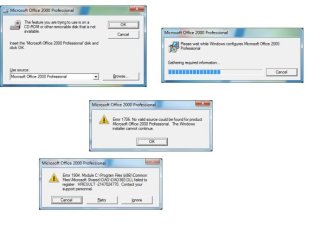
I have successfully used Office 2000 for years, and have the original setup disc. However, after installing a new SSD and then installing Office 2000 I get the Error 1904 - Can't register DAO360.dll.

I can use the program components, but only after clicking away several error messages.
 

Attachments
  • Office reinstall.jpg
    Office reinstall.jpg
    30.9 KB · Views: 1

My Computer My Computer

At a glance

Win 7 pro 64 bitIntel Q6600 @ 2.4 GHz4 MB RAMRadeon 1 GB HD 4650
Computer type
PC/Desktop
Computer Manufacturer/Model Number
Dell Inspiron 530
OS
Win 7 pro 64 bit
CPU
Intel Q6600 @ 2.4 GHz
Memory
4 MB RAM
Graphics Card(s)
Radeon 1 GB HD 4650
Hard Drives
500 GB boot drive Samsung HD 501J ATA
1 TB rive Samsung HD 103UJ ATA
2 TB Seagate GoFlex USB drive for backup
PSU
750 Watt
Internet Speed
25 Mbps down; 1.7 Mbps up
Antivirus
Avast free
Browser
Google Chrome / IE 9
Other Info
Acronis True Image 2012 for backups

My Computer My Computer

At a glance

Windows 7 Home Premium 64 bit sp1Intel i5 3570 3.4Ghz Ivy Bridge SKT 1155 quad...G-Skill Rip Jaws 16Gb (8x2) DDR3 -1600 PC3 12...Gigabyte NVIDIA GT610 1Gb DDR3 810/1200 PCI-E...
Computer type
PC/Desktop
Computer Manufacturer/Model Number
Self built using existing case
OS
Windows 7 Home Premium 64 bit sp1
CPU
Intel i5 3570 3.4Ghz Ivy Bridge SKT 1155 quad core
Motherboard
Gigabyte Z77-HD3 SKT 1155 2xSata 3, 4x USB 3.0
Memory
G-Skill Rip Jaws 16Gb (8x2) DDR3 -1600 PC3 12800 CL 10 red
Graphics Card(s)
Gigabyte NVIDIA GT610 1Gb DDR3 810/1200 PCI-E 2.0 Silent
Sound Card
NVIDIA High Definition & Realtech High Definition Audio
Monitor(s) Displays
2 x Philips 226V4L 16:9 aspect ratio
Screen Resolution
1920 x 1080 HD
Hard Drives
Samsung 840 Pro 256gb SSD, SATA 3.
Hitachi Touro Portable 1tb, USB 3.0 HDD used for image b/ups.
PSU
Corsair VS450
Case
Codeng
Cooling
PSU fan & CPU fan
Keyboard
Logitech
Mouse
Logitech Wireless trackball M570
Internet Speed
Wireless 3G. 3mg down & 550kb up.
Antivirus
Bitdefender Internet Security 2020
Browser
Opera (Current Version) & Firefox
Other Info
MS Office 2013 Pro. Davis weather station software. MGE Nova 600 avr UPS.
Thanks, but that link didn't help. The entries in the registry:
HKEY_CURRENT_USER\Software\Microsoft\OfficeCustomizationWizard
HKEY_LOCAL_MACHINE\Software\Microsoft\Windows\CurrentVersion\Installer
do not exist on my machine - maybe because I'm running Windows 7 and the article predates 7??

The article also states "This article has been archived. It is offered "as is" and will no longer be updated."

Any other suggestions?
 

My Computer My Computer

At a glance

Win 7 pro 64 bitIntel Q6600 @ 2.4 GHz4 MB RAMRadeon 1 GB HD 4650
Computer type
PC/Desktop
Computer Manufacturer/Model Number
Dell Inspiron 530
OS
Win 7 pro 64 bit
CPU
Intel Q6600 @ 2.4 GHz
Memory
4 MB RAM
Graphics Card(s)
Radeon 1 GB HD 4650
Hard Drives
500 GB boot drive Samsung HD 501J ATA
1 TB rive Samsung HD 103UJ ATA
2 TB Seagate GoFlex USB drive for backup
PSU
750 Watt
Internet Speed
25 Mbps down; 1.7 Mbps up
Antivirus
Avast free
Browser
Google Chrome / IE 9
Other Info
Acronis True Image 2012 for backups
As this is not officially supported in Windows 7, have you tried installing Office 2000 in a compatibility mode for XP?
 

My Computer My Computer

At a glance

Windows 10 64 bitIntel i7 6700K16GB Corsair DominatorIntel CPU Graphics
Computer type
PC/Desktop
Computer Manufacturer/Model Number
My Own Build
OS
Windows 10 64 bit
CPU
Intel i7 6700K
Motherboard
ASUS ROG Maximus VIII Hero
Memory
16GB Corsair Dominator
Graphics Card(s)
Intel CPU Graphics
Sound Card
RealTek
Monitor(s) Displays
27" Dell S2719dgf
Screen Resolution
2560X1440
Hard Drives
1 TB Samsung 850 EVO SSD for Win 10 Pro
500GB Samsung 850 EVO SSD for Win 10 Insider
2 TB drive for backup
PSU
EVGA Supernova 750G2
Case
BeQuiet Silent Base 600
Cooling
Deepcool Captain 120EX
Keyboard
Microsoft Wireless 2000
Mouse
Microsoft wireless
Internet Speed
100 MB/sec (Cable)
Antivirus
Microsoft Defender and Malwarebytes
Browser
Edge/Firefox
Other Info
Cakewalk (Sonar) by BandLab and Studio One 4.1 Pro recording studio software. MOTU 896Mk3 Hybrid recording interface, Frontier Tranzport wireless control unit, Behringer X-Touch Control Surface.
Five USB connected optical drives for CD Audio production using Nero BurningROM
As this is not officially supported in Windows 7, have you tried installing Office 2000 in a compatibility mode for XP?
No. Now I tried compatibility mode. Everything went smoothly but still am getting one of the "installing" prompts. Better than before but still not fixed. I also uninstalled/reinstalled and shut down Avast while installing.

Curious thing is that Office 2000 installed and ran fine in Win 7 on my old HDD. It's only now that I'm installing it on my new SSD that I'm having these problems. However, the programs run fine after clicking through the prompts - which vary by program. PPT only the "installing" prompt. Access NO PROMPTS. Excel the Install prompt plus Error 1904 - Can't register DAO360.dll.

Having to click through the prompts is inefficient and bothersome, but not enough for me to buy an updated copy of Office. The programs on 2000 are fully sufficient for my needs....

I'll still appreciate any advice on how to eliminate the prompts.

Thanks
 

My Computer My Computer

At a glance

Win 7 pro 64 bitIntel Q6600 @ 2.4 GHz4 MB RAMRadeon 1 GB HD 4650
Computer type
PC/Desktop
Computer Manufacturer/Model Number
Dell Inspiron 530
OS
Win 7 pro 64 bit
CPU
Intel Q6600 @ 2.4 GHz
Memory
4 MB RAM
Graphics Card(s)
Radeon 1 GB HD 4650
Hard Drives
500 GB boot drive Samsung HD 501J ATA
1 TB rive Samsung HD 103UJ ATA
2 TB Seagate GoFlex USB drive for backup
PSU
750 Watt
Internet Speed
25 Mbps down; 1.7 Mbps up
Antivirus
Avast free
Browser
Google Chrome / IE 9
Other Info
Acronis True Image 2012 for backups
I hear you, I'm still using Office 2003 which is in the same boat.
 

My Computer My Computer

At a glance

Windows 10 64 bitIntel i7 6700K16GB Corsair DominatorIntel CPU Graphics
Computer type
PC/Desktop
Computer Manufacturer/Model Number
My Own Build
OS
Windows 10 64 bit
CPU
Intel i7 6700K
Motherboard
ASUS ROG Maximus VIII Hero
Memory
16GB Corsair Dominator
Graphics Card(s)
Intel CPU Graphics
Sound Card
RealTek
Monitor(s) Displays
27" Dell S2719dgf
Screen Resolution
2560X1440
Hard Drives
1 TB Samsung 850 EVO SSD for Win 10 Pro
500GB Samsung 850 EVO SSD for Win 10 Insider
2 TB drive for backup
PSU
EVGA Supernova 750G2
Case
BeQuiet Silent Base 600
Cooling
Deepcool Captain 120EX
Keyboard
Microsoft Wireless 2000
Mouse
Microsoft wireless
Internet Speed
100 MB/sec (Cable)
Antivirus
Microsoft Defender and Malwarebytes
Browser
Edge/Firefox
Other Info
Cakewalk (Sonar) by BandLab and Studio One 4.1 Pro recording studio software. MOTU 896Mk3 Hybrid recording interface, Frontier Tranzport wireless control unit, Behringer X-Touch Control Surface.
Five USB connected optical drives for CD Audio production using Nero BurningROM
Since an SSD has the problem but an HDD did not I'd be wondering if that file is one of those that defrag can't move on the HDD but using an SSD does things differently and some programs look for a file in the same location on the drive as when installed.
 

My Computer My Computer

At a glance

Windows 7 Ultimate 64-bit, Windows 8.1 64-bit...
Computer type
PC/Desktop
Computer Manufacturer/Model Number
Customs, Dell, Gateway, HP, Toshiba, Acer, ASUS
OS
Windows 7 Ultimate 64-bit, Windows 8.1 64-bit, Mac OS X 10.10, Linux Mint 17, Windows 10 Pro TP
Keyboard
Microsoft
Mouse
Microsoft
Back
Top