Solved Everything is crashing? Chrome pages and games. What's up?

Was this the first PC you built? Did you check all the connections again, if necessary rebuild it?

You cannot ever expect Win7 to start on different hardware. If it does, or if you correctly adjust it to do so, then you must be connected to the internet to swap out all drivers, with Hardware Auto-Updating enabled. You said neither of these was the case. You could either have bad drivers or the build is defective.

One way to test this is to run with a boot disk like Peppermint3 - Create Live CD/DVD/USB To Use For Emergency Backup - Windows 7 Forums with the hard drive unplugged to eliminate it and Win7 as involved with the results.

But you are badly in need of a perfect Clean Reinstall Windows 7. I don't know why you would build a new PC and then think that the OS is so unimportant it can be slapped on there from a laptop without adjustment. The OS is crucial and should be installed with the utmost care to assure it will work perfectly. So if you do reinstall don't waste the opportunity to follow the steps in that tutorial closely without missing any this time. Those steps are based on what has worked best in tens of thousands of installs we've directly helped with here since beta, and has been used by a million consumers without a single complaint or return here with problems if they stick with the tools and methods given.

If a boot disk and reinstall persist with the problem then we need to have our hardware experts help you tear down the build and rebuild it making sure nothing is done wrong.
 
Very curious; we have been working on this for 4 days and then I see this from the log.

License Status: Initial grace period Time remaining: 43020 minute(s) (29 day(s))
From Gregs post # 101
But you are badly in need of a perfect Clean Reinstall Windows 7.
I totally agree. I't time to start at square 1 and stop dancing through the rose bushes.

I see no reason with the OP's hardware if installed correctly and a proper copy of Windows 7 Activated properly this computer shouldn't work correctly.

Keeping the laptop out of the picture their shouldn't be any driver problems if one follows Greg's tutorial and guidance.

It's time to stop the tail from wagging the dog.

Notes:
2 known good sticks of ram in the proper slots according to the motherboard manual is a must.

Specs show 2 SSD's and Speccy shows 1.
We need to know exactly what hardware is installed when doing the Clean Install.
 
Last edited:

My Computer My Computer

At a glance

Windows 10 Pro. 64/ version 1709 Windows 7 Pr...Intel i7-6800K @ 4.3Corsair Platinum 16 gig @2400EVGA GTX 1070 OC
Computer type
PC/Desktop
Computer Manufacturer/Model Number
Home made Desktop
OS
Windows 10 Pro. 64/ version 1709 Windows 7 Pro/64
CPU
Intel i7-6800K @ 4.3
Motherboard
ASUS X-99 Deluxe II
Memory
Corsair Platinum 16 gig @2400
Graphics Card(s)
EVGA GTX 1070 OC
Monitor(s) Displays
Asus 27" LED LCD/VE278Q
Screen Resolution
1920-1080 or 1280-720 HDMI
Hard Drives
INTEL SSD 730-240 Gb Sata 3.0/
PSU
EVGA Platium 1200W
Case
Phanteks Luxe Tempered Glass 8 fans/ one radiator
Cooling
XSPC/ Water Cooled CPU
Keyboard
Das 4 Professional
Mouse
Logitech M705/MX Anywhere 2-S
Internet Speed
100 mbits
Antivirus
Microsoft Security Essentials/ Malwarebytes Premium 3.0/ SAS
Browser
I.E. 11 default/Firefox/ ISP Time Warner Cable/Spectrum
Other Info
LG BluRay Burner/
Sound system-KLipsch-THX/
Icy Dock ssd Hot Swap bays.
Very curious; we have been working on this for 4 days and then I see this from the log.

License Status: Initial grace period Time remaining: 43020 minute(s) (29 day(s))
From Gregs post # 101
But you are badly in need of a perfect Clean Reinstall Windows 7.
I totally agree. I't time to start at square 1 and stop dancing through the rose bushes.

I see no reason with the OP's hardware if installed correctly and a proper copy of Windows 7 Activated properly this computer shouldn't work correctly.

Keeping the laptop out of the picture their shouldn't be any driver problems if one follows Greg's tutorial and guidance.

It's time to stop the tail from wagging the dog.

Notes:
2 known good sticks of ram in the proper slots according to the motherboard manual is a must.

Specs show 2 SSD's and Speccy shows 1.
We need to know exactly what hardware is installed when doing the Clean Install.

I've decided that I'd like to try tearing down the computer and rebuilding it again. I will probably try doing this on Saturday, so if anyone would be willing to help me hardware-wise, that'd be perfect.

To answer Greg's question, this was not the first computer I built. I also helped build my roommates computer and we had also used a laptop to install Windows. He hasn't ran into any trouble since. But since I had just gotten myself an actual disk drive, I will look to reinstall windows following the tutorial. Also, the 29 days grace period is probably due to me trying the windows 7 fix according to the troubleshooting tutorial. I created a USB to do that. I can assure you I have a genuine copy of windows from my university.

Speccy showed one ssd because I took out the other one for a clean reinstall of windows 8 (also on a laptop and also crashing) when taking that screenshot.
 

My Computer My Computer

At a glance

Windows 7 Home Premium 64bitIntel Core i7 4790k @ 4.0 ghz8gb x2 Kingston Hyperx Fury Blue Memory RAM @...Gigabyte GeForce GTX 970 G1 Gaming 4GB GDDR5 ...
Computer type
PC/Desktop
OS
Windows 7 Home Premium 64bit
CPU
Intel Core i7 4790k @ 4.0 ghz
Motherboard
Gigabyte z97x-SLI motherboard
Memory
8gb x2 Kingston Hyperx Fury Blue Memory RAM @ 1600 mhz
Graphics Card(s)
Gigabyte GeForce GTX 970 G1 Gaming 4GB GDDR5 PCiE Video Grap
Hard Drives
Samsung Evo 500 GB SSD x2
PSU
Corsair CX750M Powersupply
Cooling
Corsair H100i Watercooler
You state this in post #103.

I can assure you I have a genuine copy of windows from my university.
The problem seem to be that the copy of Windows is a oem/slp and is tied to the computer it came with. Not transferable to another computer. I'm thinking that a university is not buying Retail Windows 7.

What is your location in the world?
 

My Computer My Computer

At a glance

Windows 10 Pro. 64/ version 1709 Windows 7 Pr...Intel i7-6800K @ 4.3Corsair Platinum 16 gig @2400EVGA GTX 1070 OC
Computer type
PC/Desktop
Computer Manufacturer/Model Number
Home made Desktop
OS
Windows 10 Pro. 64/ version 1709 Windows 7 Pro/64
CPU
Intel i7-6800K @ 4.3
Motherboard
ASUS X-99 Deluxe II
Memory
Corsair Platinum 16 gig @2400
Graphics Card(s)
EVGA GTX 1070 OC
Monitor(s) Displays
Asus 27" LED LCD/VE278Q
Screen Resolution
1920-1080 or 1280-720 HDMI
Hard Drives
INTEL SSD 730-240 Gb Sata 3.0/
PSU
EVGA Platium 1200W
Case
Phanteks Luxe Tempered Glass 8 fans/ one radiator
Cooling
XSPC/ Water Cooled CPU
Keyboard
Das 4 Professional
Mouse
Logitech M705/MX Anywhere 2-S
Internet Speed
100 mbits
Antivirus
Microsoft Security Essentials/ Malwarebytes Premium 3.0/ SAS
Browser
I.E. 11 default/Firefox/ ISP Time Warner Cable/Spectrum
Other Info
LG BluRay Burner/
Sound system-KLipsch-THX/
Icy Dock ssd Hot Swap bays.
If you still have problems after troubleshooting, please check which batch is your CPU (can be found on the box if you still have one next to "FPO/batch#") or google "Intel Core i7 4790k 1150 overheating" L3 have had to be returned.
 

My Computer My Computer

At a glance

w7 ultimate 64-bit sp1i5 2500K @4.52x4GB G.Skill Ripjaws-X 2,133 CL9GTX 560Ti
Computer type
PC/Desktop
Computer Manufacturer/Model Number
custom build
OS
w7 ultimate 64-bit sp1
CPU
i5 2500K @4.5
Motherboard
MSI P67A-GD65 rev2
Memory
2x4GB G.Skill Ripjaws-X 2,133 CL9
Graphics Card(s)
GTX 560Ti
Sound Card
on board
Monitor(s) Displays
BenQ G2410HD
Screen Resolution
1920x1080
Hard Drives
Samsung 2.5-Inch 250 GB 850 EVO
PSU
BeQuiet 600W
Keyboard
K65
Mouse
Razer Deathadder Ergonomic Gaming Mouse
Internet Speed
35Mbps
You state this in post #103.

I can assure you I have a genuine copy of windows from my university.
The problem seem to be that the copy of Windows is a oem/slp and is tied to the computer it came with. Not transferable to another computer. I'm thinking that a university is not buying Retail Windows 7.

What is your location in the world?

My university provided free physical copies of Windows 7 x32 and 64. They come in a disc and also with a serial number. I've been using this copy ever since I built my computer back in September without issue.


If you still have problems after troubleshooting, please check which batch is your CPU (can be found on the box if you still have one next to "FPO/batch#") or google "Intel Core i7 4790k 1150 overheating" L3 have had to be returned.


What troubleshooting are you referring to? The Windows troubleshooting tutorial on this website? Everything I've tried has failed thus far, but I'll make a fresh install of Windows 8 when I get home and if that fails too, I think it's most certainly a hardware issue. Thanks for the tip, I'll check it when I get home.

Possible update: I tried extracting my 970 GTX driver yesterday without installing it as someone above suggested using Winrar and my whole computer experienced a huge lag, nothing I've ever experienced before. I used to be able to extract large compressed files the same way without the computer even breaking a sweat.

Update: If I hadn't already mentioned this, I have completed Step 19 of Repair Install found in http://www.sevenforums.com/tutorials/220165-troubleshooting-steps-windows-7-a.html using a USB drive. Installed all updates, also done this http://www.sevenforums.com/tutorials/2803-device-installation-settings.html to receive other updates and updated. Applications are still crashing.
 

My Computer My Computer

At a glance

Windows 7 Home Premium 64bitIntel Core i7 4790k @ 4.0 ghz8gb x2 Kingston Hyperx Fury Blue Memory RAM @...Gigabyte GeForce GTX 970 G1 Gaming 4GB GDDR5 ...
Computer type
PC/Desktop
OS
Windows 7 Home Premium 64bit
CPU
Intel Core i7 4790k @ 4.0 ghz
Motherboard
Gigabyte z97x-SLI motherboard
Memory
8gb x2 Kingston Hyperx Fury Blue Memory RAM @ 1600 mhz
Graphics Card(s)
Gigabyte GeForce GTX 970 G1 Gaming 4GB GDDR5 PCiE Video Grap
Hard Drives
Samsung Evo 500 GB SSD x2
PSU
Corsair CX750M Powersupply
Cooling
Corsair H100i Watercooler
Did you reactivate when you moved the OS? It should be a retail key if its Student but this shows OEM.

Check on System page that it is Activated. If not reactivate with your Student key.

Are you going to try running with a boot disk before rebuilding? This would eliminate HD and OS if you unplug them.

I've asked for hardware attention here but the thread is so convoluted if you go to rebuild I would start a new thread in General titled Rebuilding problem home build.
 
Last edited:
Did you reactivate when you moved the OS? It should be a retail key if its Student but this shows OEM.

Check on System page that it is Activated. If not reactivate with your Student key.

Are you going to try running with a boot disk before rebuilding? This would eliminate HD and OS if you unplug them. It is hard to let go of the OS being at fault if only the browser crashes since we need to ask how that is hardware related? Perhaps network connection? Can you flip Ethernet to a wireless adapter?

I've asked for hardware attention here but the thread is so convoluted if you go to rebuild I would start a new thread in General titled Rebuilding problem home build.

Not only the browser, my games crashes too. Smaller, less demanding software does not crash, however. I have to type all my messages in a Rich Text Document before copy pasting it here. Winrar does not crash, Installers crash. Downloads through a download manager does not crash, but downloading through Steam crashes.

I'll check my key again when I get home. But what do you mean by running with a boot disk? I have a Wireless USB adapter, which is what I'm currently using. I also tried using an eternet cable. It didn't do anything to prevent crashes.
 

My Computer My Computer

At a glance

Windows 7 Home Premium 64bitIntel Core i7 4790k @ 4.0 ghz8gb x2 Kingston Hyperx Fury Blue Memory RAM @...Gigabyte GeForce GTX 970 G1 Gaming 4GB GDDR5 ...
Computer type
PC/Desktop
OS
Windows 7 Home Premium 64bit
CPU
Intel Core i7 4790k @ 4.0 ghz
Motherboard
Gigabyte z97x-SLI motherboard
Memory
8gb x2 Kingston Hyperx Fury Blue Memory RAM @ 1600 mhz
Graphics Card(s)
Gigabyte GeForce GTX 970 G1 Gaming 4GB GDDR5 PCiE Video Grap
Hard Drives
Samsung Evo 500 GB SSD x2
PSU
Corsair CX750M Powersupply
Cooling
Corsair H100i Watercooler
My apologies as I misspoke about browsers. Am helping on several similar cases now.

The boot disk is in the link I posted for Peppermint which once again explains everything if you only click on it. Why do I need to repeatedly remind you of this? Such carelessness in skipping steps and not learning from repeat mistakes we correct causes me to wonder what was done to the build.

Do you have a tech savvy friend who can help you with this rebuild? What guide did you follow for your first build? Did you skip steps there too? Experience says yes.
 
My apologies as I misspoke about browsers. Am helping on several similar cases now.

The boot disk is in the link I posted for Peppermint which once again explains everything if you only click on it. Why do I need to repeatedly remind you of this? Such carelessness in skipping steps and not learning from repeat mistakes we correct causes me to wonder what was done to the build.

Do you have a tech savvy friend who can help you with this rebuild? What guide did you follow for your first build? Did you skip steps there too? Experience says yes.

I can assure you I'm not making any efforts in skipping over steps. It's hard to navigate the forum when my browser repeatedly crashes and when the page is completely defaced.. But I did see the Peppermint mention, I don't think it's necessary since I'll be installing the fresh install of Windows 8 onto a blank SSD.

No, I don't have a tech savvy friend who could help me. I read the manuals and used Youtube videos.
 

My Computer My Computer

At a glance

Windows 7 Home Premium 64bitIntel Core i7 4790k @ 4.0 ghz8gb x2 Kingston Hyperx Fury Blue Memory RAM @...Gigabyte GeForce GTX 970 G1 Gaming 4GB GDDR5 ...
Computer type
PC/Desktop
OS
Windows 7 Home Premium 64bit
CPU
Intel Core i7 4790k @ 4.0 ghz
Motherboard
Gigabyte z97x-SLI motherboard
Memory
8gb x2 Kingston Hyperx Fury Blue Memory RAM @ 1600 mhz
Graphics Card(s)
Gigabyte GeForce GTX 970 G1 Gaming 4GB GDDR5 PCiE Video Grap
Hard Drives
Samsung Evo 500 GB SSD x2
PSU
Corsair CX750M Powersupply
Cooling
Corsair H100i Watercooler
Update: I just completed a fresh install of Windows 8 on a blank SSD using a disk drive and the errors still persist.
 

My Computer My Computer

At a glance

Windows 7 Home Premium 64bitIntel Core i7 4790k @ 4.0 ghz8gb x2 Kingston Hyperx Fury Blue Memory RAM @...Gigabyte GeForce GTX 970 G1 Gaming 4GB GDDR5 ...
Computer type
PC/Desktop
OS
Windows 7 Home Premium 64bit
CPU
Intel Core i7 4790k @ 4.0 ghz
Motherboard
Gigabyte z97x-SLI motherboard
Memory
8gb x2 Kingston Hyperx Fury Blue Memory RAM @ 1600 mhz
Graphics Card(s)
Gigabyte GeForce GTX 970 G1 Gaming 4GB GDDR5 PCiE Video Grap
Hard Drives
Samsung Evo 500 GB SSD x2
PSU
Corsair CX750M Powersupply
Cooling
Corsair H100i Watercooler

My Computer My Computer

At a glance

Windows 7 Home Premium 64bitIntel Core i7 4790k @ 4.0 ghz8gb x2 Kingston Hyperx Fury Blue Memory RAM @...Gigabyte GeForce GTX 970 G1 Gaming 4GB GDDR5 ...
Computer type
PC/Desktop
OS
Windows 7 Home Premium 64bit
CPU
Intel Core i7 4790k @ 4.0 ghz
Motherboard
Gigabyte z97x-SLI motherboard
Memory
8gb x2 Kingston Hyperx Fury Blue Memory RAM @ 1600 mhz
Graphics Card(s)
Gigabyte GeForce GTX 970 G1 Gaming 4GB GDDR5 PCiE Video Grap
Hard Drives
Samsung Evo 500 GB SSD x2
PSU
Corsair CX750M Powersupply
Cooling
Corsair H100i Watercooler
Just dropping off some books, I won't stay long

The motherboard is GA-Z97X-SLI rev 1.0
Here's what I think you should have in the box when installing.
Other members should be consulted.

Using the information from your specs
[1] Gigabyte z97x-SLI rev 1.0 Motherboard
[1] CPU Intel Core i7 4790k @ 4.0 ghz
[1] RAM 8gb Kingston Hyperx Fury Blue Memory RAM @ 1600 mhz
* I only saw 2 references for Kingston 8 GB, but could not match what Nanodice provided in the specs - the QVL uses part numbers, not the product name
RAM QVL (PDF)
-> if one stick is used, it should be in slot 1
Dual channel works better if you pair the RAM, but it s not required. to be paired.
In other words, 2 identical 4GB RAM sticks work better than 1 stick of 8GB GB of RAM
What is critical is that the memory is identical - most RAM is sold in kits, so this shouldn't be a problem.

-> If two sticks are used - slots 1 and 3 should be used.
Dual channel refers to the banks of memory - both sticks are viewed as one bank

In dual channel architecture mobo with 4 slots, there are effectively two banks of memory, not four as in single channel
This access improves memory management, but it does not double it.​

[1] PSU Corsair CX750M
[1] SSD Samsung Evo 500 GB
* I did not see this in the QVL for SSDs
** M.2 and SATA Express connectors - need research
SSD QVL (PDF) | M.2 QVL (PDF)

[??] Corsair H100i Watercooler
* If the box has sufficient cooling without this, then leave it out of the box.
There are some high end pieces that most likely generate a lot of heat, but installing Windows should not put too much stress on the components.
What cooling is in the box - single, double fans?

I would leave out the following
[0] GPU Gigabyte GeForce GTX 970 G1 Gaming 4GB GDDR5 PCiE Video Grap
* The onBoard Intel graphics should be used until the machine is stable

It is extremely important to have tunnel vision during this exercise - focus solely on the installation of Windows and subsequent incremental testing.
Install only the base required programs, add one program at a time.

Boring, I know, but that's the way to troubleshoot an issue like the one your machine exhibits.
Tear it down to the bare minimum and build it back up slowly, observing if and when issue occur. Then you stop and back off what was just done.
The issue might not be solved, but you have identified a cause. There might be more, so you repeat the process of adding one thing at a time and observe

The good news is that you only have one or two (if the cooler can be left out) pieces of hardware to test, but that will be the last things you test.
After you have a solid OS and application base, you can move on to the hardware.

What is the warranty status on all of the parts?

If after all of this, the machine is still flakey, then you might have to consider a warranty call.

Specs

NanoDice Mobo [10146_big].png
 

My Computer My Computer

At a glance

x64 (6.3.9600) Win8.1 Pro & soon dual boot x6...AMD A6-3420M APU with Radeon(tm) HD Graphics6.00 GBAMD Radeon(TM) HD 6520G
Computer type
Laptop
Computer Manufacturer/Model Number
HP Pavilion dv6-6c10us
OS
x64 (6.3.9600) Win8.1 Pro & soon dual boot x64 (6.1.7601) Win7_SP1 HomePrem
CPU
AMD A6-3420M APU with Radeon(tm) HD Graphics
Motherboard
Hewlett-Packard 1805
Memory
6.00 GB
Graphics Card(s)
AMD Radeon(TM) HD 6520G
Sound Card
(1) AMD High Definition Audio Device (2) IDT High Definiti
Monitor(s) Displays
HP W2072a 20" LCD (1600 x 900) @ 60 Hz
Screen Resolution
1366 x 768 x 32 bits (4294967296 colors) @ 60 Hz
Hard Drives
ST640LM0 00 HM641JI SATA Disk Device
Keyboard
Logitech k520 wireless KB
Mouse
Logitech m320 wireless mouse (bundled with KB)
Internet Speed
15/5 | 54 MB Wireless 'n'
Antivirus
Realtime: Defender or Avast | On-demand: Malwarebytes, ESET
Browser
IE 11 on Win8, IE 10 on win 7
Other Info
Media: [Gimp, Audacity, VLC] || Comm: [WEmail 2012, Skype] || Productivity: [OpenOffice,| Textpad] || Utils: [Sysinternals, cCleaner, Speccy, Defraggler]
Excellent post Bill.

That is what I meant when I stated start from scratch.
The Corsair H100i is a very good cooler but not needed at this time.
Somewhere back through all this it was stated the H100i was refurbished. (?)
t case on this cpu is 74C
tj max is 105
A properly installed stock cooler should keep this system within those specs doing normal everyday things on the computer for testing at least.

I would like to have the case (tower) in the system specs so we could see if the case has proper ventilation.

I also would recommend 2 sticks or 4 of matching ram so the full advantage of dual channel of the motherboard could be used before a after market video card was installed.

Once again great job Bill.
 

My Computer My Computer

At a glance

Windows 10 Pro. 64/ version 1709 Windows 7 Pr...Intel i7-6800K @ 4.3Corsair Platinum 16 gig @2400EVGA GTX 1070 OC
Computer type
PC/Desktop
Computer Manufacturer/Model Number
Home made Desktop
OS
Windows 10 Pro. 64/ version 1709 Windows 7 Pro/64
CPU
Intel i7-6800K @ 4.3
Motherboard
ASUS X-99 Deluxe II
Memory
Corsair Platinum 16 gig @2400
Graphics Card(s)
EVGA GTX 1070 OC
Monitor(s) Displays
Asus 27" LED LCD/VE278Q
Screen Resolution
1920-1080 or 1280-720 HDMI
Hard Drives
INTEL SSD 730-240 Gb Sata 3.0/
PSU
EVGA Platium 1200W
Case
Phanteks Luxe Tempered Glass 8 fans/ one radiator
Cooling
XSPC/ Water Cooled CPU
Keyboard
Das 4 Professional
Mouse
Logitech M705/MX Anywhere 2-S
Internet Speed
100 mbits
Antivirus
Microsoft Security Essentials/ Malwarebytes Premium 3.0/ SAS
Browser
I.E. 11 default/Firefox/ ISP Time Warner Cable/Spectrum
Other Info
LG BluRay Burner/
Sound system-KLipsch-THX/
Icy Dock ssd Hot Swap bays.
We knew this. What about the boot disk.


Okay, I'm back. The boot disk didn't work either. Same symptoms.


Just dropping off some books, I won't stay long

The motherboard is GA-Z97X-SLI rev 1.0
Here's what I think you should have in the box when installing.
Other members should be consulted.

Using the information from your specs
[1] Gigabyte z97x-SLI rev 1.0 Motherboard
[1] CPU Intel Core i7 4790k @ 4.0 ghz
[1] RAM 8gb Kingston Hyperx Fury Blue Memory RAM @ 1600 mhz
* I only saw 2 references for Kingston 8 GB, but could not match what Nanodice provided in the specs - the QVL uses part numbers, not the product name
RAM QVL (PDF)
-> if one stick is used, it should be in slot 1
Dual channel works better if you pair the RAM, but it s not required. to be paired.
In other words, 2 identical 4GB RAM sticks work better than 1 stick of 8GB GB of RAM
What is critical is that the memory is identical - most RAM is sold in kits, so this shouldn't be a problem.

-> If two sticks are used - slots 1 and 3 should be used.
Dual channel refers to the banks of memory - both sticks are viewed as one bank

In dual channel architecture mobo with 4 slots, there are effectively two banks of memory, not four as in single channel
This access improves memory management, but it does not double it.​

[1] PSU Corsair CX750M
[1] SSD Samsung Evo 500 GB
* I did not see this in the QVL for SSDs
** M.2 and SATA Express connectors - need research
SSD QVL (PDF) | M.2 QVL (PDF)

[??] Corsair H100i Watercooler
* If the box has sufficient cooling without this, then leave it out of the box.
There are some high end pieces that most likely generate a lot of heat, but installing Windows should not put too much stress on the components.
What cooling is in the box - single, double fans?

I would leave out the following
[0] GPU Gigabyte GeForce GTX 970 G1 Gaming 4GB GDDR5 PCiE Video Grap
* The onBoard Intel graphics should be used until the machine is stable

It is extremely important to have tunnel vision during this exercise - focus solely on the installation of Windows and subsequent incremental testing.
Install only the base required programs, add one program at a time.

Boring, I know, but that's the way to troubleshoot an issue like the one your machine exhibits.
Tear it down to the bare minimum and build it back up slowly, observing if and when issue occur. Then you stop and back off what was just done.
The issue might not be solved, but you have identified a cause. There might be more, so you repeat the process of adding one thing at a time and observe

The good news is that you only have one or two (if the cooler can be left out) pieces of hardware to test, but that will be the last things you test.
After you have a solid OS and application base, you can move on to the hardware.

What is the warranty status on all of the parts?

If after all of this, the machine is still flakey, then you might have to consider a warranty call.


This is the RAM that I have Amazon.com: Kingston HyperX FURY 8GB 1600MHz DDR3 CL10 DIMM - Blue (HX316C10F/8): Computers & Accessories

I'm currently only using one RAM, not both and I have it in the first DDR slot as stated on the motherboard itself.

The Corsair H100i has two fans attached to the heatsink, which is what I have. I've already taken the Nvidia graphics card out of my case.


Excellent post Bill.

That is what I meant when I stated start from scratch.
The Corsair H100i is a very good cooler but not needed at this time.
Somewhere back through all this it was stated the H100i was refurbished. (?)
t case on this cpu is 74C
tj max is 105
A properly installed stock cooler should keep this system within those specs doing normal everyday things on the computer for testing at least.

I would like to have the case (tower) in the system specs so we could see if the case has proper ventilation.

I also would recommend 2 sticks or 4 of matching ram so the full advantage of dual channel of the motherboard could be used before a after market video card was installed.

Once again great job Bill.

I have this case Amazon.com: Fractal Design Define R4 Cases, Black Pearl (FD-CA-DEF-R4-BL-W): Computers & Accessories
and yes, the Corsair watercooler is refurbished.

Here's a further update: I've spoken to a tech from Gigabyte (via phone) and he said that I should take the motherboard out of the case and lay it on a cardboard, then reinstall all components and see if the errors still persist. I've done just that today and made sure every single cable was plugged in properly and in the right spot. I've also taken the Corsair watercooler off because of it's bulkiness and I'm currently using the stock cooler that came with the Intel processor. I'm also using the "good" RAM that passed memtest on all DDR slots on the motherboard without errors.

I'd say that for the first 10 minutes, my system ran a little bit more stable (able to browse the internet without trouble) until I ran a video game to see if it crashes. Sure enough, it did. I ran two different video games just to be certain.

One of them, Hawken, I've ran before to test. It crashed straight to the desktop, displaying the "Close Program" error.

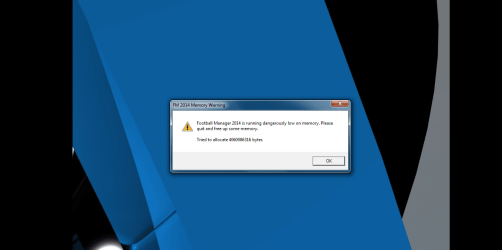
I then ran Football Manager 2014 and it displayed an error message that I "do not have sufficient memory to run the program, please allocate more memory". I'll take a screenshot of the error later.Untitled.png

Do you still think this is a memory problem? Could it be the memory controller?

Update: I plugged in the second 8gb on the 3rd RAM slot to run dual channel to see if it overcomes the memory problem and the error doesn't show up anymore, instead, the game still crashes, but does so with a different error (crash dump)
 
Last edited:

My Computer My Computer

At a glance

Windows 7 Home Premium 64bitIntel Core i7 4790k @ 4.0 ghz8gb x2 Kingston Hyperx Fury Blue Memory RAM @...Gigabyte GeForce GTX 970 G1 Gaming 4GB GDDR5 ...
Computer type
PC/Desktop
OS
Windows 7 Home Premium 64bit
CPU
Intel Core i7 4790k @ 4.0 ghz
Motherboard
Gigabyte z97x-SLI motherboard
Memory
8gb x2 Kingston Hyperx Fury Blue Memory RAM @ 1600 mhz
Graphics Card(s)
Gigabyte GeForce GTX 970 G1 Gaming 4GB GDDR5 PCiE Video Grap
Hard Drives
Samsung Evo 500 GB SSD x2
PSU
Corsair CX750M Powersupply
Cooling
Corsair H100i Watercooler
Have you yet posted http://www.sevenforums.com/bsod-help-support/96879-blue-screen-death-bsod-posting-instructions.html ?

Did you ask Giga Support to confirm the RAM specs? Have you contacted the RAM maker for help doing further tests they may require for RMA? These are all under warranty the first year.

I'm doing that right now. Thanks.

I told Gigabyte all my components, including the RAM model. I had a 10 minute conversation regarding the RAM itself, including letting him know of my memtest results. He told me to submit an RMA and send the motherboard over so they can test it then either fix or replace it.
 

My Computer My Computer

At a glance

Windows 7 Home Premium 64bitIntel Core i7 4790k @ 4.0 ghz8gb x2 Kingston Hyperx Fury Blue Memory RAM @...Gigabyte GeForce GTX 970 G1 Gaming 4GB GDDR5 ...
Computer type
PC/Desktop
OS
Windows 7 Home Premium 64bit
CPU
Intel Core i7 4790k @ 4.0 ghz
Motherboard
Gigabyte z97x-SLI motherboard
Memory
8gb x2 Kingston Hyperx Fury Blue Memory RAM @ 1600 mhz
Graphics Card(s)
Gigabyte GeForce GTX 970 G1 Gaming 4GB GDDR5 PCiE Video Grap
Hard Drives
Samsung Evo 500 GB SSD x2
PSU
Corsair CX750M Powersupply
Cooling
Corsair H100i Watercooler
Have you yet posted http://www.sevenforums.com/bsod-help-support/96879-blue-screen-death-bsod-posting-instructions.html ?

Did you ask Giga Support to confirm the RAM specs? Have you contacted the RAM maker for help doing further tests they may require for RMA? These are all under warranty the first year.

I'm doing that right now. Thanks.

I told Gigabyte all my components, including the RAM model. I had a 10 minute conversation regarding the RAM itself, including letting him know of my memtest results. He told me to submit an RMA and send the motherboard over so they can test it then either fix or replace it.

Guess we're done. Excellent finish - good feedback from all.

So the Mobo goes back and we'll see what happens when you it is returned.

I like happy endings, don't you.

Bill
.
 

My Computer My Computer

At a glance

x64 (6.3.9600) Win8.1 Pro & soon dual boot x6...AMD A6-3420M APU with Radeon(tm) HD Graphics6.00 GBAMD Radeon(TM) HD 6520G
Computer type
Laptop
Computer Manufacturer/Model Number
HP Pavilion dv6-6c10us
OS
x64 (6.3.9600) Win8.1 Pro & soon dual boot x64 (6.1.7601) Win7_SP1 HomePrem
CPU
AMD A6-3420M APU with Radeon(tm) HD Graphics
Motherboard
Hewlett-Packard 1805
Memory
6.00 GB
Graphics Card(s)
AMD Radeon(TM) HD 6520G
Sound Card
(1) AMD High Definition Audio Device (2) IDT High Definiti
Monitor(s) Displays
HP W2072a 20" LCD (1600 x 900) @ 60 Hz
Screen Resolution
1366 x 768 x 32 bits (4294967296 colors) @ 60 Hz
Hard Drives
ST640LM0 00 HM641JI SATA Disk Device
Keyboard
Logitech k520 wireless KB
Mouse
Logitech m320 wireless mouse (bundled with KB)
Internet Speed
15/5 | 54 MB Wireless 'n'
Antivirus
Realtime: Defender or Avast | On-demand: Malwarebytes, ESET
Browser
IE 11 on Win8, IE 10 on win 7
Other Info
Media: [Gimp, Audacity, VLC] || Comm: [WEmail 2012, Skype] || Productivity: [OpenOffice,| Textpad] || Utils: [Sysinternals, cCleaner, Speccy, Defraggler]
Have you yet posted http://www.sevenforums.com/bsod-help-support/96879-blue-screen-death-bsod-posting-instructions.html ?

Did you ask Giga Support to confirm the RAM specs? Have you contacted the RAM maker for help doing further tests they may require for RMA? These are all under warranty the first year.

I'm doing that right now. Thanks.

I told Gigabyte all my components, including the RAM model. I had a 10 minute conversation regarding the RAM itself, including letting him know of my memtest results. He told me to submit an RMA and send the motherboard over so they can test it then either fix or replace it.

Guess we're done. Excellent finish - good feedback from all.

So the Mobo goes back and we'll see what happens when you it is returned.

I like happy endings, don't you.

Bill
.

Well.. I was really hoping it'd be a software issue instead.. :/

I have another question, how should I ship the motherboard? I'm actually really worried about it. I'm thinking of just placing it in the box it came with and then another cardboard box and shipping it over?
 

My Computer My Computer

At a glance

Windows 7 Home Premium 64bitIntel Core i7 4790k @ 4.0 ghz8gb x2 Kingston Hyperx Fury Blue Memory RAM @...Gigabyte GeForce GTX 970 G1 Gaming 4GB GDDR5 ...
Computer type
PC/Desktop
OS
Windows 7 Home Premium 64bit
CPU
Intel Core i7 4790k @ 4.0 ghz
Motherboard
Gigabyte z97x-SLI motherboard
Memory
8gb x2 Kingston Hyperx Fury Blue Memory RAM @ 1600 mhz
Graphics Card(s)
Gigabyte GeForce GTX 970 G1 Gaming 4GB GDDR5 PCiE Video Grap
Hard Drives
Samsung Evo 500 GB SSD x2
PSU
Corsair CX750M Powersupply
Cooling
Corsair H100i Watercooler
Back
Top