A couple of issues - Windows Update / Repair install 'canceled' long

This means that your only real recourse is to a repair install.:(

OK, Noel. Is there are reference here somewhere on how to do a repair install? I'm assuming that there is a possibility that everything could be wiped but best case, the repair install fixes the hive. Worst case I need to rebuild everything from scratch which would be a daunting task since I have so much %$#^# on my machine that I have accumulated. If there's a handy guide or checklist around for this type of repair, it would help.

Thanks for taking the time to help me out, in any case.

Cheers,
Lrw
 

My Computer My Computer

At a glance

Windows 7 64 bit Professional SP1Intel core i5-2500k unlocked8GB corsair vengeance pc12800Galaxy GeForce GTX 550-Ti 1GB
Computer type
PC/Desktop
Computer Manufacturer/Model Number
custom build
OS
Windows 7 64 bit Professional SP1
CPU
Intel core i5-2500k unlocked
Motherboard
asus p8z68-v LX intel z68 lga1155
Memory
8GB corsair vengeance pc12800
Graphics Card(s)
Galaxy GeForce GTX 550-Ti 1GB
Hard Drives
WD Caviar black 1TB sata 7200
Antivirus
avast
Browser
firefox, ie, chrome
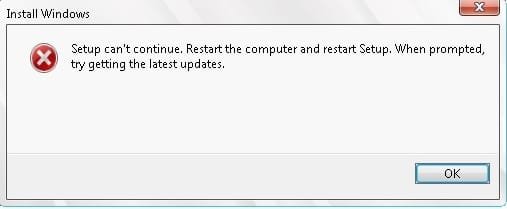
Well I tried the repair install as was suggested. It had been so long since I opened this thread that I had forgotten that I had already tried to do a repair install which failed - see the attached jpg.

So, it looks like I am stuck doing a clean install. What's the best way to inventory what I need to rebuild? I have so much stuff that I need to make sure not to lose, photos, documents, programs, scripts, scheduled tasks, etc, etc.

Or ... is there a way to get the upgrade install to complete?

Regards,
Lrw
 

Attachments

  • setup can't continue.jpg
    setup can't continue.jpg
    10.4 KB · Views: 15

My Computer My Computer

At a glance

Windows 7 64 bit Professional SP1Intel core i5-2500k unlocked8GB corsair vengeance pc12800Galaxy GeForce GTX 550-Ti 1GB
Computer type
PC/Desktop
Computer Manufacturer/Model Number
custom build
OS
Windows 7 64 bit Professional SP1
CPU
Intel core i5-2500k unlocked
Motherboard
asus p8z68-v LX intel z68 lga1155
Memory
8GB corsair vengeance pc12800
Graphics Card(s)
Galaxy GeForce GTX 550-Ti 1GB
Hard Drives
WD Caviar black 1TB sata 7200
Antivirus
avast
Browser
firefox, ie, chrome
I doubt there is an easy way to force the setup to complete :(

To inventorise installed programs, I use Belarc Advisor - Belarc Advisor - Free Personal PC Audit, for software, hardware and security configuration information on your computer. Software license management, IT asset management, cyber security audits, and more.

As for data - back up the entire Users folder structure to external media, and that should catch most of it.
Check for Data on your desktop (which should already be in the Users folder anyhow) - and anywhere else you may have hidden it.

Outlook/Windows Mail folders should be checked, since they can reside in the Windows folder structure(!!)
 

My Computer My Computer

At a glance

Win 7 x64 Home Premium (and x86 VirtualBox VM...i3 370M/i7 6500U8GB - finally :)/8GBit's an i3, dude!/dual Intel&nVidia
Computer type
Laptop
Computer Manufacturer/Model Number
Asus K52F or Lenovo B51-80
OS
Win 7 x64 Home Premium (and x86 VirtualBox VM)/Win10
CPU
i3 370M/i7 6500U
Motherboard
Asus/Lenovo
Memory
8GB - finally :)/8GB
Graphics Card(s)
it's an i3, dude!/dual Intel&nVidia
Sound Card
onboard
Monitor(s) Displays
15.6" built-in
Screen Resolution
1366x768/1920x1080
Hard Drives
750GB Seagate internal
Sundry external drives attached to other computers on the local network
1TB SSD on the Lenovo
PSU
n/a
Internet Speed
as much as I can get - usually on a dongle/phone, so <1MB/s
Antivirus
MSE/Defender
Browser
IE11/12/Edge/Chrome/FF(if I must)
As I posted earlier in the thread everything needed to prepare for, achieve and maintain a perfect Clean Reinstall Windows 7
is in the blue link.

Had you already completed these steps this would have been resolved within a day or two and you'd have the best possible install of Win7, like a million other consumers who have used the tutorial without a single complaint or return with problems.
 
I'll be diving into this clean reinstall later today - running backups now. I was trying to avoid it but alas, it seems the only way now.

Regards,
Lrw
 

My Computer My Computer

At a glance

Windows 7 64 bit Professional SP1Intel core i5-2500k unlocked8GB corsair vengeance pc12800Galaxy GeForce GTX 550-Ti 1GB
Computer type
PC/Desktop
Computer Manufacturer/Model Number
custom build
OS
Windows 7 64 bit Professional SP1
CPU
Intel core i5-2500k unlocked
Motherboard
asus p8z68-v LX intel z68 lga1155
Memory
8GB corsair vengeance pc12800
Graphics Card(s)
Galaxy GeForce GTX 550-Ti 1GB
Hard Drives
WD Caviar black 1TB sata 7200
Antivirus
avast
Browser
firefox, ie, chrome
Gregrocker:

One question: Should I use the OEM System Builder Pack DVD that I have - it is Win Pro 7 SP1 64-bit. Or should I download one from your link?

Regards,
Lrw
 

My Computer My Computer

At a glance

Windows 7 64 bit Professional SP1Intel core i5-2500k unlocked8GB corsair vengeance pc12800Galaxy GeForce GTX 550-Ti 1GB
Computer type
PC/Desktop
Computer Manufacturer/Model Number
custom build
OS
Windows 7 64 bit Professional SP1
CPU
Intel core i5-2500k unlocked
Motherboard
asus p8z68-v LX intel z68 lga1155
Memory
8GB corsair vengeance pc12800
Graphics Card(s)
Galaxy GeForce GTX 550-Ti 1GB
Hard Drives
WD Caviar black 1TB sata 7200
Antivirus
avast
Browser
firefox, ie, chrome
OK, I have run the clean install but I am having an issue with one device, showing me the ! in device manager for SM Bus Controller in other devices. Any ideas what this is and how to fix it? Still a long road to get all my stuff back.

Regards,
Lrw
 

My Computer My Computer

At a glance

Windows 7 64 bit Professional SP1Intel core i5-2500k unlocked8GB corsair vengeance pc12800Galaxy GeForce GTX 550-Ti 1GB
Computer type
PC/Desktop
Computer Manufacturer/Model Number
custom build
OS
Windows 7 64 bit Professional SP1
CPU
Intel core i5-2500k unlocked
Motherboard
asus p8z68-v LX intel z68 lga1155
Memory
8GB corsair vengeance pc12800
Graphics Card(s)
Galaxy GeForce GTX 550-Ti 1GB
Hard Drives
WD Caviar black 1TB sata 7200
Antivirus
avast
Browser
firefox, ie, chrome
Confirm that you have enabled Automatically deliver drivers via Windows Update (Step 3),
Checked for Updates and then installed all rounds of Important and Optional Updates until there are no more.

If so, install the latest chipset for your mobo from the model's Support Downloads webpage. The specific controller driver may be separate or part of the chipset itself.
 
Confirm that you have enabled Automatically deliver drivers via Windows Update (Step 3),
Checked for Updates and then installed all rounds of Important and Optional Updates until there are no more.

If so, install the latest chipset for your mobo from the model's Support Downloads webpage. The specific controller driver may be separate or part of the chipset itself.

THanks for the advice Greg. However, how do I completely remove that Tweakbit that I happened to install from your link, above (which you have apparently unlinked from the word 'driver')?

Regards,
Lrw
 

My Computer My Computer

At a glance

Windows 7 64 bit Professional SP1Intel core i5-2500k unlocked8GB corsair vengeance pc12800Galaxy GeForce GTX 550-Ti 1GB
Computer type
PC/Desktop
Computer Manufacturer/Model Number
custom build
OS
Windows 7 64 bit Professional SP1
CPU
Intel core i5-2500k unlocked
Motherboard
asus p8z68-v LX intel z68 lga1155
Memory
8GB corsair vengeance pc12800
Graphics Card(s)
Galaxy GeForce GTX 550-Ti 1GB
Hard Drives
WD Caviar black 1TB sata 7200
Antivirus
avast
Browser
firefox, ie, chrome
What "tweakbit" are you referring to? I never had any hyperlink to the word "driver." Is this something you saw when not signed into the website, which is when ads are allowed to infiltrate?
 
I honestly did click on the word driver from your post (from the last sentence) , not sure how or why but it took me to Tweakbit page, sorry I don't have the link anymore, and I was able to uninstall it. First time I did it via Uninstall in control panel, I clicked the button to keep instead of remove. I don't have much installed on my machine yet, so this is the only place I could have got it. Was quite surprised that the link was gone when I came back to ask you about it. Gremlins? At least it is gone now. I think that I was signed in to the forum at the time also. Anyway, that tweakbit is one of those 'pay us first' before you can do anything. I was able to fix the driver error via the Asus downloads for the chipset.

Regards,
Lrw
 

My Computer My Computer

At a glance

Windows 7 64 bit Professional SP1Intel core i5-2500k unlocked8GB corsair vengeance pc12800Galaxy GeForce GTX 550-Ti 1GB
Computer type
PC/Desktop
Computer Manufacturer/Model Number
custom build
OS
Windows 7 64 bit Professional SP1
CPU
Intel core i5-2500k unlocked
Motherboard
asus p8z68-v LX intel z68 lga1155
Memory
8GB corsair vengeance pc12800
Graphics Card(s)
Galaxy GeForce GTX 550-Ti 1GB
Hard Drives
WD Caviar black 1TB sata 7200
Antivirus
avast
Browser
firefox, ie, chrome
But did you follow the tutorial's steps fully? I specifically asked you to Confirm if you enabled Hardware Auto Updating and then installed all Important and Optional WIndows Updates, with reboots, until there are no more. The fact you didn't answer makes me wonder if you even did the reinstall correctly.

It isn't really a cafeteria menu if you want to get and keep a perfect install. Out of the million who have used it, the only ones who ever come back with problems are the ones who didn't follow all the steps.
 

My Computer My Computer

At a glance

Windows 10 Pro. 64/ version 1709 Windows 7 Pr...Intel i7-6800K @ 4.3Corsair Platinum 16 gig @2400EVGA GTX 1070 OC
Computer type
PC/Desktop
Computer Manufacturer/Model Number
Home made Desktop
OS
Windows 10 Pro. 64/ version 1709 Windows 7 Pro/64
CPU
Intel i7-6800K @ 4.3
Motherboard
ASUS X-99 Deluxe II
Memory
Corsair Platinum 16 gig @2400
Graphics Card(s)
EVGA GTX 1070 OC
Monitor(s) Displays
Asus 27" LED LCD/VE278Q
Screen Resolution
1920-1080 or 1280-720 HDMI
Hard Drives
INTEL SSD 730-240 Gb Sata 3.0/
PSU
EVGA Platium 1200W
Case
Phanteks Luxe Tempered Glass 8 fans/ one radiator
Cooling
XSPC/ Water Cooled CPU
Keyboard
Das 4 Professional
Mouse
Logitech M705/MX Anywhere 2-S
Internet Speed
100 mbits
Antivirus
Microsoft Security Essentials/ Malwarebytes Premium 3.0/ SAS
Browser
I.E. 11 default/Firefox/ ISP Time Warner Cable/Spectrum
Other Info
LG BluRay Burner/
Sound system-KLipsch-THX/
Icy Dock ssd Hot Swap bays.
But did you follow the tutorial's steps fully? I specifically asked you to Confirm if you enabled Hardware Auto Updating and then installed all Important and Optional WIndows Updates, with reboots, until there are no more. The fact you didn't answer makes me wonder if you even did the reinstall correctly.

It isn't really a cafeteria menu if you want to get and keep a perfect install. Out of the million who have used it, the only ones who ever come back with problems are the ones who didn't follow all the steps.

I have not finished all the updates yet. I am still on Step 7 but will be following all the steps to make sure it is clean.

Regards,
Lrw
 

My Computer My Computer

At a glance

Windows 7 64 bit Professional SP1Intel core i5-2500k unlocked8GB corsair vengeance pc12800Galaxy GeForce GTX 550-Ti 1GB
Computer type
PC/Desktop
Computer Manufacturer/Model Number
custom build
OS
Windows 7 64 bit Professional SP1
CPU
Intel core i5-2500k unlocked
Motherboard
asus p8z68-v LX intel z68 lga1155
Memory
8GB corsair vengeance pc12800
Graphics Card(s)
Galaxy GeForce GTX 550-Ti 1GB
Hard Drives
WD Caviar black 1TB sata 7200
Antivirus
avast
Browser
firefox, ie, chrome
Hey there IRW,
I was having some issues similar to your thread here. I'm pretty novice when it comes to all this stuff but what I did was opened another user account being an administrator also along with the guest account. Then downloaded a thing called System Care by IOBIT, from the new account and ran a registry repair tool it has. It allowed me to change the default values and it has seemed to fix the majority of issues i was having. I hope ya get it figured out!
 

My Computer My Computer

At a glance

Windows 7 Home Premium 64bit
Computer type
Laptop
Computer Manufacturer/Model Number
Asus
OS
Windows 7 Home Premium 64bit
It says clearly in the tutorial not to import any drivers until all Updates are installed. There are multiple reasons for this. It's important enough these steps are printed in red so they can't be missed.
 
Maybe they should have been bolded also? Anyway, I did need to get my Ethernet driver from ASUS before any of the updates could have been done. I used another computer to get those and then was able to proceed further. It was in the process of checking the device manager for the Network adapter that I got side tracked. I will continue tomorrow. I thought I had all the updates on after the last reboot but it is now wanting to install 25 more important updates.

Regards,
Lrw
 

My Computer My Computer

At a glance

Windows 7 64 bit Professional SP1Intel core i5-2500k unlocked8GB corsair vengeance pc12800Galaxy GeForce GTX 550-Ti 1GB
Computer type
PC/Desktop
Computer Manufacturer/Model Number
custom build
OS
Windows 7 64 bit Professional SP1
CPU
Intel core i5-2500k unlocked
Motherboard
asus p8z68-v LX intel z68 lga1155
Memory
8GB corsair vengeance pc12800
Graphics Card(s)
Galaxy GeForce GTX 550-Ti 1GB
Hard Drives
WD Caviar black 1TB sata 7200
Antivirus
avast
Browser
firefox, ie, chrome
It specifically says to save your network adapter in backup so you have it to get online.

I dont' think you've followed the tutorial at all which is a shame since you had this chance to get the one perfect install you'd never have to do again, and I was here to help you.

Good luck with whatever it is you have there. Unsubscribed.
 
Back
Top