
Solved Size of certain icons changed when installing visual style

conradskill

New member
Local time
3:35 PM
Messages
2
Hi,

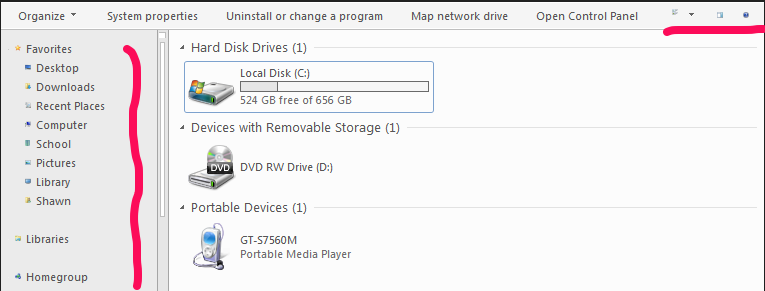
I was changing visual styles the other day, and one visual style resized these icons as can be seen in the image below (the ones identified by the pink lines). Changing visual styles again did not change them back to their normal size, and I wasn't able to find anything in the Advanced Appearance Settings page which allows me to resize them.

Does anyone have any idea what's up with this?

Thanks
mTv8JRx.png
 

My Computer My Computer

At a glance

Windows 7 Ultimate 64bit
Computer type
Laptop
Computer Manufacturer/Model Number
Sony
OS
Windows 7 Ultimate 64bit
Can you goto Personlisation-->Windows Colour-->Icon if so the size is in there. Otherwise you would have to change the dependancy manually, and as much as I would love to know the answer to what the dependancy is I don't.

Update: I think (don't know) the changes made there are in the registry, though there are hundreds of refrences to icon size.

Update 2: No registry needed tried this on my desktop, go into colour and click the advanced option and scroll down to Icon and bump the size up.
 
Last edited:

My Computer My Computer

At a glance

Windows 7 - Home Edition - Build 7601x8086Samsung DDR3 4GBIntergrated
Computer type
Laptop
Computer Manufacturer/Model Number
Lenovo
OS
Windows 7 - Home Edition - Build 7601x8086
Memory
Samsung DDR3 4GB
Graphics Card(s)
Intergrated
Sound Card
Intergrated
Screen Resolution
1400 x 1050
Hard Drives
80GB HDD 2.5
PSU
20V adapter
Case
Piece of plastic
Cooling
Copper heatsink
Keyboard
Intergrated PS2
Mouse
TouchPad
Antivirus
Commodo
Browser
K-Melon
Can you goto Personlisation-->Windows Colour-->Icon if so the size is in there. Otherwise you would have to change the dependancy manually, and as much as I would love to know the answer to what the dependancy is I don't.

Update: I think (don't know) the changes made there are in the registry, though there are hundreds of refrences to icon size.

Update 2: No registry needed tried this on my desktop, go into colour and click the advanced option and scroll down to Icon and bump the size up.

Hi

I've tried changing the Icon size from that screen, and it has no effect.

Edit: Changing the size of the title bar and caption buttons changes it. Anything under 18 is tiny like that. Anything bigger than 17 is normal.
 
Last edited:

My Computer My Computer

At a glance

Windows 7 Ultimate 64bit
Computer type
Laptop
Computer Manufacturer/Model Number
Sony
OS
Windows 7 Ultimate 64bit
Glad you found a solution. In the future if you find anything else off you can open the theme to change it as well: How to open Windows 7 themes
 

My Computer My Computer

At a glance

Windows 7 - Home Edition - Build 7601x8086Samsung DDR3 4GBIntergrated
Computer type
Laptop
Computer Manufacturer/Model Number
Lenovo
OS
Windows 7 - Home Edition - Build 7601x8086
Memory
Samsung DDR3 4GB
Graphics Card(s)
Intergrated
Sound Card
Intergrated
Screen Resolution
1400 x 1050
Hard Drives
80GB HDD 2.5
PSU
20V adapter
Case
Piece of plastic
Cooling
Copper heatsink
Keyboard
Intergrated PS2
Mouse
TouchPad
Antivirus
Commodo
Browser
K-Melon
Back
Top