Solved How to Download FreeFileSync without Malware

XP VM User

New member
Member
VIP
Local time
11:48 AM
Messages
279
Hi Everyone!

This is an offshoot of another thread so new question rule in the Forum, so I made new thread...

In this link to my prior thread: http://www.sevenforums.com/backup-restore/357684-need-new-backup-storage-program-5.html

See reccomendation by ignatzsonic.. Its so simple to save files!

Back up personal data WITHOUT using Macrium, Norton, Acronis, or any similar product. No clone, no image. Nothing of the kind. Just an outright copy as if you had used the mouse and dragged the files to another drive. Do this either with the mouse periodically or with any of several programs designed for that purpose specifically (Syncback, Synctoy, Free File Sync, Second Copy, etc). If you have 300 GB of personal data, you will need 300 GB of space on your external drive.

Ok so far: 1. Got the new, External HDD
2. Did not use any of the included WD programs to avoid installing ad-ware, bloatware, etc PUPs
3. Now all I need to do is get my free copy of "FreeFileSync" (as others at Windows Seven Forum i.e Lady Fitzgerald et al) have reccomended that one too so its my program of choice right now unless someone proves another one is better to it...)

BUT

IN following the link to get FreeFileSync, I got problems!

First this was where I was linked to go to the MAIN FreeFileSync site:

FreeFileSync | Free backup software to synchronize files and synchronize folders on Windows, Linux and Mac OS X

Its their own site!

Then , I got problems.

I clicked on the Green Download Free File Sync 6.13! arrow and I was "re-directed" to another site : Download FreeFileSync

Not happy with that at all....

And that re-directed site has reviews (nice! thanks!)

Read this one, just done in December 2014 (I have to write a lot and say things like that because others pointed out some of my reviews, etc were 1 year old and maybe they changed the site--------not this time, this review was written in December 2014: )

Here it is in full

tdc December 10, 2014
Not the easiest backup tool (I definitely wouldn't recommend it for a novice user), but by far the most feature-packed one. Cons: - The installer tries to get you to install sponsored offers (crapware, which are possibly malicious), which sometimes has awkward wording in an attempt to trick you into installing the crapware. This further prevents me from recommending this software to a novice user. - You can only copy, there is no option to simply move files. (To do this you would need to copy from folder A to folder B, then have a blank folder C copy to folder B so everything in it is erased.) - You need to use Task Scheduler to schedule backup tasks, which comes with the inherent flaws and limitations of Task Scheduler.

Even though I try, I guess I'm the "novice" user he is referring to above!

Thanks everyone for reading this and trying to get me a file that is not full of added programs/toolbars/ads!
XP VM USER (got name from first posting)
---------------------------------------
Offtopic: By the way... something new came up while researching this problem!

This reviewer pointed out something I never considered!

Gestetner December 9, 2014
Fast and reliable. I used another program before but it cannot sync more than 100,000 files, this one can sync 500,000 files. I used it also for copying entire drives or partitions and this software is great for monitoring the progress AND for continuing aborted copy operations.

The small lapttop has already over 423,000 files on it!!! So says my Norton Internet Security when it does a file scan (or malwarebytes.com too)

Its NOT FULL!

So I never knew that there is a 500,000 limit on FreeFileSync!! The one I'm advised and plan to use!
I know I know.. ignatzatsonic recommended just copying, no "syncing" needed.. but syncing once I have ONE fully backup copy would save some time, as long as I periodically keep that full copy "up to date" when the computer is not needed for a few days....
 

My Computer My Computer

Computer type
Laptop
Computer Manufacturer/Model Number
SONY VAIO VPCS111FM
OS
Windows7 Professional 64bit
CPU
Intel(R) Core (TM) i5 CPU M 430 @2.27 Ghz
Memory
8.0 GB
Hard Drives
Seagate 500GB Momentus
Cooling
Internal fan
Mouse
Logitech bluetooth trackball
Browser
Pale Moon Browser for x64

My Computer My Computer

Computer type
PC/Desktop
Computer Manufacturer/Model Number
Golden Mk. I.4
OS
Windows 10 Pro x64 ; Xubuntu x64
CPU
Intel i7 860 @ 2.80 GHz O/C'ed to 4.0GHz
Motherboard
Gigabyte P55A-UD3R Rev.1. Award BIOS F13
Memory
16GB Corsair Vengance DDR3 @ 661 MHz Dual Channel (9-9-9-24)
Graphics Card(s)
EVGA NVidia GTX 560 1024MB
Sound Card
Realtek Integrated
Monitor(s) Displays
Dual Samsung SyncMaster 2494HS
Screen Resolution
1920*1080 and 1920*1080
Hard Drives
1*Samsung 840 EVO 120GB SSD;
1*OCZ Vertex 2 60GB SSD;
2*Samsung F3 SpinPoint 1TB in RAID0;
1*Samsung F1 SpinPoint 1TB;
2*Western Digital 1TB External USB 3.0
1*Western Digital 500GB External USB 3.0
1*Seagate 500GB External USB 2.0
PSU
Thermaltake ToughPower QFan 750W
Case
Thermaltake Element S VK60001W2Z
Cooling
Corsair H60 Water Cooling, 2*230mm and 2*80mm case fans
Keyboard
Logitech G110
Mouse
Logitech MX518
If I look for problems I guess I find them

Hi Golden! (from Australia!!)

Thanks Thanks for recommending me "SyncToy" I never knew of that one... Its a Microsoft product so I'm not worried about its site or malware, etc as much as 3rd party stuff

BUT!

I really write too long! But the reason I do is I LEFT OUT CRITICAL INFORMATION!

The purpose of this backup/sync is for my ONLY backup to laptop!

I do not want to lose the stuff in the laptop!

I do not want to ever have to recover stuff, but if I have to it has to be easy to do!

SyncToy has reviews! (I only took two from 2014)

Jeff6289 posted in Storage Forum

SyncToy vs RoboCopy vs ?
Win 2008 Server. I ran SyncToy for a couple years when I had an XP Pro (32 bit) workstation, and it seemed to work fine until... ...found some corruption in older files. Don't know if SyncToy did it or not, but after looking around the internet, saw some other reports about SyncToy reliability,...
12 · Mar 24, 2014

Pimiento
Bren8806 posted in Windows Forum
SyncToy issues

Hi All. We have pretty much all users running on synctoy 2.0 Desktop and Notebook. Issue is that when the sync toy fails we don't know about it until it is too late. Just had an EGM loose a file he created on Monday however his profile became corrupt so we reloaded it and found that the files he...

Please explain how I can trust it.... if it corrupts my one and only backup files!!!

Thanks, (trying to get this out to you so you can read it and reply, sorry for grammar/spelling errors)
 

My Computer My Computer

Computer type
Laptop
Computer Manufacturer/Model Number
SONY VAIO VPCS111FM
OS
Windows7 Professional 64bit
CPU
Intel(R) Core (TM) i5 CPU M 430 @2.27 Ghz
Memory
8.0 GB
Hard Drives
Seagate 500GB Momentus
Cooling
Internal fan
Mouse
Logitech bluetooth trackball
Browser
Pale Moon Browser for x64
I've never come across those sorts of errors before. I suggest you run a test of SyncToy, then validate the results to ensure it works correctly for you.

We cam also consider robocopy if you feel SyncToy or FreeFileSync is not for you.
 

My Computer My Computer

Computer type
PC/Desktop
Computer Manufacturer/Model Number
Golden Mk. I.4
OS
Windows 10 Pro x64 ; Xubuntu x64
CPU
Intel i7 860 @ 2.80 GHz O/C'ed to 4.0GHz
Motherboard
Gigabyte P55A-UD3R Rev.1. Award BIOS F13
Memory
16GB Corsair Vengance DDR3 @ 661 MHz Dual Channel (9-9-9-24)
Graphics Card(s)
EVGA NVidia GTX 560 1024MB
Sound Card
Realtek Integrated
Monitor(s) Displays
Dual Samsung SyncMaster 2494HS
Screen Resolution
1920*1080 and 1920*1080
Hard Drives
1*Samsung 840 EVO 120GB SSD;
1*OCZ Vertex 2 60GB SSD;
2*Samsung F3 SpinPoint 1TB in RAID0;
1*Samsung F1 SpinPoint 1TB;
2*Western Digital 1TB External USB 3.0
1*Western Digital 500GB External USB 3.0
1*Seagate 500GB External USB 2.0
PSU
Thermaltake ToughPower QFan 750W
Case
Thermaltake Element S VK60001W2Z
Cooling
Corsair H60 Water Cooling, 2*230mm and 2*80mm case fans
Keyboard
Logitech G110
Mouse
Logitech MX518
Thanks for replying Golden!

Hi Golden!

Thanks again for replying!

I see two parts to your reply..

Part I:

I've never come across those sorts of errors before. I suggest you run a test of SyncToy, then validate the results to ensure it works correctly for you.

I'm beginning to see I'm really a total (below) novice in my ability to recover any HD from a crash/loss of data virus loss etc. I've never successfully done it... and others mention that just "copying" a HDD 100% does not mean that it will boot back again alive after total loss of data on the original drive.

I have therefore, as a novice, no idea what a "run a test of SyncToy, then validate the results to ensure it works correcty for you." would entail?

Does this mean I test it after copying the entire HD from the laptop, then erase 100% of the lapttop to see if it restores it again? What if it doesn't?? It not only doesn't work for me... I will have LOST ALL DATA AND PROGRAMS ! (sorry to shout) just upset where these conversations are leading,

Either I use a program that automatically does this... which others point out can corrupt the data at any point... or else just copy it by hand, file by file.. (remember I said something about having 423,000 files to hand copy?? What do I do? Spend rest of life copying each day's work????? (that is my attempt at humor there in this dire situation)...

Thanks for any advice for Part I.


Part II: I researched robocopy briefly...

I don't understand how it copies... does it copy everything? Or just the files I point it to?

I need the MBR etc registry, etc file structures copied perfectly, so in the event of a loss of the laptop HD, I can totally 100% guarantee restoration of the computer data and programs (!) from the robocopy on an external drive ....

I don't see any information, on how robocopy would accomplish a "restoration" of the HD... am I confusing things again??

Thanks for any advice for Part II.
 

My Computer My Computer

Computer type
Laptop
Computer Manufacturer/Model Number
SONY VAIO VPCS111FM
OS
Windows7 Professional 64bit
CPU
Intel(R) Core (TM) i5 CPU M 430 @2.27 Ghz
Memory
8.0 GB
Hard Drives
Seagate 500GB Momentus
Cooling
Internal fan
Mouse
Logitech bluetooth trackball
Browser
Pale Moon Browser for x64

My Computer My Computer

Computer type
PC/Desktop
Computer Manufacturer/Model Number
Golden Mk. I.4
OS
Windows 10 Pro x64 ; Xubuntu x64
CPU
Intel i7 860 @ 2.80 GHz O/C'ed to 4.0GHz
Motherboard
Gigabyte P55A-UD3R Rev.1. Award BIOS F13
Memory
16GB Corsair Vengance DDR3 @ 661 MHz Dual Channel (9-9-9-24)
Graphics Card(s)
EVGA NVidia GTX 560 1024MB
Sound Card
Realtek Integrated
Monitor(s) Displays
Dual Samsung SyncMaster 2494HS
Screen Resolution
1920*1080 and 1920*1080
Hard Drives
1*Samsung 840 EVO 120GB SSD;
1*OCZ Vertex 2 60GB SSD;
2*Samsung F3 SpinPoint 1TB in RAID0;
1*Samsung F1 SpinPoint 1TB;
2*Western Digital 1TB External USB 3.0
1*Western Digital 500GB External USB 3.0
1*Seagate 500GB External USB 2.0
PSU
Thermaltake ToughPower QFan 750W
Case
Thermaltake Element S VK60001W2Z
Cooling
Corsair H60 Water Cooling, 2*230mm and 2*80mm case fans
Keyboard
Logitech G110
Mouse
Logitech MX518
Dang, can't you do anything without continuing questions in posts that are a mile long? You worry way too much so build a bridge and get over it.

Yes, the FFS installation file has a PUP in it. PUP means Potentially Unwanted Program; that doesn't necessarily mean it is malware. The PUP here is Open Candy. Open Candy does not install itself on your computer and runs only when the installer is running. All Open Candy does is offer add-ons, such as Google Chrome and Toolbar, which you will get the opportunity to opt out of. Many AVs and anti-malware programs will hit on it because many people will not pay attention when they are running the installer. I keep program installation files after installing programs so, to keep my anti-malware programs from removing FFS' installer, I change the name of it by adding .disable to the end. That makes it impossible for it to run until I change it back.
 

My Computer My Computer

Computer type
PC/Desktop
Computer Manufacturer/Model Number
Custom Build
OS
Win 7 Ultimate 64 bit
CPU
Intel i7-3930K
Motherboard
ASUS P9X79 WS
Memory
Kingston HyperX Genesis 32GB Kit (8x4GB Modules) 1600MHz DDR
Graphics Card(s)
MSI R7850 Twin Frozr 2GD5/OC Radeon HD 7850 2GB 256-bit GDDR
Sound Card
Asus Xonar Essence STX
Monitor(s) Displays
3x Asus VG248QE 24", Vizio 32" TV
Screen Resolution
1920 x 1080, ?
Hard Drives
Samsung 128GB 840 Pro SSD (1),
Samsung 4TB 850 EVO SSDs (4)
Samsung 4TB 850 EVO SSDs (16) external backup drives used in 2.5" hot swap bays in the computer.
PSU
Corsair HX750w
Case
Antec Two Hundred v2 (modified)
Cooling
Cooler Master GeminII S524 120mm (fan replaced with a 140mm)
Keyboard
Logitech G510s
Mouse
Logitech M525 (two in use)
Internet Speed
=< 32Mbps down, 8Mbps up
Antivirus
AVAST!, MBAM, SAS, Spybot S&D (all but MBAM free) Glary Util
Browser
IE11
Other Info
LSI 9211-8i HBA card (8 SATA III ports), 2.5" & 3.5" Hot Swap Bays, HooToo HT-CR001 PCI-E to USB 3.0 Internal Hub + 6 Slot Card Reader, and LG Model CH12LS28 BD-ROM Optical Drive. Also, ScanSnap S1500 ADF duplexing scanner, Canon 9000F flat bed scanner, Corsair SP2500 2.1 speakers, Samsung CLP 415nw laser color printer, Cyberpower PP2200SW UPS
Thanks for the idea Lady Fitzgerald!

Hi Lady Fitzgerald!

Apologies for writing so much !

I appreciate your patience!

Yes I'm a Dummy... (must have a whole self of dummies /idiots books... still don't help me....
Simple answer! change the .disable from the .exe

But I am afraid to do such things all by self.. seems like nice Idea, but if I ever thought of it I'd be afraid it would mess something else up somewhere else..

YES! I know exactly what you are talking about as my malware/Norton removes all such programs to quarintine, therefore when and if I lose my HDD, I'd lose all those programs or have to go and suffer through all the errors too! in installing them again.

Please (everyone who is reading) DO not make mistake that I willy-nilly install programs.. I am very very slow and cautious... I read each page entirely all agreements every line!!

BUT they still sneak stuff in! and it messes computer up so badly I have to pay MONEY (sigh) yes money to people to fix it who tell me stay away from freeware... I can't handle it!

So you see my reluctance comes from hard earned and lost money wasted on trying to get "something" for nothing....

Ok sorry I wrote too much

Thanks again Lady Fitzgerald

(you can ignore the following message---its just to bring Golden up to date, you know my story already, but I wanted to give you first response before posting their reply!)
 

My Computer My Computer

Computer type
Laptop
Computer Manufacturer/Model Number
SONY VAIO VPCS111FM
OS
Windows7 Professional 64bit
CPU
Intel(R) Core (TM) i5 CPU M 430 @2.27 Ghz
Memory
8.0 GB
Hard Drives
Seagate 500GB Momentus
Cooling
Internal fan
Mouse
Logitech bluetooth trackball
Browser
Pale Moon Browser for x64
Ok, please try to solve my Macrium problem

Hi again Golden!

Thanks for your advice!

I'd like you to help me get and use Macrium! It is highly recommended...

But please read my "complaints" about the free download of Macrium and potential for damage to my "unsaved" computer due to "PUP"s "Potentially Unwanted Programs" (see Post #32 and elsewhere) along with spyware/adware etc etc..

This is the link to the Forum conversation on "Macrium etc Free Software---How to avoid CNET Virus/Adware/Malware programs here at:

http://www.sevenforums.com/backup-r...w-avoid-cnet-virus-adware-malware-prog-4.html

Apologies for the fact I do write a lot... I have a lot to say...

You can answer here or in the other posting site... both are open/unsolved...

Thanks for any advice Golden!
 

My Computer My Computer

Computer type
Laptop
Computer Manufacturer/Model Number
SONY VAIO VPCS111FM
OS
Windows7 Professional 64bit
CPU
Intel(R) Core (TM) i5 CPU M 430 @2.27 Ghz
Memory
8.0 GB
Hard Drives
Seagate 500GB Momentus
Cooling
Internal fan
Mouse
Logitech bluetooth trackball
Browser
Pale Moon Browser for x64
Don't bother with CNET....use the download links in the blue NOTE box in the tutorial I posted.
 

My Computer My Computer

Computer type
PC/Desktop
Computer Manufacturer/Model Number
Golden Mk. I.4
OS
Windows 10 Pro x64 ; Xubuntu x64
CPU
Intel i7 860 @ 2.80 GHz O/C'ed to 4.0GHz
Motherboard
Gigabyte P55A-UD3R Rev.1. Award BIOS F13
Memory
16GB Corsair Vengance DDR3 @ 661 MHz Dual Channel (9-9-9-24)
Graphics Card(s)
EVGA NVidia GTX 560 1024MB
Sound Card
Realtek Integrated
Monitor(s) Displays
Dual Samsung SyncMaster 2494HS
Screen Resolution
1920*1080 and 1920*1080
Hard Drives
1*Samsung 840 EVO 120GB SSD;
1*OCZ Vertex 2 60GB SSD;
2*Samsung F3 SpinPoint 1TB in RAID0;
1*Samsung F1 SpinPoint 1TB;
2*Western Digital 1TB External USB 3.0
1*Western Digital 500GB External USB 3.0
1*Seagate 500GB External USB 2.0
PSU
Thermaltake ToughPower QFan 750W
Case
Thermaltake Element S VK60001W2Z
Cooling
Corsair H60 Water Cooling, 2*230mm and 2*80mm case fans
Keyboard
Logitech G110
Mouse
Logitech MX518
My two threads are combining together again!

Hi Golden!

I really appreciate your advice to try and help me out!

You said:

Don't bother with CNET....use the download links in the blue NOTE box in the tutorial I posted.

I looked back to make sure and certain that I'm talking about the same tutorial and links you are directing me to in this same thread..

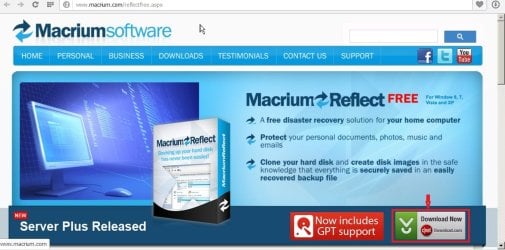
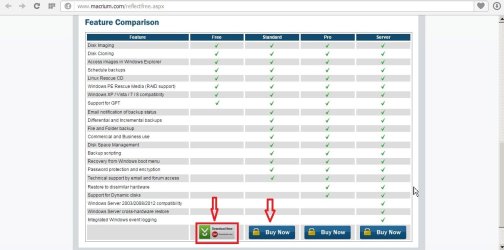
the Tutorial you posted is by "whs" (who I have communicated with as well in another thread here) and that link for Macrium leads to the shot in Screenshot 1 below: (Screenshot 2 shows not only the Free version, (red arrow and box on left) but when you click and follow and say you want to PAY MONEY! that second arrow, etc still leads you to and forces you to use CNET "Downloader" full of extra unwanted programs!!)


Note the clear "CNET" download on the button! (I drew my first red box and arrow! to show you hooray! that tutorial worked) Now You see it!!!

I'm not going to the CNET site to get their adware/viruses/spyware that others complain about..

I'm going to the link by whs in the tutorial you posted!

It leads DIRECTLY to CNET downloads!!

I was very very confused!

I was very upset to use CNET after all I've been reading about their downloader...

I have had problems myself (on XP system) downloading using "CNET" "DOWNLOADER" installer

Please read (try to read!)

my extensive, long long postings in this thread http://www.sevenforums.com/backup-r...how-avoid-cnet-virus-adware-malware-prog.html

[Someone--I'll insert later name here--mentioned in my thread above that there are "direct" to Macrium download links... I insist! and others say so too! that I cannot find it on the Macrium HOME PAGE (its the only page for true Macrium Home Page .com site delivery of Free Macrium (or even paid Macrium--I clicked on those choices! all of them USE CNET Downloader! So as much as you are correct, do not use CNET---I can't seem to obtain this valuable Macrium program to try out without going through CNET!!! downloader Installation!!!]

I was then referred to "Major Geeks" site for a "clean" no added unwanted programs, download of Macrium! Unfortnately see my thread and all the screenshots proving that "Major Geeks" is also full of extra goodies I do not want!!

So while everyone touts Macrium as something great to use!!! I can't use it if I"m afraid to corrupt my laptop before I can make a copy of it!!

ALSO (in case you're wondering) found link for the "windows 7 backup" system here (but I tired it before knowing of your site)... http://www.sevenforums.com/tutorials/663-backup-complete-computer-create-image-backup.html

(I've had that Windows 7 Backup stuck "half way through" on the computer, can't add to it it keeps blinking a error light, so I just leave it alone.... so its not working! (This tutorial has many many "warnings" that I guess I never read when I attempted mine---I HAVE Windows 7 x64 Professional so it should have been able to save off to my external HDD, but I keep getting "load in media" it never found it... it eats cd's/dvd/s of course I discovered if I kept doing that it will make 500 GB (500 plus!!!) dvd's of 700MB each one!!! you get the idea! I can't do that each time I save I'll burn out the laptop's DVD burner and my lifetime will be wasted doing that every month or so for weeks!!!)

AND I've read so many times that it fails... there is a thread here on Windows Seven Forum (here http://www.sevenforums.com/tutorials/210195-system-image-recover-broken-windows-7-system-image.html)

about what to do when the Windows 7 Backup "fails"

I don't want !!!! a system for backups that can "fail" and needs a degree in being a 100% never make an error computer typist/programmer to "fix" it so I can get my files and programs back from a crash! I want the one that says half an hour(!) its long I did see it somewhere in the words.. see Windows 7 tutorial here: http://www.sevenforums.com/tutorials/675-system-image-recovery.html it just works..

Macrium is supposed to be that good as well!

But I can't get one clean install of it!!!!

I'm lost!

I'm in trouble!

Thanks for reading my upsetting words Golden..

Any suggestions??????
 

Attachments

  • W7 FORUM Macrium WITH RED BOX & ARROR PS17189.jpg
    W7 FORUM Macrium WITH RED BOX & ARROR PS17189.jpg
    107.4 KB · Views: 1
  • W7 MACRIUM with two red boxes too PS17190.jpg
    W7 MACRIUM with two red boxes too PS17190.jpg
    79.4 KB · Views: 1

My Computer My Computer

Computer type
Laptop
Computer Manufacturer/Model Number
SONY VAIO VPCS111FM
OS
Windows7 Professional 64bit
CPU
Intel(R) Core (TM) i5 CPU M 430 @2.27 Ghz
Memory
8.0 GB
Hard Drives
Seagate 500GB Momentus
Cooling
Internal fan
Mouse
Logitech bluetooth trackball
Browser
Pale Moon Browser for x64
Thank you for trying to stop my fears of adware

Hello again Lady Fitzgerald!

Dang, can't you do anything without continuing questions in posts that are a mile long? You worry way too much so build a bridge and get over it.

Yes, the FFS installation file has a PUP in it. PUP means Potentially Unwanted Program; that doesn't necessarily mean it is malware. The PUP here is Open Candy. Open Candy does not install itself on your computer and runs only when the installer is running. All Open Candy does is offer add-ons, such as Google Chrome and Toolbar, which you will get the opportunity to opt out of. Many AVs and anti-malware programs will hit on it because many people will not pay attention when they are running the installer. I keep program installation files after installing programs so, to keep my anti-malware programs from removing FFS' installer, I change the name of it by adding .disable to the end. That makes it impossible for it to run until I change it back.

I have to relate a story from my XP installation on a different (DELL) computer....... it has Norton and Malwarebytes.com on it YET something called "sweetpacks" keeps coming in and taking over everything I do on browsers, no matter which browser I use!

I have followed (on phone help!) and many sites (like this one How to Uninstall Sweetpacks Toolbar and Search Infection?- AnviSoft) trying to get rid of it...

IT IS PERSISTENT!!

IT DOES NOT GO AWAY

So after years of fighting I realize its going to be there and destroys my online use of any browser as I have to do multiple "clicks" before entering any search term or clicking on it.... and running malwarebytes to remove it every few minutes is totally tiring!

So this short (I hope) explanation

is why I'm sooooooooooooooooo

reluctant to even take the chance that "Open Candy" will be so easy to avoid!

People tell me its easy to remove "sweetpacks"

then they try to do it...

Whatever they do just DOES NOT WORK ON MY XP computer...

So I'm married to it for life! No idea which site or email or whatever did it...

I DO NOT randomly click on things...

I only download after reading and confirming certificate is genuine

sorry to go on so long again Lady Fitzgerald

Thanks for your help and thanks for reading these comments!

Have a good day!
 

My Computer My Computer

Computer type
Laptop
Computer Manufacturer/Model Number
SONY VAIO VPCS111FM
OS
Windows7 Professional 64bit
CPU
Intel(R) Core (TM) i5 CPU M 430 @2.27 Ghz
Memory
8.0 GB
Hard Drives
Seagate 500GB Momentus
Cooling
Internal fan
Mouse
Logitech bluetooth trackball
Browser
Pale Moon Browser for x64
Two things.

First, I have had grave problems with Sync Toy. Here is my explanation from another thread:

Quote:
"Yes, on Win7 64-bit Home Premium, I found that after months of using SyncToy for crucial backups, following all directions and recommendations, it was not synching correctly. It was not detecting moved stuff or changed folder names, and my backups were filled with mistakes and confusing redundancies that had to be gone thru manually and edited, as well as some folders were simply missing.

I panicked, then hit the internet to see what I might be doing wrong, and what others' experiences were. My research led me to 2 places, "It doesn't work, stop using it" and "It DOES work, but you need to start all over, try this, try that, delete your folder pairs then redo them like this, blah blah"

After a few more months of using it I rechecked the drives and there were still many missing and redundant files and folders. Just like before. Then I set it up to try to IGNORE moved or renamed stuff and simply make 100% sure the data is identical, even if it means deleting and re-copying more files. Still failed to be 100% accurate for even this simple task.

So, I realize this is just one man's experience, but backups are one of the most crucial things in my life, do I really want to spend even one more minute of my life worrying about whether I am covered on that, just so I can use the MS solution? For me the answer was clear and I moved on. This is not a slam on other MS products, I still use their solutions whenever possible."
(END QUOTE)

Secondly, I now rely on Free File Sync, which is truly fantastic. My VERY STRICT Kaspersky anti-virus settings have never had a problem with crapware from FFS. I install it in portable mode, with my internet connection disabled, and "Open Candy" cannot communicate, does not try to install anything, and does not harm anything. Kaspersky considers it "trusted" installer. There is NO additional malware or crapware on my PC from FFS, and I enjoy the benefits of using it everyday with no downside whatsoever. Someday, when I am rich, I will donate to the FFS developers.

Choose wisely.
 

My Computer My Computer

Computer type
PC/Desktop
OS
Win 7 Home Premium 64-bit
Choose wisely (Indiana Jones was told)

Hi tblob!

(Welcome to Windows Seven Forum! ---at 6 posts guess I'm the official welcoming committee)

(Don't be off put by my excessive writing.... most here can describe their problems in 3 words or less lol )

Thanks for the warning about SyncToy-------Yes that is why I try to stay with Microsoft items when I can and avoid third party stuff... My only other choice 100% was Norton..... and sadly I lost Norton Ghost 15 on this computer----its replacement is expensive and as you pointed out (and reviewers did too) IT DOES NOT WORK 100% of the time.... so why use something even if I do it 2-3x on my 2 TB HDD for backups... I can lose EVERYTHING!! at ANYTIME! (Sorry for shouting, must mind our manners here on this Forum)

Also:

You wrote to me:
I install it in portable mode, with my internet connection disabled, and "Open Candy" cannot communicate, does not try to install anything, and does not harm anything.

I never heard of "portable mode" so instead of asking you to explain it.... I went searching..

This post from 2008 at another site I guess is "perfect" answer.......

Post: #13
(2012-04-08 08:13)Livin Wrote:
(2012-04-07 00:20)AnalogKid Wrote:
... I'm trying to speak on behalf of 'the consumer'. GIT? Building? - forget it... those words aren't in the vocabulary of the man in the street.

The DirectX dependency MAY be a stumbling block, but a 'zip' release for portable users would certainly be a fine improvement (don't forget, not every user had admin rights to even install an app) but a Zip release would work fine (providing DirectX was already on the machine).

Clearly a 2 step issue... step 1 = zip release, step 2 = resolve the DirectX issue

I'm pretty confused... the average "consumer" will not be using portable mode, or care about a portable install. The number of users of true portable apps is less than 1% of the overall app user base.

And, the big one - to quote JMarshall... "The directx runtimes just plain don't work in the case of not being fully installed. "

XBMC offers 'live' version running from CD catering to an audience that simply doesn't want to install / can't install / wants to try. Should that be tossed as a bad idea too?
Most users don't KNOW what sort of install they have, they just go with the defaults. But quite a few of them wonder how to migrate to another PC, or install their set up on multiple PC's...
It's not about consumers wanting portable apps, it's about them wanting the benefits that portable apps offers them (they just don't know the technology behind it).

I agree with the above

I am NOT the typical computer user (I have C+ emulator (note not C++ not C# I am old in knowledge on Sun computers)... so I know some of what is going on...

But I do not have portable to turn off the Internet.. I have wireless button on laptop.. on/off But then I have so many "helpful installers" from the regular companies like SONY, HP, WD, WP, etc etc which SCREAM bloody murder when they are removed from the Internet it becomes impossible to type a sentence as each one screams and has to be "disabled" and I forget how so I have to look up each one.... and remember to turn it back on again so I get "essential updates"

No one button "turn off all services" unless I'm in "safe mode" and I guess I can't run safe mode for every day of my life

JUST to AVOID "OPEN CANDY" program from bothering me!

SO I"M frightened consumer! Who does not want any more "free gifts"

Anyway.... why can't I hang a sign on my internet node/dns/IP .... THIS PERSON HAS NO MONEY----SO GIVE UP SAVE YOUR ADS FOR THOSE WHO CAN PAY AND BUY THINGS! (guess that is impossible---and a joke at best)

As you (tblob) mentioned to me
Someday, when I am rich, I will donate to the FFS developers.

Someday I too will give money to all those developers who helped me..... I just hope they are not living out of cardboard boxes with Internet stealing from a nearby telephone pole line, while waiting for me to contribute funds to their incredible brainy programming skills!

Thanks!
 

My Computer My Computer

Computer type
Laptop
Computer Manufacturer/Model Number
SONY VAIO VPCS111FM
OS
Windows7 Professional 64bit
CPU
Intel(R) Core (TM) i5 CPU M 430 @2.27 Ghz
Memory
8.0 GB
Hard Drives
Seagate 500GB Momentus
Cooling
Internal fan
Mouse
Logitech bluetooth trackball
Browser
Pale Moon Browser for x64
You didn't read my earlier advice correctly.....you can use this link below:


to download a pre-made Macrium WinPE ISO file. This is written to a USB flash drive (as shown here in Step 2), and can be used to:

1. Create images, and
2. Restore images

Without you having to ever download and install Macrium to your computer - ever.

If you image your entire disk with this tool, then you have no need for SyncToy or FreeFileSync or any other tool.
 

My Computer My Computer

Computer type
PC/Desktop
Computer Manufacturer/Model Number
Golden Mk. I.4
OS
Windows 10 Pro x64 ; Xubuntu x64
CPU
Intel i7 860 @ 2.80 GHz O/C'ed to 4.0GHz
Motherboard
Gigabyte P55A-UD3R Rev.1. Award BIOS F13
Memory
16GB Corsair Vengance DDR3 @ 661 MHz Dual Channel (9-9-9-24)
Graphics Card(s)
EVGA NVidia GTX 560 1024MB
Sound Card
Realtek Integrated
Monitor(s) Displays
Dual Samsung SyncMaster 2494HS
Screen Resolution
1920*1080 and 1920*1080
Hard Drives
1*Samsung 840 EVO 120GB SSD;
1*OCZ Vertex 2 60GB SSD;
2*Samsung F3 SpinPoint 1TB in RAID0;
1*Samsung F1 SpinPoint 1TB;
2*Western Digital 1TB External USB 3.0
1*Western Digital 500GB External USB 3.0
1*Seagate 500GB External USB 2.0
PSU
Thermaltake ToughPower QFan 750W
Case
Thermaltake Element S VK60001W2Z
Cooling
Corsair H60 Water Cooling, 2*230mm and 2*80mm case fans
Keyboard
Logitech G110
Mouse
Logitech MX518
Thanks Now I got Four or more Questions!

Hi Golden!

Thanks for explaining it (again) further...
I did do a Win PE 5.3.7220.iso CD when you first mentioned it.... (made 2 of them so in case one breaks!)

Now I read it again (or for first time clearly?)

Does it have to be on USB? I remember crashing.... (XP) and because I had just put in USB as upgrade from USB 1.0 it would NOT recognize anything until "windows" activated the PCI card with the new USB 2.0 on it.... . So my Norton "Rescue" disks were always on "CD's" that is why I did CD's here too....

Again, unfamiliar with how Windows 7 works.... Way behind on reading Computer Magazines I used to have money to get each month (PC & Mac).... Library is long trip and I'm years behind.... no way to catch up...
Does the same thing work for the CD Disk? Or as I see from the tutorial, it appears that every time you do a new "Macrium" image, you have to update this "YUMI" with Linux??

If that is TRUE (Question 1 Yes or no?) then I should NOT have made a CD that is "un-writeable i.e. permanent--as the Macrium program would need frequent "updating" as the incrementals, etc or saves of various dates occur???

Then it would have to be on a USB, that can be updated...

Also, Testing it you have to turn off computer and boot from the USB (Or in my case CD???)

How do you use "Macrium" to make the disk images then??

To Digress-------- Norton Ghost was ORIGINALLY for many many years, a small "floppy" that you inserted in the computer and it ran with the computer NOT BOOTED INTO WINDOWS and did all the copying on the most basic of "command prompts" DOS, etc level. It was easy, fun, and worked for many many years to successfully make copies I could read with Windows Explorer/View/ etc programs any time to see if they were perfectly made and even restore them without using Ghost at all... copy and paste over a damaged file etc.

Question 2 Is this what the USB YUMI is going to do? Does it run Macrium with the computer booted into the USB and makes all the copying no matter how long it takes, from HDD inside the laptop to the External HDD??

I'm very confused.....

And full of very old knowledge...

Question 3 And what happens (I don't want to try it as nothing said I should attempt it) when I try to load CD (or if I redo it as USB) into a operating Windows?

Question 4 Is that how Macrium (not downloaded or used ever!) works anyway? Outside of Windows because you can't copy system folders and MBR while they are "in use"???

Old knowledge is clouding my judgment here....

Thanks for reading all of this.... posting now so I get some reply before I do what is in the "following separate issue " posting.

Thanks again!
 

My Computer My Computer

Computer type
Laptop
Computer Manufacturer/Model Number
SONY VAIO VPCS111FM
OS
Windows7 Professional 64bit
CPU
Intel(R) Core (TM) i5 CPU M 430 @2.27 Ghz
Memory
8.0 GB
Hard Drives
Seagate 500GB Momentus
Cooling
Internal fan
Mouse
Logitech bluetooth trackball
Browser
Pale Moon Browser for x64
An Idea ---will it work?

Hi everyone !

(I have two similar topics so not trying to spam but I'll post this in both so it does not get missed as Golden etc have criss crossed my two different topics into just one)

I have an idea!

What if I choose to "pay" (unhappy face Emoticon goes here) $44.95 for a "Standard" edition of Macrium?

Would I not get a direct to Macrium link in the "Email" they promise to send me when I pay the full price for their lowest version?

Would that not avoid all of the "freeware" PUPs adware etc as I paid already! They should not make me upset by dropping more stuff on me concept? I'm using the Macrium direct site, no other site, no Major Geeks, none of the other download now buttons (that have "CNET" printed on them as I've posted already here and elsewhere in screenshots...

Any advice on that plan?

And wondering (for Golden here) Question for Golden Does that mean I get the same "WIN PE 5.3.7220.iso" CD/Download as you gave me? Nothing different? And I paid $44.95 for it?

Or do I get something different?

Something that can run "in the background!!!" while I work on the computer ??? So I can be productive while backing up my HDDs??? LIke I used to do with Norton Ghost (the advanced versions that ran while Windows OS was on).

I chose the Standard as it does "incrementals" and "differentials" just like my old Norton Ghost did...
while the free version does not (check back for my screenshot of this somewhere above)...

Thanks for advice!
 

My Computer My Computer

Computer type
Laptop
Computer Manufacturer/Model Number
SONY VAIO VPCS111FM
OS
Windows7 Professional 64bit
CPU
Intel(R) Core (TM) i5 CPU M 430 @2.27 Ghz
Memory
8.0 GB
Hard Drives
Seagate 500GB Momentus
Cooling
Internal fan
Mouse
Logitech bluetooth trackball
Browser
Pale Moon Browser for x64
Purchasing Macrium will allow you to create your own WinPE (more updated than your current PE) if you choose amongst other benefits.

Its money well worth spent, and one of the few products I advise people to purchase.

The PE iso can be run from CD/DVD or USB...very flexible.
 

My Computer My Computer

Computer type
PC/Desktop
Computer Manufacturer/Model Number
Golden Mk. I.4
OS
Windows 10 Pro x64 ; Xubuntu x64
CPU
Intel i7 860 @ 2.80 GHz O/C'ed to 4.0GHz
Motherboard
Gigabyte P55A-UD3R Rev.1. Award BIOS F13
Memory
16GB Corsair Vengance DDR3 @ 661 MHz Dual Channel (9-9-9-24)
Graphics Card(s)
EVGA NVidia GTX 560 1024MB
Sound Card
Realtek Integrated
Monitor(s) Displays
Dual Samsung SyncMaster 2494HS
Screen Resolution
1920*1080 and 1920*1080
Hard Drives
1*Samsung 840 EVO 120GB SSD;
1*OCZ Vertex 2 60GB SSD;
2*Samsung F3 SpinPoint 1TB in RAID0;
1*Samsung F1 SpinPoint 1TB;
2*Western Digital 1TB External USB 3.0
1*Western Digital 500GB External USB 3.0
1*Seagate 500GB External USB 2.0
PSU
Thermaltake ToughPower QFan 750W
Case
Thermaltake Element S VK60001W2Z
Cooling
Corsair H60 Water Cooling, 2*230mm and 2*80mm case fans
Keyboard
Logitech G110
Mouse
Logitech MX518
Thank you

Hi Golden!

Thanks for the vote of approval for plan.... Will purchase it (and relate if the Email link also offers junk stuff or not for those here considering that move as well ---so posting is not closed yet)

Can you explain why they use WinPE? "PE" Personal Edition? for their .iso?

I had a tiny tiny (anyone wanna buy it?) pre-iPad Windows touch screen computer.... sold very short time before iPad eclipsed it..... and the OS for that was called a Windows "Personal Edition" to indicate it was a watered down version of Vista or whatever was out then...

Just adding to the knowledge base here (or subtracting depending upon my lack of knowledge )
(I'll post this in the other thread too... so that both are "even" with answers)
 

My Computer My Computer

Computer type
Laptop
Computer Manufacturer/Model Number
SONY VAIO VPCS111FM
OS
Windows7 Professional 64bit
CPU
Intel(R) Core (TM) i5 CPU M 430 @2.27 Ghz
Memory
8.0 GB
Hard Drives
Seagate 500GB Momentus
Cooling
Internal fan
Mouse
Logitech bluetooth trackball
Browser
Pale Moon Browser for x64
Finally got to Download and Install Macrium!

Hi Everyone!

Thanks for staying with me on this thread and your advice.....

I have another similar thread so I'm posting this message there too for those who miss it here...

I took my "idea" listed in two threads I have--about purchasing the Macrium and hopefully avoiding the Adware/bloatware/spyware PUPs etc and guess what?

It works!

For $44.99 it was peace of mind....

No problems.... just as I assumed. If you're paying full price for their product, they are not going to make your life unhappy with Loading your computer with extra items.

So paying that price, I did not have to fight the English language tricky wording where you have to either check the box to avoid or not check the box to avoid, and many such choices to wade through, and if you miss catching just one you're in trouble having to spend hours of time here writing back and forth to remove their unwanted software/toolbars and who know what else (one pointed out a secret "enable" for a constant survey of web sites you visit!

So Macrium downloaded directly from their purchase screen, web address (did it twice and saved it so I can't accidentally erase one with strange names in Downloads section), plus checked it with Norton plus Malwarebytes for problems.. both said the "Reflectdll.exe" was clear of everything (as everyone here assured me it was---once you get past those CNET and other downloaders)

Its successfully installed and launched.

Now I have a new problem... so I began a new Thread: Macrium Reflect--How to Use It....

Thanks to everyone---will mark this solved when the other thread is solved I guess??

OR better yet---when I find FreeFileSync for "pay" that does not have extra stuff on it!

Thanks again!
 

My Computer My Computer

Computer type
Laptop
Computer Manufacturer/Model Number
SONY VAIO VPCS111FM
OS
Windows7 Professional 64bit
CPU
Intel(R) Core (TM) i5 CPU M 430 @2.27 Ghz
Memory
8.0 GB
Hard Drives
Seagate 500GB Momentus
Cooling
Internal fan
Mouse
Logitech bluetooth trackball
Browser
Pale Moon Browser for x64
Back
Top