Difference of internet speed on LAN and Wi-Fi

crusher25

New member
Member
Local time
7:47 AM
Messages
76
Location
New York
Hello guys. I just bought a router (ipTIME N604R plus).

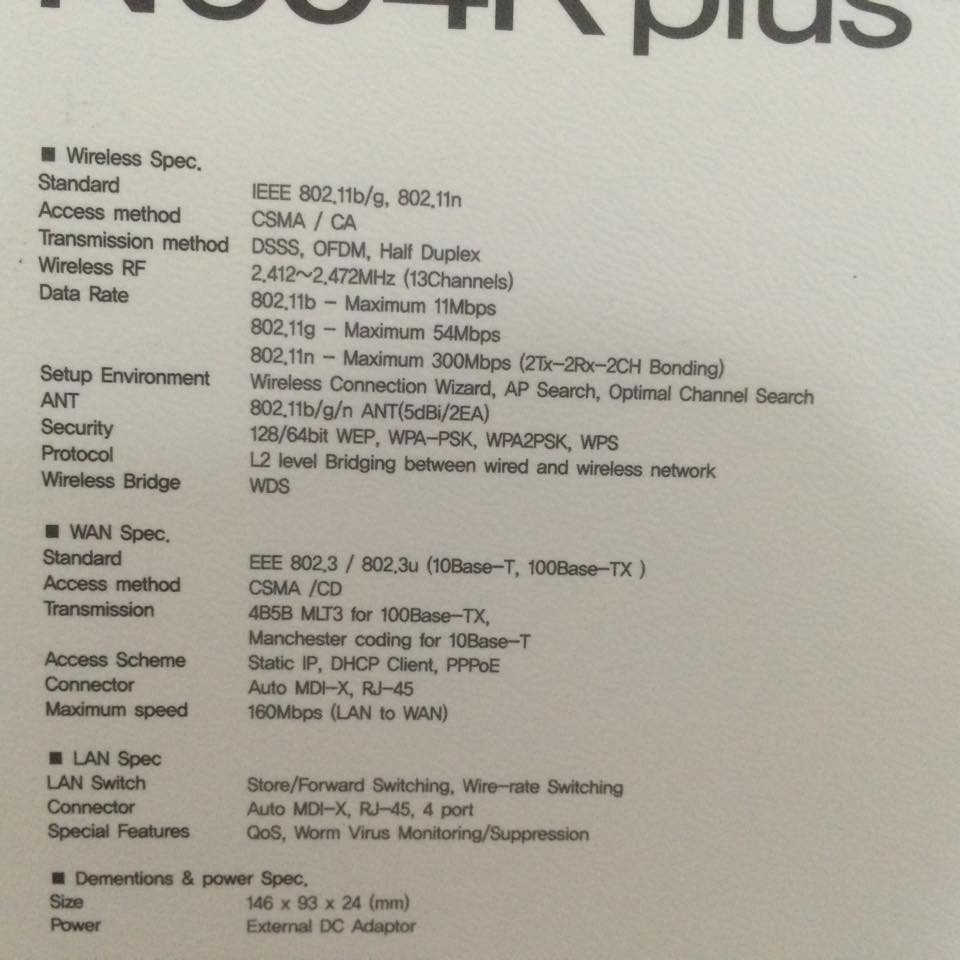
Here are the specs:

8gCnYYbZ
8gCnYYbZ.jpg


I'm just curious why there's a big difference between my speed on LAN and on Wi-Fi. I know there's a disparity but I just think it is too big? Or this one is still normal?

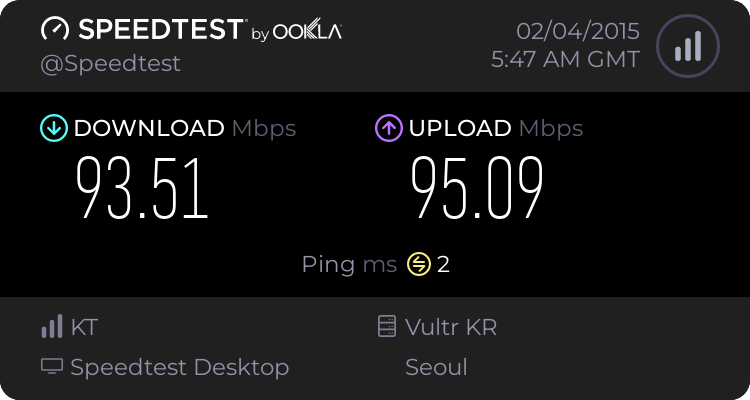
Speedtest on my laptop connected through LAN:
4114899749.png


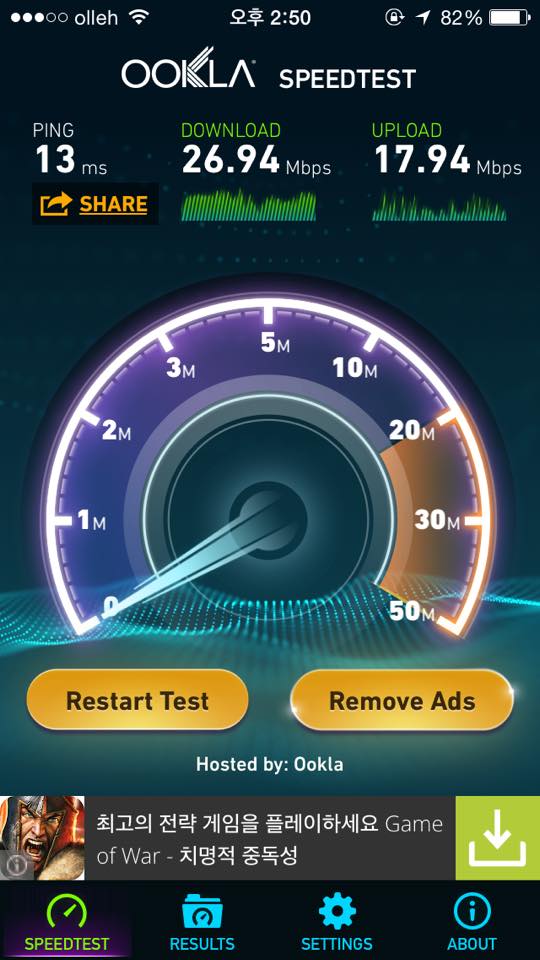
Speedtest on my iPhone 5S connected through Wi-Fi:

FAGyDzFs
FAGyDzFs.jpg


If someone can explain the reason to me, I would really appreciate it. I just want to know why. :) Thanks!
 

My Computer My Computer

Computer type
PC/Desktop
OS
Windows 10 Pro 64-bit
CPU
AMD Ryzen 5 1600
Motherboard
ASRock AB350 Pro4
Memory
2 x 8 GB G.Skill Ripjaws V DDR4 3000Mhz (F4-30000C15D)
Graphics Card(s)
EVGA GeForce GTX 1060 SSC GAMING ACX 3.0 6GB
Monitor(s) Displays
ViewSonic XG3202-C
Screen Resolution
1920x1080 (144hz)
Hard Drives
Main: Crucial MX200 500 GB
Sub: Seagate Barracuda 1 TB
PSU
Corsair TX650M
Case
NZXT S340 Elite (Matte Black/Red)
Keyboard
Razer BlackWidow Ultimate 2016
Mouse
Razer DeathAdder Chroma
Internet Speed
1000 Mbps
Antivirus
Norton Internet Security
Browser
Google Chrome, Mozilla Firefox
Simple, Ethernet throughput is 1Gbps, Wi-Fi maxes out at 300Mbps, thus ethernet gives more headroom for uncompressed data.
Also you performed the 2nd test through mobile phone, speedtest.net is flash-based test, so it requires lots of CPU as well, and that's where your phone might have distort the results.
 

My Computer My Computer

Computer type
Laptop
Computer Manufacturer/Model Number
IBM Thinkpad T42
OS
Windows XP Professional x86
CPU
Intel Pentium M 745
Motherboard
T42
Memory
1GB DDR-333
Graphics Card(s)
ATi Radeon 9600
Sound Card
AD1981B
Monitor(s) Displays
14.1" LG TFT
Screen Resolution
1400x1050
Hard Drives
1x 100GB Seagate IDE 5400rpm
PSU
65+120W
Keyboard
Thinkpad's owh
Mouse
Touchpad, Trackpoint, XL-750BK
Internet Speed
100/100
Antivirus
hell no!
Simple, Ethernet throughput is 1Gbps, Wi-Fi maxes out at 300Mbps, thus ethernet gives more headroom for uncompressed data.
Also you performed the 2nd test through mobile phone, speedtest.net is flash-based test, so it requires lots of CPU as well, and that's where your phone might have distort the results.

Yup I know that difference but the speedtest on my iPhone through Wi-Fi doesn't even reach that 300 mbps. Someone told me it's an iPhone limitation already.
 

My Computer My Computer

Computer type
PC/Desktop
OS
Windows 10 Pro 64-bit
CPU
AMD Ryzen 5 1600
Motherboard
ASRock AB350 Pro4
Memory
2 x 8 GB G.Skill Ripjaws V DDR4 3000Mhz (F4-30000C15D)
Graphics Card(s)
EVGA GeForce GTX 1060 SSC GAMING ACX 3.0 6GB
Monitor(s) Displays
ViewSonic XG3202-C
Screen Resolution
1920x1080 (144hz)
Hard Drives
Main: Crucial MX200 500 GB
Sub: Seagate Barracuda 1 TB
PSU
Corsair TX650M
Case
NZXT S340 Elite (Matte Black/Red)
Keyboard
Razer BlackWidow Ultimate 2016
Mouse
Razer DeathAdder Chroma
Internet Speed
1000 Mbps
Antivirus
Norton Internet Security
Browser
Google Chrome, Mozilla Firefox
Simple, Ethernet throughput is 1Gbps, Wi-Fi maxes out at 300Mbps, thus ethernet gives more headroom for uncompressed data.
Also you performed the 2nd test through mobile phone, speedtest.net is flash-based test, so it requires lots of CPU as well, and that's where your phone might have distort the results.

Yup I know that difference but the speedtest on my iPhone through Wi-Fi doesn't even reach that 300 mbps. Someone told me it's an iPhone limitation already.

it's not going to reach 300 Mb/s anyway, since your internet is not that fast, you can see that it tops out at around 95 Mb/s on your Ethernet-connected computer.

Regardless, the speed of the switch (or WAP in your case) has nothing to do with internet, but how fast data travels from your device to the switch. In a perfect lab environment, the actual speed of the connection between your iPhone and the WAP could get close to 300 Mb/s.
 

My Computer My Computer

Computer type
PC/Desktop
OS
Windows 7 Pro
Back
Top