
How to print 3x5 Index Cards and 3.5 x 6.5 Envelopes in Word 2007

CluelessInSeatl

New member
Local time
9:55 AM
Messages
23
I've been using Word 2003 for a long while, and so have a large number of .dot files set up for printing onto 3x5 cards.

A while back I was given a hand-me-down PC with Word 2007 already installed on it. But when I try to print a from Word 2007 a .doc file that was based on one of my .dot files for printing 3x5 cards, the better part of the text doesn't print on the card. It appears that Word 2007 is is trying to print on 8.5x11.5 paper, even though I'm using the manual feeder on my HP LaserJet P1006 printer, and have set the paper size to 3" x 5" in Word.

So I end up having to go to the other room, and and send the same file over my network from my old computer running Word 2003 to the same printer. Then the file prints out properly onto the 3x5 card.

What's the trick to telling Word 2007 that I'm trying to print onto a 3x5 index card?

Will in Seattle a.k.a. "Clueless"
 

My Computer My Computer

At a glance

MS DOS 6.21, Win 2K, Win XP & Windows 7
Computer type
PC/Desktop
OS
MS DOS 6.21, Win 2K, Win XP & Windows 7
Actually, you may need to tell your printer you are printing on 3x5 stock. Also, check your printer settings to make sure 3x5 stock is a standard size. If not, you may have to add it.
 

My Computer My Computer

At a glance

Win 7 Ultimate 64 bitIntel i7-3930KKingston HyperX Genesis 32GB Kit (8x4GB Modul...MSI R7850 Twin Frozr 2GD5/OC Radeon HD 7850 2...
Computer type
PC/Desktop
Computer Manufacturer/Model Number
Custom Build
OS
Win 7 Ultimate 64 bit
CPU
Intel i7-3930K
Motherboard
ASUS P9X79 WS
Memory
Kingston HyperX Genesis 32GB Kit (8x4GB Modules) 1600MHz DDR
Graphics Card(s)
MSI R7850 Twin Frozr 2GD5/OC Radeon HD 7850 2GB 256-bit GDDR
Sound Card
Asus Xonar Essence STX
Monitor(s) Displays
3x Asus VG248QE 24", Vizio 32" TV
Screen Resolution
1920 x 1080, ?
Hard Drives
Samsung 128GB 840 Pro SSD (1),
Samsung 4TB 850 EVO SSDs (4)
Samsung 4TB 850 EVO SSDs (16) external backup drives used in 2.5" hot swap bays in the computer.
PSU
Corsair HX750w
Case
Antec Two Hundred v2 (modified)
Cooling
Cooler Master GeminII S524 120mm (fan replaced with a 140mm)
Keyboard
Logitech G510s
Mouse
Logitech M525 (two in use)
Internet Speed
=< 32Mbps down, 8Mbps up
Antivirus
AVAST!, MBAM, SAS, Spybot S&D (all but MBAM free) Glary Util
Browser
IE11
Other Info
LSI 9211-8i HBA card (8 SATA III ports), 2.5" & 3.5" Hot Swap Bays, HooToo HT-CR001 PCI-E to USB 3.0 Internal Hub + 6 Slot Card Reader, and LG Model CH12LS28 BD-ROM Optical Drive. Also, ScanSnap S1500 ADF duplexing scanner, Canon 9000F flat bed scanner, Corsair SP2500 2.1 speakers, Samsung CLP 415nw laser color printer, Cyberpower PP2200SW UPS
It may also be easier to use Avery Dennison card stock for 3x5, 4x6 or postcards. They are on 8.5"x11" sheets and micro-perforated for easy separation. The Avery number for 4"x6" postcards is 5389 for my Laserjet printer but can be used in my Inkjet printer. Some printers' paper trays simply can't be adjusted down to hold the smallest sizes which makes those on sheets easier to manage. [I actually use WordPerfect for most of my label, business card and envelope printing, easier than Word.]
 

My Computer My Computer

At a glance

Windows 7 Ultimate 64-bit, Windows 8.1 64-bit...
Computer type
PC/Desktop
Computer Manufacturer/Model Number
Customs, Dell, Gateway, HP, Toshiba, Acer, ASUS
OS
Windows 7 Ultimate 64-bit, Windows 8.1 64-bit, Mac OS X 10.10, Linux Mint 17, Windows 10 Pro TP
Keyboard
Microsoft
Mouse
Microsoft
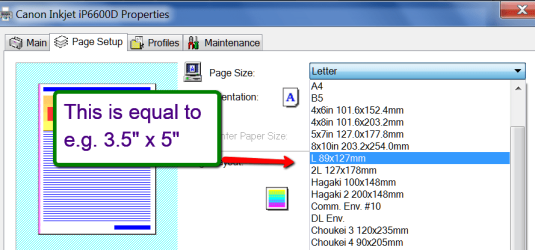
See picture of printer properties.
 

Attachments

  • 2015-02-11_2113.png
    2015-02-11_2113.png
    22.7 KB · Views: 0

My Computer My Computer

At a glance

Vista, Windows7, Mint Mate, Zorin, Windows 8from 1.6GHz Duo to i7
Computer Manufacturer/Model Number
HP, Dell, Gateway, Toshiba - 4 laptops and 2 desktops
OS
Vista, Windows7, Mint Mate, Zorin, Windows 8
CPU
from 1.6GHz Duo to i7
Monitor(s) Displays
2x HP w2207
Hard Drives
5x HDD, 7x SSD, 12x Externals
Keyboard
with trackball - no mices
Mouse
Trackball mice
Internet Speed
DSL 6000
It may also be easier to use Avery Dennison card stock for 3x5, 4x6 or postcards. They are on 8.5"x11" sheets and micro-perforated for easy separation. The Avery number for 4"x6" postcards is 5389 for my Laserjet printer but can be used in my Inkjet printer. Some printers' paper trays simply can't be adjusted down to hold the smallest sizes which makes those on sheets easier to manage.

Hi Berton! Thanks for offering to help me on this.

Actually, my printer has an adjustable paper tray for printing 3x5 cards. And it works fine for printing 3x5 cards when I print from Word 2003. So I'm operating on the assumption that the problem is not with the card feeder, since it is still functioning properly. In fact, what I have to do to print 3x5 cards is go to my computer in the other room, open the file I want to print from the Word 2003 I have installed on that computer, and then send the file from there to the printer.

A minor nuisance, but a nuisance nonetheless.

[I actually use WordPerfect for most of my label, business card and envelope printing, easier than Word.]
"WordPerfect"?! Now there's a name I haven't heard in a long, long while! I was a WordStar guy, myself. In CP/M, no less.

And thanks for that picture of the printer properties set-up page. Up to now I've never had to fiddle with my HP LaserJet P1006 settings. It always just took the settings from whatever program I was printing from. I'm still hoping I can figure out how to get Word 2007 to send the correct settings to the printer, instead of my having to learn how to re-jigger the printer every time I want to print on different sizes of paper, cards, envelopes, etc.

Thanks again for your help,

Will in Seattle
a.k.a. "Clueless"
 

My Computer My Computer

At a glance

MS DOS 6.21, Win 2K, Win XP & Windows 7
Computer type
PC/Desktop
OS
MS DOS 6.21, Win 2K, Win XP & Windows 7
[FONT=&quot]Hi! In order to facilitate and automate the printing of documents in Word 2007, install FolderMill ([/FONT][FONT=&quot][FONT=&quot]http://www.foldermill.com/[/FONT]). This program assumes the entire printer setup and management, as well as automatically convert document formats.[/FONT]
 

My Computer My Computer

At a glance

Windows 7 Ultimate x64
Computer type
PC/Desktop
OS
Windows 7 Ultimate x64
...Up to now I've never had to fiddle with my HP LaserJet P1006 settings. It always just took the settings from whatever program I was printing from. I'm still hoping I can figure out how to get Word 2007 to send the correct settings to the printer, instead of my having to learn how to re-jigger the printer every time I want to print on different sizes of paper, cards, envelopes, etc.

Thanks again for your help,

Will in Seattle
a.k.a. "Clueless"

The problem isn't with Word—it sends the correct data to the printer. The problem is with your current printer. Many newer printers have to have the size specified in its driver to be able to properly print. My old HP printer would print any size Word doc I threw at it without a problem. My current Samsung has only so many standard sizes; to print a custom size, I have to go into the driver software to create a custom size that I can print. For some odd reason, #6 envelopes were not a standard size; I had to create a custom setting for it. Once I did that, I was able print them automatically.

My old HP would handle different media densities without a hitch. My current Samsung POS has to be told to ignore the default paper density every time I print an envelope or 3x5 card. Fortunately for me, the printer is within fairly easy reach of my computer chair (I have to lean over a wee bit) so I can hit the OK button once or twice (it seems to depend on the printer's "mood") to get the printout to go through.

That's just my printer, though. Your printer may have different settings that may require you to make a custom size every time you use it or otherwise behave differently.
 

My Computer My Computer

At a glance

Win 7 Ultimate 64 bitIntel i7-3930KKingston HyperX Genesis 32GB Kit (8x4GB Modul...MSI R7850 Twin Frozr 2GD5/OC Radeon HD 7850 2...
Computer type
PC/Desktop
Computer Manufacturer/Model Number
Custom Build
OS
Win 7 Ultimate 64 bit
CPU
Intel i7-3930K
Motherboard
ASUS P9X79 WS
Memory
Kingston HyperX Genesis 32GB Kit (8x4GB Modules) 1600MHz DDR
Graphics Card(s)
MSI R7850 Twin Frozr 2GD5/OC Radeon HD 7850 2GB 256-bit GDDR
Sound Card
Asus Xonar Essence STX
Monitor(s) Displays
3x Asus VG248QE 24", Vizio 32" TV
Screen Resolution
1920 x 1080, ?
Hard Drives
Samsung 128GB 840 Pro SSD (1),
Samsung 4TB 850 EVO SSDs (4)
Samsung 4TB 850 EVO SSDs (16) external backup drives used in 2.5" hot swap bays in the computer.
PSU
Corsair HX750w
Case
Antec Two Hundred v2 (modified)
Cooling
Cooler Master GeminII S524 120mm (fan replaced with a 140mm)
Keyboard
Logitech G510s
Mouse
Logitech M525 (two in use)
Internet Speed
=< 32Mbps down, 8Mbps up
Antivirus
AVAST!, MBAM, SAS, Spybot S&D (all but MBAM free) Glary Util
Browser
IE11
Other Info
LSI 9211-8i HBA card (8 SATA III ports), 2.5" & 3.5" Hot Swap Bays, HooToo HT-CR001 PCI-E to USB 3.0 Internal Hub + 6 Slot Card Reader, and LG Model CH12LS28 BD-ROM Optical Drive. Also, ScanSnap S1500 ADF duplexing scanner, Canon 9000F flat bed scanner, Corsair SP2500 2.1 speakers, Samsung CLP 415nw laser color printer, Cyberpower PP2200SW UPS
Back
Top