
kayipbalik
New member
- Local time
- 9:21 AM
- Messages
- 2
So here is what happened, in steps:
1) Started BitLocker encryption on drive E:
2) Power failure interrupts the process around %17
3) Could neither access drive E: nor continue BitLocker encryption
4) After some search, found out that BitLocker Repair Tool can recover a drive to "an empty output volume of equal or larger size than the BitLocker-protected drive"
https://technet.microsoft.com/en-us/library/ee523219(v=ws.10).aspx
5) Did that. After the decryption process, used "chkdsk /f", to check for and fix errors.
6) After that, formatted drive E: and re-copied its content back in
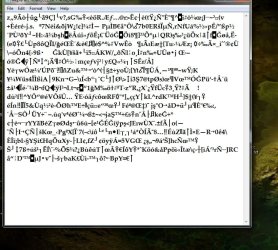
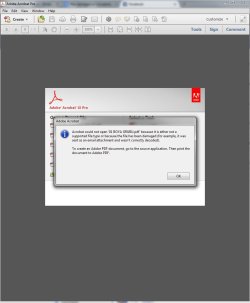
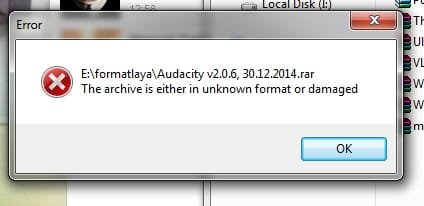
7) Found out the next day that some files are not working. Text documents have scrambled symbols in them, for example. Rar, pdf, iso, jpg, doc.. All kinds of files are affected.
Interestingly, the same files in multiple folders within the drive do not work in any of the locations.
I did a loooooong search, but all I could find was thousands of posts everywhere on "How To Recover A File From A Damaged Drive".
But I do have the files. They are already "recovered".
Still, tried a bunch of recovery tools, even though I already knew that it was futile, since:
a) I had already copied the content of the drive in question back in it.
b) It is not that the files are missing. They somehow remained "scrambled", I believe. They don't need to be recovered. They need to be "repaired", maybe, don't know how, but with the "BitLocker Recovery Key" file that I still have?
Any suggestions?
1) Started BitLocker encryption on drive E:
2) Power failure interrupts the process around %17
3) Could neither access drive E: nor continue BitLocker encryption
4) After some search, found out that BitLocker Repair Tool can recover a drive to "an empty output volume of equal or larger size than the BitLocker-protected drive"
https://technet.microsoft.com/en-us/library/ee523219(v=ws.10).aspx
5) Did that. After the decryption process, used "chkdsk /f", to check for and fix errors.
6) After that, formatted drive E: and re-copied its content back in
7) Found out the next day that some files are not working. Text documents have scrambled symbols in them, for example. Rar, pdf, iso, jpg, doc.. All kinds of files are affected.
Interestingly, the same files in multiple folders within the drive do not work in any of the locations.
I did a loooooong search, but all I could find was thousands of posts everywhere on "How To Recover A File From A Damaged Drive".
But I do have the files. They are already "recovered".
Still, tried a bunch of recovery tools, even though I already knew that it was futile, since:
a) I had already copied the content of the drive in question back in it.
b) It is not that the files are missing. They somehow remained "scrambled", I believe. They don't need to be recovered. They need to be "repaired", maybe, don't know how, but with the "BitLocker Recovery Key" file that I still have?
Any suggestions?
Attachments
My Computer
At a glance
Windows 7 Ultimate x64
- Computer type
- PC/Desktop
- OS
- Windows 7 Ultimate x64


