Reinstalled Win7, getting dual boot options but I only want one

lose311

New member
Local time
7:17 PM
Messages
6
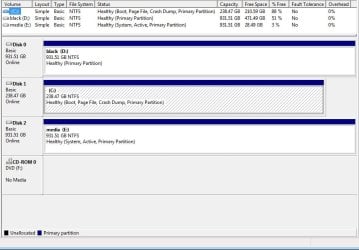
Last time I installed Win7 Ultimate 64, it was after I had erased all my hard drives and reformatted them. I always install Windows to my SSD (C), but last time my media drive (E) was empty so Windows put the "boot" folder in E but the rest of Windows in C as I wanted. Now that I have re-installed Windows again on C, whenever I boot up I get the dual boot screen, asking if I want to boot "Windows 7" or "Windows 7". I choose the first one and it takes me to my newly installed Windows. How can I get rid of the second dual boot option? I'm guessing it has to do with the fact that my E drive has a system tag on it in the Computer Management screen (see attachment). I don't mind if I have to reformat any of the drives, I can move my files around no problem.. just want to know what I need to do to fix this. I'm still in the early stages of setting up my apps/settings, so if I have to reinstall Windows I'd rather do it now.

thanks..
 

Attachments

  • problem.jpg
    problem.jpg
    68.9 KB · Views: 4

My Computer My Computer

At a glance

Win 7 Ultimate x64AMD Fx6200 Six CoreCorsair Vengeance 8 GB (2X4 GB) PC3-12800 160...Asus GTX 650 Ti Boost DirectCU II (2 GB)
Computer type
PC/Desktop
Computer Manufacturer/Model Number
Custom build
OS
Win 7 Ultimate x64
CPU
AMD Fx6200 Six Core
Motherboard
Asus M5A99x Evo
Memory
Corsair Vengeance 8 GB (2X4 GB) PC3-12800 1600mHz DDR3
Graphics Card(s)
Asus GTX 650 Ti Boost DirectCU II (2 GB)
Hard Drives
Crucial MX100 256G (boot)
Hitachi 1TB
WD Black 1TB
Antivirus
MSE
Browser
Chrome

My Computer My Computer

At a glance

64-bit Windows 11 Pro for WorkstationsIntel i7-8700K OC'd to 5 GHz64 GB (4x16GB) G.SKILL TridentZ RGB DDR4 3600...ASUS ROG-STRIX-GTX1080TI-O11G-GAMING
Computer type
PC/Desktop
Computer Manufacturer/Model Number
Self built custom
OS
64-bit Windows 11 Pro for Workstations
CPU
Intel i7-8700K OC'd to 5 GHz
Motherboard
ASUS ROG Maximus XI Formula Z390
Memory
64 GB (4x16GB) G.SKILL TridentZ RGB DDR4 3600 MHz
Graphics Card(s)
ASUS ROG-STRIX-GTX1080TI-O11G-GAMING
Sound Card
Integrated
Monitor(s) Displays
2 x Samsung Odyssey G7 27"
Screen Resolution
2560x1440
Hard Drives
1TB Samsung 990 PRO M.2,
4TB Samsung 990 PRO PRO M.2,
TerraMaster F8 SSD Plus NAS
PSU
Seasonic Prime Titanium 850W
Case
Thermaltake Core P3
Cooling
Corsair Hydro H115i
Keyboard
Logitech wireless K800
Mouse
Logitech MX Master 4
Internet Speed
2 Gb/s Download and 100 Mb/s Upload
Antivirus
Malwarebyte Anti-Malware Premium
Browser
Google Chrome
Other Info
Logitech Z625 speaker system,
Logitech BRIO 4K Pro webcam,
HP Color LaserJet Pro MFP M477fdn,
APC SMART-UPS RT 1000 XL - SURT1000XLI,
Galaxy S23 Plus phone
Almost too easy.. thanks!
 

My Computer My Computer

At a glance

Win 7 Ultimate x64AMD Fx6200 Six CoreCorsair Vengeance 8 GB (2X4 GB) PC3-12800 160...Asus GTX 650 Ti Boost DirectCU II (2 GB)
Computer type
PC/Desktop
Computer Manufacturer/Model Number
Custom build
OS
Win 7 Ultimate x64
CPU
AMD Fx6200 Six Core
Motherboard
Asus M5A99x Evo
Memory
Corsair Vengeance 8 GB (2X4 GB) PC3-12800 1600mHz DDR3
Graphics Card(s)
Asus GTX 650 Ti Boost DirectCU II (2 GB)
Hard Drives
Crucial MX100 256G (boot)
Hitachi 1TB
WD Black 1TB
Antivirus
MSE
Browser
Chrome
You're most welcome. :)
 

My Computer My Computer

At a glance

64-bit Windows 11 Pro for WorkstationsIntel i7-8700K OC'd to 5 GHz64 GB (4x16GB) G.SKILL TridentZ RGB DDR4 3600...ASUS ROG-STRIX-GTX1080TI-O11G-GAMING
Computer type
PC/Desktop
Computer Manufacturer/Model Number
Self built custom
OS
64-bit Windows 11 Pro for Workstations
CPU
Intel i7-8700K OC'd to 5 GHz
Motherboard
ASUS ROG Maximus XI Formula Z390
Memory
64 GB (4x16GB) G.SKILL TridentZ RGB DDR4 3600 MHz
Graphics Card(s)
ASUS ROG-STRIX-GTX1080TI-O11G-GAMING
Sound Card
Integrated
Monitor(s) Displays
2 x Samsung Odyssey G7 27"
Screen Resolution
2560x1440
Hard Drives
1TB Samsung 990 PRO M.2,
4TB Samsung 990 PRO PRO M.2,
TerraMaster F8 SSD Plus NAS
PSU
Seasonic Prime Titanium 850W
Case
Thermaltake Core P3
Cooling
Corsair Hydro H115i
Keyboard
Logitech wireless K800
Mouse
Logitech MX Master 4
Internet Speed
2 Gb/s Download and 100 Mb/s Upload
Antivirus
Malwarebyte Anti-Malware Premium
Browser
Google Chrome
Other Info
Logitech Z625 speaker system,
Logitech BRIO 4K Pro webcam,
HP Color LaserJet Pro MFP M477fdn,
APC SMART-UPS RT 1000 XL - SURT1000XLI,
Galaxy S23 Plus phone
I would also move the Bootmgr - Move to C:\ with EasyBCD - Windows 7 Forums so that it isn't dependent upon the other drive to boot.

Once C is marked System Active, you may need to mark E Inactive. Partition - Mark as Inactive - Windows 7 Forums

Are you sure you didn't install two Win7's? If in doubt check for a Windows folder on the other hard drives.

Already checked other drives.. there is still a "Boot" folder in E, but no other windows folders except the one in C. Can I safely delete the "Boot" folder in E because that was there from an old Win install?

Anyway, I will try the other steps you mentioned.. thanks.
 

My Computer My Computer

At a glance

Win 7 Ultimate x64AMD Fx6200 Six CoreCorsair Vengeance 8 GB (2X4 GB) PC3-12800 160...Asus GTX 650 Ti Boost DirectCU II (2 GB)
Computer type
PC/Desktop
Computer Manufacturer/Model Number
Custom build
OS
Win 7 Ultimate x64
CPU
AMD Fx6200 Six Core
Motherboard
Asus M5A99x Evo
Memory
Corsair Vengeance 8 GB (2X4 GB) PC3-12800 1600mHz DDR3
Graphics Card(s)
Asus GTX 650 Ti Boost DirectCU II (2 GB)
Hard Drives
Crucial MX100 256G (boot)
Hitachi 1TB
WD Black 1TB
Antivirus
MSE
Browser
Chrome
You cannot delete the Boot folder from E until you move it there using the tutorial and tool I linked you before, or the OS won't boot.

As stated E is presently booting C as signified by the System Active flags, and will continue doing so until you make the changes and confirm C is now System Active.
 
In the future always unplug all other hard drives to avoid this problem.
 

My Computer My Computer

At a glance

Windows 10 Pro x64Intel Core i7 6700KGSkill TridentZ RGB 16GB 3600 16-16-16-36EVGA GTX 980 Ti SC x2
Computer type
PC/Desktop
Computer Manufacturer/Model Number
Skylake Special #666
OS
Windows 10 Pro x64
CPU
Intel Core i7 6700K
Motherboard
Asus Sabertooth Z170 Mark 1
Memory
GSkill TridentZ RGB 16GB 3600 16-16-16-36
Graphics Card(s)
EVGA GTX 980 Ti SC x2
Sound Card
Realtek High Definition
Monitor(s) Displays
AOC G2460PG
Screen Resolution
1920 x 1080 144Hz
Hard Drives
Samsung 860 Pro 256GB, Seagate Barracuda 4TB x2
PSU
EVGA 1000 P2, EVGA White Custom Braided Cables
Case
Corsair Vengeance C70 Gunmetal Black
Cooling
Corsair H100i v2, Corsair ML120 x2, Thermal Grizzly Kryonaut
Keyboard
Logitech G910 Orion Spectrum
Mouse
Logitech G700s
Internet Speed
Verizon Fios Quantum Gateway 75/75
Antivirus
Windows Defender, Malwarebytes Free 3.8.3
Browser
Chrome
Other Info
Corsair SP120 x4, LG Blu-ray Drive, Durabrand HT-395 100 Watt Dolby Digital Amp, Corsair H2100 Wireless 7.1 Headset
I would also move the Bootmgr - Move to C:\ with EasyBCD - Windows 7 Forums so that it isn't dependent upon the other drive to boot.

Once C is marked System Active, you may need to mark E Inactive. Partition - Mark as Inactive - Windows 7 Forums

Are you sure you didn't install two Win7's? If in doubt check for a Windows folder on the other hard drives.

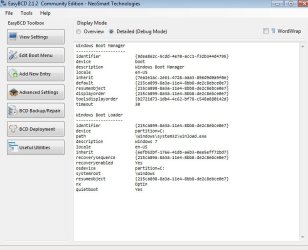
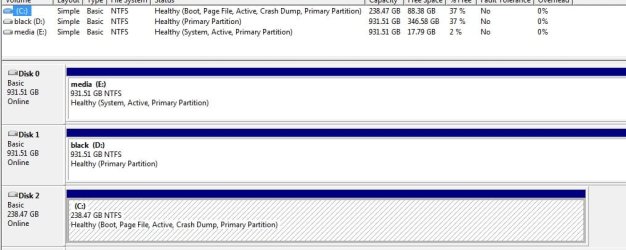
Ok.. sorry for the delay but I finally got around to using EasyBCD to move the bootmgr to C:. But E: is still system and active. Can I mark it inactive now or is there another step required?

Attachment of current Disk Management and EasyBCD output

thanks.
 

Attachments

  • bcd.jpg
    bcd.jpg
    52.5 KB · Views: 3
  • hd.jpg
    hd.jpg
    59.5 KB · Views: 4

My Computer My Computer

At a glance

Win 7 Ultimate x64AMD Fx6200 Six CoreCorsair Vengeance 8 GB (2X4 GB) PC3-12800 160...Asus GTX 650 Ti Boost DirectCU II (2 GB)
Computer type
PC/Desktop
Computer Manufacturer/Model Number
Custom build
OS
Win 7 Ultimate x64
CPU
AMD Fx6200 Six Core
Motherboard
Asus M5A99x Evo
Memory
Corsair Vengeance 8 GB (2X4 GB) PC3-12800 1600mHz DDR3
Graphics Card(s)
Asus GTX 650 Ti Boost DirectCU II (2 GB)
Hard Drives
Crucial MX100 256G (boot)
Hitachi 1TB
WD Black 1TB
Antivirus
MSE
Browser
Chrome
C needs the system files written to it, even though it`s marked active, startup repair may not write system files to it. If you mark E inactive, Windows on C will not boot until the system files are written to it.

Unplugging all other drives then running startup repair is supposed to fix this, but it never works 100 % of the time.

It can be done with Diskpart, but I would just use the Partition Wizard boot cd to mark E inactive. First you unplug any other drives, then mark it in active, the system files just magically dissapear. ( at least they don`t show up on it anymore )

If you can never get C booting on it`s own, you`ll end up re installing windows to C :(

The real experts on this will help you get the system files on C to have it boot on it`s own.
 

My Computer My Computer

At a glance

Windows 10 Pro x64Intel Core i7 6700KGSkill TridentZ RGB 16GB 3600 16-16-16-36EVGA GTX 980 Ti SC x2
Computer type
PC/Desktop
Computer Manufacturer/Model Number
Skylake Special #666
OS
Windows 10 Pro x64
CPU
Intel Core i7 6700K
Motherboard
Asus Sabertooth Z170 Mark 1
Memory
GSkill TridentZ RGB 16GB 3600 16-16-16-36
Graphics Card(s)
EVGA GTX 980 Ti SC x2
Sound Card
Realtek High Definition
Monitor(s) Displays
AOC G2460PG
Screen Resolution
1920 x 1080 144Hz
Hard Drives
Samsung 860 Pro 256GB, Seagate Barracuda 4TB x2
PSU
EVGA 1000 P2, EVGA White Custom Braided Cables
Case
Corsair Vengeance C70 Gunmetal Black
Cooling
Corsair H100i v2, Corsair ML120 x2, Thermal Grizzly Kryonaut
Keyboard
Logitech G910 Orion Spectrum
Mouse
Logitech G700s
Internet Speed
Verizon Fios Quantum Gateway 75/75
Antivirus
Windows Defender, Malwarebytes Free 3.8.3
Browser
Chrome
Other Info
Corsair SP120 x4, LG Blu-ray Drive, Durabrand HT-395 100 Watt Dolby Digital Amp, Corsair H2100 Wireless 7.1 Headset
Did you follow the steps exactly in Bootmgr - Move to C:\ with EasyBCD and have you rebooted several times? The System flag is still on E and not yet on C so it is not booting itself.

Try moving it again and then if it doesn't get flagged System, power down to swap cables between Disk0 and Disk2 so Win7 is in first position. Then boot Win7 disk or System Repair Disk to run Startup Repair - Run 3 Separate Times until Win7 boots and holds the System flag. Make sure Disk0 remains first to boot in BIOS setup. Trigger the disk with the one-time BIOS Boot menu key.

Once Win7 is marked System Active then you can mark E Inactive so the System flag goes away if it doesn't on it's own. Partition - Mark as Inactive - Windows 7 Forums
 
Did you follow the steps exactly in Bootmgr - Move to C:\ with EasyBCD and have you rebooted several times? The System flag is still on E and not yet on C so it is not booting itself.

Try moving it again and then if it doesn't get flagged System, power down to swap cables between Disk0 and Disk2 so Win7 is in first position. Then boot Win7 disk or System Repair Disk to run Startup Repair - Run 3 Separate Times until Win7 boots and holds the System flag. Make sure Disk0 remains first to boot in BIOS setup. Trigger the disk with the one-time BIOS Boot menu key.

Once Win7 is marked System Active then you can mark E Inactive so the System flag goes away if it doesn't on it's own. Partition - Mark as Inactive - Windows 7 Forums

Yeah, I did follow steps exactly and have rebooted a few times. Will try again later today and report back, thanks!
 

My Computer My Computer

At a glance

Win 7 Ultimate x64AMD Fx6200 Six CoreCorsair Vengeance 8 GB (2X4 GB) PC3-12800 160...Asus GTX 650 Ti Boost DirectCU II (2 GB)
Computer type
PC/Desktop
Computer Manufacturer/Model Number
Custom build
OS
Win 7 Ultimate x64
CPU
AMD Fx6200 Six Core
Motherboard
Asus M5A99x Evo
Memory
Corsair Vengeance 8 GB (2X4 GB) PC3-12800 1600mHz DDR3
Graphics Card(s)
Asus GTX 650 Ti Boost DirectCU II (2 GB)
Hard Drives
Crucial MX100 256G (boot)
Hitachi 1TB
WD Black 1TB
Antivirus
MSE
Browser
Chrome
If EasyBCD doesn't work after you try again, then I'd also unplug all other hard drives when you swap Win7 drive to DiSK0 cable. This avoids any interference. Let us know how it goes.
 
Back
Top