
v12vanquish135
New member
- Local time
- 2:19 PM
- Messages
- 2
Hello good people!
I find myself in a precarious situation. About 2 years ago I installed Windows 7 on my new 1TB hard drive I had just bought to replace my old Windows XP installed drive - actually, I planned on using the first one as a backup drive in case I ever need it. So here's the thing; I installed Win7 on my new drive, but I left the first one plugged in while I was doing it. Win7 understood by that - I guess - that i wanted to setup a dual boot system (which i learned today). So it did that. And it was kinda handy, having both drives working at once.
Thing is, my Win7 drive has run its course, and is in dire need of a format. So I figured I would format my D: drive first, seeing as I don't use it, so I can get it all cleaned up, and then transfer all the files I want to keep from my C: drive to my D: drive. Thing is, as I learned, the dual boot thing prevents me from formatting either drives while running windows 7. Which also means that my only immediate way of formatting them would be to do both at once, but if I do that, I can't keep backups (i don't have an external HDD, nor a third HDD, and I currently don't have the cash to buy either one of them).
So I looked online, learned quite a lot about the situation, but most fixes I found online seem to be very complex in nature, and all of them had slight differences with my current situation. Here's my disk management screen :
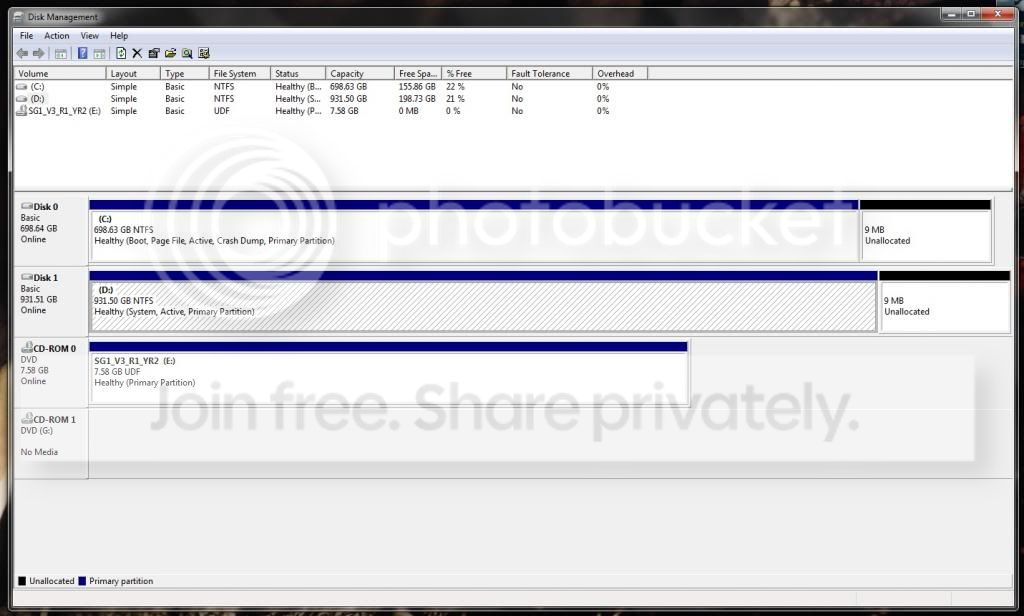
So my disk 0 is the one with Windows7 installed, and disk 1 is the one with XP. I thought maybe I could just free some space on my D: drive, dump my stuff there, boot on that drive with XP and format the C: drive like that, but would that work? Win7 is the one in dual boot, not XP, right? Otherwise, what should I do to make this work? Like I said, I found a few tutorials online, but I want to make sure that they work in my particular case so I don't mess up my drives/end up losing everything.
PS : Ideally I would like to format both drives, but not at the same time; D: first, to use as a backup drive, and then C: to reinstall Win7 properly (I don't need to keep XP, actually I want it gone).
Thanks!!
I find myself in a precarious situation. About 2 years ago I installed Windows 7 on my new 1TB hard drive I had just bought to replace my old Windows XP installed drive - actually, I planned on using the first one as a backup drive in case I ever need it. So here's the thing; I installed Win7 on my new drive, but I left the first one plugged in while I was doing it. Win7 understood by that - I guess - that i wanted to setup a dual boot system (which i learned today). So it did that. And it was kinda handy, having both drives working at once.
Thing is, my Win7 drive has run its course, and is in dire need of a format. So I figured I would format my D: drive first, seeing as I don't use it, so I can get it all cleaned up, and then transfer all the files I want to keep from my C: drive to my D: drive. Thing is, as I learned, the dual boot thing prevents me from formatting either drives while running windows 7. Which also means that my only immediate way of formatting them would be to do both at once, but if I do that, I can't keep backups (i don't have an external HDD, nor a third HDD, and I currently don't have the cash to buy either one of them).
So I looked online, learned quite a lot about the situation, but most fixes I found online seem to be very complex in nature, and all of them had slight differences with my current situation. Here's my disk management screen :
So my disk 0 is the one with Windows7 installed, and disk 1 is the one with XP. I thought maybe I could just free some space on my D: drive, dump my stuff there, boot on that drive with XP and format the C: drive like that, but would that work? Win7 is the one in dual boot, not XP, right? Otherwise, what should I do to make this work? Like I said, I found a few tutorials online, but I want to make sure that they work in my particular case so I don't mess up my drives/end up losing everything.
PS : Ideally I would like to format both drives, but not at the same time; D: first, to use as a backup drive, and then C: to reinstall Win7 properly (I don't need to keep XP, actually I want it gone).
Thanks!!
My Computer
At a glance
Windows 7 Ultimate x64Intel Core i54GB DDR3Nvidia GeForce GTX660
- Computer type
- PC/Desktop
- Computer Manufacturer/Model Number
- Custom
- OS
- Windows 7 Ultimate x64
- CPU
- Intel Core i5
- Motherboard
- Intel P7P55Dp
- Memory
- 4GB DDR3
- Graphics Card(s)
- Nvidia GeForce GTX660


