new hard drive enclosure, drive doesn't register

5thman

New member
Local time
2:53 PM
Messages
15
I'm having the same issues as this lady. I have two IDE hard drives from older computers that I want to try to recover data from. I got a new enclosure all set up, plugged the first drive in (Drive 5), and it doesn't register under My Computer. I right click My Computer, go to Manage, avoid initializing/formatting the drive, and find that it's offline and unallocated. This is what it looks like.

I right click the drive listing (left side) and click Offline, hoping that'll bring it online. "The request could not be performed because of an I/O device error." Right click the right side, and I see "new simple volume, new spanned volume, new striped volume, properties, help." The latter two are clickable, the rest gray. I do everything the 'net tells me to do: change the jumper to Master, clean it with compressed air, restart the computer, restart the enclosure, reinstall the enclosure driver. Nothing changes.

I try plugging the enclosure into mom's laptop, and "offline" is now grayed out when I right click the left side of the drive listing. On the right side, "new simple volume" is clickable now, but my friend says that will also initialize the drive and erase everything, so I didn't try it. Apart from these differences, everything was exactly the same.

So I use the steps in the thread I linked in the beginning, hoping that the data recovery tool might be able to access the drive. When it scans all devices, however, the enclosure's light goes out, as if it's hiding from the scan. Once the scan ends, the light comes back on. The external drive is unlisted.

I haven't tried the other hard drive yet, but I'm not expecting much better from it. Any suggestions?

EDIT: A photo of the drive itself. It might be the older of the two, as the circuitry is facing outward and not inward.
 
Last edited:

My Computer My Computer

Computer type
PC/Desktop
Computer Manufacturer/Model Number
dell studio 540
OS
windows 7 home premium 64-bit
CPU
intel core 2 quad cpu q8300 2.50 ghz
Memory
6 gb
Graphics Card(s)
intel integrated POS
Antivirus
avg free edition
Browser
firefox
What kind of enclosure did you buy? The drives may be genuinely unusable, or it might be a problem with the enclosure.

When I want to salvage data from old drives I use this old tried-and-true Kingwin SATA/IDE->USB 2.0 adapter. Very inexpensive (so you can try it out yourself for minimal cost investment), but very reliable in my own experience. If you have a very large drive (e.g. SATA) that you want to access, it might be worth considering their USB 3.0 version for just a few dollars more because of the much faster USB 3.0 transfer speed.

I wouldn't give up yet on your IDE drives yet until I'd given this other adapter approach a shot. Never failed for me.
 

My Computer My Computer

Computer type
PC/Desktop
Computer Manufacturer/Model Number
Home-built, two systems (1) and (2)
OS
Windows 7 Pro x64 (1), Win7 Pro X64 (2)
CPU
i5-3350p 3.1Ghz/6MB-cache (1); E8400 3.0Ghz/6MB-cache (2)
Motherboard
ASUS P8Z77-V Pro (1); ASUS P5Q3 (2)
Memory
8GB PC3-12800 DDR3 (1); 4GB PC3-10600 DDR3 (2)
Graphics Card(s)
ATI HD7750 (1), (see TV cards); ATI R7 250 (2)
Sound Card
Realtek ALC892 HD Audio (1); Realtek ALC1200 HD Audio (2)
Monitor(s) Displays
Eizo HD2441W LCD, Eizo S2433W (1); Eizo 24" S2433W (2)
Screen Resolution
1920x1200, 1920x1200 (1); 1920x1200 (2)
Hard Drives
(1) 1TB SATA-II (7200RPM), 2x2TB SATA-III (7200RPM), 250GB SATA-III (10000RPM) for OS; 2x2TB external USB 3.0

(2) 320GB SATA-II (7200RPM), 750GB SATA-II (7200RPM), 150GB SATA-II (10000RPM) for OS; 2TB external USB 3.0
PSU
Nesteq ECS-6001 600W (1); Nesteq ECS-5001 500W (2)
Case
Acousti-Case 360 (1) and (2)
Cooling
Noctua NH-U12P SE2 for CPU, 2x120mm case fans (1) and (2)
Keyboard
IBM PS/2 (1) and (2)
Mouse
Logitech MX Revolution wireless (1); Microsoft wired (2)
Internet Speed
100mbps down / 10mbps up
Antivirus
Microsoft Security Essentials; Malwarebyte Anti-Malware Pro
Browser
Firefox
Other Info
Ceton InfiniTV 4-tuner cablecard-enabled TV card as well as Hauppauge HVR-2250 OTA/ATSC 2-tuner TV card in (1), running under Win7 WMC
I got a "Sabrent" enclosure for about $20 bucks brand new.

Also, shortly after posting here, I tried the second hard drive and it worked with no trouble at all. So I guess either the first hard drive has its own problems, or it's too old for the enclosure to handle. I have my doubts about the latter.
 

My Computer My Computer

Computer type
PC/Desktop
Computer Manufacturer/Model Number
dell studio 540
OS
windows 7 home premium 64-bit
CPU
intel core 2 quad cpu q8300 2.50 ghz
Memory
6 gb
Graphics Card(s)
intel integrated POS
Antivirus
avg free edition
Browser
firefox
What exactly is the adapter for, anyway? The page you linked seems to assume I know what it is already. That is, what exactly does it do?

Also any further suggestions would be appreciated, especially regarding what to do if the drive is damaged. It is definitely the older of the two drives and possibly ran Windows 2000 when it was our family comp. I'm anxious to recover the data if at all possible, since it's basically a time capsule now.

Thanks in advance.
 

My Computer My Computer

Computer type
PC/Desktop
Computer Manufacturer/Model Number
dell studio 540
OS
windows 7 home premium 64-bit
CPU
intel core 2 quad cpu q8300 2.50 ghz
Memory
6 gb
Graphics Card(s)
intel integrated POS
Antivirus
avg free edition
Browser
firefox
The adapter lets you plug a hard drive into it and then plug the USB cable into your PC to access it. I have one just a different brand. It has IDE, laptop IDE, and SATA ports on it. It's meant for file recovery, not everyday use. There is no enclosure.
 

My Computer My Computer

Computer type
PC/Desktop
Computer Manufacturer/Model Number
Home Built
OS
Windows 10 Education 64 bit
CPU
AMD Phenom II X4 980 Black Edition Deneb 3.7GHz
Motherboard
Asus M4N68T-M V2 µATX Motherboard
Memory
8GB 4GBx2 Kingston PC10600 DDR3 1333 Memory
Graphics Card(s)
Zotac NVIDIA Geforce GT640 2 Gig DDR3 PCIe
Sound Card
VIA VT1708s High Definition Audio 8-channel Onboard
Monitor(s) Displays
22" LG E2242 1080p and 2 19" I-INC AG191D
Screen Resolution
1280x1024 - 1920x1080 - 1280x1024
Hard Drives
Crucial M100 256 GB SSD and 500 GB WD Blue SATA
PSU
Thermaltake TR 620
Case
Power Up Black ATX Mid-Tower Case
Cooling
Stock heatsink and fan
Keyboard
Logitech Wireless K350 Wave
Mouse
Logitech Wireless M570 Trackman Wheel
Internet Speed
80 Mbps Down 30 Mbps Up
Antivirus
Windows Defender
Browser
Internet Explorer 11
Other Info
HP DVD1040e Lightscribe - External USB2
What exactly is the adapter for, anyway? The page you linked seems to assume I know what it is already. That is, what exactly does it do?
As Alphanumeric explained, it's just a way to remove a hard drive from a case and using appropriate cables and/or IDE/SATA connectors provided in the adapter kit box, you just plug this "naked" drive into the central gizmo. Then you plug another cable into the gizmo which has a USB connector at its other end, along with a drive power cable (and adapters, for drive power connector type IDE or SATA) that also comes with the kit.

So you've now got the standalone IDE or SATA drive connected to power, and to the gizmo through the appropriate connection type for data. I usually then sit it down on the cardboard carton of the adapter kit so it's on something solid.

With the drive already powered up and running in this standalone external state, you then plug the USB end of the data cable into the PC. Presto, that external IDE/SATA drive now appears to be an external removable USB-interface hard drive, same as you might by from Western Digital MyBook or Verbatim or any external USB drive. Today these external USB drives are ALL actually SATA drives inside of an enclosure that provides a USB interface, i.e. EXACTLY LIKE THIS ADAPTER SETUP I JUST DESCRIBED... except without an enclosure.

As with all removable USB-interface drives that get plugged in, Windows will connect using MSC protocol which causes them to get a drive letter(s) assigned for each partition discovered on the drive. You then attempt to access the drive(s) contents using Windows Explorer or other tools, and salvage any data you can, copying everything to some other new storage so that you can throw the old drive away when you're done.

And as with any MSC-connected removable device, when you're done with your work you "safely eject" the device (i.e. right-click on the "safely remove hardware" icon in System Tray and select as appropriate from the popup menu), and then remove the USB cable from the PC, and then now it is safe to pull the power cord from the wall for the device and uncable the drive from its connections, and then probably throw the drive away.


Also any further suggestions would be appreciated, especially regarding what to do if the drive is damaged. It is definitely the older of the two drives and possibly ran Windows 2000 when it was our family comp. I'm anxious to recover the data if at all possible, since it's basically a time capsule now.
My sympathies. I know the situation, and how you're feeling. This is another example of priceless irreplaceable data for which you didn't have backed up somehow (word to the wise for the future).

I only suggest the adapter idea because (a) it's a second approach to possibly successfully accessing the drive, since your first external enclosure approach was unsuccessful, and (b) it's hardly any cost at all, so it's definitely at least worth a shot. There's no guarantee the adapter approach will work, but it's a very simple mechanism based on a USB interface that I know I've had success with and I'm not familiar with the external enclosure you tried first.

There's no guarantee it will work, as your enclosure results suggest that either the drive is truly fried or has become unusable. And of course if that's the case your only option is what will no doubt be a ridiculously expensive "data recovery" adventure with 3rd-party services that normally deal with trying to recover important data for businesses, who don't care about price. But when I've called these on rare occasion when I was in a situation like yours (i.e. my drive simply died, and I didn't have a usable current backup) the prices quoted were simply too unbelievable for me to accept. On the other hand, if the data lost is priceless than any price to recover it is not too much, I guess.

I don't know what to suggest, aside from my inexpensive suggestion to try another way to interface to the drive with the adpater, and see if you have "recognition" of the partition(s) on the drive and can actually now get to its contents. Certainly you obviously cannot "format" the drive, as that will erase its contents not preserve its contents. So if the adapter experiment also claims that the drive is unreadable or unformatted or unusable, I'm afraid you're "doomed" by conventional ordinary recovery method standards using ordinary hardware ideas.

And now it's up to you just how far you want to go with a 3rd-party data recovery service and how much you're willing to spend.
 

My Computer My Computer

Computer type
PC/Desktop
Computer Manufacturer/Model Number
Home-built, two systems (1) and (2)
OS
Windows 7 Pro x64 (1), Win7 Pro X64 (2)
CPU
i5-3350p 3.1Ghz/6MB-cache (1); E8400 3.0Ghz/6MB-cache (2)
Motherboard
ASUS P8Z77-V Pro (1); ASUS P5Q3 (2)
Memory
8GB PC3-12800 DDR3 (1); 4GB PC3-10600 DDR3 (2)
Graphics Card(s)
ATI HD7750 (1), (see TV cards); ATI R7 250 (2)
Sound Card
Realtek ALC892 HD Audio (1); Realtek ALC1200 HD Audio (2)
Monitor(s) Displays
Eizo HD2441W LCD, Eizo S2433W (1); Eizo 24" S2433W (2)
Screen Resolution
1920x1200, 1920x1200 (1); 1920x1200 (2)
Hard Drives
(1) 1TB SATA-II (7200RPM), 2x2TB SATA-III (7200RPM), 250GB SATA-III (10000RPM) for OS; 2x2TB external USB 3.0

(2) 320GB SATA-II (7200RPM), 750GB SATA-II (7200RPM), 150GB SATA-II (10000RPM) for OS; 2TB external USB 3.0
PSU
Nesteq ECS-6001 600W (1); Nesteq ECS-5001 500W (2)
Case
Acousti-Case 360 (1) and (2)
Cooling
Noctua NH-U12P SE2 for CPU, 2x120mm case fans (1) and (2)
Keyboard
IBM PS/2 (1) and (2)
Mouse
Logitech MX Revolution wireless (1); Microsoft wired (2)
Internet Speed
100mbps down / 10mbps up
Antivirus
Microsoft Security Essentials; Malwarebyte Anti-Malware Pro
Browser
Firefox
Other Info
Ceton InfiniTV 4-tuner cablecard-enabled TV card as well as Hauppauge HVR-2250 OTA/ATSC 2-tuner TV card in (1), running under Win7 WMC
My sympathies. I know the situation, and how you're feeling. This is another example of priceless irreplaceable data for which you didn't have backed up somehow (word to the wise for the future).
Yeah this computer was either before reliable flash drives, or was so wracked with malware that it was unusable. I can't remember which. Probably both.

I wouldn't mind using the adapter if I thought it was any different than an enclosure. What's the difference besides the lack of a container for the drive?
 

My Computer My Computer

Computer type
PC/Desktop
Computer Manufacturer/Model Number
dell studio 540
OS
windows 7 home premium 64-bit
CPU
intel core 2 quad cpu q8300 2.50 ghz
Memory
6 gb
Graphics Card(s)
intel integrated POS
Antivirus
avg free edition
Browser
firefox
Welcome 5thman :)

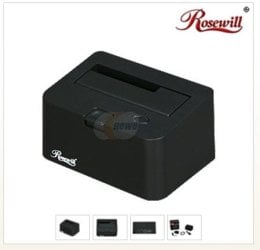
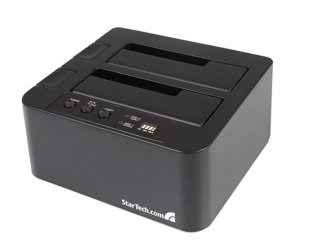
I have tried many of the different enclosures, adapters, and Hard Drive docks. Sometimes a failure with one type will be a success with another type, or vice versa.

Yes, the IDE drive jumper needs to be set to master. Also try connecting on different computers, as you have already tried. If they are full size desktop HD's make sure you have a good power connection.

Various HD Docks :ar: Computer Parts, Laptops, Electronics, and More - Newegg.com 600006270&isNodeId=1
 

Attachments

  • HD_Dock_Unit.JPG
    HD_Dock_Unit.JPG
    19.3 KB · Views: 19
  • StarTech_Docking_Unit.JPG
    StarTech_Docking_Unit.JPG
    29.6 KB · Views: 0

My Computer My Computer

Computer type
PC/Desktop
Computer Manufacturer/Model Number
Built them myself, Science Experiments !
OS
Win7 Enterprise, Win7 x86 (Ult 7600), Win7 x64 Ult 7600, TechNet RTM on AMD x64 (2.8Ghz)
CPU
AMD fx8350 4ghz, AMD-32 2400mhz, AMD-64 3200mhz, AMDx64 2.8G
Motherboard
SIS 755, ECS-K8M890M-M (Ult 7600), GigaByte & others
Memory
2gb, 4gb on the Ult 7600, 4gb on Technet RTM, 32gb on FX8350
Graphics Card(s)
Draw my own Graphics, several nVidia cards
Sound Card
on motherboard
Monitor(s) Displays
19" flat scr, 28" I-Inc widescr,22" Emprex Widescr, 23" Acer
Screen Resolution
1280 x 1024, 1440 x 900, 1920 x 1080
Hard Drives
6 pata Ide HD's & 2 Sata HD's
added 80gb external on Ult 7600 computer,
numerous extra 1tb, 2TB, 3Tb SATA HD's
A collection of ext HD Docks w/ HDs
PSU
430w, 550w, 600w, 700, 800, etc
Case
All Generic Full Towers
Cooling
Open Air & a few fans, some w/ colored LEDs
Keyboard
Compaq & Dell recycled from GoodWill
Mouse
Made in China Optical Wired Mouse
Internet Speed
Fast Cable InterNet
Antivirus
AVG Free on 24 different Desktops, NO Problems!
Browser
IE 8 is preferred, but use FireFox sometimes
Other Info
Linksys Routers, switches, & Hubs
Too Many USB Flash Drives to count, Biggest is 64GB !
Eight computers in my home network.
Sixteen computers at my business network.
Linked via TeamViewer !
Lots of old used spare computer parts everywhere!
My sympathies. I know the situation, and how you're feeling. This is another example of priceless irreplaceable data for which you didn't have backed up somehow (word to the wise for the future).
Yeah this computer was either before reliable flash drives, or was so wracked with malware that it was unusable. I can't remember which. Probably both.

I wouldn't mind using the adapter if I thought it was any different than an enclosure. What's the difference besides the lack of a container for the drive?

I don't think there is a whole lot of difference really. basically the same electronics inside. The advantage of the adapter, for me anyway, is it will work with any hard drive I might have to retrieve data off of. Enclosures can restrict you in what drive you can connect. Example, those made for laptop IDE drives won't work with full sized IDE drives or SATA drives. And the those for IDE/SATA won't work with laptop IDE drives. And some are IDE only or SATA only. For data recovery the adapter is usually a better choice, especially if you know your going to use it more than once.
Enclosures are good if you want to repurpose the drive. I have several here at home. If I can boot up the PC and get into Windows, I use those to copy the data via USB.
Some enclosures can be finicky about what drives are connected. All depends on how good the firmware is. Some of the early ones that came out had size restrictions etc. They didn't play nice with all drives. I don't think that is an issue anymore. The one gotcha that is till there is jumper settings for IDE drives. Some enclosures may want it jumpered as Cable Select and some will only work if its set as master. Get it wrong and the drive doesn't get detected.
In your case, it sounds like the drive has failed. If you haven't already, you could try just plugging it in as a slave in another PC. If it's a SATA drive that should be easy enough to do.
 

My Computer My Computer

Computer type
PC/Desktop
Computer Manufacturer/Model Number
Home Built
OS
Windows 10 Education 64 bit
CPU
AMD Phenom II X4 980 Black Edition Deneb 3.7GHz
Motherboard
Asus M4N68T-M V2 µATX Motherboard
Memory
8GB 4GBx2 Kingston PC10600 DDR3 1333 Memory
Graphics Card(s)
Zotac NVIDIA Geforce GT640 2 Gig DDR3 PCIe
Sound Card
VIA VT1708s High Definition Audio 8-channel Onboard
Monitor(s) Displays
22" LG E2242 1080p and 2 19" I-INC AG191D
Screen Resolution
1280x1024 - 1920x1080 - 1280x1024
Hard Drives
Crucial M100 256 GB SSD and 500 GB WD Blue SATA
PSU
Thermaltake TR 620
Case
Power Up Black ATX Mid-Tower Case
Cooling
Stock heatsink and fan
Keyboard
Logitech Wireless K350 Wave
Mouse
Logitech Wireless M570 Trackman Wheel
Internet Speed
80 Mbps Down 30 Mbps Up
Antivirus
Windows Defender
Browser
Internet Explorer 11
Other Info
HP DVD1040e Lightscribe - External USB2
This came in the mail today, but the driver failed to install, likely due to our internet service being about as stable as an ice cream bridge. So I went to uninstall the device driver and try again.

It's been hanging on "confirm device uninstall" for the past ten minutes and shows no sign of finishing. I don't know what the hell to do anymore.

EDIT: Unplugged the device and it abruptly went away. Plugged it back in and it tried installing the driver again, this time with full five bars of internet (supposedly). Failed anyway. I downloaded the device driver manually but I have no clue what to do with it, nor what to do if it still fails. I can't tell if the universe hates me, or just my computer, or just the windows automatic driver update program.
 

My Computer My Computer

Computer type
PC/Desktop
Computer Manufacturer/Model Number
dell studio 540
OS
windows 7 home premium 64-bit
CPU
intel core 2 quad cpu q8300 2.50 ghz
Memory
6 gb
Graphics Card(s)
intel integrated POS
Antivirus
avg free edition
Browser
firefox
I recently retired a BlacX single drive and replaced it with a dual-bay BlacX box, no drivers were needed for the box and most of the drives I've put in it have been recognized and the only one that didn't work was recognized but had the dreaded clicking, couldn't access it. Both boxes are for SATA drives only. I can use a mix of sizes, 1x 2.5" and 1x 3.5" or 2x of either size.

I use an adapter cable similar to the Kingwin mentioned for the PATA drives.
 

My Computer My Computer

Computer type
PC/Desktop
Computer Manufacturer/Model Number
Customs, Dell, Gateway, HP, Toshiba, Acer, ASUS
OS
Windows 7 Ultimate 64-bit, Windows 8.1 64-bit, Mac OS X 10.10, Linux Mint 17, Windows 10 Pro TP
Keyboard
Microsoft
Mouse
Microsoft
I fail to see how this has anything to do with my current issue. So I guess I'll try to learn how to manually install the drivers and hope it works.

EDIT: The device manager tells me, after I selected the driver folder and tried to manually install, that I don't need to manually install the device driver because the driver is already installed and up-to-date, despite the fact that the device told me it failed to install correctly, and the device itself doesn't actually show up under My Computer. Anyone have any useful suggestions?
 

My Computer My Computer

Computer type
PC/Desktop
Computer Manufacturer/Model Number
dell studio 540
OS
windows 7 home premium 64-bit
CPU
intel core 2 quad cpu q8300 2.50 ghz
Memory
6 gb
Graphics Card(s)
intel integrated POS
Antivirus
avg free edition
Browser
firefox
The relevance is that drivers usually aren't needed [and not included with mine] if the USB ports are otherwise working properly. Several years ago Win98SE needed drivers for USB devices added to the computer, WinXP made great strides in that area. If a USB device doesn't work on a computer I always try the device on a different computer to narrow the possibilities of what is failing.
 

My Computer My Computer

Computer type
PC/Desktop
Computer Manufacturer/Model Number
Customs, Dell, Gateway, HP, Toshiba, Acer, ASUS
OS
Windows 7 Ultimate 64-bit, Windows 8.1 64-bit, Mac OS X 10.10, Linux Mint 17, Windows 10 Pro TP
Keyboard
Microsoft
Mouse
Microsoft
Ahh I see. Then how do I access the device if it doesn't show up under My Computer when I plug it in? It shows in the Device Manager, but all the info on it is identical to another usb driver listed there -- I can't even tell the two apart unless I highlight one and disconnect, and see which one disappears. And I wouldn't know what to look for if I plugged it into another computer, to tell what exactly is failing.
 

My Computer My Computer

Computer type
PC/Desktop
Computer Manufacturer/Model Number
dell studio 540
OS
windows 7 home premium 64-bit
CPU
intel core 2 quad cpu q8300 2.50 ghz
Memory
6 gb
Graphics Card(s)
intel integrated POS
Antivirus
avg free edition
Browser
firefox
Mine also doesn't show in Windows Explorer or File Explorer until I plug an HDD into it.
 

My Computer My Computer

Computer type
PC/Desktop
Computer Manufacturer/Model Number
Customs, Dell, Gateway, HP, Toshiba, Acer, ASUS
OS
Windows 7 Ultimate 64-bit, Windows 8.1 64-bit, Mac OS X 10.10, Linux Mint 17, Windows 10 Pro TP
Keyboard
Microsoft
Mouse
Microsoft
But it is connected to the drive I want to scan. Does that mean this device can't detect the drive either? 'Cos the enclosure acted like there was nothing there, but was able to read my other device just fine, and I have a feeling the same will be true here.
 

My Computer My Computer

Computer type
PC/Desktop
Computer Manufacturer/Model Number
dell studio 540
OS
windows 7 home premium 64-bit
CPU
intel core 2 quad cpu q8300 2.50 ghz
Memory
6 gb
Graphics Card(s)
intel integrated POS
Antivirus
avg free edition
Browser
firefox
Does the drive show in Disk Management? If so can a drive letter be assigned to it? If both are No there is a high probability there has been a failure.
 

My Computer My Computer

Computer type
PC/Desktop
Computer Manufacturer/Model Number
Customs, Dell, Gateway, HP, Toshiba, Acer, ASUS
OS
Windows 7 Ultimate 64-bit, Windows 8.1 64-bit, Mac OS X 10.10, Linux Mint 17, Windows 10 Pro TP
Keyboard
Microsoft
Mouse
Microsoft
Does the drive show in Disk Management? If so can a drive letter be assigned to it? If both are No there is a high probability there has been a failure.
No, it doesn't seem to show at all. When I used the enclosure, it showed, but I couldn't do anything with it but reformat, which wasn't an option for me since the whole point was to recover the data on the drive.
 

My Computer My Computer

Computer type
PC/Desktop
Computer Manufacturer/Model Number
dell studio 540
OS
windows 7 home premium 64-bit
CPU
intel core 2 quad cpu q8300 2.50 ghz
Memory
6 gb
Graphics Card(s)
intel integrated POS
Antivirus
avg free edition
Browser
firefox
If formatting is the only choice it usually means either the partition/s on it are lost or the formatting got corrupted or changed. Have seen drives become formatted as RAW, difficult to deal with. I've determined that by booting to a GPARTED partitioning program just to see what I could. Have also booted to a Linux LiveDVD and sometimes able to do more.
 

My Computer My Computer

Computer type
PC/Desktop
Computer Manufacturer/Model Number
Customs, Dell, Gateway, HP, Toshiba, Acer, ASUS
OS
Windows 7 Ultimate 64-bit, Windows 8.1 64-bit, Mac OS X 10.10, Linux Mint 17, Windows 10 Pro TP
Keyboard
Microsoft
Mouse
Microsoft
Try that device/hard drive in another PC before you format the drive. I think you have software issues on that PC. That should be plug and play with no drivers needed from the internet.
 

My Computer My Computer

Computer type
PC/Desktop
Computer Manufacturer/Model Number
Home Built
OS
Windows 10 Education 64 bit
CPU
AMD Phenom II X4 980 Black Edition Deneb 3.7GHz
Motherboard
Asus M4N68T-M V2 µATX Motherboard
Memory
8GB 4GBx2 Kingston PC10600 DDR3 1333 Memory
Graphics Card(s)
Zotac NVIDIA Geforce GT640 2 Gig DDR3 PCIe
Sound Card
VIA VT1708s High Definition Audio 8-channel Onboard
Monitor(s) Displays
22" LG E2242 1080p and 2 19" I-INC AG191D
Screen Resolution
1280x1024 - 1920x1080 - 1280x1024
Hard Drives
Crucial M100 256 GB SSD and 500 GB WD Blue SATA
PSU
Thermaltake TR 620
Case
Power Up Black ATX Mid-Tower Case
Cooling
Stock heatsink and fan
Keyboard
Logitech Wireless K350 Wave
Mouse
Logitech Wireless M570 Trackman Wheel
Internet Speed
80 Mbps Down 30 Mbps Up
Antivirus
Windows Defender
Browser
Internet Explorer 11
Other Info
HP DVD1040e Lightscribe - External USB2
Back
Top