Kari keeps saying that you can make yourself independent of all of that and operate in you own little patch. For some things that's true, for others it is not plus you need a good amount of skill to disconnect yourself from the designed path.
Yes, I keep saying that because it's true. In this thread I have been asking the opponents of Windows 10 to give at least one example of what kind of cloud interaction there will be if the user signs in with a local account and does not sign in to OneDrive or any other cloud service?
The answer is of course a most absolute
none whatsoever! The Windows 10 will with those two simple steps use cloud exactly as much as XP, Vista or Seven.
Wolfgang, you must or at least should know I have great respect for you and I hope you understand that I am not here for picking a fight. I did this same when the discussion about Windows 8 was going on, trying to correct the misinformation. I beg you and any other member to provide one single example of that terrifying cloud usage user has to accept when using a local account. Please! One simple example.
Again, of course as I sit here writing this I know you cannot do that because the cloud in 10 with a local account is non-existent but still, I am waiting.
It is not that Microsoft is forcing you to the cloud. For heavens sake, not at all. It's just that if the user so decides, the cloud is there to be used to its full intent and capabilities, but only then. If the user decides against, it's OK.
The user decides.
Would you eat food that you hate if they handed it out for free. If yes, in China you can have cat, dog, rat, snake and a few other lekker meals.
I should have come to that example and use it in the earlier discussion about Bing Search. It's there but it don't have to be used if the user dislikes it because the free, built-in alternative is just a click away.
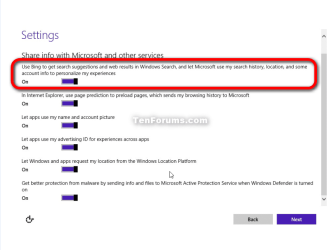
BTW, what I have totally forgotten is that Bing can be turned off if it is not wanted. When installation reaches the final steps and arrives to a dialog asking if you want to use the default express settings or customize them, select customize and turn Bing off:
Example: For my 11" W8.1 system I set up a high definition Theme because it is a lot easier to read things. Now if I install 8.1 on my PC with the 22" screen, I do not want a high def theme because on the big screen I can read things.
If they want to sync these things, they should at least ask for my permission.
Two ways for not to sync your theme and desktop settings. Again, the first one is really simple: use a local account! No cloud, no syncing between the devices, no nothing.
The second option is "quite demanding"

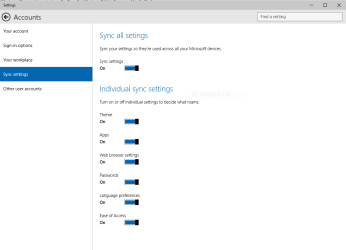
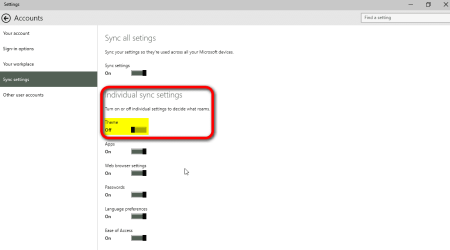
. It takes five mouse clicks: Start Menu > Settings > Accounts > Sync Settings > Turn off theme syncing:
Already now, not full four months into open beta, the Windows 10 is well documented both by Microsoft itself and third party sites like our own
TenForums.com in the forefront. I disagree very strongly when it's said that "it is too difficult for a normal user to use a local account and get rid of the cloud", when in fact the documentation is really easy to find. Of course if the user sees it not important to get information about the new OS prior to installing it it's then the user's own fault. That would of course be just plain stupid but it happens, who gets new stuff without knowing how it work and refuses to check the manual?
BTW, the tutorial index of the TenForums is now available as a downloadable, easy to read spreadsheet:
About the level of the tutorials and TenForums.com in general, read for instance this article:
Check TenForums for Useful Win10 Info of All Kinds - Windows Enterprise Desktop
Kari