[HELP] Laptop got reformatted. Starting from scratch again.

fabbriche

New member
Local time
3:50 PM
Messages
12
I've encountered a problem with my laptop that I needed to take it to a service center. It wouldn't boot and the technician said that it would need to be reformatted. After reformatting it's now working but my Recovery Partition that came with my laptop when I bought it got reformatted as well. The Recovery Partition is now showing "unallocated space." So it means that I can no longer reinstall or reformat my laptop should I need to because the recovery partition is now gone. And my OS is now Windows 7 6.1.7600 when it used to be 7601 SP1 with my Recovery Partition.

1. How do I get the Recovery Partition back that came with my laptop (Acer Aspire 4752, Windows 7 Home Basic 64-bit)?
2. Where do I download the files and how do I put them all back to my hard drive? There used to be a 100MB 'System Reserved' partition and 15GB Recovery Partition on my hard drive but now both are showing 'unallocated space' due to the reformatting done at the service center.

I hope someone can help me with my problem. Thank you so much in advance.
 

My Computer My Computer

Computer type
Laptop
Computer Manufacturer/Model Number
Acer
OS
Windows 7 Ultimate x64
CPU
Intel core i3
Can you even boot your machine now, after whatever your service tech did to the drive?

The "system reserved" partition is typically where Boot Manager lives, and it is marked as "active" so that's where the BIOS would go to start the whole boot process. From there, your installed Windows on C is identified and the rest of the Windows startup continues.

If you "system reserved" partition is still there, does it still show "active"? Or does your C-partition now show it to be the "active" partition? Can you currently boot? What did your service tech actually do to your drive, and did he give it back to you in some kind of working condition or not?

If for some reason he erased the contents of both the "system reserved" and "recovery" partitions, you're not going to get them back (unless you'd been taking "system image" backups say to an external USB drive) for your own protection. But without some partition being "active" and containing Boot manager, I don't see how you could actually now be booting to Windows at all?

And if he erased those other two partitions, what did he do in your primary C-partition? How did he get Windows there and operational and bootable?


Is your problem that you now can't boot? Or can you actually boot but you want to reinstall all the 3rd-party software you once had before he did whatever he did? Not to mention all the drivers your machine needs for its hardware, which originally came from Acer.

If he somehow and for some reason replaced your C-partition with a straight Win7 rather than Win7 + SP1, you can still apply SP1 yourself (although it's a lengthy and time consuming process) through Windows Update. But of course you'll first have to have a working Win7 system.

Please post a full-screen screenshot from either DISKMGMT.MSC or Partition Wizard of your hard drive. Please spread the columns so we can see all the text in each cell.

I'd certainly ask for a full explanation from your service tech about what he did to your machine, and how he expected you to deal with what he gave you back when it was returned.
 

My Computer My Computer

Computer type
PC/Desktop
Computer Manufacturer/Model Number
Home-built, two systems (1) and (2)
OS
Windows 7 Pro x64 (1), Win7 Pro X64 (2)
CPU
i5-3350p 3.1Ghz/6MB-cache (1); E8400 3.0Ghz/6MB-cache (2)
Motherboard
ASUS P8Z77-V Pro (1); ASUS P5Q3 (2)
Memory
8GB PC3-12800 DDR3 (1); 4GB PC3-10600 DDR3 (2)
Graphics Card(s)
ATI HD7750 (1), (see TV cards); ATI R7 250 (2)
Sound Card
Realtek ALC892 HD Audio (1); Realtek ALC1200 HD Audio (2)
Monitor(s) Displays
Eizo HD2441W LCD, Eizo S2433W (1); Eizo 24" S2433W (2)
Screen Resolution
1920x1200, 1920x1200 (1); 1920x1200 (2)
Hard Drives
(1) 1TB SATA-II (7200RPM), 2x2TB SATA-III (7200RPM), 250GB SATA-III (10000RPM) for OS; 2x2TB external USB 3.0

(2) 320GB SATA-II (7200RPM), 750GB SATA-II (7200RPM), 150GB SATA-II (10000RPM) for OS; 2TB external USB 3.0
PSU
Nesteq ECS-6001 600W (1); Nesteq ECS-5001 500W (2)
Case
Acousti-Case 360 (1) and (2)
Cooling
Noctua NH-U12P SE2 for CPU, 2x120mm case fans (1) and (2)
Keyboard
IBM PS/2 (1) and (2)
Mouse
Logitech MX Revolution wireless (1); Microsoft wired (2)
Internet Speed
100mbps down / 10mbps up
Antivirus
Microsoft Security Essentials; Malwarebyte Anti-Malware Pro
Browser
Firefox
Other Info
Ceton InfiniTV 4-tuner cablecard-enabled TV card as well as Hauppauge HVR-2250 OTA/ATSC 2-tuner TV card in (1), running under Win7 WMC
Order the recovery discs from the manufacturer, it will put your machine back to day one, if that`s what you really want.

Windows 7 Ultimate came with your PC ?

What is on your COA ?
 
Last edited:

My Computer My Computer

Computer type
PC/Desktop
Computer Manufacturer/Model Number
Skylake Special #666
OS
Windows 10 Pro x64
CPU
Intel Core i7 6700K
Motherboard
Asus Sabertooth Z170 Mark 1
Memory
GSkill TridentZ RGB 16GB 3600 16-16-16-36
Graphics Card(s)
EVGA GTX 980 Ti SC x2
Sound Card
Realtek High Definition
Monitor(s) Displays
AOC G2460PG
Screen Resolution
1920 x 1080 144Hz
Hard Drives
Samsung 860 Pro 256GB, Seagate Barracuda 4TB x2
PSU
EVGA 1000 P2, EVGA White Custom Braided Cables
Case
Corsair Vengeance C70 Gunmetal Black
Cooling
Corsair H100i v2, Corsair ML120 x2, Thermal Grizzly Kryonaut
Keyboard
Logitech G910 Orion Spectrum
Mouse
Logitech G700s
Internet Speed
Verizon Fios Quantum Gateway 75/75
Antivirus
Windows Defender, Malwarebytes Free 3.8.3
Browser
Chrome
Other Info
Corsair SP120 x4, LG Blu-ray Drive, Durabrand HT-395 100 Watt Dolby Digital Amp, Corsair H2100 Wireless 7.1 Headset
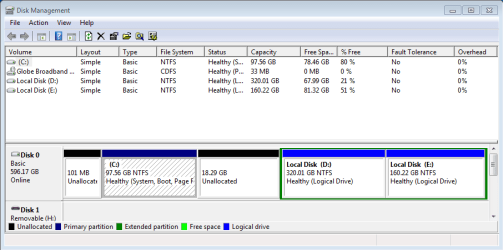
Yes, I can boot my machine now. It's now working fine. What the service tech did was he reformatted my laptop's whole hard drive and installed a generic Windows 7 OS instead of the OEM version that came with it that was on a Recovery partition. The System Reserved and Recovery partitions are both reformatted as well; they're both now showing unallocated space on Disk management. The active partition now is the drive C:. I don't have a system image backup. Is it possible to get all the Recovery partition files back for my specific unit or download them somewhere? I can download the drivers from Acer website anytime. It's the Recovery partition or the Windows 7 installation itself that I badly need 'cause I don't have any other way but to go to the service center again should something wrong happens again that needs reformatting or reinstalling Windows. Also, is SP1 available in Windows Update or do I need to download the whole OS? Thank you so much for the reply.
 

Attachments

  • Capture.PNG
    Capture.PNG
    14.9 KB · Views: 1

My Computer My Computer

Computer type
Laptop
Computer Manufacturer/Model Number
Acer
OS
Windows 7 Ultimate x64
CPU
Intel core i3
Isn't the 101mb unallocated the boot portion of Windows 7 -- which is hidden for that reason?
I'm wondering if the USB-made bootable stick with recovery OS material can be cloned onto now unallocated 18GB partition? The 18GB partition could be absorbed into C and/or D partition if not stuffed with recovery OS material.
 

My Computer My Computer

Computer type
PC/Desktop
Computer Manufacturer/Model Number
Antec desktop; Acer Aspire laptops
OS
Windows 7 Professional 64-bit
CPU
Desktop i5; Acers i5 & i7
Memory
desktop 16GB; 1 Acer 8GB & 1 Acer 16GB
Hard Drives
1TB split into 2 equal partitions [OS and data] usable by RJS
Internet Speed
AT&T DSL
Browser
FF, GChrome, msIE
Other Info
Windows 7 Firewall, Emsisoft AM/AV, MSE [scan-only], SpywareBlaster, Ruiware/BillP combine
Yes, I can boot my machine now. It's now working fine. What the service tech did was he reformatted my laptop's whole hard drive and installed a generic Windows 7 OS instead of the OEM version that came with it that was on a Recovery partition. The System Reserved and Recovery partitions are both reformatted as well; they're both now showing unallocated space on Disk management. The active partition now is the drive C:.
I understand.

Incidentally, when posting a screenshot from DISKMGMT it's important to spread the columns (especially "status") so that we can see all the text in these cells. In particular, unless you had told us that it was C which was active that would not have been obvious. Of course the fact that the 101MB unallocated space (which used to be the active "system reserved" partition on the original drive) was "unallocated" implied it would not have been "active" and containing Boot Manager. Nevertheless...


I don't have a system image backup. Is it possible to get all the Recovery partition files back for my specific unit or download them somewhere?
Don't fret. Just use Macrium Reflect and create your own "system image" on an external USB drive (which you really should have anyway, for regular "system image" and "data" backups). If you have disaster problems in the future you'll want to restore from a very recent working backup anyway, not go all the way back to "factory" and have to reinstall everything all over again not to mention perform hundreds of Windows Updates.

So, since you're now way back at ground zero, I'd take a current "system image". Then I'd apply Windows Updates to the point where you can then apply SP1. Take another image before doing the SP1 update. Then you'll have another few hundred Windows Updates after that. Again, take a final "gold" update, which is your new starting point in the future. Now you can begin installing 3rd-party software and completing the rest of your customization. Again, when you're done take another "image" (and you might take additional images along the way, just for comfort's sake).


Also, is SP1 available in Windows Update or do I need to download the whole OS? Thank you so much for the reply.
As I recall, you can't just apply SP1 until at least a fair number of preliminary Windows Updates are applied to the original Win7 which is what you currently have. Then, SP1 is one large download/update. And once you reach that point, there's a whole next set of several hundred additional updates to apply to get you current.
 

My Computer My Computer

Computer type
PC/Desktop
Computer Manufacturer/Model Number
Home-built, two systems (1) and (2)
OS
Windows 7 Pro x64 (1), Win7 Pro X64 (2)
CPU
i5-3350p 3.1Ghz/6MB-cache (1); E8400 3.0Ghz/6MB-cache (2)
Motherboard
ASUS P8Z77-V Pro (1); ASUS P5Q3 (2)
Memory
8GB PC3-12800 DDR3 (1); 4GB PC3-10600 DDR3 (2)
Graphics Card(s)
ATI HD7750 (1), (see TV cards); ATI R7 250 (2)
Sound Card
Realtek ALC892 HD Audio (1); Realtek ALC1200 HD Audio (2)
Monitor(s) Displays
Eizo HD2441W LCD, Eizo S2433W (1); Eizo 24" S2433W (2)
Screen Resolution
1920x1200, 1920x1200 (1); 1920x1200 (2)
Hard Drives
(1) 1TB SATA-II (7200RPM), 2x2TB SATA-III (7200RPM), 250GB SATA-III (10000RPM) for OS; 2x2TB external USB 3.0

(2) 320GB SATA-II (7200RPM), 750GB SATA-II (7200RPM), 150GB SATA-II (10000RPM) for OS; 2TB external USB 3.0
PSU
Nesteq ECS-6001 600W (1); Nesteq ECS-5001 500W (2)
Case
Acousti-Case 360 (1) and (2)
Cooling
Noctua NH-U12P SE2 for CPU, 2x120mm case fans (1) and (2)
Keyboard
IBM PS/2 (1) and (2)
Mouse
Logitech MX Revolution wireless (1); Microsoft wired (2)
Internet Speed
100mbps down / 10mbps up
Antivirus
Microsoft Security Essentials; Malwarebyte Anti-Malware Pro
Browser
Firefox
Other Info
Ceton InfiniTV 4-tuner cablecard-enabled TV card as well as Hauppauge HVR-2250 OTA/ATSC 2-tuner TV card in (1), running under Win7 WMC
Note that you since it is now C which is the "active" partition where Boot Manager lives (along with Windows itself), you might as well use Partition Wizard to absorb the two unallocated spaces into either C, or to the adjacent D. No need to have those empty spaces. Again, "system image" on an external USB backup drive of your operational current system is far more valuable and useful than having a "recovery partition" to get you back to factory.

And for full backup, you should also either "image" the additional data partitions, or for maximum recovery convenience you can use the folder/file "data" backup capability of either non-free Macrium Reflect Standard or some other product (e.g. NovaBACKUP, etc.).
 

My Computer My Computer

Computer type
PC/Desktop
Computer Manufacturer/Model Number
Home-built, two systems (1) and (2)
OS
Windows 7 Pro x64 (1), Win7 Pro X64 (2)
CPU
i5-3350p 3.1Ghz/6MB-cache (1); E8400 3.0Ghz/6MB-cache (2)
Motherboard
ASUS P8Z77-V Pro (1); ASUS P5Q3 (2)
Memory
8GB PC3-12800 DDR3 (1); 4GB PC3-10600 DDR3 (2)
Graphics Card(s)
ATI HD7750 (1), (see TV cards); ATI R7 250 (2)
Sound Card
Realtek ALC892 HD Audio (1); Realtek ALC1200 HD Audio (2)
Monitor(s) Displays
Eizo HD2441W LCD, Eizo S2433W (1); Eizo 24" S2433W (2)
Screen Resolution
1920x1200, 1920x1200 (1); 1920x1200 (2)
Hard Drives
(1) 1TB SATA-II (7200RPM), 2x2TB SATA-III (7200RPM), 250GB SATA-III (10000RPM) for OS; 2x2TB external USB 3.0

(2) 320GB SATA-II (7200RPM), 750GB SATA-II (7200RPM), 150GB SATA-II (10000RPM) for OS; 2TB external USB 3.0
PSU
Nesteq ECS-6001 600W (1); Nesteq ECS-5001 500W (2)
Case
Acousti-Case 360 (1) and (2)
Cooling
Noctua NH-U12P SE2 for CPU, 2x120mm case fans (1) and (2)
Keyboard
IBM PS/2 (1) and (2)
Mouse
Logitech MX Revolution wireless (1); Microsoft wired (2)
Internet Speed
100mbps down / 10mbps up
Antivirus
Microsoft Security Essentials; Malwarebyte Anti-Malware Pro
Browser
Firefox
Other Info
Ceton InfiniTV 4-tuner cablecard-enabled TV card as well as Hauppauge HVR-2250 OTA/ATSC 2-tuner TV card in (1), running under Win7 WMC
Did you not read post #3 ?

I told you how to get the discs.

You did not answer the question of what operating system is listed on your COA, let us know and we can help you download the proper iso file to burn to dvd, so you yourself can install windows in the future.
 

My Computer My Computer

Computer type
PC/Desktop
Computer Manufacturer/Model Number
Skylake Special #666
OS
Windows 10 Pro x64
CPU
Intel Core i7 6700K
Motherboard
Asus Sabertooth Z170 Mark 1
Memory
GSkill TridentZ RGB 16GB 3600 16-16-16-36
Graphics Card(s)
EVGA GTX 980 Ti SC x2
Sound Card
Realtek High Definition
Monitor(s) Displays
AOC G2460PG
Screen Resolution
1920 x 1080 144Hz
Hard Drives
Samsung 860 Pro 256GB, Seagate Barracuda 4TB x2
PSU
EVGA 1000 P2, EVGA White Custom Braided Cables
Case
Corsair Vengeance C70 Gunmetal Black
Cooling
Corsair H100i v2, Corsair ML120 x2, Thermal Grizzly Kryonaut
Keyboard
Logitech G910 Orion Spectrum
Mouse
Logitech G700s
Internet Speed
Verizon Fios Quantum Gateway 75/75
Antivirus
Windows Defender, Malwarebytes Free 3.8.3
Browser
Chrome
Other Info
Corsair SP120 x4, LG Blu-ray Drive, Durabrand HT-395 100 Watt Dolby Digital Amp, Corsair H2100 Wireless 7.1 Headset
"And my OS is now Windows 7 6.1.7600 when it used to be 7601 SP1 with my Recovery Partition." snippit from fabbriche's opening. AddRAM, my first guess is that OP had Windows 7 SP1 OEM. However, you're correct in asking 'cause there are a few versions of Windows 7 out there.
 

My Computer My Computer

Computer type
PC/Desktop
Computer Manufacturer/Model Number
Antec desktop; Acer Aspire laptops
OS
Windows 7 Professional 64-bit
CPU
Desktop i5; Acers i5 & i7
Memory
desktop 16GB; 1 Acer 8GB & 1 Acer 16GB
Hard Drives
1TB split into 2 equal partitions [OS and data] usable by RJS
Internet Speed
AT&T DSL
Browser
FF, GChrome, msIE
Other Info
Windows 7 Firewall, Emsisoft AM/AV, MSE [scan-only], SpywareBlaster, Ruiware/BillP combine
That has nothing to do with why I`m asking what OS is on his COA.

99% of all Windows 7 PC`s sold to the public came with Home Premium 64 Bit, not Ultimate. (excluding Starter or Basic altogether)

I told him how to get his pc back to factory specs in post #3

We will await his answer.
 

My Computer My Computer

Computer type
PC/Desktop
Computer Manufacturer/Model Number
Skylake Special #666
OS
Windows 10 Pro x64
CPU
Intel Core i7 6700K
Motherboard
Asus Sabertooth Z170 Mark 1
Memory
GSkill TridentZ RGB 16GB 3600 16-16-16-36
Graphics Card(s)
EVGA GTX 980 Ti SC x2
Sound Card
Realtek High Definition
Monitor(s) Displays
AOC G2460PG
Screen Resolution
1920 x 1080 144Hz
Hard Drives
Samsung 860 Pro 256GB, Seagate Barracuda 4TB x2
PSU
EVGA 1000 P2, EVGA White Custom Braided Cables
Case
Corsair Vengeance C70 Gunmetal Black
Cooling
Corsair H100i v2, Corsair ML120 x2, Thermal Grizzly Kryonaut
Keyboard
Logitech G910 Orion Spectrum
Mouse
Logitech G700s
Internet Speed
Verizon Fios Quantum Gateway 75/75
Antivirus
Windows Defender, Malwarebytes Free 3.8.3
Browser
Chrome
Other Info
Corsair SP120 x4, LG Blu-ray Drive, Durabrand HT-395 100 Watt Dolby Digital Amp, Corsair H2100 Wireless 7.1 Headset
Thanks for clarifying, AddRAM! I learn something new every time youse guys post in here!
 
Last edited:

My Computer My Computer

Computer type
PC/Desktop
Computer Manufacturer/Model Number
Antec desktop; Acer Aspire laptops
OS
Windows 7 Professional 64-bit
CPU
Desktop i5; Acers i5 & i7
Memory
desktop 16GB; 1 Acer 8GB & 1 Acer 16GB
Hard Drives
1TB split into 2 equal partitions [OS and data] usable by RJS
Internet Speed
AT&T DSL
Browser
FF, GChrome, msIE
Other Info
Windows 7 Firewall, Emsisoft AM/AV, MSE [scan-only], SpywareBlaster, Ruiware/BillP combine
Why would you be so concerned about having the factory install which is the worst possible install of Win7 one can have, larded with bloatware and useless duplicate utilities that interfere with better versions built into Win7? Any Clean Reinstall Windows 7 is better than that. Just make sure the tech activated with the Product key on the COA sticker affixed to machine, by auditing the installed key using Belarc Advisor.

If the install isn't to your liking, then do a booted Clean Reinstall Windows 7, deleting C so you can use all the space there that was left Unallocated. You will learn a great deal about your PC and if you follow the steps like a million others have, you'll get and keep a perfect install.

Once it's all set up and running best, save a backup image externally to use in case Win7 ever again becomes irreparable.
 
Hello. Sorry for the late reply. I have Windows 7 Home Basic in my COA. Windows 7 Ultimate is the one installed now by the service tech. I've already applied all Windows Updates and my system is now upgraded to SP1. All is fine now except the USB 3.0 port is not working even when the drivers downloaded from the manufacturer installed. My Bluetooth seems not to be working as well. Should I still use the OEM drivers or find the generic drivers? Is there any software I can use to update my drivers to the latest and working ones? Thanks again.

The OS that came with my laptop had all the device drivers working properly already so it was easier to deal with that as I would just have to uninstall the bloatware that I don't need. The service tech has clean installed Windows on my system I presume as there is not much 3rd-party software installed but some of my devices don't work (USB 3.0, Bluetooth) even with the drivers installed from the manufacturer's website. I think I'm okay with my current system if only I can get all the working drivers for my system.
 

My Computer My Computer

Computer type
Laptop
Computer Manufacturer/Model Number
Acer
OS
Windows 7 Ultimate x64
CPU
Intel core i3
You can't activate Win 7 Ultimate with a Home Basic COA. Is your copy of Windows even activated? Check on the System tab of Control Panel and look to see if Windows is actually activated. If it is activated, or if it isn't, you might have a problem going forward.
 

My Computer My Computer

Computer type
PC/Desktop
Computer Manufacturer/Model Number
Mellon Labs (custom build)
OS
Win 7 Pro x64/Win 10 Pro x64 dual boot
CPU
AMD FX 8350 Vishera @ 4200
Motherboard
ASUS M5A97 R2.0
Memory
16 GB Mushkin Blackline DDR3-2400 @ 1866 (9-10-10-10-31)
Graphics Card(s)
XFX Radeon R9 280 Double D Black Edition
Sound Card
Realtek HD Audio on MB. Sounds great.
Monitor(s) Displays
Acer 24", Acer 22"
Screen Resolution
3840 x 1080
Hard Drives
1 x Mushkin Chronos 120 GB SSD (Win 10)
1 x Samsung 850 EVO 250 GB SSD (Win 7)
1 x WD 1TB SATA Blue
1 x WD 1TB SATA Green
PSU
Corsair TX-750
Case
CoolerMaster HAF 912+
Cooling
Coolermaster Seidon 240M Liquid AIO. 6 case fans
Keyboard
Logitech G710+
Mouse
Logitech G500s
Internet Speed
Much better since I got fiber, but still way overpriced.
Antivirus
MSE, Malware Bytes for scanning
Browser
Firefox
Other Info
Corsair VOID USB headphones.

A Mellon Labs X-1 - LCD Smartie driven system status display.

Brought to you by the letter E
I don't know what the service tech did but "Windows is activated" is showing in Control Panel > System and security > System.
 

My Computer My Computer

Computer type
Laptop
Computer Manufacturer/Model Number
Acer
OS
Windows 7 Ultimate x64
CPU
Intel core i3
Then it's possible that the service tech has given you an illegal copy of Windows. Unless he sold you a legitimate Win 7 Ultimate key or COA when he did the reformat, he's put you in a bad position where you now have a possibly invalid version of Windows which may at some point get blacklisted by Microsoft and start telling you it's invalid.

Did he put a Win 7 Ultimate COA on the bottom of your laptop when he did the reformat? That's what he was supposed to do. If you have an Ultimate COA than you're ok, otherwise you may have to go back to Home Basic, which means buying the restore disks from Acer, or getting an ISO of Home Basic and using your COA to install it.
 

My Computer My Computer

Computer type
PC/Desktop
Computer Manufacturer/Model Number
Mellon Labs (custom build)
OS
Win 7 Pro x64/Win 10 Pro x64 dual boot
CPU
AMD FX 8350 Vishera @ 4200
Motherboard
ASUS M5A97 R2.0
Memory
16 GB Mushkin Blackline DDR3-2400 @ 1866 (9-10-10-10-31)
Graphics Card(s)
XFX Radeon R9 280 Double D Black Edition
Sound Card
Realtek HD Audio on MB. Sounds great.
Monitor(s) Displays
Acer 24", Acer 22"
Screen Resolution
3840 x 1080
Hard Drives
1 x Mushkin Chronos 120 GB SSD (Win 10)
1 x Samsung 850 EVO 250 GB SSD (Win 7)
1 x WD 1TB SATA Blue
1 x WD 1TB SATA Green
PSU
Corsair TX-750
Case
CoolerMaster HAF 912+
Cooling
Coolermaster Seidon 240M Liquid AIO. 6 case fans
Keyboard
Logitech G710+
Mouse
Logitech G500s
Internet Speed
Much better since I got fiber, but still way overpriced.
Antivirus
MSE, Malware Bytes for scanning
Browser
Firefox
Other Info
Corsair VOID USB headphones.

A Mellon Labs X-1 - LCD Smartie driven system status display.

Brought to you by the letter E
All is fine now except the USB 3.0 port is not working even when the drivers downloaded from the manufacturer installed. My Bluetooth seems not to be working as well.
I would have thought Acer would provide appropriate driver downloads for all of these hardware items on your machine.

But if not, and if these devices currently show in Device Manager as "other devices" or having a yellow exclamation mark next to them (indicating that the needed driver is not installed), please provide the Hardware ID of each of them so that we can try and hunt down a usable driver. Right-click on the device as it appears in Device Manager, select Properties, select "details" tab, select Property dropdown and then select the second "Hardware IDs" item in the dropdown list. Post the Hardware ID for each of these problem devices.
 

My Computer My Computer

Computer type
PC/Desktop
Computer Manufacturer/Model Number
Home-built, two systems (1) and (2)
OS
Windows 7 Pro x64 (1), Win7 Pro X64 (2)
CPU
i5-3350p 3.1Ghz/6MB-cache (1); E8400 3.0Ghz/6MB-cache (2)
Motherboard
ASUS P8Z77-V Pro (1); ASUS P5Q3 (2)
Memory
8GB PC3-12800 DDR3 (1); 4GB PC3-10600 DDR3 (2)
Graphics Card(s)
ATI HD7750 (1), (see TV cards); ATI R7 250 (2)
Sound Card
Realtek ALC892 HD Audio (1); Realtek ALC1200 HD Audio (2)
Monitor(s) Displays
Eizo HD2441W LCD, Eizo S2433W (1); Eizo 24" S2433W (2)
Screen Resolution
1920x1200, 1920x1200 (1); 1920x1200 (2)
Hard Drives
(1) 1TB SATA-II (7200RPM), 2x2TB SATA-III (7200RPM), 250GB SATA-III (10000RPM) for OS; 2x2TB external USB 3.0

(2) 320GB SATA-II (7200RPM), 750GB SATA-II (7200RPM), 150GB SATA-II (10000RPM) for OS; 2TB external USB 3.0
PSU
Nesteq ECS-6001 600W (1); Nesteq ECS-5001 500W (2)
Case
Acousti-Case 360 (1) and (2)
Cooling
Noctua NH-U12P SE2 for CPU, 2x120mm case fans (1) and (2)
Keyboard
IBM PS/2 (1) and (2)
Mouse
Logitech MX Revolution wireless (1); Microsoft wired (2)
Internet Speed
100mbps down / 10mbps up
Antivirus
Microsoft Security Essentials; Malwarebyte Anti-Malware Pro
Browser
Firefox
Other Info
Ceton InfiniTV 4-tuner cablecard-enabled TV card as well as Hauppauge HVR-2250 OTA/ATSC 2-tuner TV card in (1), running under Win7 WMC

My Computer My Computer

Computer type
PC/Desktop
Computer Manufacturer/Model Number
Home made Desktop
OS
Windows 10 Pro. 64/ version 1709 Windows 7 Pro/64
CPU
Intel i7-6800K @ 4.3
Motherboard
ASUS X-99 Deluxe II
Memory
Corsair Platinum 16 gig @2400
Graphics Card(s)
EVGA GTX 1070 OC
Monitor(s) Displays
Asus 27" LED LCD/VE278Q
Screen Resolution
1920-1080 or 1280-720 HDMI
Hard Drives
INTEL SSD 730-240 Gb Sata 3.0/
PSU
EVGA Platium 1200W
Case
Phanteks Luxe Tempered Glass 8 fans/ one radiator
Cooling
XSPC/ Water Cooled CPU
Keyboard
Das 4 Professional
Mouse
Logitech M705/MX Anywhere 2-S
Internet Speed
100 mbits
Antivirus
Microsoft Security Essentials/ Malwarebytes Premium 3.0/ SAS
Browser
I.E. 11 default/Firefox/ ISP Time Warner Cable/Spectrum
Other Info
LG BluRay Burner/
Sound system-KLipsch-THX/
Icy Dock ssd Hot Swap bays.
There is an "unknown device" in the device manager which has hardware ids

NUSB3\ROOT_HUB30&VID_1033&PID_0194&REV_0004&SID_05071025
NUSB3\ROOT_HUB30&VID_1033&PID_0194&REV_0004
NUSB3\ROOT_HUB30&VID_1033&PID_0194


Also, why are many of my drivers date from 2006? Aren't they outdated? But when I click 'update driver' it says they're up to date.

And here is the result of Microsoft Genuine Advantage Diagnostic Tool

Diagnostic Report (1.9.0027.0):
-----------------------------------------
Windows Validation Data-->

Validation Code: 0
Cached Online Validation Code: N/A, hr = 0xc004f012
Windows Product Key: *****-*****-V9488-FGM44-2C9T3
Windows Product Key Hash: rmk1OjF0iZq7gQoRmEcpnJHr0oc=
Windows Product ID: 00426-OEM-8992662-00010
Windows Product ID Type: 2
Windows License Type: OEM SLP
Windows OS version: 6.1.7601.2.00010100.1.0.001
ID: {BAF7A3C5-02C1-4392-B73E-915EF18ED967}(1)
Is Admin: Yes
TestCab: 0x0
LegitcheckControl ActiveX: N/A, hr = 0x80070002
Signed By: N/A, hr = 0x80070002
Product Name: Windows 7 Ultimate
Architecture: 0x00000009
Build lab: 7601.win7sp1_gdr.150113-1808
TTS Error:
Validation Diagnostic:
Resolution Status: N/A

Vista WgaER Data-->
ThreatID(s): N/A, hr = 0x80070002
Version: N/A, hr = 0x80070002

Windows XP Notifications Data-->
Cached Result: N/A, hr = 0x80070002
File Exists: No
Version: N/A, hr = 0x80070002
WgaTray.exe Signed By: N/A, hr = 0x80070002
WgaLogon.dll Signed By: N/A, hr = 0x80070002

OGA Notifications Data-->
Cached Result: N/A, hr = 0x80070002
Version: N/A, hr = 0x80070002
OGAExec.exe Signed By: N/A, hr = 0x80070002
OGAAddin.dll Signed By: N/A, hr = 0x80070002

OGA Data-->
Office Status: 109 N/A
OGA Version: N/A, 0x80070002
Signed By: N/A, hr = 0x80070002
Office Diagnostics: 025D1FF3-364-80041010_025D1FF3-229-80041010_025D1FF3-230-1_025D1FF3-517-80040154_025D1FF3-237-80040154_025D1FF3-238-2_025D1FF3-244-80070002_025D1FF3-258-3

Browser Data-->
Proxy settings: 127.0.0.1:80
User Agent: Mozilla/4.0 (compatible; MSIE 8.0; Win32)
Default Browser: C:\Program Files (x86)\Mozilla Firefox\firefox.exe
Download signed ActiveX controls: Prompt
Download unsigned ActiveX controls: Disabled
Run ActiveX controls and plug-ins: Allowed
Initialize and script ActiveX controls not marked as safe: Disabled
Allow scripting of Internet Explorer Webbrowser control: Disabled
Active scripting: Allowed
Script ActiveX controls marked as safe for scripting: Allowed

File Scan Data-->
File Mismatch: C:\Windows\system32\wat\watadminsvc.exe[Hr = 0x80070003]
File Mismatch: C:\Windows\system32\wat\npwatweb.dll[Hr = 0x80070003]
File Mismatch: C:\Windows\system32\wat\watux.exe[Hr = 0x80070003]
File Mismatch: C:\Windows\system32\wat\watweb.dll[Hr = 0x80070003]

Other data-->
Office Details: <GenuineResults><MachineData><UGUID>{BAF7A3C5-02C1-4392-B73E-915EF18ED967}</UGUID><Version>1.9.0027.0</Version><OS>6.1.7601.2.00010100.1.0.001</OS><Architecture>x64</Architecture><PKey>*****-*****-*****-*****-2C9T3</PKey><PID>00426-OEM-8992662-00010</PID><PIDType>2</PIDType><SID>S-1-5-21-1764637445-3728625103-2112595837</SID><SYSTEM><Manufacturer>Acer</Manufacturer><Model>Aspire 4752</Model></SYSTEM><BIOS><Manufacturer>Phoenix Technologies Ltd.</Manufacturer><Version>V2.09</Version><SMBIOSVersion major="2" minor="6"/><Date>20110811000000.000000+000</Date></BIOS><HWID>36A93807018400FE</HWID><UserLCID>3409</UserLCID><SystemLCID>0409</SystemLCID><TimeZone>Taipei Standard Time(GMT+08:00)</TimeZone><iJoin>0</iJoin><SBID><stat>3</stat><msppid></msppid><name></name><model></model></SBID><OEM><OEMID>ACRSYS</OEMID><OEMTableID>ACRPRDCT</OEMTableID></OEM><GANotification/></MachineData><Software><Office><Result>109</Result><Products/><Applications/></Office></Software></GenuineResults>

Spsys.log Content: 0x80070002

Licensing Data-->
Software licensing service version: 6.1.7601.17514

Name: Windows(R) 7, Ultimate edition
Description: Windows Operating System - Windows(R) 7, OEM_SLP channel
Activation ID: 7cfd4696-69a9-4af7-af36-ff3d12b6b6c8
Application ID: 55c92734-d682-4d71-983e-d6ec3f16059f
Extended PID: 00426-00178-926-600010-02-1033-7600.0000-0492015
Installation ID: 002126524962690992284526556974197053061320262943548792
Processor Certificate URL: SpcService Web Service
Machine Certificate URL: RacService Web Service
Use License URL: UseLicenseService Web Service
Product Key Certificate URL: PkcService Web Service
Partial Product Key: 2C9T3
License Status: Licensed
Remaining Windows rearm count: 4
Trusted time: 2/24/2015 3:50:35 AM

Windows Activation Technologies-->
HrOffline: 0x00000000
HrOnline: N/A
HealthStatus: 0x0000000000000000
Event Time Stamp: N/A
ActiveX: Not Registered - 0x80040154
Admin Service: Not Registered - 0x80040154
HealthStatus Bitmask Output:


HWID Data-->
HWID Hash Current: NAAAAAIAAQABAAEAAAABAAAABQABAAEAJJSQm7CMzVBoeVBpIFiKPAR9+qv+2idX1Cwucw==

OEM Activation 1.0 Data-->
N/A

OEM Activation 2.0 Data-->
BIOS valid for OA 2.0: yes
Windows marker version: 0x20001
OEMID and OEMTableID Consistent: yes
BIOS Information:
ACPI Table Name OEMID Value OEMTableID Value
APIC ACRSYS ACRPRDCT
FACP ACRSYS ACRPRDCT
HPET ACRSYS ACRPRDCT
MCFG ACRSYS ACRPRDCT
SLIC ACRSYS ACRPRDCT
SSDT ACRSYS PtidDevc
ASF! ACRSYS ACRPRDCT
SSDT ACRSYS PtidDevc
UEFI ACRSYS ACRPRDCT

 

My Computer My Computer

Computer type
Laptop
Computer Manufacturer/Model Number
Acer
OS
Windows 7 Ultimate x64
CPU
Intel core i3
Thanks for the log. You got problems.
You have a OEM/SLP of Ultimate and your system that came with Windows Home basic.

From your log.

Windows License Type: OEM SLP
Product Name: Windows 7 Ultimate
From post #1.

1. How do I get the Recovery Partition back that came with my laptop (Acer Aspire 4752, Windows 7 Home Basic 64-bit)?
Your have a counterfeit copy of Windows 7 Ultimate installed.

The next thing you need to do is install a proper legal copy of Windows 7 and activate it.

Do you still have Home Basic COA key? That should still work.
 

My Computer My Computer

Computer type
PC/Desktop
Computer Manufacturer/Model Number
Home made Desktop
OS
Windows 10 Pro. 64/ version 1709 Windows 7 Pro/64
CPU
Intel i7-6800K @ 4.3
Motherboard
ASUS X-99 Deluxe II
Memory
Corsair Platinum 16 gig @2400
Graphics Card(s)
EVGA GTX 1070 OC
Monitor(s) Displays
Asus 27" LED LCD/VE278Q
Screen Resolution
1920-1080 or 1280-720 HDMI
Hard Drives
INTEL SSD 730-240 Gb Sata 3.0/
PSU
EVGA Platium 1200W
Case
Phanteks Luxe Tempered Glass 8 fans/ one radiator
Cooling
XSPC/ Water Cooled CPU
Keyboard
Das 4 Professional
Mouse
Logitech M705/MX Anywhere 2-S
Internet Speed
100 mbits
Antivirus
Microsoft Security Essentials/ Malwarebytes Premium 3.0/ SAS
Browser
I.E. 11 default/Firefox/ ISP Time Warner Cable/Spectrum
Other Info
LG BluRay Burner/
Sound system-KLipsch-THX/
Icy Dock ssd Hot Swap bays.
Back
Top