Solved Macrium Image file 87 GB, can't browse files

zeek

New member
Local time
8:18 AM
Messages
15
Hello, I have Macrium Free, imaged my entire computer, made the boot CD for the Windows PE....I boot up, do exactly what the sticky thread says . . . . the image is on a brand new Western Digital 1TB external HDD, when I try to image the internal HDD (seagate drive) Macrium simply puts the contents of the WD drive on the Seagate internal HDD, sort of like a simple copy/paste. Of course when I restart it doesn't load Windows because what is on the internal HDD is simply a few folders. I figured oh well do a fresh Windows 7 Ultimate install and grab the files after I mount the Macrium image, but when I do it just takes in a circle, I mount, open the image, which has a folder, with an image....this happens until there is nowhere else to click, but there are never any files to browse, the image files are large, I made 2, one on 2-20-15 (87GB) and one on 2-23-15(174GB)

Any ideas?
Thanks you
Zeek
 

My Computer My Computer

At a glance

Windows 7 Ultimate
Computer type
PC/Desktop
Computer Manufacturer/Model Number
custom
OS
Windows 7 Ultimate
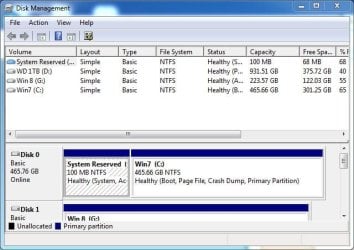
Did you image both partitions, System Reserved and the "C" drive on the hard drive when you made the backup? If you only imaged the "C" drive that is incorrect and probably why its not working.

See my Win 7 drive, below for an example and also the Macrium screenshot of my Win 7 drive and both partitions selected for imaging.
 

Attachments

  • Capture.JPG
    Capture.JPG
    53.8 KB · Views: 30
  • macrium capture.JPG
    macrium capture.JPG
    43.4 KB · Views: 3

My Computer My Computer

At a glance

Windows 10 64 bitIntel i7 6700K16GB Corsair DominatorIntel CPU Graphics
Computer type
PC/Desktop
Computer Manufacturer/Model Number
My Own Build
OS
Windows 10 64 bit
CPU
Intel i7 6700K
Motherboard
ASUS ROG Maximus VIII Hero
Memory
16GB Corsair Dominator
Graphics Card(s)
Intel CPU Graphics
Sound Card
RealTek
Monitor(s) Displays
27" Dell S2719dgf
Screen Resolution
2560X1440
Hard Drives
1 TB Samsung 850 EVO SSD for Win 10 Pro
500GB Samsung 850 EVO SSD for Win 10 Insider
2 TB drive for backup
PSU
EVGA Supernova 750G2
Case
BeQuiet Silent Base 600
Cooling
Deepcool Captain 120EX
Keyboard
Microsoft Wireless 2000
Mouse
Microsoft wireless
Internet Speed
100 MB/sec (Cable)
Antivirus
Microsoft Defender and Malwarebytes
Browser
Edge/Firefox
Other Info
Cakewalk (Sonar) by BandLab and Studio One 4.1 Pro recording studio software. MOTU 896Mk3 Hybrid recording interface, Frontier Tranzport wireless control unit, Behringer X-Touch Control Surface.
Five USB connected optical drives for CD Audio production using Nero BurningROM
when I try to image the internal HDD (seagate drive) Macrium simply puts the contents of the WD drive on the Seagate internal HDD, sort of like a simple copy/paste................the image files are large, I made 2, one on 2-20-15 (87GB) and one on 2-23-15(174GB)

I agree with Fireberd.

It certainly sounds like you are simply not choosing the correct partitions to be imaged in the Macrium interface. If you are trying to image the internal Seagate, that should have nothing to do with "the contents of the WD drive". I assume the WD is the destination drive---where you tell Macrium to store the image of the Seagate.

If the Seagate has a System Reserved and a C, you need to include both in the image file. Or you could make separate image files of each. But they both have to be imaged if you intend to have a bootable drive when restored.

Regarding size---the image file of the C partition should be about 40 to 50 percent as large as the actual occupied space on the C partition. Is that true in your case?

It's peculiar that your Feb 20 image is 87 GB and your Feb 23 image is 174 GB--twice as large. I'd expect images separated by only 3 days to be quite similar in size unless there were MAJOR changes in the C partition during those 3 days or unless you made an error and they are not in fact images of the same partition(s).
 

My Computer My Computer

At a glance

Windows 7 Home Premium SP1, 64-bitIntel Skylake i5-6600K, not overclocked8 GB HyperX DDR4-2666 (2 x 4 GB)none; graphics are integrated on CPU
Computer type
PC/Desktop
Computer Manufacturer/Model Number
Ignatz Special; 4 speed manual gearbox; factory air conditioning; one of one
OS
Windows 7 Home Premium SP1, 64-bit
CPU
Intel Skylake i5-6600K, not overclocked
Motherboard
AsRock Z170M Extreme 4, micro ATX
Memory
8 GB HyperX DDR4-2666 (2 x 4 GB)
Graphics Card(s)
none; graphics are integrated on CPU
Sound Card
onboard: Realtek ALC1150; external: USB Behringer UF0-202
Monitor(s) Displays
Dell S2340M 23 inch IPS
Screen Resolution
1600 x 900
Hard Drives
System: Crucial MX100 series SSD, 128 GB;
Data: Samsung Spinpoint 103SJ, 1 TB;
Backup: WD Caviar Green WD30EZRX-00D8PB0, 3 TB
PSU
Rosewill SilentNight 500 watt fanless, semi-modular
Case
Antec Solo II
Cooling
Noctua NH-U12S; Noctua F12 intake, Noctua S12A exhaust
Keyboard
Microsoft 200 6JH-00001 USB
Mouse
Dell or Microsoft optical wired; USB
Antivirus
Microsoft Security Essentials and Malwarebytes Premium
Browser
Pale Moon
Other Info
All fans PWM; speeds at idle: CPU circa 500 rpm; intake circa 600 rpm; exhaust circa 600 rpm; CPU temps 27 idle and 47 C load in a warm room (27 C/81 F) when running Intel Extreme Tuning Utility stress test.
I am pretty sure that I imaged all the drives that showed up in Macrium and then saved the image to the external WD drive. My computer went all screwy so I decided to restore the image from the external WD to the internal Seagte and there is my problem. Even if I imaged only the c drive shouldn't I be able to see all my files?

AT this point all I really want is my files from the image file.

As far as size . . . yeah strange it is 2 times as big, which tells me I did something wrong..which I think was after I created the image I mapped the WD external drive, which has the image file in a folder called "Zeek" which is in a folder called "back_up", so I assume Macrium included the mapped drive.

Is there a way I can at least get my files from the mrimg image file?
 

My Computer My Computer

At a glance

Windows 7 Ultimate
Computer type
PC/Desktop
Computer Manufacturer/Model Number
custom
OS
Windows 7 Ultimate
You should be able to double click that mrimg file, which will force it to open in an Explorer interface with a drive letter attached to it. You can then browse the files within the mrimg file and copy them wherever you want.

When you make an image you have to be careful---you can select individual partitions to be included in the image file and exclude other partitions on the same drive. You've got a lot of control and it looks like you made some type of error there.

You can control where that image file is stored. You can make a new storage folder for an image within the Macrium interface after you select the partitions to be imaged. Or you can make that folder before you even open Macrium and then just tell Macrium to put the image file in that folder.

When I make a new image file, I make a new folder for it, using the date as the folder name. For instance D:\images\022715 if I were to make an image today.
 

My Computer My Computer

At a glance

Windows 7 Home Premium SP1, 64-bitIntel Skylake i5-6600K, not overclocked8 GB HyperX DDR4-2666 (2 x 4 GB)none; graphics are integrated on CPU
Computer type
PC/Desktop
Computer Manufacturer/Model Number
Ignatz Special; 4 speed manual gearbox; factory air conditioning; one of one
OS
Windows 7 Home Premium SP1, 64-bit
CPU
Intel Skylake i5-6600K, not overclocked
Motherboard
AsRock Z170M Extreme 4, micro ATX
Memory
8 GB HyperX DDR4-2666 (2 x 4 GB)
Graphics Card(s)
none; graphics are integrated on CPU
Sound Card
onboard: Realtek ALC1150; external: USB Behringer UF0-202
Monitor(s) Displays
Dell S2340M 23 inch IPS
Screen Resolution
1600 x 900
Hard Drives
System: Crucial MX100 series SSD, 128 GB;
Data: Samsung Spinpoint 103SJ, 1 TB;
Backup: WD Caviar Green WD30EZRX-00D8PB0, 3 TB
PSU
Rosewill SilentNight 500 watt fanless, semi-modular
Case
Antec Solo II
Cooling
Noctua NH-U12S; Noctua F12 intake, Noctua S12A exhaust
Keyboard
Microsoft 200 6JH-00001 USB
Mouse
Dell or Microsoft optical wired; USB
Antivirus
Microsoft Security Essentials and Malwarebytes Premium
Browser
Pale Moon
Other Info
All fans PWM; speeds at idle: CPU circa 500 rpm; intake circa 600 rpm; exhaust circa 600 rpm; CPU temps 27 idle and 47 C load in a warm room (27 C/81 F) when running Intel Extreme Tuning Utility stress test.
OK, so I may have neglected to include the "system reserve", so what in the world is in that 87GB mrimg file? I figure it is all that data from the "c drive", I can live with with a fresh Windows 7 Ultimate install, but why can't I browse the mrimg file? When I get home I will post some screenshots so y'all can see what I mean.

To make matters worse, my other external HDD, that is files only, no image . . . just died, so it looks like mu only hope of getting my docs, pics.music . . . back is that mrimg file.
 

My Computer My Computer

At a glance

Windows 7 Ultimate
Computer type
PC/Desktop
Computer Manufacturer/Model Number
custom
OS
Windows 7 Ultimate
OK, so I may have neglected to include the "system reserve", so what in the world is in that 87GB mrimg file? I figure it is all that data from the "c drive", I can live with with a fresh Windows 7 Ultimate install, but why can't I browse the mrimg file? When I get home I will post some screenshots so y'all can see what I mean.

To make matters worse, my other external HDD, that is files only, no image . . . just died, so it looks like mu only hope of getting my docs, pics.music . . . back is that mrimg file.

The 87 GB mrimg file contains all the files on whatever partition it is an image of--data, Windows files, pictures of your cat, whatever.

Do you in fact have Macrium installed on your hard drive?

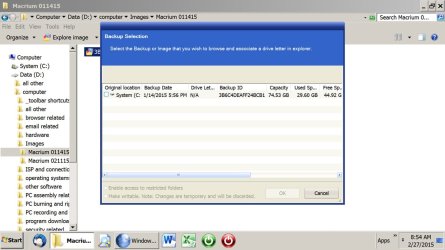
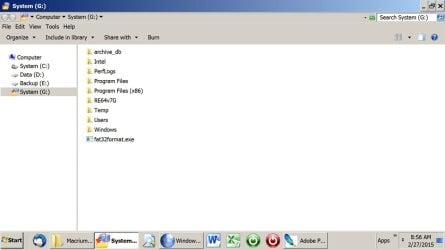
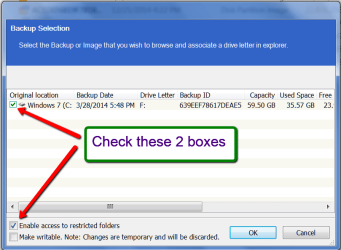
I don't know why you can't browse that mrimg file if you poke it with the mouse. Possibly it is corrupt? You should see the first picture below. If you then put a checkmark in that checkbox below the "O" in the word "original", you should see something like the second picture. The G drive shown in that second picture is in fact the mounted image file. You can see the folders within it on the right. They can be browsed and copied out to another drive.
 

Attachments

  • Untitled-1.jpg
    Untitled-1.jpg
    105.6 KB · Views: 0
  • Untitled-2.jpg
    Untitled-2.jpg
    67.2 KB · Views: 0

My Computer My Computer

At a glance

Windows 7 Home Premium SP1, 64-bitIntel Skylake i5-6600K, not overclocked8 GB HyperX DDR4-2666 (2 x 4 GB)none; graphics are integrated on CPU
Computer type
PC/Desktop
Computer Manufacturer/Model Number
Ignatz Special; 4 speed manual gearbox; factory air conditioning; one of one
OS
Windows 7 Home Premium SP1, 64-bit
CPU
Intel Skylake i5-6600K, not overclocked
Motherboard
AsRock Z170M Extreme 4, micro ATX
Memory
8 GB HyperX DDR4-2666 (2 x 4 GB)
Graphics Card(s)
none; graphics are integrated on CPU
Sound Card
onboard: Realtek ALC1150; external: USB Behringer UF0-202
Monitor(s) Displays
Dell S2340M 23 inch IPS
Screen Resolution
1600 x 900
Hard Drives
System: Crucial MX100 series SSD, 128 GB;
Data: Samsung Spinpoint 103SJ, 1 TB;
Backup: WD Caviar Green WD30EZRX-00D8PB0, 3 TB
PSU
Rosewill SilentNight 500 watt fanless, semi-modular
Case
Antec Solo II
Cooling
Noctua NH-U12S; Noctua F12 intake, Noctua S12A exhaust
Keyboard
Microsoft 200 6JH-00001 USB
Mouse
Dell or Microsoft optical wired; USB
Antivirus
Microsoft Security Essentials and Malwarebytes Premium
Browser
Pale Moon
Other Info
All fans PWM; speeds at idle: CPU circa 500 rpm; intake circa 600 rpm; exhaust circa 600 rpm; CPU temps 27 idle and 47 C load in a warm room (27 C/81 F) when running Intel Extreme Tuning Utility stress test.
I have Macrium on my wife's laptop, I plug in my external WD HDD, which has the image file . . .I go through all the steps you listed, but the image file never actually opens. I am at work, when I get home I will make a screenr video of exactly what it does, and then share the link. I really appreciate your guy's help, like I said at this point I want my files . .
Thank You
Zeek
 

My Computer My Computer

At a glance

Windows 7 Ultimate
Computer type
PC/Desktop
Computer Manufacturer/Model Number
custom
OS
Windows 7 Ultimate
My images are stored on an internal.

I don't know what type of goofiness an external USB drive might introduce, so I'd at least try to copy the image file to the internal on your wife's laptop and see if that let's you browse it. Or try to plug the external into some other port on the laptop if available.
 

My Computer My Computer

At a glance

Windows 7 Home Premium SP1, 64-bitIntel Skylake i5-6600K, not overclocked8 GB HyperX DDR4-2666 (2 x 4 GB)none; graphics are integrated on CPU
Computer type
PC/Desktop
Computer Manufacturer/Model Number
Ignatz Special; 4 speed manual gearbox; factory air conditioning; one of one
OS
Windows 7 Home Premium SP1, 64-bit
CPU
Intel Skylake i5-6600K, not overclocked
Motherboard
AsRock Z170M Extreme 4, micro ATX
Memory
8 GB HyperX DDR4-2666 (2 x 4 GB)
Graphics Card(s)
none; graphics are integrated on CPU
Sound Card
onboard: Realtek ALC1150; external: USB Behringer UF0-202
Monitor(s) Displays
Dell S2340M 23 inch IPS
Screen Resolution
1600 x 900
Hard Drives
System: Crucial MX100 series SSD, 128 GB;
Data: Samsung Spinpoint 103SJ, 1 TB;
Backup: WD Caviar Green WD30EZRX-00D8PB0, 3 TB
PSU
Rosewill SilentNight 500 watt fanless, semi-modular
Case
Antec Solo II
Cooling
Noctua NH-U12S; Noctua F12 intake, Noctua S12A exhaust
Keyboard
Microsoft 200 6JH-00001 USB
Mouse
Dell or Microsoft optical wired; USB
Antivirus
Microsoft Security Essentials and Malwarebytes Premium
Browser
Pale Moon
Other Info
All fans PWM; speeds at idle: CPU circa 500 rpm; intake circa 600 rpm; exhaust circa 600 rpm; CPU temps 27 idle and 47 C load in a warm room (27 C/81 F) when running Intel Extreme Tuning Utility stress test.
Great idea . . .will try that too
 

My Computer My Computer

At a glance

Windows 7 Ultimate
Computer type
PC/Desktop
Computer Manufacturer/Model Number
custom
OS
Windows 7 Ultimate
Internals are fine to store images provided it isn't a partition on your OS drive. This works but if the OS drive dies then you're lost. Externals are obviously ok as well but for USB 3 drives make sure you can install the USB 3 drivers. BTW I use USB 3 externals all the time.
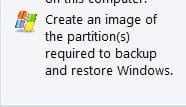
For a basic system image if you select
Capture.JPG
and point the destination to your external HDD you shouldn't have a problem.
 

My Computer My Computer

At a glance

Windows 7x64 Home Premium SP1Intel i7 2600kG.Skill Ripjaws (DDR3-1600) 2x4GBNvidia GeForce GTS 450; Intel HD Graphics 300...
Computer type
PC/Desktop
Computer Manufacturer/Model Number
Own build
OS
Windows 7x64 Home Premium SP1
CPU
Intel i7 2600k
Motherboard
ASUS P8Z68 Deluxe
Memory
G.Skill Ripjaws (DDR3-1600) 2x4GB
Graphics Card(s)
Nvidia GeForce GTS 450; Intel HD Graphics 3000(GT2+)
Monitor(s) Displays
Dell Ultrasharp IPS panel U2311H, Samsung SyncMaster P2350
Screen Resolution
1920x1080
Hard Drives
Samsung 850 Pro SSD 256GB, Samsung SSD 840 120GB, Seagates 1TB Barracuda ST31000528AS x2
PSU
Seasonic M12II 520W
Case
Lian Li Lancool PC-K60
Cooling
Case: 1x120mm, 3x140mm CPU: Hyper 212+
Keyboard
Logitech MK520 (wireless)
Mouse
Logitech MK520
Internet Speed
6-7 Mbps
Antivirus
Norton Security Premium, Malwarebytes on 2 (MSE on 3rd PC)
Browser
FireFox
Other Info
Audio: Logitech Z523 2.1
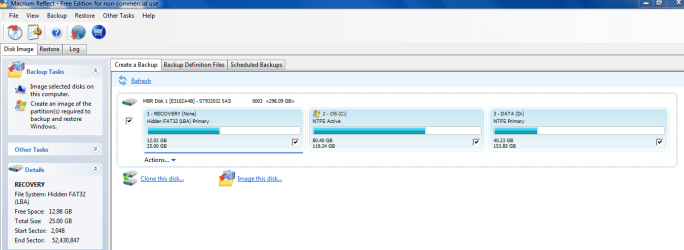
looks easy...what I want to do is back up everything so I can r-image if needed. What happens if I create an image with all three of these checked, see screenshot. Can I restore from them? If I do just "create an image to backup and restore windows" that will be nothing but windows right? NO data just the OS and programs?
 

Attachments

  • Capture.PNG
    Capture.PNG
    32.4 KB · Views: 4

My Computer My Computer

At a glance

Windows 7 Ultimate
Computer type
PC/Desktop
Computer Manufacturer/Model Number
custom
OS
Windows 7 Ultimate
You've got it about right.

You could image the data partition, but imaging is not how I would back up my data. Why complicate getting at your data backup by using an image rather than an ordinary copy?

Using Macrium, if you want to be able to restore Windows, you'd need to make an image of C, nothing more.

You don't have a System Reserved partition, which is fine. If you did, you'd have to image it also.

Your C partition is marked active. If you had a System Reserved partition, it would typically be marked active instead.

You need to image the "Recovery" partition only if you might want to restore it sometime. It's optional. It was put there by the manufacturer so you can "reset to factory condition" if you ever wanted to do that. I'd probably make a one-time image of it SEPARATELY from your C image. Just once. You'd normally make an image of C periodically---maybe once a month.

No harm done if you want instead to image both C and Recovery every time, either separately or in a single file.

Likewise, you don't need to include the Data partition. That's optional.

So, I'd just check C. If you instead clicked the left margin where it says "create an image of the partitions required to backup and restore Windows" I think that would just image C because it looks to me like C is all you need to image---as your Windows installation is configured right now.

You say "What I want to do is backup everything".....well if that's what you mean literally, then you need to check all 3 partitions.
 

My Computer My Computer

At a glance

Windows 7 Home Premium SP1, 64-bitIntel Skylake i5-6600K, not overclocked8 GB HyperX DDR4-2666 (2 x 4 GB)none; graphics are integrated on CPU
Computer type
PC/Desktop
Computer Manufacturer/Model Number
Ignatz Special; 4 speed manual gearbox; factory air conditioning; one of one
OS
Windows 7 Home Premium SP1, 64-bit
CPU
Intel Skylake i5-6600K, not overclocked
Motherboard
AsRock Z170M Extreme 4, micro ATX
Memory
8 GB HyperX DDR4-2666 (2 x 4 GB)
Graphics Card(s)
none; graphics are integrated on CPU
Sound Card
onboard: Realtek ALC1150; external: USB Behringer UF0-202
Monitor(s) Displays
Dell S2340M 23 inch IPS
Screen Resolution
1600 x 900
Hard Drives
System: Crucial MX100 series SSD, 128 GB;
Data: Samsung Spinpoint 103SJ, 1 TB;
Backup: WD Caviar Green WD30EZRX-00D8PB0, 3 TB
PSU
Rosewill SilentNight 500 watt fanless, semi-modular
Case
Antec Solo II
Cooling
Noctua NH-U12S; Noctua F12 intake, Noctua S12A exhaust
Keyboard
Microsoft 200 6JH-00001 USB
Mouse
Dell or Microsoft optical wired; USB
Antivirus
Microsoft Security Essentials and Malwarebytes Premium
Browser
Pale Moon
Other Info
All fans PWM; speeds at idle: CPU circa 500 rpm; intake circa 600 rpm; exhaust circa 600 rpm; CPU temps 27 idle and 47 C load in a warm room (27 C/81 F) when running Intel Extreme Tuning Utility stress test.

My Computer My Computer

At a glance

Windows 7 Ultimate
Computer type
PC/Desktop
Computer Manufacturer/Model Number
custom
OS
Windows 7 Ultimate
This looks like it is all mucked up.

1. If you made a proper image, you should be able to mount the image. Start with opening the image file (e.g. double click). Follow the instructions (check the little checkboxes - see picture below) and the image should open. Else you find it in Computer as a mounted drive from where you can open it.

2. From your first post I gather that you did not define the drive/folder to where you wanted to image. So Macrium just picked the first one in line.

3. You cannot open the images on your wife's PC. You will get some "access denied".
 

Attachments

  • 2015-02-27_1851.png
    2015-02-27_1851.png
    25.6 KB · Views: 0

My Computer My Computer

At a glance

Vista, Windows7, Mint Mate, Zorin, Windows 8from 1.6GHz Duo to i7
Computer Manufacturer/Model Number
HP, Dell, Gateway, Toshiba - 4 laptops and 2 desktops
OS
Vista, Windows7, Mint Mate, Zorin, Windows 8
CPU
from 1.6GHz Duo to i7
Monitor(s) Displays
2x HP w2207
Hard Drives
5x HDD, 7x SSD, 12x Externals
Keyboard
with trackball - no mices
Mouse
Trackball mice
Internet Speed
DSL 6000
yep all mucked up.....I never got an access denied,even when I check the bottom box. My question is what is in that image file and why can't I get in to it?
 

My Computer My Computer

At a glance

Windows 7 Ultimate
Computer type
PC/Desktop
Computer Manufacturer/Model Number
custom
OS
Windows 7 Ultimate
yep all mucked up.....I never got an access denied,even when I check the bottom box. My question is what is in that image file and why can't I get in to it?

I'd expect Macrium image files to have an mrimg extension.

It looks to me like your image files don't. Not sure why.

Try manually attaching .mrimg to a filename.

I see a vhd file. You got virtual hard disks going on???
 

My Computer My Computer

At a glance

Windows 7 Home Premium SP1, 64-bitIntel Skylake i5-6600K, not overclocked8 GB HyperX DDR4-2666 (2 x 4 GB)none; graphics are integrated on CPU
Computer type
PC/Desktop
Computer Manufacturer/Model Number
Ignatz Special; 4 speed manual gearbox; factory air conditioning; one of one
OS
Windows 7 Home Premium SP1, 64-bit
CPU
Intel Skylake i5-6600K, not overclocked
Motherboard
AsRock Z170M Extreme 4, micro ATX
Memory
8 GB HyperX DDR4-2666 (2 x 4 GB)
Graphics Card(s)
none; graphics are integrated on CPU
Sound Card
onboard: Realtek ALC1150; external: USB Behringer UF0-202
Monitor(s) Displays
Dell S2340M 23 inch IPS
Screen Resolution
1600 x 900
Hard Drives
System: Crucial MX100 series SSD, 128 GB;
Data: Samsung Spinpoint 103SJ, 1 TB;
Backup: WD Caviar Green WD30EZRX-00D8PB0, 3 TB
PSU
Rosewill SilentNight 500 watt fanless, semi-modular
Case
Antec Solo II
Cooling
Noctua NH-U12S; Noctua F12 intake, Noctua S12A exhaust
Keyboard
Microsoft 200 6JH-00001 USB
Mouse
Dell or Microsoft optical wired; USB
Antivirus
Microsoft Security Essentials and Malwarebytes Premium
Browser
Pale Moon
Other Info
All fans PWM; speeds at idle: CPU circa 500 rpm; intake circa 600 rpm; exhaust circa 600 rpm; CPU temps 27 idle and 47 C load in a warm room (27 C/81 F) when running Intel Extreme Tuning Utility stress test.
Macrium image files look like in the picture below. Can you make a snip of yours in 'Content' format and post that here.
 

Attachments

  • 2015-02-27_1925.png
    2015-02-27_1925.png
    36 KB · Views: 0

My Computer My Computer

At a glance

Vista, Windows7, Mint Mate, Zorin, Windows 8from 1.6GHz Duo to i7
Computer Manufacturer/Model Number
HP, Dell, Gateway, Toshiba - 4 laptops and 2 desktops
OS
Vista, Windows7, Mint Mate, Zorin, Windows 8
CPU
from 1.6GHz Duo to i7
Monitor(s) Displays
2x HP w2207
Hard Drives
5x HDD, 7x SSD, 12x Externals
Keyboard
with trackball - no mices
Mouse
Trackball mice
Internet Speed
DSL 6000
here it is . . .and ignore that vhd, it was nothing and I deleted it.
 

Attachments

  • Capture.PNG
    Capture.PNG
    6.7 KB · Views: 0

My Computer My Computer

At a glance

Windows 7 Ultimate
Computer type
PC/Desktop
Computer Manufacturer/Model Number
custom
OS
Windows 7 Ultimate
This is not 'Content' view but they look like Macrium images. Those should be easy to mount and recover data from. What exactly happens when you double click on one of those files.

Btw - on the 166GB file it looks like you imaged the system and the disk/partition with the previous image. You have to be careful what you select (the little checkmarks) and to where you write the images.
 

My Computer My Computer

At a glance

Vista, Windows7, Mint Mate, Zorin, Windows 8from 1.6GHz Duo to i7
Computer Manufacturer/Model Number
HP, Dell, Gateway, Toshiba - 4 laptops and 2 desktops
OS
Vista, Windows7, Mint Mate, Zorin, Windows 8
CPU
from 1.6GHz Duo to i7
Monitor(s) Displays
2x HP w2207
Hard Drives
5x HDD, 7x SSD, 12x Externals
Keyboard
with trackball - no mices
Mouse
Trackball mice
Internet Speed
DSL 6000
Back
Top