Solved BOSD While Playing World of Warcraft ntoskrnl.exe

Amirali66

New member
Local time
12:36 PM
Messages
15
hello
i am a big fan of world of warcraft,i play it everyday for 4-5 hours and every day i get atleast 1 BSOD and at max 3-4 while playing.i tried CCleaner to clean registery,i uninstalled my graphic card drivers and installed a fresh and lastest version from the official website,i have not overclocked any part of my computer,i use eset nod32 antivirus,my firewall is always enabled,my windows is up to dated,my psu is a 430W green model.my gpu temp is normal always.i also cleaned all fans and slots for dusts in my computer,and took off the rams and gpu from slots and installed them again in slots.
i dunno if its my graphic card problem,ram,hard disk, CPU or motherboard or even drivers. i need help,it's really boring,the log below is the latest BOSD ,i had near 100 .dmp crash files on my pc,but all deleted because i used ccleaner on my pc yesterday.but i remember each time i opened them with bluescreenview.exe the file that was crashed was a new one.i mean not always ntoskrnl.exe in everycrash report.some times tcpip.sys or other crashes was seen with ntoskrnl.exe

sry for my bad english btw,
cheers,
AmirAli
 

My Computer My Computer

At a glance

Windows 7 home premium 64-bit
Computer type
PC/Desktop
OS
Windows 7 home premium 64-bit
Its a display related BSOD, apparently.

The driver is the latest, so not paying attention on it right now.

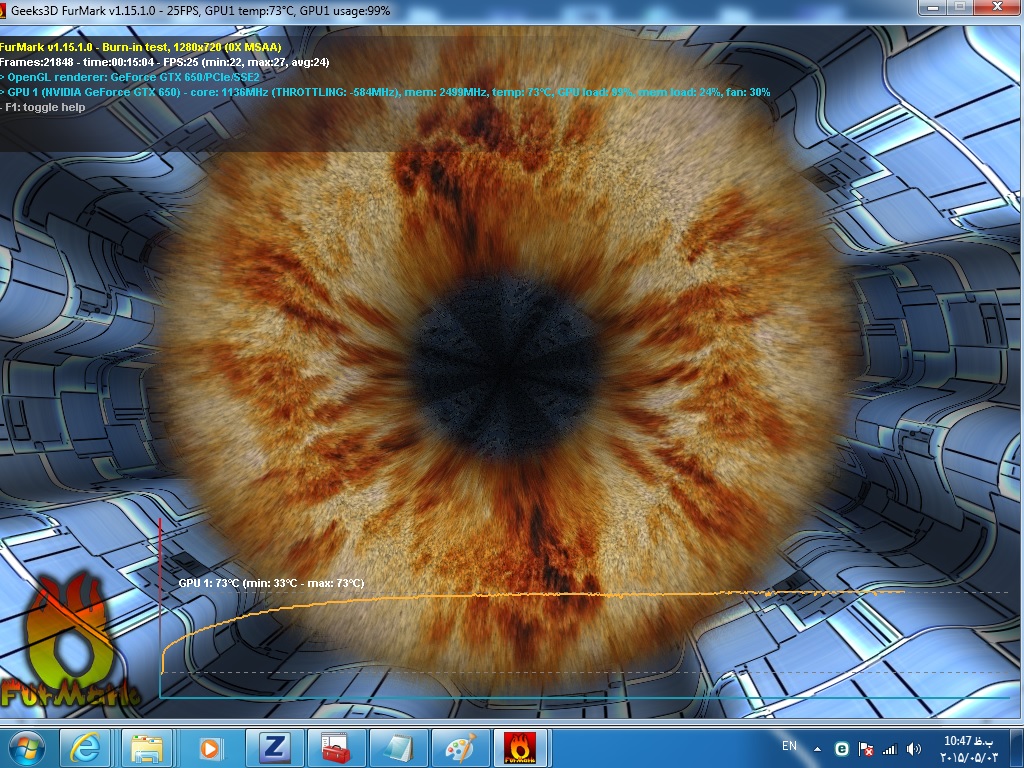
Stress test the Graphics Card using Furmark. Take a screenshot of the furmark window before closing it. Upload the screenshot for us. Also let us know if you experienced any crash or artifacts during the test.

Check if the Power Supply Unit (PSU) supplying adequate power to the computer or not.
Also let us know the wattage of the PSU.

Is the computer hot? Report us the heat of the computer after a couple of hours of your normal usage. Upload a screenshot of the summery tab of Speccy. Alternatively, you can publish a Speccy snapshot too: http://www.sevenforums.com/tutorials/311593-speccy-publish-snapshot-your-system-specs.html .
_________________________________________________
Code:
.....
*******************************************************************************
*                                                                             *
*                        Bugcheck Analysis                                    *
*                                                                             *
*******************************************************************************

Use !analyze -v to get detailed debugging information.

BugCheck C2, {7, 109b, 60000, fffffa8007476b40}

GetPointerFromAddress: unable to read from fffff800030c5100
GetUlongFromAddress: unable to read from fffff800030c51c0
Probably caused by : dxgmms1.sys ( dxgmms1!VIDMM_GLOBAL::CloseOneAllocation+275 )

Followup: MachineOwner
---------

0: kd> !analyze -v
*******************************************************************************
*                                                                             *
*                        Bugcheck Analysis                                    *
*                                                                             *
*******************************************************************************

BAD_POOL_CALLER (c2)
The current thread is making a bad pool request.  Typically this is at a bad IRQL level or double freeing the same allocation, etc.
Arguments:
Arg1: 0000000000000007, Attempt to free pool which was already freed
Arg2: 000000000000109b, (reserved)
Arg3: 0000000000060000, Memory contents of the pool block
Arg4: fffffa8007476b40, Address of the block of pool being deallocated

Debugging Details:
------------------


POOL_ADDRESS:  fffffa8007476b40 Nonpaged pool

FREED_POOL_TAG:  Even

BUGCHECK_STR:  0xc2_7_Even

CUSTOMER_CRASH_COUNT:  1

DEFAULT_BUCKET_ID:  WIN7_DRIVER_FAULT

PROCESS_NAME:  Wow-64.exe

CURRENT_IRQL:  0

ANALYSIS_VERSION: 6.3.9600.17237 (debuggers(dbg).140716-0327) amd64fre

LAST_CONTROL_TRANSFER:  from fffff80002fc0bf9 to fffff80002e8bec0

STACK_TEXT:  
fffff880`07d64268 fffff800`02fc0bf9 : 00000000`000000c2 00000000`00000007 00000000`0000109b 00000000`00060000 : nt!KeBugCheckEx
fffff880`07d64270 fffff880`053a0711 : 00000000`00000000 00000000`00000001 fffff8a0`6d4d6956 00000000`00000174 : nt!ExFreePool+0xcb1
fffff880`07d64320 fffff880`05386ecc : fffff880`00000000 fffffa80`00000000 00000000`00000000 00000000`00000000 : dxgmms1!VIDMM_GLOBAL::CloseOneAllocation+0x275
fffff880`07d643f0 fffff880`052c7ccc : 00000000`00000000 fffff8a0`013a7000 fffff8a0`013a7000 00000000`00000001 : dxgmms1!VidMmCloseAllocation+0x44
fffff880`07d64420 fffff880`052c765f : fffff8a0`013a7000 fffff8a0`013a8300 fffff8a0`00000000 00000000`00000799 : dxgkrnl!DXGDEVICE::DestroyAllocations+0x248
fffff880`07d64510 fffff880`052f5883 : 00000000`00000000 fffff8a0`0cfa9140 fffff8a0`0be23390 fffff880`07d64930 : dxgkrnl!DXGDEVICE::ProcessTerminationList+0xa3
fffff880`07d64560 fffff880`052f4faf : fffff8a0`00000799 fffff8a0`0be23390 fffff880`07d648c0 fffff880`07d648f0 : dxgkrnl!DXGCONTEXT::Present+0x2cb
fffff880`07d64880 fffff960`001ea134 : fffffa80`048bf590 00000000`00144ab8 fffff8a0`0b1d7050 fffff8a0`00000010 : dxgkrnl!DxgkPresent+0x543
fffff880`07d64bf0 fffff800`02e8b153 : fffffa80`048bf590 00000000`201b2900 00000000`00253fd3 fffffa80`04151d01 : win32k!NtGdiDdDDIPresent+0x18
fffff880`07d64c20 000007fe`fe98145a : 00000000`00000000 00000000`00000000 00000000`00000000 00000000`00000000 : nt!KiSystemServiceCopyEnd+0x13
00000000`08aff448 00000000`00000000 : 00000000`00000000 00000000`00000000 00000000`00000000 00000000`00000000 : 0x000007fe`fe98145a


STACK_COMMAND:  kb

FOLLOWUP_IP: 
dxgmms1!VIDMM_GLOBAL::CloseOneAllocation+275
fffff880`053a0711 33d2            xor     edx,edx

SYMBOL_STACK_INDEX:  2

SYMBOL_NAME:  dxgmms1!VIDMM_GLOBAL::CloseOneAllocation+275

FOLLOWUP_NAME:  MachineOwner

MODULE_NAME: dxgmms1

IMAGE_NAME:  dxgmms1.sys

DEBUG_FLR_IMAGE_TIMESTAMP:  5164dc13

IMAGE_VERSION:  6.1.7601.18126

FAILURE_BUCKET_ID:  X64_0xc2_7_Even_dxgmms1!VIDMM_GLOBAL::CloseOneAllocation+275

BUCKET_ID:  X64_0xc2_7_Even_dxgmms1!VIDMM_GLOBAL::CloseOneAllocation+275

ANALYSIS_SOURCE:  KM

FAILURE_ID_HASH_STRING:  km:x64_0xc2_7_even_dxgmms1!vidmm_global::closeoneallocation+275

FAILURE_ID_HASH:  {311ef64c-f284-9be4-edd0-9dfb48e05c6e}

Followup: MachineOwner
---------

0: kd> lmvm nvlddmkm
start             end                 module name
fffff880`0487e000 fffff880`05290000   nvlddmkm   (deferred)             
    Image path: \SystemRoot\system32\DRIVERS\nvlddmkm.sys
    Image name: nvlddmkm.sys
    Timestamp:        Thu Feb 05 23:31:37 2015 (54D3B001)
    CheckSum:         009D4DDE
    ImageSize:        00A12000
    Translations:     0000.04b0 0000.04e4 0409.04b0 0409.04e4
 

My Computer My Computer

At a glance

Microsoft Windows 10 Pro Insider Preview 64-bitIntel(R) Core(TM) i3-4130 CPU @ 3.40GHzCorsair Vengence 4GB x2 (8.00GB Dual-Channel ...2047MB GeForce GTS 450 (ZOTAC International)
Computer type
PC/Desktop
Computer Manufacturer/Model Number
Self Assembled
OS
Microsoft Windows 10 Pro Insider Preview 64-bit
CPU
Intel(R) Core(TM) i3-4130 CPU @ 3.40GHz
Motherboard
Gigabyte Technology Co., Ltd. B85M-D3H
Memory
Corsair Vengence 4GB x2 (8.00GB Dual-Channel DDR3 @ 798MHz)
Graphics Card(s)
2047MB GeForce GTS 450 (ZOTAC International)
Sound Card
Onboard (Realtek High Definition Audio)
Monitor(s) Displays
LG Flatron E2040T
Screen Resolution
1600x900
Hard Drives
Western Digital 1 TB
Seagate 500 GB
PSU
Corsair VS550
Case
Cooler Master K380
Cooling
Cooler Master Seidon 120V Plus
Keyboard
Logitech MK260r
Mouse
Logitech MK260r
Internet Speed
PMPL Broadband
Antivirus
Windows Defender + MBAM
Browser
Firefox
Other Info
Dell Studio 15" Laptop
hello Arc and ty for reply,
i did several actions that may help you find my problem:
i did stress test on CPU and GPU,i checked HDD,i checked my RAM s with ''Windows memory diagnostic tool''
as i checked the results myself GPU and CPU are fine,but i think there is a problem with RAM or HDD ,cuz ''Windows memory diagnostic tool'' told me i got hardware problem while testing My RAM s.

here are the results of my tests :

CPU stress test 1 :
[Mar 5 14:41] Worker starting
[Mar 5 14:41] Setting affinity to run worker on logical CPU #1
[Mar 5 14:41] Beginning a continuous self-test to check your computer.
[Mar 5 14:41] Please read stress.txt. Choose Test/Stop to end this test.
[Mar 5 14:41] Test 1, 5300 Lucas-Lehmer iterations of M14155777 using type-2 FFT length 720K, Pass1=320, Pass2=2304.
[Mar 5 14:43] Test 2, 5300 Lucas-Lehmer iterations of M14155775 using FFT length 720K, Pass1=320, Pass2=2304.
[Mar 5 14:44] Torture Test completed 1 tests in 3 minutes - 0 errors, 0 warnings.
[Mar 5 14:44] Worker stopped.
[Mar 5 14:44] Worker starting
[Mar 5 14:44] Your timings will be written to the results.txt file.
[Mar 5 14:44] Compare your results to other computers at CPU Benchmarks for Lucas-Lehmer/Trial Factor - PrimeNet
[Mar 5 14:44] Timing 31 iterations of 1024K FFT length. Best time: 16.019 ms., avg time: 16.448 ms.
[Mar 5 14:44] Timing 25 iterations of 1280K FFT length. Best time: 20.304 ms., avg time: 20.453 ms.
[Mar 5 14:44] Timing 20 iterations of 1536K FFT length. Best time: 25.438 ms., avg time: 25.635 ms.
[Mar 5 14:44] Timing 17 iterations of 1792K FFT length. Best time: 31.783 ms., avg time: 32.702 ms.
[Mar 5 14:44] Timing 15 iterations of 2048K FFT length. Best time: 33.760 ms., avg time: 34.744 ms.
[Mar 5 14:44] Timing 12 iterations of 2560K FFT length. Best time: 42.414 ms., avg time: 43.645 ms.
[Mar 5 14:44] Timing 10 iterations of 3072K FFT length. Best time: 53.458 ms., avg time: 55.973 ms.
[Mar 5 14:44] Timing 10 iterations of 3584K FFT length. Best time: 67.459 ms., avg time: 69.869 ms.
[Mar 5 14:44] Timing 10 iterations of 4096K FFT length. Best time: 71.910 ms., avg time: 72.748 ms.
[Mar 5 14:44] Timing 10 iterations of 5120K FFT length. Best time: 91.504 ms., avg time: 93.374 ms.
[Mar 5 14:44] Timing 10 iterations of 6144K FFT length. Best time: 115.085 ms., avg time: 119.233 ms.
[Mar 5 14:45] Timing 10 iterations of 7168K FFT length. Best time: 139.438 ms., avg time: 141.282 ms.
[Mar 5 14:45] Timing 10 iterations of 8192K FFT length. Best time: 158.898 ms., avg time: 162.616 ms.
[Mar 5 14:45] Timing FFTs using 2 threads.
[Mar 5 14:45] Timing 31 iterations of 1024K FFT length. Best time: 10.011 ms., avg time: 10.385 ms.
[Mar 5 14:45] Timing 24 iterations of 1280K FFT length.
[Mar 5 14:45] Execution halted.
[Mar 5 14:45] Worker stopped.
[Mar 5 14:45] Worker starting
[Mar 5 14:45] Your timings will be written to the results.txt file.
[Mar 5 14:45] Compare your results to other computers at CPU Benchmarks for Lucas-Lehmer/Trial Factor - PrimeNet
[Mar 5 14:45] Timing 31 iterations of 1024K FFT length. Best time: 16.845 ms., avg time: 18.884 ms.
[Mar 5 14:45] Timing 24 iterations of 1280K FFT length. Best time: 21.612 ms., avg time: 22.521 ms.
[Mar 5 14:45] Timing 20 iterations of 1536K FFT length. Best time: 26.715 ms., avg time: 28.030 ms.
[Mar 5 14:45] Timing 17 iterations of 1792K FFT length. Best time: 32.608 ms., avg time: 32.866 ms.
[Mar 5 14:46] Timing 15 iterations of 2048K FFT length. Best time: 35.114 ms., avg time: 35.435 ms.
[Mar 5 14:46] Timing 12 iterations of 2560K FFT length. Best time: 44.589 ms., avg time: 51.283 ms.
[Mar 5 14:46] Timing 10 iterations of 3072K FFT length. Best time: 55.162 ms., avg time: 55.538 ms.
[Mar 5 14:46] Timing 10 iterations of 3584K FFT length. Best time: 66.433 ms., avg time: 66.666 ms.
[Mar 5 14:46] Timing 10 iterations of 4096K FFT length. Best time: 73.256 ms., avg time: 73.537 ms.
[Worker #1 Mar 5 14:46] Timing 10 iterations of 5120K FFT length. Best time: 93.416 ms., avg time: 94.362 ms.
[Worker #1 Mar 5 14:46] Timing 10 iterations of 6144K FFT length.
[Worker #1 Mar 5 14:46] Execution halted.
[Worker #1 Mar 5 14:46] Worker stopped.
[Main thread Mar 5 14:48] Starting workers.
[Worker #2 Mar 5 14:48] Worker starting
[Worker #2 Mar 5 14:48] Setting affinity to run worker on logical CPU #2
[Worker #3 Mar 5 14:48] Worker starting
[Worker #3 Mar 5 14:48] Setting affinity to run worker on logical CPU #3
[Worker #3 Mar 5 14:48] Beginning a continuous self-test to check your computer.
[Worker #3 Mar 5 14:48] Please read stress.txt. Choose Test/Stop to end this test.
[Worker #2 Mar 5 14:48] Beginning a continuous self-test to check your computer.
[Worker #4 Mar 5 14:48] Worker starting
[Worker #1 Mar 5 14:48] Worker starting
[Worker #4 Mar 5 14:48] Setting affinity to run worker on logical CPU #4
[Worker #2 Mar 5 14:48] Please read stress.txt. Choose Test/Stop to end this test.
[Worker #1 Mar 5 14:48] Setting affinity to run worker on logical CPU #1
[Worker #4 Mar 5 14:48] Beginning a continuous self-test to check your computer.
[Worker #4 Mar 5 14:48] Please read stress.txt. Choose Test/Stop to end this test.
[Worker #1 Mar 5 14:48] Beginning a continuous self-test to check your computer.
[Worker #1 Mar 5 14:48] Please read stress.txt. Choose Test/Stop to end this test.
[Worker #3 Mar 5 14:48] Test 1, 5300 Lucas-Lehmer iterations of M14155777 using type-2 FFT length 720K, Pass1=320, Pass2=2304.
[Worker #1 Mar 5 14:48] Test 1, 5300 Lucas-Lehmer iterations of M14155777 using type-2 FFT length 720K, Pass1=320, Pass2=2304.
[Worker #2 Mar 5 14:48] Test 1, 5300 Lucas-Lehmer iterations of M14155777 using type-2 FFT length 720K, Pass1=320, Pass2=2304.
[Worker #4 Mar 5 14:48] Test 1, 5300 Lucas-Lehmer iterations of M14155777 using type-2 FFT length 720K, Pass1=320, Pass2=2304.
[Worker #4 Mar 5 14:50] Test 2, 5300 Lucas-Lehmer iterations of M14155775 using FFT length 720K, Pass1=320, Pass2=2304.
[Worker #2 Mar 5 14:50] Test 2, 5300 Lucas-Lehmer iterations of M14155775 using FFT length 720K, Pass1=320, Pass2=2304.
[Worker #1 Mar 5 14:50] Test 2, 5300 Lucas-Lehmer iterations of M14155775 using FFT length 720K, Pass1=320, Pass2=2304.
[Worker #3 Mar 5 14:50] Test 2, 5300 Lucas-Lehmer iterations of M14155775 using FFT length 720K, Pass1=320, Pass2=2304.
[Worker #4 Mar 5 14:52] Self-test 720K passed!
[Worker #4 Mar 5 14:52] Test 1, 800000 Lucas-Lehmer iterations of M172031 using type-1 FFT length 8K, Pass1=32, Pass2=256.
[Worker #2 Mar 5 14:52] Self-test 720K passed!
[Worker #2 Mar 5 14:52] Test 1, 800000 Lucas-Lehmer iterations of M172031 using type-1 FFT length 8K, Pass1=32, Pass2=256.
[Worker #1 Mar 5 14:52] Self-test 720K passed!
[Worker #1 Mar 5 14:52] Test 1, 800000 Lucas-Lehmer iterations of M172031 using type-1 FFT length 8K, Pass1=32, Pass2=256.
[Worker #3 Mar 5 14:52] Self-test 720K passed!
[Worker #3 Mar 5 14:52] Test 1, 800000 Lucas-Lehmer iterations of M172031 using type-1 FFT length 8K, Pass1=32, Pass2=256.
[Worker #4 Mar 5 14:53] Test 2, 800000 Lucas-Lehmer iterations of M163839 using type-1 FFT length 8K, Pass1=32, Pass2=256.
[Worker #2 Mar 5 14:54] Test 2, 800000 Lucas-Lehmer iterations of M163839 using type-1 FFT length 8K, Pass1=32, Pass2=256.
[Worker #1 Mar 5 14:54] Test 2, 800000 Lucas-Lehmer iterations of M163839 using type-1 FFT length 8K, Pass1=32, Pass2=256.
[Worker #3 Mar 5 14:54] Test 2, 800000 Lucas-Lehmer iterations of M163839 using type-1 FFT length 8K, Pass1=32, Pass2=256.
[Worker #4 Mar 5 14:55] Self-test 8K passed!
[Worker #4 Mar 5 14:55] Test 1, 4500 Lucas-Lehmer iterations of M15597569 using type-2 FFT length 800K, Pass1=640, Pass2=1280.
[Worker #2 Mar 5 14:55] Self-test 8K passed!
[Worker #2 Mar 5 14:55] Test 1, 4500 Lucas-Lehmer iterations of M15597569 using type-2 FFT length 800K, Pass1=640, Pass2=1280.
[Worker #1 Mar 5 14:55] Self-test 8K passed!
[Worker #1 Mar 5 14:55] Test 1, 4500 Lucas-Lehmer iterations of M15597569 using type-2 FFT length 800K, Pass1=640, Pass2=1280.
[Worker #3 Mar 5 14:55] Self-test 8K passed!
[Worker #3 Mar 5 14:55] Test 1, 4500 Lucas-Lehmer iterations of M15597569 using type-2 FFT length 800K, Pass1=640, Pass2=1280.
[Worker #4 Mar 5 14:57] Test 2, 4500 Lucas-Lehmer iterations of M15597567 using FFT length 800K, Pass1=640, Pass2=1280.
[Worker #2 Mar 5 14:57] Test 2, 4500 Lucas-Lehmer iterations of M15597567 using FFT length 800K, Pass1=640, Pass2=1280.
[Worker #1 Mar 5 14:57] Test 2, 4500 Lucas-Lehmer iterations of M15597567 using FFT length 800K, Pass1=640, Pass2=1280.
[Worker #3 Mar 5 14:57] Test 2, 4500 Lucas-Lehmer iterations of M15597567 using FFT length 800K, Pass1=640, Pass2=1280.
[Worker #4 Mar 5 14:58] Self-test 800K passed!
[Worker #4 Mar 5 14:58] Test 1, 460000 Lucas-Lehmer iterations of M250519 using type-0 FFT length 12K, Pass1=48, Pass2=256.
[Worker #2 Mar 5 14:58] Self-test 800K passed!
[Worker #2 Mar 5 14:58] Test 1, 460000 Lucas-Lehmer iterations of M250519 using type-0 FFT length 12K, Pass1=48, Pass2=256.
[Worker #1 Mar 5 14:58] Self-test 800K passed!
[Worker #1 Mar 5 14:58] Test 1, 460000 Lucas-Lehmer iterations of M250519 using type-0 FFT length 12K, Pass1=48, Pass2=256.
[Worker #3 Mar 5 14:59] Self-test 800K passed!
[Worker #3 Mar 5 14:59] Test 1, 460000 Lucas-Lehmer iterations of M250519 using type-0 FFT length 12K, Pass1=48, Pass2=256.
[Worker #4 Mar 5 15:00] Test 2, 460000 Lucas-Lehmer iterations of M245759 using type-0 FFT length 12K, Pass1=48, Pass2=256.
[Worker #2 Mar 5 15:00] Test 2, 460000 Lucas-Lehmer iterations of M245759 using type-0 FFT length 12K, Pass1=48, Pass2=256.
[Worker #1 Mar 5 15:00] Test 2, 460000 Lucas-Lehmer iterations of M245759 using type-0 FFT length 12K, Pass1=48, Pass2=256.
[Worker #3 Mar 5 15:00] Test 2, 460000 Lucas-Lehmer iterations of M245759 using type-0 FFT length 12K, Pass1=48, Pass2=256.
[Worker #4 Mar 5 15:01] Self-test 12K passed!
[Worker #4 Mar 5 15:01] Test 1, 4000 Lucas-Lehmer iterations of M18474367 using type-2 FFT length 960K, Pass1=1280, Pass2=768.
[Worker #2 Mar 5 15:01] Self-test 12K passed!
[Worker #2 Mar 5 15:01] Test 1, 4000 Lucas-Lehmer iterations of M18474367 using type-2 FFT length 960K, Pass1=1280, Pass2=768.
[Worker #1 Mar 5 15:01] Self-test 12K passed!
[Worker #1 Mar 5 15:01] Test 1, 4000 Lucas-Lehmer iterations of M18474367 using type-2 FFT length 960K, Pass1=1280, Pass2=768.
[Worker #3 Mar 5 15:02] Self-test 12K passed!
[Worker #3 Mar 5 15:02] Test 1, 4000 Lucas-Lehmer iterations of M18474367 using type-2 FFT length 960K, Pass1=1280, Pass2=768.
[Worker #4 Mar 5 15:03] Test 2, 4000 Lucas-Lehmer iterations of M18274367 using FFT length 960K, Pass1=1280, Pass2=768.
[Main thread Mar 5 15:03] Stopping all worker threads.
[Worker #3 Mar 5 15:03] Torture Test completed 8 tests in 15 minutes - 0 errors, 0 warnings.
[Worker #1 Mar 5 15:03] Torture Test completed 8 tests in 15 minutes - 0 errors, 0 warnings.
[Worker #2 Mar 5 15:03] Torture Test completed 8 tests in 15 minutes - 0 errors, 0 warnings.
[Worker #3 Mar 5 15:03] Worker stopped.
[Worker #1 Mar 5 15:03] Worker stopped.
[Worker #2 Mar 5 15:03] Worker stopped.
[Worker #4 Mar 5 15:03] Torture Test completed 9 tests in 15 minutes - 0 errors, 0 warnings.
[Worker #4 Mar 5 15:03] Worker stopped.
[Main thread Mar 5 15:03] Execution halted.


another cpu stress test :
[Thu Mar 05 14:44:08 2015]
Compare your results to other computers at CPU Benchmarks for Lucas-Lehmer/Trial Factor - PrimeNet
Intel(R) Core(TM)2 Quad CPU Q9300 @ 2.50GHz
CPU speed: 2500.03 MHz, 4 cores
CPU features: Prefetch, SSE, SSE2, SSE4
L1 cache size: 32 KB
L2 cache size: 3 MB
L1 cache line size: 64 bytes
L2 cache line size: 64 bytes
TLBS: 256
Prime95 64-bit version 28.5, RdtscTiming=1
Best time for 1024K FFT length: 16.019 ms., avg: 16.448 ms.
Best time for 1280K FFT length: 20.304 ms., avg: 20.453 ms.
Best time for 1536K FFT length: 25.438 ms., avg: 25.635 ms.
Best time for 1792K FFT length: 31.783 ms., avg: 32.702 ms.
Best time for 2048K FFT length: 33.760 ms., avg: 34.744 ms.
Best time for 2560K FFT length: 42.414 ms., avg: 43.645 ms.
Best time for 3072K FFT length: 53.458 ms., avg: 55.973 ms.
Best time for 3584K FFT length: 67.459 ms., avg: 69.869 ms.
Best time for 4096K FFT length: 71.910 ms., avg: 72.748 ms.
Best time for 5120K FFT length: 91.504 ms., avg: 93.374 ms.
Best time for 6144K FFT length: 115.085 ms., avg: 119.233 ms.
Best time for 7168K FFT length: 139.438 ms., avg: 141.282 ms.
Best time for 8192K FFT length: 158.898 ms., avg: 162.616 ms.
Timing FFTs using 2 threads.
Best time for 1024K FFT length: 10.011 ms., avg: 10.385 ms.
Compare your results to other computers at CPU Benchmarks for Lucas-Lehmer/Trial Factor - PrimeNet
Intel(R) Core(TM)2 Quad CPU Q9300 @ 2.50GHz
CPU speed: 2499.72 MHz, 4 cores
CPU features: Prefetch, SSE, SSE2, SSE4
L1 cache size: 32 KB
L2 cache size: 3 MB
L1 cache line size: 64 bytes
L2 cache line size: 64 bytes
TLBS: 256
Prime95 64-bit version 28.5, RdtscTiming=1
Best time for 1024K FFT length: 16.845 ms., avg: 18.884 ms.
Best time for 1280K FFT length: 21.612 ms., avg: 22.521 ms.
Best time for 1536K FFT length: 26.715 ms., avg: 28.030 ms.
Best time for 1792K FFT length: 32.608 ms., avg: 32.866 ms.
Best time for 2048K FFT length: 35.114 ms., avg: 35.435 ms.
Best time for 2560K FFT length: 44.589 ms., avg: 51.283 ms.
Best time for 3072K FFT length: 55.162 ms., avg: 55.538 ms.
Best time for 3584K FFT length: 66.433 ms., avg: 66.666 ms.
Best time for 4096K FFT length: 73.256 ms., avg: 73.537 ms.
Best time for 5120K FFT length: 93.416 ms., avg: 94.362 ms.
[Thu Mar 05 14:52:06 2015]
Self-test 720K passed!
Self-test 8K passed!
[Thu Mar 05 14:58:33 2015]
Self-test 800K passed!
Self-test 12K passed!

Memory test with windows tool:
- System
- Provider
[ Name] Microsoft-Windows-MemoryDiagnostics-Results
[ Guid] {5F92BC59-248F-4111-86A9-E393E12C6139}

EventID 1102

Version 0

Level 2

Task 0

Opcode 0

Keywords 0x8000000000000000

- TimeCreated
[ SystemTime] 2015-03-05T17:32:33.584042100Z

EventRecordID 85183

Correlation

- Execution
[ ProcessID] 1292
[ ThreadID] 1280

Channel System

Computer amiralia-PC

- Security
[ UserID] S-1-5-18

- UserData
- Results
LaunchType BootManager

CompletionType Fail

MemorySize 4095

TestType 12

TestDuration 4481

TestCount 22

NumPagesTested 1047177

NumPagesUnTested 1155

NumBadPages 2

T1NumBadPages 0

T2NumBadPages 0

T3NumBadPages 0

T4NumBadPages 0

T5NumBadPages 0

T6NumBadPages 0

T7NumBadPages 0

T8NumBadPages 0

T9NumBadPages 0

T10NumBadPages 1

T11NumBadPages 0

T12NumBadPages 0

T13NumBadPages 0

T14NumBadPages 0

T15NumBadPages 0

T16NumBadPages 0


and here are some pictures part's temp,gpu stress test ,HDD test and event viewer for RAM test:


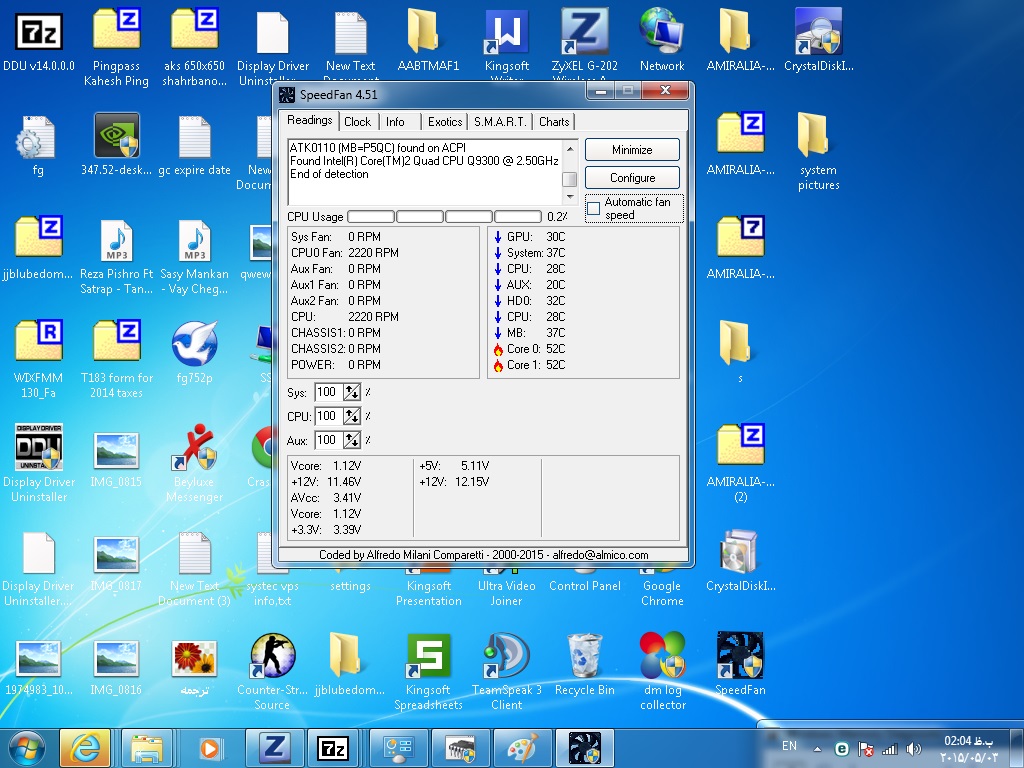
1:this picture is for part's temp with 0% cpu usage:

fanspeed_0_cpu_usage.jpg


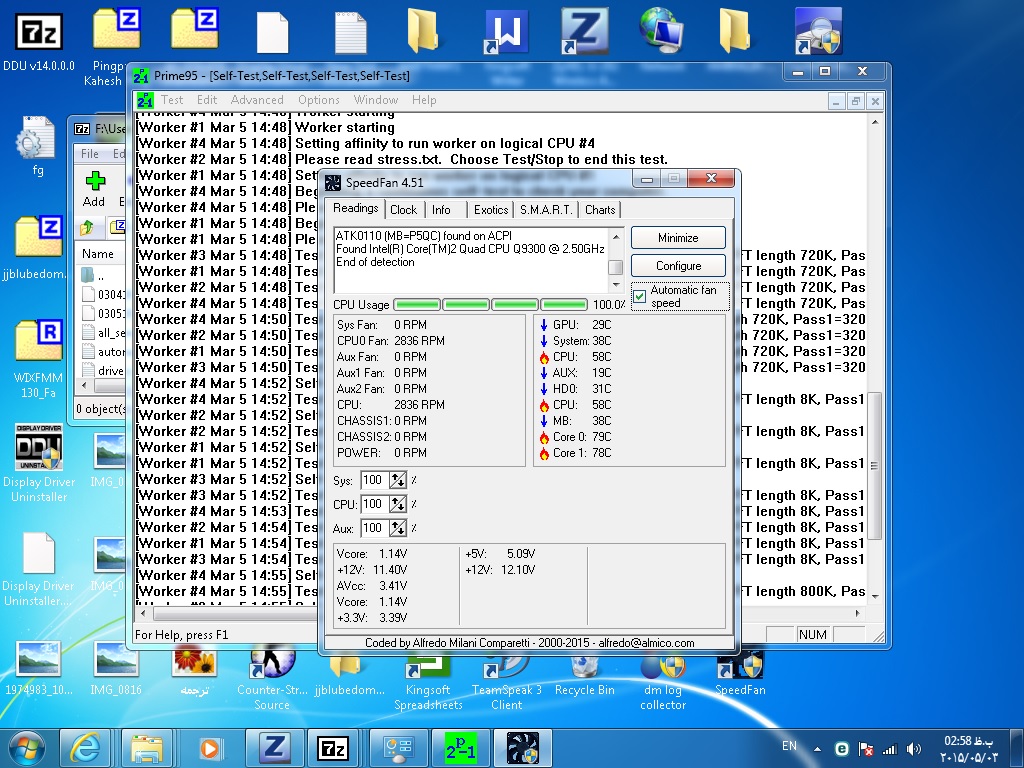
2.this picture is part's temp with 100% cpu usage under cpu stress test:

fanspeed_100_cpu_usage_cpu_stress_test.jpg


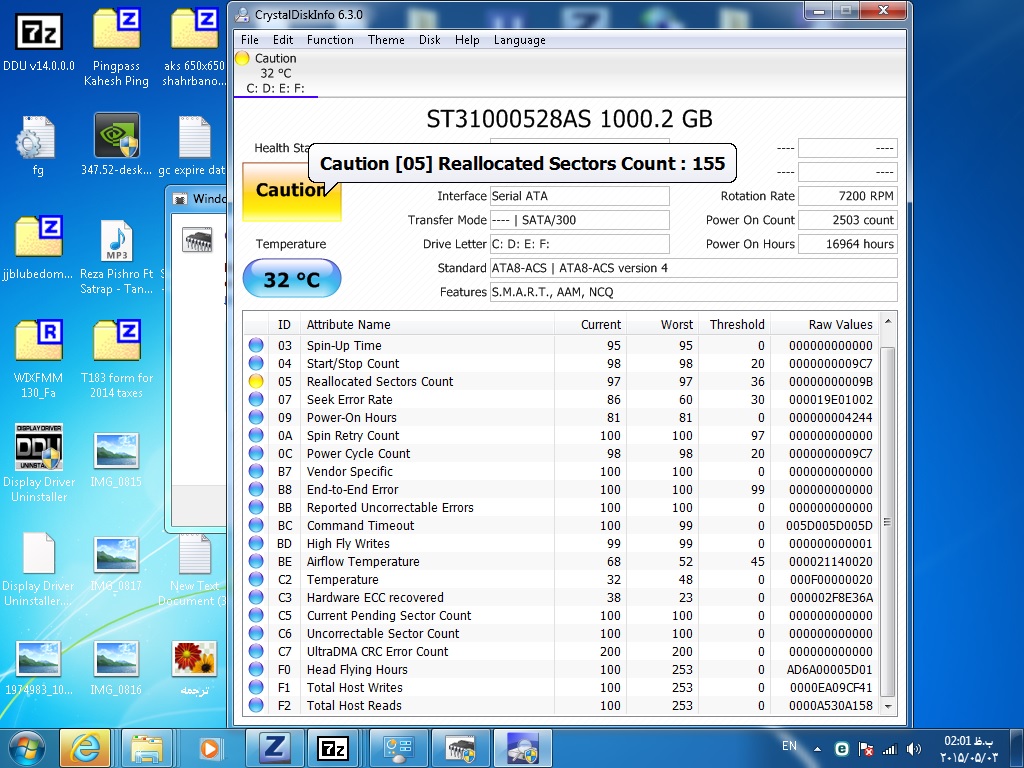
3.this picture HDD test if it is damaged or not:
Hard_disk_check.jpg


4:event viewer after RAM test:
memory_test.jpg


5: GPU stress test:

gpu_bench_deafault_settings.jpg


and eXtreme Power Supply Calculator says :
Minimum PSU Wattage:391 WattsRecommended Wattage:441 Watts
 
Last edited:

My Computer My Computer

At a glance

Windows 7 home premium 64-bit
Computer type
PC/Desktop
OS
Windows 7 home premium 64-bit

My Computer My Computer

At a glance

Microsoft Windows 10 Pro Insider Preview 64-bitIntel(R) Core(TM) i3-4130 CPU @ 3.40GHzCorsair Vengence 4GB x2 (8.00GB Dual-Channel ...2047MB GeForce GTS 450 (ZOTAC International)
Computer type
PC/Desktop
Computer Manufacturer/Model Number
Self Assembled
OS
Microsoft Windows 10 Pro Insider Preview 64-bit
CPU
Intel(R) Core(TM) i3-4130 CPU @ 3.40GHz
Motherboard
Gigabyte Technology Co., Ltd. B85M-D3H
Memory
Corsair Vengence 4GB x2 (8.00GB Dual-Channel DDR3 @ 798MHz)
Graphics Card(s)
2047MB GeForce GTS 450 (ZOTAC International)
Sound Card
Onboard (Realtek High Definition Audio)
Monitor(s) Displays
LG Flatron E2040T
Screen Resolution
1600x900
Hard Drives
Western Digital 1 TB
Seagate 500 GB
PSU
Corsair VS550
Case
Cooler Master K380
Cooling
Cooler Master Seidon 120V Plus
Keyboard
Logitech MK260r
Mouse
Logitech MK260r
Internet Speed
PMPL Broadband
Antivirus
Windows Defender + MBAM
Browser
Firefox
Other Info
Dell Studio 15" Laptop
hello again,
i just ran the dos version of seatools for my HDD on both short and long test and both tests passed.

since my motherboard is an asus-p5qc which got 2xddr3 memory slots and 4xddr2 slots on it,and my ram s are 2x2gig 1333 kingston(ddr3),i can only use 2 of my MB slots for my rams.
so i just ran memtest with both sticks in slots,after several minutes of test i got 2 errors,then i stopped the test right after,i took 1 of my rams and started test(on slot 0) and no errors after 7 passes.then put the other ram in same slot(slot 0) and again no errors after 7 passes.
so my question is, do i need to test each stick again on other slot(slot 1)? or i can come to result that the other slot(slot 1) is the cause of my problem and it's damaged and my both Ram s are fine.
and if the slot 1 is damaged ,why it can detect both rams and its shown i got 4gig ram in windows system info when both sticks are installed together?
I got confused really.
do u suggest testing both sticks individually on the other slot(slot 1) or its for sure a motherboard slot issue?
 
Last edited:

My Computer My Computer

At a glance

Windows 7 home premium 64-bit
Computer type
PC/Desktop
OS
Windows 7 home premium 64-bit
bump!
 

My Computer My Computer

At a glance

Windows 7 home premium 64-bit
Computer type
PC/Desktop
OS
Windows 7 home premium 64-bit
so i just ran memtest with both sticks in slots,after several minutes of test i got 2 errors,then i stopped the test right after,i took 1 of my rams and started test(on slot 0) and no errors after 7 passes.then put the other ram in same slot(slot 0) and again no errors after 7 passes.
so my question is, do i need to test each stick again on other slot(slot 1)? or i can come to result that the other slot(slot 1) is the cause of my problem and it's damaged and my both Ram s are fine
Yes - you must test the other slot before you can make any conclusion about the motherboard.
 

My Computer My Computer

At a glance

Windows 10 Pro x64 ; Xubuntu x64Intel i7 860 @ 2.80 GHz O/C'ed to 4.0GHz16GB Corsair Vengance DDR3 @ 661 MHz Dual Cha...EVGA NVidia GTX 560 1024MB
Computer type
PC/Desktop
Computer Manufacturer/Model Number
Golden Mk. I.4
OS
Windows 10 Pro x64 ; Xubuntu x64
CPU
Intel i7 860 @ 2.80 GHz O/C'ed to 4.0GHz
Motherboard
Gigabyte P55A-UD3R Rev.1. Award BIOS F13
Memory
16GB Corsair Vengance DDR3 @ 661 MHz Dual Channel (9-9-9-24)
Graphics Card(s)
EVGA NVidia GTX 560 1024MB
Sound Card
Realtek Integrated
Monitor(s) Displays
Dual Samsung SyncMaster 2494HS
Screen Resolution
1920*1080 and 1920*1080
Hard Drives
1*Samsung 840 EVO 120GB SSD;
1*OCZ Vertex 2 60GB SSD;
2*Samsung F3 SpinPoint 1TB in RAID0;
1*Samsung F1 SpinPoint 1TB;
2*Western Digital 1TB External USB 3.0
1*Western Digital 500GB External USB 3.0
1*Seagate 500GB External USB 2.0
PSU
Thermaltake ToughPower QFan 750W
Case
Thermaltake Element S VK60001W2Z
Cooling
Corsair H60 Water Cooling, 2*230mm and 2*80mm case fans
Keyboard
Logitech G110
Mouse
Logitech MX518
i did another memtest on second slot only(slot 1) with each ram
first ram : error on second pass
second ram: error on 5th pass


so this is what i did :
lets take a review,
my MB got two ddr3 slots and i got two( 2 gig ) ddr3 1333 RAM(MB= asus p5qc)
first i started the test with both sticks installed on MB and i got 2 errors on first pass
i decided to test RAM s individually so,
i stopped the test right after and removed 1 of my rams
now i started test with 1 ram only(ram 1) in slot 0 ====> 7 passes no errors
then i removed the ram 1 and placed ram 2 in slot 0=====> 7 passes and no errors
then i removed ram 2 from slot 0 and placed it in slot 1===>2 passes and 1 error
then i stopped the test right after and removed ram 2 from slot 1 and placed ram 1 in slot 1===> 5 passes and first error was shown.


so can u help me find what cause my BSOD now?
some questions in my mind now:
is it possible that my both RAM s are faulty and i was unlucky while testing them on slot 0 to see an error within 7 passes ? i mean maybe if i did more tests like 10+ passes the errors could be shown on slot 0 too.
or 7 pass is ok and like slot 1 errors show up before 7th pass and i should be
worry about my MB faulty slot(slot1) not my RAMs.

;
 

My Computer My Computer

At a glance

Windows 7 home premium 64-bit
Computer type
PC/Desktop
OS
Windows 7 home premium 64-bit
Well, the RAM 2 is faulty. It errors in two different slots.

If it is within warranty, RMA it. But if not, you have to get new RAM.

But when replacing RAM, it is better to use a new RAM KIT. If you can, get a new KIT of RAM (a pair of RAM tested to work together perfectly). Otherwise, take RAM 2 at teh shop, aks them to give them one which will be a perfect replacement (voltage, FSB etc) of it.
 

My Computer My Computer

At a glance

Microsoft Windows 10 Pro Insider Preview 64-bitIntel(R) Core(TM) i3-4130 CPU @ 3.40GHzCorsair Vengence 4GB x2 (8.00GB Dual-Channel ...2047MB GeForce GTS 450 (ZOTAC International)
Computer type
PC/Desktop
Computer Manufacturer/Model Number
Self Assembled
OS
Microsoft Windows 10 Pro Insider Preview 64-bit
CPU
Intel(R) Core(TM) i3-4130 CPU @ 3.40GHz
Motherboard
Gigabyte Technology Co., Ltd. B85M-D3H
Memory
Corsair Vengence 4GB x2 (8.00GB Dual-Channel DDR3 @ 798MHz)
Graphics Card(s)
2047MB GeForce GTS 450 (ZOTAC International)
Sound Card
Onboard (Realtek High Definition Audio)
Monitor(s) Displays
LG Flatron E2040T
Screen Resolution
1600x900
Hard Drives
Western Digital 1 TB
Seagate 500 GB
PSU
Corsair VS550
Case
Cooler Master K380
Cooling
Cooler Master Seidon 120V Plus
Keyboard
Logitech MK260r
Mouse
Logitech MK260r
Internet Speed
PMPL Broadband
Antivirus
Windows Defender + MBAM
Browser
Firefox
Other Info
Dell Studio 15" Laptop
Well, the RAM 2 is faulty. It errors in two different slots.

If it is within warranty, RMA it. But if not, you have to get new RAM.

But when replacing RAM, it is better to use a new RAM KIT. If you can, get a new KIT of RAM (a pair of RAM tested to work together perfectly). Otherwise, take RAM 2 at teh shop, aks them to give them one which will be a perfect replacement (voltage, FSB etc) of it.
no!
,RAM 2 doesnt error in two different slots,only in slot(1)
as i mentioned,both rams error only in slot(1) and none of them have any errror in slot(0)

can u pls read my previous post (post number 8)carefuly again and give another help?
i would be thankful for that,
cheers,
 

My Computer My Computer

At a glance

Windows 7 home premium 64-bit
Computer type
PC/Desktop
OS
Windows 7 home premium 64-bit
now i started test with 1 ram only(ram 1) in slot 0 ====> 7 passes no errors
then i removed the ram 1 and placed ram 2 in slot 0=====> 7 passes and no errors
then i removed ram 2 from slot 0 and placed it in slot 1===>2 passes and 1 error
then i stopped the test right after and removed ram 2 from slot 1 and placed ram 1 in slot 1===> 5 passes and first
#|Slot0|Slot1
RAM1| PASS | ERROR
RAM2| PASS | ERROR
Yes, Slot 1. Then it is a motherboard issue. You need to replace the motherboard. As long as you are not replacing it, dont place a RAM in the slot 1.

From post #3, the Seagate 1 TB HDD is not in a healthy state. Test it using seatools for DOS.
The DOS test is suggested, because it will attempt to recover the disc during the long generic DOS test. Take both the short generic test and the long generic test. Let us know that result too.
 

My Computer My Computer

At a glance

Microsoft Windows 10 Pro Insider Preview 64-bitIntel(R) Core(TM) i3-4130 CPU @ 3.40GHzCorsair Vengence 4GB x2 (8.00GB Dual-Channel ...2047MB GeForce GTS 450 (ZOTAC International)
Computer type
PC/Desktop
Computer Manufacturer/Model Number
Self Assembled
OS
Microsoft Windows 10 Pro Insider Preview 64-bit
CPU
Intel(R) Core(TM) i3-4130 CPU @ 3.40GHz
Motherboard
Gigabyte Technology Co., Ltd. B85M-D3H
Memory
Corsair Vengence 4GB x2 (8.00GB Dual-Channel DDR3 @ 798MHz)
Graphics Card(s)
2047MB GeForce GTS 450 (ZOTAC International)
Sound Card
Onboard (Realtek High Definition Audio)
Monitor(s) Displays
LG Flatron E2040T
Screen Resolution
1600x900
Hard Drives
Western Digital 1 TB
Seagate 500 GB
PSU
Corsair VS550
Case
Cooler Master K380
Cooling
Cooler Master Seidon 120V Plus
Keyboard
Logitech MK260r
Mouse
Logitech MK260r
Internet Speed
PMPL Broadband
Antivirus
Windows Defender + MBAM
Browser
Firefox
Other Info
Dell Studio 15" Laptop
now i started test with 1 ram only(ram 1) in slot 0 ====> 7 passes no errors
then i removed the ram 1 and placed ram 2 in slot 0=====> 7 passes and no errors
then i removed ram 2 from slot 0 and placed it in slot 1===>2 passes and 1 error
then i stopped the test right after and removed ram 2 from slot 1 and placed ram 1 in slot 1===> 5 passes and first
#|Slot0|Slot1
RAM1| PASS | ERROR
RAM2| PASS | ERROR
Yes, Slot 1. Then it is a motherboard issue. You need to replace the motherboard. As long as you are not replacing it, dont place a RAM in the slot 1.

From post #3, the Seagate 1 TB HDD is not in a healthy state. Test it using seatools for DOS.
The DOS test is suggested, because it will attempt to recover the disc during the long generic DOS test. Take both the short generic test and the long generic test. Let us know that result too.

as i mentioned in post #5 i did both short and long test of my HDD with seatools and both passed,


just 1 question:
for some reasons i cant buy a new MB,just i want to know if i can use 1 of my rams on the working slot?(slot 0)?
or maybe sell both rams and buy 1x4gig ram and place it in working slot?
how much is the performance difference of 2x2gig ram in dual channel with 1x4gig ram?

sry for bothering and ty for replys.
 

My Computer My Computer

At a glance

Windows 7 home premium 64-bit
Computer type
PC/Desktop
OS
Windows 7 home premium 64-bit
You can use any RAM in the working slot. The existing one or the new one.

But you need to take care of the HDD. Its unhealthy ATM. Do the following at least, which will give you some more time with the HDD.
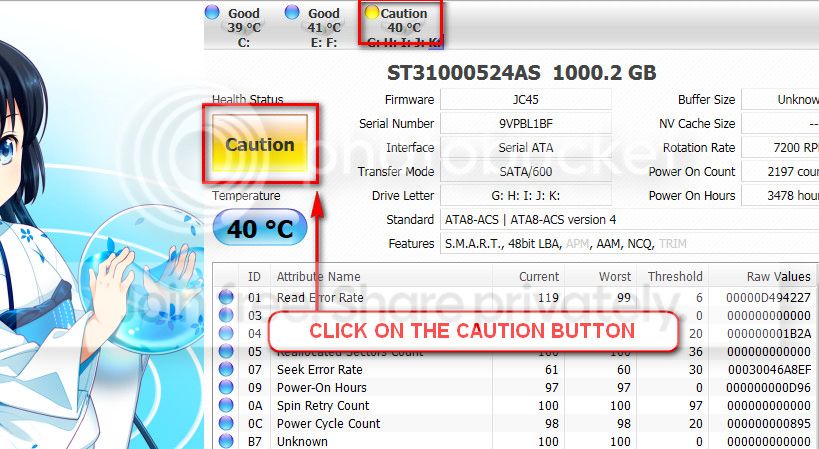
The caution indication can be converted to good using CrystalDiscInfo. Click on the caution Button, you will get another window ....
1_zps1eeadfca.jpg

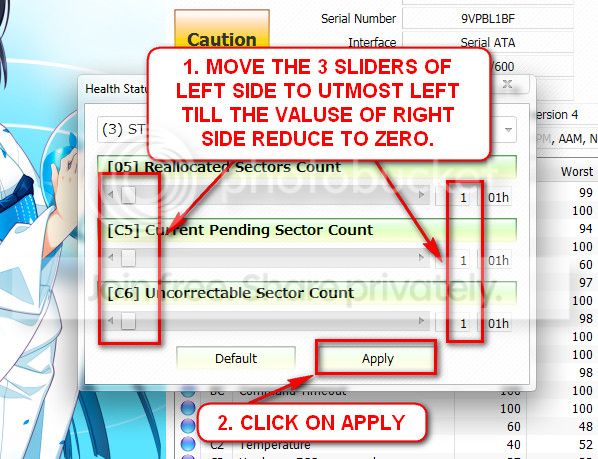
In the resulting window, there are three sliders in the left. Drag them to the ultimate left, and notice the values at the right side are converting to zeros.
2_zps50ae6eec.jpg

Now click the apply button, and notice that the caution is gone.
 

My Computer My Computer

At a glance

Microsoft Windows 10 Pro Insider Preview 64-bitIntel(R) Core(TM) i3-4130 CPU @ 3.40GHzCorsair Vengence 4GB x2 (8.00GB Dual-Channel ...2047MB GeForce GTS 450 (ZOTAC International)
Computer type
PC/Desktop
Computer Manufacturer/Model Number
Self Assembled
OS
Microsoft Windows 10 Pro Insider Preview 64-bit
CPU
Intel(R) Core(TM) i3-4130 CPU @ 3.40GHz
Motherboard
Gigabyte Technology Co., Ltd. B85M-D3H
Memory
Corsair Vengence 4GB x2 (8.00GB Dual-Channel DDR3 @ 798MHz)
Graphics Card(s)
2047MB GeForce GTS 450 (ZOTAC International)
Sound Card
Onboard (Realtek High Definition Audio)
Monitor(s) Displays
LG Flatron E2040T
Screen Resolution
1600x900
Hard Drives
Western Digital 1 TB
Seagate 500 GB
PSU
Corsair VS550
Case
Cooler Master K380
Cooling
Cooler Master Seidon 120V Plus
Keyboard
Logitech MK260r
Mouse
Logitech MK260r
Internet Speed
PMPL Broadband
Antivirus
Windows Defender + MBAM
Browser
Firefox
Other Info
Dell Studio 15" Laptop
You can use any RAM in the working slot. The existing one or the new one.

But you need to take care of the HDD. Its unhealthy ATM. Do the following at least, which will give you some more time with the HDD.
The caution indication can be converted to good using CrystalDiscInfo. Click on the caution Button, you will get another window ....
1_zps1eeadfca.jpg

In the resulting window, there are three sliders in the left. Drag them to the ultimate left, and notice the values at the right side are converting to zeros.
2_zps50ae6eec.jpg

Now click the apply button, and notice that the caution is gone.

ok,i followed your steps in crystaldiscinfo and the health status changed to green(good).

now i should start playing world of warcraft after all these steps and troubleshootings we have done and see if i still get a BSOD or not.if everything was ok after serveral days of playing,i will post the results back and mark the thread as solved.
btw i have to say thank u,you helped alot :)
 

My Computer My Computer

At a glance

Windows 7 home premium 64-bit
Computer type
PC/Desktop
OS
Windows 7 home premium 64-bit
hello again and sry for the delay on my post
i just sold my two rams and bought 4x1 gig ddr2 instead,and now no BSOD
as u said one of my ddr3 ram slots was damaged on MB and my MB doesnt support 1x4gig ddr3 1333 ram ,i was forced to use 2x2gig ddr3 1333 ram before and now 1 of slots damaged and i am forced to use 4 x 1gig ddr2 instead.
i should thank you for all your tips ARC
cheers,
AmirAli.
 

My Computer My Computer

At a glance

Windows 7 home premium 64-bit
Computer type
PC/Desktop
OS
Windows 7 home premium 64-bit
Good news.

Let us know for any further BSOD.
 

My Computer My Computer

At a glance

Microsoft Windows 10 Pro Insider Preview 64-bitIntel(R) Core(TM) i3-4130 CPU @ 3.40GHzCorsair Vengence 4GB x2 (8.00GB Dual-Channel ...2047MB GeForce GTS 450 (ZOTAC International)
Computer type
PC/Desktop
Computer Manufacturer/Model Number
Self Assembled
OS
Microsoft Windows 10 Pro Insider Preview 64-bit
CPU
Intel(R) Core(TM) i3-4130 CPU @ 3.40GHz
Motherboard
Gigabyte Technology Co., Ltd. B85M-D3H
Memory
Corsair Vengence 4GB x2 (8.00GB Dual-Channel DDR3 @ 798MHz)
Graphics Card(s)
2047MB GeForce GTS 450 (ZOTAC International)
Sound Card
Onboard (Realtek High Definition Audio)
Monitor(s) Displays
LG Flatron E2040T
Screen Resolution
1600x900
Hard Drives
Western Digital 1 TB
Seagate 500 GB
PSU
Corsair VS550
Case
Cooler Master K380
Cooling
Cooler Master Seidon 120V Plus
Keyboard
Logitech MK260r
Mouse
Logitech MK260r
Internet Speed
PMPL Broadband
Antivirus
Windows Defender + MBAM
Browser
Firefox
Other Info
Dell Studio 15" Laptop
Back
Top