Solved I too have a desktop icon problem

Melita

New member
Power User
VIP
Local time
10:54 AM
Messages
293
Location
Canada
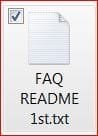
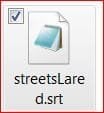
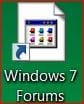
I used Ccleaner to clean up the computer. When I re-started the computer, desktop icons for Internet web page short cuts (about 20 of them), have all changed to the same icon, the way it is seen in my attachment at the top. Before the clean up, they all had different icons according to the web page, as shown in attachment at the bottom. How can I get back the original web page icons for these short cuts?

Attachment 1.JPG

Attachment 2.JPG

Thank you,
 
Last edited:

My Computer

Computer Manufacturer/Model Number
Laptop - Acer Aspire 5250-BZ479
OS
Windows 7 Home Premium 64bit
CPU
AMD Dual Core C-50
Memory
2GB DDR3/320GB HDD
Graphics Card(s)
AMD Radeon HD 6250
Monitor(s) Displays
15.6" HD LED LCD
Internet Speed
ADSL
I used the command line method but it did not work. Perhaps because they are short cuts and not files and folders which have their own extensions. The files and folder icons did not change after Ccleaner anyway, and after the cache rebuild operation also they remained the same.

After the cache rebuild two things happened to the short cut icons. (1) They all changed to the usual Notepad icon of WIN 7. Please see attachment. (2) This is spooky. When a web page is opened using one of the icons, two tabs open. First tab opens 'Ghostery' home page (I use this add on with Firefox which is my default browser), and the second one opens the correct web page. This happens with all the Internet short cuts! Now I have notepad icon on all these and I am plagued with Ghostery home page.

icon.JPG

What can I do now? :cry:
 

My Computer

Computer Manufacturer/Model Number
Laptop - Acer Aspire 5250-BZ479
OS
Windows 7 Home Premium 64bit
CPU
AMD Dual Core C-50
Memory
2GB DDR3/320GB HDD
Graphics Card(s)
AMD Radeon HD 6250
Monitor(s) Displays
15.6" HD LED LCD
Internet Speed
ADSL

My Computer

Computer type
PC/Desktop
Computer Manufacturer/Model Number
Dell All in one Inspiron 2020
OS
W10 32 bit, XUbuntu 18.xx 64 bit
CPU
Intel(R) Celeron(R) CPU G1620T @ 2.40GHz, 2400 Mhz
Motherboard
Dell
Memory
4GB
Graphics Card(s)
Intel HD graphics
Sound Card
High Definition Audio Device
Monitor(s) Displays
20 inch Screen
Screen Resolution
W7=1280 x 720 & Linux Mint Xfce=1360 x 768
Hard Drives
500 GB hard drive
Keyboard
Usb
Mouse
Usb
Internet Speed
High-Speed
Antivirus
MSE
Browser
Main Browser Firefox
Other Info
I have done a clean install of Windows 7 using Dell re-installation disk (Dell sent me one). I also use Free Macrium reflect backup and restore.
As those website favicons are not stored in the computer (as the exes are), I doubt that rebuilding icon cache etc can restore them back.

IMHO you will need to make the shortcuts once again. Run CCleaner at the default settings only, the "non-checked by default", if checked, may wipe up or delete some things those are important to you.

Another point, I did not know that some people in Canada are also following the ICC world cup, as we are doing in India. :)
 

My Computer

Computer type
PC/Desktop
Computer Manufacturer/Model Number
Self Assembled
OS
Microsoft Windows 10 Pro Insider Preview 64-bit
CPU
Intel(R) Core(TM) i3-4130 CPU @ 3.40GHz
Motherboard
Gigabyte Technology Co., Ltd. B85M-D3H
Memory
Corsair Vengence 4GB x2 (8.00GB Dual-Channel DDR3 @ 798MHz)
Graphics Card(s)
2047MB GeForce GTS 450 (ZOTAC International)
Sound Card
Onboard (Realtek High Definition Audio)
Monitor(s) Displays
LG Flatron E2040T
Screen Resolution
1600x900
Hard Drives
Western Digital 1 TB
Seagate 500 GB
PSU
Corsair VS550
Case
Cooler Master K380
Cooling
Cooler Master Seidon 120V Plus
Keyboard
Logitech MK260r
Mouse
Logitech MK260r
Internet Speed
PMPL Broadband
Antivirus
Windows Defender + MBAM
Browser
Firefox
Other Info
Dell Studio 15" Laptop
Thank you for this, but I really don't think this will help as Arc explained above.
As those website favicons are not stored in the computer (as the exes are), I doubt that rebuilding icon cache etc can restore them back. IMHO you will need to make the shortcuts once again.
Yes, it looks like I'll have to do it all over again, unless someone else has a better idea. At last I managed to get rid of the Ghostery page by removing it from Firefox and downloading it again and it is not opening anymore when I click on those shortcuts. It sent me round the bend for a while!
Run CCleaner at the default settings only, the "non-checked by default", if checked, may wipe up or delete some things those are important to you.
Thank you. That is the mistake I made. Selected a few additional things to wipe.

I did not know that some people in Canada are also following the ICC world cup, as we are doing in India. :)
It is unusual I know. Only those who come from that part of the world or those who have ties to South Asia like me, are the ones who watch Cricket here. In this part of the world, people have not even heard of the game :p

P.S. I have sent you a private message.

Kind regards,
 

My Computer

Computer Manufacturer/Model Number
Laptop - Acer Aspire 5250-BZ479
OS
Windows 7 Home Premium 64bit
CPU
AMD Dual Core C-50
Memory
2GB DDR3/320GB HDD
Graphics Card(s)
AMD Radeon HD 6250
Monitor(s) Displays
15.6" HD LED LCD
Internet Speed
ADSL
The two home pages might have been FF configuration - only open first Homepage. You reolved that by reinstall Ghostery.


Do you have the URLs in your bookmarks/favorites?

Are the favicons on those?

You can drag the URL from your bookmarks/favotites to your desktop (not sure about FF) if the icons are in the regular location.

If you just visit the page again, is the shortcut icon fixed? I don't expect it would be, but one click will tell - it's an easy test

I'm surprised that Windows didn't change the icon to the IE globe icon - I'm also not sure that's a Notepad icon, it could be just a default for a FF file extension - not sure, though.

Is the shortcut extension .url? Check properties.
 

My Computer

Computer type
Laptop
Computer Manufacturer/Model Number
HP Pavilion dv6-6c10us
OS
x64 (6.3.9600) Win8.1 Pro & soon dual boot x64 (6.1.7601) Win7_SP1 HomePrem
CPU
AMD A6-3420M APU with Radeon(tm) HD Graphics
Motherboard
Hewlett-Packard 1805
Memory
6.00 GB
Graphics Card(s)
AMD Radeon(TM) HD 6520G
Sound Card
(1) AMD High Definition Audio Device (2) IDT High Definiti
Monitor(s) Displays
HP W2072a 20" LCD (1600 x 900) @ 60 Hz
Screen Resolution
1366 x 768 x 32 bits (4294967296 colors) @ 60 Hz
Hard Drives
ST640LM0 00 HM641JI SATA Disk Device
Keyboard
Logitech k520 wireless KB
Mouse
Logitech m320 wireless mouse (bundled with KB)
Internet Speed
15/5 | 54 MB Wireless 'n'
Antivirus
Realtime: Defender or Avast | On-demand: Malwarebytes, ESET
Browser
IE 11 on Win8, IE 10 on win 7
Other Info
Media: [Gimp, Audacity, VLC] || Comm: [WEmail 2012, Skype] || Productivity: [OpenOffice,| Textpad] || Utils: [Sysinternals, cCleaner, Speccy, Defraggler]
Try one more thing: tweaking.com's Windows Repair (All in One) -- accept defaults if you wish, and ensure to check the one for rebuilding icons.
 

My Computer

Computer type
PC/Desktop
Computer Manufacturer/Model Number
Antec desktop; Acer Aspire laptops
OS
Windows 7 Professional 64-bit
CPU
Desktop i5; Acers i5 & i7
Memory
desktop 16GB; 1 Acer 8GB & 1 Acer 16GB
Hard Drives
1TB split into 2 equal partitions [OS and data] usable by RJS
Internet Speed
AT&T DSL
Browser
FF, GChrome, msIE
Other Info
Windows 7 Firewall, Emsisoft AM/AV, MSE [scan-only], SpywareBlaster, Ruiware/BillP combine
Do you have the URLs in your bookmarks/favorites?
Are the favicons on those? You can drag the URL from your bookmarks/favotites to your desktop (not sure about FF) if the icons are in the regular location.
Yes, dragging the URL from the Bookmarks works nicely and smoothly in Firefox too and it gives the original icon. I didn't know this until you suggested here! Unfortunately, although I have loads of Bookmarks I don't have ones for the favicons on the desk top. Didn't think they will be needed. If I had them it would have been a piece of cake to rectify this. So in future, I going to have a separate folder in Bookmarks specially for favicons, thanks to you.
If you just visit the page again, is the shortcut icon fixed? I don't expect it would be, but one click will tell - it's an easy test
No, it doesn't but in three steps it can be put right. Reduce the page size so that I can see the messed up favicon on desk top, delete it and drag and drop page to desktop again. It is saved with the proper icon.
I'm surprised that Windows didn't change the icon to the IE globe icon - I'm also not sure that's a Notepad icon, it could be just a default for a FF file extension - not sure, though.
I just had a good look at this. In my computer, files that automatically open with Notepad take up two types of icons (two attachments here). Both these open with notepad. So far I am unable to work out how Windows decides on the icon. I have not made any changes to file extensions.

NP 1.JPG NP 2.JPG

Is the shortcut extension .url? Check properties.
Yes it is, in both, good favicons (I have just made some), and the bad ones as well.

Thank you very much for helping.

Try one more thing: tweaking.com's Windows Repair (All in One) -- accept defaults if you wish, and ensure to check the one for rebuilding icons.
Thank you for helping but I am a little scared to do a 'repair', as there is nothing wrong with my OS.

Kind regards,
 
Last edited:

My Computer

Computer Manufacturer/Model Number
Laptop - Acer Aspire 5250-BZ479
OS
Windows 7 Home Premium 64bit
CPU
AMD Dual Core C-50
Memory
2GB DDR3/320GB HDD
Graphics Card(s)
AMD Radeon HD 6250
Monitor(s) Displays
15.6" HD LED LCD
Internet Speed
ADSL
Try one more thing: tweaking.com's Windows Repair (All in One) -- accept defaults if you wish, and ensure to check the one for rebuilding icons. -- RolandJS
Thank you for helping but I am a little scared to do a 'repair', as there is nothing wrong with my OS. -- Melita
Apparently, all your desktop icons have returned to their former pictures? Your opening problem has been solved, yes? If so, you're correct, no need to do my suggestion. You might want to download it and simply "park it" for future use :)
 

My Computer

Computer type
PC/Desktop
Computer Manufacturer/Model Number
Antec desktop; Acer Aspire laptops
OS
Windows 7 Professional 64-bit
CPU
Desktop i5; Acers i5 & i7
Memory
desktop 16GB; 1 Acer 8GB & 1 Acer 16GB
Hard Drives
1TB split into 2 equal partitions [OS and data] usable by RJS
Internet Speed
AT&T DSL
Browser
FF, GChrome, msIE
Other Info
Windows 7 Firewall, Emsisoft AM/AV, MSE [scan-only], SpywareBlaster, Ruiware/BillP combine
Try one more thing: tweaking.com's Windows Repair (All in One) -- accept defaults if you wish, and ensure to check the one for rebuilding icons. -- RolandJS
Thank you for helping but I am a little scared to do a 'repair', as there is nothing wrong with my OS. -- Melita
Apparently, all your desktop icons have returned to their former pictures? Your opening problem has been solved, yes? If so, you're correct, no need to do my suggestion. You might want to download it and simply "park it" for future use :)
Thank you. It may be useful in the future.

Regards,
 

My Computer

Computer Manufacturer/Model Number
Laptop - Acer Aspire 5250-BZ479
OS
Windows 7 Home Premium 64bit
CPU
AMD Dual Core C-50
Memory
2GB DDR3/320GB HDD
Graphics Card(s)
AMD Radeon HD 6250
Monitor(s) Displays
15.6" HD LED LCD
Internet Speed
ADSL
Favicons aren't the same as Windows icons .... they're stored in the Internet cache as favicon for that URL.

I wasn't sure how tightly nit the URL and favicon were, but you answered that question - a shortcut URL outside of favorites will not get updated by a fresh visit to the page. The favicon will get updated on the bookmark though.

See: http://www.sevenforums.com/browsers...avicon-ico-w-ie7-post1460887.html#post1460887
There's a utility referenced in the last post (I've never used that utility). The only problem might be - all files are named favicon.
If you copy them, be sure to name them something more meaningful
(i.e. SevenFoums.com favicon -> faviconSF -- OR -- iconSevenForums)

Once you have the favicons in a different folder, you can change the shortcut to use that icon, not the favicon. cCleaner won't touch those.

Or... you can copy the bookmark / favorite to the desktop ;)

Glad you got it sorted.

Bill
.
 

My Computer

Computer type
Laptop
Computer Manufacturer/Model Number
HP Pavilion dv6-6c10us
OS
x64 (6.3.9600) Win8.1 Pro & soon dual boot x64 (6.1.7601) Win7_SP1 HomePrem
CPU
AMD A6-3420M APU with Radeon(tm) HD Graphics
Motherboard
Hewlett-Packard 1805
Memory
6.00 GB
Graphics Card(s)
AMD Radeon(TM) HD 6520G
Sound Card
(1) AMD High Definition Audio Device (2) IDT High Definiti
Monitor(s) Displays
HP W2072a 20" LCD (1600 x 900) @ 60 Hz
Screen Resolution
1366 x 768 x 32 bits (4294967296 colors) @ 60 Hz
Hard Drives
ST640LM0 00 HM641JI SATA Disk Device
Keyboard
Logitech k520 wireless KB
Mouse
Logitech m320 wireless mouse (bundled with KB)
Internet Speed
15/5 | 54 MB Wireless 'n'
Antivirus
Realtime: Defender or Avast | On-demand: Malwarebytes, ESET
Browser
IE 11 on Win8, IE 10 on win 7
Other Info
Media: [Gimp, Audacity, VLC] || Comm: [WEmail 2012, Skype] || Productivity: [OpenOffice,| Textpad] || Utils: [Sysinternals, cCleaner, Speccy, Defraggler]
i suggest you for all web locations use bookmark's rather than desktop icon, since they always make display problems. every time you delete tempoary internet files or whatever. same happens with bookmark icons as well, but at least they're remade every time you visit web page again.
 

My Computer

Computer type
PC/Desktop
OS
Windows 7 Ultimate x64
CPU
Intel i5 3350P
Motherboard
Asus P8H77-V
Memory
Kingston HyperX DDR3 1600MHz 4GB (x2)
Graphics Card(s)
Asus, GeForce GTX 560Ti, DCUII 1024MB
Favicons aren't the same as Windows icons .... they're stored in the Internet cache as favicon for that URL..........................................Or... you can copy the bookmark / favorite to the desktop ;)

Glad you got it sorted.

Bill
.
Thank you for the link and other information.

Regards,
 

My Computer

Computer Manufacturer/Model Number
Laptop - Acer Aspire 5250-BZ479
OS
Windows 7 Home Premium 64bit
CPU
AMD Dual Core C-50
Memory
2GB DDR3/320GB HDD
Graphics Card(s)
AMD Radeon HD 6250
Monitor(s) Displays
15.6" HD LED LCD
Internet Speed
ADSL
Back
Top