Migrating Data to D: and then cloning OS from C: to new SSD

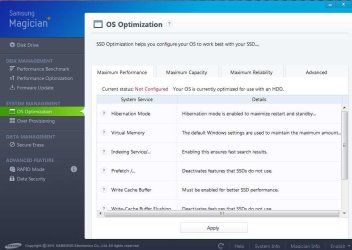
Samsung Magician reports OS Optimization =Not configured, and mentions to use the OS Optimization menu, Samsung has a performance optimization tab that one can use if your "OS lacks TRIM support for SSD", I used it before, but the setting disappeared after reboots, and apparently I would have to keep Magician running at boot up to apply the settings, I never heard of this OS Optimization menu either, but maybe it was an Win7 utility hidden some where?

Windows 7 does support TRIM for SSD, so maybe the "performance optimization tab" of Magician doesn't offer you a lot? I've never even seen it.

Virtually certain there is no such Windows "optimization" utility. Win 7 knows you have an SSD and acts and adjusts accordingly. You can find all sorts of web pages with voodoo of one type or another. Suit yourself as to their effectiveness.
 

My Computer My Computer

At a glance

Windows 7 Home Premium SP1, 64-bitIntel Skylake i5-6600K, not overclocked8 GB HyperX DDR4-2666 (2 x 4 GB)none; graphics are integrated on CPU
Computer type
PC/Desktop
Computer Manufacturer/Model Number
Ignatz Special; 4 speed manual gearbox; factory air conditioning; one of one
OS
Windows 7 Home Premium SP1, 64-bit
CPU
Intel Skylake i5-6600K, not overclocked
Motherboard
AsRock Z170M Extreme 4, micro ATX
Memory
8 GB HyperX DDR4-2666 (2 x 4 GB)
Graphics Card(s)
none; graphics are integrated on CPU
Sound Card
onboard: Realtek ALC1150; external: USB Behringer UF0-202
Monitor(s) Displays
Dell S2340M 23 inch IPS
Screen Resolution
1600 x 900
Hard Drives
System: Crucial MX100 series SSD, 128 GB;
Data: Samsung Spinpoint 103SJ, 1 TB;
Backup: WD Caviar Green WD30EZRX-00D8PB0, 3 TB
PSU
Rosewill SilentNight 500 watt fanless, semi-modular
Case
Antec Solo II
Cooling
Noctua NH-U12S; Noctua F12 intake, Noctua S12A exhaust
Keyboard
Microsoft 200 6JH-00001 USB
Mouse
Dell or Microsoft optical wired; USB
Antivirus
Microsoft Security Essentials and Malwarebytes Premium
Browser
Pale Moon
Other Info
All fans PWM; speeds at idle: CPU circa 500 rpm; intake circa 600 rpm; exhaust circa 600 rpm; CPU temps 27 idle and 47 C load in a warm room (27 C/81 F) when running Intel Extreme Tuning Utility stress test.
Use this for backup - it's the best, seriously.

http://www.sevenforums.com/tutorials/73828-imaging-free-macrium.html?ltr=I

And forget SSD optimization. As long as the SSD is aligned, there is nothing to optimize.

Thanks WHS, didn't see this reply until now, I downloaded Macrium before as recommended by you guys here to do an Image of the old HDD that didn't work because of the disc errors, I will try it out for regular back ups and see...I was also recommended Todo Backup..

There are many imaging programs. But if you ask 100 guys here which one they prefer, I think you would get a majority for Macrium.

Another one that has sprung up recently is AOMEI. I myself had problems with it, but other people seem to like it. They have a neat one called OneKey where you need no recovery media. But that's no good if the disk goes south.
 

My Computer My Computer

At a glance

Vista, Windows7, Mint Mate, Zorin, Windows 8from 1.6GHz Duo to i7
Computer Manufacturer/Model Number
HP, Dell, Gateway, Toshiba - 4 laptops and 2 desktops
OS
Vista, Windows7, Mint Mate, Zorin, Windows 8
CPU
from 1.6GHz Duo to i7
Monitor(s) Displays
2x HP w2207
Hard Drives
5x HDD, 7x SSD, 12x Externals
Keyboard
with trackball - no mices
Mouse
Trackball mice
Internet Speed
DSL 6000
If you want to migrate or clone data OS or other data from or to any other drives,use Easeus partition master.....
 

My Computer My Computer

At a glance

windows 7 ultimate 64 bitIntel core i3-2350M cpu@!2.30 Ghz4.00 GBAMD RADEON HD 6370M(1GB)
Computer type
Laptop
Computer Manufacturer/Model Number
LENOVO G570
OS
windows 7 ultimate 64 bit
CPU
Intel core i3-2350M cpu@!2.30 Ghz
Motherboard
Lenovo
Memory
4.00 GB
Graphics Card(s)
AMD RADEON HD 6370M(1GB)
Monitor(s) Displays
Generic pnp Monitor
Screen Resolution
1366*768
Hard Drives
ST9500325AS ATA device(500GB) NTFS
Keyboard
Standard ps/2 keyboard
Mouse
synaptics ps/2 port Touchpad
Internet Speed
921.6 kbps(Dial up Connection)
Antivirus
Quick Heal,MSE
Browser
Opera,Chrome
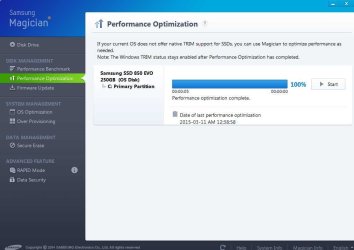
Samsung Magician reports OS Optimization =Not configured, and mentions to use the OS Optimization menu, Samsung has a performance optimization tab that one can use if your "OS lacks TRIM support for SSD", I used it before, but the setting disappeared after reboots, and apparently I would have to keep Magician running at boot up to apply the settings, I never heard of this OS Optimization menu either, but maybe it was an Win7 utility hidden some where?

Windows 7 does support TRIM for SSD, so maybe the "performance optimization tab" of Magician doesn't offer you a lot? I've never even seen it.

Virtually certain there is no such Windows "optimization" utility. Win 7 knows you have an SSD and acts and adjusts accordingly. You can find all sorts of web pages with voodoo of one type or another. Suit yourself as to their effectiveness.

Not sure if Samsung Optimization is doing anything else Win7 is not able to do...I'm cleaning up my boot-up programs and was not sure if removing Samsung was going to affect the SSD performance..

here's what the console looks like...

PS:Just checked and it's useful for old WinXP and Vista OS users..
 

Attachments

  • SammyPerformanceOpt.jpg
    SammyPerformanceOpt.jpg
    41 KB · Views: 0
Last edited:

My Computer My Computer

At a glance

Windows 7 Home Premium Edition SP1 64 bitIntel i7-920 2.66 GHZ6 Gig DDR3 @ 1066 MHZATi Radeon HD 5770 - 1GB GDDR5
Computer type
PC/Desktop
Computer Manufacturer/Model Number
Dell Studio XPS 9000
OS
Windows 7 Home Premium Edition SP1 64 bit
CPU
Intel i7-920 2.66 GHZ
Motherboard
Intel
Memory
6 Gig DDR3 @ 1066 MHZ
Graphics Card(s)
ATi Radeon HD 5770 - 1GB GDDR5
Sound Card
M-Audio AudioPhile 24/96
Monitor(s) Displays
Dell_ST2310_Digital
Screen Resolution
1920 x 1080(p) (60.000Hz)
Hard Drives
Samsung 250 Gb SDD 850 EVO,
Hitachi 1TB 7200/RPM, External Seagate 1TB 7200 RPM
PSU
Corsair 650 Watt
Mouse
Logitech Wireless MX Revolution
Antivirus
Windows Defender
Browser
Firefox
PS:Just checked and it's useful for old WinXP and Vista OS users..

Yep.

That would coincide with what it says on that screen shot...."if your OS does not provide native TRIM support" or whatever. Win 7 does provide native TRIM support.

So, if you can take the words in the screen shot at face value, it offers you nothing.
 

My Computer My Computer

At a glance

Windows 7 Home Premium SP1, 64-bitIntel Skylake i5-6600K, not overclocked8 GB HyperX DDR4-2666 (2 x 4 GB)none; graphics are integrated on CPU
Computer type
PC/Desktop
Computer Manufacturer/Model Number
Ignatz Special; 4 speed manual gearbox; factory air conditioning; one of one
OS
Windows 7 Home Premium SP1, 64-bit
CPU
Intel Skylake i5-6600K, not overclocked
Motherboard
AsRock Z170M Extreme 4, micro ATX
Memory
8 GB HyperX DDR4-2666 (2 x 4 GB)
Graphics Card(s)
none; graphics are integrated on CPU
Sound Card
onboard: Realtek ALC1150; external: USB Behringer UF0-202
Monitor(s) Displays
Dell S2340M 23 inch IPS
Screen Resolution
1600 x 900
Hard Drives
System: Crucial MX100 series SSD, 128 GB;
Data: Samsung Spinpoint 103SJ, 1 TB;
Backup: WD Caviar Green WD30EZRX-00D8PB0, 3 TB
PSU
Rosewill SilentNight 500 watt fanless, semi-modular
Case
Antec Solo II
Cooling
Noctua NH-U12S; Noctua F12 intake, Noctua S12A exhaust
Keyboard
Microsoft 200 6JH-00001 USB
Mouse
Dell or Microsoft optical wired; USB
Antivirus
Microsoft Security Essentials and Malwarebytes Premium
Browser
Pale Moon
Other Info
All fans PWM; speeds at idle: CPU circa 500 rpm; intake circa 600 rpm; exhaust circa 600 rpm; CPU temps 27 idle and 47 C load in a warm room (27 C/81 F) when running Intel Extreme Tuning Utility stress test.
Just a tip: Removing almost anything other than MS from startup will benefit Win7 signifcantly. Clean boot is still thought of as a troubleshooting method but it's actually a best practice IMO. The only thing better than removing Startups is reinstalling the OS without adding anything from the start to startup.
 
PS:Just checked and it's useful for old WinXP and Vista OS users..

Yep.

That would coincide with what it says on that screen shot...."if your OS does not provide native TRIM support" or whatever. Win 7 does provide native TRIM support.

So, if you can take the words in the screen shot at face value, it offers you nothing.

I just started to look under the hood of 'Samsung Magician' today, and this 'OS Optimization' was right under my nose...:(, even though it claims my SSD is 'not configured" , I'll leave playing with this settings for another day after I clear my head...:confused:
 

Attachments

  • SammyOS-Optimization.jpg
    SammyOS-Optimization.jpg
    59.4 KB · Views: 0

My Computer My Computer

At a glance

Windows 7 Home Premium Edition SP1 64 bitIntel i7-920 2.66 GHZ6 Gig DDR3 @ 1066 MHZATi Radeon HD 5770 - 1GB GDDR5
Computer type
PC/Desktop
Computer Manufacturer/Model Number
Dell Studio XPS 9000
OS
Windows 7 Home Premium Edition SP1 64 bit
CPU
Intel i7-920 2.66 GHZ
Motherboard
Intel
Memory
6 Gig DDR3 @ 1066 MHZ
Graphics Card(s)
ATi Radeon HD 5770 - 1GB GDDR5
Sound Card
M-Audio AudioPhile 24/96
Monitor(s) Displays
Dell_ST2310_Digital
Screen Resolution
1920 x 1080(p) (60.000Hz)
Hard Drives
Samsung 250 Gb SDD 850 EVO,
Hitachi 1TB 7200/RPM, External Seagate 1TB 7200 RPM
PSU
Corsair 650 Watt
Mouse
Logitech Wireless MX Revolution
Antivirus
Windows Defender
Browser
Firefox
I assume Magician is the method by which you would upgrade the SSD's firmware, do a secure erase, etc. So it's probably needed for some tasks, but I don't know why it would need to be involved in your boot process or be running all the time.

Samsung SSDs have been having some issues across several models recently, so you might eventually be forced to do a firmware upgrade if you experience problems.
 

My Computer My Computer

At a glance

Windows 7 Home Premium SP1, 64-bitIntel Skylake i5-6600K, not overclocked8 GB HyperX DDR4-2666 (2 x 4 GB)none; graphics are integrated on CPU
Computer type
PC/Desktop
Computer Manufacturer/Model Number
Ignatz Special; 4 speed manual gearbox; factory air conditioning; one of one
OS
Windows 7 Home Premium SP1, 64-bit
CPU
Intel Skylake i5-6600K, not overclocked
Motherboard
AsRock Z170M Extreme 4, micro ATX
Memory
8 GB HyperX DDR4-2666 (2 x 4 GB)
Graphics Card(s)
none; graphics are integrated on CPU
Sound Card
onboard: Realtek ALC1150; external: USB Behringer UF0-202
Monitor(s) Displays
Dell S2340M 23 inch IPS
Screen Resolution
1600 x 900
Hard Drives
System: Crucial MX100 series SSD, 128 GB;
Data: Samsung Spinpoint 103SJ, 1 TB;
Backup: WD Caviar Green WD30EZRX-00D8PB0, 3 TB
PSU
Rosewill SilentNight 500 watt fanless, semi-modular
Case
Antec Solo II
Cooling
Noctua NH-U12S; Noctua F12 intake, Noctua S12A exhaust
Keyboard
Microsoft 200 6JH-00001 USB
Mouse
Dell or Microsoft optical wired; USB
Antivirus
Microsoft Security Essentials and Malwarebytes Premium
Browser
Pale Moon
Other Info
All fans PWM; speeds at idle: CPU circa 500 rpm; intake circa 600 rpm; exhaust circa 600 rpm; CPU temps 27 idle and 47 C load in a warm room (27 C/81 F) when running Intel Extreme Tuning Utility stress test.
I assume Magician is the method by which you would upgrade the SSD's firmware, do a secure erase, etc. So it's probably needed for some tasks, but I don't know why it would need to be involved in your boot process or be running all the time.

Samsung SSDs have been having some issues across several models recently, so you might eventually be forced to do a firmware upgrade if you experience problems.

I read some comments/reviews that Samsung fixed the firmware issue already for this latest generation of SSDs, don't know if it nneds to stay on Boot either, but it was loaded as a "Service"...
 

My Computer My Computer

At a glance

Windows 7 Home Premium Edition SP1 64 bitIntel i7-920 2.66 GHZ6 Gig DDR3 @ 1066 MHZATi Radeon HD 5770 - 1GB GDDR5
Computer type
PC/Desktop
Computer Manufacturer/Model Number
Dell Studio XPS 9000
OS
Windows 7 Home Premium Edition SP1 64 bit
CPU
Intel i7-920 2.66 GHZ
Motherboard
Intel
Memory
6 Gig DDR3 @ 1066 MHZ
Graphics Card(s)
ATi Radeon HD 5770 - 1GB GDDR5
Sound Card
M-Audio AudioPhile 24/96
Monitor(s) Displays
Dell_ST2310_Digital
Screen Resolution
1920 x 1080(p) (60.000Hz)
Hard Drives
Samsung 250 Gb SDD 850 EVO,
Hitachi 1TB 7200/RPM, External Seagate 1TB 7200 RPM
PSU
Corsair 650 Watt
Mouse
Logitech Wireless MX Revolution
Antivirus
Windows Defender
Browser
Firefox
After digging into Magician's 'OS optimization' tab, you get to choose from the three optimization choices or create your own under 'Advance' just hit 'Apply' and Magician changes your settings under Win7.

Decided to go with the 'Maximum performance' setup for now, let's see how it goes, I guess I'll keep Magician on the boot-up/services for now, seems to be very useful to keep track of the SSD and change settings on the fly with one click...

Boot today was down to 27.5 seconds...
 

My Computer My Computer

At a glance

Windows 7 Home Premium Edition SP1 64 bitIntel i7-920 2.66 GHZ6 Gig DDR3 @ 1066 MHZATi Radeon HD 5770 - 1GB GDDR5
Computer type
PC/Desktop
Computer Manufacturer/Model Number
Dell Studio XPS 9000
OS
Windows 7 Home Premium Edition SP1 64 bit
CPU
Intel i7-920 2.66 GHZ
Motherboard
Intel
Memory
6 Gig DDR3 @ 1066 MHZ
Graphics Card(s)
ATi Radeon HD 5770 - 1GB GDDR5
Sound Card
M-Audio AudioPhile 24/96
Monitor(s) Displays
Dell_ST2310_Digital
Screen Resolution
1920 x 1080(p) (60.000Hz)
Hard Drives
Samsung 250 Gb SDD 850 EVO,
Hitachi 1TB 7200/RPM, External Seagate 1TB 7200 RPM
PSU
Corsair 650 Watt
Mouse
Logitech Wireless MX Revolution
Antivirus
Windows Defender
Browser
Firefox
After digging into Magician's 'OS optimization' tab, you get to choose from the three optimization choices or create your own under 'Advance' just hit 'Apply' and Magician changes your settings under Win7.

Decided to go with the 'Maximum performance' setup for now, let's see how it goes, I guess I'll keep Magician on the boot-up/services for now, seems to be very useful to keep track of the SSD and change settings on the fly with one click...

Boot today was down to 27.5 seconds...

Does the "OS optimization" tab reveal what changes it makes within Windows if you choose "Maximum Performance"?

I'm just curious what they might be and might experiment with them on my own Intel SSD just for kicks--via direct means rather than through Magician. I've noticed my boot speeds have increased by maybe 8 seconds over the last 3 years with no obvious explanation, so I'm considering trying to improve.

Also wondering how you measured 27.5. Magician report? Stopwatch? BootRacer? The "Restart-Time.vbs" tool found on this site?

Problem I've found about boot speed claims is that they often don't measure the same thing.

Some people and methods measure only the OS loading proper. Others measure the entire "restart" procedure from pushing the restart button to all icons fully loaded on the desktop.

Sounds like you are on the right track. Keep monitoring and taking notes.
 

My Computer My Computer

At a glance

Windows 7 Home Premium SP1, 64-bitIntel Skylake i5-6600K, not overclocked8 GB HyperX DDR4-2666 (2 x 4 GB)none; graphics are integrated on CPU
Computer type
PC/Desktop
Computer Manufacturer/Model Number
Ignatz Special; 4 speed manual gearbox; factory air conditioning; one of one
OS
Windows 7 Home Premium SP1, 64-bit
CPU
Intel Skylake i5-6600K, not overclocked
Motherboard
AsRock Z170M Extreme 4, micro ATX
Memory
8 GB HyperX DDR4-2666 (2 x 4 GB)
Graphics Card(s)
none; graphics are integrated on CPU
Sound Card
onboard: Realtek ALC1150; external: USB Behringer UF0-202
Monitor(s) Displays
Dell S2340M 23 inch IPS
Screen Resolution
1600 x 900
Hard Drives
System: Crucial MX100 series SSD, 128 GB;
Data: Samsung Spinpoint 103SJ, 1 TB;
Backup: WD Caviar Green WD30EZRX-00D8PB0, 3 TB
PSU
Rosewill SilentNight 500 watt fanless, semi-modular
Case
Antec Solo II
Cooling
Noctua NH-U12S; Noctua F12 intake, Noctua S12A exhaust
Keyboard
Microsoft 200 6JH-00001 USB
Mouse
Dell or Microsoft optical wired; USB
Antivirus
Microsoft Security Essentials and Malwarebytes Premium
Browser
Pale Moon
Other Info
All fans PWM; speeds at idle: CPU circa 500 rpm; intake circa 600 rpm; exhaust circa 600 rpm; CPU temps 27 idle and 47 C load in a warm room (27 C/81 F) when running Intel Extreme Tuning Utility stress test.
After digging into Magician's 'OS optimization' tab, you get to choose from the three optimization choices or create your own under 'Advance' just hit 'Apply' and Magician changes your settings under Win7.

Decided to go with the 'Maximum performance' setup for now, let's see how it goes, I guess I'll keep Magician on the boot-up/services for now, seems to be very useful to keep track of the SSD and change settings on the fly with one click...

Boot today was down to 27.5 seconds...

Does the "OS optimization" tab reveal what changes it makes within Windows if you choose "Maximum Performance"?

I'm just curious what they might be and might experiment with them on my own Intel SSD just for kicks--via direct means rather than through Magician. I've noticed my boot speeds have increased by maybe 8 seconds over the last 3 years with no obvious explanation, so I'm considering trying to improve.

Also wondering how you measured 27.5. Magician report? Stopwatch? BootRacer? The "Restart-Time.vbs" tool found on this site?

Problem I've found about boot speed claims is that they often don't measure the same thing.

Some people and methods measure only the OS loading proper. Others measure the entire "restart" procedure from pushing the restart button to all icons fully loaded on the desktop.

Sounds like you are on the right track. Keep monitoring and taking notes.

For some reason I can't expand the 'Magician's Dashboard' to include a complete listing of all the settings and descriptions/changes under 'Maximum Performance' [Or any other setting tab] without scrolling down before shooting a screen-grab to post here...

On my post #49 you can see the settings Magician checks/changes under the 'Maximum Performance' mode, under 'System' you can see the settings affected/customized by Magician, and under 'Details' you get a short description of why Magician changed this settings...there are two missing settings on my post #49 screen grab [out of a total of 8 settings]at the bottom, and they are:

Power options : Win power options can be configured to optimized your PC for maximum battery life or performance, your PC is currently optimized for higher performance.

System Restore: Automatic Backup is disable to prevent extra background processes.

I discovered how to monitor 'boot-up' time by following WHS excellent tip on Post #32 right here on this thread, I had no idea Win7 had all these performance tools hidden under that folder, already figured out issues with my Shutdown delays [event 201]using this monitoring log...

But it seems my SSD boot up readings are very erratic, just today my reading was back up to 32.1 now, I suppose the best way to get a really accurate reading would be to 'disable all' under MSConfig command like the old days, but then you'll have to go back 'enable all' plus click- off all the previously disable programs [need to remember them too) and re-boot, there was a 'utility' to do this back in the days of Win95 etc, but I discarded all that extra weight after Win7 came along...
 

My Computer My Computer

At a glance

Windows 7 Home Premium Edition SP1 64 bitIntel i7-920 2.66 GHZ6 Gig DDR3 @ 1066 MHZATi Radeon HD 5770 - 1GB GDDR5
Computer type
PC/Desktop
Computer Manufacturer/Model Number
Dell Studio XPS 9000
OS
Windows 7 Home Premium Edition SP1 64 bit
CPU
Intel i7-920 2.66 GHZ
Motherboard
Intel
Memory
6 Gig DDR3 @ 1066 MHZ
Graphics Card(s)
ATi Radeon HD 5770 - 1GB GDDR5
Sound Card
M-Audio AudioPhile 24/96
Monitor(s) Displays
Dell_ST2310_Digital
Screen Resolution
1920 x 1080(p) (60.000Hz)
Hard Drives
Samsung 250 Gb SDD 850 EVO,
Hitachi 1TB 7200/RPM, External Seagate 1TB 7200 RPM
PSU
Corsair 650 Watt
Mouse
Logitech Wireless MX Revolution
Antivirus
Windows Defender
Browser
Firefox
http://www.sevenforums.com/tutorials/720-restart-time.html

OK; I think that same restart time taken from Event Viewer can be had by running the Restart-Time.vbs script which you can download from the above link on this forum. It provides the same result and shows it via a popup on your screen when you run it. I think when you hear of boot times of 8 or 10 seconds, all that is being measured is Windows loading proper--which is only a portion of what is represented by that number in Event Viewer--all of that pre-Windows stuff is excluded.

Sorry, I wasn't clear: I meant does the "Performance Optimization" tab under "Disk Management" in Magician offer anything worthwhile? It looks like those choices you mention in post 49 from the "OS Optimization" tab are well known and some are done by default when you install Win 7 on an SSD.

You can make a shortcut icon that opens MSCONFIG in one mouse click, but I don't know of any quick way of toggling back and forth between different settings in MSCONFIG.

I did a little adjusting and got my boot time down to 35 from 38. I've got the processes and services running at boot pretty well trimmed down, so I don't know why mine has crept up from 28 over time. I could try to use Soluto or some more advanced tool, but I'm not interested enough.
 

My Computer My Computer

At a glance

Windows 7 Home Premium SP1, 64-bitIntel Skylake i5-6600K, not overclocked8 GB HyperX DDR4-2666 (2 x 4 GB)none; graphics are integrated on CPU
Computer type
PC/Desktop
Computer Manufacturer/Model Number
Ignatz Special; 4 speed manual gearbox; factory air conditioning; one of one
OS
Windows 7 Home Premium SP1, 64-bit
CPU
Intel Skylake i5-6600K, not overclocked
Motherboard
AsRock Z170M Extreme 4, micro ATX
Memory
8 GB HyperX DDR4-2666 (2 x 4 GB)
Graphics Card(s)
none; graphics are integrated on CPU
Sound Card
onboard: Realtek ALC1150; external: USB Behringer UF0-202
Monitor(s) Displays
Dell S2340M 23 inch IPS
Screen Resolution
1600 x 900
Hard Drives
System: Crucial MX100 series SSD, 128 GB;
Data: Samsung Spinpoint 103SJ, 1 TB;
Backup: WD Caviar Green WD30EZRX-00D8PB0, 3 TB
PSU
Rosewill SilentNight 500 watt fanless, semi-modular
Case
Antec Solo II
Cooling
Noctua NH-U12S; Noctua F12 intake, Noctua S12A exhaust
Keyboard
Microsoft 200 6JH-00001 USB
Mouse
Dell or Microsoft optical wired; USB
Antivirus
Microsoft Security Essentials and Malwarebytes Premium
Browser
Pale Moon
Other Info
All fans PWM; speeds at idle: CPU circa 500 rpm; intake circa 600 rpm; exhaust circa 600 rpm; CPU temps 27 idle and 47 C load in a warm room (27 C/81 F) when running Intel Extreme Tuning Utility stress test.
Back
Top