Super fast boot has become painfully slow

Charlietbh

New member
Local time
1:28 AM
Messages
24
Hi all,

First post, looked around here first, got Speccy and filled in my specs - if you need more please say.

PC built and supplied by Quiet PC 18 months ago, always super fast and always started up super fast. Few days ago I thought I noticed it slow to boot up, but as I usually turn it on and then do something else I didn't think about it again. Last few days I've paid attention to the boot and it's taken way longer. Only changed I can remember recently were changing from Chrome to Firefox and there was a Windows Update - but I'm pretty sure it started before then.

Steps I've tried so far:

  1. Deleted anything installed recently
  2. Removed any programs causing errors in Event Viewer or fixed the problem (some of those removed: CCleaner, Firefox, all recent Adobe updates)
  3. Disk Clean up, Defrag, Disk Check (the thing where you right click the HD and Check now...)
Appreciate any advice. Rest of the machine seems to be running ok, but I'm worried this is the start of something.
-Edit-

In case it helps I've just restarted and noted what happens.

What used to happen was Power button > brief Quiet PC screen > brief Windows logo > Desktop

What happens now is Power button > brief Quiet PC screen > brief Windows logo > black screen with the mouse pointer for about 60 seconds > Desktop
 

My Computer My Computer

At a glance

Windows 7 Professional 64-bit SP1Interl Core i5 3570k @ 3.40 GHz16 BG DDR32047MB NVIDIA GTX 660 Ti
Computer type
PC/Desktop
Computer Manufacturer/Model Number
Quiet PC
OS
Windows 7 Professional 64-bit SP1
CPU
Interl Core i5 3570k @ 3.40 GHz
Motherboard
Gigabyte Z77X-UD5H
Memory
16 BG DDR3
Graphics Card(s)
2047MB NVIDIA GTX 660 Ti
Hard Drives
238GB SSD2 ATA DEVICE
Antivirus
Symantec Endpoint
Browser
IE

My Computer My Computer

At a glance

Windows 10, Home Clean InstallIntel Core2 processsor Q8200(2.33Ghz 1333FSB)...6 gbATI Radeon 256MB HD3650
Computer type
PC/Desktop
Computer Manufacturer/Model Number
Dell XPS 420
OS
Windows 10, Home Clean Install
CPU
Intel Core2 processsor Q8200(2.33Ghz 1333FSB) Quad Core Tech
Motherboard
Dell
Memory
6 gb
Graphics Card(s)
ATI Radeon 256MB HD3650
Sound Card
Intergrated 7.1 Channel Audio
Monitor(s) Displays
Dell SP2009W 20"
Hard Drives
640 GB Serial ATA Hard drive
Cooling
Fan
Keyboard
Dell USB Keyboard
Mouse
Dell Premium Optical USB
Internet Speed
DSL 2.85
Thanks for the reply. I tried all those steps and no change, so I ran a clean boot again and checked the event log - lots of errors to do with not being able to register my PC on the IP address of my modem. Thought this may be to do with my PC and laptop having similar names so looked at users and credentials and found a Generic Credential I didn't recognise: viretualapp/didlogical. Anyone know what that is and if it could be causing the problem? Says "Modified today"

-Edit-

Never mind, deleted the credential and no difference to boot speed.
 

My Computer My Computer

At a glance

Windows 7 Professional 64-bit SP1Interl Core i5 3570k @ 3.40 GHz16 BG DDR32047MB NVIDIA GTX 660 Ti
Computer type
PC/Desktop
Computer Manufacturer/Model Number
Quiet PC
OS
Windows 7 Professional 64-bit SP1
CPU
Interl Core i5 3570k @ 3.40 GHz
Motherboard
Gigabyte Z77X-UD5H
Memory
16 BG DDR3
Graphics Card(s)
2047MB NVIDIA GTX 660 Ti
Hard Drives
238GB SSD2 ATA DEVICE
Antivirus
Symantec Endpoint
Browser
IE
Google is your friend. This is what I found.

What is Virtualapp/Didlogical?


So, who creates the entry Virtualapp/Didlogical?

Virtualapp/Didlogical is a credential that is stored when you use any of the Windows Live products, this can include Windows Live Messenger, Windows Live Mail, Windows Live Sign-In Assisstant, Windows XP Mode and other Microsoft services.
 

My Computer My Computer

At a glance

Windows 10 Pro. 64/ version 1709 Windows 7 Pr...Intel i7-6800K @ 4.3Corsair Platinum 16 gig @2400EVGA GTX 1070 OC
Computer type
PC/Desktop
Computer Manufacturer/Model Number
Home made Desktop
OS
Windows 10 Pro. 64/ version 1709 Windows 7 Pro/64
CPU
Intel i7-6800K @ 4.3
Motherboard
ASUS X-99 Deluxe II
Memory
Corsair Platinum 16 gig @2400
Graphics Card(s)
EVGA GTX 1070 OC
Monitor(s) Displays
Asus 27" LED LCD/VE278Q
Screen Resolution
1920-1080 or 1280-720 HDMI
Hard Drives
INTEL SSD 730-240 Gb Sata 3.0/
PSU
EVGA Platium 1200W
Case
Phanteks Luxe Tempered Glass 8 fans/ one radiator
Cooling
XSPC/ Water Cooled CPU
Keyboard
Das 4 Professional
Mouse
Logitech M705/MX Anywhere 2-S
Internet Speed
100 mbits
Antivirus
Microsoft Security Essentials/ Malwarebytes Premium 3.0/ SAS
Browser
I.E. 11 default/Firefox/ ISP Time Warner Cable/Spectrum
Other Info
LG BluRay Burner/
Sound system-KLipsch-THX/
Icy Dock ssd Hot Swap bays.
Google is your friend. This is what I found.

What is Virtualapp/Didlogical?


So, who creates the entry Virtualapp/Didlogical?

Virtualapp/Didlogical is a credential that is stored when you use any of the Windows Live products, this can include Windows Live Messenger, Windows Live Mail, Windows Live Sign-In Assisstant, Windows XP Mode and other Microsoft services.

Found that too, but don't have any technical knowledge to know if it could have been causing the problem.
 

My Computer My Computer

At a glance

Windows 7 Professional 64-bit SP1Interl Core i5 3570k @ 3.40 GHz16 BG DDR32047MB NVIDIA GTX 660 Ti
Computer type
PC/Desktop
Computer Manufacturer/Model Number
Quiet PC
OS
Windows 7 Professional 64-bit SP1
CPU
Interl Core i5 3570k @ 3.40 GHz
Motherboard
Gigabyte Z77X-UD5H
Memory
16 BG DDR3
Graphics Card(s)
2047MB NVIDIA GTX 660 Ti
Hard Drives
238GB SSD2 ATA DEVICE
Antivirus
Symantec Endpoint
Browser
IE
Anyone have any ideas? Have spent I'd say 10 solid hours trying every fix I can find online, uninstalling pretty much everything and re-installing drivers. Currently just have Chrome, Office and Windows on the machine :(
 

My Computer My Computer

At a glance

Windows 7 Professional 64-bit SP1Interl Core i5 3570k @ 3.40 GHz16 BG DDR32047MB NVIDIA GTX 660 Ti
Computer type
PC/Desktop
Computer Manufacturer/Model Number
Quiet PC
OS
Windows 7 Professional 64-bit SP1
CPU
Interl Core i5 3570k @ 3.40 GHz
Motherboard
Gigabyte Z77X-UD5H
Memory
16 BG DDR3
Graphics Card(s)
2047MB NVIDIA GTX 660 Ti
Hard Drives
238GB SSD2 ATA DEVICE
Antivirus
Symantec Endpoint
Browser
IE
Do a System Restore to before the problem started.
 

My Computer My Computer

At a glance

Windows 7 Professional 64bitIntel Core i7 4600M @ 2.90GHz16.0GB Dual-Channel DDR3 @ 797MHz (11-11-11-28)Intel HD Graphics 4600 (Dell) 2048MB ATI AMD ...
Computer type
Laptop
Computer Manufacturer/Model Number
Dell Latitude E6540 Laptop
OS
Windows 7 Professional 64bit
CPU
Intel Core i7 4600M @ 2.90GHz
Motherboard
Dell Inc. 0CYT5F (SOCKET 0)
Memory
16.0GB Dual-Channel DDR3 @ 797MHz (11-11-11-28)
Graphics Card(s)
Intel HD Graphics 4600 (Dell) 2048MB ATI AMD Radeon HD 8790M
Sound Card
Realtek High Definition Audio
Monitor(s) Displays
HP ZR30w (2560x1600@60Hz)
Hard Drives
256GB LITEONIT LMT-256M6M-41 mm SATA (SSD)
1TB Samsung SSD 860 EVO mSATA SATA (SSD)
2TB USB 3.0 USB Device
115GB SanDisk Ultra Fit USB
Other Info
Multiple Dell E-Port Plus II Port Replicator/Docking Stations 0Y72NH USB 3.0 + 130W AC Adapters
It's probably not good to start deleting things you don't understand. For us to help you, we need your help. Reading through your statements leads me into a state of confusion since there's no detail of what you have or what you did.

To start, perform this diagnostic procedure: http://www.sevenforums.com/tutorials/92394-sf-diagnostic-tool-using-troubleshooting.html

Take your time and follow it step by step. Be sure to "Run as Administrator" and use the "Grab All" button. Allow for all the steps to complete. This can take five or more minutes. Upload the zip file here so we can see what you have and what's running. This will give us the current state of your system.
 

My Computer My Computer

At a glance

Windows 7 Pro-x64i7-2600 3.4GHz - 3.8GHz Turbo8Gb - 2x4GB, Muskin 991770 PC3-1333Integrated Intel HD 2000
Computer type
PC/Desktop
Computer Manufacturer/Model Number
Built 2/11/2011
OS
Windows 7 Pro-x64
CPU
i7-2600 3.4GHz - 3.8GHz Turbo
Motherboard
Intel DH67BL-B3
Memory
8Gb - 2x4GB, Muskin 991770 PC3-1333
Graphics Card(s)
Integrated Intel HD 2000
Sound Card
Integrated Intel 10.1 HD, RealTek ALC892
Monitor(s) Displays
Asus LCD VH222H, Haier HL24XSL2a
Screen Resolution
1920x1080, 1920x1080
Hard Drives
Crucial SSD C300-128Gb,
Western Digital WD5002AALX - 500Gb,
Western Digital WD7501AALS - 750Gb
PSU
Seasonic 650W 80+ Gold Modular
Case
Rosewill Defender
Cooling
Stock CPU, Four 120mm case fans, PCH fan added
Keyboard
Logitech EX100 Y-RBH94 Wireless
Mouse
Logitech EX100 M-RCE95 Wireless
Internet Speed
3.0/1.5 Mbs
Antivirus
Microsoft Security Essentials
Browser
Microsoft Internet Explorer 11
Other Info
Antec Veris Premier-Multimedia IR Station,
Cyber Accoustics-3602 Speakers,
AFT XM-5U Card Reader,
Hauppauge TV-HVR-2250,
Sony LX300 USB Turntable
Thanks so much man, I was starting to lose my mind (I think I've spent about 18 hours over the last few days trying different things recommended all over the web).

System restore points removed as a step someone else suggested I'm afraid.

btw, noticed this red error in event log:

Event 3299, Apache Service
The Apache service named reported the following error:
>>> httpd.exe: Could not reliably determine the server's fully qualified domain name, using 169.254.205.176 for ServerName .

No idea what that is
 

Attachments

My Computer My Computer

At a glance

Windows 7 Professional 64-bit SP1Interl Core i5 3570k @ 3.40 GHz16 BG DDR32047MB NVIDIA GTX 660 Ti
Computer type
PC/Desktop
Computer Manufacturer/Model Number
Quiet PC
OS
Windows 7 Professional 64-bit SP1
CPU
Interl Core i5 3570k @ 3.40 GHz
Motherboard
Gigabyte Z77X-UD5H
Memory
16 BG DDR3
Graphics Card(s)
2047MB NVIDIA GTX 660 Ti
Hard Drives
238GB SSD2 ATA DEVICE
Antivirus
Symantec Endpoint
Browser
IE
169.254.205.176 shows up as a private network near Los Angeles, California. That's not a good sign. You may have software "phoning home" or you're running a Torrent in which case, you're on your own. I would be sure to run a good AV scan.

After looking at what's running, your problem may be tied to the Symantec AV running along side MSE. For test purposes, uninstall the Symantec software and turn-on Windows Firewall.

http://www.sevenforums.com/tutorials/343888-norton-symantec-uninstall-completely.html

Open CCleaner and turn-off the monitor options. This can cause a startup delay and be a processor hog. Just check for an update manually about once a month.

That's all I had time to check for now.
 

My Computer My Computer

At a glance

Windows 7 Pro-x64i7-2600 3.4GHz - 3.8GHz Turbo8Gb - 2x4GB, Muskin 991770 PC3-1333Integrated Intel HD 2000
Computer type
PC/Desktop
Computer Manufacturer/Model Number
Built 2/11/2011
OS
Windows 7 Pro-x64
CPU
i7-2600 3.4GHz - 3.8GHz Turbo
Motherboard
Intel DH67BL-B3
Memory
8Gb - 2x4GB, Muskin 991770 PC3-1333
Graphics Card(s)
Integrated Intel HD 2000
Sound Card
Integrated Intel 10.1 HD, RealTek ALC892
Monitor(s) Displays
Asus LCD VH222H, Haier HL24XSL2a
Screen Resolution
1920x1080, 1920x1080
Hard Drives
Crucial SSD C300-128Gb,
Western Digital WD5002AALX - 500Gb,
Western Digital WD7501AALS - 750Gb
PSU
Seasonic 650W 80+ Gold Modular
Case
Rosewill Defender
Cooling
Stock CPU, Four 120mm case fans, PCH fan added
Keyboard
Logitech EX100 Y-RBH94 Wireless
Mouse
Logitech EX100 M-RCE95 Wireless
Internet Speed
3.0/1.5 Mbs
Antivirus
Microsoft Security Essentials
Browser
Microsoft Internet Explorer 11
Other Info
Antec Veris Premier-Multimedia IR Station,
Cyber Accoustics-3602 Speakers,
AFT XM-5U Card Reader,
Hauppauge TV-HVR-2250,
Sony LX300 USB Turntable
169.254.205.176 shows up as a private network near Los Angeles, California. That's not a good sign. You may have software "phoning home" or you're running a Torrent in which case, you're on your own. I would be sure to run a good AV scan.

After looking at what's running, your problem may be tied to the Symantec AV running along side MSE. For test purposes, uninstall the Symantec software and turn-on Windows Firewall.

http://www.sevenforums.com/tutorials/343888-norton-symantec-uninstall-completely.html

Open CCleaner and turn-off the monitor options. This can cause a startup delay and be a processor hog. Just check for an update manually about once a month.

That's all I had time to check for now.

That's the one that worries me, but neither Symantec nor Malwarebytes picked anything up in Safe Mode...

-Edit-

Was just some Marvell thing, un-installed it and the message is gone now. Only message left in Event Viewer > Custom Views > Administrative Events is Event 4001, WLAN-AutoConfig

Can anyone tell me if I'm barking up the wrong tree? In the below the difference between the highlighted process and the one above it is, I would say, when and how long the black screen lag during boot happens; does this mean it is the cause?

wBS6Qkm.jpg
 
Last edited:

My Computer My Computer

At a glance

Windows 7 Professional 64-bit SP1Interl Core i5 3570k @ 3.40 GHz16 BG DDR32047MB NVIDIA GTX 660 Ti
Computer type
PC/Desktop
Computer Manufacturer/Model Number
Quiet PC
OS
Windows 7 Professional 64-bit SP1
CPU
Interl Core i5 3570k @ 3.40 GHz
Motherboard
Gigabyte Z77X-UD5H
Memory
16 BG DDR3
Graphics Card(s)
2047MB NVIDIA GTX 660 Ti
Hard Drives
238GB SSD2 ATA DEVICE
Antivirus
Symantec Endpoint
Browser
IE
Many of the AV products cannot be run concurrently. They interfere with each other and can cause problems. Some will even BSOD the system. Choose ONE but I would suggest dumping Symantec. It's a resource hog with 8-10 drivers with a huge overhead.

I was looking at a number Kernel Power events in the system log you supplied but it (the log) ended 2/24/2015 so nothing was current. Kernel Power events indicate one or more of the processors is resetting. Either because of power failures or component failure. I didn't see any "Throttling" which indicates overheating so they are all power events. Will your battery accept a full charge? Check with the laptop OEM and see if there's a more recent BIOS update. Yours it currently: BIOS Version/Date American Megatrends Inc. F14, 22/08/2012


Also check this:
Click the Orb and type msconfig. Click on msconfig.exe. Click on the Boot tab then Advanced Options... Post an image of that window if any of the boxes are checked. (None should be)

While you're there, click on the Startup tab and post images all the entries.
 

My Computer My Computer

At a glance

Windows 7 Pro-x64i7-2600 3.4GHz - 3.8GHz Turbo8Gb - 2x4GB, Muskin 991770 PC3-1333Integrated Intel HD 2000
Computer type
PC/Desktop
Computer Manufacturer/Model Number
Built 2/11/2011
OS
Windows 7 Pro-x64
CPU
i7-2600 3.4GHz - 3.8GHz Turbo
Motherboard
Intel DH67BL-B3
Memory
8Gb - 2x4GB, Muskin 991770 PC3-1333
Graphics Card(s)
Integrated Intel HD 2000
Sound Card
Integrated Intel 10.1 HD, RealTek ALC892
Monitor(s) Displays
Asus LCD VH222H, Haier HL24XSL2a
Screen Resolution
1920x1080, 1920x1080
Hard Drives
Crucial SSD C300-128Gb,
Western Digital WD5002AALX - 500Gb,
Western Digital WD7501AALS - 750Gb
PSU
Seasonic 650W 80+ Gold Modular
Case
Rosewill Defender
Cooling
Stock CPU, Four 120mm case fans, PCH fan added
Keyboard
Logitech EX100 Y-RBH94 Wireless
Mouse
Logitech EX100 M-RCE95 Wireless
Internet Speed
3.0/1.5 Mbs
Antivirus
Microsoft Security Essentials
Browser
Microsoft Internet Explorer 11
Other Info
Antec Veris Premier-Multimedia IR Station,
Cyber Accoustics-3602 Speakers,
AFT XM-5U Card Reader,
Hauppauge TV-HVR-2250,
Sony LX300 USB Turntable
Thanks carwiz.

It's a PC rather than a laptop, and I checked the BIOS and it's the latest as far as I can see (Gigabyte Z77X-UD5H)

Nothing ticked in Advanced Boot tab, and startup is below. I've also tried Safe Boot and Diagnostic Start-up in there with no difference.

I removed Norton and just have MS Security Essentials at the moment.

e5qFw4h.jpg
 

My Computer My Computer

At a glance

Windows 7 Professional 64-bit SP1Interl Core i5 3570k @ 3.40 GHz16 BG DDR32047MB NVIDIA GTX 660 Ti
Computer type
PC/Desktop
Computer Manufacturer/Model Number
Quiet PC
OS
Windows 7 Professional 64-bit SP1
CPU
Interl Core i5 3570k @ 3.40 GHz
Motherboard
Gigabyte Z77X-UD5H
Memory
16 BG DDR3
Graphics Card(s)
2047MB NVIDIA GTX 660 Ti
Hard Drives
238GB SSD2 ATA DEVICE
Antivirus
Symantec Endpoint
Browser
IE
Sorry, don't know why I was thinking laptop. Too many threads going at once. :o

Lets see if it's a BIOS boot delay or a Windows boot delay.

Open the Event Viewer.
Navigate to: Application and Services Logs > Microsoft > Windows > Diagnostics-Performance > Operational

Click on the last (latest) Event 100 in the upper pane.
In the lower pane, click on the Details tab and select Friendly (view).
Right click anywhere in the lower pane and click on Select All.
Right click again in the lower pane and click on Copy.
Paste the details into your next message.
 

My Computer My Computer

At a glance

Windows 7 Pro-x64i7-2600 3.4GHz - 3.8GHz Turbo8Gb - 2x4GB, Muskin 991770 PC3-1333Integrated Intel HD 2000
Computer type
PC/Desktop
Computer Manufacturer/Model Number
Built 2/11/2011
OS
Windows 7 Pro-x64
CPU
i7-2600 3.4GHz - 3.8GHz Turbo
Motherboard
Intel DH67BL-B3
Memory
8Gb - 2x4GB, Muskin 991770 PC3-1333
Graphics Card(s)
Integrated Intel HD 2000
Sound Card
Integrated Intel 10.1 HD, RealTek ALC892
Monitor(s) Displays
Asus LCD VH222H, Haier HL24XSL2a
Screen Resolution
1920x1080, 1920x1080
Hard Drives
Crucial SSD C300-128Gb,
Western Digital WD5002AALX - 500Gb,
Western Digital WD7501AALS - 750Gb
PSU
Seasonic 650W 80+ Gold Modular
Case
Rosewill Defender
Cooling
Stock CPU, Four 120mm case fans, PCH fan added
Keyboard
Logitech EX100 Y-RBH94 Wireless
Mouse
Logitech EX100 M-RCE95 Wireless
Internet Speed
3.0/1.5 Mbs
Antivirus
Microsoft Security Essentials
Browser
Microsoft Internet Explorer 11
Other Info
Antec Veris Premier-Multimedia IR Station,
Cyber Accoustics-3602 Speakers,
AFT XM-5U Card Reader,
Hauppauge TV-HVR-2250,
Sony LX300 USB Turntable
Thanks, results below. I've finally cleared on of the events (event 4001) but turning WLAN off, but it's made no difference.

- System

- Provider

[ Name] Microsoft-Windows-Diagnostics-Performance
[ Guid] {CFC18EC0-96B1-4EBA-961B-622CAEE05B0A}

EventID 100

Version 2

Level 3

Task 4002

Opcode 34

Keywords 0x8000000000010000

- TimeCreated

[ SystemTime] 2015-03-20T10:00:09.045620800Z

EventRecordID 2460

- Correlation

[ ActivityID] {03508C48-F800-0001-A53E-E152F462D001}

- Execution

[ ProcessID] 1432
[ ThreadID] 1444

Channel Microsoft-Windows-Diagnostics-Performance/Operational

Computer CLS-PC

- Security

[ UserID] S-1-5-19


- EventData

BootTsVersion 2
BootStartTime 2015-03-20T09:57:49.578000100Z
BootEndTime 2015-03-20T10:00:06.835617700Z
SystemBootInstance 689
UserBootInstance 688
BootTime 63706
MainPathBootTime 46906
BootKernelInitTime 11
BootDriverInitTime 283
BootDevicesInitTime 908
BootPrefetchInitTime 0
BootPrefetchBytes 0
BootAutoChkTime 0
BootSmssInitTime 3041
BootCriticalServicesInitTime 40427
BootUserProfileProcessingTime 458
BootMachineProfileProcessingTime 0
BootExplorerInitTime 566
BootNumStartupApps 9
BootPostBootTime 16800
BootIsRebootAfterInstall false
BootRootCauseStepImprovementBits 0
BootRootCauseGradualImprovementBits 0
BootRootCauseStepDegradationBits 0
BootRootCauseGradualDegradationBits 0
BootIsDegradation false
BootIsStepDegradation false
BootIsGradualDegradation false
BootImprovementDelta 0
BootDegradationDelta 0
BootIsRootCauseIdentified false
OSLoaderDuration 1896
BootPNPInitStartTimeMS 11
BootPNPInitDuration 924
OtherKernelInitDuration 234
SystemPNPInitStartTimeMS 1150
SystemPNPInitDuration 268
SessionInitStartTimeMS 1427
Session0InitDuration 2142
Session1InitDuration 112
SessionInitOtherDuration 785
WinLogonStartTimeMS 4468
OtherLogonInitActivityDuration 41413
UserLogonWaitDuration 175
 

My Computer My Computer

At a glance

Windows 7 Professional 64-bit SP1Interl Core i5 3570k @ 3.40 GHz16 BG DDR32047MB NVIDIA GTX 660 Ti
Computer type
PC/Desktop
Computer Manufacturer/Model Number
Quiet PC
OS
Windows 7 Professional 64-bit SP1
CPU
Interl Core i5 3570k @ 3.40 GHz
Motherboard
Gigabyte Z77X-UD5H
Memory
16 BG DDR3
Graphics Card(s)
2047MB NVIDIA GTX 660 Ti
Hard Drives
238GB SSD2 ATA DEVICE
Antivirus
Symantec Endpoint
Browser
IE
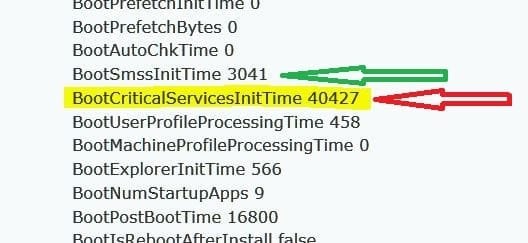
I suspect you may have some malware running as a service or there's a service taking an unusually long time to initialize. In the image below, the green arrow indicates the Session 0 & 1 start up time that includes normal drivers, services and paging. The red arrow is Services Initialization time and is way out of line. Normally this is a few seconds at most but usually less than one second. Yours is over 40 seconds and consuming most of the boot time.

Go back to the same area of the Event Log and look for any other events in the 100 series such as 101, 103 etc. If there are any, copy and post those. Ignore the 200s, these are Shut-Down entries.

In the mean time, I'll go back through your zipped files and see if something stands out. You do have a few programs that are considered PUPs (Potentially Unwanted Programs) by most AV companies. One, or more, of these may have installed a service and is performing data gathering or unusual functions. One such program is Dropbox but you have it checked in your Start Up group so I assume you know what it does.
 

Attachments

  • Boot Too Long.JPG
    Boot Too Long.JPG
    26.9 KB · Views: 32

My Computer My Computer

At a glance

Windows 7 Pro-x64i7-2600 3.4GHz - 3.8GHz Turbo8Gb - 2x4GB, Muskin 991770 PC3-1333Integrated Intel HD 2000
Computer type
PC/Desktop
Computer Manufacturer/Model Number
Built 2/11/2011
OS
Windows 7 Pro-x64
CPU
i7-2600 3.4GHz - 3.8GHz Turbo
Motherboard
Intel DH67BL-B3
Memory
8Gb - 2x4GB, Muskin 991770 PC3-1333
Graphics Card(s)
Integrated Intel HD 2000
Sound Card
Integrated Intel 10.1 HD, RealTek ALC892
Monitor(s) Displays
Asus LCD VH222H, Haier HL24XSL2a
Screen Resolution
1920x1080, 1920x1080
Hard Drives
Crucial SSD C300-128Gb,
Western Digital WD5002AALX - 500Gb,
Western Digital WD7501AALS - 750Gb
PSU
Seasonic 650W 80+ Gold Modular
Case
Rosewill Defender
Cooling
Stock CPU, Four 120mm case fans, PCH fan added
Keyboard
Logitech EX100 Y-RBH94 Wireless
Mouse
Logitech EX100 M-RCE95 Wireless
Internet Speed
3.0/1.5 Mbs
Antivirus
Microsoft Security Essentials
Browser
Microsoft Internet Explorer 11
Other Info
Antec Veris Premier-Multimedia IR Station,
Cyber Accoustics-3602 Speakers,
AFT XM-5U Card Reader,
Hauppauge TV-HVR-2250,
Sony LX300 USB Turntable
I'm out at the moment so I'll check in a bit, but wouldn't that be picked up by the various scans I've run? Have run Norton, Malwarebytes and Comodo all in safe mode recently and they didn't find anything.
 

My Computer My Computer

At a glance

Windows 7 Professional 64-bit SP1Interl Core i5 3570k @ 3.40 GHz16 BG DDR32047MB NVIDIA GTX 660 Ti
Computer type
PC/Desktop
Computer Manufacturer/Model Number
Quiet PC
OS
Windows 7 Professional 64-bit SP1
CPU
Interl Core i5 3570k @ 3.40 GHz
Motherboard
Gigabyte Z77X-UD5H
Memory
16 BG DDR3
Graphics Card(s)
2047MB NVIDIA GTX 660 Ti
Hard Drives
238GB SSD2 ATA DEVICE
Antivirus
Symantec Endpoint
Browser
IE
Not necessarily. These have been marked as "Critical Services" and you probably "Ok"ed the install from some other download. That is, if it is malware. There could just be a problem with a piece of hardware or corrupt file. I'll be back around lunch time (my time) to finish looking.
 

My Computer My Computer

At a glance

Windows 7 Pro-x64i7-2600 3.4GHz - 3.8GHz Turbo8Gb - 2x4GB, Muskin 991770 PC3-1333Integrated Intel HD 2000
Computer type
PC/Desktop
Computer Manufacturer/Model Number
Built 2/11/2011
OS
Windows 7 Pro-x64
CPU
i7-2600 3.4GHz - 3.8GHz Turbo
Motherboard
Intel DH67BL-B3
Memory
8Gb - 2x4GB, Muskin 991770 PC3-1333
Graphics Card(s)
Integrated Intel HD 2000
Sound Card
Integrated Intel 10.1 HD, RealTek ALC892
Monitor(s) Displays
Asus LCD VH222H, Haier HL24XSL2a
Screen Resolution
1920x1080, 1920x1080
Hard Drives
Crucial SSD C300-128Gb,
Western Digital WD5002AALX - 500Gb,
Western Digital WD7501AALS - 750Gb
PSU
Seasonic 650W 80+ Gold Modular
Case
Rosewill Defender
Cooling
Stock CPU, Four 120mm case fans, PCH fan added
Keyboard
Logitech EX100 Y-RBH94 Wireless
Mouse
Logitech EX100 M-RCE95 Wireless
Internet Speed
3.0/1.5 Mbs
Antivirus
Microsoft Security Essentials
Browser
Microsoft Internet Explorer 11
Other Info
Antec Veris Premier-Multimedia IR Station,
Cyber Accoustics-3602 Speakers,
AFT XM-5U Card Reader,
Hauppauge TV-HVR-2250,
Sony LX300 USB Turntable
Is your PC behind a server or used as a home server, file server? There's a couple of services I don't normally see running on a home PC. One is TrkWks. It could be used by Dropbox, Norton, Sage or QuickBooks (or any number of backdoor programs). I need to see if it's still running after you removed Norton. Please run a new SF Diagnostics as before and upload a new zip file.

The Distributed Link Tracking Client (TrkWks) is responsible for tracking links to files saved on a file server. For example; if you save a file on a file server and put a link to it on your desktop and the file is moved on the file server. The link on your desktop will change accordingly to the new location of the file on the file server.
 

My Computer My Computer

At a glance

Windows 7 Pro-x64i7-2600 3.4GHz - 3.8GHz Turbo8Gb - 2x4GB, Muskin 991770 PC3-1333Integrated Intel HD 2000
Computer type
PC/Desktop
Computer Manufacturer/Model Number
Built 2/11/2011
OS
Windows 7 Pro-x64
CPU
i7-2600 3.4GHz - 3.8GHz Turbo
Motherboard
Intel DH67BL-B3
Memory
8Gb - 2x4GB, Muskin 991770 PC3-1333
Graphics Card(s)
Integrated Intel HD 2000
Sound Card
Integrated Intel 10.1 HD, RealTek ALC892
Monitor(s) Displays
Asus LCD VH222H, Haier HL24XSL2a
Screen Resolution
1920x1080, 1920x1080
Hard Drives
Crucial SSD C300-128Gb,
Western Digital WD5002AALX - 500Gb,
Western Digital WD7501AALS - 750Gb
PSU
Seasonic 650W 80+ Gold Modular
Case
Rosewill Defender
Cooling
Stock CPU, Four 120mm case fans, PCH fan added
Keyboard
Logitech EX100 Y-RBH94 Wireless
Mouse
Logitech EX100 M-RCE95 Wireless
Internet Speed
3.0/1.5 Mbs
Antivirus
Microsoft Security Essentials
Browser
Microsoft Internet Explorer 11
Other Info
Antec Veris Premier-Multimedia IR Station,
Cyber Accoustics-3602 Speakers,
AFT XM-5U Card Reader,
Hauppauge TV-HVR-2250,
Sony LX300 USB Turntable
Got someone from 247techies on the machine at the moment so I can't check. They've been logged on for 15 hours now, so not holding out much hope...

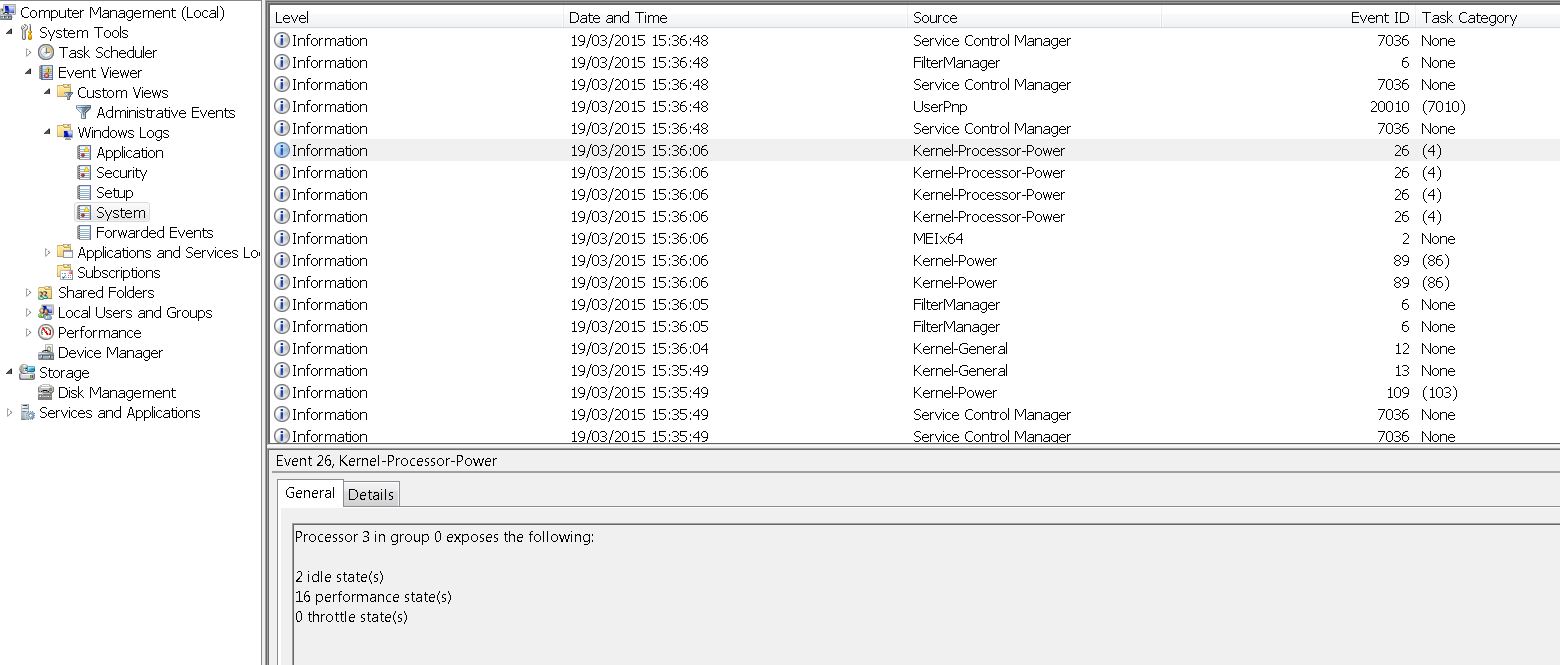
Had a quick look and the only one I could see was 109
 

My Computer My Computer

At a glance

Windows 7 Professional 64-bit SP1Interl Core i5 3570k @ 3.40 GHz16 BG DDR32047MB NVIDIA GTX 660 Ti
Computer type
PC/Desktop
Computer Manufacturer/Model Number
Quiet PC
OS
Windows 7 Professional 64-bit SP1
CPU
Interl Core i5 3570k @ 3.40 GHz
Motherboard
Gigabyte Z77X-UD5H
Memory
16 BG DDR3
Graphics Card(s)
2047MB NVIDIA GTX 660 Ti
Hard Drives
238GB SSD2 ATA DEVICE
Antivirus
Symantec Endpoint
Browser
IE
Back
Top