My Windows 7 laptop refuses to charge

Hoope

New member
Local time
11:44 AM
Messages
5
Hello! I am new here and do not know where I should put this thread exactly, so please forgive me for placing it in a wrong spot. Please also forgive any grammatical mistakes as I'm typing this on my phone.

I have a problem where my laptop won't charge. It was working fine until I tripped on the cord and the two pieces of battery that you can take apart separated. No biggie I thought and just plugged it back in. I was dead wrong. It wouldn't charge after that. I don't think the prongs aware damaged as I didn't pull it hard. It just kind of fell apart like I said. There is no green light turning on in the battery.

The computer I have tried restarting and even restoring, but I can't restore until my computer does a search of the files and does a whole repair which will take way too much time, as my battery is down at 38%, 43 minutes. Something else I noticed is that my display turned strange after I unplugged it. The bar that usually sticks to the bottom now goes down, and the background is a bright white instead of the usual black background. This makes the layout look strange. This might sound weird but I am suspecting that the way the layout is might be causing my laptop not to charge. Is there a way I can get it back from this white layout to the original black background layout and task bar that will actually stay put instead of sinking down and disappearing every time I move my mouse from it? I don't know how to change it back or what it's even called.

Any help would be appreciated. My laptop is a Windows 7 ASUS. I think it is the Home Vista version. Thank you for reading.
 

My Computer My Computer

At a glance

Windows 7 ASUS
Computer type
PC/Desktop
OS
Windows 7 ASUS
hi welcome to the forum

can it run on the power cord itself without the battery? you might of damaged the dc jack power port on the laptop. did the laptop fall to the floor?
 

My Computer My Computer

At a glance

win 10
Computer type
PC/Desktop
Computer Manufacturer/Model Number
dell xps 9000
OS
win 10
Thanks Oscar :).
My laptop did not fall, it was just the cord that came apart for when you want to store it. I'm not sure if it is broken or how to tell. And my laptop has been running without the cord but it only has like 40 minutes left of battery.
 

My Computer My Computer

At a glance

Windows 7 ASUS
Computer type
PC/Desktop
OS
Windows 7 ASUS
what i wanted you to try is running the laptop on the power cord and taking out the battery will the laptop run with just the power cord plugged in.
 

My Computer My Computer

At a glance

win 10
Computer type
PC/Desktop
Computer Manufacturer/Model Number
dell xps 9000
OS
win 10
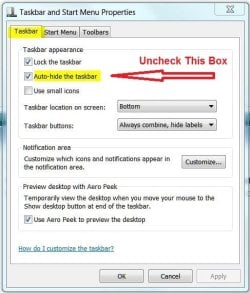
The disappearing Task Bar is called Auto Hide. Right click on the task bar and select Properties. Click on the Taskbar tab if not already there and uncheck the Auto-Hide box. Click Apply then OK.
 

Attachments

  • Task Bar - Auto Hide.JPG
    Task Bar - Auto Hide.JPG
    50 KB · Views: 20

My Computer My Computer

At a glance

Windows 7 Pro-x64i7-2600 3.4GHz - 3.8GHz Turbo8Gb - 2x4GB, Muskin 991770 PC3-1333Integrated Intel HD 2000
Computer type
PC/Desktop
Computer Manufacturer/Model Number
Built 2/11/2011
OS
Windows 7 Pro-x64
CPU
i7-2600 3.4GHz - 3.8GHz Turbo
Motherboard
Intel DH67BL-B3
Memory
8Gb - 2x4GB, Muskin 991770 PC3-1333
Graphics Card(s)
Integrated Intel HD 2000
Sound Card
Integrated Intel 10.1 HD, RealTek ALC892
Monitor(s) Displays
Asus LCD VH222H, Haier HL24XSL2a
Screen Resolution
1920x1080, 1920x1080
Hard Drives
Crucial SSD C300-128Gb,
Western Digital WD5002AALX - 500Gb,
Western Digital WD7501AALS - 750Gb
PSU
Seasonic 650W 80+ Gold Modular
Case
Rosewill Defender
Cooling
Stock CPU, Four 120mm case fans, PCH fan added
Keyboard
Logitech EX100 Y-RBH94 Wireless
Mouse
Logitech EX100 M-RCE95 Wireless
Internet Speed
3.0/1.5 Mbs
Antivirus
Microsoft Security Essentials
Browser
Microsoft Internet Explorer 11
Other Info
Antec Veris Premier-Multimedia IR Station,
Cyber Accoustics-3602 Speakers,
AFT XM-5U Card Reader,
Hauppauge TV-HVR-2250,
Sony LX300 USB Turntable
what i wanted you to try is running the laptop on the power cord and taking out the battery will the laptop run with just the power cord plugged in.

It doesnt run with the battery out, it shut off. When I tried starting up without the battery, it didn't turn on either. Also sorry for the misunderstanding!

And thank you for the trick for the task bar :)
 

My Computer My Computer

At a glance

Windows 7 ASUS
Computer type
PC/Desktop
OS
Windows 7 ASUS
Sounds like DC jack is faulty does the port feel loose at all
 

My Computer My Computer

At a glance

win 10
Computer type
PC/Desktop
Computer Manufacturer/Model Number
dell xps 9000
OS
win 10
Sounds like DC jack is faulty does the port feel loose at all

No, it doesn't feel loose at all. Are there any other ways I can try to fix it besides getting it replaced? I am not sure if its because of the mode the laptop is in or something it's just really weird
 

My Computer My Computer

At a glance

Windows 7 ASUS
Computer type
PC/Desktop
OS
Windows 7 ASUS
Try another power adapter.
 

My Computer My Computer

At a glance

win 10
Computer type
PC/Desktop
Computer Manufacturer/Model Number
dell xps 9000
OS
win 10

My Computer My Computer

At a glance

Windows 7 ASUS
Computer type
PC/Desktop
OS
Windows 7 ASUS
Then going to be hard to trouble shoot. Do you have a meter to test the output voltage of the ac adapter.
 

My Computer My Computer

At a glance

win 10
Computer type
PC/Desktop
Computer Manufacturer/Model Number
dell xps 9000
OS
win 10
Ditto with checking the basics. You need a meter.
Do you have power at the wall socket?
Does the charger output any voltage?
Is the battery plugged in?

If these check out, the PC socket is probably damaged.
 

My Computer My Computer

At a glance

Windows 7 Pro-x64i7-2600 3.4GHz - 3.8GHz Turbo8Gb - 2x4GB, Muskin 991770 PC3-1333Integrated Intel HD 2000
Computer type
PC/Desktop
Computer Manufacturer/Model Number
Built 2/11/2011
OS
Windows 7 Pro-x64
CPU
i7-2600 3.4GHz - 3.8GHz Turbo
Motherboard
Intel DH67BL-B3
Memory
8Gb - 2x4GB, Muskin 991770 PC3-1333
Graphics Card(s)
Integrated Intel HD 2000
Sound Card
Integrated Intel 10.1 HD, RealTek ALC892
Monitor(s) Displays
Asus LCD VH222H, Haier HL24XSL2a
Screen Resolution
1920x1080, 1920x1080
Hard Drives
Crucial SSD C300-128Gb,
Western Digital WD5002AALX - 500Gb,
Western Digital WD7501AALS - 750Gb
PSU
Seasonic 650W 80+ Gold Modular
Case
Rosewill Defender
Cooling
Stock CPU, Four 120mm case fans, PCH fan added
Keyboard
Logitech EX100 Y-RBH94 Wireless
Mouse
Logitech EX100 M-RCE95 Wireless
Internet Speed
3.0/1.5 Mbs
Antivirus
Microsoft Security Essentials
Browser
Microsoft Internet Explorer 11
Other Info
Antec Veris Premier-Multimedia IR Station,
Cyber Accoustics-3602 Speakers,
AFT XM-5U Card Reader,
Hauppauge TV-HVR-2250,
Sony LX300 USB Turntable
Back
Top