Casting from a Windows 10 laptop to a Windows 7 laptop

quartz1

New member
Member
Local time
1:42 AM
Messages
18
Hi,

Does anyone know if this is possible? Just as title - I have a Windows 10 laptop, and I want to be able to send the screen to a Windows 7 laptop (same local WiFi network) - preferably at no cost
 

My Computers My Computers

  • At a glance

    W10 unfortunately, that's why I'm here
    OS
    W10 unfortunately, that's why I'm here
  • Computer type
    PC/Desktop
Hi,
Does anyone know if this is possible? Just as title - I have a Windows 10 laptop, and I want to be able to send the screen to a Windows 7 laptop (same local WiFi network) - preferably at no cost
Screen Mirroring requires Miracast is not natively supported in Windows 7. You will need a third party program to do this. I don't have any experience with this so can't help you with that.

I have sent the screens of one computer to another with Windows 10 or 11. It is straightforward in Windows 10 or 11 to set this up. Note this works with both desktops and laptops as long as they have WiFi.
 

My Computers My Computers

  • At a glance

    Windows 7 Professional 64bit / Windows 10 Hom...AMD FX-8350GSKILL Ripjaw-X PC3 12800 12GB (2x4GB, 2x2GB)ASUS ENGTX560 DCII OC/2DI/1GD5 1GB
    Computer type
    PC/Desktop
    Computer Manufacturer/Model Number
    Custom build
    OS
    Windows 7 Professional 64bit / Windows 10 Home 64bit
    CPU
    AMD FX-8350
    Motherboard
    Gigabyte GA-990FXA-UD3 (AM3+) Rev. 4.0
    Memory
    GSKILL Ripjaw-X PC3 12800 12GB (2x4GB, 2x2GB)
    Graphics Card(s)
    ASUS ENGTX560 DCII OC/2DI/1GD5 1GB
    Sound Card
    Integrated
    Monitor(s) Displays
    Asus VE228H (21.5-in)
    Screen Resolution
    1920x1080 60Hz
    Hard Drives
    SAMSUNG 870 EVO 1TB (2.5" SATA SSD)
    SAMSUNG 870 EVO 500GB (2.5" SATA SSD)
    PSU
    Antec TruePower (new) TP-650 (650 watts)
    Case
    Antec Three Hundred
    Cooling
    AMD stock (plan to upgrade to Cooler Master Hyper 212 EVO)
    Keyboard
    Logitech K540 (wireless)
    Mouse
    Logitech M310 (wireless)
    Internet Speed
    Comcast Gigabit X2 Internet (2100Mbps down / 300Mbps up)
    Browser
    Firefox, Edge, Chrome
    Other Info
    Optical drive: ASUS DRW-24B3ST/BLK/G (Black) (24X)
    External hard drives: 2TB & 6TB
    Internet Gateway: Comcast XB8
  • Computer type
    PC/Desktop
There are a number of remote desktop programs that should work for sharing a screen with Win7.

"Teamviewer" has long been a standard in this space, and is allegedly free for personal use ... but they have a reputation for annoying their free users by randomly accusing them of being commercial users and locking their accounts, even for relatively infrequent use.

"Anydesk" is another alternative. This is the program I still use for free when I need to provide support to my family, who live in different States. Though they seem to be trying to phase out the free tier, it's still listed on their "Pricing" page.

"Distant Desktop" is yet another alternative, though their free use is time-limited monthly, so I don't know if that would be a factor for you.

The Achilles Heel with all of these is the traffic goes across the internet, so it's kind of silly if you're merely connecting two machines on the same LAN. Also, they're reliant on the companies' servers to make the connection between your two computers. AFAIK, your traffic doesn't actually go through their servers, but their server is required to transfer IP tokens to both machines and then the programs on your machines take over with a direct internet connection between them. But that paradigm leaves you at the mercy of the company, which can leave you high and dry if they decide to shut off their servers -- as happened with "Mikogo", another free remote screen sharing app that simply disappeared.

I believe the open-source "TightVNC" is supposedly designed primarily for screen sharing on the same LAN, but I haven't actually used it so can't comment further. If you can get it to work, that might be your best bet.

 

My Computer My Computer

At a glance

Windows 7/8.1/10 multibootIntel Core i7-770048GB (2x16GB Crucial DDR4-3200 + 2x8GB Hynix ...Intel HD630 + AMD Radeon R7 450 PCIe
Computer type
PC/Desktop
Computer Manufacturer/Model Number
Dell Optiplex 7050
OS
Windows 7/8.1/10 multiboot
CPU
Intel Core i7-7700
Motherboard
Dell, Intel Q270 chipset
Memory
48GB (2x16GB Crucial DDR4-3200 + 2x8GB Hynix DDR4-2400)
Graphics Card(s)
Intel HD630 + AMD Radeon R7 450 PCIe
Monitor(s) Displays
Asus VC279 (27")
Screen Resolution
1920x1080
Hard Drives
Toshiba M.2 NVMe (256GB),
Samsung 960 Evo (500GB),
WD Red Plus 80EFBX (8TB)
... I have a Windows 10 laptop, and I want to be able to send the screen to a Windows 7 laptop (same local WiFi network) - preferably at no cost
There are a number of remote desktop programs that should work for sharing a screen with Win7.
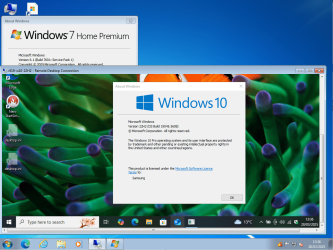
Windows 7's built-in Remote Desktop Connection works, available in W7 Home and Pro. The PC you want to connect to must be running Pro though, Home doesn't support an incoming connection.

image.png
 

My Computers My Computers

  • At a glance

    Windows 7 Home Premium x64AMD V1204GB
    Computer type
    Laptop
    Computer Manufacturer/Model Number
    Toshiba satellite C650D
    OS
    Windows 7 Home Premium x64
    CPU
    AMD V120
    Memory
    4GB
    Internet Speed
    150 Mbps
    Antivirus
    MSE
    Browser
    IE11, Edge, Firefox
    Other Info
    I also have W7 Pro on my System Two, and several W7 Hyper-V VMs. My other machines run Windows 10/11. Their specs are in my Ten Forums & Eleven Forum profiles.
  • At a glance

    Windows 7 Pro x64Intel i5-3320M8 GB
    Computer type
    Laptop
    System Manufacturer/Model Number
    Lenovo Thinkpad T430
    OS
    Windows 7 Pro x64
    CPU
    Intel i5-3320M
    Memory
    8 GB
    Hard Drives
    250GB Samsung SSD 860 EVO
    Antivirus
    MSE
thanks for the responses. I've actually found an acceptable solution. given that the target Windows 7 laptop is literally (or even actually) going to be less than 6ft away from the W10 source and not moving, I'm going to use an HDMI to USB input adapter, and take the HDMI output from the W10 laptop using a 2 metre long HDMI cable and feed it into the adapter, into a USB port on the W7 laptop. then run OBS studio (W7 compatible version, not the latest) to display the HDMI --> USB input

Then I have a nifty bluetooth remote control for the W10 laptop, which gives me enough control over the W10 laptop which is now 6 feet away (play, pause, forward back vol up down mute)
 

My Computers My Computers

  • At a glance

    W10 unfortunately, that's why I'm here
    OS
    W10 unfortunately, that's why I'm here
  • Computer type
    PC/Desktop
Back
Top