Solved how to configure windows 7 Pro to utilize maximum memory

waynezo

New member
Member
Local time
2:47 PM
Messages
42
I recently upgraded my memory to 18 gigabytes. With chrome running about a half a dozen windows it will use about 6 gigabytes. since I have plenty of memory leftover is there a way to configure windows so it will use as much memory as possible perhaps even direct some of the memory to the video cards?

My Rig

Windows 7 Pro/Core i7 920
Asus P6T Deluxe V2/2 @ ATI Radeon HD 4770 Video Cards/12GB Crucial &
6GB OCZ Gold @ DDR3 1600/Intel X25-M 80GB SSD HD
 

My Computer My Computer

Computer type
PC/Desktop
Computer Manufacturer/Model Number
Custom
OS
Windows 7 Pro 64 bit
CPU
i7 920
Motherboard
Asus P6T Deluxe V2
Memory
18GB DDR3 1600
Graphics Card(s)
2 @ ATI Radeon HD 4770 Video Cards
Hard Drives
Intel X25-M 80GB SSD HD
Antivirus
Microsoft Security Essentials
Browser
Chrome
As I understand it, you want Windows to use "as much memory as possible", rather than whatever it wants.

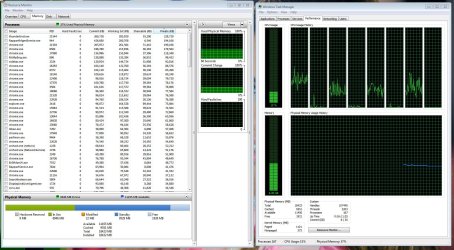
Post a screen shot of the memory tab of Resource Monitor and the performance tab of Task Manager.

If you want to use more memory, you could always open more Chrome Windows. Or remove the unused memory, so that your RAM usage is closer to 100% of the available--up from about 33%.
 

My Computer My Computer

Computer type
PC/Desktop
Computer Manufacturer/Model Number
Ignatz Special; 4 speed manual gearbox; factory air conditioning; one of one
OS
Windows 7 Home Premium SP1, 64-bit
CPU
Intel Skylake i5-6600K, not overclocked
Motherboard
AsRock Z170M Extreme 4, micro ATX
Memory
8 GB HyperX DDR4-2666 (2 x 4 GB)
Graphics Card(s)
none; graphics are integrated on CPU
Sound Card
onboard: Realtek ALC1150; external: USB Behringer UF0-202
Monitor(s) Displays
Dell S2340M 23 inch IPS
Screen Resolution
1600 x 900
Hard Drives
System: Crucial MX100 series SSD, 128 GB;
Data: Samsung Spinpoint 103SJ, 1 TB;
Backup: WD Caviar Green WD30EZRX-00D8PB0, 3 TB
PSU
Rosewill SilentNight 500 watt fanless, semi-modular
Case
Antec Solo II
Cooling
Noctua NH-U12S; Noctua F12 intake, Noctua S12A exhaust
Keyboard
Microsoft 200 6JH-00001 USB
Mouse
Dell or Microsoft optical wired; USB
Antivirus
Microsoft Security Essentials and Malwarebytes Premium
Browser
Pale Moon
Other Info
All fans PWM; speeds at idle: CPU circa 500 rpm; intake circa 600 rpm; exhaust circa 600 rpm; CPU temps 27 idle and 47 C load in a warm room (27 C/81 F) when running Intel Extreme Tuning Utility stress test.
I found the best way to use your memory is let Windows 7 manage it.
Window 7 knows what to do with memory and when.
Tinkering with memory like we use to do in XP is not needed in Windows 7.
 

My Computer My Computer

Computer type
PC/Desktop
Computer Manufacturer/Model Number
Home made Desktop
OS
Windows 10 Pro. 64/ version 1709 Windows 7 Pro/64
CPU
Intel i7-6800K @ 4.3
Motherboard
ASUS X-99 Deluxe II
Memory
Corsair Platinum 16 gig @2400
Graphics Card(s)
EVGA GTX 1070 OC
Monitor(s) Displays
Asus 27" LED LCD/VE278Q
Screen Resolution
1920-1080 or 1280-720 HDMI
Hard Drives
INTEL SSD 730-240 Gb Sata 3.0/
PSU
EVGA Platium 1200W
Case
Phanteks Luxe Tempered Glass 8 fans/ one radiator
Cooling
XSPC/ Water Cooled CPU
Keyboard
Das 4 Professional
Mouse
Logitech M705/MX Anywhere 2-S
Internet Speed
100 mbits
Antivirus
Microsoft Security Essentials/ Malwarebytes Premium 3.0/ SAS
Browser
I.E. 11 default/Firefox/ ISP Time Warner Cable/Spectrum
Other Info
LG BluRay Burner/
Sound system-KLipsch-THX/
Icy Dock ssd Hot Swap bays.

My Computer My Computer

Computer type
PC/Desktop
OS
Windows 7 Ultimate 64 bit
CPU
Intel pentium 3
Motherboard
MSI
Memory
2GB RAM DDR 3
Graphics Card(s)
Intel HD Graphics
Sound Card
Realtek Audio
Monitor(s) Displays
zenware
Screen Resolution
1680x1050
Hard Drives
80 GB
Case
i-Max
Cooling
Cooler Master
Keyboard
A4TECH
Mouse
edvan
Antivirus
Avast Anti virus 2015
Browser
Google chrome
Yes I want to keep all the memory and have windows use it to perform faster. Since I'm not a gamer the amount of memory I have may be overkill, But I want to make sure windows is taking advantage of it. I would also like to allocate some to my video cards if possible (they are 5 years old and I'm running 4 monitors).
 

Attachments

  • Capture.JPG
    Capture.JPG
    313.1 KB · Views: 6

My Computer My Computer

Computer type
PC/Desktop
Computer Manufacturer/Model Number
Custom
OS
Windows 7 Pro 64 bit
CPU
i7 920
Motherboard
Asus P6T Deluxe V2
Memory
18GB DDR3 1600
Graphics Card(s)
2 @ ATI Radeon HD 4770 Video Cards
Hard Drives
Intel X25-M 80GB SSD HD
Antivirus
Microsoft Security Essentials
Browser
Chrome
I want to make sure windows is taking advantage of it.

Is "taking advantage" a synonym for "using more"? If not, what does it mean?

Do you have any reason to believe that Windows is not using exactly as much as it needs and wants--satisfying its appetite?
 

My Computer My Computer

Computer type
PC/Desktop
Computer Manufacturer/Model Number
Ignatz Special; 4 speed manual gearbox; factory air conditioning; one of one
OS
Windows 7 Home Premium SP1, 64-bit
CPU
Intel Skylake i5-6600K, not overclocked
Motherboard
AsRock Z170M Extreme 4, micro ATX
Memory
8 GB HyperX DDR4-2666 (2 x 4 GB)
Graphics Card(s)
none; graphics are integrated on CPU
Sound Card
onboard: Realtek ALC1150; external: USB Behringer UF0-202
Monitor(s) Displays
Dell S2340M 23 inch IPS
Screen Resolution
1600 x 900
Hard Drives
System: Crucial MX100 series SSD, 128 GB;
Data: Samsung Spinpoint 103SJ, 1 TB;
Backup: WD Caviar Green WD30EZRX-00D8PB0, 3 TB
PSU
Rosewill SilentNight 500 watt fanless, semi-modular
Case
Antec Solo II
Cooling
Noctua NH-U12S; Noctua F12 intake, Noctua S12A exhaust
Keyboard
Microsoft 200 6JH-00001 USB
Mouse
Dell or Microsoft optical wired; USB
Antivirus
Microsoft Security Essentials and Malwarebytes Premium
Browser
Pale Moon
Other Info
All fans PWM; speeds at idle: CPU circa 500 rpm; intake circa 600 rpm; exhaust circa 600 rpm; CPU temps 27 idle and 47 C load in a warm room (27 C/81 F) when running Intel Extreme Tuning Utility stress test.

My Computer My Computer

Computer type
PC/Desktop
Computer Manufacturer/Model Number
Home made Desktop
OS
Windows 10 Pro. 64/ version 1709 Windows 7 Pro/64
CPU
Intel i7-6800K @ 4.3
Motherboard
ASUS X-99 Deluxe II
Memory
Corsair Platinum 16 gig @2400
Graphics Card(s)
EVGA GTX 1070 OC
Monitor(s) Displays
Asus 27" LED LCD/VE278Q
Screen Resolution
1920-1080 or 1280-720 HDMI
Hard Drives
INTEL SSD 730-240 Gb Sata 3.0/
PSU
EVGA Platium 1200W
Case
Phanteks Luxe Tempered Glass 8 fans/ one radiator
Cooling
XSPC/ Water Cooled CPU
Keyboard
Das 4 Professional
Mouse
Logitech M705/MX Anywhere 2-S
Internet Speed
100 mbits
Antivirus
Microsoft Security Essentials/ Malwarebytes Premium 3.0/ SAS
Browser
I.E. 11 default/Firefox/ ISP Time Warner Cable/Spectrum
Other Info
LG BluRay Burner/
Sound system-KLipsch-THX/
Icy Dock ssd Hot Swap bays.
I don't want to "use more" for the sake of using more. I want increased performance. I don't know if Windows is or is not using all it needs. That is what I hope to find out.
 

My Computer My Computer

Computer type
PC/Desktop
Computer Manufacturer/Model Number
Custom
OS
Windows 7 Pro 64 bit
CPU
i7 920
Motherboard
Asus P6T Deluxe V2
Memory
18GB DDR3 1600
Graphics Card(s)
2 @ ATI Radeon HD 4770 Video Cards
Hard Drives
Intel X25-M 80GB SSD HD
Antivirus
Microsoft Security Essentials
Browser
Chrome

My Computer My Computer

Computer type
PC/Desktop
Computer Manufacturer/Model Number
Custom
OS
Windows 7 Pro 64 bit
CPU
i7 920
Motherboard
Asus P6T Deluxe V2
Memory
18GB DDR3 1600
Graphics Card(s)
2 @ ATI Radeon HD 4770 Video Cards
Hard Drives
Intel X25-M 80GB SSD HD
Antivirus
Microsoft Security Essentials
Browser
Chrome
From your post # 5

page filing just for today.PNG

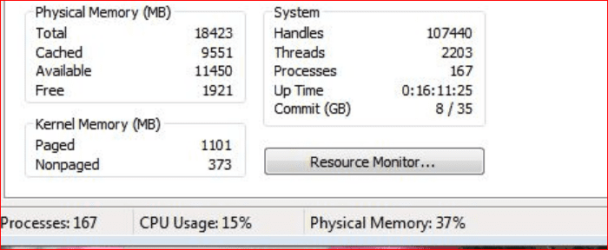
Paged, Non paged and processes are extremely high.

Example:
My system now.

Paged = 159
Non paged = 43
Processes = 45
 

My Computer My Computer

Computer type
PC/Desktop
Computer Manufacturer/Model Number
Home made Desktop
OS
Windows 10 Pro. 64/ version 1709 Windows 7 Pro/64
CPU
Intel i7-6800K @ 4.3
Motherboard
ASUS X-99 Deluxe II
Memory
Corsair Platinum 16 gig @2400
Graphics Card(s)
EVGA GTX 1070 OC
Monitor(s) Displays
Asus 27" LED LCD/VE278Q
Screen Resolution
1920-1080 or 1280-720 HDMI
Hard Drives
INTEL SSD 730-240 Gb Sata 3.0/
PSU
EVGA Platium 1200W
Case
Phanteks Luxe Tempered Glass 8 fans/ one radiator
Cooling
XSPC/ Water Cooled CPU
Keyboard
Das 4 Professional
Mouse
Logitech M705/MX Anywhere 2-S
Internet Speed
100 mbits
Antivirus
Microsoft Security Essentials/ Malwarebytes Premium 3.0/ SAS
Browser
I.E. 11 default/Firefox/ ISP Time Warner Cable/Spectrum
Other Info
LG BluRay Burner/
Sound system-KLipsch-THX/
Icy Dock ssd Hot Swap bays.
Memory doesn't really mean increased performance. It just means more is available for programs to use. Increased performance is faster CPU, faster motherboard (and busses), faster video card, etc.
 

My Computer My Computer

Computer type
PC/Desktop
Computer Manufacturer/Model Number
My Own Build
OS
Windows 10 64 bit
CPU
Intel i7 6700K
Motherboard
ASUS ROG Maximus VIII Hero
Memory
16GB Corsair Dominator
Graphics Card(s)
Intel CPU Graphics
Sound Card
RealTek
Monitor(s) Displays
27" Dell S2719dgf
Screen Resolution
2560X1440
Hard Drives
1 TB Samsung 850 EVO SSD for Win 10 Pro
500GB Samsung 850 EVO SSD for Win 10 Insider
2 TB drive for backup
PSU
EVGA Supernova 750G2
Case
BeQuiet Silent Base 600
Cooling
Deepcool Captain 120EX
Keyboard
Microsoft Wireless 2000
Mouse
Microsoft wireless
Internet Speed
100 MB/sec (Cable)
Antivirus
Microsoft Defender and Malwarebytes
Browser
Edge/Firefox
Other Info
Cakewalk (Sonar) by BandLab and Studio One 4.1 Pro recording studio software. MOTU 896Mk3 Hybrid recording interface, Frontier Tranzport wireless control unit, Behringer X-Touch Control Surface.
Five USB connected optical drives for CD Audio production using Nero BurningROM

My Computer My Computer

Computer type
PC/Desktop
Computer Manufacturer/Model Number
Custom
OS
Windows 7 Pro 64 bit
CPU
i7 920
Motherboard
Asus P6T Deluxe V2
Memory
18GB DDR3 1600
Graphics Card(s)
2 @ ATI Radeon HD 4770 Video Cards
Hard Drives
Intel X25-M 80GB SSD HD
Antivirus
Microsoft Security Essentials
Browser
Chrome
I will say it again.
In my opinion you, me or anybody else is not going to out smart Windows 7 when it comes to memory. Leave it at default and enjoy it.
I have more ram than I need at this time. Oh well. If Windows 7 wants or need to use more ram it will do so without me doing anything.

I had 32 gigs of ram on this system and now I down to 16 gigs installed.
 

My Computer My Computer

Computer type
PC/Desktop
Computer Manufacturer/Model Number
Home made Desktop
OS
Windows 10 Pro. 64/ version 1709 Windows 7 Pro/64
CPU
Intel i7-6800K @ 4.3
Motherboard
ASUS X-99 Deluxe II
Memory
Corsair Platinum 16 gig @2400
Graphics Card(s)
EVGA GTX 1070 OC
Monitor(s) Displays
Asus 27" LED LCD/VE278Q
Screen Resolution
1920-1080 or 1280-720 HDMI
Hard Drives
INTEL SSD 730-240 Gb Sata 3.0/
PSU
EVGA Platium 1200W
Case
Phanteks Luxe Tempered Glass 8 fans/ one radiator
Cooling
XSPC/ Water Cooled CPU
Keyboard
Das 4 Professional
Mouse
Logitech M705/MX Anywhere 2-S
Internet Speed
100 mbits
Antivirus
Microsoft Security Essentials/ Malwarebytes Premium 3.0/ SAS
Browser
I.E. 11 default/Firefox/ ISP Time Warner Cable/Spectrum
Other Info
LG BluRay Burner/
Sound system-KLipsch-THX/
Icy Dock ssd Hot Swap bays.
167 processes.

I've never seen anyone with more processes running.

How many of your running services are non-Microsoft?

You may have performance issues not directly related to RAM--I don't know since your complaints are about RAM usage, not performance.
 

My Computer My Computer

Computer type
PC/Desktop
Computer Manufacturer/Model Number
Ignatz Special; 4 speed manual gearbox; factory air conditioning; one of one
OS
Windows 7 Home Premium SP1, 64-bit
CPU
Intel Skylake i5-6600K, not overclocked
Motherboard
AsRock Z170M Extreme 4, micro ATX
Memory
8 GB HyperX DDR4-2666 (2 x 4 GB)
Graphics Card(s)
none; graphics are integrated on CPU
Sound Card
onboard: Realtek ALC1150; external: USB Behringer UF0-202
Monitor(s) Displays
Dell S2340M 23 inch IPS
Screen Resolution
1600 x 900
Hard Drives
System: Crucial MX100 series SSD, 128 GB;
Data: Samsung Spinpoint 103SJ, 1 TB;
Backup: WD Caviar Green WD30EZRX-00D8PB0, 3 TB
PSU
Rosewill SilentNight 500 watt fanless, semi-modular
Case
Antec Solo II
Cooling
Noctua NH-U12S; Noctua F12 intake, Noctua S12A exhaust
Keyboard
Microsoft 200 6JH-00001 USB
Mouse
Dell or Microsoft optical wired; USB
Antivirus
Microsoft Security Essentials and Malwarebytes Premium
Browser
Pale Moon
Other Info
All fans PWM; speeds at idle: CPU circa 500 rpm; intake circa 600 rpm; exhaust circa 600 rpm; CPU temps 27 idle and 47 C load in a warm room (27 C/81 F) when running Intel Extreme Tuning Utility stress test.
I will say it again.
In my opinion you, me or anybody else is not going to out smart Windows 7 when it comes to memory. Leave it at default and enjoy it.
I have more ram than I need at this time. Oh well. If Windows 7 wants or need to use more ram it will do so without me doing anything.

I had 32 gigs of ram on this system and now I down to 16 gigs installed.


Point taken :)

But what is going on with my "Paged, Non paged and processes"?
 

My Computer My Computer

Computer type
PC/Desktop
Computer Manufacturer/Model Number
Custom
OS
Windows 7 Pro 64 bit
CPU
i7 920
Motherboard
Asus P6T Deluxe V2
Memory
18GB DDR3 1600
Graphics Card(s)
2 @ ATI Radeon HD 4770 Video Cards
Hard Drives
Intel X25-M 80GB SSD HD
Antivirus
Microsoft Security Essentials
Browser
Chrome
167 processes.

I've never seen anyone with more processes running.

How many of your running services are non-Microsoft?

You may have performance issues not directly related to RAM--I don't know since your complaints are about RAM usage, not performance.

OS is snappy not having performance problems just always looking for more. Chrome was maxing out the 6GB Mem I used to have. adding the 12 GB solved that problem. I thought windows would grab more of the new memory.
 

My Computer My Computer

Computer type
PC/Desktop
Computer Manufacturer/Model Number
Custom
OS
Windows 7 Pro 64 bit
CPU
i7 920
Motherboard
Asus P6T Deluxe V2
Memory
18GB DDR3 1600
Graphics Card(s)
2 @ ATI Radeon HD 4770 Video Cards
Hard Drives
Intel X25-M 80GB SSD HD
Antivirus
Microsoft Security Essentials
Browser
Chrome
There is a misconception here. The memory usage graph does not account for all memory usage. It was never intended that it would. If you look at the Resource Monitor memory tab you will see a substantial amount of memory shown as "Standby". This memory is very much in use as a kind of cache and contributes substantially to good performance. All memory except that labeled as "Free" is in use. If Standby memory was included in the graph many systems would show near 100% usage most of the time and that would be neither interesting nor useful.

But with 18 GB RAM you must face the fact that much of the time you will have substantial amounts of RAM that is Free and unused. With a relatively light workload there is simply no way that such large amounts of memory can be put to efficient use at all times.

Microsoft has devoted an enormous amount of effort to the system memory manager to make it use whatever memory resources are available to the fullest possible extent. Within reasonable limits adding memory will improve performance. But there will always be a point of diminishing returns beyond which more memory does little to nothing. With 18 GB I expect you are well past that point. With typical workloads that limit is roughly 8 GB on a 64 bit OS. Of course there are exceptions, such as when running virtual machines or when the workload is very high.

The suggestion in post #4 is not useful in such cases and will accomplish the exact opposite of what you want. The purpose of the option is to restrict memory availability for testing and diagnostic purposes. It will in no way force the OS to make more efficient use of memory.

If you post the screenshots suggested in post #2 it will be possible to more fully explain the situation.

Edit: After seeing the screenshots it appears that all but 1926 MB of RAM is actually in use. With 18 GB RAM I would consider this very good. Any attempt at manipulating this is unlikely to be productive and may well impair performance.

 

My Computer My Computer

Computer type
PC/Desktop
Computer Manufacturer/Model Number
HP
OS
Windows 7 Pro 64 bit
CPU
Xeon W3520
Memory
8 GB
Graphics Card(s)
Nvidia Geforce 210
There is a misconception here. The memory usage graph does not account for all memory usage. It was never intended that it would. If you look at the Resource Monitor memory tab you will see a substantial amount of memory shown as "Standby". This memory is very much in use as a kind of cache and contributes substantially to good performance. All memory except that labeled as "Free" is in use. If Standby memory was included in the graph many systems would show near 100% usage most of the time and that would be neither interesting nor useful.

But with 18 GB RAM you must face the fact that much of the time you will have substantial amounts of RAM that is Free and unused. With a relatively light workload there is simply no way that such large amounts of memory can be put to efficient use at all times.

Microsoft has devoted an enormous amount of effort to the system memory manager to make it use whatever memory resources are available to the fullest possible extent. Within reasonable limits adding memory will improve performance. But there will always be a point of diminishing returns beyond which more memory does little to nothing. With 18 GB I expect you are well past that point. With typical workloads that limit is roughly 8 GB on a 64 bit OS. Of course there are exceptions, such as when running virtual machines or when the workload is very high.

The suggestion in post #4 is not useful in such cases and will accomplish the exact opposite of what you want. The purpose of the option is to restrict memory availability for testing and diagnostic purposes. It will in no way force the OS to make more efficient use of memory.

If you post the screenshots suggested in post #2 it will be possible to more fully explain the situation.

Thank you for LMiller7 for the detailed explanation. I feel better knowing over 9GB is on standby. I did post screen shots on post #5. Perhaps I need to leave setting as they are. I'd rather have the extra memory in my Rig than sitting in a drawer :)
 

My Computer My Computer

Computer type
PC/Desktop
Computer Manufacturer/Model Number
Custom
OS
Windows 7 Pro 64 bit
CPU
i7 920
Motherboard
Asus P6T Deluxe V2
Memory
18GB DDR3 1600
Graphics Card(s)
2 @ ATI Radeon HD 4770 Video Cards
Hard Drives
Intel X25-M 80GB SSD HD
Antivirus
Microsoft Security Essentials
Browser
Chrome
There is a misconception here. The memory usage graph does not account for all memory usage. It was never intended that it would. If you look at the Resource Monitor memory tab you will see a substantial amount of memory shown as "Standby". This memory is very much in use as a kind of cache and contributes substantially to good performance. All memory except that labeled as "Free" is in use. If Standby memory was included in the graph many systems would show near 100% usage most of the time and that would be neither interesting nor useful.

But with 18 GB RAM you must face the fact that much of the time you will have substantial amounts of RAM that is Free and unused. With a relatively light workload there is simply no way that such large amounts of memory can be put to efficient use at all times.

Microsoft has devoted an enormous amount of effort to the system memory manager to make it use whatever memory resources are available to the fullest possible extent. Within reasonable limits adding memory will improve performance. But there will always be a point of diminishing returns beyond which more memory does little to nothing. With 18 GB I expect you are well past that point. With typical workloads that limit is roughly 8 GB on a 64 bit OS. Of course there are exceptions, such as when running virtual machines or when the workload is very high.

The suggestion in post #4 is not useful in such cases and will accomplish the exact opposite of what you want. The purpose of the option is to restrict memory availability for testing and diagnostic purposes. It will in no way force the OS to make more efficient use of memory.

If you post the screenshots suggested in post #2 it will be possible to more fully explain the situation.

Edit: After seeing the screenshots it appears that all but 1926 MB of RAM is actually in use. With 18 GB RAM I would consider this very good. Any attempt at manipulating this is unlikely to be productive and may well impair performance.

Sounds like good advice :) P.S. I ran Ubuntu and Win 10 virtual machines simoultaneously and used 90% of the memory "in use" so I guess I don't have any thing to complain about :)
 

My Computer My Computer

Computer type
PC/Desktop
Computer Manufacturer/Model Number
Custom
OS
Windows 7 Pro 64 bit
CPU
i7 920
Motherboard
Asus P6T Deluxe V2
Memory
18GB DDR3 1600
Graphics Card(s)
2 @ ATI Radeon HD 4770 Video Cards
Hard Drives
Intel X25-M 80GB SSD HD
Antivirus
Microsoft Security Essentials
Browser
Chrome
Back
Top