
Solved Numerous drive letters appeared and occupied

s9n60310a

New member
Local time
6:53 PM
Messages
9
Disk management
Godz1ok.png


As shown in the picture, sorry for the Chinese language.

I have only 1 HDD, and it had only been seperated into 2 active Windows partitions, with 2 hidden partitions.

C: for system, D: for normal storage, Z: used to be hidden as the OEM partition but now it appears, another hidden for Dell system recovery.

IG8xven.png


Normally it should only show 2 partitions, C: and D:
E~I being used for DVD drives and virtual drives.

But now everything from J: till Y: appeared which I never use them before.

Whenever I plug in as USB or external HDD, nothing show up in My Computer.

I try to assign them to a drive letter in disk management, it tells that the drive letter had been occupied by other drives, asking if I still want to assign it.

I pressed yes, and it did show up in My Computer, but when I double click on it, it tells that the disk had not been formatted, asking to format.

The USB or HDD is for sure well formatted for Windows.
This phenomenon can be temporarily fixed right after reboot and boot up, and the USB or HDD can be read as normal.

But after a while, all the other drive letter from J to Y show up again, and the phenomenon happened.

===========

Another problem is that in the disk management, the partition (102MB) marked red for OEM has no drive letter, which is normal
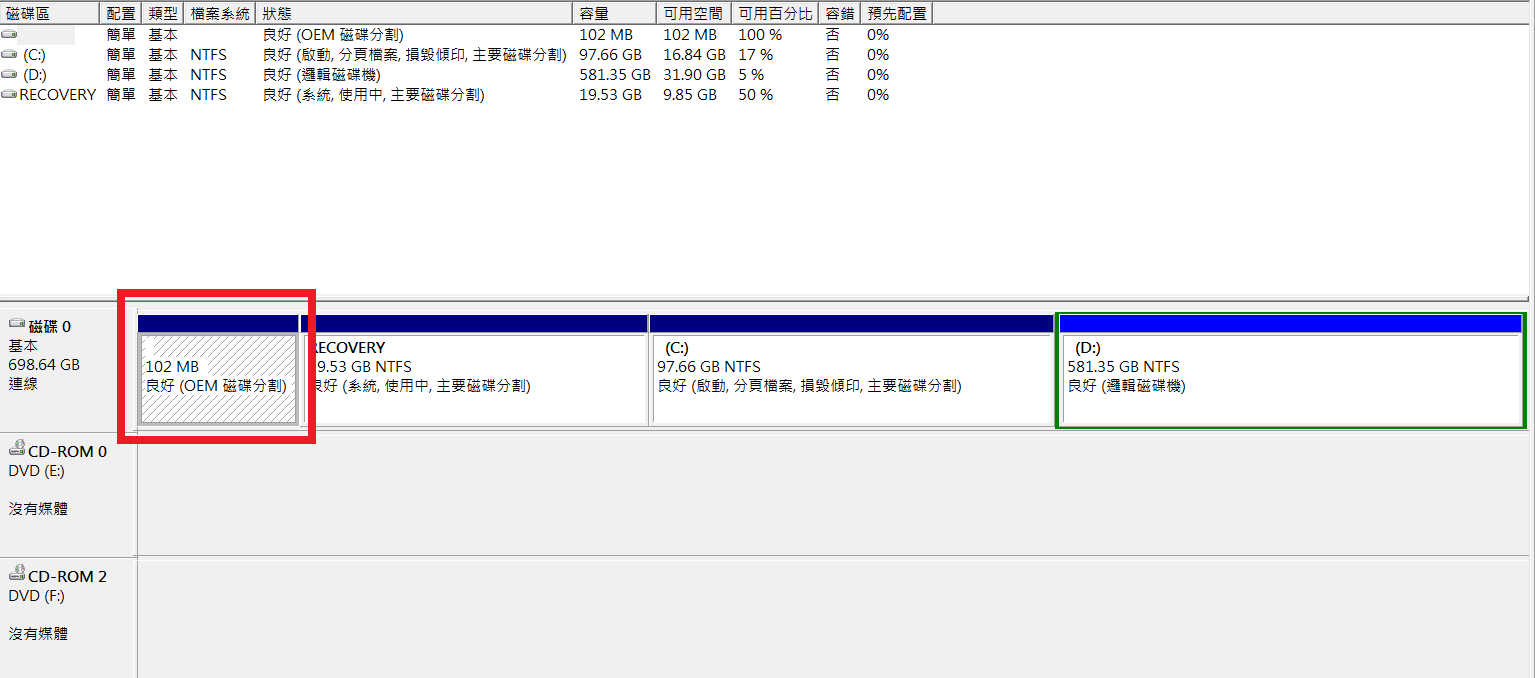
yOFMOj5.png


but in My Computer, it appeared as drive letter Z: and everything inside become accessible.

o2jtaM8.png


===========

Hope I explained the condition well and someone can help me out.

Sorry for the crappy English and the system language.

If any information need, I can add up and explain them.

Thanks.
 

My Computer My Computer

At a glance

Windows 7 Ultimate x64Intel i7-2630QM8G DDR3 1600NVIDIA GeForce GT 540M
Computer type
Laptop
Computer Manufacturer/Model Number
Dell XPS 15 L502x
OS
Windows 7 Ultimate x64
CPU
Intel i7-2630QM
Memory
8G DDR3 1600
Graphics Card(s)
NVIDIA GeForce GT 540M
Hard Drives
WDC WD7500BPKT (750G)
Antivirus
Kaspersky Internet Security 2012
Browser
Opera
That is crazy :what:

Did this recently start ?

Do you want to try a system restore ?
 

My Computer My Computer

At a glance

Windows 10 Pro x64Intel Core i7 6700KGSkill TridentZ RGB 16GB 3600 16-16-16-36EVGA GTX 980 Ti SC x2
Computer type
PC/Desktop
Computer Manufacturer/Model Number
Skylake Special #666
OS
Windows 10 Pro x64
CPU
Intel Core i7 6700K
Motherboard
Asus Sabertooth Z170 Mark 1
Memory
GSkill TridentZ RGB 16GB 3600 16-16-16-36
Graphics Card(s)
EVGA GTX 980 Ti SC x2
Sound Card
Realtek High Definition
Monitor(s) Displays
AOC G2460PG
Screen Resolution
1920 x 1080 144Hz
Hard Drives
Samsung 860 Pro 256GB, Seagate Barracuda 4TB x2
PSU
EVGA 1000 P2, EVGA White Custom Braided Cables
Case
Corsair Vengeance C70 Gunmetal Black
Cooling
Corsair H100i v2, Corsair ML120 x2, Thermal Grizzly Kryonaut
Keyboard
Logitech G910 Orion Spectrum
Mouse
Logitech G700s
Internet Speed
Verizon Fios Quantum Gateway 75/75
Antivirus
Windows Defender, Malwarebytes Free 3.8.3
Browser
Chrome
Other Info
Corsair SP120 x4, LG Blu-ray Drive, Durabrand HT-395 100 Watt Dolby Digital Amp, Corsair H2100 Wireless 7.1 Headset
That is crazy :what:

Did this recently start ?

Do you want to try a system restore ?

This happed after I tried to use a Windows fix, pressing F8 on boot up.

Before this, sometimes the drive letter Y: appears, which gain access of the Recovery partition, but only Y: appears, not anything else.

Not planning for a system restore. Currently I have no hard drive to backup all my stuff and settings.
 

My Computer My Computer

At a glance

Windows 7 Ultimate x64Intel i7-2630QM8G DDR3 1600NVIDIA GeForce GT 540M
Computer type
Laptop
Computer Manufacturer/Model Number
Dell XPS 15 L502x
OS
Windows 7 Ultimate x64
CPU
Intel i7-2630QM
Memory
8G DDR3 1600
Graphics Card(s)
NVIDIA GeForce GT 540M
Hard Drives
WDC WD7500BPKT (750G)
Antivirus
Kaspersky Internet Security 2012
Browser
Opera

My Computer My Computer

At a glance

Windows 10 Pro. 64/ version 1709 Windows 7 Pr...Intel i7-6800K @ 4.3Corsair Platinum 16 gig @2400EVGA GTX 1070 OC
Computer type
PC/Desktop
Computer Manufacturer/Model Number
Home made Desktop
OS
Windows 10 Pro. 64/ version 1709 Windows 7 Pro/64
CPU
Intel i7-6800K @ 4.3
Motherboard
ASUS X-99 Deluxe II
Memory
Corsair Platinum 16 gig @2400
Graphics Card(s)
EVGA GTX 1070 OC
Monitor(s) Displays
Asus 27" LED LCD/VE278Q
Screen Resolution
1920-1080 or 1280-720 HDMI
Hard Drives
INTEL SSD 730-240 Gb Sata 3.0/
PSU
EVGA Platium 1200W
Case
Phanteks Luxe Tempered Glass 8 fans/ one radiator
Cooling
XSPC/ Water Cooled CPU
Keyboard
Das 4 Professional
Mouse
Logitech M705/MX Anywhere 2-S
Internet Speed
100 mbits
Antivirus
Microsoft Security Essentials/ Malwarebytes Premium 3.0/ SAS
Browser
I.E. 11 default/Firefox/ ISP Time Warner Cable/Spectrum
Other Info
LG BluRay Burner/
Sound system-KLipsch-THX/
Icy Dock ssd Hot Swap bays.

My Computer My Computer

At a glance

Windows 7 Ultimate x64Intel i7-2630QM8G DDR3 1600NVIDIA GeForce GT 540M
Computer type
Laptop
Computer Manufacturer/Model Number
Dell XPS 15 L502x
OS
Windows 7 Ultimate x64
CPU
Intel i7-2630QM
Memory
8G DDR3 1600
Graphics Card(s)
NVIDIA GeForce GT 540M
Hard Drives
WDC WD7500BPKT (750G)
Antivirus
Kaspersky Internet Security 2012
Browser
Opera
You should have never disabled system restore If you never created a disk image, that was very foolish.

You do not have to have another hard drive to create a system image, you can always create another partition for backup purposes as a last resort :)
 

My Computer My Computer

At a glance

Windows 10 Pro x64Intel Core i7 6700KGSkill TridentZ RGB 16GB 3600 16-16-16-36EVGA GTX 980 Ti SC x2
Computer type
PC/Desktop
Computer Manufacturer/Model Number
Skylake Special #666
OS
Windows 10 Pro x64
CPU
Intel Core i7 6700K
Motherboard
Asus Sabertooth Z170 Mark 1
Memory
GSkill TridentZ RGB 16GB 3600 16-16-16-36
Graphics Card(s)
EVGA GTX 980 Ti SC x2
Sound Card
Realtek High Definition
Monitor(s) Displays
AOC G2460PG
Screen Resolution
1920 x 1080 144Hz
Hard Drives
Samsung 860 Pro 256GB, Seagate Barracuda 4TB x2
PSU
EVGA 1000 P2, EVGA White Custom Braided Cables
Case
Corsair Vengeance C70 Gunmetal Black
Cooling
Corsair H100i v2, Corsair ML120 x2, Thermal Grizzly Kryonaut
Keyboard
Logitech G910 Orion Spectrum
Mouse
Logitech G700s
Internet Speed
Verizon Fios Quantum Gateway 75/75
Antivirus
Windows Defender, Malwarebytes Free 3.8.3
Browser
Chrome
Other Info
Corsair SP120 x4, LG Blu-ray Drive, Durabrand HT-395 100 Watt Dolby Digital Amp, Corsair H2100 Wireless 7.1 Headset
The reason I use the F8 fix is that I encounter a BSOD that shows "bad system config info".
The fix didn't work
So I found a tutor said to go in command and type
"bcdedit /deletevalue {default} truncate memory"
"bcdedit/deletevalue {default} numproc"

but it still failed.

Then I remebered that before reboot, I adjusted msconfig, and had seen the max ram been set to 0
I don't know why, but I though it is something defualt.

That is the cause of BSOD, so I entered safe mode and adjust msconfig back to normal, then it fixed from BSOD.
 
Last edited:

My Computer My Computer

At a glance

Windows 7 Ultimate x64Intel i7-2630QM8G DDR3 1600NVIDIA GeForce GT 540M
Computer type
Laptop
Computer Manufacturer/Model Number
Dell XPS 15 L502x
OS
Windows 7 Ultimate x64
CPU
Intel i7-2630QM
Memory
8G DDR3 1600
Graphics Card(s)
NVIDIA GeForce GT 540M
Hard Drives
WDC WD7500BPKT (750G)
Antivirus
Kaspersky Internet Security 2012
Browser
Opera
You should have never disabled system restore If you never created a disk image, that was very foolish.

You do not have to have another hard drive to create a system image, you can always create another partition for backup purposes as a last resort :)

Worse come to worse I would do the built-in recovery of OEM, so I disabled it.
 

My Computer My Computer

At a glance

Windows 7 Ultimate x64Intel i7-2630QM8G DDR3 1600NVIDIA GeForce GT 540M
Computer type
Laptop
Computer Manufacturer/Model Number
Dell XPS 15 L502x
OS
Windows 7 Ultimate x64
CPU
Intel i7-2630QM
Memory
8G DDR3 1600
Graphics Card(s)
NVIDIA GeForce GT 540M
Hard Drives
WDC WD7500BPKT (750G)
Antivirus
Kaspersky Internet Security 2012
Browser
Opera
So if you can`t fix the issue it looks like that`s what you`ll be using.

Something has created all those phantom drives, you`re just going to have to work on deleting them all.

By the way, you really should add some space from D to C.

And why do you think you need another drive for storage, you have 581 GBs right there on your hard drive for storage, do not store any data on C, once you get this figured out, please turn system restore back on.

You should have also had a disk image stored on D.

But it looks like you only have 5% free space on D, you need to work on deleting un needed data off there.
 

My Computer My Computer

At a glance

Windows 10 Pro x64Intel Core i7 6700KGSkill TridentZ RGB 16GB 3600 16-16-16-36EVGA GTX 980 Ti SC x2
Computer type
PC/Desktop
Computer Manufacturer/Model Number
Skylake Special #666
OS
Windows 10 Pro x64
CPU
Intel Core i7 6700K
Motherboard
Asus Sabertooth Z170 Mark 1
Memory
GSkill TridentZ RGB 16GB 3600 16-16-16-36
Graphics Card(s)
EVGA GTX 980 Ti SC x2
Sound Card
Realtek High Definition
Monitor(s) Displays
AOC G2460PG
Screen Resolution
1920 x 1080 144Hz
Hard Drives
Samsung 860 Pro 256GB, Seagate Barracuda 4TB x2
PSU
EVGA 1000 P2, EVGA White Custom Braided Cables
Case
Corsair Vengeance C70 Gunmetal Black
Cooling
Corsair H100i v2, Corsair ML120 x2, Thermal Grizzly Kryonaut
Keyboard
Logitech G910 Orion Spectrum
Mouse
Logitech G700s
Internet Speed
Verizon Fios Quantum Gateway 75/75
Antivirus
Windows Defender, Malwarebytes Free 3.8.3
Browser
Chrome
Other Info
Corsair SP120 x4, LG Blu-ray Drive, Durabrand HT-395 100 Watt Dolby Digital Amp, Corsair H2100 Wireless 7.1 Headset
So if you can`t fix the issue it looks like that`s what you`ll be using.

Something has created all those phantom drives, you`re just going to have to work on deleting them all.

By the way, you really should add some space from D to C.

And why do you think you need another drive for storage, you have 581 GBs right there on your hard drive for storage, do not store any data on C, once you get this figured out, please turn system restore back on.

You should have also had a disk image stored on D.

But it looks like you only have 5% free space on D, you need to work on deleting un needed data off there.

Some Windows update had been installed 1 or 2 days before and after that BSOD.
 

My Computer My Computer

At a glance

Windows 7 Ultimate x64Intel i7-2630QM8G DDR3 1600NVIDIA GeForce GT 540M
Computer type
Laptop
Computer Manufacturer/Model Number
Dell XPS 15 L502x
OS
Windows 7 Ultimate x64
CPU
Intel i7-2630QM
Memory
8G DDR3 1600
Graphics Card(s)
NVIDIA GeForce GT 540M
Hard Drives
WDC WD7500BPKT (750G)
Antivirus
Kaspersky Internet Security 2012
Browser
Opera
Have you installed any new hardware recently, such as an internal card reader?
 

My Computer My Computer

At a glance

Win 7 Ultimate 64 bitIntel i7-3930KKingston HyperX Genesis 32GB Kit (8x4GB Modul...MSI R7850 Twin Frozr 2GD5/OC Radeon HD 7850 2...
Computer type
PC/Desktop
Computer Manufacturer/Model Number
Custom Build
OS
Win 7 Ultimate 64 bit
CPU
Intel i7-3930K
Motherboard
ASUS P9X79 WS
Memory
Kingston HyperX Genesis 32GB Kit (8x4GB Modules) 1600MHz DDR
Graphics Card(s)
MSI R7850 Twin Frozr 2GD5/OC Radeon HD 7850 2GB 256-bit GDDR
Sound Card
Asus Xonar Essence STX
Monitor(s) Displays
3x Asus VG248QE 24", Vizio 32" TV
Screen Resolution
1920 x 1080, ?
Hard Drives
Samsung 128GB 840 Pro SSD (1),
Samsung 4TB 850 EVO SSDs (4)
Samsung 4TB 850 EVO SSDs (16) external backup drives used in 2.5" hot swap bays in the computer.
PSU
Corsair HX750w
Case
Antec Two Hundred v2 (modified)
Cooling
Cooler Master GeminII S524 120mm (fan replaced with a 140mm)
Keyboard
Logitech G510s
Mouse
Logitech M525 (two in use)
Internet Speed
=< 32Mbps down, 8Mbps up
Antivirus
AVAST!, MBAM, SAS, Spybot S&D (all but MBAM free) Glary Util
Browser
IE11
Other Info
LSI 9211-8i HBA card (8 SATA III ports), 2.5" & 3.5" Hot Swap Bays, HooToo HT-CR001 PCI-E to USB 3.0 Internal Hub + 6 Slot Card Reader, and LG Model CH12LS28 BD-ROM Optical Drive. Also, ScanSnap S1500 ADF duplexing scanner, Canon 9000F flat bed scanner, Corsair SP2500 2.1 speakers, Samsung CLP 415nw laser color printer, Cyberpower PP2200SW UPS
Have you installed any new hardware recently, such as an internal card reader?

No hardware installed.

If the virtual drive counts, then yes, dvdfab virtual drive, virtual clonedrive, and ram disk.

Had them uninstalled due to this problem.
 

My Computer My Computer

At a glance

Windows 7 Ultimate x64Intel i7-2630QM8G DDR3 1600NVIDIA GeForce GT 540M
Computer type
Laptop
Computer Manufacturer/Model Number
Dell XPS 15 L502x
OS
Windows 7 Ultimate x64
CPU
Intel i7-2630QM
Memory
8G DDR3 1600
Graphics Card(s)
NVIDIA GeForce GT 540M
Hard Drives
WDC WD7500BPKT (750G)
Antivirus
Kaspersky Internet Security 2012
Browser
Opera
Those programs would never create all those virtual/phantom drives.
 

My Computer My Computer

At a glance

Windows 10 Pro x64Intel Core i7 6700KGSkill TridentZ RGB 16GB 3600 16-16-16-36EVGA GTX 980 Ti SC x2
Computer type
PC/Desktop
Computer Manufacturer/Model Number
Skylake Special #666
OS
Windows 10 Pro x64
CPU
Intel Core i7 6700K
Motherboard
Asus Sabertooth Z170 Mark 1
Memory
GSkill TridentZ RGB 16GB 3600 16-16-16-36
Graphics Card(s)
EVGA GTX 980 Ti SC x2
Sound Card
Realtek High Definition
Monitor(s) Displays
AOC G2460PG
Screen Resolution
1920 x 1080 144Hz
Hard Drives
Samsung 860 Pro 256GB, Seagate Barracuda 4TB x2
PSU
EVGA 1000 P2, EVGA White Custom Braided Cables
Case
Corsair Vengeance C70 Gunmetal Black
Cooling
Corsair H100i v2, Corsair ML120 x2, Thermal Grizzly Kryonaut
Keyboard
Logitech G910 Orion Spectrum
Mouse
Logitech G700s
Internet Speed
Verizon Fios Quantum Gateway 75/75
Antivirus
Windows Defender, Malwarebytes Free 3.8.3
Browser
Chrome
Other Info
Corsair SP120 x4, LG Blu-ray Drive, Durabrand HT-395 100 Watt Dolby Digital Amp, Corsair H2100 Wireless 7.1 Headset
Windows Updates did not cause this problem either or their would be many complaining about such a thing.

I'm guessing that a combination of these is causing the problem.

If the virtual drive counts, then yes, dvdfab virtual drive, virtual clonedrive, and ram disk.
No one of them would cause the problem but the combination just might.

These programs are designed to work with Windows 7 but not necessarily with each other.
 

My Computer My Computer

At a glance

Windows 10 Pro. 64/ version 1709 Windows 7 Pr...Intel i7-6800K @ 4.3Corsair Platinum 16 gig @2400EVGA GTX 1070 OC
Computer type
PC/Desktop
Computer Manufacturer/Model Number
Home made Desktop
OS
Windows 10 Pro. 64/ version 1709 Windows 7 Pro/64
CPU
Intel i7-6800K @ 4.3
Motherboard
ASUS X-99 Deluxe II
Memory
Corsair Platinum 16 gig @2400
Graphics Card(s)
EVGA GTX 1070 OC
Monitor(s) Displays
Asus 27" LED LCD/VE278Q
Screen Resolution
1920-1080 or 1280-720 HDMI
Hard Drives
INTEL SSD 730-240 Gb Sata 3.0/
PSU
EVGA Platium 1200W
Case
Phanteks Luxe Tempered Glass 8 fans/ one radiator
Cooling
XSPC/ Water Cooled CPU
Keyboard
Das 4 Professional
Mouse
Logitech M705/MX Anywhere 2-S
Internet Speed
100 mbits
Antivirus
Microsoft Security Essentials/ Malwarebytes Premium 3.0/ SAS
Browser
I.E. 11 default/Firefox/ ISP Time Warner Cable/Spectrum
Other Info
LG BluRay Burner/
Sound system-KLipsch-THX/
Icy Dock ssd Hot Swap bays.
You don`t need to setup any virtual drives with those programs if you have a dvd/cd burner.

And as Jack stated, no way did windows update cause that problem.
 

My Computer My Computer

At a glance

Windows 10 Pro x64Intel Core i7 6700KGSkill TridentZ RGB 16GB 3600 16-16-16-36EVGA GTX 980 Ti SC x2
Computer type
PC/Desktop
Computer Manufacturer/Model Number
Skylake Special #666
OS
Windows 10 Pro x64
CPU
Intel Core i7 6700K
Motherboard
Asus Sabertooth Z170 Mark 1
Memory
GSkill TridentZ RGB 16GB 3600 16-16-16-36
Graphics Card(s)
EVGA GTX 980 Ti SC x2
Sound Card
Realtek High Definition
Monitor(s) Displays
AOC G2460PG
Screen Resolution
1920 x 1080 144Hz
Hard Drives
Samsung 860 Pro 256GB, Seagate Barracuda 4TB x2
PSU
EVGA 1000 P2, EVGA White Custom Braided Cables
Case
Corsair Vengeance C70 Gunmetal Black
Cooling
Corsair H100i v2, Corsair ML120 x2, Thermal Grizzly Kryonaut
Keyboard
Logitech G910 Orion Spectrum
Mouse
Logitech G700s
Internet Speed
Verizon Fios Quantum Gateway 75/75
Antivirus
Windows Defender, Malwarebytes Free 3.8.3
Browser
Chrome
Other Info
Corsair SP120 x4, LG Blu-ray Drive, Durabrand HT-395 100 Watt Dolby Digital Amp, Corsair H2100 Wireless 7.1 Headset
I tried to remove the registries of these 3 programs.
Will observe if the problem still exist.
 

My Computer My Computer

At a glance

Windows 7 Ultimate x64Intel i7-2630QM8G DDR3 1600NVIDIA GeForce GT 540M
Computer type
Laptop
Computer Manufacturer/Model Number
Dell XPS 15 L502x
OS
Windows 7 Ultimate x64
CPU
Intel i7-2630QM
Memory
8G DDR3 1600
Graphics Card(s)
NVIDIA GeForce GT 540M
Hard Drives
WDC WD7500BPKT (750G)
Antivirus
Kaspersky Internet Security 2012
Browser
Opera
Back
Top