
Disk management

As shown in the picture, sorry for the Chinese language.
I have only 1 HDD, and it had only been seperated into 2 active Windows partitions, with 2 hidden partitions.
C: for system, D: for normal storage, Z: used to be hidden as the OEM partition but now it appears, another hidden for Dell system recovery.

Normally it should only show 2 partitions, C: and D:
E~I being used for DVD drives and virtual drives.
But now everything from J: till Y: appeared which I never use them before.
Whenever I plug in as USB or external HDD, nothing show up in My Computer.
I try to assign them to a drive letter in disk management, it tells that the drive letter had been occupied by other drives, asking if I still want to assign it.
I pressed yes, and it did show up in My Computer, but when I double click on it, it tells that the disk had not been formatted, asking to format.
The USB or HDD is for sure well formatted for Windows.
This phenomenon can be temporarily fixed right after reboot and boot up, and the USB or HDD can be read as normal.
But after a while, all the other drive letter from J to Y show up again, and the phenomenon happened.
===========
Another problem is that in the disk management, the partition (102MB) marked red for OEM has no drive letter, which is normal
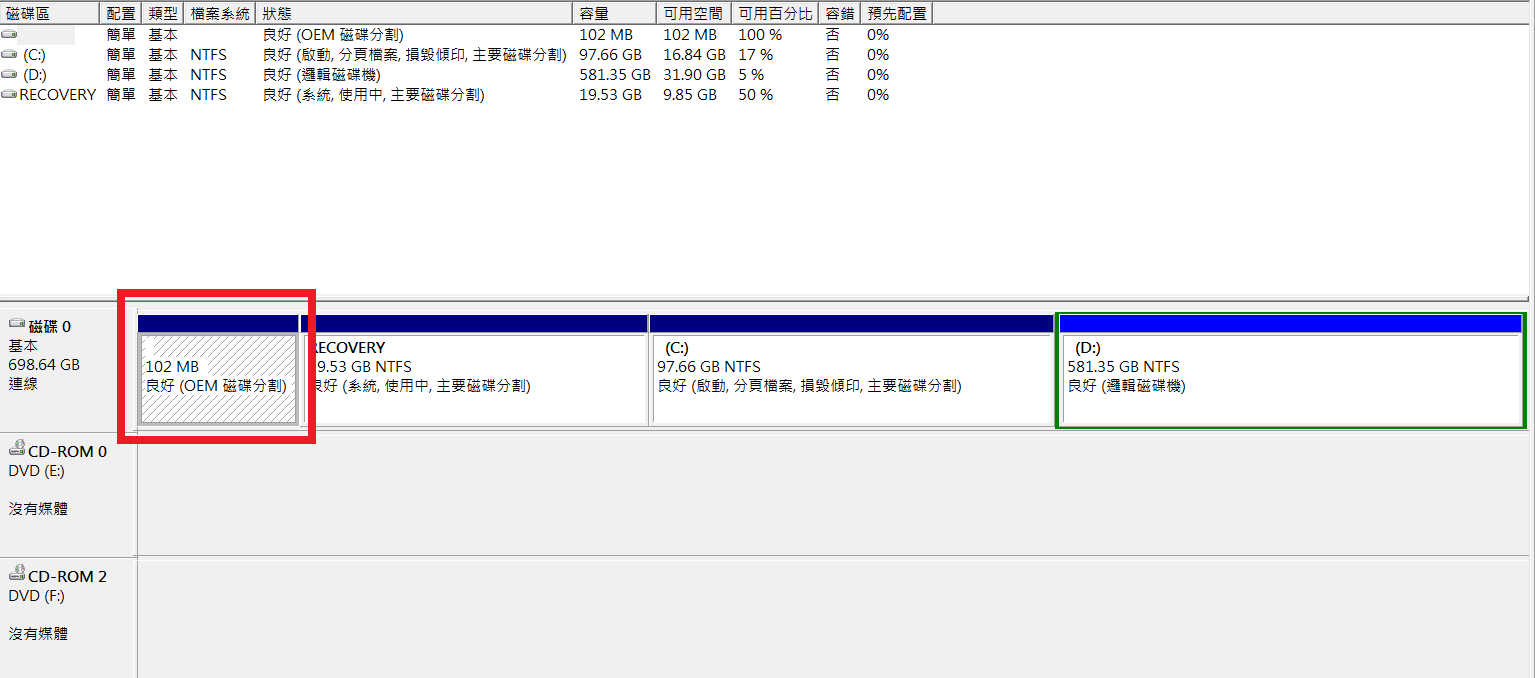
but in My Computer, it appeared as drive letter Z: and everything inside become accessible.

===========
Hope I explained the condition well and someone can help me out.
Sorry for the crappy English and the system language.
If any information need, I can add up and explain them.
Thanks.
As shown in the picture, sorry for the Chinese language.
I have only 1 HDD, and it had only been seperated into 2 active Windows partitions, with 2 hidden partitions.
C: for system, D: for normal storage, Z: used to be hidden as the OEM partition but now it appears, another hidden for Dell system recovery.
Normally it should only show 2 partitions, C: and D:
E~I being used for DVD drives and virtual drives.
But now everything from J: till Y: appeared which I never use them before.
Whenever I plug in as USB or external HDD, nothing show up in My Computer.
I try to assign them to a drive letter in disk management, it tells that the drive letter had been occupied by other drives, asking if I still want to assign it.
I pressed yes, and it did show up in My Computer, but when I double click on it, it tells that the disk had not been formatted, asking to format.
The USB or HDD is for sure well formatted for Windows.
This phenomenon can be temporarily fixed right after reboot and boot up, and the USB or HDD can be read as normal.
But after a while, all the other drive letter from J to Y show up again, and the phenomenon happened.
===========
Another problem is that in the disk management, the partition (102MB) marked red for OEM has no drive letter, which is normal
but in My Computer, it appeared as drive letter Z: and everything inside become accessible.
===========
Hope I explained the condition well and someone can help me out.
Sorry for the crappy English and the system language.
If any information need, I can add up and explain them.
Thanks.
My Computer
At a glance
Windows 7 Ultimate x64Intel i7-2630QM8G DDR3 1600NVIDIA GeForce GT 540M
- Computer type
- Laptop
- Computer Manufacturer/Model Number
- Dell XPS 15 L502x
- OS
- Windows 7 Ultimate x64
- CPU
- Intel i7-2630QM
- Memory
- 8G DDR3 1600
- Graphics Card(s)
- NVIDIA GeForce GT 540M
- Hard Drives
- WDC WD7500BPKT (750G)
- Antivirus
- Kaspersky Internet Security 2012
- Browser
- Opera


