I'm not very happy with Windows 7 so far

Jack1337

New member
Local time
3:27 PM
Messages
10
I must admit, I made a huge mistake by formatting and moving to Windows 7 from my absolutely perfect XP set up, but now that 7 is here I might try and figure out what my problems are before reverting back to XP.

Lets get one thing out of the way first, while I do know how to maintain a computer more than the average user, I'm definitely not all that computer savvy and I'm also easily frustrated with computers and absolutely hate them, it's just not stuff I like tinkering with or have any interest to mess with.

My Specs:
Athlon 64 3500+
2GB RAM
7800GTX 256MB

I had an absolutely perfect XP SP2 installation on this system that used BBLean(blackbox) as its main shell and in the two years it was on my computer I didn't have a single problem with that setup, technically it's 4 years since I've had the same setup since 2005 but my HDD in 2007 and I replaced it with a new one then and had to install stuff all over again.

Fact of the matter is, from 2005-2009 I didn't have any problems with my system, no slow downs, no viruses or spyware, I maintained a nice, clean registry at all times with RegCleaner I think and TuneUp.

Yesterday I installed Windows 7 Ultimate x64 and I honestly hate it, it doesn't do what I want it to do and I can't even begin to understand why. Was getting x64 for my system a mistake?

My biggest problem is, my Wacom Intuos 3 tablet, I don't have Phtoshop CS4, tried installing a trial and of course it wouldn't even want to install on Windows 7, I'll give something else a try, but I do have CS3 and that just refuses to work with my tablet correctly.

There is this weird input lag in CS3 when I try to draw with my tablet, like you draw and after a few seconds the lines show up, usually not even in the same shape as you drew them.
This isn't the case when I draw in PS with my mouse and I can draw just fine in MSPaint with the tablet.

Also Windows 7 has this TERRIBLY ANNOYING program that pops up every time my tablet activates, some writing program or something, dunno what it is and I don't want to know what it is, I just want it out of my system but couldn't find a way to get rid of it.

My second problem is I can't get VMWare workstation to work right, it works but the internet inside it doesn't work and the program just doesn't perform as well as it did in XP for me.
In XP I used one of the 5.5 VMWare release, now I'm using 6.5.something and it's just terrible, can't get the internet working inside it, can't do nothing right.

The fact that Windows 7 x64 only recognizes my SB5100 USB Modem if I connected it through the ethernet cable doesn't make things better either, because this renders me unable to use Xbox Live, I don't have a router or want one since I didn't need one until now.

Try to understand guys, not everyone likes computers or wants to mess around with them to get things working, I personally just want things to work for me and that's it.

If anyone can help me, please do so.
Thanks in advance
 

My Computer My Computer

At a glance

Windows 7 Ultimate x64Athlon 64 3500+2GBNVidia GeForce 7800GTX 256MB
OS
Windows 7 Ultimate x64
CPU
Athlon 64 3500+
Motherboard
GA-K8NF-9
Memory
2GB
Graphics Card(s)
NVidia GeForce 7800GTX 256MB
Sound Card
AC97
I think my severe photoshop lag has something to do with that idiotic ripples effect Windows 7 has every time I tap my tablet pen on the tablet surface, I THINK I disabled the stupid handwriting program, I think not sure but it still lags in PS.

Guys, I need to get back to work and I can't at this rate, this is really starting to drive me mad.

All Iwant is to use photoshop CS3 like I did before if I can't use vMWare or anything else with this damn OS
 

My Computer My Computer

At a glance

Windows 7 Ultimate x64Athlon 64 3500+2GBNVidia GeForce 7800GTX 256MB
OS
Windows 7 Ultimate x64
CPU
Athlon 64 3500+
Motherboard
GA-K8NF-9
Memory
2GB
Graphics Card(s)
NVidia GeForce 7800GTX 256MB
Sound Card
AC97
You should go back to XP. A quick check on the Gigabyte website showed that they never released any Vista drivers for your motherboard, let alone Windows 7 drivers. That could certainly add to any problems that might come up. That being said...

Did you download the Windows 7 drivers for your Wacom tablet?
Did you visit the Adobe website and check for Windows 7 issues with CS3/4?
Did you download the Vista drivers for your SB5100, and did you read the instructions for installing Vista drivers?

Honestly, the OS isn't the problem here. You have old hardware that might not support anything newer than XP.
 

My Computer My Computer

At a glance

Windows 7 Ultimate x64 SP1Core i7-2670QM8GB DDR3 PC3-10600Intel HD Graphics 3000 + GeForce GT 540M
Computer Manufacturer/Model Number
Dell XPS 15 L502x
OS
Windows 7 Ultimate x64 SP1
CPU
Core i7-2670QM
Memory
8GB DDR3 PC3-10600
Graphics Card(s)
Intel HD Graphics 3000 + GeForce GT 540M
Screen Resolution
1920x1080
Hard Drives
1TB 5400RPM Seagate
Jack

Im sorry you are having a hard time with win 7. We can certainly help you to work out the problems but I do have a suggestion. If you are not going to upgrade your ram you might want to install the 32 bit win 7 instead,.

Now what problem is the most important to deal with first
Ken
 

My Computer My Computer

At a glance

Win 8 Release candidate 8400[email protected]4 gigsNvidia 9600M
Computer Manufacturer/Model Number
HP Pavillion dv-7 1005 Tx
OS
Win 8 Release candidate 8400
CPU
[email protected]
Memory
4 gigs
Graphics Card(s)
Nvidia 9600M
Sound Card
HD built-in
Monitor(s) Displays
17" Wxga
Screen Resolution
1440x900
Cooling
none
Internet Speed
45Mb down 5Mb up
I think my severe photoshop lag has something to do with that idiotic ripples effect Windows 7 has every time I tap my tablet pen on the tablet surface, I THINK I disabled the stupid handwriting program, I think not sure but it still lags in PS.

Guys, I need to get back to work and I can't at this rate, this is really starting to drive me mad.

All Iwant is to use photoshop CS3 like I did before if I can't use vMWare or anything else with this damn OS


Have you tried running CS3 as Windows XP SP3 mode.. ?


Right click CS3 'Properties'compatibility' and choose Windows XP SP 3

Not trying to teach you to suck eggs, but wasn't sure if you knew the above :rolleyes:

~Mike
 

My Computer My Computer

At a glance

Windows 7 x64, MAC, BT4, Vista x64, server 20...Intel Core 2 Duo E6550 2.33GHz 1333FSB Socket...Corsair 4GB Kit (2x2GB) DDR2 800MHz/PC2-6400 ...Sapphire RADEON X1950PRO 512MB GDDR3
Computer Manufacturer/Model Number
Hand Built
OS
Windows 7 x64, MAC, BT4, Vista x64, server 2003 ent (DC)
CPU
Intel Core 2 Duo E6550 2.33GHz 1333FSB Socket 775 4MB Cache
Motherboard
Gigabyte GA-P35C-DS3R Socket 775 8 Channel Audio ATX
Memory
Corsair 4GB Kit (2x2GB) DDR2 800MHz/PC2-6400 Dominator
Graphics Card(s)
Sapphire RADEON X1950PRO 512MB GDDR3
Sound Card
Sound blaster Audigy PCI
Monitor(s) Displays
Samsung SM223BW 21.6" TFT Widescreen 1680x1050 3000:1
Screen Resolution
1680X1050
Hard Drives
Western Digital WD5000AAKS 500GB SATAII 7200RPM 16MB Cache
Samsung F1 Spinpoint 1TB SATAII 5400RPM 32MB Cache
PSU
OCZ GameXStream 600W PSU - 120mm Fan SLI Ready
Case
Antec 900 Nine Hundred - Gaming Case
Cooling
OCZ Vindicator AMD and Intel Socket 754 939 940 AM2 775
Keyboard
Logitech
Mouse
Logitech
Internet Speed
5800 kbps DN & 800 kbps up "on a good day"
Other Info
Because I can :-D

My score is 5.8 CPU lagg even overclocked @ 3.1 per core
Grab latest drivers for your tablet. They have 32 and 64 bit drivers. They came out with them on Sep. 29, 2009

Wacom Hardware Drivers
 

My Computer My Computer

At a glance

windows 7
OS
windows 7
Did you download the Windows 7 drivers for your Wacom tablet?
Yeah, I even disabled that default TabletPC crap Windows 7 has, this did improve performance a great deal in Photoshop, but there's still input lag when pressure sensitivity changes.

I got no input lag in MSPaint or if I use my tablet normally as a mouse


Did you visit the Adobe website and check for Windows 7 issues with CS3/4?

People have been using both CS3 and CS4 fine, though there are some installation problems with some of the CS4 versions I guess, but I can do without CS4, CS3 is what I used and what I need right now.

Did you download the Vista drivers for your SB5100, and did you read the instructions for installing Vista drivers?

Turns out those work only for 32bit x64 or something, for 64 you have to do it the way I did it in order to get the modem up and running, but there's no need for drivers this way.

As for my mobo not having the right drivers, I dunno, this CPU-Z program detects it just fine, though I'm not sure if it detects the right rev version, so far everything other than the tablet is alright, and VMWare is being a **** because it's not the old version I like I guess which doesn't even work on Vista.

I'm thinking of dual booting XP and 7, but it seems installing XP now and getting to dual boot with this is a hell of a lot of trouble from what I've seen.

edit: I tried running CS3 with both XP SP2 and XP SP3 compatibility even before disabling the TabletPC stuff.
I reinstalled my drivers now, I'm sure they're the latest ones cause I downloaded them from the Wacom site couple hours ago.

I'll restart, see if reinstalling the drivers after disabling that PCTablet stuff helps, but I doubt it will.

I'll run CS3 in XP Compatibility mode again to see what happens, but I'm not very optimistic about it all.
 

My Computer My Computer

At a glance

Windows 7 Ultimate x64Athlon 64 3500+2GBNVidia GeForce 7800GTX 256MB
OS
Windows 7 Ultimate x64
CPU
Athlon 64 3500+
Motherboard
GA-K8NF-9
Memory
2GB
Graphics Card(s)
NVidia GeForce 7800GTX 256MB
Sound Card
AC97
Jack

Well Its only been a couple of days right? IM sure it was difficult in XP for the first couple of days too.

Ken
 

My Computer My Computer

At a glance

Win 8 Release candidate 8400[email protected]4 gigsNvidia 9600M
Computer Manufacturer/Model Number
HP Pavillion dv-7 1005 Tx
OS
Win 8 Release candidate 8400
CPU
[email protected]
Memory
4 gigs
Graphics Card(s)
Nvidia 9600M
Sound Card
HD built-in
Monitor(s) Displays
17" Wxga
Screen Resolution
1440x900
Cooling
none
Internet Speed
45Mb down 5Mb up
PS CS3 still lags
tbh I'm pretty much ready on going back to XP, my only really big concern now is that I don't have the drivers disc for my mobo and last time I checked there were a bunch of different revisions of the thing, 1.0, 1.1 and A3 or something, CPU-Z says in Windows 7 it's A3, should I go with that? You guys said 7 might not have installed the right drivers, but if it didn't would my USB functions be messed up? Cause everything USB is nice and fast, at least as far as transfers to flash drivers and my external HDD go.
 

My Computer My Computer

At a glance

Windows 7 Ultimate x64Athlon 64 3500+2GBNVidia GeForce 7800GTX 256MB
OS
Windows 7 Ultimate x64
CPU
Athlon 64 3500+
Motherboard
GA-K8NF-9
Memory
2GB
Graphics Card(s)
NVidia GeForce 7800GTX 256MB
Sound Card
AC97
Jack

Im sorry you are having a hard time with win 7. We can certainly help you to work out the problems but I do have a suggestion. If you are not going to upgrade your ram you might want to install the 32 bit win 7 instead,.

I agree. Use the x86 version until you upgrade to at least 4GB (if your motherboard supports that much RAM).
 

My Computer My Computer

At a glance

Windows 7 Ultimate x64 SP1Core i7-2670QM8GB DDR3 PC3-10600Intel HD Graphics 3000 + GeForce GT 540M
Computer Manufacturer/Model Number
Dell XPS 15 L502x
OS
Windows 7 Ultimate x64 SP1
CPU
Core i7-2670QM
Memory
8GB DDR3 PC3-10600
Graphics Card(s)
Intel HD Graphics 3000 + GeForce GT 540M
Screen Resolution
1920x1080
Hard Drives
1TB 5400RPM Seagate
PS CS3 still lags
tbh I'm pretty much ready on going back to XP, my only really big concern now is that I don't have the drivers disc for my mobo and last time I checked there were a bunch of different revisions of the thing, 1.0, 1.1 and A3 or something, CPU-Z says in Windows 7 it's A3, should I go with that? You guys said 7 might not have installed the right drivers, but if it didn't would my USB functions be messed up? Cause everything USB is nice and fast, at least as far as transfers to flash drivers and my external HDD go.

The revision should be printed on the motherboard. Personally, I always verify what's on the motherboard intead of relying on a utility to tell me what it is supposed to be.
 

My Computer My Computer

At a glance

Windows 7 Ultimate x64 SP1Core i7-2670QM8GB DDR3 PC3-10600Intel HD Graphics 3000 + GeForce GT 540M
Computer Manufacturer/Model Number
Dell XPS 15 L502x
OS
Windows 7 Ultimate x64 SP1
CPU
Core i7-2670QM
Memory
8GB DDR3 PC3-10600
Graphics Card(s)
Intel HD Graphics 3000 + GeForce GT 540M
Screen Resolution
1920x1080
Hard Drives
1TB 5400RPM Seagate
I guess I don't understand why you're "sort of" trying 7 and criticizing it so much. The TabletPC stuff in 7 is absolutely amazing. Handwriting recognition that is top notch, right out of the box, etc. If you don't need 7 and don't like it, go back to XP, problem solved.

If you were smart, you imaged your drive with the XP installation on it before you blew it away. Restore it and you're back in business.
 

My Computer My Computer

At a glance

Windows 7 Ultimate RTM (Technet)3.00 gigahertz Intel Core2 Duo E84004GBATI Radeon X1950 Pro
Computer Manufacturer/Model Number
Custom
OS
Windows 7 Ultimate RTM (Technet)
CPU
3.00 gigahertz Intel Core2 Duo E8400
Motherboard
ASUSTeK Computer INC. P5K/EPU Rev 1.xx
Memory
4GB
Graphics Card(s)
ATI Radeon X1950 Pro
Sound Card
Built in HD Audio
Monitor(s) Displays
22" Gateway LCD
Screen Resolution
1920 x 1200
Hard Drives
ST3160023A [Hard drive] (160.04 GB) -- drive 0, rev 8.01, ST3500630AS [Hard drive] (500.11 GB) -- drive 2, rev 3.AAK
ST3500630AS [Hard drive] (500.11 GB) -- drive 1, rev 3.AAK
Keyboard
Logitech G11
Mouse
Microsoft Wireless Laser Mouse 5000
Internet Speed
13.44 Mbps
I guess I don't understand why you're "sort of" trying 7 and criticizing it so much. The TabletPC stuff in 7 is absolutely amazing. Handwriting recognition that is top notch, right out of the box, etc. If you don't need 7 and don't like it, go back to XP, problem solved.

If you were smart, you imaged your drive with the XP installation on it before you blew it away. Restore it and you're back in business.

yeah I was too lazy to do that XD
as for the tablet PC stuff being amazing, it may be amazing, but it should know its place and not butt in when I don't need it.

I hate it when programs assume they're supposed to run on their own and interfere with my work. I don't like all these new fancy features these days, they supposedly make things easier, but IMO they just make everything more complex and frustrating to use because getting rid of them is annoying as hell sometimes.

And I can't open my computer for reasons I'm too lazy to explain now, I'm not good at that stuff and I'll just mess it all up, yes just unscrewing the case can be fatal in my case I'm dumb when it comes to those thngs lol
Edit: Wait, I missed that post where the guy told me to install the 32bit version instead.
People were trying real hard to convince me that 64 bit is the way to go even though I've been steering clear of 64bit OS's for years now. I clearly stated I have only 2GB RAM yet people would still insist I get 64bit.

Well I'm not sure if I want more Windows 7 or not at this point, maybe I'll wait until I get a new killer gaming computer in a couple months and install 7 on that, but right now I'm very close to going back to XP.

First I have to make sure nothing goes wrong with that too though because I'm not a big fan of messing with this stuff, it's such a waste of time for me :(
 

My Computer My Computer

At a glance

Windows 7 Ultimate x64Athlon 64 3500+2GBNVidia GeForce 7800GTX 256MB
OS
Windows 7 Ultimate x64
CPU
Athlon 64 3500+
Motherboard
GA-K8NF-9
Memory
2GB
Graphics Card(s)
NVidia GeForce 7800GTX 256MB
Sound Card
AC97
Update: The Photoshop CS3 lag input couldn't be solved, but I tried installing CS4 from the whole Adobe Suit thing and that setup worked fine, as far as I can tell there's no input lag whatsoever in CS4 so it was definitely not my mobo or drivers.
 

My Computer My Computer

At a glance

Windows 7 Ultimate x64Athlon 64 3500+2GBNVidia GeForce 7800GTX 256MB
OS
Windows 7 Ultimate x64
CPU
Athlon 64 3500+
Motherboard
GA-K8NF-9
Memory
2GB
Graphics Card(s)
NVidia GeForce 7800GTX 256MB
Sound Card
AC97
Hi all

That Mobo should run W7 (either x-86 / X-64) without a problem.

Photoshop CS4 (64 bit) just flies on W7 x-64. I use it daily without a problem.

CS3 should also be fine -- upgraded a long while ago so I can't remember too much about CS3.

W7 installs on 5 / 6 / 7 year old (and older I'm told) computers without any problem so long as you have 512KB ram (seems to be the cut off point). I'm running one old 2004 bought Sony Vaio Pentium IV laptop just fine with W7 (and CS4). This machine would hardly load VISTA but gave no probs whatsoever with W7.

A 2GB machine will run just fine. (even W7 x-64 will work on your machine if the cpu supports 64 bit mode.)

The User Interface is different from XP and *could* take a while to get used to but it won't take long.

In any case if you had such a great XP system why didn't you back it up first with something like Acronis True Image so you could restore it again if you didn't like W7.

Vmware also has absolutely NO problems installing on W7 - I use it a LOT and have even from the W7 BETA.

You've done something seriously wrong if you've got that many probs with W7.

If you really don't like it don't use it but I suspect you've done something hideously wrong if you can't install Photoshop and Vmware on W7.

Note with vmware you can only run 64 bit Guest VM's if you've enabled the Virtualisation in the BIOS. (Both AMD and Intel CPU's can turn this feature on - not sure what the AMD name is).

Also I suggest next time ALWAYS backup your system -- it only takes around 10 - 15 mins on decent gear and will save you no end of grief and time later on.

Cheers
jimbo
 

My Computer My Computer

At a glance

Linux CENTOS 7 / various Windows OS'es and se...Intel i7 Intel i58GB, 16GBOn Motherboard
Computer type
PC/Desktop
Computer Manufacturer/Model Number
Custom built, several laptops HP/ASUS
OS
Linux CENTOS 7 / various Windows OS'es and servers
CPU
Intel i7 Intel i5
Memory
8GB, 16GB
Graphics Card(s)
On Motherboard
Sound Card
Realtek HD audio
Monitor(s) Displays
Apple Cinema display, Samsung LCD
Screen Resolution
1920 X 1080
Hard Drives
4 X 1TB SATA
Mouse
Toshiba wireless laser
Internet Speed
> 20MB up
^ The saddest part is, I always backup my Wii's NAND before getting so much as a new WiiWare game yet I didn't backup my entire friggin computer.

And the version of Photoshop CS4 that comes with the entire Adobe Suit installs perfectly fine, just the stand alone one wouldn't.
As for PS3 CS3, I really don't know why it did that, it worked perfectly aside from the tablet issue.

Also in VMWare I have internet problems and my XP VMWare just isn't as fluid as it was in XP 2 but other than that as I said it installed fine and it runs fine, but I really hate the 6.x VMWare series and would prefer 5.5.x
 

My Computer My Computer

At a glance

Windows 7 Ultimate x64Athlon 64 3500+2GBNVidia GeForce 7800GTX 256MB
OS
Windows 7 Ultimate x64
CPU
Athlon 64 3500+
Motherboard
GA-K8NF-9
Memory
2GB
Graphics Card(s)
NVidia GeForce 7800GTX 256MB
Sound Card
AC97
Here again what's the difference between vmware workstation 5.5.x and 6.x.x

Menus etc are IDENTICAL -- can't see what's to hate about 6.x.x. Also both NAT and Bridged WORK in the latest version of vmware workstation.

Now running Virtual PC in XP mode I might agree with you here as performance is sluggish but your other concerns just don't reflect the experience others have had with W7.

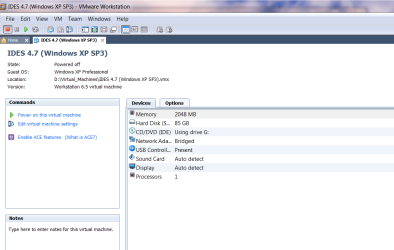
here's the vmware menu for vmware workstation 6.5.3 build 18504 for one of my XP VM's. -- can't see ANY difference to previous releases in the menu. Works EXACTLY as before.

(This is a BIG one as its running a stand alone version of a large SAP (ERP) Test system which uses a very big oracle database - hence the 85GB virtual disk space). Performance is fine and around 95% - 98% Native.

The powered on vm behaves just like it should do -- can't see any difference from vmware 5.5.x

cheers
jimbo
 

Attachments

  • vmware_one.png
    vmware_one.png
    32.6 KB · Views: 12
  • sapvm.png
    sapvm.png
    236.8 KB · Views: 19

My Computer My Computer

At a glance

Linux CENTOS 7 / various Windows OS'es and se...Intel i7 Intel i58GB, 16GBOn Motherboard
Computer type
PC/Desktop
Computer Manufacturer/Model Number
Custom built, several laptops HP/ASUS
OS
Linux CENTOS 7 / various Windows OS'es and servers
CPU
Intel i7 Intel i5
Memory
8GB, 16GB
Graphics Card(s)
On Motherboard
Sound Card
Realtek HD audio
Monitor(s) Displays
Apple Cinema display, Samsung LCD
Screen Resolution
1920 X 1080
Hard Drives
4 X 1TB SATA
Mouse
Toshiba wireless laser
Internet Speed
> 20MB up
That's nice it works good for you, but on my computer and between XP 32bit with 5.5.x and Windows 7 x64 and VMWare 6.5.something there's a difference.

In XP I couldn't tell the difference whether I was running on the guest or host sometimes, it was that smooth, I used the guest to download torrents and everything in order to keep my host OS nice and clean for gaming and work.

Now, the same virtual machine isn't as smooth, you can tell it's running in a virtual environment and it's just no good.
I even gave it a higher priority when grabbed and increased the Memory size from the 512MB it had for years to 1GB thinking that would improve performance but it didn't.

It's painfully obvious that either Windows 7 is to blame for this or the new VMWare build.
 

My Computer My Computer

At a glance

Windows 7 Ultimate x64Athlon 64 3500+2GBNVidia GeForce 7800GTX 256MB
OS
Windows 7 Ultimate x64
CPU
Athlon 64 3500+
Motherboard
GA-K8NF-9
Memory
2GB
Graphics Card(s)
NVidia GeForce 7800GTX 256MB
Sound Card
AC97
That's nice it works good for you, but on my computer and between XP 32bit with 5.5.x and Windows 7 x64 and VMWare 6.5.something there's a difference.

In XP I couldn't tell the difference whether I was running on the guest or host sometimes, it was that smooth, I used the guest to download torrents and everything in order to keep my host OS nice and clean for gaming and work.

Now, the same virtual machine isn't as smooth, you can tell it's running in a virtual environment and it's just no good.
I even gave it a higher priority when grabbed and increased the Memory size from the 512MB it had for years to 1GB thinking that would improve performance but it didn't.

It's painfully obvious that either Windows 7 is to blame for this or the new VMWare build.

I'd agree that Windows 7 x64 is the problem, if you had tried Vista x64 and suffered the same problems. It might just be an issue with your motherboard not playing nice with any 64 bit architecture. Try an x86 version of Windows 7 and see if you have the same problems.
 

My Computer My Computer

At a glance

Windows 7 Ultimate x64 SP1Core i7-2670QM8GB DDR3 PC3-10600Intel HD Graphics 3000 + GeForce GT 540M
Computer Manufacturer/Model Number
Dell XPS 15 L502x
OS
Windows 7 Ultimate x64 SP1
CPU
Core i7-2670QM
Memory
8GB DDR3 PC3-10600
Graphics Card(s)
Intel HD Graphics 3000 + GeForce GT 540M
Screen Resolution
1920x1080
Hard Drives
1TB 5400RPM Seagate
Do I have to reformat again to switch to 32bit?
I'll do it no problem I just wanna know if there's a way to switch to it on the fly

I don't have anything in my C parition so it won't be a big deal.
Anything important I should know before I do this?

TBH guys now that my tablet works fine I'm more satisfied with Windows 7, it also works nice and fast, but that was there with XP too.
Is 32bit going to be slower?
 

My Computer My Computer

At a glance

Windows 7 Ultimate x64Athlon 64 3500+2GBNVidia GeForce 7800GTX 256MB
OS
Windows 7 Ultimate x64
CPU
Athlon 64 3500+
Motherboard
GA-K8NF-9
Memory
2GB
Graphics Card(s)
NVidia GeForce 7800GTX 256MB
Sound Card
AC97
Back
Top