Solved Dual Boot with windows 7 64 ulti & vista 32 ulti is not achieved !

Vineet Garg

Member
Power User
VIP
Local time
10:58 AM
Messages
565
Sir/Madam,
i had windows 7 ulti 64 sp1 running on my laptop. i was trying to dual boot it with vista ulti 32 sp1 on another partition on the same harddrive. i tried to do that with YUMI/ZOTAC WinUsb Maker for it. every time after choosing the partition, 'installing windows' status window would appear and show copying files. and within half minute and copying files 2% , there was a message in the window:
" the installation was cancelled: windows can't copy files required for installation.make sure all files required for installation are available, and restart the installation. Error code : 0x80070070 "
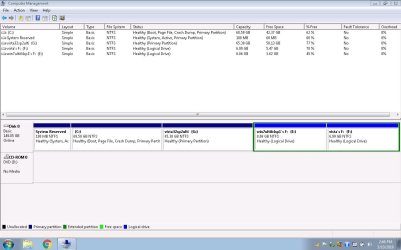
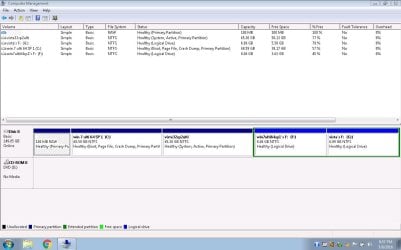
i tried with both YUMI and ZOTAC , made seperate partition and also deleted the partition from within win 7, deleted the partition in vista installation process but no change. then i went into the vista installation process and deleted the System reserved partition 100 mb (with 30 mb occupied) (of course the active partition of windows 7 64 ulti installation !) and it installs instantly and runing very well. BUT... with this disk status
CAPTURE 2.JPG

now, vista is running very well (sp2 also made) but with no option of choosing windows 7 64 ulti sp1 @ Boot. it is now there with me on my external hdd in the form of a complete system image and its major portition still as remnant on its original installation partition.( as we can see in the image) i have also got the system repair disc for the restore of the system image of windows 7 64 ulti. but i want a dual boot ! is it possible ? and how ?
Thanks.
Vineet Garg
 
Last edited:

My Computer My Computer

At a glance

Windows 7 Ultimate x32 With Sp1 + Vista Ultim...Intel Mobile Core 2 Duo T5750 @ 2.00GHz Merom...2.00GB Dual-Channel DDR2 @ 332MHz (5-5-5-15)Mobile Intel(R) 965 Express Chipset Family
Computer type
Laptop
Computer Manufacturer/Model Number
hp compaq presario c795VU notebook pc
OS
Windows 7 Ultimate x32 With Sp1 + Vista Ultimate x32 with Sp1 & Sp2 !!
CPU
Intel Mobile Core 2 Duo T5750 @ 2.00GHz Merom 65nm Technolog
Motherboard
Hewlett-Packard 30D9 (CPU)
Memory
2.00GB Dual-Channel DDR2 @ 332MHz (5-5-5-15)
Graphics Card(s)
Mobile Intel(R) 965 Express Chipset Family
Sound Card
High Definition Audio Device
Monitor(s) Displays
LP154WX4-TLCB on Mobile Intel 965 Express Chipset Family
Screen Resolution
1280x800 @ 60Hz
Hard Drives
149GB Western Digital WDC WD1600BEVS-60VAT0 ATA Device (SATA)
Keyboard
Standard 101/102-Key or Microsoft Natural PS/2 Key + HP QLB
Mouse
ALPS pointing device
Antivirus
Kaspersky AV 2017(Win 7) & AVG AntiVirus Free 2016 (VISTA)
Browser
google chrome
Where did you get the ISO you used to create the flash drive?

Give Rufus a try, it's always worked for me.

Choose MBR partition scheme for BIOS or UEFI in the Partition scheme and target system type dropdown.
 

My Computer My Computer

At a glance

Windows 10 Pro X64Intel Quad Core i7-4770 @ 3.4Ghz16.0GB PC3-12800 DDR3 SDRAM 1600 MHzIntel Integrated HD Graphics
Computer type
PC/Desktop
Computer Manufacturer/Model Number
Lenovo IdeaCenter 450
OS
Windows 10 Pro X64
CPU
Intel Quad Core i7-4770 @ 3.4Ghz
Memory
16.0GB PC3-12800 DDR3 SDRAM 1600 MHz
Graphics Card(s)
Intel Integrated HD Graphics
Sound Card
Realtek HD Audio
Monitor(s) Displays
HP 22" LCD
Screen Resolution
1680 x 1050
Hard Drives
250GB Samsung EVO SATA-3 SSD
2TB Seagate ST2000DM001 SATA-2
1.5TB Seagate ST3150041AS SATA
Keyboard
Dell USB
Mouse
Lenovo USB
Internet Speed
Cable via Road Runner 3MB Upload, 30MB Download
Antivirus
Windows Defender, MBAM Pro, MBAE
Browser
Seamonkey
Other Info
UEFI/GPT
PLDS DVD-RW DH16AERSH

My Computer My Computer

At a glance

W7 home premium 32bit/W7HP 64bit/w10 tp insid...E5300 dual core3gbNvidia Geforce 7100 Nforce 630i
Computer type
PC/Desktop
Computer Manufacturer/Model Number
medionl/Aspire 6930G/acer x55a
OS
W7 home premium 32bit/W7HP 64bit/w10 tp insider ring
CPU
E5300 dual core
Motherboard
medion MS7366
Memory
3gb
Graphics Card(s)
Nvidia Geforce 7100 Nforce 630i
Monitor(s) Displays
avixc
Internet Speed
n (isp resticted to 72)
Antivirus
mse/pands
Browser
palemoon
Other Info
Belkin Fd7050 n USB using Railink RT2870 drivers, more upto date

My Computer My Computer

At a glance

Multi-Boot W7_Pro_x64 W8.1_Pro_x64 W10_Pro_x6...AMD Athlon II x4 6206GB GSkill DDR2 800AMD 4670 GPU + AMD 4200 IGP
Computer type
PC/Desktop
Computer Manufacturer/Model Number
home built
OS
Multi-Boot W7_Pro_x64 W8.1_Pro_x64 W10_Pro_x64 +Linux_VMs +Chromium_VM
CPU
AMD Athlon II x4 620
Motherboard
Gigabyte GA-MA785G-UD3H
Memory
6GB GSkill DDR2 800
Graphics Card(s)
AMD 4670 GPU + AMD 4200 IGP
Sound Card
on board Realtek ALC889A
Monitor(s) Displays
RCA 40" LCD TV, Insignia 32" LCD TV, HP 15" LCD monitor
Screen Resolution
1680 x 1050
Hard Drives
OCZ Vertex 3 120GB,
Samsung F3 1TB (3),
Several others - WD, Seagate, Hitachi, ...
PSU
Corsair 500 W
Case
Rosewill mid tower
Cooling
CM 90mm rifle
Keyboard
Gyration wireless, Logitech wireless, Dell USB wired
Mouse
Gyration wireless, Logitech wireless, V7 USB wired
Internet Speed
Spectrum - 100Mbps D / 10Mbps U
Antivirus
Avast, MBAM3, EMET, WinPatrol
Browser
Pale Moon, Firefox, IE
Other Info
2 multi-boot PC's
Mainly HTPC/Office/Gen purpose (no gaming).
Trendnet USB KVM.
LG DVD burner/Blue Ray Player.
Tray system for removable SATA backup drives.

Not currently OCd, under-volted.
I use Hybrid sleep, rarely re-boot or shutdown.

Hauppauge HD-PVR, Avermedia PCIe TV Tuner, Hauppauge PCI TV Tuner.
Hi everyone,
thanks for the quick responses! BUT...
1.i have attached a file to my original post.
2.. vista 32 sp2 ulti is working very well and my first query is : if i can use win 7 ulti 64 sp1 system image in a way that vista is not damaged and eventually, i have a dual-boot system ?
3. sir Ztruker,
(a) here are the link(s) for vista sp1 32 and sp2 32 downloads
How To Burn Downloaded Windows Vista to DVD or USB • Raymond.CC
(b) i downloaded sp1's three files and made an ISO with the help of ImgBurn and then i burnt it to flash drive with the help of YUMI and ZOTAK. and afterwards i made the service pack 2 update.
(C) though the problem does not seem to be related to YUMI/ZOTAK, but as i could understand, it would have been better if i had got your advice prior to all this. initially, i could not understand you but it seems you are talking of a advanced feature/option of RUFUS and it would have saved the instance.
(d) somebody had also advised me to reset bios/cmos to default settings,prior to the incident.but i didn't dare.
4. sir Torchwood (Roy),
i have already gone through the great contribution of Mr. Brink. thanks.
5. sir DavidE,
(a)i am hesitating to make a system image restore because i have deleted the System Reserved Partition 100 mb and its now a raw partition (as you can see in the attachment). so, i actually want to know what i am supposed to do with that prior to a system image restore
(b) to say again is there a system restore method for win 7 that doesn't damage vista
(C)sir, do you mean something other / advanced than a system image restore
from system recovery option screen, which can repair the damaged installation of win 7 without damaging vista
Thanks,
Vineet Garg
(to my surprise how this emotion icon added to my post ?)

[ EDIT : RUFUS is really great. and in fact i would like to say its the greatest ! 1. RUFUS saved me all this work/troublesome when the next time i made double boot. 2. though rufus can't produce multiboot , its very small and it deletes the existing data on usb flash drive, its great to work with both BIOS & UEFI with single version 3. if one still needs to make a multiboot for UEFI, SARDU is good enough. though YUMI has released a dedicated version for UEFI, it's still in Beta stage. while SARDU supports both UEFI & BIOS.]
 
Last edited:

My Computer My Computer

At a glance

Windows 7 Ultimate x32 With Sp1 + Vista Ultim...Intel Mobile Core 2 Duo T5750 @ 2.00GHz Merom...2.00GB Dual-Channel DDR2 @ 332MHz (5-5-5-15)Mobile Intel(R) 965 Express Chipset Family
Computer type
Laptop
Computer Manufacturer/Model Number
hp compaq presario c795VU notebook pc
OS
Windows 7 Ultimate x32 With Sp1 + Vista Ultimate x32 with Sp1 & Sp2 !!
CPU
Intel Mobile Core 2 Duo T5750 @ 2.00GHz Merom 65nm Technolog
Motherboard
Hewlett-Packard 30D9 (CPU)
Memory
2.00GB Dual-Channel DDR2 @ 332MHz (5-5-5-15)
Graphics Card(s)
Mobile Intel(R) 965 Express Chipset Family
Sound Card
High Definition Audio Device
Monitor(s) Displays
LP154WX4-TLCB on Mobile Intel 965 Express Chipset Family
Screen Resolution
1280x800 @ 60Hz
Hard Drives
149GB Western Digital WDC WD1600BEVS-60VAT0 ATA Device (SATA)
Keyboard
Standard 101/102-Key or Microsoft Natural PS/2 Key + HP QLB
Mouse
ALPS pointing device
Antivirus
Kaspersky AV 2017(Win 7) & AVG AntiVirus Free 2016 (VISTA)
Browser
google chrome
5. sir DavidE,
(a)i am hesitating to make a system image restore because i have deleted the System Reserved Partition 100 mb and its now a raw partition (as you can see in the attachment). so, i actually want to know what i am supposed to do with that prior to a system image restore
(b) to say again is there a system restore method for win 7 that doesn't damage vista
(C)sir, do you mean something other / advanced than a system image restore
from system recovery option screen, which can repair the damaged installation of win 7 without damaging vista

Do you get a Startup Repair option when you boot with your repair disc ?
That is the option i was suggesting you try (not a system image restore).
Look at the Startup Repair tutorial, it has screen prints showing this option:
http://www.sevenforums.com/tutorials/681-startup-repair.html

What tool did you use to create your backup image ?
With Macrium Reflect free you can choose what partition(s) to backup and restore.
If you used the Win 7 built in Imaging program i don't know if you can choose individual partitions to restore.
Macrium Reflect is much more flexible than the Win 7 built in Image utility.

Right now your bootloader is in the Vista partition, and that's ok.
You don't need a System Reserved partition for the bootloader.
The bootloader can be stored in the System Reserved partition, or a Windows (C) partition, either way is fine.

If the Startup Repair works, it will add the Win 7 bootloader info, so you will then get an OS selection window to choose Vista or Win 7 when you boot the PC.
 

My Computer My Computer

At a glance

Multi-Boot W7_Pro_x64 W8.1_Pro_x64 W10_Pro_x6...AMD Athlon II x4 6206GB GSkill DDR2 800AMD 4670 GPU + AMD 4200 IGP
Computer type
PC/Desktop
Computer Manufacturer/Model Number
home built
OS
Multi-Boot W7_Pro_x64 W8.1_Pro_x64 W10_Pro_x64 +Linux_VMs +Chromium_VM
CPU
AMD Athlon II x4 620
Motherboard
Gigabyte GA-MA785G-UD3H
Memory
6GB GSkill DDR2 800
Graphics Card(s)
AMD 4670 GPU + AMD 4200 IGP
Sound Card
on board Realtek ALC889A
Monitor(s) Displays
RCA 40" LCD TV, Insignia 32" LCD TV, HP 15" LCD monitor
Screen Resolution
1680 x 1050
Hard Drives
OCZ Vertex 3 120GB,
Samsung F3 1TB (3),
Several others - WD, Seagate, Hitachi, ...
PSU
Corsair 500 W
Case
Rosewill mid tower
Cooling
CM 90mm rifle
Keyboard
Gyration wireless, Logitech wireless, Dell USB wired
Mouse
Gyration wireless, Logitech wireless, V7 USB wired
Internet Speed
Spectrum - 100Mbps D / 10Mbps U
Antivirus
Avast, MBAM3, EMET, WinPatrol
Browser
Pale Moon, Firefox, IE
Other Info
2 multi-boot PC's
Mainly HTPC/Office/Gen purpose (no gaming).
Trendnet USB KVM.
LG DVD burner/Blue Ray Player.
Tray system for removable SATA backup drives.

Not currently OCd, under-volted.
I use Hybrid sleep, rarely re-boot or shutdown.

Hauppauge HD-PVR, Avermedia PCIe TV Tuner, Hauppauge PCI TV Tuner.
Hi sir DavidE & others,
sir,
1. once i went through the link 'Startup Repair'(above), it took hardly half an hour. thank you very much. it is difficult for me to think something easier than that. here is the log for that: OH THATS NOT THERE @ win 7 "c:\Windows\System32\Logfile\Srt\SrtTrail.txt" and neither the current boot config data win 7 "c:\Boot\BCD.Backup.0001" is it with vista C:? let me see ? no its nowhere !
2.the pick was: @ DavidE
"Right now your bootloader is in the Vista partition, and that's ok. You don't need a System Reserved partition for the bootloader. The bootloader can be stored in the System Reserved partition, or a Windows (C) partition, either way is fine.
If the Startup Repair works, it will add the Win 7 bootloader info, so you will then get an OS selection window to choose Vista or Win 7 when you boot the PC.
"
3. A small description of the whole process is here now.
View attachment startup repair on my pc.docx
4 Macrium Reflect Free is really awesome! https://www.raymond.cc/blog/how-to-create-full-windows-backup-by-imaging-without-using-norton-ghost/
5. sir(s), still i am facing some problems/ queries. that i will be putting in the next post. plz help me with them also.
Thanks & Regards,
Vineet Garg.
 
Last edited:

My Computer My Computer

At a glance

Windows 7 Ultimate x32 With Sp1 + Vista Ultim...Intel Mobile Core 2 Duo T5750 @ 2.00GHz Merom...2.00GB Dual-Channel DDR2 @ 332MHz (5-5-5-15)Mobile Intel(R) 965 Express Chipset Family
Computer type
Laptop
Computer Manufacturer/Model Number
hp compaq presario c795VU notebook pc
OS
Windows 7 Ultimate x32 With Sp1 + Vista Ultimate x32 with Sp1 & Sp2 !!
CPU
Intel Mobile Core 2 Duo T5750 @ 2.00GHz Merom 65nm Technolog
Motherboard
Hewlett-Packard 30D9 (CPU)
Memory
2.00GB Dual-Channel DDR2 @ 332MHz (5-5-5-15)
Graphics Card(s)
Mobile Intel(R) 965 Express Chipset Family
Sound Card
High Definition Audio Device
Monitor(s) Displays
LP154WX4-TLCB on Mobile Intel 965 Express Chipset Family
Screen Resolution
1280x800 @ 60Hz
Hard Drives
149GB Western Digital WDC WD1600BEVS-60VAT0 ATA Device (SATA)
Keyboard
Standard 101/102-Key or Microsoft Natural PS/2 Key + HP QLB
Mouse
ALPS pointing device
Antivirus
Kaspersky AV 2017(Win 7) & AVG AntiVirus Free 2016 (VISTA)
Browser
google chrome
You're welcome and glad to see you got it fixed :)
 

My Computer My Computer

At a glance

Multi-Boot W7_Pro_x64 W8.1_Pro_x64 W10_Pro_x6...AMD Athlon II x4 6206GB GSkill DDR2 800AMD 4670 GPU + AMD 4200 IGP
Computer type
PC/Desktop
Computer Manufacturer/Model Number
home built
OS
Multi-Boot W7_Pro_x64 W8.1_Pro_x64 W10_Pro_x64 +Linux_VMs +Chromium_VM
CPU
AMD Athlon II x4 620
Motherboard
Gigabyte GA-MA785G-UD3H
Memory
6GB GSkill DDR2 800
Graphics Card(s)
AMD 4670 GPU + AMD 4200 IGP
Sound Card
on board Realtek ALC889A
Monitor(s) Displays
RCA 40" LCD TV, Insignia 32" LCD TV, HP 15" LCD monitor
Screen Resolution
1680 x 1050
Hard Drives
OCZ Vertex 3 120GB,
Samsung F3 1TB (3),
Several others - WD, Seagate, Hitachi, ...
PSU
Corsair 500 W
Case
Rosewill mid tower
Cooling
CM 90mm rifle
Keyboard
Gyration wireless, Logitech wireless, Dell USB wired
Mouse
Gyration wireless, Logitech wireless, V7 USB wired
Internet Speed
Spectrum - 100Mbps D / 10Mbps U
Antivirus
Avast, MBAM3, EMET, WinPatrol
Browser
Pale Moon, Firefox, IE
Other Info
2 multi-boot PC's
Mainly HTPC/Office/Gen purpose (no gaming).
Trendnet USB KVM.
LG DVD burner/Blue Ray Player.
Tray system for removable SATA backup drives.

Not currently OCd, under-volted.
I use Hybrid sleep, rarely re-boot or shutdown.

Hauppauge HD-PVR, Avermedia PCIe TV Tuner, Hauppauge PCI TV Tuner.
hi All ,
sir(s), i have recovered windows 7 successfully but i am facing some challenges (due to past !) and having some queries !
1.PROBLEM: i am having a system image for win 7 created prior to the vista install and the whole incident ! i want to restore it but the problem is that it is a compact system image which includes "windows 7 C: + system reserved partition 100 mb" and it can be restored only in full ! so i fear that restoring it would endanger the vista installation, as it would ,probably, be overwriting its boot loader or perhaps the whole installation! is there a work around ? the image was working too well!

{ANALYSIS :the inbuilt imaging program is really inflexible and i seem to be falling another prey to it ! now it makes system image = "win 7 c:+vista c:". naturally it wants to include win 7 and its boot loader all together but as it is lying now with vista c:, it includes the whole vista c: also. and that is all the reason why i am fearing restoring it ! from now onwards, i would be using Macrium Relect Free which is really awesome! but what to do now ?}

2.QUERIES: the lying of the boot loader of win 7 within vista c: dims the possibility of a probable back by win 7 when the vista is not bootable . you have to get vista bootable and then only win 7 will work and that too, probably, after a 'Startup Repair' for windows 7! and as i understand a reinstall of vista will surely need a Startup Repair for win 7 to work? what type of multiboot it is ?win 7 can never back unusable vista ? are multiboots like that only? plz help me at least with the problem.
Regards and Thanks,
Vineet Garg.
 
Last edited:

My Computer My Computer

At a glance

Windows 7 Ultimate x32 With Sp1 + Vista Ultim...Intel Mobile Core 2 Duo T5750 @ 2.00GHz Merom...2.00GB Dual-Channel DDR2 @ 332MHz (5-5-5-15)Mobile Intel(R) 965 Express Chipset Family
Computer type
Laptop
Computer Manufacturer/Model Number
hp compaq presario c795VU notebook pc
OS
Windows 7 Ultimate x32 With Sp1 + Vista Ultimate x32 with Sp1 & Sp2 !!
CPU
Intel Mobile Core 2 Duo T5750 @ 2.00GHz Merom 65nm Technolog
Motherboard
Hewlett-Packard 30D9 (CPU)
Memory
2.00GB Dual-Channel DDR2 @ 332MHz (5-5-5-15)
Graphics Card(s)
Mobile Intel(R) 965 Express Chipset Family
Sound Card
High Definition Audio Device
Monitor(s) Displays
LP154WX4-TLCB on Mobile Intel 965 Express Chipset Family
Screen Resolution
1280x800 @ 60Hz
Hard Drives
149GB Western Digital WDC WD1600BEVS-60VAT0 ATA Device (SATA)
Keyboard
Standard 101/102-Key or Microsoft Natural PS/2 Key + HP QLB
Mouse
ALPS pointing device
Antivirus
Kaspersky AV 2017(Win 7) & AVG AntiVirus Free 2016 (VISTA)
Browser
google chrome
Why didn`t you put Vista on another drive ?

And I would have installed Vista with the 7 drive unplugged so they are separate, then just use the one time boot menu key to bring up the boot menu to boot into Vista when you wanted to use it.
 

My Computer My Computer

At a glance

Windows 10 Pro x64Intel Core i7 6700KGSkill TridentZ RGB 16GB 3600 16-16-16-36EVGA GTX 980 Ti SC x2
Computer type
PC/Desktop
Computer Manufacturer/Model Number
Skylake Special #666
OS
Windows 10 Pro x64
CPU
Intel Core i7 6700K
Motherboard
Asus Sabertooth Z170 Mark 1
Memory
GSkill TridentZ RGB 16GB 3600 16-16-16-36
Graphics Card(s)
EVGA GTX 980 Ti SC x2
Sound Card
Realtek High Definition
Monitor(s) Displays
AOC G2460PG
Screen Resolution
1920 x 1080 144Hz
Hard Drives
Samsung 860 Pro 256GB, Seagate Barracuda 4TB x2
PSU
EVGA 1000 P2, EVGA White Custom Braided Cables
Case
Corsair Vengeance C70 Gunmetal Black
Cooling
Corsair H100i v2, Corsair ML120 x2, Thermal Grizzly Kryonaut
Keyboard
Logitech G910 Orion Spectrum
Mouse
Logitech G700s
Internet Speed
Verizon Fios Quantum Gateway 75/75
Antivirus
Windows Defender, Malwarebytes Free 3.8.3
Browser
Chrome
Other Info
Corsair SP120 x4, LG Blu-ray Drive, Durabrand HT-395 100 Watt Dolby Digital Amp, Corsair H2100 Wireless 7.1 Headset
Post a maximized/resized screen print of Disk Management using these instructions so we can see all the info:
http://www.sevenforums.com/tutorials/274797-disk-management-post-screen-capture-image.html

Create backup image(s) using Macrium with what you have now.
I prefer 1 partition per backup image, but you can include all partitions in one backup, then later select what partition(s) to restore.

1.PROBLEM: i am having a system image for win 7 created prior to the vista install and the whole incident ! i want to restore it but the problem is that it is a compact system image which includes "windows 7 C: + system reserved partition 100 mb" and it can be restored only in full ! so i fear that restoring it would endanger the vista installation, as it would ,probably, be overwriting its boot loader or perhaps the whole installation! is there a work around ? the image was working too well!
That sounds like you want to restore a Win 7 image created with the Win 7 Imaging utility from before Vista was installed.
If that's true, a Win 7 Startup Repair would probably fix a Vista boot problem.
If not, then you could restore the current System Reserved partition that i just suggested creating using Macrium.
 

My Computer My Computer

At a glance

Multi-Boot W7_Pro_x64 W8.1_Pro_x64 W10_Pro_x6...AMD Athlon II x4 6206GB GSkill DDR2 800AMD 4670 GPU + AMD 4200 IGP
Computer type
PC/Desktop
Computer Manufacturer/Model Number
home built
OS
Multi-Boot W7_Pro_x64 W8.1_Pro_x64 W10_Pro_x64 +Linux_VMs +Chromium_VM
CPU
AMD Athlon II x4 620
Motherboard
Gigabyte GA-MA785G-UD3H
Memory
6GB GSkill DDR2 800
Graphics Card(s)
AMD 4670 GPU + AMD 4200 IGP
Sound Card
on board Realtek ALC889A
Monitor(s) Displays
RCA 40" LCD TV, Insignia 32" LCD TV, HP 15" LCD monitor
Screen Resolution
1680 x 1050
Hard Drives
OCZ Vertex 3 120GB,
Samsung F3 1TB (3),
Several others - WD, Seagate, Hitachi, ...
PSU
Corsair 500 W
Case
Rosewill mid tower
Cooling
CM 90mm rifle
Keyboard
Gyration wireless, Logitech wireless, Dell USB wired
Mouse
Gyration wireless, Logitech wireless, V7 USB wired
Internet Speed
Spectrum - 100Mbps D / 10Mbps U
Antivirus
Avast, MBAM3, EMET, WinPatrol
Browser
Pale Moon, Firefox, IE
Other Info
2 multi-boot PC's
Mainly HTPC/Office/Gen purpose (no gaming).
Trendnet USB KVM.
LG DVD burner/Blue Ray Player.
Tray system for removable SATA backup drives.

Not currently OCd, under-volted.
I use Hybrid sleep, rarely re-boot or shutdown.

Hauppauge HD-PVR, Avermedia PCIe TV Tuner, Hauppauge PCI TV Tuner.
hi All,
sir(s), it's done! sorry for the delayed response. thanks to all.
1. @ DavidE : sir, many thanks for providing the solution
(a) "Create backup image(s) using Macrium with what you have now." i forgot the power of system imaging for a moment.(b) "If that's true, a Win 7 Startup Repair would probably fix a Vista boot problem." yes sir it did and for the first time i am able to experience the power of dual boot ! (c)"If not, then you could restore the current System Reserved partition" sorry, that's not 100% . as system reserved partition is lying with vista C:, a system reserved partition restore, here, would again corrupt win 7 boot loader and would again need a system repair for win 7 as before. as a final result dual boot would be achieved and that too with desired state(s) of win 7 (& vista) but with all dual boot's concerns i expressed in the previous post. [image(s) would further clarify] (d) thanks for the all important link about posting screen shots. image(s) would follow.
2. @ AddRAM : Why didn`t you put Vista on another drive ?And I would have installed Vista with the 7 drive unplugged so they are separate,
(a) sir, good idea but, unplugging and plugging internal hard drive(s) in a laptop ? (b) handling more than one internal harddrives in a laptop ? (c) it wouldn't be eating into ventilation space/scope of the laptop ?
3. here is a brief about troubleshooting
View attachment the final outcome SUCCESS.docx
4 . image(s) are here :(a) this is the image when i started the thread i.e. vista 32 was just installed and vista 32 was a active partition ! (and system reserved 100 mb was rendered just a raw partition) At this moment win 7 64 was not working and i was advised to repair win 7. it did so but with all dual/multi boot concerns i expressed later. NOTE : even after win 7 started working, the disk management view was same.
CAPTURE 2.JPG
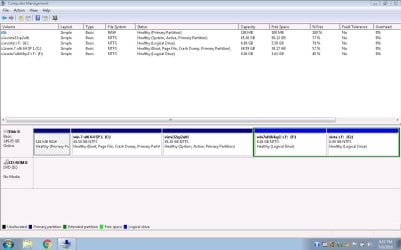
(b) and this is the image when everything has solved. boot loader partition is independent of the two partitions : vista 32 and win 7 64 and both are working. System reserved 100 mb back in action NOTE : 1. this image also represents the view before vista installation if one assumes vista partition as unallocated space or empty primary partition. 2. this image also represents the view when desired win 7 64 image was restored and vista 32 needed a repair.
CAPTURE 1.JPG


(sorry, having tough time with ISP)
Regards & Thanks,
Vineet Garg.
 
Last edited:

My Computer My Computer

At a glance

Windows 7 Ultimate x32 With Sp1 + Vista Ultim...Intel Mobile Core 2 Duo T5750 @ 2.00GHz Merom...2.00GB Dual-Channel DDR2 @ 332MHz (5-5-5-15)Mobile Intel(R) 965 Express Chipset Family
Computer type
Laptop
Computer Manufacturer/Model Number
hp compaq presario c795VU notebook pc
OS
Windows 7 Ultimate x32 With Sp1 + Vista Ultimate x32 with Sp1 & Sp2 !!
CPU
Intel Mobile Core 2 Duo T5750 @ 2.00GHz Merom 65nm Technolog
Motherboard
Hewlett-Packard 30D9 (CPU)
Memory
2.00GB Dual-Channel DDR2 @ 332MHz (5-5-5-15)
Graphics Card(s)
Mobile Intel(R) 965 Express Chipset Family
Sound Card
High Definition Audio Device
Monitor(s) Displays
LP154WX4-TLCB on Mobile Intel 965 Express Chipset Family
Screen Resolution
1280x800 @ 60Hz
Hard Drives
149GB Western Digital WDC WD1600BEVS-60VAT0 ATA Device (SATA)
Keyboard
Standard 101/102-Key or Microsoft Natural PS/2 Key + HP QLB
Mouse
ALPS pointing device
Antivirus
Kaspersky AV 2017(Win 7) & AVG AntiVirus Free 2016 (VISTA)
Browser
google chrome
Back
Top