Solved Two Active Partitions - No errors yet, but is this a problem?

Attachments

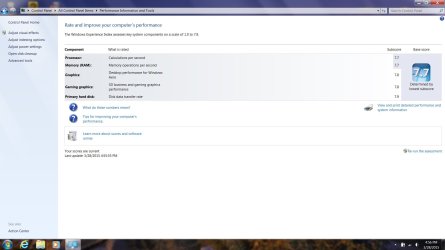
  • Perf Score.jpg
    Perf Score.jpg
    96.2 KB · Views: 5

My Computer My Computer

Computer type
Laptop
Computer Manufacturer/Model Number
ProStar Model P157SM-A
OS
Windows 7 Professional 64 bit SP 1
CPU
Intel Core i7-4710 MQ
Motherboard
No info
Memory
16 GB
Graphics Card(s)
NVIDIA GeForce GTX 870M
Hard Drives
256 GB Samsung SSD
1TB 7200 RPM Hard Drive
Antivirus
Norton Internet Security
Browser
Internet Explorer and Mozilla Firefox
Very Very Good :)
 

My Computer My Computer

Computer type
PC/Desktop
Computer Manufacturer/Model Number
Skylake Special #666
OS
Windows 10 Pro x64
CPU
Intel Core i7 6700K
Motherboard
Asus Sabertooth Z170 Mark 1
Memory
GSkill TridentZ RGB 16GB 3600 16-16-16-36
Graphics Card(s)
EVGA GTX 980 Ti SC x2
Sound Card
Realtek High Definition
Monitor(s) Displays
AOC G2460PG
Screen Resolution
1920 x 1080 144Hz
Hard Drives
Samsung 860 Pro 256GB, Seagate Barracuda 4TB x2
PSU
EVGA 1000 P2, EVGA White Custom Braided Cables
Case
Corsair Vengeance C70 Gunmetal Black
Cooling
Corsair H100i v2, Corsair ML120 x2, Thermal Grizzly Kryonaut
Keyboard
Logitech G910 Orion Spectrum
Mouse
Logitech G700s
Internet Speed
Verizon Fios Quantum Gateway 75/75
Antivirus
Windows Defender, Malwarebytes Free 3.8.3
Browser
Chrome
Other Info
Corsair SP120 x4, LG Blu-ray Drive, Durabrand HT-395 100 Watt Dolby Digital Amp, Corsair H2100 Wireless 7.1 Headset
Nice nums. A top system.
 

My Computer My Computer

Computer Manufacturer/Model Number
HP, Dell, Gateway, Toshiba - 4 laptops and 2 desktops
OS
Vista, Windows7, Mint Mate, Zorin, Windows 8
CPU
from 1.6GHz Duo to i7
Monitor(s) Displays
2x HP w2207
Hard Drives
5x HDD, 7x SSD, 12x Externals
Keyboard
with trackball - no mices
Mouse
Trackball mice
Internet Speed
DSL 6000
Very Very Good :)

Nice nums. A top system.

Yup, since I tend to keep my laptops a long time I tried to get a good one

(The one I'm migrating from is a Dell D630 that I got in 2008, and then upgraded the HDD and operating system in 2011 - can't upgrade the memory, so I figured time to get a new one - at least that's my excuse ;)


Now, if I can just keep from messing it up ...
 

My Computer My Computer

Computer type
Laptop
Computer Manufacturer/Model Number
ProStar Model P157SM-A
OS
Windows 7 Professional 64 bit SP 1
CPU
Intel Core i7-4710 MQ
Motherboard
No info
Memory
16 GB
Graphics Card(s)
NVIDIA GeForce GTX 870M
Hard Drives
256 GB Samsung SSD
1TB 7200 RPM Hard Drive
Antivirus
Norton Internet Security
Browser
Internet Explorer and Mozilla Firefox
Don`t download anything, keep all your data on the hard drive, do your windows updates, and windows should remain perfect for a long time to come.

Did you make a new image yet ?
 

My Computer My Computer

Computer type
PC/Desktop
Computer Manufacturer/Model Number
Skylake Special #666
OS
Windows 10 Pro x64
CPU
Intel Core i7 6700K
Motherboard
Asus Sabertooth Z170 Mark 1
Memory
GSkill TridentZ RGB 16GB 3600 16-16-16-36
Graphics Card(s)
EVGA GTX 980 Ti SC x2
Sound Card
Realtek High Definition
Monitor(s) Displays
AOC G2460PG
Screen Resolution
1920 x 1080 144Hz
Hard Drives
Samsung 860 Pro 256GB, Seagate Barracuda 4TB x2
PSU
EVGA 1000 P2, EVGA White Custom Braided Cables
Case
Corsair Vengeance C70 Gunmetal Black
Cooling
Corsair H100i v2, Corsair ML120 x2, Thermal Grizzly Kryonaut
Keyboard
Logitech G910 Orion Spectrum
Mouse
Logitech G700s
Internet Speed
Verizon Fios Quantum Gateway 75/75
Antivirus
Windows Defender, Malwarebytes Free 3.8.3
Browser
Chrome
Other Info
Corsair SP120 x4, LG Blu-ray Drive, Durabrand HT-395 100 Watt Dolby Digital Amp, Corsair H2100 Wireless 7.1 Headset

My Computer My Computer

Computer Manufacturer/Model Number
HP, Dell, Gateway, Toshiba - 4 laptops and 2 desktops
OS
Vista, Windows7, Mint Mate, Zorin, Windows 8
CPU
from 1.6GHz Duo to i7
Monitor(s) Displays
2x HP w2207
Hard Drives
5x HDD, 7x SSD, 12x Externals
Keyboard
with trackball - no mices
Mouse
Trackball mice
Internet Speed
DSL 6000
Don`t download anything, keep all your data on the hard drive, do your windows updates, and windows should remain perfect for a long time to come.

Did you make a new image yet ?

:cool:

Made 2 of them yesterday evening - first one on an external drive, set it aside for safekeeping, then immediately made a second one and saved it to my "Archive" partition - that way it's handy if I need it, but if the drive fails I'm protected

I'll figure out my backup strategy and schedule shortly - I got some great ideas from the tutorials and threads
 

My Computer My Computer

Computer type
Laptop
Computer Manufacturer/Model Number
ProStar Model P157SM-A
OS
Windows 7 Professional 64 bit SP 1
CPU
Intel Core i7-4710 MQ
Motherboard
No info
Memory
16 GB
Graphics Card(s)
NVIDIA GeForce GTX 870M
Hard Drives
256 GB Samsung SSD
1TB 7200 RPM Hard Drive
Antivirus
Norton Internet Security
Browser
Internet Explorer and Mozilla Firefox
Yes, image, image, image

And when you download something, save it first and check it with Virus Total
https://www.virustotal.com/

Macrium does such a nice job on images it's easy to do them frequently

I've been downloading and saving first, but I was letting Norton do the checking since I'm running Norton Internet Security in combination with periodic Malwarebytes scans - do you recommend adding VirusTotal as well?
 

My Computer My Computer

Computer type
Laptop
Computer Manufacturer/Model Number
ProStar Model P157SM-A
OS
Windows 7 Professional 64 bit SP 1
CPU
Intel Core i7-4710 MQ
Motherboard
No info
Memory
16 GB
Graphics Card(s)
NVIDIA GeForce GTX 870M
Hard Drives
256 GB Samsung SSD
1TB 7200 RPM Hard Drive
Antivirus
Norton Internet Security
Browser
Internet Explorer and Mozilla Firefox
I would not run Norton on any PC as it is overweening bloatware that causes regular issues we see here. You'll get much better performance using a free lightweight AV like MSE with on-demand scanning by Malwarebytes and SuperAntiSpyware.

If you're prone to infection, then buy the MBAM Real Time protection.

What works best for Win7 is compiled in Clean Reinstall Windows 7 which has been used by over 1.3 million consumers without a single complaint or return here with problems.
 
Get rid of Norton, all you need is MSE and MBAM.

I`m sure I gave you the links but...

Microsoft Security Essentials - Microsoft Windows

https://www.malwarebytes.org/


Also, whenever, whenever you go to install something, don`t just click next next next. Today`s downloads have so much garbage in them, you have to go slow and uncheck the free giveaway crap, they add toolbars, change your home page, search etc. and that`s how people ruin windows.

Go slow, take your time :)
 

My Computer My Computer

Computer type
PC/Desktop
Computer Manufacturer/Model Number
Skylake Special #666
OS
Windows 10 Pro x64
CPU
Intel Core i7 6700K
Motherboard
Asus Sabertooth Z170 Mark 1
Memory
GSkill TridentZ RGB 16GB 3600 16-16-16-36
Graphics Card(s)
EVGA GTX 980 Ti SC x2
Sound Card
Realtek High Definition
Monitor(s) Displays
AOC G2460PG
Screen Resolution
1920 x 1080 144Hz
Hard Drives
Samsung 860 Pro 256GB, Seagate Barracuda 4TB x2
PSU
EVGA 1000 P2, EVGA White Custom Braided Cables
Case
Corsair Vengeance C70 Gunmetal Black
Cooling
Corsair H100i v2, Corsair ML120 x2, Thermal Grizzly Kryonaut
Keyboard
Logitech G910 Orion Spectrum
Mouse
Logitech G700s
Internet Speed
Verizon Fios Quantum Gateway 75/75
Antivirus
Windows Defender, Malwarebytes Free 3.8.3
Browser
Chrome
Other Info
Corsair SP120 x4, LG Blu-ray Drive, Durabrand HT-395 100 Watt Dolby Digital Amp, Corsair H2100 Wireless 7.1 Headset
Don`t download anything, keep all your data on the hard drive, do your windows updates, and windows should remain perfect for a long time to come.


Regarding Windows Updates, I'm absolutely current except for the optional Skype update released on the 24th.

I am so grateful to the tech at ProStar - after he reimaged my C Drive, he applied 194 Windows Updates for me before sending my machine back to me, and they all installed successfully the first time (I checked the Install history just to be sure)

I've done all the rest plus all the MS Office updates and so forth - a little over 100 of them so far :p
 

My Computer My Computer

Computer type
Laptop
Computer Manufacturer/Model Number
ProStar Model P157SM-A
OS
Windows 7 Professional 64 bit SP 1
CPU
Intel Core i7-4710 MQ
Motherboard
No info
Memory
16 GB
Graphics Card(s)
NVIDIA GeForce GTX 870M
Hard Drives
256 GB Samsung SSD
1TB 7200 RPM Hard Drive
Antivirus
Norton Internet Security
Browser
Internet Explorer and Mozilla Firefox
Watch those MS office updates, alot are unnecessary.
 

My Computer My Computer

Computer type
PC/Desktop
Computer Manufacturer/Model Number
Skylake Special #666
OS
Windows 10 Pro x64
CPU
Intel Core i7 6700K
Motherboard
Asus Sabertooth Z170 Mark 1
Memory
GSkill TridentZ RGB 16GB 3600 16-16-16-36
Graphics Card(s)
EVGA GTX 980 Ti SC x2
Sound Card
Realtek High Definition
Monitor(s) Displays
AOC G2460PG
Screen Resolution
1920 x 1080 144Hz
Hard Drives
Samsung 860 Pro 256GB, Seagate Barracuda 4TB x2
PSU
EVGA 1000 P2, EVGA White Custom Braided Cables
Case
Corsair Vengeance C70 Gunmetal Black
Cooling
Corsair H100i v2, Corsair ML120 x2, Thermal Grizzly Kryonaut
Keyboard
Logitech G910 Orion Spectrum
Mouse
Logitech G700s
Internet Speed
Verizon Fios Quantum Gateway 75/75
Antivirus
Windows Defender, Malwarebytes Free 3.8.3
Browser
Chrome
Other Info
Corsair SP120 x4, LG Blu-ray Drive, Durabrand HT-395 100 Watt Dolby Digital Amp, Corsair H2100 Wireless 7.1 Headset
I would not run Norton on any PC as it is overweening bloatware that causes regular issues we see here. You'll get much better performance using a free lightweight AV like MSE with on-demand scanning by Malwarebytes and SuperAntiSpyware.

If you're prone to infection, then buy the MBAM Real Time protection.

What works best for Win7 is compiled in Clean Reinstall Windows 7 which has been used by over 1.3 million consumers without a single complaint or return here with problems.

Thanks, Greg! I'll go check that thread out ASAP

At different times and in different environments, I've used machines that ran MSE, AVG, ZoneAlarm, McAfee, Trend Pcillin , or who knows what else - sheesh! Better to keep it simple ...

About all my machines typically seem to pick up are tracking cookies - I almost never get viruses - although I get a fair amount of spam that would probably cause infection if I opened or clicked on it :eek:
 

My Computer My Computer

Computer type
Laptop
Computer Manufacturer/Model Number
ProStar Model P157SM-A
OS
Windows 7 Professional 64 bit SP 1
CPU
Intel Core i7-4710 MQ
Motherboard
No info
Memory
16 GB
Graphics Card(s)
NVIDIA GeForce GTX 870M
Hard Drives
256 GB Samsung SSD
1TB 7200 RPM Hard Drive
Antivirus
Norton Internet Security
Browser
Internet Explorer and Mozilla Firefox
Watch those MS office updates, alot are unnecessary.

How do you tell which ones are truly unnecessary - are they covered in Windows Secrets Patch Watch perhaps, or somewhere else?

I always take time to review them, especially the Optional ones, but it's sometimes hard to tell from the descriptions


Since I'm still running Office 2007, there were a few updates to get it current once I installed it :rolleyes:
 

My Computer My Computer

Computer type
Laptop
Computer Manufacturer/Model Number
ProStar Model P157SM-A
OS
Windows 7 Professional 64 bit SP 1
CPU
Intel Core i7-4710 MQ
Motherboard
No info
Memory
16 GB
Graphics Card(s)
NVIDIA GeForce GTX 870M
Hard Drives
256 GB Samsung SSD
1TB 7200 RPM Hard Drive
Antivirus
Norton Internet Security
Browser
Internet Explorer and Mozilla Firefox
No, when you run windows update, look at the list of updates for office, you`ll get all these security updates for things you don`t even have installed, you`ll get help updates you`ll never use.

I was getting security updates for access, info path, one note, outlook. Things I didn`t even have installed. I have no use for Office anymore.

Install Office Word and you get 50 updates about it :shock:

And I NEVER use an email program, I use verizon.net and I have my garbage yahoo account :)

I view my email on any PC anywhere in the world :D
 

My Computer My Computer

Computer type
PC/Desktop
Computer Manufacturer/Model Number
Skylake Special #666
OS
Windows 10 Pro x64
CPU
Intel Core i7 6700K
Motherboard
Asus Sabertooth Z170 Mark 1
Memory
GSkill TridentZ RGB 16GB 3600 16-16-16-36
Graphics Card(s)
EVGA GTX 980 Ti SC x2
Sound Card
Realtek High Definition
Monitor(s) Displays
AOC G2460PG
Screen Resolution
1920 x 1080 144Hz
Hard Drives
Samsung 860 Pro 256GB, Seagate Barracuda 4TB x2
PSU
EVGA 1000 P2, EVGA White Custom Braided Cables
Case
Corsair Vengeance C70 Gunmetal Black
Cooling
Corsair H100i v2, Corsair ML120 x2, Thermal Grizzly Kryonaut
Keyboard
Logitech G910 Orion Spectrum
Mouse
Logitech G700s
Internet Speed
Verizon Fios Quantum Gateway 75/75
Antivirus
Windows Defender, Malwarebytes Free 3.8.3
Browser
Chrome
Other Info
Corsair SP120 x4, LG Blu-ray Drive, Durabrand HT-395 100 Watt Dolby Digital Amp, Corsair H2100 Wireless 7.1 Headset
Get rid of Norton, all you need is MSE and MBAM.

I`m sure I gave you the links but...

Microsoft Security Essentials - Microsoft Windows

https://www.malwarebytes.org/


Also, whenever, whenever you go to install something, don`t just click next next next. Today`s downloads have so much garbage in them, you have to go slow and uncheck the free giveaway crap, they add toolbars, change your home page, search etc. and that`s how people ruin windows.

Go slow, take your time :)

I've already got MBAM installed and running - I added it first - and I'll look at MSE next as well as reading the thread Greg provided

And, yes, I've noticed all the offers for add-ons and tool bars and whatevers - I usually spot them and avoid them nowadays, although I've been caught by surprise once or twice in the past
 

My Computer My Computer

Computer type
Laptop
Computer Manufacturer/Model Number
ProStar Model P157SM-A
OS
Windows 7 Professional 64 bit SP 1
CPU
Intel Core i7-4710 MQ
Motherboard
No info
Memory
16 GB
Graphics Card(s)
NVIDIA GeForce GTX 870M
Hard Drives
256 GB Samsung SSD
1TB 7200 RPM Hard Drive
Antivirus
Norton Internet Security
Browser
Internet Explorer and Mozilla Firefox
No, when you run windows update, look at the list of updates for office, you`ll get all these security updates for things you don`t even have installed, you`ll get help updates you`ll never use.

I was getting security updates for access, info path, one note, outlook. Things I didn`t even have installed. I have no use for Office anymore.

And I NEVER use an email program, I use verizon.net and I have my garbage yahoo account :)

I view my email on any PC anywhere in the world :D


So can I - except I'm such an old fogey I still use my old AOL email accounts:roflmao:
I only use Outlook for work
 

My Computer My Computer

Computer type
Laptop
Computer Manufacturer/Model Number
ProStar Model P157SM-A
OS
Windows 7 Professional 64 bit SP 1
CPU
Intel Core i7-4710 MQ
Motherboard
No info
Memory
16 GB
Graphics Card(s)
NVIDIA GeForce GTX 870M
Hard Drives
256 GB Samsung SSD
1TB 7200 RPM Hard Drive
Antivirus
Norton Internet Security
Browser
Internet Explorer and Mozilla Firefox
Yes, image, image, image

And when you download something, save it first and check it with Virus Total
https://www.virustotal.com/

Macrium does such a nice job on images it's easy to do them frequently

I've been downloading and saving first, but I was letting Norton do the checking since I'm running Norton Internet Security in combination with periodic Malwarebytes scans - do you recommend adding VirusTotal as well?

Checking with Norton is OK but Virus Total checks with about 50 of the best known AV programs and your chances for an extensive check are a lot better.

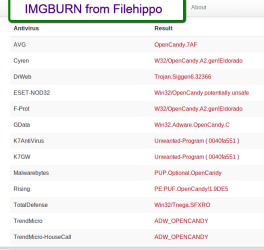
Sorry, but on Norton the guys are wrong. I run Norton NIS on some systems and MSE on other systems. Norton has a much smaller footprint than MSE and is a lot less bothersome because it does the scans automatically during idle time. Norton is also the only one that finds things at times. MSE never finds anything.

I scanned one download from FileHippo first with MSE and then with Virus Total. See the results below. MSE found zippo. If MSE ignores the PUPs, which it apparenly does, it should have at least found the trojan.
 

Attachments

  • 2015-03-24_1939.png
    2015-03-24_1939.png
    27.3 KB · Views: 10
  • 2015-03-23_2212.png
    2015-03-23_2212.png
    24.3 KB · Views: 0

My Computer My Computer

Computer Manufacturer/Model Number
HP, Dell, Gateway, Toshiba - 4 laptops and 2 desktops
OS
Vista, Windows7, Mint Mate, Zorin, Windows 8
CPU
from 1.6GHz Duo to i7
Monitor(s) Displays
2x HP w2207
Hard Drives
5x HDD, 7x SSD, 12x Externals
Keyboard
with trackball - no mices
Mouse
Trackball mice
Internet Speed
DSL 6000
I went to the VirusTotal web site and scanned the executables I had downloaded, so I can see how it works and why one would use it. I'll add it to my security strategy/tactics.

As far as MSE versus other tools, I'll just say I have a lot of food for thought, and I will evaluate the various tools on an ongoing basis while I do my best to keep my machine protected. :rolleyes:
 

My Computer My Computer

Computer type
Laptop
Computer Manufacturer/Model Number
ProStar Model P157SM-A
OS
Windows 7 Professional 64 bit SP 1
CPU
Intel Core i7-4710 MQ
Motherboard
No info
Memory
16 GB
Graphics Card(s)
NVIDIA GeForce GTX 870M
Hard Drives
256 GB Samsung SSD
1TB 7200 RPM Hard Drive
Antivirus
Norton Internet Security
Browser
Internet Explorer and Mozilla Firefox
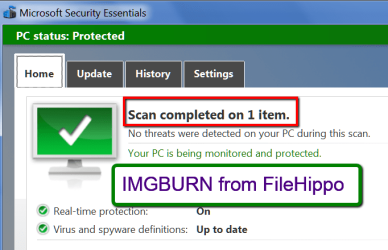
Of course IMGburn might be considered by other programs and not by MSE, every program is different.

IMGBurn is another tool with hidden surprises in it, just like every other free download on the net, pay attention to what you`re doing and you`ll never have an issue.

I want an AV, not a program that does 20 different things, like Norton or AVG does.

MSE scans during idle time too.
 
Last edited:

My Computer My Computer

Computer type
PC/Desktop
Computer Manufacturer/Model Number
Skylake Special #666
OS
Windows 10 Pro x64
CPU
Intel Core i7 6700K
Motherboard
Asus Sabertooth Z170 Mark 1
Memory
GSkill TridentZ RGB 16GB 3600 16-16-16-36
Graphics Card(s)
EVGA GTX 980 Ti SC x2
Sound Card
Realtek High Definition
Monitor(s) Displays
AOC G2460PG
Screen Resolution
1920 x 1080 144Hz
Hard Drives
Samsung 860 Pro 256GB, Seagate Barracuda 4TB x2
PSU
EVGA 1000 P2, EVGA White Custom Braided Cables
Case
Corsair Vengeance C70 Gunmetal Black
Cooling
Corsair H100i v2, Corsair ML120 x2, Thermal Grizzly Kryonaut
Keyboard
Logitech G910 Orion Spectrum
Mouse
Logitech G700s
Internet Speed
Verizon Fios Quantum Gateway 75/75
Antivirus
Windows Defender, Malwarebytes Free 3.8.3
Browser
Chrome
Other Info
Corsair SP120 x4, LG Blu-ray Drive, Durabrand HT-395 100 Watt Dolby Digital Amp, Corsair H2100 Wireless 7.1 Headset
Back
Top