Solved Add User to Same Desktop?

Each program can be different, you have to read the advanced install options.
Some have an option to "install for all users" ...
If you install a program and the icon is only on your Admin desktop, just copy that icon/shortcut to her desktop.
 

My Computer

Computer type
PC/Desktop
Computer Manufacturer/Model Number
home built
OS
Multi-Boot W7_Pro_x64 W8.1_Pro_x64 W10_Pro_x64 +Linux_VMs +Chromium_VM
CPU
AMD Athlon II x4 620
Motherboard
Gigabyte GA-MA785G-UD3H
Memory
6GB GSkill DDR2 800
Graphics Card(s)
AMD 4670 GPU + AMD 4200 IGP
Sound Card
on board Realtek ALC889A
Monitor(s) Displays
RCA 40" LCD TV, Insignia 32" LCD TV, HP 15" LCD monitor
Screen Resolution
1680 x 1050
Hard Drives
OCZ Vertex 3 120GB,
Samsung F3 1TB (3),
Several others - WD, Seagate, Hitachi, ...
PSU
Corsair 500 W
Case
Rosewill mid tower
Cooling
CM 90mm rifle
Keyboard
Gyration wireless, Logitech wireless, Dell USB wired
Mouse
Gyration wireless, Logitech wireless, V7 USB wired
Internet Speed
Spectrum - 100Mbps D / 10Mbps U
Antivirus
Avast, MBAM3, EMET, WinPatrol
Browser
Pale Moon, Firefox, IE
Other Info
2 multi-boot PC's
Mainly HTPC/Office/Gen purpose (no gaming).
Trendnet USB KVM.
LG DVD burner/Blue Ray Player.
Tray system for removable SATA backup drives.

Not currently OCd, under-volted.
I use Hybrid sleep, rarely re-boot or shutdown.

Hauppauge HD-PVR, Avermedia PCIe TV Tuner, Hauppauge PCI TV Tuner.
So if I understand correctly, as long as I am logged into Mom's account, if I install sftw for her and get prompted for my creds, the sftw WILL get installed into her desktop, not mine.

Maybe. However, applications are getting smarter at detecting who started what process. You should install for all users though. No reason to only install for one.
 

My Computer

Computer type
PC/Desktop
OS
Windows 10, Windows 8.1 Pro, Windows 7 Professional, OS X El Capitan
Thank guys, I really appreciate it... and yeah, I always install for "all users" by default. But good to know I can just copy the icon/shortcut if need be.

And thanks to Laura too as I did follow her directions to use the Public folders and that got me most of the way there. I finished the tweaking too.

So one last thing... can I have the computer auto boot into Mom's standard account (without her having to login).... or does it have to boot to the login screen with Admin/Me + Mom icons and she has to hit her icon?
 

My Computer

OS
Win 7 Ultimate 64-bit
So one last thing... can I have the computer auto boot into Mom's standard account (without her having to login).

Sure can. The tutorial below will demonstrate how. Make sure you are logged into an admin account (your account) when attempting the steps.

Log On Automatically at Startup
 

My Computer

Computer type
PC/Desktop
OS
Windows 10, Windows 8.1 Pro, Windows 7 Professional, OS X El Capitan
Many thanks... but one final glitch... I am finding I am not being prompted for creds in her desktop when I do something like try to run msconfig or install sft... [...]

EDIT LATER: Found the problem... UAC was turned off. Turned it back on to the highest setting and am now prompted. YAY! :)

Am marking this thread solved. Free libations to all.
 
Last edited:

My Computer

OS
Win 7 Ultimate 64-bit
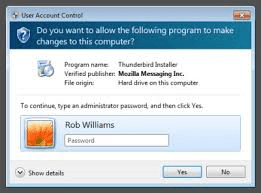
Many thanks... but one final glitch... I am finding I am not being prompted for creds in her desktop when I do something like try to run msconfig or install sft... I get an error I don't have permission ... this is what I wanted to avoid... I wanted to be promted for creds and not have to log off/on ...I must have set something up wrong... have any idea why is it not asking for creds?


I think some earlier posts said you can do most things by logging in as Mom and then entering your Admin credentials when the pop up asks for them - maybe you've tried to do something that doesn't fit those criteria.

Like DavidE, I often operate from my Standard account and only switch to Admin when I want to do certain things. However, I have not tested to see which actions require that I be logged in as Admin rather than just able to supply the credential.

Screen shot is just to be sure we're talking apples and apples - found it on Google
 

Attachments

  • Admin Perm Pop Up.png
    Admin Perm Pop Up.png
    54.8 KB · Views: 9

My Computer

Computer type
Laptop
Computer Manufacturer/Model Number
ProStar Model P157SM-A
OS
Windows 7 Professional 64 bit SP 1
CPU
Intel Core i7-4710 MQ
Motherboard
No info
Memory
16 GB
Graphics Card(s)
NVIDIA GeForce GTX 870M
Hard Drives
256 GB Samsung SSD
1TB 7200 RPM Hard Drive
Antivirus
Norton Internet Security
Browser
Internet Explorer and Mozilla Firefox

Attachments

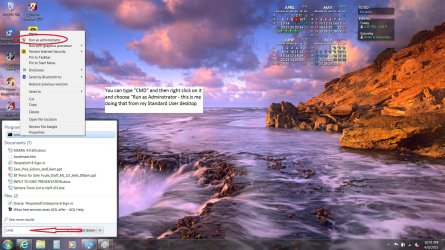
  • Run as Admin.jpg
    Run as Admin.jpg
    740.3 KB · Views: 2

My Computer

Computer type
Laptop
Computer Manufacturer/Model Number
ProStar Model P157SM-A
OS
Windows 7 Professional 64 bit SP 1
CPU
Intel Core i7-4710 MQ
Motherboard
No info
Memory
16 GB
Graphics Card(s)
NVIDIA GeForce GTX 870M
Hard Drives
256 GB Samsung SSD
1TB 7200 RPM Hard Drive
Antivirus
Norton Internet Security
Browser
Internet Explorer and Mozilla Firefox
Back
Top