
Solved Can I safely change NtfsDisable8dot3NameCreation in registry

bawldiggle

GrayGhost2 ret.
Pro User
VIP
Local time
11:28 PM
Messages
895
Location
Australia
Some of my file "full-path-names" are getting rather long (230 characters)
- a bit too close for comfort to the absolute 260 (including drive, folders, separators, file-type, null char, 8.3 file name.

I have always assumed there was no limit to (character-length) of nested folder etc ... but I have discovered I am wrong.

Windows File Name Restrictions – Why a File Name Can be too Long
Limits on the Length of File Names and Paths -- Table

Microsoft Technet Registry value "NtfsDisable8dot3NameCreation"

Can I safely disable creating 8.3 truncated file-names (stored along with the "normal" full-name) ?
- from my reading, 8.3 is a hangover from 16bit programs

In HKLM\SYSTEM\CurrentControlSet\Control\FileSystem (key)
Value Name:- NtfsDisable8dot3NameCreation
- what would be the safest "data" value without sabotaging my file system
- the table of parameters in the Microsoft Technet "Descriptions" table is not as clear as I would like.
- I am aware the 8.3 name is only 12-characters) ... but every "inch" counts.

In the meantime I am trying to workout how to restructure our filing "system"
- we use long integers as part of folders + file names to indicate series/changes to AutoCad files
- long term I am considering creating an Excel file to open files using VBA (we still use Excel 2003)

Would appreciate any advice :)

-----------
SPECS
Win7 Home Premium 32 bit
AutoCad 2006 32 bit
Office 2003 (32 bit)
 
Last edited:

My Computer My Computer

At a glance

XP Pro (x86) | 7 HP (x86) & (x64) | 7 Pro (x64)
Computer type
PC/Desktop
Computer Manufacturer/Model Number
Toshiba, Lenovo (laptops) + 4 rigs
OS
XP Pro (x86) | 7 HP (x86) & (x64) | 7 Pro (x64)
By default that option is set for only creating 8.3 file names for system files on the system drive (C: )

As for why you want to disable...turn it off. I have no idea why. It is not going to do anything for you.

Anyways a better solution to your current file system, should probably look into version control that way you don't need to put version information in the file name itself.
 

My Computer My Computer

At a glance

Windows 10 Pro (x64)Intel Core i7-3930K (3.2GHz - 4.5GHz)4x Samsung 4GB PC3-12800 DDR3 (16GB 1600MHz)Nvidia Geforce GTX 690
Computer type
PC/Desktop
Computer Manufacturer/Model Number
Alienware Aurora ALX R4
OS
Windows 10 Pro (x64)
CPU
Intel Core i7-3930K (3.2GHz - 4.5GHz)
Motherboard
Alienware Aurora-R4 x79
Memory
4x Samsung 4GB PC3-12800 DDR3 (16GB 1600MHz)
Graphics Card(s)
Nvidia Geforce GTX 690
Sound Card
SteelSeries Siberia Elite
Monitor(s) Displays
Dell UltraSharp U3011
Screen Resolution
2560x1600
Hard Drives
Samsung 850 Pro 256 GB, Seagate 1TB Desktop Hybrid HDD, 2x Western Digital 4TB Green HDD
PSU
875W Some Dell PSU <.<
Case
Alienware Aurora ALX
Cooling
Custom Liquid Cooling (EK CPU & GPU blocks) dual EK 480RAD
Keyboard
Logitech G710+ Mechanical
Mouse
Logitech G700s
Internet Speed
Verizon Fios (50 mbps average)
Other Info
Server: Intel NUC D54250WYK: i5-4250U, 16GB, 256 GB mSATA, Windows Server 2012 R2
Version information is how we locate files in WinExp
- trawling through WinExp opening properties does not resolve my problem (as I see it)
- we keep every drawing file based on a client-number + project-ID + versions integers
- so if we need to back-track to a previous version we have the "older" files available

Dropping 8.3 will release 12 characters for "full-names" until I can get our team together to discuss our filing protocols.
- in the mean time by releasing 12 characters our filing system will not collapse, (I hope)

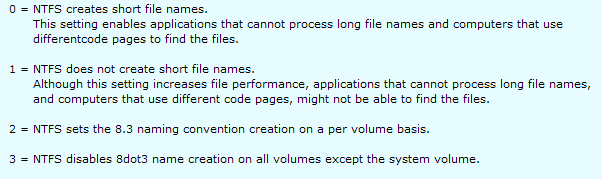
The factory default setting is "2"
- which is described as ...
NTFS sets the 8.3 naming convention creation on a per volume basis.
... according to Microsoft Technet Registry value "NtfsDisable8dot3NameCreation"

parameters.PNG

I assume "per volume" means the drive to which it is applied (a cmd to set it)
- as per "Sample Commands" (section) on NtfsDisable8dot3NameCreation"

I am inclined to use "1" but am concerned about the affects on system files in "C:\"
- my laptop has only one drive, two rigs have dual spinners and two other rigs are single spinners.

All arrived at by my ignorance over the years.
- and my trust in paid gurus who were fudging their "knowledge"

If I use "3" on single drive machines I assume "3" will not apply because "C:\" is the system drive ...
NTFS disables 8dot3 name creation on all volumes except the system volume.

... or am I chasing rainbows ? :)
 

My Computer My Computer

At a glance

XP Pro (x86) | 7 HP (x86) & (x64) | 7 Pro (x64)
Computer type
PC/Desktop
Computer Manufacturer/Model Number
Toshiba, Lenovo (laptops) + 4 rigs
OS
XP Pro (x86) | 7 HP (x86) & (x64) | 7 Pro (x64)
Dropping 8.3 will release 12 characters for "full-names" until I can get our team together to discuss our filing protocols.
- in the mean time by releasing 12 characters our filing system will not collapse, (I hope)
No. It won't. You have the wrong idea. The 8.3 name that the system generates is just an Alias in the MFT it does not count toward the path length limitation.

And that is why I recommend a version control system. The version control system like subversion handles the file history, allowing one to go back in time of the file without using different file names to tell them apart.
 

My Computer My Computer

At a glance

Windows 10 Pro (x64)Intel Core i7-3930K (3.2GHz - 4.5GHz)4x Samsung 4GB PC3-12800 DDR3 (16GB 1600MHz)Nvidia Geforce GTX 690
Computer type
PC/Desktop
Computer Manufacturer/Model Number
Alienware Aurora ALX R4
OS
Windows 10 Pro (x64)
CPU
Intel Core i7-3930K (3.2GHz - 4.5GHz)
Motherboard
Alienware Aurora-R4 x79
Memory
4x Samsung 4GB PC3-12800 DDR3 (16GB 1600MHz)
Graphics Card(s)
Nvidia Geforce GTX 690
Sound Card
SteelSeries Siberia Elite
Monitor(s) Displays
Dell UltraSharp U3011
Screen Resolution
2560x1600
Hard Drives
Samsung 850 Pro 256 GB, Seagate 1TB Desktop Hybrid HDD, 2x Western Digital 4TB Green HDD
PSU
875W Some Dell PSU <.<
Case
Alienware Aurora ALX
Cooling
Custom Liquid Cooling (EK CPU & GPU blocks) dual EK 480RAD
Keyboard
Logitech G710+ Mechanical
Mouse
Logitech G700s
Internet Speed
Verizon Fios (50 mbps average)
Other Info
Server: Intel NUC D54250WYK: i5-4250U, 16GB, 256 GB mSATA, Windows Server 2012 R2
In this article the author states ...
There is still another limit on the length of a file name that is often overlooked. There is usually a default option to provide an alternate name for a file using the old 8.3 naming system. When you create a new folder, Windows will reserve 12 characters for the alternate file name, leaving 244 characters for all containing folders. The creation of 8.3 names can be disabled but this can cause problems with very old 16-bit programs.
The Microsoft article How to Disable Automatic Short File Name Generation does not clarify the effects of 8.3 on maximum characters in a full-name string.

Maybe I am misinterpreting what I am reading.

What is a file version system ?
Does it require another program or is it just an ID/version protocol apart from the full-name-path ?

Thank you for hanging in there with me :) We have to get our filing system sorted before it becomes a catastrophic issue.
:)
 

My Computer My Computer

At a glance

XP Pro (x86) | 7 HP (x86) & (x64) | 7 Pro (x64)
Computer type
PC/Desktop
Computer Manufacturer/Model Number
Toshiba, Lenovo (laptops) + 4 rigs
OS
XP Pro (x86) | 7 HP (x86) & (x64) | 7 Pro (x64)
A DuckDuckGo search https://duckduckgo.com/?q=subversion+file+system&kaa=p has given me a lot of links to follow up.
- "Subversion" will require a lot of research on my part.

The 8.3 settings are starting to make sense (I think :shock:) Microsoft TechNet article Configuring Your File System
- a side benefit of disabling 8.3 could increase opening speed of files.
- not an issue with text files but maybe could help reducing delays while AutoCad files open. (maybe)

This article implies maybe some risks if "NtfsDisable8dot3NameCreation" is changed. But the article states the default is "0" when it is "2" on 5 of my machines.
No wonder I am confused :shock:
 

My Computer My Computer

At a glance

XP Pro (x86) | 7 HP (x86) & (x64) | 7 Pro (x64)
Computer type
PC/Desktop
Computer Manufacturer/Model Number
Toshiba, Lenovo (laptops) + 4 rigs
OS
XP Pro (x86) | 7 HP (x86) & (x64) | 7 Pro (x64)
8.3 filenames are a holdover from a bygone era but that doesn't mean they are no longer of any importance. The problem is that some relatively recent 32 bit applications (for reasons best known to the developers) still rely on these names and will fail if they are not present. If you set this option and later discover it creates a problem the situation is not so easily corrected. If you re-enable the setting new files will get 8.3 filenames, but it will not go back and create these names on files created when the setting was disabled.

The setting can improve performance on a system that creates many files and is the default on new server operating systems. File servers tend to run only a small set of applications, usually provided by the OS. But on a workstation running a variety of applications the benefits tend to be lower and the risks higher.
 

My Computer My Computer

At a glance

Windows 7 Pro 64 bitXeon W35208 GBNvidia Geforce 210
Computer type
PC/Desktop
Computer Manufacturer/Model Number
HP
OS
Windows 7 Pro 64 bit
CPU
Xeon W3520
Memory
8 GB
Graphics Card(s)
Nvidia Geforce 210
@ LMiller7 :)

Thank you for clarifying 8.3. I think it best I leave "NtfsDisable8dot3NameCreation" as is, the default.

Next step for me is to do some "homework" on "Subversion" - might be helpful with our long folder & file names
- it is not a problem yet ... !

Thanks to all for your guidance :)
 

My Computer My Computer

At a glance

XP Pro (x86) | 7 HP (x86) & (x64) | 7 Pro (x64)
Computer type
PC/Desktop
Computer Manufacturer/Model Number
Toshiba, Lenovo (laptops) + 4 rigs
OS
XP Pro (x86) | 7 HP (x86) & (x64) | 7 Pro (x64)
Back
Top