Solved My System's (Desktop) TOP burning after gaming ...

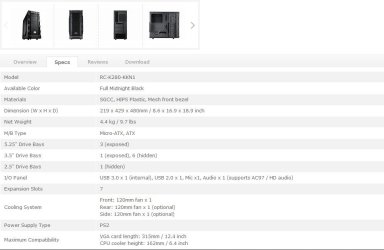
Cooler Master: K280

According to CM specs it comes supplied with one front mounted 120mm fan
 

My Computer My Computer

At a glance

Win7 Ultimate X64Intel i5 3570K8GB DDR3 1600Onboard
Computer type
PC/Desktop
Computer Manufacturer/Model Number
Pauly Special
OS
Win7 Ultimate X64
CPU
Intel i5 3570K
Motherboard
Gigabyte Z77X-DS3H
Memory
8GB DDR3 1600
Graphics Card(s)
Onboard
Sound Card
Onboard
Screen Resolution
1280x1024
Hard Drives
Samsung 840 Evo SSD (OS)
1TB Spinner (Data)
PSU
800W Arctic
Case
Cooler Master
Cooling
3x120mm Fans
Keyboard
MS Wireless
Mouse
MS Wireless
Internet Speed
20M
You don't need to spend a lot on this, a decent triple copper heatpipe CPU cooler can be bought for around £25 (that will be miles better than the stock one you have installed) and a case fan should cost you around £10.
 

My Computer My Computer

At a glance

W7 Pro x64 SP1 | W10 Pro IP x64 | W8.1 Pro x6...i7-4790k @ 4GHz (4.4GHz Boost)16GB DDR3 Kingston HyperX Fury @ 1600MHz CL 9...EVGA GTX 980 Classified
Computer type
PC/Desktop
Computer Manufacturer/Model Number
Custom Build
OS
W7 Pro x64 SP1 | W10 Pro IP x64 | W8.1 Pro x64 VM | Linux Mint VM
CPU
i7-4790k @ 4GHz (4.4GHz Boost)
Motherboard
ASUS Sabertooth Z87 (BIOS Rev 2004)
Memory
16GB DDR3 Kingston HyperX Fury @ 1600MHz CL 9-9-9-27
Graphics Card(s)
EVGA GTX 980 Classified
Sound Card
Realtek Onboard
Monitor(s) Displays
Samsung S27D390
Screen Resolution
1920 x 1080
Hard Drives
240GB Intel 520 Series SSD |
Samsung 850 EVO 120GB SSD |
2TB WD Caviar Black |
2TB WD Caviar Green
PSU
Corsair HX850-80 Gold Modular
Case
Cooler Master Silencio 650
Cooling
Corsair H80i w/2 x Corsair SP120 | 2 x 120mm Noctua NF-S12B
Keyboard
Microsoft Sidewinder X4
Mouse
Gigabyte M6900 optical
Internet Speed
152mb
Antivirus
F-Secure
Browser
Firefox 38.0
Other Info
Backup Rig: Win 7 Pro 64-bit | AMD A10-5800k | ASUS F2A85-V Pro | 8GB Samsung DDR3 @1600MHz | 120GB Toshiba SDD | 2TB Seagate HDD | Cooler Master Silencio 550
I would surly install all the quality fans the case can handle.
I would also make sure all intake fans had filters.
Then just add a quality cpu cooler and you should have that heat problem you described.

Example:
My ambient room temp is 20C and the out side of my case is 22C.
A computer case should never feel hot.

Thank you Paul for the case website.
 

My Computer My Computer

At a glance

Windows 10 Pro. 64/ version 1709 Windows 7 Pr...Intel i7-6800K @ 4.3Corsair Platinum 16 gig @2400EVGA GTX 1070 OC
Computer type
PC/Desktop
Computer Manufacturer/Model Number
Home made Desktop
OS
Windows 10 Pro. 64/ version 1709 Windows 7 Pro/64
CPU
Intel i7-6800K @ 4.3
Motherboard
ASUS X-99 Deluxe II
Memory
Corsair Platinum 16 gig @2400
Graphics Card(s)
EVGA GTX 1070 OC
Monitor(s) Displays
Asus 27" LED LCD/VE278Q
Screen Resolution
1920-1080 or 1280-720 HDMI
Hard Drives
INTEL SSD 730-240 Gb Sata 3.0/
PSU
EVGA Platium 1200W
Case
Phanteks Luxe Tempered Glass 8 fans/ one radiator
Cooling
XSPC/ Water Cooled CPU
Keyboard
Das 4 Professional
Mouse
Logitech M705/MX Anywhere 2-S
Internet Speed
100 mbits
Antivirus
Microsoft Security Essentials/ Malwarebytes Premium 3.0/ SAS
Browser
I.E. 11 default/Firefox/ ISP Time Warner Cable/Spectrum
Other Info
LG BluRay Burner/
Sound system-KLipsch-THX/
Icy Dock ssd Hot Swap bays.
Enough for two more fans.
Capture.JPG
 

My Computer My Computer

At a glance

W7 Pro x64 SP1 | W10 Pro IP x64 | W8.1 Pro x6...i7-4790k @ 4GHz (4.4GHz Boost)16GB DDR3 Kingston HyperX Fury @ 1600MHz CL 9...EVGA GTX 980 Classified
Computer type
PC/Desktop
Computer Manufacturer/Model Number
Custom Build
OS
W7 Pro x64 SP1 | W10 Pro IP x64 | W8.1 Pro x64 VM | Linux Mint VM
CPU
i7-4790k @ 4GHz (4.4GHz Boost)
Motherboard
ASUS Sabertooth Z87 (BIOS Rev 2004)
Memory
16GB DDR3 Kingston HyperX Fury @ 1600MHz CL 9-9-9-27
Graphics Card(s)
EVGA GTX 980 Classified
Sound Card
Realtek Onboard
Monitor(s) Displays
Samsung S27D390
Screen Resolution
1920 x 1080
Hard Drives
240GB Intel 520 Series SSD |
Samsung 850 EVO 120GB SSD |
2TB WD Caviar Black |
2TB WD Caviar Green
PSU
Corsair HX850-80 Gold Modular
Case
Cooler Master Silencio 650
Cooling
Corsair H80i w/2 x Corsair SP120 | 2 x 120mm Noctua NF-S12B
Keyboard
Microsoft Sidewinder X4
Mouse
Gigabyte M6900 optical
Internet Speed
152mb
Antivirus
F-Secure
Browser
Firefox 38.0
Other Info
Backup Rig: Win 7 Pro 64-bit | AMD A10-5800k | ASUS F2A85-V Pro | 8GB Samsung DDR3 @1600MHz | 120GB Toshiba SDD | 2TB Seagate HDD | Cooler Master Silencio 550
Cooler Master: K280

According to CM specs it comes supplied with one front mounted 120mm fan

Thank you for giving this link.So does that means , i am good to go ??

And may be , my previous CPU placement down under the enclosed space in table might have cause the overheat..

OR shall i install 3 fans (As this CM link suggests that , 3 fans is the limit) ???
 

My Computer My Computer

At a glance

Windows 7 Home Premium 64 biti716 GBNvidia GFORCE GTX 960 2 GB
Computer type
PC/Desktop
Computer Manufacturer/Model Number
Asus
OS
Windows 7 Home Premium 64 bit
CPU
i7
Motherboard
Gigabyte H97-D3H
Memory
16 GB
Graphics Card(s)
Nvidia GFORCE GTX 960 2 GB
Screen Resolution
1280*720
Cooling
CORSAIR Liquid Fan + One Built in FAN
Antivirus
Avast Free Anti Virus 2015
Browser
Google Chrome
It wouldn't have helped where it was but there still isn't enough cooling in there to keep an i7 cool enough under load. Replace the CPU cooler and add more fans to the case.
 

My Computer My Computer

At a glance

W7 Pro x64 SP1 | W10 Pro IP x64 | W8.1 Pro x6...i7-4790k @ 4GHz (4.4GHz Boost)16GB DDR3 Kingston HyperX Fury @ 1600MHz CL 9...EVGA GTX 980 Classified
Computer type
PC/Desktop
Computer Manufacturer/Model Number
Custom Build
OS
W7 Pro x64 SP1 | W10 Pro IP x64 | W8.1 Pro x64 VM | Linux Mint VM
CPU
i7-4790k @ 4GHz (4.4GHz Boost)
Motherboard
ASUS Sabertooth Z87 (BIOS Rev 2004)
Memory
16GB DDR3 Kingston HyperX Fury @ 1600MHz CL 9-9-9-27
Graphics Card(s)
EVGA GTX 980 Classified
Sound Card
Realtek Onboard
Monitor(s) Displays
Samsung S27D390
Screen Resolution
1920 x 1080
Hard Drives
240GB Intel 520 Series SSD |
Samsung 850 EVO 120GB SSD |
2TB WD Caviar Black |
2TB WD Caviar Green
PSU
Corsair HX850-80 Gold Modular
Case
Cooler Master Silencio 650
Cooling
Corsair H80i w/2 x Corsair SP120 | 2 x 120mm Noctua NF-S12B
Keyboard
Microsoft Sidewinder X4
Mouse
Gigabyte M6900 optical
Internet Speed
152mb
Antivirus
F-Secure
Browser
Firefox 38.0
Other Info
Backup Rig: Win 7 Pro 64-bit | AMD A10-5800k | ASUS F2A85-V Pro | 8GB Samsung DDR3 @1600MHz | 120GB Toshiba SDD | 2TB Seagate HDD | Cooler Master Silencio 550
It wouldn't have helped where it was but there still isn't enough cooling in there to keep an i7 cool enough under load. Replace the CPU cooler and add more fans to the case.
Agreed, the CPU is a small part on the motherboard with it's own cooling but the PC itself also has to dissipate heat, probably much more than minimal cooling devices can handle. Gamers and Overclockers have to deal with high heat.
 

My Computer My Computer

At a glance

Windows 7 Ultimate 64-bit, Windows 8.1 64-bit...
Computer type
PC/Desktop
Computer Manufacturer/Model Number
Customs, Dell, Gateway, HP, Toshiba, Acer, ASUS
OS
Windows 7 Ultimate 64-bit, Windows 8.1 64-bit, Mac OS X 10.10, Linux Mint 17, Windows 10 Pro TP
Keyboard
Microsoft
Mouse
Microsoft
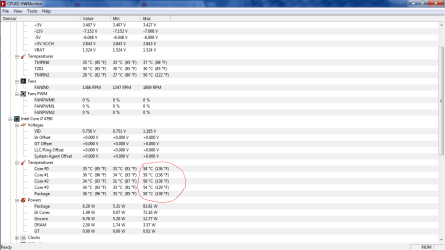
Just so you guys know , i installed this software i.e HWMoniter to have a look at my Core Temperatures & this is what it looks like (See the attached Picture # 1)


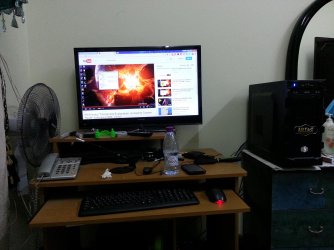
And i just installed a PORTABLE BIG FAN , which i used previously for my Gaming laptop ,it worked great and kept my laptop cooler, ( See Picture # 2 )

So, these temp's are after using this portable fan with/on my CASE ( The fan is placed a bit far i agree but the air is touching the case , i assure you ). I am not even playing any games while these Temp's are comming.It is just a live PC working Temp along with my portable fan running besides it...
 

Attachments

  • My RIP Temperature (With a portable fan ).png
    My RIP Temperature (With a portable fan ).png
    29.7 KB · Views: 6
  • Using Portable fan for cooling.jpg
    Using Portable fan for cooling.jpg
    680 KB · Views: 1

My Computer My Computer

At a glance

Windows 7 Home Premium 64 biti716 GBNvidia GFORCE GTX 960 2 GB
Computer type
PC/Desktop
Computer Manufacturer/Model Number
Asus
OS
Windows 7 Home Premium 64 bit
CPU
i7
Motherboard
Gigabyte H97-D3H
Memory
16 GB
Graphics Card(s)
Nvidia GFORCE GTX 960 2 GB
Screen Resolution
1280*720
Cooling
CORSAIR Liquid Fan + One Built in FAN
Antivirus
Avast Free Anti Virus 2015
Browser
Google Chrome
Please stop calling him RIP Gary, his name is Gav :)
 

My Computer My Computer

At a glance

Windows 10 Pro x64Intel Core i7 6700KGSkill TridentZ RGB 16GB 3600 16-16-16-36EVGA GTX 980 Ti SC x2
Computer type
PC/Desktop
Computer Manufacturer/Model Number
Skylake Special #666
OS
Windows 10 Pro x64
CPU
Intel Core i7 6700K
Motherboard
Asus Sabertooth Z170 Mark 1
Memory
GSkill TridentZ RGB 16GB 3600 16-16-16-36
Graphics Card(s)
EVGA GTX 980 Ti SC x2
Sound Card
Realtek High Definition
Monitor(s) Displays
AOC G2460PG
Screen Resolution
1920 x 1080 144Hz
Hard Drives
Samsung 860 Pro 256GB, Seagate Barracuda 4TB x2
PSU
EVGA 1000 P2, EVGA White Custom Braided Cables
Case
Corsair Vengeance C70 Gunmetal Black
Cooling
Corsair H100i v2, Corsair ML120 x2, Thermal Grizzly Kryonaut
Keyboard
Logitech G910 Orion Spectrum
Mouse
Logitech G700s
Internet Speed
Verizon Fios Quantum Gateway 75/75
Antivirus
Windows Defender, Malwarebytes Free 3.8.3
Browser
Chrome
Other Info
Corsair SP120 x4, LG Blu-ray Drive, Durabrand HT-395 100 Watt Dolby Digital Amp, Corsair H2100 Wireless 7.1 Headset
Just so you guys know , i installed this software i.e HWMoniter to have a look at my Core Temperatures & this is what it looks like (See the attached Picture # 1)


And i just installed a PORTABLE BIG FAN , which i used previously for my Gaming laptop ,it worked great and kept my laptop cooler, ( See Picture # 2 )

Those temps (mid 30s) are fine. The pic shows temps maxed in the high 50s when you apparently were using about 80 watts under a load.

You could continue to use that big table fan if you want, but one simple exhaust fan that spun at maybe 1500 rpm would be a lot quieter, cheaper, and should cool just as well.
 

My Computer My Computer

At a glance

Windows 7 Home Premium SP1, 64-bitIntel Skylake i5-6600K, not overclocked8 GB HyperX DDR4-2666 (2 x 4 GB)none; graphics are integrated on CPU
Computer type
PC/Desktop
Computer Manufacturer/Model Number
Ignatz Special; 4 speed manual gearbox; factory air conditioning; one of one
OS
Windows 7 Home Premium SP1, 64-bit
CPU
Intel Skylake i5-6600K, not overclocked
Motherboard
AsRock Z170M Extreme 4, micro ATX
Memory
8 GB HyperX DDR4-2666 (2 x 4 GB)
Graphics Card(s)
none; graphics are integrated on CPU
Sound Card
onboard: Realtek ALC1150; external: USB Behringer UF0-202
Monitor(s) Displays
Dell S2340M 23 inch IPS
Screen Resolution
1600 x 900
Hard Drives
System: Crucial MX100 series SSD, 128 GB;
Data: Samsung Spinpoint 103SJ, 1 TB;
Backup: WD Caviar Green WD30EZRX-00D8PB0, 3 TB
PSU
Rosewill SilentNight 500 watt fanless, semi-modular
Case
Antec Solo II
Cooling
Noctua NH-U12S; Noctua F12 intake, Noctua S12A exhaust
Keyboard
Microsoft 200 6JH-00001 USB
Mouse
Dell or Microsoft optical wired; USB
Antivirus
Microsoft Security Essentials and Malwarebytes Premium
Browser
Pale Moon
Other Info
All fans PWM; speeds at idle: CPU circa 500 rpm; intake circa 600 rpm; exhaust circa 600 rpm; CPU temps 27 idle and 47 C load in a warm room (27 C/81 F) when running Intel Extreme Tuning Utility stress test.
Just so you guys know , i installed this software i.e HWMoniter to have a look at my Core Temperatures & this is what it looks like (See the attached Picture # 1)


And i just installed a PORTABLE BIG FAN , which i used previously for my Gaming laptop ,it worked great and kept my laptop cooler, ( See Picture # 2 )

Those temps (mid 30s) are fine. The pic shows temps maxed in the high 50s when you apparently were using about 80 watts under a load.

You could continue to use that big table fan if you want, but one simple exhaust fan that spun at maybe 1500 rpm would be a lot quieter, cheaper, and should cool just as well.

Agreed & that's exactly what I intend to do asap I.e get an exaust fan installed.I may even install a 3rd fan (Which is the max limit these casing allows) , if I will have that much budget.
Would you recommend taking my stock cooler out and replace it with a new fan? Or should I just get 2 more ( one being the exaust fan) fans installed alongside the already installed stock fan..?
 

My Computer My Computer

At a glance

Windows 7 Home Premium 64 biti716 GBNvidia GFORCE GTX 960 2 GB
Computer type
PC/Desktop
Computer Manufacturer/Model Number
Asus
OS
Windows 7 Home Premium 64 bit
CPU
i7
Motherboard
Gigabyte H97-D3H
Memory
16 GB
Graphics Card(s)
Nvidia GFORCE GTX 960 2 GB
Screen Resolution
1280*720
Cooling
CORSAIR Liquid Fan + One Built in FAN
Antivirus
Avast Free Anti Virus 2015
Browser
Google Chrome

My Computer My Computer

At a glance

Windows 7 Home Premium 64 biti716 GBNvidia GFORCE GTX 960 2 GB
Computer type
PC/Desktop
Computer Manufacturer/Model Number
Asus
OS
Windows 7 Home Premium 64 bit
CPU
i7
Motherboard
Gigabyte H97-D3H
Memory
16 GB
Graphics Card(s)
Nvidia GFORCE GTX 960 2 GB
Screen Resolution
1280*720
Cooling
CORSAIR Liquid Fan + One Built in FAN
Antivirus
Avast Free Anti Virus 2015
Browser
Google Chrome
Would you recommend taking my stock cooler out and replace it with a new fan? Or should I just get 2 more ( one being the exaust fan) fans installed alongside the already installed stock fan..?

You can do it piece by piece if you want.

You don't have an overclocking processor.

Is your ambient (room) temperature unusually high? Say above 27 C or 80 F?

The stock Intel cooler is fine for a non-overclock situation if you don't mind the noise it makes when it spins up above 2000 rpm.

I would NOT replace the fan on the stock Intel cooler. I'd either keep the Intel cooler as is or possibly replace it entirely later.

I'd probably just get one good exhaust fan and see if that did the trick Keep an eye on the temps in HWMonitor. Scythe and Noctua are 2 good brands to look for. If one exhaust fan doesn't solve your problem, then re-evaluate and maybe consider another CPU cooler. Be sure to get the right diameter fan and be sure to mount it so that it sucks air out rather than blows air in.

The most important thing is to get some airflow going from front to back. You don't have that now because you don't have anything pulling air out the back of the case.

 

My Computer My Computer

At a glance

Windows 7 Home Premium SP1, 64-bitIntel Skylake i5-6600K, not overclocked8 GB HyperX DDR4-2666 (2 x 4 GB)none; graphics are integrated on CPU
Computer type
PC/Desktop
Computer Manufacturer/Model Number
Ignatz Special; 4 speed manual gearbox; factory air conditioning; one of one
OS
Windows 7 Home Premium SP1, 64-bit
CPU
Intel Skylake i5-6600K, not overclocked
Motherboard
AsRock Z170M Extreme 4, micro ATX
Memory
8 GB HyperX DDR4-2666 (2 x 4 GB)
Graphics Card(s)
none; graphics are integrated on CPU
Sound Card
onboard: Realtek ALC1150; external: USB Behringer UF0-202
Monitor(s) Displays
Dell S2340M 23 inch IPS
Screen Resolution
1600 x 900
Hard Drives
System: Crucial MX100 series SSD, 128 GB;
Data: Samsung Spinpoint 103SJ, 1 TB;
Backup: WD Caviar Green WD30EZRX-00D8PB0, 3 TB
PSU
Rosewill SilentNight 500 watt fanless, semi-modular
Case
Antec Solo II
Cooling
Noctua NH-U12S; Noctua F12 intake, Noctua S12A exhaust
Keyboard
Microsoft 200 6JH-00001 USB
Mouse
Dell or Microsoft optical wired; USB
Antivirus
Microsoft Security Essentials and Malwarebytes Premium
Browser
Pale Moon
Other Info
All fans PWM; speeds at idle: CPU circa 500 rpm; intake circa 600 rpm; exhaust circa 600 rpm; CPU temps 27 idle and 47 C load in a warm room (27 C/81 F) when running Intel Extreme Tuning Utility stress test.
Would you recommend taking my stock cooler out and replace it with a new fan? Or should I just get 2 more ( one being the exaust fan) fans installed alongside the already installed stock fan..?

You can do it piece by piece if you want.

You don't have an overclocking processor.

Is your ambient (room) temperature unusually high? Say above 27 C or 80 F?

The stock Intel cooler is fine for a non-overclock situation if you don't mind the noise it makes when it spins up above 2000 rpm.

I would NOT replace the fan on the stock Intel cooler. I'd either keep the Intel cooler as is or possibly replace it entirely later.

I'd probably just get one good exhaust fan and see if that did the trick Keep an eye on the temps in HWMonitor. Scythe and Noctua are 2 good brands to look for. If one exhaust fan doesn't solve your problem, then re-evaluate and maybe consider another CPU cooler. Be sure to get the right diameter fan and be sure to mount it so that it sucks air out rather than blows air in.

The most important thing is to get some airflow going from front to back. You don't have that now because you don't have anything pulling air out the back of the case.

Hmm Alrite .I will keep these two brands names ( Scythe and Noctua ) in mind before i go tomorrow to the Computer shops.I wonder if , the shops here in Doha Qatar has these brands or better , similar brands.I will just install an exaust fan , for now (as you suggested ) & see if it helps.
It seems that , the exaust fan is a MUST for me now.All of the people here at SEVEN forums have spotted my exaust fan space empty and are surprised to see that.I can't wait to go the shops.I am going their tomorrow morning and i will go to various shops (along with the shop that made my PC).Let's see how this turns out.I am going to post the CORE TEMPERATURES again FOR YOU GUYS once i install the new Exaust fann..

Thank you so much for helping me ALL OF YOU WHO helped me here.. ..I didn't knew ANYWHERE to go or who to talk to... :)
 

My Computer My Computer

At a glance

Windows 7 Home Premium 64 biti716 GBNvidia GFORCE GTX 960 2 GB
Computer type
PC/Desktop
Computer Manufacturer/Model Number
Asus
OS
Windows 7 Home Premium 64 bit
CPU
i7
Motherboard
Gigabyte H97-D3H
Memory
16 GB
Graphics Card(s)
Nvidia GFORCE GTX 960 2 GB
Screen Resolution
1280*720
Cooling
CORSAIR Liquid Fan + One Built in FAN
Antivirus
Avast Free Anti Virus 2015
Browser
Google Chrome
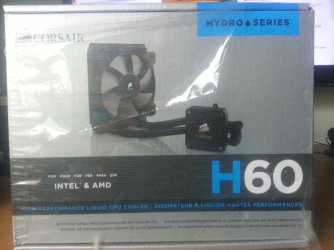
Ok guys... So,i was at the computer shops this morning and after much surfing and talking to the local shop guys ..And having a lot of suggestions ...Price Comparisons...Durability prespectives...Long run/short run analysis ... I finally have bought an Exaust fan...

I had two choices , A) Regular Adjustable Exaust fan B) A proper water cooler Exaust Fan

Thanks to a local shop guy , who made me understand how this Exaust fan thing works and what will i be getting in both cases.TBH , some shop guys were just trying to push me to buy their product , without any information or incentives.Others, were helpful and like this one shop guy , he explained me that how , the Water Cooler Exaust fan will replace the stock cooler and keep my system cool.He said after looking at my RIG's inside , that my hardware components are very LOAD INTENSIVE and that much load on a stock FAN isn't good and obviously will result in overheating.My own shop guy (the one whom from i bought my rig) said that , if you are one of those guys , who would just play a game for 2 to 3 hours.For that person,this stock cooler is enough but if you wanna play for hours and hours without worrying about the overheating,then you gotta buy a good water cooler Exaust Fan...Hence , after much thought , i have bought a Corsair Hydro Series H60 Exaust Fan (Kindly, See the attached picure)

I will take my system in the evening to the shop guy and have it installed.I only have one question that is bothering me.I have not been given any WARRANTY/GUARENTEE ..Which is odd to me.Are fans of this nature usually given without any WARRANTY/GUARENTEE ?
 

Attachments

  • 20150429_140213.jpg
    20150429_140213.jpg
    695.1 KB · Views: 0

My Computer My Computer

At a glance

Windows 7 Home Premium 64 biti716 GBNvidia GFORCE GTX 960 2 GB
Computer type
PC/Desktop
Computer Manufacturer/Model Number
Asus
OS
Windows 7 Home Premium 64 bit
CPU
i7
Motherboard
Gigabyte H97-D3H
Memory
16 GB
Graphics Card(s)
Nvidia GFORCE GTX 960 2 GB
Screen Resolution
1280*720
Cooling
CORSAIR Liquid Fan + One Built in FAN
Antivirus
Avast Free Anti Virus 2015
Browser
Google Chrome
Since the cooler is an after-market product [not part of the original build] you should have been given any document that came in the box which will include a warranty statement. The installer may not have to offer a labor warranty if a replacement becomes necessary.
 

My Computer My Computer

At a glance

Windows 7 Ultimate 64-bit, Windows 8.1 64-bit...
Computer type
PC/Desktop
Computer Manufacturer/Model Number
Customs, Dell, Gateway, HP, Toshiba, Acer, ASUS
OS
Windows 7 Ultimate 64-bit, Windows 8.1 64-bit, Mac OS X 10.10, Linux Mint 17, Windows 10 Pro TP
Keyboard
Microsoft
Mouse
Microsoft

My Computer My Computer

At a glance

Windows 10 Pro x64Intel Core i7 6700KGSkill TridentZ RGB 16GB 3600 16-16-16-36EVGA GTX 980 Ti SC x2
Computer type
PC/Desktop
Computer Manufacturer/Model Number
Skylake Special #666
OS
Windows 10 Pro x64
CPU
Intel Core i7 6700K
Motherboard
Asus Sabertooth Z170 Mark 1
Memory
GSkill TridentZ RGB 16GB 3600 16-16-16-36
Graphics Card(s)
EVGA GTX 980 Ti SC x2
Sound Card
Realtek High Definition
Monitor(s) Displays
AOC G2460PG
Screen Resolution
1920 x 1080 144Hz
Hard Drives
Samsung 860 Pro 256GB, Seagate Barracuda 4TB x2
PSU
EVGA 1000 P2, EVGA White Custom Braided Cables
Case
Corsair Vengeance C70 Gunmetal Black
Cooling
Corsair H100i v2, Corsair ML120 x2, Thermal Grizzly Kryonaut
Keyboard
Logitech G910 Orion Spectrum
Mouse
Logitech G700s
Internet Speed
Verizon Fios Quantum Gateway 75/75
Antivirus
Windows Defender, Malwarebytes Free 3.8.3
Browser
Chrome
Other Info
Corsair SP120 x4, LG Blu-ray Drive, Durabrand HT-395 100 Watt Dolby Digital Amp, Corsair H2100 Wireless 7.1 Headset
The guy who made this system for me assured me that he is installing all the essential hardware componenets to support heaviest of the heavy Games.

Until he gets caught out by a bunch 'puter geeks.

My own shop guy (the one whom from i bought my rig) said that , if you are one of those guys , who would just play a game for 2 to 3 hours.For that person,this stock cooler is enough but if you wanna play for hours and hours without worrying about the overheating,then you gotta buy a good water cooler Exaust Fan.
 

My Computer My Computer

At a glance

W7 Pro x64 SP1 | W10 Pro IP x64 | W8.1 Pro x6...i7-4790k @ 4GHz (4.4GHz Boost)16GB DDR3 Kingston HyperX Fury @ 1600MHz CL 9...EVGA GTX 980 Classified
Computer type
PC/Desktop
Computer Manufacturer/Model Number
Custom Build
OS
W7 Pro x64 SP1 | W10 Pro IP x64 | W8.1 Pro x64 VM | Linux Mint VM
CPU
i7-4790k @ 4GHz (4.4GHz Boost)
Motherboard
ASUS Sabertooth Z87 (BIOS Rev 2004)
Memory
16GB DDR3 Kingston HyperX Fury @ 1600MHz CL 9-9-9-27
Graphics Card(s)
EVGA GTX 980 Classified
Sound Card
Realtek Onboard
Monitor(s) Displays
Samsung S27D390
Screen Resolution
1920 x 1080
Hard Drives
240GB Intel 520 Series SSD |
Samsung 850 EVO 120GB SSD |
2TB WD Caviar Black |
2TB WD Caviar Green
PSU
Corsair HX850-80 Gold Modular
Case
Cooler Master Silencio 650
Cooling
Corsair H80i w/2 x Corsair SP120 | 2 x 120mm Noctua NF-S12B
Keyboard
Microsoft Sidewinder X4
Mouse
Gigabyte M6900 optical
Internet Speed
152mb
Antivirus
F-Secure
Browser
Firefox 38.0
Other Info
Backup Rig: Win 7 Pro 64-bit | AMD A10-5800k | ASUS F2A85-V Pro | 8GB Samsung DDR3 @1600MHz | 120GB Toshiba SDD | 2TB Seagate HDD | Cooler Master Silencio 550
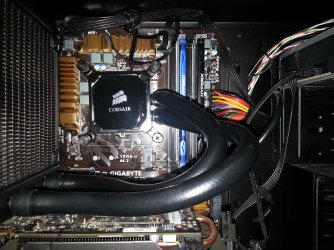
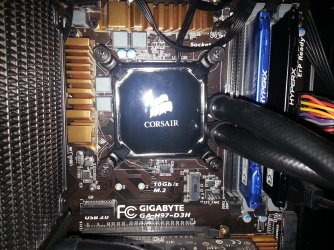
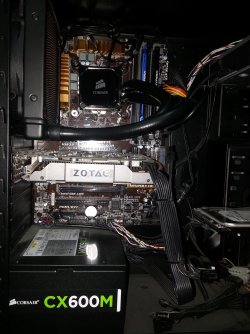
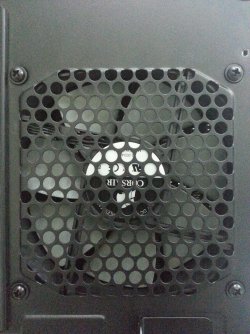
Ok guys , i just came home with my RIG . The exaust fan is installed now (Kindly see Pictures , below )

I am so glad , i finally bought this.This was the only reasonable fan avaliable in the building , which was affordable.I think , they had some more advanced fans too (May be , like that water thingi in pipes or something ) But that was too expensive (as per one shop guy) Although , i believe that this one was the only one avaliable in may be 1 or 2 shops , ..

So , anyways , comming back to my Exaust fan.The shop guy installed this in no time , like may be 30 minutes or so.So , he goes "Check it now" i.e check your system to make sure that everything is working fine.And i was like , how do i check the fan :)
I could see the FAN installed in my RIG and the system was switched ON and running , so i just said , "A OK " and now i am home now...

One last question , before i check mark this Post as SOLVED..

How do i check this exaust FAN i.e check it's performance ? Just so , i know that it is working or not as it's supposed to be....I just wanna make sure that i didn't got fooled or tricked you know ....
 

Attachments

  • a.jpg
    a.jpg
    870.5 KB · Views: 0
  • b.jpg
    b.jpg
    977.9 KB · Views: 0
  • c.jpg
    c.jpg
    725.2 KB · Views: 0
  • d.jpg
    d.jpg
    907.2 KB · Views: 0

My Computer My Computer

At a glance

Windows 7 Home Premium 64 biti716 GBNvidia GFORCE GTX 960 2 GB
Computer type
PC/Desktop
Computer Manufacturer/Model Number
Asus
OS
Windows 7 Home Premium 64 bit
CPU
i7
Motherboard
Gigabyte H97-D3H
Memory
16 GB
Graphics Card(s)
Nvidia GFORCE GTX 960 2 GB
Screen Resolution
1280*720
Cooling
CORSAIR Liquid Fan + One Built in FAN
Antivirus
Avast Free Anti Virus 2015
Browser
Google Chrome
As long as the fan is spinning it's working, just check your CPU temperature with Speccy (linked in my sig below).
Capture.JPG
 

My Computer My Computer

At a glance

W7 Pro x64 SP1 | W10 Pro IP x64 | W8.1 Pro x6...i7-4790k @ 4GHz (4.4GHz Boost)16GB DDR3 Kingston HyperX Fury @ 1600MHz CL 9...EVGA GTX 980 Classified
Computer type
PC/Desktop
Computer Manufacturer/Model Number
Custom Build
OS
W7 Pro x64 SP1 | W10 Pro IP x64 | W8.1 Pro x64 VM | Linux Mint VM
CPU
i7-4790k @ 4GHz (4.4GHz Boost)
Motherboard
ASUS Sabertooth Z87 (BIOS Rev 2004)
Memory
16GB DDR3 Kingston HyperX Fury @ 1600MHz CL 9-9-9-27
Graphics Card(s)
EVGA GTX 980 Classified
Sound Card
Realtek Onboard
Monitor(s) Displays
Samsung S27D390
Screen Resolution
1920 x 1080
Hard Drives
240GB Intel 520 Series SSD |
Samsung 850 EVO 120GB SSD |
2TB WD Caviar Black |
2TB WD Caviar Green
PSU
Corsair HX850-80 Gold Modular
Case
Cooler Master Silencio 650
Cooling
Corsair H80i w/2 x Corsair SP120 | 2 x 120mm Noctua NF-S12B
Keyboard
Microsoft Sidewinder X4
Mouse
Gigabyte M6900 optical
Internet Speed
152mb
Antivirus
F-Secure
Browser
Firefox 38.0
Other Info
Backup Rig: Win 7 Pro 64-bit | AMD A10-5800k | ASUS F2A85-V Pro | 8GB Samsung DDR3 @1600MHz | 120GB Toshiba SDD | 2TB Seagate HDD | Cooler Master Silencio 550
Back
Top