Using Windows XP "Pictures ans Fax Viewer" in windows 7

Xp4me

New member
Member
Local time
5:22 AM
Messages
65
Windows 7 Photo Viewer is useless so I searched for a way to run Windows XP Picture and Fax Viewer on Windows 7 and found this: Can I get the old Windows XP Picture Viewer on Windows 7? | The Tech Guy
I followed the instructions and when I right click on a photo I can see that I now have the option for both viewers. However, when I try to open a photo with the Windows XP Picture and Fax Viewer I get the attached error message.
Could it be that maybe I have to register the "shimgvw.dll" or maybe it needs to be placed in a different location? The site (Shimgvw.dll download - OriginalDLL.com) that I got the "shimgvw.dll" from did say it was the 64 Bit version.
Could it be that the Registry Editor is written for the 32 bit version?
Any help would be greatly appreciated.

For the people who just want to bash and make comments about why I don't just use the Windows 7 Photo Viewer: Win7 Photo Viewer can't go forward and back more than 1 photo at a time, without exiting the slideshow.
It can't resume the slideshow from the photo that you stared the slideshow with.....like in
XP. The slideshow can't even show the photos in the order that you have them in.
It's too slow, can't read all TIFF photos and I won't even get into the printing issues. I could list a half dozen other reasons also but why bother.......bottom line, it's a downgrade from the XP version
 

Attachments
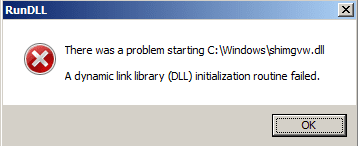
  • Error Message.png
    Error Message.png
    3.8 KB · Views: 47
Last edited:

My Computer My Computer

At a glance

XP 32 Bit & Win 7 64 BitFX 8350 AMD 8 - CoreMushkin Silverline 8GB x2 16GBMSI Twin Frozr Geforce GTX 660
Computer type
PC/Desktop
Computer Manufacturer/Model Number
Custom build
OS
XP 32 Bit & Win 7 64 Bit
CPU
FX 8350 AMD 8 - Core
Motherboard
Gigabyte 990FXA-UD5
Memory
Mushkin Silverline 8GB x2 16GB
Graphics Card(s)
MSI Twin Frozr Geforce GTX 660
Hard Drives
SSD Samsung SSD 840 EVO
HDD Seagate Barracuda ST3000DM001 3TB
Antivirus
Bitdefender Internet Security
Browser
Firefox
The method from The Tech Guy will work fine in Windows 7 x64 (64 bit) if you get a copy of shimgvw.dll from Windows XP x64 (64 bit).
It is located in C:\Windows\SysWOW64 in Windows XP x64.

I believe the version he provided a link to, is for Windows XP x86 (32 bit) and will only work with Windows 7 x86 (32 bit).
 

My Computer My Computer

At a glance

Windows 10 Pro x64, Windows 8.1 Pro x64, Wind...INTEL i9-7920X LGA 206664 GB (4 X 16 GB) G-Skill V Series DDR4 3200 ...EVGA GTX 1060 SC 3 GB
Computer type
PC/Desktop
Computer Manufacturer/Model Number
Custom Built
OS
Windows 10 Pro x64, Windows 8.1 Pro x64, Windows 7 Ultimate x64 SP1,
CPU
INTEL i9-7920X LGA 2066
Motherboard
Gigabyte X299-WU8 F3
Memory
64 GB (4 X 16 GB) G-Skill V Series DDR4 3200 Quad Channel
Graphics Card(s)
EVGA GTX 1060 SC 3 GB
Sound Card
Realtek Onboard ALC1220
Monitor(s) Displays
2 x Samsung S27E310
Screen Resolution
1920x1080
Hard Drives
Samsung 2 x 970 EVO Plus 500 GB NVMe
1 x 6TB WD 6003FZBX SATA
1 x 6TB WD 60EFRX SATA
12 x 3TB WD 30EFRX SATA
PSU
Seasonic X-1050
Case
Thermaltake Armor+
Cooling
Corsair H80i V2 Liquid AOI Cooler
Keyboard
Logitech G510s
Mouse
Logitech MX Master 2S
Internet Speed
200 Mb/s
Antivirus
ESET NOD32 13.1
Browser
EDGE (Dev, Canary, Beta), Chrome
Other Info
ASUS RT-AC68U router
Malwarebytes 4.0.4
The method from The Tech Guy will work fine in Windows 7 x64 (64 bit) if you get a copy of shimgvw.dll from Windows XP x64 (64 bit).
It is located in C:\Windows\SysWOW64 in Windows XP x64.

I believe the version he provided a link to, is for Windows XP x86 (32 bit) and will only work with Windows 7 x86 (32 bit).
I have Win7 64Bit so I got the shimgvw.dll from here: Shimgvw.dll download - OriginalDLL.com , which is suppose to be the 64 Bit version.
In the Windows Registry Editor Version 5.00 that he provided it shows "system32" so I tried changing every instance of "system32" to "syswow64". I placed the shimgvw.dll in the C:\Windows folder like he stated, but still got the same error message listed at start of thread.
I also tried adding the shimgvw.dll to the actual C:\Windows\syswow64 folder as well, but it showed as shimgvw.dll(2), and gave me the same error message. Maybe I need to delete the original first so there's not 2 of the same file, even though technically they are different files with the same name.
 

My Computer My Computer

At a glance

XP 32 Bit & Win 7 64 BitFX 8350 AMD 8 - CoreMushkin Silverline 8GB x2 16GBMSI Twin Frozr Geforce GTX 660
Computer type
PC/Desktop
Computer Manufacturer/Model Number
Custom build
OS
XP 32 Bit & Win 7 64 Bit
CPU
FX 8350 AMD 8 - Core
Motherboard
Gigabyte 990FXA-UD5
Memory
Mushkin Silverline 8GB x2 16GB
Graphics Card(s)
MSI Twin Frozr Geforce GTX 660
Hard Drives
SSD Samsung SSD 840 EVO
HDD Seagate Barracuda ST3000DM001 3TB
Antivirus
Bitdefender Internet Security
Browser
Firefox
I know what that site says, but that is not the 64 bit version of shimgvw.dll.

The 64 bit version is 477 KBs in size, dated 3/29/2006 and has a HASH of:

SHA-1 7fca6cd76d3df11f2478ed787762eeb3e923603d

Also, it is not necessary to alter the procedure given by The Tech Guy.
 

My Computer My Computer

At a glance

Windows 10 Pro x64, Windows 8.1 Pro x64, Wind...INTEL i9-7920X LGA 206664 GB (4 X 16 GB) G-Skill V Series DDR4 3200 ...EVGA GTX 1060 SC 3 GB
Computer type
PC/Desktop
Computer Manufacturer/Model Number
Custom Built
OS
Windows 10 Pro x64, Windows 8.1 Pro x64, Windows 7 Ultimate x64 SP1,
CPU
INTEL i9-7920X LGA 2066
Motherboard
Gigabyte X299-WU8 F3
Memory
64 GB (4 X 16 GB) G-Skill V Series DDR4 3200 Quad Channel
Graphics Card(s)
EVGA GTX 1060 SC 3 GB
Sound Card
Realtek Onboard ALC1220
Monitor(s) Displays
2 x Samsung S27E310
Screen Resolution
1920x1080
Hard Drives
Samsung 2 x 970 EVO Plus 500 GB NVMe
1 x 6TB WD 6003FZBX SATA
1 x 6TB WD 60EFRX SATA
12 x 3TB WD 30EFRX SATA
PSU
Seasonic X-1050
Case
Thermaltake Armor+
Cooling
Corsair H80i V2 Liquid AOI Cooler
Keyboard
Logitech G510s
Mouse
Logitech MX Master 2S
Internet Speed
200 Mb/s
Antivirus
ESET NOD32 13.1
Browser
EDGE (Dev, Canary, Beta), Chrome
Other Info
ASUS RT-AC68U router
Malwarebytes 4.0.4
If you have a Windows 64-bit version, System32 contains the 64-bit drivers, dlls and programs. 32-bit software will be in SysWOW64. You have it backward. Do a system restore to before your changes or your system will hosed.

Windows x-64 runs 32-bit software in a pseudo virtual machine called Windows On Windows (WOW) and gets the programs from SysWOW64. The 64-bit software is run from System32 to remain compatible with fixed-names that may be used in software.

Please don't modify the Registry unless you have assistance.
 

My Computer My Computer

At a glance

Windows 7 Pro-x64i7-2600 3.4GHz - 3.8GHz Turbo8Gb - 2x4GB, Muskin 991770 PC3-1333Integrated Intel HD 2000
Computer type
PC/Desktop
Computer Manufacturer/Model Number
Built 2/11/2011
OS
Windows 7 Pro-x64
CPU
i7-2600 3.4GHz - 3.8GHz Turbo
Motherboard
Intel DH67BL-B3
Memory
8Gb - 2x4GB, Muskin 991770 PC3-1333
Graphics Card(s)
Integrated Intel HD 2000
Sound Card
Integrated Intel 10.1 HD, RealTek ALC892
Monitor(s) Displays
Asus LCD VH222H, Haier HL24XSL2a
Screen Resolution
1920x1080, 1920x1080
Hard Drives
Crucial SSD C300-128Gb,
Western Digital WD5002AALX - 500Gb,
Western Digital WD7501AALS - 750Gb
PSU
Seasonic 650W 80+ Gold Modular
Case
Rosewill Defender
Cooling
Stock CPU, Four 120mm case fans, PCH fan added
Keyboard
Logitech EX100 Y-RBH94 Wireless
Mouse
Logitech EX100 M-RCE95 Wireless
Internet Speed
3.0/1.5 Mbs
Antivirus
Microsoft Security Essentials
Browser
Microsoft Internet Explorer 11
Other Info
Antec Veris Premier-Multimedia IR Station,
Cyber Accoustics-3602 Speakers,
AFT XM-5U Card Reader,
Hauppauge TV-HVR-2250,
Sony LX300 USB Turntable
WOW! It actually works now! I followed the original procedure given by The Tech Guy, but instead of using a 64 bit shimgvw.dll, I pulled the shimgvw.dll file from my 32 Bit version of XP, (I'm running a dual boot of XP 32 bit & Win7 64 Bit). Thanks so much to the both of you and thanks for not telling me to just use 3rd party software like so many people from this forum usually do.
P.S. One big problem though, it doesn't play the slideshow in the order of the photos in the folder.
In Xp, I go to view - arrange icons by - modified, and then I drag the photos around in the order that I want them to play. All my photos are on a separate storage drive and already in the order that I want them in. Somehow Win 7 is controlling part of the Windows XP Picture and Fax Viewer.
 

My Computer My Computer

At a glance

XP 32 Bit & Win 7 64 BitFX 8350 AMD 8 - CoreMushkin Silverline 8GB x2 16GBMSI Twin Frozr Geforce GTX 660
Computer type
PC/Desktop
Computer Manufacturer/Model Number
Custom build
OS
XP 32 Bit & Win 7 64 Bit
CPU
FX 8350 AMD 8 - Core
Motherboard
Gigabyte 990FXA-UD5
Memory
Mushkin Silverline 8GB x2 16GB
Graphics Card(s)
MSI Twin Frozr Geforce GTX 660
Hard Drives
SSD Samsung SSD 840 EVO
HDD Seagate Barracuda ST3000DM001 3TB
Antivirus
Bitdefender Internet Security
Browser
Firefox

My Computer My Computer

At a glance

Win-7-Pro64bit 7-H-Prem-64biti7-5930K 2nd i9-9940x both water blocked VRM'...Trident-z 3200C14 2nd Trident-z 3600C16EVGA 1080ti ftw3 2nd Titan Xp both water blocked
Computer type
PC/Desktop
Computer Manufacturer/Model Number
Custom assembled by me :}
OS
Win-7-Pro64bit 7-H-Prem-64bit
CPU
i7-5930K 2nd i9-9940x both water blocked VRM's too
Motherboard
ASUS SABERTOOTH X99 2nd ASUS x299 Apex
Memory
Trident-z 3200C14 2nd Trident-z 3600C16
Graphics Card(s)
EVGA 1080ti ftw3 2nd Titan Xp both water blocked
Sound Card
Built-in Realtek
Monitor(s) Displays
1-AOC G2460PG 24"G-Sync 144Hz/ 2nd 1-ASUS VG248QE 24" 144Hz
Screen Resolution
1920 x 1080 144Hz
Hard Drives
2-Samsung M.2 Evo & Evo Plus
2-Samsung 850 EVO 500GB SSD's/ 3-2.5 W.D. Black 1tb-&3-1tb/3-3.5 WD Black 1tb hdd's
PSU
EVGA SuperNOVA 1000-P2 2nd 1200-P2
Case
2-Corsair Obsidian Series 450D Black ATX Mid Tower
Cooling
Custom water loops
Keyboard
Logitech G710+/ 2nd Logitech G910
Mouse
2-RedDragon M901 Perdition 16400 dpi Gaming mouse = wired
Internet Speed
Comcast Ping 19ms 89.31mbps download speed 6.12mbps upload
Antivirus
Malwarebytes Pro/ Superantispyware Pro
Browser
FireFox & Pale moon
Other Info
2nd ASUS X299 Apex/Intel i9-9940x with Custom water loop/7H-Prem-x64/Corsair 450D case/Ram Trident-z 3600C16 4x8gb / Samsung970Evo plus 500gb SSD/Dual ssd EZ swap evo/PSU EVGA SuperNova 1200w-P2 80+Platinum/GPU Titan Xp /8-ML-140 on push-pull on 2-280GTX rads
Hi,
Yea 7 you can drag files around to sort them you'll need to ultimately rename them :(
You can disable auto sort but Libraries will ignore the sorting but it does make a lot easier to rename bulks of files after you drag sort them,
http://www.sevenforums.com/tutorials/92758-windows-explorer-auto-arrange-disable.html
Thanx, but there's actually an easier way for being able to drag photos where ever you want them ( Folder Options X Freeware - Trusted download and reviews from SnapFiles ) read what the second tweak does. It says (The custom sort order is applied each time you open the folder ) but hasn't been the case for me, win 7 automatically changes the arrange to sort by name, even though I don't have it selected.
 

My Computer My Computer

At a glance

XP 32 Bit & Win 7 64 BitFX 8350 AMD 8 - CoreMushkin Silverline 8GB x2 16GBMSI Twin Frozr Geforce GTX 660
Computer type
PC/Desktop
Computer Manufacturer/Model Number
Custom build
OS
XP 32 Bit & Win 7 64 Bit
CPU
FX 8350 AMD 8 - Core
Motherboard
Gigabyte 990FXA-UD5
Memory
Mushkin Silverline 8GB x2 16GB
Graphics Card(s)
MSI Twin Frozr Geforce GTX 660
Hard Drives
SSD Samsung SSD 840 EVO
HDD Seagate Barracuda ST3000DM001 3TB
Antivirus
Bitdefender Internet Security
Browser
Firefox
I don't believe it, I spent all this time searching google and bothering people here for a way to run the XP Picture and Fax Viewer on Win 7 and still can't use it........correctly. This is a prime example, just one of many reasons why any OS after XP is actually a downgrade in so many ways. How sad is it that I have to constantly search for ways to fix what microsoft broke in Win 7. People should not have to create hacks in order to get Win 7 to do what XP has always been able to do.

I'm hoping that there is some kind of hack or tweak tool out there that will simply add the (Modified) option back to the arrange by setting.....that would be the easiest solution.
 

My Computer My Computer

At a glance

XP 32 Bit & Win 7 64 BitFX 8350 AMD 8 - CoreMushkin Silverline 8GB x2 16GBMSI Twin Frozr Geforce GTX 660
Computer type
PC/Desktop
Computer Manufacturer/Model Number
Custom build
OS
XP 32 Bit & Win 7 64 Bit
CPU
FX 8350 AMD 8 - Core
Motherboard
Gigabyte 990FXA-UD5
Memory
Mushkin Silverline 8GB x2 16GB
Graphics Card(s)
MSI Twin Frozr Geforce GTX 660
Hard Drives
SSD Samsung SSD 840 EVO
HDD Seagate Barracuda ST3000DM001 3TB
Antivirus
Bitdefender Internet Security
Browser
Firefox
I would disagree that x-p was better than 7 is,
Besides the sort deal which is frustrating but easily corrected by renaming files after using the disable auto sort

Libraries themselves :/ kind of hit and miss and it where the issue is sorting by Name is fine with me I've just gotten used to renaming or naming them to be an accurate description of what they are and not going by a default created name by a camera........
Cheers.
 

My Computer My Computer

At a glance

Win-7-Pro64bit 7-H-Prem-64biti7-5930K 2nd i9-9940x both water blocked VRM'...Trident-z 3200C14 2nd Trident-z 3600C16EVGA 1080ti ftw3 2nd Titan Xp both water blocked
Computer type
PC/Desktop
Computer Manufacturer/Model Number
Custom assembled by me :}
OS
Win-7-Pro64bit 7-H-Prem-64bit
CPU
i7-5930K 2nd i9-9940x both water blocked VRM's too
Motherboard
ASUS SABERTOOTH X99 2nd ASUS x299 Apex
Memory
Trident-z 3200C14 2nd Trident-z 3600C16
Graphics Card(s)
EVGA 1080ti ftw3 2nd Titan Xp both water blocked
Sound Card
Built-in Realtek
Monitor(s) Displays
1-AOC G2460PG 24"G-Sync 144Hz/ 2nd 1-ASUS VG248QE 24" 144Hz
Screen Resolution
1920 x 1080 144Hz
Hard Drives
2-Samsung M.2 Evo & Evo Plus
2-Samsung 850 EVO 500GB SSD's/ 3-2.5 W.D. Black 1tb-&3-1tb/3-3.5 WD Black 1tb hdd's
PSU
EVGA SuperNOVA 1000-P2 2nd 1200-P2
Case
2-Corsair Obsidian Series 450D Black ATX Mid Tower
Cooling
Custom water loops
Keyboard
Logitech G710+/ 2nd Logitech G910
Mouse
2-RedDragon M901 Perdition 16400 dpi Gaming mouse = wired
Internet Speed
Comcast Ping 19ms 89.31mbps download speed 6.12mbps upload
Antivirus
Malwarebytes Pro/ Superantispyware Pro
Browser
FireFox & Pale moon
Other Info
2nd ASUS X299 Apex/Intel i9-9940x with Custom water loop/7H-Prem-x64/Corsair 450D case/Ram Trident-z 3600C16 4x8gb / Samsung970Evo plus 500gb SSD/Dual ssd EZ swap evo/PSU EVGA SuperNova 1200w-P2 80+Platinum/GPU Titan Xp /8-ML-140 on push-pull on 2-280GTX rads
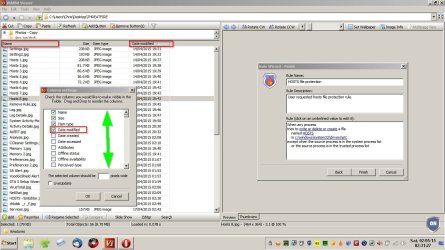
Well mostly I use Windows Photo Viewer but when I need more (and better) options I use Wildbit Image Viewer. I'd suggest trying the portable version. You can indeed arange by "modified" and a whole lot more. Just right click on "Name" and choose sorting options. As for the other options and settings there are too many to explain but I'll mention that it's possible to create your own thumbnail cache and load it for fast operation.

There are also lots of view settings to suit your needs.

Widbit.jpg

It sounds like you know what you're doing with photo viewer / editor types of software but if you have any questions on Wildbit (if you test it) - I'll try to help.

Wildbit Image Viewer

Suggest getting (Portable Zip, w/o help)
 

My Computer My Computer

At a glance

Microsoft Windows 7 Home Premium 64-bit 7601 ...AMD C-60 APU with Radeon(tm) HD Graphics4.00 GBAMD Radeon HD 6290 Graphics
Computer type
Laptop
Computer Manufacturer/Model Number
ASUS
OS
Microsoft Windows 7 Home Premium 64-bit 7601 Multiprocessor Free Service Pack 1
CPU
AMD C-60 APU with Radeon(tm) HD Graphics
Motherboard
ASUSTeK COMPUTER INC. X501U
Memory
4.00 GB
Graphics Card(s)
AMD Radeon HD 6290 Graphics
Sound Card
(1) AMD High Definition Audio Device (2) Realtek High Defi
Screen Resolution
1366 x 768 x 32 bits (4294967296 colors) @ 60 Hz
Hard Drives
Hitachi HTS545050A7E380 SATA Disk Device
Antivirus
Comodo CIS & FW, SecureAplus App Whitelisting, Threatfire
Browser
Cyberfox 64bit, Opera 64bit, Airfox
Other Info
Spy-The-Spy, HitmanPro.Alert, Norton Connect Safe, MJRegWatcher, BitDefender TrafficLight, Voodoo Shield, Zemana AntiMalware
Okaaaaaaaaay, I guess I'll have to start another thread to find out how to get the photo viewer to play the slideshow in the actual order of the photos.
 

My Computer My Computer

At a glance

XP 32 Bit & Win 7 64 BitFX 8350 AMD 8 - CoreMushkin Silverline 8GB x2 16GBMSI Twin Frozr Geforce GTX 660
Computer type
PC/Desktop
Computer Manufacturer/Model Number
Custom build
OS
XP 32 Bit & Win 7 64 Bit
CPU
FX 8350 AMD 8 - Core
Motherboard
Gigabyte 990FXA-UD5
Memory
Mushkin Silverline 8GB x2 16GB
Graphics Card(s)
MSI Twin Frozr Geforce GTX 660
Hard Drives
SSD Samsung SSD 840 EVO
HDD Seagate Barracuda ST3000DM001 3TB
Antivirus
Bitdefender Internet Security
Browser
Firefox
Re: Slide Show problems.

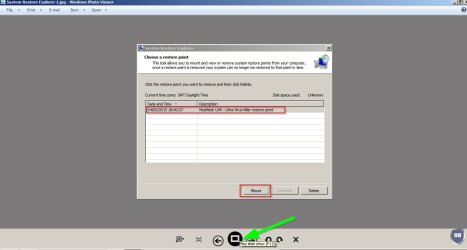
I removed the slide show option from the navigation pane but get the option to start playing a slide show in Windows Photo Viewer. Ignore the look of it on my machine as I made it Metro Style but it's still Windows Photo Viewer.

Slide Show 1.jpg

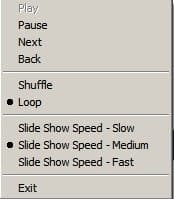
Once it starts there's a right click option to choose "shuffle" or "loop". Trythe loop option. On my machine it plays in the same order as the images are ordered in an explorer window.

Slide Show 2.jpg

The only other thing I can think of is perhaps issues with "Folder Template Discovery" or "Auto Arrange" or changing the template for the folder. On my machine all folders are set to "General Items" and "Folder Template Discovery" is switched off.

I don't experience the problem that you are having! :)
 
Last edited:

My Computer My Computer

At a glance

Microsoft Windows 7 Home Premium 64-bit 7601 ...AMD C-60 APU with Radeon(tm) HD Graphics4.00 GBAMD Radeon HD 6290 Graphics
Computer type
Laptop
Computer Manufacturer/Model Number
ASUS
OS
Microsoft Windows 7 Home Premium 64-bit 7601 Multiprocessor Free Service Pack 1
CPU
AMD C-60 APU with Radeon(tm) HD Graphics
Motherboard
ASUSTeK COMPUTER INC. X501U
Memory
4.00 GB
Graphics Card(s)
AMD Radeon HD 6290 Graphics
Sound Card
(1) AMD High Definition Audio Device (2) Realtek High Defi
Screen Resolution
1366 x 768 x 32 bits (4294967296 colors) @ 60 Hz
Hard Drives
Hitachi HTS545050A7E380 SATA Disk Device
Antivirus
Comodo CIS & FW, SecureAplus App Whitelisting, Threatfire
Browser
Cyberfox 64bit, Opera 64bit, Airfox
Other Info
Spy-The-Spy, HitmanPro.Alert, Norton Connect Safe, MJRegWatcher, BitDefender TrafficLight, Voodoo Shield, Zemana AntiMalware
Back
Top