DVD drive disappeared after Win 7 install

Barney

Sorry I was getting confused by the two problems

Ken
 

My Computer My Computer

At a glance

Win 8 Release candidate 8400[email protected]4 gigsNvidia 9600M
Computer Manufacturer/Model Number
HP Pavillion dv-7 1005 Tx
OS
Win 8 Release candidate 8400
CPU
[email protected]
Memory
4 gigs
Graphics Card(s)
Nvidia 9600M
Sound Card
HD built-in
Monitor(s) Displays
17" Wxga
Screen Resolution
1440x900
Cooling
none
Internet Speed
45Mb down 5Mb up
Question for Whest...

I am downloading the Intel Matrix Storage from HP as I type.

However, that is for Vista as HP have not released any 7 drivers.

If I do it from the Intel site I can choose it for 7....

Which one do I want?

And is it "chipset storage"?


Thanks for all the help so far guys!
 

My Computer My Computer

At a glance

Vista / Windows 7AMD Athlon 64 X2 Dual-Core2GB DDR2NVIDIA GeForce 7150M
Computer Manufacturer/Model Number
HP dv6000 / 6500
OS
Vista / Windows 7
CPU
AMD Athlon 64 X2 Dual-Core
Motherboard
Quanta 30CF
Memory
2GB DDR2
Graphics Card(s)
NVIDIA GeForce 7150M
Question for Whest...

I am downloading the Intel Matrix Storage from HP as I type.

However, that is for Vista as HP have not released any 7 drivers.

If I do it from the Intel site I can choose it for 7....

Which one do I want?

And is it "chipset storage"?


Thanks for all the help so far guys!
Barney, be careful there, you are not using an intel board.
You have an AMD processor so the board is different.
 

My Computer My Computer

At a glance

Windows 7 7600 1 X64AMD PHENOM II X 550 PROCESSOR 3.1 ghzCorsair 4 gig ddr 3ati radeon 3300
Computer Manufacturer/Model Number
Custom Build
OS
Windows 7 7600 1 X64
CPU
AMD PHENOM II X 550 PROCESSOR 3.1 ghz
Motherboard
ASUS M4A78-TE
Memory
Corsair 4 gig ddr 3
Graphics Card(s)
ati radeon 3300
Sound Card
ati hd
Monitor(s) Displays
syncmaster 2033sw
Screen Resolution
1600X900 60 hz refresh
Hard Drives
twin_seagates SATA's 1 TB & 500 Gig, hitachi_slimline 160 gig
PSU
antec_550 watt
Case
cooler master GLite
Cooling
stock_heat sink
Internet Speed
20mbs up/ 1.5mbs down
Other Info
favorite child "stewie"
favorite dog "brian"
ok, I don't know whether to install it now....:confused:
 

My Computer My Computer

At a glance

Vista / Windows 7AMD Athlon 64 X2 Dual-Core2GB DDR2NVIDIA GeForce 7150M
Computer Manufacturer/Model Number
HP dv6000 / 6500
OS
Vista / Windows 7
CPU
AMD Athlon 64 X2 Dual-Core
Motherboard
Quanta 30CF
Memory
2GB DDR2
Graphics Card(s)
NVIDIA GeForce 7150M
Question for Whest...

I am downloading the Intel Matrix Storage from HP as I type.

However, that is for Vista as HP have not released any 7 drivers.

If I do it from the Intel site I can choose it for 7....

Which one do I want?

And is it "chipset storage"?


Thanks for all the help so far guys!

Barney

Which ever driver is newer. win 7 is preferred but if you use the vista driver all you need to do is install it in compatibility mode. to do this you right click the setup or install file and go to properties>compat>set it for vista

ken
 

My Computer My Computer

At a glance

Win 8 Release candidate 8400[email protected]4 gigsNvidia 9600M
Computer Manufacturer/Model Number
HP Pavillion dv-7 1005 Tx
OS
Win 8 Release candidate 8400
CPU
[email protected]
Memory
4 gigs
Graphics Card(s)
Nvidia 9600M
Sound Card
HD built-in
Monitor(s) Displays
17" Wxga
Screen Resolution
1440x900
Cooling
none
Internet Speed
45Mb down 5Mb up
BIOS

Hey Barney, are you familiar on how to move around in your bios?
We need you to go to system config using the tab key and go to the section that shows you storage devices, after that we need ou to use the tab key to CD/DVD drive, after that we need to see how its connected.
Regards,
Adrian
 

My Computer My Computer

At a glance

Windows 7 7600 1 X64AMD PHENOM II X 550 PROCESSOR 3.1 ghzCorsair 4 gig ddr 3ati radeon 3300
Computer Manufacturer/Model Number
Custom Build
OS
Windows 7 7600 1 X64
CPU
AMD PHENOM II X 550 PROCESSOR 3.1 ghz
Motherboard
ASUS M4A78-TE
Memory
Corsair 4 gig ddr 3
Graphics Card(s)
ati radeon 3300
Sound Card
ati hd
Monitor(s) Displays
syncmaster 2033sw
Screen Resolution
1600X900 60 hz refresh
Hard Drives
twin_seagates SATA's 1 TB & 500 Gig, hitachi_slimline 160 gig
PSU
antec_550 watt
Case
cooler master GLite
Cooling
stock_heat sink
Internet Speed
20mbs up/ 1.5mbs down
Other Info
favorite child "stewie"
favorite dog "brian"
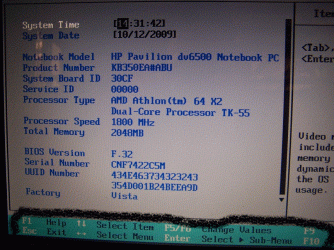
The BIOS does not give me options to show any kind of detail. I do know how to move around the BIOS, I worked in IT for years (believe it or not!!). This BIOS is very limited and this is not unusual on some laptops I believe.

The screenshots I posted were of when I had gone into the only options available. There is nothing else to show in the BIOS, honestly.
 

My Computer My Computer

At a glance

Vista / Windows 7AMD Athlon 64 X2 Dual-Core2GB DDR2NVIDIA GeForce 7150M
Computer Manufacturer/Model Number
HP dv6000 / 6500
OS
Vista / Windows 7
CPU
AMD Athlon 64 X2 Dual-Core
Motherboard
Quanta 30CF
Memory
2GB DDR2
Graphics Card(s)
NVIDIA GeForce 7150M
So you have a amd cpu so dont use the intel matrix it wouldnt install in any case - try the bios update for amd processors and see if that fixes it.
 

My Computer My Computer

At a glance

XP, Vista, W7 64bit Home PremiumIntel Core Duo 6850 3.0 ghz @ 3.7 ghz4GB Corsair DDR 2 PC-6400Ati 4870 1ghz
OS
XP, Vista, W7 64bit Home Premium
CPU
Intel Core Duo 6850 3.0 ghz @ 3.7 ghz
Motherboard
Asus P5E
Memory
4GB Corsair DDR 2 PC-6400
Graphics Card(s)
Ati 4870 1ghz
Sound Card
Supreme FX 11
Monitor(s) Displays
View Sonic VX1962wm
Screen Resolution
1680 X1050
Hard Drives
3 Seagate Sata Drives 160gb 250gb 500gb
PSU
Thermaltake 600 watt
Case
NZXT Alpha
Cooling
3X120cm Fans
Keyboard
Microsoft Digital Media Pro Keyboard
Mouse
Microsoft Wheel Mouse Optical
Internet Speed
1.5Mb to 8Mb/384k
The BIOS does not give me options to show any kind of detail. I do know how to move around the BIOS, I worked in IT for years (believe it or not!!). This BIOS is very limited and this is not unusual on some laptops I believe.

The screenshots I posted were of when I had gone into the only options available. There is nothing else to show in the BIOS, honestly.
OK barney, lets take this one step at a time.
You know how to access your bios on boot up.
basic input/output system (BIOS) is the standard used by IBM to configure IBM PC hardware.
As you can see on the bottom of your screen shot you see arrows, these arrows I hilited in your screen shot, I suggest that you access your bios move around using you up/down arrows and get familiar with it.
 

Attachments

  • bios1.gif
    bios1.gif
    229.6 KB · Views: 23

My Computer My Computer

At a glance

Windows 7 7600 1 X64AMD PHENOM II X 550 PROCESSOR 3.1 ghzCorsair 4 gig ddr 3ati radeon 3300
Computer Manufacturer/Model Number
Custom Build
OS
Windows 7 7600 1 X64
CPU
AMD PHENOM II X 550 PROCESSOR 3.1 ghz
Motherboard
ASUS M4A78-TE
Memory
Corsair 4 gig ddr 3
Graphics Card(s)
ati radeon 3300
Sound Card
ati hd
Monitor(s) Displays
syncmaster 2033sw
Screen Resolution
1600X900 60 hz refresh
Hard Drives
twin_seagates SATA's 1 TB & 500 Gig, hitachi_slimline 160 gig
PSU
antec_550 watt
Case
cooler master GLite
Cooling
stock_heat sink
Internet Speed
20mbs up/ 1.5mbs down
Other Info
favorite child "stewie"
favorite dog "brian"
ok Adrian, I'm sorry, I've said that I know how to move around my BIOS and that there are no other options in it. This is the truth and I guess we are now at the point where this is not fixable.

I know how to use arrows / tab keys but seriously, if I pressed the down arrow on that screen you posted it would skip the whole screen and go to Diagnostics which you cannot see off that shot. The other entries are static, non editable. I can't really say it any more times. This is not a good BIOS!! I've searched google and others complain about the lack of functionality in some laptops BIOS. Guess I struck out with this laptop.

If I can't edit the BIOS, which I can't, then my DVD drive is doomed?

Seriously, I was an IT Manager for 5 years, I was good at my job.

But this disappearing DVD drive has got me stuck. It seems to work (opens and spins a disc), but there's nothing I can do to make Windows recognise it in any shape or form.

Reseating it, registry hacks, BIOS upgrades and so on.

It was fine until I put Windows 7 on.

Maybe it's an excuse to get a new laptop.

Thanks for all the help anyway.
 

My Computer My Computer

At a glance

Vista / Windows 7AMD Athlon 64 X2 Dual-Core2GB DDR2NVIDIA GeForce 7150M
Computer Manufacturer/Model Number
HP dv6000 / 6500
OS
Vista / Windows 7
CPU
AMD Athlon 64 X2 Dual-Core
Motherboard
Quanta 30CF
Memory
2GB DDR2
Graphics Card(s)
NVIDIA GeForce 7150M
ok Adrian, I'm sorry, I've said that I know how to move around my BIOS and that there are no other options in it. This is the truth and I guess we are now at the point where this is not fixable.

I know how to use arrows / tab keys but seriously, if I pressed the down arrow on that screen you posted it would skip the whole screen and go to Diagnostics which you cannot see off that shot. The other entries are static, non editable. I can't really say it any more times. This is not a good BIOS!! I've searched google and others complain about the lack of functionality in some laptops BIOS. Guess I struck out with this laptop.

If I can't edit the BIOS, which I can't, then my DVD drive is doomed?

Seriously, I was an IT Manager for 5 years, I was good at my job.

But this disappearing DVD drive has got me stuck. It seems to work (opens and spins a disc), but there's nothing I can do to make Windows recognise it in any shape or form.

Reseating it, registry hacks, BIOS upgrades and so on.

It was fine until I put Windows 7 on.

Maybe it's an excuse to get a new laptop.

Thanks for all the help anyway.
I apologise Barney, I did not read thouroughly, I meant no disrespect as to your abilities. I will consult with the forum elders on this one.
Don't give up!
 

My Computer My Computer

At a glance

Windows 7 7600 1 X64AMD PHENOM II X 550 PROCESSOR 3.1 ghzCorsair 4 gig ddr 3ati radeon 3300
Computer Manufacturer/Model Number
Custom Build
OS
Windows 7 7600 1 X64
CPU
AMD PHENOM II X 550 PROCESSOR 3.1 ghz
Motherboard
ASUS M4A78-TE
Memory
Corsair 4 gig ddr 3
Graphics Card(s)
ati radeon 3300
Sound Card
ati hd
Monitor(s) Displays
syncmaster 2033sw
Screen Resolution
1600X900 60 hz refresh
Hard Drives
twin_seagates SATA's 1 TB & 500 Gig, hitachi_slimline 160 gig
PSU
antec_550 watt
Case
cooler master GLite
Cooling
stock_heat sink
Internet Speed
20mbs up/ 1.5mbs down
Other Info
favorite child "stewie"
favorite dog "brian"
No need to apologise, really. I am just very frustrated with it, it was working fine before Windows 7, and everything still points to a physically working drive (light, spinning etc).

It's annoying going round in circles and not getting anywhere. I can't think of anything else to do now, might be some in depth registry thing but who knows. I do appreciate the help.

P.S. Barney is my dog's name, I am Sarah ;)
 

My Computer My Computer

At a glance

Vista / Windows 7AMD Athlon 64 X2 Dual-Core2GB DDR2NVIDIA GeForce 7150M
Computer Manufacturer/Model Number
HP dv6000 / 6500
OS
Vista / Windows 7
CPU
AMD Athlon 64 X2 Dual-Core
Motherboard
Quanta 30CF
Memory
2GB DDR2
Graphics Card(s)
NVIDIA GeForce 7150M
No need to apologise, really. I am just very frustrated with it, it was working fine before Windows 7, and everything still points to a physically working drive (light, spinning etc).

It's annoying going round in circles and not getting anywhere. I can't think of anything else to do now, might be some in depth registry thing but who knows. I do appreciate the help.

P.S. Barney is my dog's name, I am Sarah ;)
Hello Sarah, welcome to the forum. I to am a proud care giver to a rather plump Jack Russell named Daizie dog.
 

Attachments

  • IMG_0162.JPG
    IMG_0162.JPG
    50.1 KB · Views: 6

My Computer My Computer

At a glance

Windows 7 7600 1 X64AMD PHENOM II X 550 PROCESSOR 3.1 ghzCorsair 4 gig ddr 3ati radeon 3300
Computer Manufacturer/Model Number
Custom Build
OS
Windows 7 7600 1 X64
CPU
AMD PHENOM II X 550 PROCESSOR 3.1 ghz
Motherboard
ASUS M4A78-TE
Memory
Corsair 4 gig ddr 3
Graphics Card(s)
ati radeon 3300
Sound Card
ati hd
Monitor(s) Displays
syncmaster 2033sw
Screen Resolution
1600X900 60 hz refresh
Hard Drives
twin_seagates SATA's 1 TB & 500 Gig, hitachi_slimline 160 gig
PSU
antec_550 watt
Case
cooler master GLite
Cooling
stock_heat sink
Internet Speed
20mbs up/ 1.5mbs down
Other Info
favorite child "stewie"
favorite dog "brian"
If the drive was broken or the connection to the motherboard was broken then it wouldn't light up and spin a disc right??

I think that may be too optimistic. Just because the drive's internal mechanisms pick up on the presence of a disc and spin up, doesn't necessarily mean the hardware is intact. In fact, I'm pretty sure you can completely disconnect your average IDE CDrom/DVD drive from its controller, and it'll still spin up in the presence of a disc as long as its molex (power) connector is plugged in.

My gut feeling is that the hardware is broken and the timeline link to the Win7 installation was coincidental (perhaps that bit of ex3rcise was the last straw!). If you've tried two separate drives, it's presumably the controller or related motherboard circuitry which is misbehaving, if the problem is indeed to be found at the hardware layer. I'd suggest:

1) Try booting off a bootable CD. Make absolutely sure it's bootable (on other machines). Since the current boot order places it ahead of the HDD (from your JPGs), that should in theory help to rule out any Windows/registry/software issues. If the drive fails to boot off a known-good bootable disc, it's bung.

2) Try flashing the BIOS to the latest version, if there are any later versions. I doubt it'll help, but it's just about the only other thing you can do before the soldering iron has to come out.

Sorry if any/all of these suggestions have been discussed already. My toddler is making it difficult for me to pay attention right now :)
 

My Computer My Computer

At a glance

Win7x64
Computer Manufacturer/Model Number
Multiple machines in various stages of decomposition.
OS
Win7x64
Try the latest Nforce Chipset drivers would be my only other suggestion - I know its to do with the storage manager, as it effects the dvd drive - thats with intel chipsets though, but would probably be the same or similar with nforce chipset - windows will load the driver (if AHCI is enabled in the bios prior to OS installation), but with intel it also needs the matrix driver software to function properly, and can make the dvd drive non functional or dissappear if not installed.
I hope this is the right suggestion as i saw the at the hpsite either intel or nforce chipset drivers available and assume the nforce chipset supports AMD cpu's - you could also send support at hp.com an inquiry about the drive dissappearing if nothing else works.
 
Last edited:

My Computer My Computer

At a glance

XP, Vista, W7 64bit Home PremiumIntel Core Duo 6850 3.0 ghz @ 3.7 ghz4GB Corsair DDR 2 PC-6400Ati 4870 1ghz
OS
XP, Vista, W7 64bit Home Premium
CPU
Intel Core Duo 6850 3.0 ghz @ 3.7 ghz
Motherboard
Asus P5E
Memory
4GB Corsair DDR 2 PC-6400
Graphics Card(s)
Ati 4870 1ghz
Sound Card
Supreme FX 11
Monitor(s) Displays
View Sonic VX1962wm
Screen Resolution
1680 X1050
Hard Drives
3 Seagate Sata Drives 160gb 250gb 500gb
PSU
Thermaltake 600 watt
Case
NZXT Alpha
Cooling
3X120cm Fans
Keyboard
Microsoft Digital Media Pro Keyboard
Mouse
Microsoft Wheel Mouse Optical
Internet Speed
1.5Mb to 8Mb/384k
I've found advice to disable the drivers integrity check: Run: bcdedit /set loadoptions DDISABLE_INTEGRITY_CHECKS.

this worked for me.
 

My Computer My Computer

At a glance

win 7 x64
OS
win 7 x64
I have the EXACT problem.

Same model of PC also! - I've tried swapping my optical drive with that of another dv6500. Resulted in recognition of that drive. I swapped them back and my own optical drive was newly recognized and drivers were installed with it. I was able to boot DVDs from the drive and all worked well. The following morning however it again disappeared!
 

My Computer My Computer

At a glance

Windows 7 Home Premium
OS
Windows 7 Home Premium
Same problem here...

My dvd drive was perfect before installing Win7.. I had winXP, then W7 7100 RC, then W7 7600 RTM. My dvd drive worked fine within the first installation of W7 RC and during the next 2 month... then seemed to be broken or something because it disappeared from the file manager and from the system devices list... but, of course, was phsically ok because of the light and the spinning.
The problem is that it was not a defined issue, because sometimes the computer started with the dvd drive recognized just for a couple of minutes and then disapeared. This permitted me to look for a "lucky boot-up" (where the computer recognize the dvd drive) to try and reinstall the newer version of Win7 (7600).
I did it and the new configuration worked for a couple of hours. Then the dvd drive disappeared again.

I tryed the Upper/lower filters fix: useless.
I tryed the drivers integrity control fix: useless
I tryed to flash the bios of my pc wit the newest version: still useless :mad:

I have an Acer aspire 5520g with a 2 core AMD processor.
When Sarah said " I found this info in the registry: MAT****A DVD-RAM UJ-861H ATA Device" i figured out that UJ-861H is the same name if my dvd hard drive. Could it mean something?

I'm getting crazy like Sarah with this problem, I don't really think it is only a coincidence with the broke of the drive..

Any help will be appreciated, sorry for my english misstakes, I'm doing my best.

Cheers

 

My Computer My Computer

At a glance

Windows 7
OS
Windows 7
Same problem; there is no solution currently available!

FYI, similar to the original poster, I have an HP Pavilion dv7-1129wm Entertainment Notebook PC -17" BrightView Widescreen LCD,2.1 GHz Dual-Core Processor, 4 GB Memory, 250 GB Hard Drive, SuperMulti DVD burner,DVD+/-RW, 802.11b/g wireless LAN, Webcam, and Windows Vista Home Premium 64-bit.

I have the EXACT same problem too! My HP laptop that came with Vista was PERFECT prior to installing Windows 7 Ultimate. A few days after upgrading, my optical drive downright disappears despite the eject button on the optical drive working as it should and the drive light coming on and spinning discs that I put in. After following all instructions in this thread, no change. It is GONE. My optical has DISAPPEARED as a result of installing Windows 7. This is NOT a hardware failure with coincidental timing, as there are clearly many others who have experienced the same thing.

I've also tried downloading patches/updates from Microsoft and HP, but when I run them, they tell me the patch/update doesn't apply to my system.

I am going to reset my computer back to factory settings as saved in my partitioned hard drive. Hopefully my optical drive will not still be vanished from existence after I revert... :cry:
 

My Computer My Computer

At a glance

Originally 64-bit Windows Vista - Installed W...
Computer Manufacturer/Model Number
HP Pavilion dv7-1129wm Entertainment Notebook
OS
Originally 64-bit Windows Vista - Installed Windows 7 Ultimate
Hey,

I had given this thread up for dead. I still have no joy at all and it's not until your drive is gone that you realise how much you need it.

If anyone else comes up with any solutions please post!!

I'm feeling the pain!
 

My Computer My Computer

At a glance

Vista / Windows 7AMD Athlon 64 X2 Dual-Core2GB DDR2NVIDIA GeForce 7150M
Computer Manufacturer/Model Number
HP dv6000 / 6500
OS
Vista / Windows 7
CPU
AMD Athlon 64 X2 Dual-Core
Motherboard
Quanta 30CF
Memory
2GB DDR2
Graphics Card(s)
NVIDIA GeForce 7150M
Back
Top