Solved Stuck at BIOS splash screen, suspected hard drive issue.

atr1

New member
Local time
6:07 PM
Messages
8
Today when I was trying to turn on my PC, it got stuck at the BIOS splash screen, I couldn't get into the boot menu as well. I thought about it, and felt that there could be a number of problems, RAM, HDD, etc. (some hardware issue), so I thought I would try disconnecting hardware from my mobo in a trial and error fashion to figure out which was the culprit. I managed to get past the BIOS splash screen and into the boot menu when i disconnected one of my HDDs (it’s a seagate 1TB barracuda). I'm trying to figure out what went wrong with it, but cannot run somehing like chkdsk on it as it is impossible to get past the BIOS splash screen when its SATA cable is connected to the mobo.

Can i get some advice on how i can narrow down the cause of this issue? Also coincidentally, I was defragmenting that HDD yesterday and another one of my family members turned off the PC while the process was still on-going. I'm not too sure if this has caused an issue, but it might help with the diagnosis?:confused:


Feel free to check my profile for system specs, also i don't have another desktop only laptops.
 

My Computer My Computer

At a glance

Windows 7 64-bit with SP1i5-4670Gskill 4GB 2xPalit GTX680 2GB
Computer type
PC/Desktop
Computer Manufacturer/Model Number
Custom
OS
Windows 7 64-bit with SP1
CPU
i5-4670
Motherboard
ASUS B-85 Plus
Memory
Gskill 4GB 2x
Graphics Card(s)
Palit GTX680 2GB
Monitor(s) Displays
Samsung SyncMaster 931bw
Screen Resolution
1440x900
Hard Drives
Seagate 1TB HDD
Seagate 500GB HDD
PSU
Corsair CS750
Case
Corsair carbide 200r
Cooling
Stock casing and CPU fans
Keyboard
Dell
Mouse
HP
Antivirus
Norton 360
Browser
Chrome
There are 2 cables that go to the problem hard drive, data and power. Try this test: Remove the data cable but leave the power cable connected, then try to boot.
If the problem persists with just the power connected then I'm afraid the drive has an electrical problem. Very difficult to fix without taking it apart on a workbench.

However, if the PC boots with the drive powered but the data cable not connected, then you may be able to fix it if you can get into Windows.

The B-85 has a UEFI BIOS, so I will assume that you have AHCI capability and the SATA controller is set to AHCI Mode.
This means that you have the capability to 'hot swap' drives.
You would make sure that the SATA port that you will connect the drive to is set up for hot swapping in BIOS, then boot the computer without the drive connected, get into Windows, and then connect the drive.
If that works and you don't crash then you could start testing by running CHKDSK on it.
 

My Computer My Computer

At a glance

Windows 7 64 Bit Home Premium SP1i7-3820GSkill F3-14900CL9Q - 16GBEVGA GeForce GTX660 - Driver 352.86
Computer type
PC/Desktop
Computer Manufacturer/Model Number
Home Built - Jan 2013
OS
Windows 7 64 Bit Home Premium SP1
CPU
i7-3820
Motherboard
Asus P9X79-PRO - Bios 4608
Memory
GSkill F3-14900CL9Q - 16GB
Graphics Card(s)
EVGA GeForce GTX660 - Driver 352.86
Sound Card
On board Realtek ALC898
Monitor(s) Displays
Acer S271HL
Screen Resolution
1920 x 1080
Hard Drives
#1- Samsung 840 Pro Series
#2- Western Digital WD1002FAEX Sata3 Black
#3- Western Digital WD1002FAEX Sata3 Black
PSU
Corsair CMPSU-850TX-V2 - 850 watt (by Seasonic)
Case
Corsair Obsidian 550D
Cooling
Standard 3 120mm case fans, Cooler Master Hyper 212 EVO
Keyboard
MS KC-0405
Mouse
Intellimouse 5-button
Internet Speed
56 Mbits/Sec (on a good day)
Antivirus
Avast & Malwarebytes
Browser
Firefox
Other Info
Asus DVD - DRW-24B1ST 24X
An alternate that you can try if you do not want to dirty your fingers going by the learned post of TVeblen:

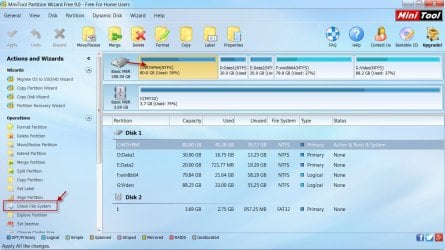
Create a bootable CD/pendrive with Partition Wizard Bootable CD Free version - 75 MB Free download Magic Partition Manager Software, partition magic alternative, free partition magic, partition magic Windows 7 and server partition software - Partition Wizard Online boot from it with your 1TB drive connected and run Check File System on it.

(Since your system is UEFI you may have to disable Secureboot and set to Legacy Mode to boot from the CD or pendrive)

Screenshot: (For illustration only. You will run the Filesystem check on your 1TB drive parttiion/volume)

5-2-2015 8-57-48 AM.jpg
 

My Computer My Computer

At a glance

Windows 7 Home Premium 32 bit
OS
Windows 7 Home Premium 32 bit
atr1, was it the hard drive which contains the Windows OS (C:\) or it's just a simple one with all your data ? I am facing the same issue as you, but mine is a little different. Yesterday I began to reinstall Windows 7 to get rid of a few dangerous viruses that infected my pc. Neither my antivirus couldn't do anything against them. The first part of the installation was done successfully, it restarted. At boot up it stuck at bios screen. And now I can't access bios setup and boot past the bios screen. I reset the jumpers, removed and put back the bios battery to clear the cmos settings - none of them worked. When I disconnected the hdd with the Windows OS, it booted past the bios screen. But now the problem remains with my hard drive. How to fix it ? It's the first time I encountered a problem like this. I hope we'll find the solution somehow. :)
 

My Computer My Computer

At a glance

Windows 7 Profesional 32-bitIntel(R) Pentium(R) 4 CPU @ 3.41 GHz3.50 GBNVIDIA GeForce 7600 GS
Computer type
PC/Desktop
Computer Manufacturer/Model Number
ASUS
OS
Windows 7 Profesional 32-bit
CPU
Intel(R) Pentium(R) 4 CPU @ 3.41 GHz
Motherboard
ASUSTeK Computer INC. P5GD2-X Rev 1.xx
Memory
3.50 GB
Graphics Card(s)
NVIDIA GeForce 7600 GS
Sound Card
C-Media High Definition Audio Device
Internet Speed
2 Mbps
Antivirus
avast! PREMIER 2015
Browser
Mozilla Firefox
There are 2 cables that go to the problem hard drive, data and power. Try this test: Remove the data cable but leave the power cable connected, then try to boot.
If the problem persists with just the power connected then I'm afraid the drive has an electrical problem. Very difficult to fix without taking it apart on a workbench.

However, if the PC boots with the drive powered but the data cable not connected, then you may be able to fix it if you can get into Windows.

The B-85 has a UEFI BIOS, so I will assume that you have AHCI capability and the SATA controller is set to AHCI Mode.
This means that you have the capability to 'hot swap' drives.
You would make sure that the SATA port that you will connect the drive to is set up for hot swapping in BIOS, then boot the computer without the drive connected, get into Windows, and then connect the drive.
If that works and you don't crash then you could start testing by running CHKDSK on it.

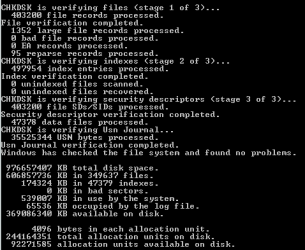
Thanks for the hot swap idea, never knew i could do such a thing, it worked wonders. Still stuck at the bios splash screen if the HDD is connected to my mobo before post. So i disconnected that HDD's SATA cable from the mobo and did a re-boot. On my spare 500GB drive, I installed windows and did chkdsk on the problem hard drive(did the hot-swap thing; connected the drive's SATA cable to my mobo once i was in the OS).

Capture cmd.PNG

Above is the result. I couldn't make sense of anything other than the obvious, the statement that says the drive is fine.

I still experience my initial problem; i have yet to run chkdsk [drive lettering]/R. I'll give you an update when i'm done.:)
 

My Computer My Computer

At a glance

Windows 7 64-bit with SP1i5-4670Gskill 4GB 2xPalit GTX680 2GB
Computer type
PC/Desktop
Computer Manufacturer/Model Number
Custom
OS
Windows 7 64-bit with SP1
CPU
i5-4670
Motherboard
ASUS B-85 Plus
Memory
Gskill 4GB 2x
Graphics Card(s)
Palit GTX680 2GB
Monitor(s) Displays
Samsung SyncMaster 931bw
Screen Resolution
1440x900
Hard Drives
Seagate 1TB HDD
Seagate 500GB HDD
PSU
Corsair CS750
Case
Corsair carbide 200r
Cooling
Stock casing and CPU fans
Keyboard
Dell
Mouse
HP
Antivirus
Norton 360
Browser
Chrome
@Jumanji Great idea could've totally avoided doing a fresh install of windows if I did that, but oh well..... needed to get some work done urgently anyways. Thanks though.

@Techster3 It contained my OS. You should try the hot swapping thing if your motherboard allows for it, the mobo in your specs seems to be rather old though. If that's the case you can try this on another computer and have the 'target HDD' rectified with the use of some maintenance tools. I can't seem to think of any other method if not for hot-swapping. Maybe someone more professional can lend you a hand. Good luck:D
 

My Computer My Computer

At a glance

Windows 7 64-bit with SP1i5-4670Gskill 4GB 2xPalit GTX680 2GB
Computer type
PC/Desktop
Computer Manufacturer/Model Number
Custom
OS
Windows 7 64-bit with SP1
CPU
i5-4670
Motherboard
ASUS B-85 Plus
Memory
Gskill 4GB 2x
Graphics Card(s)
Palit GTX680 2GB
Monitor(s) Displays
Samsung SyncMaster 931bw
Screen Resolution
1440x900
Hard Drives
Seagate 1TB HDD
Seagate 500GB HDD
PSU
Corsair CS750
Case
Corsair carbide 200r
Cooling
Stock casing and CPU fans
Keyboard
Dell
Mouse
HP
Antivirus
Norton 360
Browser
Chrome
Success, the computer can get past posting with the HDD connected to the mobo. Thanks for helping out guys, I wonder why it happened though?:huh:
 

My Computer My Computer

At a glance

Windows 7 64-bit with SP1i5-4670Gskill 4GB 2xPalit GTX680 2GB
Computer type
PC/Desktop
Computer Manufacturer/Model Number
Custom
OS
Windows 7 64-bit with SP1
CPU
i5-4670
Motherboard
ASUS B-85 Plus
Memory
Gskill 4GB 2x
Graphics Card(s)
Palit GTX680 2GB
Monitor(s) Displays
Samsung SyncMaster 931bw
Screen Resolution
1440x900
Hard Drives
Seagate 1TB HDD
Seagate 500GB HDD
PSU
Corsair CS750
Case
Corsair carbide 200r
Cooling
Stock casing and CPU fans
Keyboard
Dell
Mouse
HP
Antivirus
Norton 360
Browser
Chrome
May be a loose connection? Check disk carried out as per TVeblen's suggestion showed everything OK with no repairs done during any of the stages but plugging in and plugging out the drive during the swap might have corrected the impaired connections. Can't imagine any other cause unless you had tried some other thing which you may not recollect.

Anyway all is well that ends well. Credit goes to TVeblen's hotswap suggestion, I would believe.
 

My Computer My Computer

At a glance

Windows 7 Home Premium 32 bit
OS
Windows 7 Home Premium 32 bit
Back
Top