Solved MSE Won't Complete Full Scan, Error 0x800106ba

SaraBrown93

New member
Member
Local time
1:48 PM
Messages
62
Greetings!

I am in need of some assistance in solving a problem I've been having with Microsoft Security Essentials.

For the past 2 days, I've been trying to complete a full scan and unfortunately, every time it reaches towards the end of the scan, I will receive the following error message: "This program's service has stopped. You can start the service manually or restart your computer, which will start the service." and at the bottom I see the error code as "0x800106ba". (I have no issues with the quick scan, just the full scan)

I have tried uninstalling and re-installing Microsoft Security Essentials and disabling it to update Windows Defender but none of these solutions have worked.

The only other virus protection I use other than Microsoft Security Essentials is Malwarebytes Anti-malware; however, I have been sure to exclude the files from each other so they do not conflict.

I am currently running a Windows 7 64-bit Operating System, all updates should be currently update, and also NO viruses/malware have been detected on my PC.

Thank you all for your assistance and good luck!
 

My Computer My Computer

At a glance

Windows 7 Home Premium 64bit
Computer type
Laptop
Computer Manufacturer/Model Number
HP Pavilion dv6 7000 CTO Entertainment Series
OS
Windows 7 Home Premium 64bit
Antivirus
Malwarebytes AntiMalware Pro & Microsoft Security Essentials
Browser
Internet Explorer 10 and Google Chrome

My Computer My Computer

At a glance

Windows 10, Home Clean InstallIntel Core2 processsor Q8200(2.33Ghz 1333FSB)...6 gbATI Radeon 256MB HD3650
Computer type
PC/Desktop
Computer Manufacturer/Model Number
Dell XPS 420
OS
Windows 10, Home Clean Install
CPU
Intel Core2 processsor Q8200(2.33Ghz 1333FSB) Quad Core Tech
Motherboard
Dell
Memory
6 gb
Graphics Card(s)
ATI Radeon 256MB HD3650
Sound Card
Intergrated 7.1 Channel Audio
Monitor(s) Displays
Dell SP2009W 20"
Hard Drives
640 GB Serial ATA Hard drive
Cooling
Fan
Keyboard
Dell USB Keyboard
Mouse
Dell Premium Optical USB
Internet Speed
DSL 2.85
Unfortunately, I have tried the following solution; however "fix it" says it is not compatible with my version of windows and I can not uninstall and re-install Windows Defender for it is not listed in the programs list.
 

My Computer My Computer

At a glance

Windows 7 Home Premium 64bit
Computer type
Laptop
Computer Manufacturer/Model Number
HP Pavilion dv6 7000 CTO Entertainment Series
OS
Windows 7 Home Premium 64bit
Antivirus
Malwarebytes AntiMalware Pro & Microsoft Security Essentials
Browser
Internet Explorer 10 and Google Chrome
With Windows 7, once you install MSE make sure Defender is turned off.

MSE replaces Defender in Windows 7.
 

My Computer My Computer

At a glance

Windows 10 Pro. 64/ version 1709 Windows 7 Pr...Intel i7-6800K @ 4.3Corsair Platinum 16 gig @2400EVGA GTX 1070 OC
Computer type
PC/Desktop
Computer Manufacturer/Model Number
Home made Desktop
OS
Windows 10 Pro. 64/ version 1709 Windows 7 Pro/64
CPU
Intel i7-6800K @ 4.3
Motherboard
ASUS X-99 Deluxe II
Memory
Corsair Platinum 16 gig @2400
Graphics Card(s)
EVGA GTX 1070 OC
Monitor(s) Displays
Asus 27" LED LCD/VE278Q
Screen Resolution
1920-1080 or 1280-720 HDMI
Hard Drives
INTEL SSD 730-240 Gb Sata 3.0/
PSU
EVGA Platium 1200W
Case
Phanteks Luxe Tempered Glass 8 fans/ one radiator
Cooling
XSPC/ Water Cooled CPU
Keyboard
Das 4 Professional
Mouse
Logitech M705/MX Anywhere 2-S
Internet Speed
100 mbits
Antivirus
Microsoft Security Essentials/ Malwarebytes Premium 3.0/ SAS
Browser
I.E. 11 default/Firefox/ ISP Time Warner Cable/Spectrum
Other Info
LG BluRay Burner/
Sound system-KLipsch-THX/
Icy Dock ssd Hot Swap bays.
I have been sure to disable Windows Defender; however, the problem I am having still occurs.
 

My Computer My Computer

At a glance

Windows 7 Home Premium 64bit
Computer type
Laptop
Computer Manufacturer/Model Number
HP Pavilion dv6 7000 CTO Entertainment Series
OS
Windows 7 Home Premium 64bit
Antivirus
Malwarebytes AntiMalware Pro & Microsoft Security Essentials
Browser
Internet Explorer 10 and Google Chrome
Then I don't understand this in post #1. Why are updating Defender?

I have tried uninstalling and re-installing Microsoft Security Essentials and disabling it to update Windows Defender but none of these solutions have worked.
 

My Computer My Computer

At a glance

Windows 10 Pro. 64/ version 1709 Windows 7 Pr...Intel i7-6800K @ 4.3Corsair Platinum 16 gig @2400EVGA GTX 1070 OC
Computer type
PC/Desktop
Computer Manufacturer/Model Number
Home made Desktop
OS
Windows 10 Pro. 64/ version 1709 Windows 7 Pro/64
CPU
Intel i7-6800K @ 4.3
Motherboard
ASUS X-99 Deluxe II
Memory
Corsair Platinum 16 gig @2400
Graphics Card(s)
EVGA GTX 1070 OC
Monitor(s) Displays
Asus 27" LED LCD/VE278Q
Screen Resolution
1920-1080 or 1280-720 HDMI
Hard Drives
INTEL SSD 730-240 Gb Sata 3.0/
PSU
EVGA Platium 1200W
Case
Phanteks Luxe Tempered Glass 8 fans/ one radiator
Cooling
XSPC/ Water Cooled CPU
Keyboard
Das 4 Professional
Mouse
Logitech M705/MX Anywhere 2-S
Internet Speed
100 mbits
Antivirus
Microsoft Security Essentials/ Malwarebytes Premium 3.0/ SAS
Browser
I.E. 11 default/Firefox/ ISP Time Warner Cable/Spectrum
Other Info
LG BluRay Burner/
Sound system-KLipsch-THX/
Icy Dock ssd Hot Swap bays.
I had uninstalled Microsoft Security Essentials completely from my system to activate Windows Defender in case it was an outdated issue. I updated Windows Defender successfully and afterwards I re-installed MSE (which disabled Windows Defender again automatically) for a clean installation in case any files were not installed correctly or were corrupt. But, the issue still continues with the full scan.
 

My Computer My Computer

At a glance

Windows 7 Home Premium 64bit
Computer type
Laptop
Computer Manufacturer/Model Number
HP Pavilion dv6 7000 CTO Entertainment Series
OS
Windows 7 Home Premium 64bit
Antivirus
Malwarebytes AntiMalware Pro & Microsoft Security Essentials
Browser
Internet Explorer 10 and Google Chrome
SaraBrown93,

In Windows 7, Windows Defender only removes spyware.
Microsoft Security Essentials can be used along with it to get rid of viruses, etc. In Windows 7, MSE should not disable Windows Defender.

(In Windows 8 it is another story. WD is used as an antivirus program.)

Have you checked to see if your Windows installation activated? The error may also be indicative of an expired license.
Check by clicking the Start button , right-clicking Computer, and then clicking Properties.
At the bottom, Under Windows Activation, what is your activation status?

If you have run MSE and WD successfully in the near past, have you tried a Restore Point?

If still no joy, please use the Farbar Service Scanner
Download: http://www.bleepingcomputer.com/download/farbar-service-scanner/dl/62/

Let's get a view of all services and dependencies scoped by the tool...


Make sure the following options are checked:

Internet Services
Windows Firewall
System Restore
Security Center
Windows Update
Windows Defender

Press: Scan


When done, FSS creates a log, FSS.txt, on the Desktop.


:ar: Please provide the FSS.txt in your reply.

Thank you
 
Last edited:

My Computer My Computer

At a glance

Windows 7 Home Premium
Computer type
PC/Desktop
Computer Manufacturer/Model Number
An ol' eMachines
OS
Windows 7 Home Premium
Internet Speed
Fine for me...I'm retired!

My Computer My Computer

At a glance

Multi-Boot W7_Pro_x64 W8.1_Pro_x64 W10_Pro_x6...AMD Athlon II x4 6206GB GSkill DDR2 800AMD 4670 GPU + AMD 4200 IGP
Computer type
PC/Desktop
Computer Manufacturer/Model Number
home built
OS
Multi-Boot W7_Pro_x64 W8.1_Pro_x64 W10_Pro_x64 +Linux_VMs +Chromium_VM
CPU
AMD Athlon II x4 620
Motherboard
Gigabyte GA-MA785G-UD3H
Memory
6GB GSkill DDR2 800
Graphics Card(s)
AMD 4670 GPU + AMD 4200 IGP
Sound Card
on board Realtek ALC889A
Monitor(s) Displays
RCA 40" LCD TV, Insignia 32" LCD TV, HP 15" LCD monitor
Screen Resolution
1680 x 1050
Hard Drives
OCZ Vertex 3 120GB,
Samsung F3 1TB (3),
Several others - WD, Seagate, Hitachi, ...
PSU
Corsair 500 W
Case
Rosewill mid tower
Cooling
CM 90mm rifle
Keyboard
Gyration wireless, Logitech wireless, Dell USB wired
Mouse
Gyration wireless, Logitech wireless, V7 USB wired
Internet Speed
Spectrum - 100Mbps D / 10Mbps U
Antivirus
Avast, MBAM3, EMET, WinPatrol
Browser
Pale Moon, Firefox, IE
Other Info
2 multi-boot PC's
Mainly HTPC/Office/Gen purpose (no gaming).
Trendnet USB KVM.
LG DVD burner/Blue Ray Player.
Tray system for removable SATA backup drives.

Not currently OCd, under-volted.
I use Hybrid sleep, rarely re-boot or shutdown.

Hauppauge HD-PVR, Avermedia PCIe TV Tuner, Hauppauge PCI TV Tuner.
MSE has alway stopped Defender with my Windows 7 systems.

Windows Defender and Microsoft Security Essentials on Windows 7, - Microsoft Community

Q: Is Microsoft Security Essentials (XP/Vista/7)designed to replace Windows Defender?
A: No but if you are running Microsoft Security Essentials, you do not need to run Windows Defender. Microsoft Security Essentials is designed to disable Windows Defender in order to manage the PC’s real-time protection, including anti-virus, rootkits, Trojans and spyware.
 

My Computer My Computer

At a glance

Windows 10 Pro. 64/ version 1709 Windows 7 Pr...Intel i7-6800K @ 4.3Corsair Platinum 16 gig @2400EVGA GTX 1070 OC
Computer type
PC/Desktop
Computer Manufacturer/Model Number
Home made Desktop
OS
Windows 10 Pro. 64/ version 1709 Windows 7 Pro/64
CPU
Intel i7-6800K @ 4.3
Motherboard
ASUS X-99 Deluxe II
Memory
Corsair Platinum 16 gig @2400
Graphics Card(s)
EVGA GTX 1070 OC
Monitor(s) Displays
Asus 27" LED LCD/VE278Q
Screen Resolution
1920-1080 or 1280-720 HDMI
Hard Drives
INTEL SSD 730-240 Gb Sata 3.0/
PSU
EVGA Platium 1200W
Case
Phanteks Luxe Tempered Glass 8 fans/ one radiator
Cooling
XSPC/ Water Cooled CPU
Keyboard
Das 4 Professional
Mouse
Logitech M705/MX Anywhere 2-S
Internet Speed
100 mbits
Antivirus
Microsoft Security Essentials/ Malwarebytes Premium 3.0/ SAS
Browser
I.E. 11 default/Firefox/ ISP Time Warner Cable/Spectrum
Other Info
LG BluRay Burner/
Sound system-KLipsch-THX/
Icy Dock ssd Hot Swap bays.
Cottonball,

Here is the FRST.txt file that you have requested. I have checked my Windows activation status and it is still active. And unfortunately, any time that I do go back to a restore point, the problem still occurs.
 

Attachments

My Computer My Computer

At a glance

Windows 7 Home Premium 64bit
Computer type
Laptop
Computer Manufacturer/Model Number
HP Pavilion dv6 7000 CTO Entertainment Series
OS
Windows 7 Home Premium 64bit
Antivirus
Malwarebytes AntiMalware Pro & Microsoft Security Essentials
Browser
Internet Explorer 10 and Google Chrome
@DavidE and Layback Bear,

Thought that WD stayed on when I installed MSE, but, that was quite a while back.

Checked out the link provided, and a few more things, and I am wrong. :confused: Sorry for confusing the issue!

In any event, running the aforementioned Service Scanner may shed some light on the issue.
 

My Computer My Computer

At a glance

Windows 7 Home Premium
Computer type
PC/Desktop
Computer Manufacturer/Model Number
An ol' eMachines
OS
Windows 7 Home Premium
Internet Speed
Fine for me...I'm retired!
SaraBrown93,

Please run the Farbar Service Scanner mentioned in a prior post (#8).

Thanks!
 

My Computer My Computer

At a glance

Windows 7 Home Premium
Computer type
PC/Desktop
Computer Manufacturer/Model Number
An ol' eMachines
OS
Windows 7 Home Premium
Internet Speed
Fine for me...I'm retired!
Cottonball,

Here is the FSS.txt file that you have requested.

Thank you.
 

Attachments

My Computer My Computer

At a glance

Windows 7 Home Premium 64bit
Computer type
Laptop
Computer Manufacturer/Model Number
HP Pavilion dv6 7000 CTO Entertainment Series
OS
Windows 7 Home Premium 64bit
Antivirus
Malwarebytes AntiMalware Pro & Microsoft Security Essentials
Browser
Internet Explorer 10 and Google Chrome
No problem cottonball. We are here to work together.

Please continue with your guidance and I will just get out of the way.
 

My Computer My Computer

At a glance

Windows 10 Pro. 64/ version 1709 Windows 7 Pr...Intel i7-6800K @ 4.3Corsair Platinum 16 gig @2400EVGA GTX 1070 OC
Computer type
PC/Desktop
Computer Manufacturer/Model Number
Home made Desktop
OS
Windows 10 Pro. 64/ version 1709 Windows 7 Pro/64
CPU
Intel i7-6800K @ 4.3
Motherboard
ASUS X-99 Deluxe II
Memory
Corsair Platinum 16 gig @2400
Graphics Card(s)
EVGA GTX 1070 OC
Monitor(s) Displays
Asus 27" LED LCD/VE278Q
Screen Resolution
1920-1080 or 1280-720 HDMI
Hard Drives
INTEL SSD 730-240 Gb Sata 3.0/
PSU
EVGA Platium 1200W
Case
Phanteks Luxe Tempered Glass 8 fans/ one radiator
Cooling
XSPC/ Water Cooled CPU
Keyboard
Das 4 Professional
Mouse
Logitech M705/MX Anywhere 2-S
Internet Speed
100 mbits
Antivirus
Microsoft Security Essentials/ Malwarebytes Premium 3.0/ SAS
Browser
I.E. 11 default/Firefox/ ISP Time Warner Cable/Spectrum
Other Info
LG BluRay Burner/
Sound system-KLipsch-THX/
Icy Dock ssd Hot Swap bays.
No reason to get out of the way, LB!

@SaraBrown93,

Trying to work with MSE is sometimes very difficult. It installs with iron roots.

Have not taken a good look at the FRST report, but, in the meantime, please try the following:

Try using Option 2 to Scan and Repair System files:
SFC /SCANNOW Command - System File Checker
 

My Computer My Computer

At a glance

Windows 7 Home Premium
Computer type
PC/Desktop
Computer Manufacturer/Model Number
An ol' eMachines
OS
Windows 7 Home Premium
Internet Speed
Fine for me...I'm retired!
Cottonball when it comes to security you know much more than I do on how to investigate and solve problems with security a infections. That is why I lurk and watch your post. I learn.
 

My Computer My Computer

At a glance

Windows 10 Pro. 64/ version 1709 Windows 7 Pr...Intel i7-6800K @ 4.3Corsair Platinum 16 gig @2400EVGA GTX 1070 OC
Computer type
PC/Desktop
Computer Manufacturer/Model Number
Home made Desktop
OS
Windows 10 Pro. 64/ version 1709 Windows 7 Pro/64
CPU
Intel i7-6800K @ 4.3
Motherboard
ASUS X-99 Deluxe II
Memory
Corsair Platinum 16 gig @2400
Graphics Card(s)
EVGA GTX 1070 OC
Monitor(s) Displays
Asus 27" LED LCD/VE278Q
Screen Resolution
1920-1080 or 1280-720 HDMI
Hard Drives
INTEL SSD 730-240 Gb Sata 3.0/
PSU
EVGA Platium 1200W
Case
Phanteks Luxe Tempered Glass 8 fans/ one radiator
Cooling
XSPC/ Water Cooled CPU
Keyboard
Das 4 Professional
Mouse
Logitech M705/MX Anywhere 2-S
Internet Speed
100 mbits
Antivirus
Microsoft Security Essentials/ Malwarebytes Premium 3.0/ SAS
Browser
I.E. 11 default/Firefox/ ISP Time Warner Cable/Spectrum
Other Info
LG BluRay Burner/
Sound system-KLipsch-THX/
Icy Dock ssd Hot Swap bays.
Cottonball,

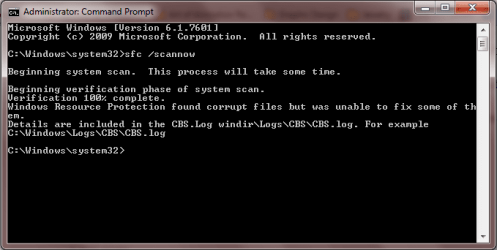
I have tried the following procedure and this what I have for my results. I have also tried running the System Update Readiness Tool and restarting my PC, but to no avail. I hope this new information I have helps out in solving the problem.
 

Attachments

  • Capture.PNG
    Capture.PNG
    11.8 KB · Views: 16

My Computer My Computer

At a glance

Windows 7 Home Premium 64bit
Computer type
Laptop
Computer Manufacturer/Model Number
HP Pavilion dv6 7000 CTO Entertainment Series
OS
Windows 7 Home Premium 64bit
Antivirus
Malwarebytes AntiMalware Pro & Microsoft Security Essentials
Browser
Internet Explorer 10 and Google Chrome
SaraBrown93,

Please press on to Option 3 of the tutorial, and attach the sfcdetails.txt file on your Desktop,

Also, when you ran FRST, did it produce an Additions.txt?

Please post it also.
 

My Computer My Computer

At a glance

Windows 7 Home Premium
Computer type
PC/Desktop
Computer Manufacturer/Model Number
An ol' eMachines
OS
Windows 7 Home Premium
Internet Speed
Fine for me...I'm retired!
Cottonball,

Yes, I was provided with an Addition text file. Here is the file if you wish to see it. I will let you know the outcome of when I try Option 3.
 

Attachments

My Computer My Computer

At a glance

Windows 7 Home Premium 64bit
Computer type
Laptop
Computer Manufacturer/Model Number
HP Pavilion dv6 7000 CTO Entertainment Series
OS
Windows 7 Home Premium 64bit
Antivirus
Malwarebytes AntiMalware Pro & Microsoft Security Essentials
Browser
Internet Explorer 10 and Google Chrome
Back
Top