"Generic Non-PnP Monitor" Acer S240HL Tri Monitor setup.

helloimgeoff1

New member
Local time
10:31 PM
Messages
6
Hi all,

This issue really bugs me, every few months it'll happen, one of my three screens (9/10 times it's the Acer), will display as a "Generic Non-PnP Monitor", with this it'll only display in 640*480 (usually 1920*1080, same as the other 2 screens).

This set up works perfectly most of the time, and has done for the last few years, but as I said it comes and goes. I've done a lot of research online and the best advice I can find is that when it happens if I unplug it all, and let the capacitors drain in the monitor and GPU then when reconnecting everything it'll work fine. I've done this before and it's not worked, I've also done it and it's worked. I've also had it in the past where it's just reverted back to how it's supposed to be mid use.

My set up:
OS: Microsoft Windows 7 Home Premium 64-bit SP1
CPU: Intel Core i7 3770 @ 3.40GHz
Motherboard: ASUSTeK COMPUTER INC. CM6330_CM6630_CM6730_CM6830
Display 1: SONY TV (1920x1080@60Hz)
Display 2: Samsung S24B300 (1920x1080@60Hz)
Display 3: Acer S240HL (1920x1080@60Hz) <--- Displaying as "Generic Non-PnP Monitor (640x480@59Hz)"
GPU: AMD Radeon HD 7800 Series

I've got the latest drivers for all the hardware, I've got the latest windows updates for everything. I've tried older versions of the drivers for the GPU, no difference with the issue.
I've been to the Acer website to download a driver specifically for the monitor, but they haven't got one on there for this montior on this OS, just for Windows Vista (which Windows 7 won't recognize as an install-able file).

Any help would be much appreciated, this is driving me up the damn wall!!!
 

My Computer My Computer

At a glance

Windows 7 Home Premium x64Intel i7-3770 @ 3.4GhzDual channel 8GB DDR3AMD Radeon HD 7800 Series
Computer type
PC/Desktop
Computer Manufacturer/Model Number
Custom build
OS
Windows 7 Home Premium x64
CPU
Intel i7-3770 @ 3.4Ghz
Motherboard
ASUSTeK CM6330_CM6630_CM6730_CM6830 (LGA1155)
Memory
Dual channel 8GB DDR3
Graphics Card(s)
AMD Radeon HD 7800 Series
Hard Drives
ST1000DM003-9YN162 ATA Device
WDC WD1600JD-75HBB0 ATA Device
Antivirus
AVG
Browser
Chrome
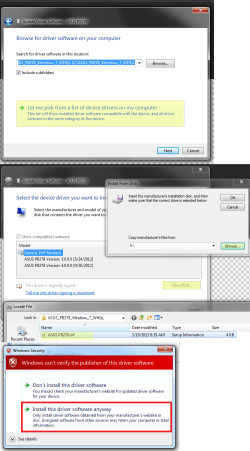
You can try forcing the install of the vista 64 bit driver, you pick update driver then follow the yellow steps and if you get the bottom picture if its unsigned just pick install anyway.

Good luck
 

Attachments

  • force install.png
    force install.png
    83.5 KB · Views: 1

My Computer My Computer

At a glance

10 Pro x64Ryzen 9 3900X64GB(4x16GB) DDR4EVGA 1080ti FTW3
Computer type
PC/Desktop
Computer Manufacturer/Model Number
Custom
OS
10 Pro x64
CPU
Ryzen 9 3900X
Motherboard
Asrock x370 Tachi
Memory
64GB(4x16GB) DDR4
Graphics Card(s)
EVGA 1080ti FTW3
Sound Card
ASUS Xonar Essence STX (V4 Bursons), ODAC rev B, NFB-11, O2
Monitor(s) Displays
3xASUS PB278Q/R, Optoma HD142X
Screen Resolution
3x1440p, 1080p
Hard Drives
512GB 850 EVO(OS, Programs)
4TB (Movies)
3TB (Downloads)
3TB (Programs)
1TB HDD (Games)
2x6TB R1 (videos)
PSU
AX760
Case
Fractal Define R5
Cooling
NH-D15S
Keyboard
Massdrop Ctrl with Box Navy's
Mouse
G903, Alioth XXL Mat
Internet Speed
280/40
Antivirus
MBAM, ESET
Browser
Canary 64 Bit
Other Info
I also own a Thinkpad P50 Xeon 4K, X220T, X1C5
How can I do this? The download gives me 2 files, I've tried to install them but it just says error and no further options.

Thanks
 

My Computer My Computer

At a glance

Windows 7 Home Premium x64Intel i7-3770 @ 3.4GhzDual channel 8GB DDR3AMD Radeon HD 7800 Series
Computer type
PC/Desktop
Computer Manufacturer/Model Number
Custom build
OS
Windows 7 Home Premium x64
CPU
Intel i7-3770 @ 3.4Ghz
Motherboard
ASUSTeK CM6330_CM6630_CM6730_CM6830 (LGA1155)
Memory
Dual channel 8GB DDR3
Graphics Card(s)
AMD Radeon HD 7800 Series
Hard Drives
ST1000DM003-9YN162 ATA Device
WDC WD1600JD-75HBB0 ATA Device
Antivirus
AVG
Browser
Chrome
How can I do this? The download gives me 2 files, I've tried to install them but it just says error and no further options.

Thanks

Oh crap sorry forgot to upload the pic I made sorry. I edited my first post, you want to use the inf the icc file is for color. Once you add it to the list you need to pick from it then it might ask you in red if its unsigned.
 

My Computer My Computer

At a glance

10 Pro x64Ryzen 9 3900X64GB(4x16GB) DDR4EVGA 1080ti FTW3
Computer type
PC/Desktop
Computer Manufacturer/Model Number
Custom
OS
10 Pro x64
CPU
Ryzen 9 3900X
Motherboard
Asrock x370 Tachi
Memory
64GB(4x16GB) DDR4
Graphics Card(s)
EVGA 1080ti FTW3
Sound Card
ASUS Xonar Essence STX (V4 Bursons), ODAC rev B, NFB-11, O2
Monitor(s) Displays
3xASUS PB278Q/R, Optoma HD142X
Screen Resolution
3x1440p, 1080p
Hard Drives
512GB 850 EVO(OS, Programs)
4TB (Movies)
3TB (Downloads)
3TB (Programs)
1TB HDD (Games)
2x6TB R1 (videos)
PSU
AX760
Case
Fractal Define R5
Cooling
NH-D15S
Keyboard
Massdrop Ctrl with Box Navy's
Mouse
G903, Alioth XXL Mat
Internet Speed
280/40
Antivirus
MBAM, ESET
Browser
Canary 64 Bit
Other Info
I also own a Thinkpad P50 Xeon 4K, X220T, X1C5
I'll go try now and get back to you!

Thanks a lot for the speedy reply :)
 

My Computer My Computer

At a glance

Windows 7 Home Premium x64Intel i7-3770 @ 3.4GhzDual channel 8GB DDR3AMD Radeon HD 7800 Series
Computer type
PC/Desktop
Computer Manufacturer/Model Number
Custom build
OS
Windows 7 Home Premium x64
CPU
Intel i7-3770 @ 3.4Ghz
Motherboard
ASUSTeK CM6330_CM6630_CM6730_CM6830 (LGA1155)
Memory
Dual channel 8GB DDR3
Graphics Card(s)
AMD Radeon HD 7800 Series
Hard Drives
ST1000DM003-9YN162 ATA Device
WDC WD1600JD-75HBB0 ATA Device
Antivirus
AVG
Browser
Chrome
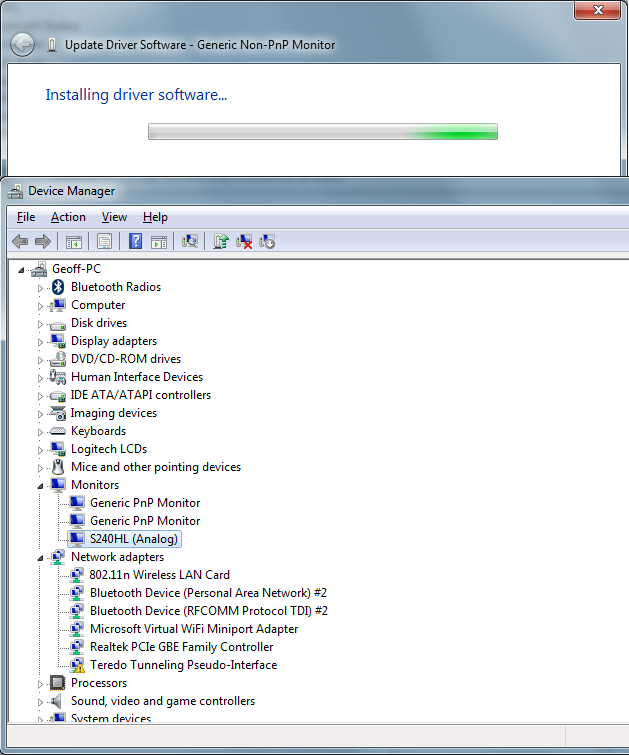
Right, I've tried what you said, followed it to the letter. The driver I downloaded from the Acer website had 2 files in it, S240HL.inf and S240HL.icm, I've ignored the icm file. I forced the install of the inf file for the "Generic Non-PnP Monitor", and now on the device manager it's changed the name to the model of the monitor (the others just say "Generic PnP Monitor"). It's still had no effect the running of the display.
nrfFcsR.png


Any more thoughts on this? I've tried the cold boot option, the pc has had hours of downtime and it's still not working for me.
 

My Computer My Computer

At a glance

Windows 7 Home Premium x64Intel i7-3770 @ 3.4GhzDual channel 8GB DDR3AMD Radeon HD 7800 Series
Computer type
PC/Desktop
Computer Manufacturer/Model Number
Custom build
OS
Windows 7 Home Premium x64
CPU
Intel i7-3770 @ 3.4Ghz
Motherboard
ASUSTeK CM6330_CM6630_CM6730_CM6830 (LGA1155)
Memory
Dual channel 8GB DDR3
Graphics Card(s)
AMD Radeon HD 7800 Series
Hard Drives
ST1000DM003-9YN162 ATA Device
WDC WD1600JD-75HBB0 ATA Device
Antivirus
AVG
Browser
Chrome
I ran into a similar problem on my work laptop last night, with a Samsung monitor -- and cold booting everything, leaving the monitor unpowered overnight, etc. also didn't work; it still showed as "Generic Non-PnP monitor" and wouldn't let me use the native resolution.

This morning I tried plugging the monitor into a Linux machine, which lets me force the resolution even if the monitor isn't detected as PnP -- and it worked there. Then when I plugged it back in to the Windows laptop it was detected as plug & play again, and everything worked.
 

My Computer My Computer

At a glance

Windows 8.1 Enterprise & Pro 64-bit, Windows ...
Computer type
PC/Desktop
OS
Windows 8.1 Enterprise & Pro 64-bit, Windows 7 Enterprise 64-bit
I ran into a similar problem on my work laptop last night, with a Samsung monitor -- and cold booting everything, leaving the monitor unpowered overnight, etc. also didn't work; it still showed as "Generic Non-PnP monitor" and wouldn't let me use the native resolution.

This morning I tried plugging the monitor into a Linux machine, which lets me force the resolution even if the monitor isn't detected as PnP -- and it worked there. Then when I plugged it back in to the Windows laptop it was detected as plug & play again, and everything worked.

Odd I wonder if the monitor just needed it self reset. OP you should try this as well, see if your OSD of the monitor has a reset option.
 

My Computer My Computer

At a glance

10 Pro x64Ryzen 9 3900X64GB(4x16GB) DDR4EVGA 1080ti FTW3
Computer type
PC/Desktop
Computer Manufacturer/Model Number
Custom
OS
10 Pro x64
CPU
Ryzen 9 3900X
Motherboard
Asrock x370 Tachi
Memory
64GB(4x16GB) DDR4
Graphics Card(s)
EVGA 1080ti FTW3
Sound Card
ASUS Xonar Essence STX (V4 Bursons), ODAC rev B, NFB-11, O2
Monitor(s) Displays
3xASUS PB278Q/R, Optoma HD142X
Screen Resolution
3x1440p, 1080p
Hard Drives
512GB 850 EVO(OS, Programs)
4TB (Movies)
3TB (Downloads)
3TB (Programs)
1TB HDD (Games)
2x6TB R1 (videos)
PSU
AX760
Case
Fractal Define R5
Cooling
NH-D15S
Keyboard
Massdrop Ctrl with Box Navy's
Mouse
G903, Alioth XXL Mat
Internet Speed
280/40
Antivirus
MBAM, ESET
Browser
Canary 64 Bit
Other Info
I also own a Thinkpad P50 Xeon 4K, X220T, X1C5
Thank you so much, this worked for me. Just bought the monitor and have been messing with it for quite a while and was thinking about returning it! I followed the steps above then went into my display settings and the monitor display was set to disconnected. I set it up as an extended display and works great.
 

My Computer My Computer

At a glance

Windows 7 Home Premium 64 bit
Computer type
Laptop
OS
Windows 7 Home Premium 64 bit
Back
Top