Solved MSE Won't Complete Full Scan, Error 0x800106ba

Cottonball,

Here are the results of the scan using Option 3.
 

Attachments

My Computer My Computer

At a glance

Windows 7 Home Premium 64bit
Computer type
Laptop
Computer Manufacturer/Model Number
HP Pavilion dv6 7000 CTO Entertainment Series
OS
Windows 7 Home Premium 64bit
Antivirus
Malwarebytes AntiMalware Pro & Microsoft Security Essentials
Browser
Internet Explorer 10 and Google Chrome
This is a tough one. I do not see where the reports provided point to problems with MSE.

You appear to be running a Limited account, vs. one with Administrative privileges. Any way you can access an Administrative account and run MSE from there?
 

My Computer My Computer

At a glance

Windows 7 Home Premium
Computer type
PC/Desktop
Computer Manufacturer/Model Number
An ol' eMachines
OS
Windows 7 Home Premium
Internet Speed
Fine for me...I'm retired!
I can. But I usually use a standard account.
 

My Computer My Computer

At a glance

Windows 7 Home Premium 64bit
Computer type
Laptop
Computer Manufacturer/Model Number
HP Pavilion dv6 7000 CTO Entertainment Series
OS
Windows 7 Home Premium 64bit
Antivirus
Malwarebytes AntiMalware Pro & Microsoft Security Essentials
Browser
Internet Explorer 10 and Google Chrome
To my understanding, it does not have Administrative privileges, though...
 

My Computer My Computer

At a glance

Windows 7 Home Premium
Computer type
PC/Desktop
Computer Manufacturer/Model Number
An ol' eMachines
OS
Windows 7 Home Premium
Internet Speed
Fine for me...I'm retired!
Just a thought.
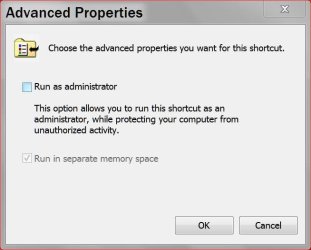
The system might not allow non admin to download and install MSE but any user can use it once installed.


MSE admin permission..JPG
 

My Computer My Computer

At a glance

Windows 10 Pro. 64/ version 1709 Windows 7 Pr...Intel i7-6800K @ 4.3Corsair Platinum 16 gig @2400EVGA GTX 1070 OC
Computer type
PC/Desktop
Computer Manufacturer/Model Number
Home made Desktop
OS
Windows 10 Pro. 64/ version 1709 Windows 7 Pro/64
CPU
Intel i7-6800K @ 4.3
Motherboard
ASUS X-99 Deluxe II
Memory
Corsair Platinum 16 gig @2400
Graphics Card(s)
EVGA GTX 1070 OC
Monitor(s) Displays
Asus 27" LED LCD/VE278Q
Screen Resolution
1920-1080 or 1280-720 HDMI
Hard Drives
INTEL SSD 730-240 Gb Sata 3.0/
PSU
EVGA Platium 1200W
Case
Phanteks Luxe Tempered Glass 8 fans/ one radiator
Cooling
XSPC/ Water Cooled CPU
Keyboard
Das 4 Professional
Mouse
Logitech M705/MX Anywhere 2-S
Internet Speed
100 mbits
Antivirus
Microsoft Security Essentials/ Malwarebytes Premium 3.0/ SAS
Browser
I.E. 11 default/Firefox/ ISP Time Warner Cable/Spectrum
Other Info
LG BluRay Burner/
Sound system-KLipsch-THX/
Icy Dock ssd Hot Swap bays.
Could be!

I'm thinking of a reinstall an Administrator account, and then running the Full scan again.

Is that what you are thinking, LB?
 

My Computer My Computer

At a glance

Windows 7 Home Premium
Computer type
PC/Desktop
Computer Manufacturer/Model Number
An ol' eMachines
OS
Windows 7 Home Premium
Internet Speed
Fine for me...I'm retired!
Yes I'm am. Making sure that one is signed into the admin account when doing this.
Once MSE in downloaded and installed using the admin account then one can decide whether all users or just the admin account can use MSE.
On my systems I'm the only user and I only have one account. So i have never run into this problem.
 

My Computer My Computer

At a glance

Windows 10 Pro. 64/ version 1709 Windows 7 Pr...Intel i7-6800K @ 4.3Corsair Platinum 16 gig @2400EVGA GTX 1070 OC
Computer type
PC/Desktop
Computer Manufacturer/Model Number
Home made Desktop
OS
Windows 10 Pro. 64/ version 1709 Windows 7 Pro/64
CPU
Intel i7-6800K @ 4.3
Motherboard
ASUS X-99 Deluxe II
Memory
Corsair Platinum 16 gig @2400
Graphics Card(s)
EVGA GTX 1070 OC
Monitor(s) Displays
Asus 27" LED LCD/VE278Q
Screen Resolution
1920-1080 or 1280-720 HDMI
Hard Drives
INTEL SSD 730-240 Gb Sata 3.0/
PSU
EVGA Platium 1200W
Case
Phanteks Luxe Tempered Glass 8 fans/ one radiator
Cooling
XSPC/ Water Cooled CPU
Keyboard
Das 4 Professional
Mouse
Logitech M705/MX Anywhere 2-S
Internet Speed
100 mbits
Antivirus
Microsoft Security Essentials/ Malwarebytes Premium 3.0/ SAS
Browser
I.E. 11 default/Firefox/ ISP Time Warner Cable/Spectrum
Other Info
LG BluRay Burner/
Sound system-KLipsch-THX/
Icy Dock ssd Hot Swap bays.
I'm not a security expert, but is this idea worth considering ?

I had a problem a long time ago where Windows (file) Explorer would crash.
I found out it was caused by an invalid media file and i tried to browse that folder.
I found the culprit file, deleted it, and that fixed my problem.
Maybe there is some invalid file that MSE can't handle, and MSE crashes ???

It always happens near the end of a Full Scan, right ?
Do you know what folder/file is being scanned when MSE stops working ?
Is it always the same folder/file ?
You might have to be looking at the MSE scan window to know what folder/file is being scanned when MSE stops working.

MSE has a command line (CMD) capability / option available.
It has a -trace option, but from what I've read only MS techs can read the trace file :(
Here is the command to run a full scan from a command prompt (CMD) in Win 7 32 bit:
"C:\Program Files\Microsoft Security Client\MpCmdRun.exe" -scan -scantype 2 -trace

Maybe it will display some helpful info when MSE "crashes", but i don't know.

The command option does write to the MpCmdRun.log, but i don't know if it will capture any error message for you ?
For me this log is C:\Users\DavidE\AppData\Local\Temp\MpCmdRun.log

Here is an example of the log when i ran a CMD scan on a specific file.

-------------------------------------------------------------------------------------
MpCmdRun: Command Line: "C:\Program Files\Microsoft Security Client\MpCmdRun.exe" -scan -scantype 3 -file "c:\itb.log" -trace
Start Time: Sat May 09 2015 11:06:54

Starting RunCommandScan.
INFO: ScheduleJob is not set. Skipping signature update.
Scanning path as file: c:\itb.log.
Start: MpScan(MP_FEATURE_SUPPORTED, dwOptions=16385, path c:\itb.log, DisableRemediation = 0, BootSectorScan = 0, Timeout in days = 1)
MpScan() started
MpScan() was completed
Finish: MpScanStart(MP_FEATURE_SUPPORTED, dwOptions=16385)
Finish: MpScan(MP_FEATURE_SUPPORTED, dwOptions=16385, path c:\itb.log, DisableRemediation = 0, BootSectorScan = 0, Timeout in days = 1)
Scanning c:\itb.log found no threats.
MpScan() has detected 0 threats.
MpCmdRun: End Time: Sat May 09 2015 11:06:54
-------------------------------------------------------------------------------------
 

My Computer My Computer

At a glance

Multi-Boot W7_Pro_x64 W8.1_Pro_x64 W10_Pro_x6...AMD Athlon II x4 6206GB GSkill DDR2 800AMD 4670 GPU + AMD 4200 IGP
Computer type
PC/Desktop
Computer Manufacturer/Model Number
home built
OS
Multi-Boot W7_Pro_x64 W8.1_Pro_x64 W10_Pro_x64 +Linux_VMs +Chromium_VM
CPU
AMD Athlon II x4 620
Motherboard
Gigabyte GA-MA785G-UD3H
Memory
6GB GSkill DDR2 800
Graphics Card(s)
AMD 4670 GPU + AMD 4200 IGP
Sound Card
on board Realtek ALC889A
Monitor(s) Displays
RCA 40" LCD TV, Insignia 32" LCD TV, HP 15" LCD monitor
Screen Resolution
1680 x 1050
Hard Drives
OCZ Vertex 3 120GB,
Samsung F3 1TB (3),
Several others - WD, Seagate, Hitachi, ...
PSU
Corsair 500 W
Case
Rosewill mid tower
Cooling
CM 90mm rifle
Keyboard
Gyration wireless, Logitech wireless, Dell USB wired
Mouse
Gyration wireless, Logitech wireless, V7 USB wired
Internet Speed
Spectrum - 100Mbps D / 10Mbps U
Antivirus
Avast, MBAM3, EMET, WinPatrol
Browser
Pale Moon, Firefox, IE
Other Info
2 multi-boot PC's
Mainly HTPC/Office/Gen purpose (no gaming).
Trendnet USB KVM.
LG DVD burner/Blue Ray Player.
Tray system for removable SATA backup drives.

Not currently OCd, under-volted.
I use Hybrid sleep, rarely re-boot or shutdown.

Hauppauge HD-PVR, Avermedia PCIe TV Tuner, Hauppauge PCI TV Tuner.
Cottonball,

I have tried reinstalling and running a full scan in the Administrator account and, unfortunately, the problem still occurs.

However, thanks to the issue that DavidE brought up, I've always noticed the that scan usually stops when begins to the scan the D:\preload\base.wim files.

I hope this helps.
 

My Computer My Computer

At a glance

Windows 7 Home Premium 64bit
Computer type
Laptop
Computer Manufacturer/Model Number
HP Pavilion dv6 7000 CTO Entertainment Series
OS
Windows 7 Home Premium 64bit
Antivirus
Malwarebytes AntiMalware Pro & Microsoft Security Essentials
Browser
Internet Explorer 10 and Google Chrome

My Computer My Computer

At a glance

Multi-Boot W7_Pro_x64 W8.1_Pro_x64 W10_Pro_x6...AMD Athlon II x4 6206GB GSkill DDR2 800AMD 4670 GPU + AMD 4200 IGP
Computer type
PC/Desktop
Computer Manufacturer/Model Number
home built
OS
Multi-Boot W7_Pro_x64 W8.1_Pro_x64 W10_Pro_x64 +Linux_VMs +Chromium_VM
CPU
AMD Athlon II x4 620
Motherboard
Gigabyte GA-MA785G-UD3H
Memory
6GB GSkill DDR2 800
Graphics Card(s)
AMD 4670 GPU + AMD 4200 IGP
Sound Card
on board Realtek ALC889A
Monitor(s) Displays
RCA 40" LCD TV, Insignia 32" LCD TV, HP 15" LCD monitor
Screen Resolution
1680 x 1050
Hard Drives
OCZ Vertex 3 120GB,
Samsung F3 1TB (3),
Several others - WD, Seagate, Hitachi, ...
PSU
Corsair 500 W
Case
Rosewill mid tower
Cooling
CM 90mm rifle
Keyboard
Gyration wireless, Logitech wireless, Dell USB wired
Mouse
Gyration wireless, Logitech wireless, V7 USB wired
Internet Speed
Spectrum - 100Mbps D / 10Mbps U
Antivirus
Avast, MBAM3, EMET, WinPatrol
Browser
Pale Moon, Firefox, IE
Other Info
2 multi-boot PC's
Mainly HTPC/Office/Gen purpose (no gaming).
Trendnet USB KVM.
LG DVD burner/Blue Ray Player.
Tray system for removable SATA backup drives.

Not currently OCd, under-volted.
I use Hybrid sleep, rarely re-boot or shutdown.

Hauppauge HD-PVR, Avermedia PCIe TV Tuner, Hauppauge PCI TV Tuner.
DavidE,

Here is a screenshot of Disk Management and when I did a scan on the "D:" Drive, it completed. No errors came up.
 

Attachments

  • Disk Managment.PNG
    Disk Managment.PNG
    30.7 KB · Views: 4

My Computer My Computer

At a glance

Windows 7 Home Premium 64bit
Computer type
Laptop
Computer Manufacturer/Model Number
HP Pavilion dv6 7000 CTO Entertainment Series
OS
Windows 7 Home Premium 64bit
Antivirus
Malwarebytes AntiMalware Pro & Microsoft Security Essentials
Browser
Internet Explorer 10 and Google Chrome
Scan the [F] partition by itself to see if that gets an error.
If that works ok, scan the partition by itself. If all that works ok at least you know all your drives are clean for what MSE scans for. Then it would seem the problem is something caused by scanning all the drives in a single scan ?
 

My Computer My Computer

At a glance

Multi-Boot W7_Pro_x64 W8.1_Pro_x64 W10_Pro_x6...AMD Athlon II x4 6206GB GSkill DDR2 800AMD 4670 GPU + AMD 4200 IGP
Computer type
PC/Desktop
Computer Manufacturer/Model Number
home built
OS
Multi-Boot W7_Pro_x64 W8.1_Pro_x64 W10_Pro_x64 +Linux_VMs +Chromium_VM
CPU
AMD Athlon II x4 620
Motherboard
Gigabyte GA-MA785G-UD3H
Memory
6GB GSkill DDR2 800
Graphics Card(s)
AMD 4670 GPU + AMD 4200 IGP
Sound Card
on board Realtek ALC889A
Monitor(s) Displays
RCA 40" LCD TV, Insignia 32" LCD TV, HP 15" LCD monitor
Screen Resolution
1680 x 1050
Hard Drives
OCZ Vertex 3 120GB,
Samsung F3 1TB (3),
Several others - WD, Seagate, Hitachi, ...
PSU
Corsair 500 W
Case
Rosewill mid tower
Cooling
CM 90mm rifle
Keyboard
Gyration wireless, Logitech wireless, Dell USB wired
Mouse
Gyration wireless, Logitech wireless, V7 USB wired
Internet Speed
Spectrum - 100Mbps D / 10Mbps U
Antivirus
Avast, MBAM3, EMET, WinPatrol
Browser
Pale Moon, Firefox, IE
Other Info
2 multi-boot PC's
Mainly HTPC/Office/Gen purpose (no gaming).
Trendnet USB KVM.
LG DVD burner/Blue Ray Player.
Tray system for removable SATA backup drives.

Not currently OCd, under-volted.
I use Hybrid sleep, rarely re-boot or shutdown.

Hauppauge HD-PVR, Avermedia PCIe TV Tuner, Hauppauge PCI TV Tuner.
I have scan, both C: and F:, individually and so far no errors are detected on either disk.
 

My Computer My Computer

At a glance

Windows 7 Home Premium 64bit
Computer type
Laptop
Computer Manufacturer/Model Number
HP Pavilion dv6 7000 CTO Entertainment Series
OS
Windows 7 Home Premium 64bit
Antivirus
Malwarebytes AntiMalware Pro & Microsoft Security Essentials
Browser
Internet Explorer 10 and Google Chrome
OK.
I don't know what this really means, why it would crash when doing a full scan, but scanning each each partition by itself works fine.

If you want you could try running a full scan from a CMD prompt with this command:
"C:\Program Files\Microsoft Security Client\MpCmdRun.exe" -scan -scantype 2
 

My Computer My Computer

At a glance

Multi-Boot W7_Pro_x64 W8.1_Pro_x64 W10_Pro_x6...AMD Athlon II x4 6206GB GSkill DDR2 800AMD 4670 GPU + AMD 4200 IGP
Computer type
PC/Desktop
Computer Manufacturer/Model Number
home built
OS
Multi-Boot W7_Pro_x64 W8.1_Pro_x64 W10_Pro_x64 +Linux_VMs +Chromium_VM
CPU
AMD Athlon II x4 620
Motherboard
Gigabyte GA-MA785G-UD3H
Memory
6GB GSkill DDR2 800
Graphics Card(s)
AMD 4670 GPU + AMD 4200 IGP
Sound Card
on board Realtek ALC889A
Monitor(s) Displays
RCA 40" LCD TV, Insignia 32" LCD TV, HP 15" LCD monitor
Screen Resolution
1680 x 1050
Hard Drives
OCZ Vertex 3 120GB,
Samsung F3 1TB (3),
Several others - WD, Seagate, Hitachi, ...
PSU
Corsair 500 W
Case
Rosewill mid tower
Cooling
CM 90mm rifle
Keyboard
Gyration wireless, Logitech wireless, Dell USB wired
Mouse
Gyration wireless, Logitech wireless, V7 USB wired
Internet Speed
Spectrum - 100Mbps D / 10Mbps U
Antivirus
Avast, MBAM3, EMET, WinPatrol
Browser
Pale Moon, Firefox, IE
Other Info
2 multi-boot PC's
Mainly HTPC/Office/Gen purpose (no gaming).
Trendnet USB KVM.
LG DVD burner/Blue Ray Player.
Tray system for removable SATA backup drives.

Not currently OCd, under-volted.
I use Hybrid sleep, rarely re-boot or shutdown.

Hauppauge HD-PVR, Avermedia PCIe TV Tuner, Hauppauge PCI TV Tuner.
Good thinking, DavidE!!

What I wonder is, what would happen if MSE scans only Partition D:\?

That is where D:\preload\base.wim is located.

If it still hangs up, I'm wondering if it is really necessary to scan the D:\ Recovery Partition with Microsoft Security Essentials?

It can be excluded from the scan:
In MSE, go to : Settings
Click on: Excluded Files
Click: Browse
Select: Recovery Partition (D:\)
Click Add > Save Changes

Then, try Malwarebytes Anti-Malware to do a custom scan of the D:\ drive (if accessible) to determine if there is something malicious.

Malwarebytes Antimalware-Free Edition
http://www.malwarebytes.org/products/malwarebytes_free/
(Uncheck offer of Premium trial during installation)


Also upload the D:\preload\base.wim file that MSE stalls on to VirusTotal for analysis:
https://www.virustotal.com/
(You might need to enable the viewing of Hidden files and folders. See Note at bottom of post.)

Use the Choose File button to navigate to the location of the file.

In the Choose file to upload prompt, select the file, then, click the 'Open' button.
The file is now displayed in the blank box of VirusTotal
Click: Scan It, and wait for the results.

If you get a message saying: 'File has already been analyzed', click: Reanalyze file now
:ar: Once scanned, please provide the link to the results page in your reply.


Note:
Enable the viewing of hidden and protected system files in Windows 7:
Close all programs so that you are at your Desktop.
Click on the Start button (globe).
Click on the Control Panel menu option.
Click on: Folder Options

Under Folder Options, click on: Show hidden files and folders
Under the Hidden files and folders section select the radio button labeled: Show hidden files, folders, and drives.
Remove the checkmark from the checkbox labeled: Hide extensions for known file types.
Remove the checkmark from the checkbox labeled: Hide protected operating system files (Recommended).
Press the Apply button and then OK.

 
Last edited:

My Computer My Computer

At a glance

Windows 7 Home Premium
Computer type
PC/Desktop
Computer Manufacturer/Model Number
An ol' eMachines
OS
Windows 7 Home Premium
Internet Speed
Fine for me...I'm retired!
Cottonball and DavidE,

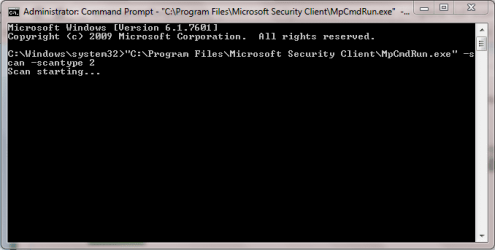
I did a scan on the "D:" drive in MSE and I still got the error. I just did a Malwarebytes scan on my PC and no virus were detected. I have also tried doing the command prompt scan that DavidE suggested and the scan just hangs like in the screenshot below:
 

Attachments

  • Capture2.PNG
    Capture2.PNG
    11.4 KB · Views: 11

My Computer My Computer

At a glance

Windows 7 Home Premium 64bit
Computer type
Laptop
Computer Manufacturer/Model Number
HP Pavilion dv6 7000 CTO Entertainment Series
OS
Windows 7 Home Premium 64bit
Antivirus
Malwarebytes AntiMalware Pro & Microsoft Security Essentials
Browser
Internet Explorer 10 and Google Chrome
I did a scan on the "D:" drive in MSE and I still got the error.
In post #31 you stated
and when I did a scan on the "D:" Drive, it completed. No errors came up.
Did a scan of D: work ok before, and now it doesn't work ?

Also, did this problem just start recently, and you didn't have this problem before?
If so, have you installed any updates recently that might have caused this ?
Do you have any Restore Point or System Backup Image from before the problem started ?

Did the PC come from HP with the drive letters assigned to the D and F partitions ?
Or, did you assign those letters, and it came from HP with no drive letter for these partitions ?
I don't understand why the Recovery partition would have a drive letter, i would have expected it to be a hidden partition but i'm just guessing.

The CMD scan is not hung, it takes a long time to run a full scan.
For me it took several hours.
You should be able to see activity for MpCmdRun.exe in Task Manager while the scan is running.
 

My Computer My Computer

At a glance

Multi-Boot W7_Pro_x64 W8.1_Pro_x64 W10_Pro_x6...AMD Athlon II x4 6206GB GSkill DDR2 800AMD 4670 GPU + AMD 4200 IGP
Computer type
PC/Desktop
Computer Manufacturer/Model Number
home built
OS
Multi-Boot W7_Pro_x64 W8.1_Pro_x64 W10_Pro_x64 +Linux_VMs +Chromium_VM
CPU
AMD Athlon II x4 620
Motherboard
Gigabyte GA-MA785G-UD3H
Memory
6GB GSkill DDR2 800
Graphics Card(s)
AMD 4670 GPU + AMD 4200 IGP
Sound Card
on board Realtek ALC889A
Monitor(s) Displays
RCA 40" LCD TV, Insignia 32" LCD TV, HP 15" LCD monitor
Screen Resolution
1680 x 1050
Hard Drives
OCZ Vertex 3 120GB,
Samsung F3 1TB (3),
Several others - WD, Seagate, Hitachi, ...
PSU
Corsair 500 W
Case
Rosewill mid tower
Cooling
CM 90mm rifle
Keyboard
Gyration wireless, Logitech wireless, Dell USB wired
Mouse
Gyration wireless, Logitech wireless, V7 USB wired
Internet Speed
Spectrum - 100Mbps D / 10Mbps U
Antivirus
Avast, MBAM3, EMET, WinPatrol
Browser
Pale Moon, Firefox, IE
Other Info
2 multi-boot PC's
Mainly HTPC/Office/Gen purpose (no gaming).
Trendnet USB KVM.
LG DVD burner/Blue Ray Player.
Tray system for removable SATA backup drives.

Not currently OCd, under-volted.
I use Hybrid sleep, rarely re-boot or shutdown.

Hauppauge HD-PVR, Avermedia PCIe TV Tuner, Hauppauge PCI TV Tuner.
DavidE,

The error on the "D:" drive just popped up this morning when I scanned it alone on MSE.

Also, I never formatted any of the drives on my PC, these are the original given names to them, even when I do a factory restore. And as for the updates, these are the frequent updates that have been occurring. Every time I try to install them, Windows says that they have been successfully installed. However; when I go back and check, they aren't and they continue to pop up.
 

Attachments

  • updates.PNG
    updates.PNG
    5.2 KB · Views: 1

My Computer My Computer

At a glance

Windows 7 Home Premium 64bit
Computer type
Laptop
Computer Manufacturer/Model Number
HP Pavilion dv6 7000 CTO Entertainment Series
OS
Windows 7 Home Premium 64bit
Antivirus
Malwarebytes AntiMalware Pro & Microsoft Security Essentials
Browser
Internet Explorer 10 and Google Chrome
You might need to get the Windows Update problem fixed first, and then see if the MSE scan problem is fixed.
Wait for cottonball to reply with suggestions about this.
I'm thinking we might need to get NoelDP, the Windows Updates and Activation guru to help with that.
 

My Computer My Computer

At a glance

Multi-Boot W7_Pro_x64 W8.1_Pro_x64 W10_Pro_x6...AMD Athlon II x4 6206GB GSkill DDR2 800AMD 4670 GPU + AMD 4200 IGP
Computer type
PC/Desktop
Computer Manufacturer/Model Number
home built
OS
Multi-Boot W7_Pro_x64 W8.1_Pro_x64 W10_Pro_x64 +Linux_VMs +Chromium_VM
CPU
AMD Athlon II x4 620
Motherboard
Gigabyte GA-MA785G-UD3H
Memory
6GB GSkill DDR2 800
Graphics Card(s)
AMD 4670 GPU + AMD 4200 IGP
Sound Card
on board Realtek ALC889A
Monitor(s) Displays
RCA 40" LCD TV, Insignia 32" LCD TV, HP 15" LCD monitor
Screen Resolution
1680 x 1050
Hard Drives
OCZ Vertex 3 120GB,
Samsung F3 1TB (3),
Several others - WD, Seagate, Hitachi, ...
PSU
Corsair 500 W
Case
Rosewill mid tower
Cooling
CM 90mm rifle
Keyboard
Gyration wireless, Logitech wireless, Dell USB wired
Mouse
Gyration wireless, Logitech wireless, V7 USB wired
Internet Speed
Spectrum - 100Mbps D / 10Mbps U
Antivirus
Avast, MBAM3, EMET, WinPatrol
Browser
Pale Moon, Firefox, IE
Other Info
2 multi-boot PC's
Mainly HTPC/Office/Gen purpose (no gaming).
Trendnet USB KVM.
LG DVD burner/Blue Ray Player.
Tray system for removable SATA backup drives.

Not currently OCd, under-volted.
I use Hybrid sleep, rarely re-boot or shutdown.

Hauppauge HD-PVR, Avermedia PCIe TV Tuner, Hauppauge PCI TV Tuner.
Sounds good DavidE. In the mean time, I will post the results of the scan from the command prompt when it's finished.
 

My Computer My Computer

At a glance

Windows 7 Home Premium 64bit
Computer type
Laptop
Computer Manufacturer/Model Number
HP Pavilion dv6 7000 CTO Entertainment Series
OS
Windows 7 Home Premium 64bit
Antivirus
Malwarebytes AntiMalware Pro & Microsoft Security Essentials
Browser
Internet Explorer 10 and Google Chrome
Back
Top