Internal microphone only picks up background noise...

JimLucTKirkard

New member
Local time
10:29 AM
Messages
12
I'm on an Alienware m14x with Windows 7, and my internal mic hasn't worked for some time. I assumed it was just broken until earlier I noticed others having the same problem. It picks up internal noise from the laptop like the keys and when I click my wireless mouse that picks up as well. I've tried disabling all other mics (which pick up no sound) and all the formats in the advanced tab, but nothing works. It seems to be a fairly common problem, anyone know what to do? Here's a picture with the driver info.

2KE5dWj.jpg


I noticed in the properties there was no "audio boost". There were also other mics to select from, but this is the only one that picks up sound. I'm currently using my phone through the external port as a substitute with the microphone app, but it's inconvenient.
 

My Computer My Computer

At a glance

Windows 7 Home Premium Service Pack 1Intel(R) Core(TM) i7-2820QM CPU @ 2.30GHz 2.3...8GBNVIDIA GeForce GT 555M
Computer type
Laptop
Computer Manufacturer/Model Number
Alienware m14x
OS
Windows 7 Home Premium Service Pack 1
CPU
Intel(R) Core(TM) i7-2820QM CPU @ 2.30GHz 2.30 Ghz
Memory
8GB
Graphics Card(s)
NVIDIA GeForce GT 555M
Hard Drives
750GB
Antivirus
AVG Free
Browser
Chrome
The first thing I see is you do not have the correct sound driver. You only have the generic, basic function, Windows installed High Definition Audio Device. The first step is to install the correct sound driver.

There are two different M14x models listed on the Dell site, a M14x (early 2011) and M14x R2 (early 2012). Which model do you have? The 14x downloads show Realtek for the sound. The 14x R2 shows Creative Labs.

Suggest you access the Dell downloads for your model and download the available sound driver, and then see if the mic works.
Support | Dell US
 

My Computer My Computer

At a glance

Windows 10 64 bitIntel i7 6700K16GB Corsair DominatorIntel CPU Graphics
Computer type
PC/Desktop
Computer Manufacturer/Model Number
My Own Build
OS
Windows 10 64 bit
CPU
Intel i7 6700K
Motherboard
ASUS ROG Maximus VIII Hero
Memory
16GB Corsair Dominator
Graphics Card(s)
Intel CPU Graphics
Sound Card
RealTek
Monitor(s) Displays
27" Dell S2719dgf
Screen Resolution
2560X1440
Hard Drives
1 TB Samsung 850 EVO SSD for Win 10 Pro
500GB Samsung 850 EVO SSD for Win 10 Insider
2 TB drive for backup
PSU
EVGA Supernova 750G2
Case
BeQuiet Silent Base 600
Cooling
Deepcool Captain 120EX
Keyboard
Microsoft Wireless 2000
Mouse
Microsoft wireless
Internet Speed
100 MB/sec (Cable)
Antivirus
Microsoft Defender and Malwarebytes
Browser
Edge/Firefox
Other Info
Cakewalk (Sonar) by BandLab and Studio One 4.1 Pro recording studio software. MOTU 896Mk3 Hybrid recording interface, Frontier Tranzport wireless control unit, Behringer X-Touch Control Surface.
Five USB connected optical drives for CD Audio production using Nero BurningROM
The first thing I see is you do not have the correct sound driver. You only have the generic, basic function, Windows installed High Definition Audio Device. The first step is to install the correct sound driver.

There are two different M14x models listed on the Dell site, a M14x (early 2011) and M14x R2 (early 2012). Which model do you have? The 14x downloads show Realtek for the sound. The 14x R2 shows Creative Labs.

Suggest you access the Dell downloads for your model and download the available sound driver, and then see if the mic works.
Support | Dell US

Okay, thanks. Downloading Realtek now. Will let you know how it goes
 

My Computer My Computer

At a glance

Windows 7 Home Premium Service Pack 1Intel(R) Core(TM) i7-2820QM CPU @ 2.30GHz 2.3...8GBNVIDIA GeForce GT 555M
Computer type
Laptop
Computer Manufacturer/Model Number
Alienware m14x
OS
Windows 7 Home Premium Service Pack 1
CPU
Intel(R) Core(TM) i7-2820QM CPU @ 2.30GHz 2.30 Ghz
Memory
8GB
Graphics Card(s)
NVIDIA GeForce GT 555M
Hard Drives
750GB
Antivirus
AVG Free
Browser
Chrome
Oh crap, now no audio is working. Nothing from speakers or headphones. I did the "detect system" thing and got the Realtek driver, installed, and restarted.I'm not sure what's going on.


Edit: Okay, now I can't turn off "listen to mic" because the box is unchecked, and the speakers are working, they all just seem ot be tied in together somehow


Edit: Okay, back to where I started except the microphone that picked up the background noise is missing from device list in the audio panel in control panel


Edit again: Seems it's possible that the mic is now being replaced with my external when I plug it in, but I can't tell. Here's a pic of my recording devices.

8wYr8cK.jpg
 
Last edited:

My Computer My Computer

At a glance

Windows 7 Home Premium Service Pack 1Intel(R) Core(TM) i7-2820QM CPU @ 2.30GHz 2.3...8GBNVIDIA GeForce GT 555M
Computer type
Laptop
Computer Manufacturer/Model Number
Alienware m14x
OS
Windows 7 Home Premium Service Pack 1
CPU
Intel(R) Core(TM) i7-2820QM CPU @ 2.30GHz 2.30 Ghz
Memory
8GB
Graphics Card(s)
NVIDIA GeForce GT 555M
Hard Drives
750GB
Antivirus
AVG Free
Browser
Chrome

My Computer My Computer

At a glance

Windows 7 Ultimate x64 SP1AMD Phenom 2 1090T2x8GB Kingston HyperX Fury Black 1600Mhz Unga...MSI GTX 970 Gaming 4G
Computer type
PC/Desktop
Computer Manufacturer/Model Number
Custom Build
OS
Windows 7 Ultimate x64 SP1
CPU
AMD Phenom 2 1090T
Motherboard
Gigabyte GA-890FXA-UD5
Memory
2x8GB Kingston HyperX Fury Black 1600Mhz Unganged
Graphics Card(s)
MSI GTX 970 Gaming 4G
Sound Card
Realtek On-Board HD 7.1 Audio / Logitech G35
Monitor(s) Displays
3xAcer GD245HQ
Screen Resolution
1920x1080
Hard Drives
Samsung 850 Pro 512GB SSD - OS /
WD Caviar Black SATA 3 - 1 TBx2 - Dynamic RAID 0 /
WD Caviar Green SATA 2 - 640GBx2 - Dynamic RAID 0 /
WD Caviar Green SATA 2 - 640GB - Internal Backup /
Seagate Barracude SATA 3 - 3TB - External Backup/ Sync
PSU
HighPower 1000W
Case
Cooler Master HAF 932
Cooling
Noctua NH-D14
Keyboard
Logitech G19
Mouse
Logitech G500
Internet Speed
100/4 Mbit Cable (100GB quota)
Antivirus
ZoneAlarm Extreme Security / MBAM Pro / MBAE Free / SAS Free
Browser
IE 11 - Firefox - Chrome
Other Info
Logitech F710/ G27/ G940/ Z5500 // TrackIR 5 // Nvidia 3D Surround Vision
Set the Stereo Mix as the Default Recording Device and see what happens. Normally, Stereo Mix set as the default and any device that is connected can be used. Stereo Mix is needed if you want to record audio from the internet.
 

My Computer My Computer

At a glance

Windows 10 64 bitIntel i7 6700K16GB Corsair DominatorIntel CPU Graphics
Computer type
PC/Desktop
Computer Manufacturer/Model Number
My Own Build
OS
Windows 10 64 bit
CPU
Intel i7 6700K
Motherboard
ASUS ROG Maximus VIII Hero
Memory
16GB Corsair Dominator
Graphics Card(s)
Intel CPU Graphics
Sound Card
RealTek
Monitor(s) Displays
27" Dell S2719dgf
Screen Resolution
2560X1440
Hard Drives
1 TB Samsung 850 EVO SSD for Win 10 Pro
500GB Samsung 850 EVO SSD for Win 10 Insider
2 TB drive for backup
PSU
EVGA Supernova 750G2
Case
BeQuiet Silent Base 600
Cooling
Deepcool Captain 120EX
Keyboard
Microsoft Wireless 2000
Mouse
Microsoft wireless
Internet Speed
100 MB/sec (Cable)
Antivirus
Microsoft Defender and Malwarebytes
Browser
Edge/Firefox
Other Info
Cakewalk (Sonar) by BandLab and Studio One 4.1 Pro recording studio software. MOTU 896Mk3 Hybrid recording interface, Frontier Tranzport wireless control unit, Behringer X-Touch Control Surface.
Five USB connected optical drives for CD Audio production using Nero BurningROM

Sorry, I'll upload it to the site. Well, new one, but same thing, just with new detail.

Set the Stereo Mix as the Default Recording Device and see what happens. Normally, Stereo Mix set as the default and any device that is connected can be used. Stereo Mix is needed if you want to record audio from the internet.

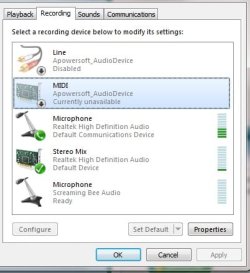
I tried it. It's at one bar constantly. The one above it had the bars go up when I struck a key, so I hit a key before hitting the print screen button. I've tried adjusting the sensitivity and what not. Before the new driver the one picking up the background noise was at maximum because it was also picking up the fan, I suppose.


Edit: Okay, I set the one with four bars as default and turned the volume and boost to maximum, and here's my voice recorded in Audacity. I had to get close to the mic (which I assume is that hole by the webcam) and speak loudly. Normal voice barely registers at all.

Vocaroo | Voice message

Okay, also just noticed stereo mix picks it up when I tap the mouse on the desk, just not as much as the one above it.

Just figured out something else. That voice message on Vocaroo was because I had it set to "listen to device". It doesn't pick it up otherwise. It's kinda weird because I'm wearing headphones so I guess it's picking up directly from the sound card.
 

Attachments

  • mic.jpg
    mic.jpg
    27.4 KB · Views: 7
Last edited:

My Computer My Computer

At a glance

Windows 7 Home Premium Service Pack 1Intel(R) Core(TM) i7-2820QM CPU @ 2.30GHz 2.3...8GBNVIDIA GeForce GT 555M
Computer type
Laptop
Computer Manufacturer/Model Number
Alienware m14x
OS
Windows 7 Home Premium Service Pack 1
CPU
Intel(R) Core(TM) i7-2820QM CPU @ 2.30GHz 2.30 Ghz
Memory
8GB
Graphics Card(s)
NVIDIA GeForce GT 555M
Hard Drives
750GB
Antivirus
AVG Free
Browser
Chrome
I would make sure you have the basics. I notice you have Apowersoft and if you have Stereo Mix set you don't need Apowersoft to record from the internet. Apowersoft may not be conflicting and causing any problems, but remove any potentials. "Get back to the basics".
 

My Computer My Computer

At a glance

Windows 10 64 bitIntel i7 6700K16GB Corsair DominatorIntel CPU Graphics
Computer type
PC/Desktop
Computer Manufacturer/Model Number
My Own Build
OS
Windows 10 64 bit
CPU
Intel i7 6700K
Motherboard
ASUS ROG Maximus VIII Hero
Memory
16GB Corsair Dominator
Graphics Card(s)
Intel CPU Graphics
Sound Card
RealTek
Monitor(s) Displays
27" Dell S2719dgf
Screen Resolution
2560X1440
Hard Drives
1 TB Samsung 850 EVO SSD for Win 10 Pro
500GB Samsung 850 EVO SSD for Win 10 Insider
2 TB drive for backup
PSU
EVGA Supernova 750G2
Case
BeQuiet Silent Base 600
Cooling
Deepcool Captain 120EX
Keyboard
Microsoft Wireless 2000
Mouse
Microsoft wireless
Internet Speed
100 MB/sec (Cable)
Antivirus
Microsoft Defender and Malwarebytes
Browser
Edge/Firefox
Other Info
Cakewalk (Sonar) by BandLab and Studio One 4.1 Pro recording studio software. MOTU 896Mk3 Hybrid recording interface, Frontier Tranzport wireless control unit, Behringer X-Touch Control Surface.
Five USB connected optical drives for CD Audio production using Nero BurningROM
I would make sure you have the basics. I notice you have Apowersoft and if you have Stereo Mix set you don't need Apowersoft to record from the internet. Apowersoft may not be conflicting and causing any problems, but remove any potentials. "Get back to the basics".

Ah, forgot what that even was. Been over a year since I was trying that. Got it uninstalled, but still no change.
 

My Computer My Computer

At a glance

Windows 7 Home Premium Service Pack 1Intel(R) Core(TM) i7-2820QM CPU @ 2.30GHz 2.3...8GBNVIDIA GeForce GT 555M
Computer type
Laptop
Computer Manufacturer/Model Number
Alienware m14x
OS
Windows 7 Home Premium Service Pack 1
CPU
Intel(R) Core(TM) i7-2820QM CPU @ 2.30GHz 2.30 Ghz
Memory
8GB
Graphics Card(s)
NVIDIA GeForce GT 555M
Hard Drives
750GB
Antivirus
AVG Free
Browser
Chrome

My Computer My Computer

At a glance

Windows 10 64 bitIntel i7 6700K16GB Corsair DominatorIntel CPU Graphics
Computer type
PC/Desktop
Computer Manufacturer/Model Number
My Own Build
OS
Windows 10 64 bit
CPU
Intel i7 6700K
Motherboard
ASUS ROG Maximus VIII Hero
Memory
16GB Corsair Dominator
Graphics Card(s)
Intel CPU Graphics
Sound Card
RealTek
Monitor(s) Displays
27" Dell S2719dgf
Screen Resolution
2560X1440
Hard Drives
1 TB Samsung 850 EVO SSD for Win 10 Pro
500GB Samsung 850 EVO SSD for Win 10 Insider
2 TB drive for backup
PSU
EVGA Supernova 750G2
Case
BeQuiet Silent Base 600
Cooling
Deepcool Captain 120EX
Keyboard
Microsoft Wireless 2000
Mouse
Microsoft wireless
Internet Speed
100 MB/sec (Cable)
Antivirus
Microsoft Defender and Malwarebytes
Browser
Edge/Firefox
Other Info
Cakewalk (Sonar) by BandLab and Studio One 4.1 Pro recording studio software. MOTU 896Mk3 Hybrid recording interface, Frontier Tranzport wireless control unit, Behringer X-Touch Control Surface.
Five USB connected optical drives for CD Audio production using Nero BurningROM
Back
Top